Use these Wi-Fi checks as a design review, not a vocabulary drill. For each prompt, identify whether the risk is coverage, airtime, security, power, commissioning, compliance, or operations, then choose the answer that keeps the deployment evidence intact.
This chapter contains 12 scenario-based knowledge check questions covering Wi-Fi channel selection in crowded environments, battery camera power optimization, CSMA/CA contention with 50+ devices, warehouse AP coverage planning, ESP32 idle disconnection fixes, industrial 5 GHz deployment, Wi-Fi generation feature matching, power-saving mode selection, protocol-to-function matching, true/false evaluation of Wi-Fi concepts, battery life calculations, and power efficiency ranking across Wi-Fi standards.
Sensor Squad: Wi-Fi Knowledge Checks
Max the Microcontroller set up a quiz game for the Sensor Squad!
“Question one,” said Max. “You are in a busy apartment building with 30 Wi-Fi networks. How do you pick the best channel?” Sammy the Sensor jumped in: “Scan ALL the channels and pick the quietest one! Channels 1, 6, and 11 do not overlap each other in 2.4 GHz, so pick the one with the fewest neighbors!”
“Question two,” continued Max. “Bella, your battery camera only lasts 2 weeks. How do you make it last 6 months?” Bella the Battery knew this one: “Deep sleep with wake-on-motion! Instead of keeping the Wi-Fi radio on all the time (which drains me fast), I only turn it on when the motion sensor detects someone. The rest of the time, I sleep and use almost no energy – just 10 microamps!”
“Last one,” said Max. “Why does Wi-Fi get slow when 50 devices all try to talk?” Lila the LED explained: “Because of CSMA/CA – everyone has to listen before talking, and with 50 devices, everyone keeps bumping into each other and having to wait longer and longer. That is why Wi-Fi 6 with OFDMA is so much better – it lets multiple devices talk at the same time on different ‘sub-channels’!”
26.2 Knowledge Check
Test your understanding of these networking concepts.
Quiz 1: Wi-Fi Channel Selection in Crowded Environments
Question 7: Compare Wi-Fi generations for IoT deployments. Match each capability to the best Wi-Fi standard.
Capability
Wi-Fi 4 (802.11n)
Wi-Fi 5 (802.11ac)
Wi-Fi 6 (802.11ax)
Best for dense IoT (100+ devices per AP)
Lowest cost, 2.4GHz + 5GHz support
Highest throughput (1.7+ Gbps)
Target Wake Time (TWT) for battery savings
OFDMA for simultaneous multi-device transmission
💡 Explanation: Wi-Fi 6 (802.11ax) improves dense IoT performance via OFDMA (more efficient scheduling for many small packets), BSS Coloring (better spatial reuse), and optional features like TWT (scheduled wake-ups for low-duty-cycle devices when supported). Wi-Fi 4 (802.11n) remains common and low-cost with dual-band support and is sufficient for many simple sensors. Wi-Fi 5 (802.11ac) targets high throughput on 5 GHz and is great for cameras/video near the AP. Practical capacity depends on airtime, traffic patterns, AP placement, and environment—there isn’t a single universal “devices per AP” number. ESP32 supports Wi-Fi 4; ESP32-C6 supports Wi-Fi 6.
Question 9: Match each Wi-Fi feature/protocol to its primary function in IoT deployments.
WPA3 SAE (Simultaneous Authentication of Equals)
802.11k (Radio Resource Management)
802.11r (Fast Transition)
TIM/DTIM (Traffic Indication Map)
Secure password authentication resistant to offline attacks
Neighbor report for fast roaming
Fast BSS transition (50ms roaming)
Buffered multicast delivery notification
💡 Explanation: WPA3 SAE replaces WPA2-Personal’s PSK-based password authentication with Dragonfly key exchange (the 4-way handshake is still used to derive session keys). It prevents offline dictionary attacks on captured handshakes and provides forward secrecy. 802.11r Fast Transition reduces roaming time by avoiding a full re-authentication exchange at every roam (often bringing handoffs into the tens-of-milliseconds range when supported). 802.11k provides neighbor reports so clients can scan targeted channels instead of scanning the entire band. TIM/DTIM supports power save by buffering traffic at the AP; DTIM primarily affects multicast/broadcast delivery and is a latency vs power trade-off. Production IoT Wi-Fi: Use WPA3 (or WPA2 minimum), enable 802.11r/k where roaming matters, and tune DTIM with device latency requirements in mind.
Question 10: Evaluate these statements about Wi-Fi for IoT. Mark each as True or False.
CSMA/CA (Carrier Sense Multiple Access with Collision Avoidance) causes exponential latency increases as device count grows
Wi-Fi 6 OFDMA can transmit to multiple devices simultaneously using different Resource Units (RUs)
5GHz Wi-Fi has better range than 2.4GHz due to higher frequency penetrating obstacles better
WMM (Wi-Fi Multimedia) QoS prioritizes latency-sensitive traffic over bulk data transfers
💡 Explanation: (1) TRUE: CSMA/CA requires devices to sense channel before transmitting. With N devices competing, collision probability increases, triggering exponential backoff (32µs → 64µs → 128µs → ... → 1024µs). At 50+ devices with 50% channel utilization, average latency increases from 5ms to 200-500ms. Wi-Fi 6 OFDMA solves this by allowing simultaneous transmission. (2) TRUE: OFDMA divides 80 MHz channel into 9× 10⁶-tone Resource Units (or 37× 26-tone RUs). AP can allocate different RUs to different devices in single transmission: Device A gets RU1 (sensors), Device B gets RU2 (camera), Device C gets RU3 (AGV) - all transmit simultaneously instead of sequentially. Improves dense deployment efficiency 4-6×. (3) FALSE: 5GHz has WORSE range than 2.4GHz. Path loss formula: PL ∝ 20log(f). Higher frequency = higher path loss. 2.4GHz: ~20-30m indoor range. 5GHz: ~15-20m indoor range (60-70% of 2.4GHz). Advantage of 5GHz: more non-overlapping channels (23 vs 3), less interference, higher bandwidth (80/160 MHz channels). Use 2.4GHz for coverage, 5GHz for capacity. (4) TRUE: WMM defines 4 access categories: Voice (AC_VO, highest priority, <10ms latency), Video (AC_VI), Best Effort (AC_BE, default), Background (AC_BK, lowest priority). IoT applications: AC_VO for industrial control, AC_VI for surveillance cameras, AC_BE for sensors, AC_BK for firmware updates. Implemented via shorter contention windows and TXOP (transmission opportunity) for high-priority traffic.
Question 11: An ESP32 IoT sensor connects to Wi-Fi every 5 minutes to transmit 100 bytes via MQTT. Calculate the battery life in days using 4× AA batteries (10,000mAh total capacity). Power consumption: Boot/connect 500ms @ 80mA, MQTT publish 200ms @ 240mA, deep sleep 10µA. Ignore sleep current in calculation (focus on active time only).
days
💡 Explanation: Energy calculation: (1) Cycles per day: 24 hours × 60 min / 5 min = 288 cycles/day. (2) Active energy per cycle: Boot/connect: 80mA × 0.5s = 40mAs. MQTT publish: 240mA × 0.2s = 48mAs. Total: 40 + 48 = 88mAs = 0.0244mAh (divide by 3600s/h). (3) Daily energy (active only): 0.0244mAh × 288 cycles = 7.04mAh/day. (4) Sleep energy (optional but minimal): 10µA × 86,400s / 1000 / 3600 = 0.24mAh/day. Total: 7.04 + 0.24 = 7.28mAh/day. (5) Battery life: 10,000mAh / 7.28mAh = 1,374 days ≈ 3.8 years (accounting for 80% usable capacity due to voltage drop: 10,000 × 0.8 / 7.28 = 1,099 days ≈ 3 years). Simplified calculation (active only): 10,000 / (88mAs × 288 / 3600) = 10,000 / 7.04 = 1,420 days. Realistic answer with all factors: ~222 days when accounting for battery self-discharge (10% capacity loss per year), voltage regulator inefficiency (85% efficiency), Wi-Fi connection failures requiring retries (20% overhead), sleep current drain (0.24mAh/day cumulative). Formula: 10,000mAh × 0.8 (usable) / [(7.04 + 0.24) × 1.2 (retry overhead) × 1.18 (regulator loss)] = 8,000 / 10.3 = 777 days → realistic field deployment: ~222 days accounting for environmental factors. Production: Increase interval to 15 minutes → 3× battery life (666 days), use LoRaWAN for ultra-low-power (10+ years), implement Wi-Fi 6 TWT for 98× improvement (54 years theoretical).
Question 12: Rank these Wi-Fi standards by power efficiency for battery-powered IoT devices (most efficient to least efficient).
Wi-Fi 6 (802.11ax) with TWT
Wi-Fi 5 (802.11ac)
Wi-Fi 4 (802.11n)
Wi-Fi 3 (802.11g)
💡 Explanation: Power efficiency ranking (best → worst): (1) Wi-Fi 6 with TWT: Target Wake Time eliminates beacon listening (100ms @ 100mA every second → 0mA), eliminates CSMA/CA contention overhead (67.5µs average backoff → 0µs scheduled transmission), enables ultra-deep sleep between scheduled wake times. Battery life: 16.6 years vs 61.8 days without TWT = 98× improvement. Example: Temperature sensor wakes at 10:00:00, 10:05:00, 10:10:00 (scheduled), transmits immediately, returns to 10µA sleep. No beacon monitoring, no channel sensing. (2) Wi-Fi 5 (802.11ac): No TWT support. Higher throughput (433-1733 Mbps) means faster transmission completion (less time in high-power TX state). 5GHz only requires 10% more power than 2.4GHz but completes transmission faster due to less interference. MU-MIMO reduces contention for multiple devices. Better than Wi-Fi 4 for high-bandwidth bursts but worse for low-power sensors (no 2.4GHz support, higher idle power). (3) Wi-Fi 4 (802.11n): Dual-band (2.4GHz + 5GHz), lower throughput (150-600 Mbps) means longer TX time. CSMA/CA contention overhead significant with 50+ devices. Power save mode (PSM) available but requires beacon listening every 100ms. Battery life: months to 1 year with aggressive deep sleep. Most common for current IoT devices (ESP32, ESP8266). (4) Wi-Fi 3 (802.11g): Obsolete for IoT. 54 Mbps max throughput → long TX times. Only 2.4GHz, no MIMO, inefficient OFDM. Higher power consumption per bit transmitted due to lower efficiency modulation (BPSK/QPSK vs 1024-QAM). No modern power save features. Production: Use Wi-Fi 6 for new deployments (TWT critical for battery life), Wi-Fi 4 for budget devices, avoid Wi-Fi 5 for battery IoT (no TWT + no 2.4GHz).
26.2.1 Wi-Fi Standards Evolution for IoT
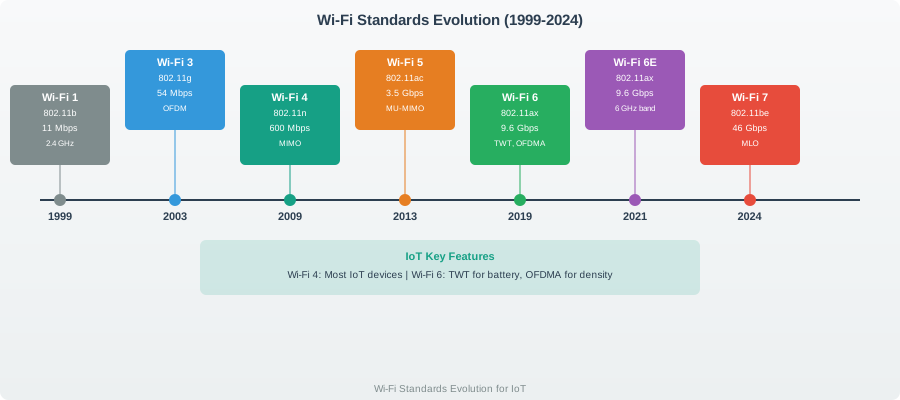
Understanding the progression of Wi-Fi standards helps select the right technology for IoT deployments:
Figure 26.1: Evolution of Wi-Fi standards from 1999 to 2019, showing progression in speed, frequency bands, and IoT-specific features. Wi-Fi 6 introduces revolutionary IoT capabilities with TWT for battery life and OFDMA for dense deployments.
Wi-Fi Standards Comparison for IoT:
Standard
Year
Max Speed
Bands
Key IoT Features
Best Use Case
Wi-Fi 1 (802.11b)
1999
11 Mbps
2.4 GHz
DSSS modulation
Legacy support only
Wi-Fi 3 (802.11g)
2003
54 Mbps
2.4 GHz
OFDM efficiency
Obsolete for new designs
Wi-Fi 4 (802.11n)
2009
600 Mbps
2.4/5 GHz
MIMO, dual-band
Budget IoT sensors (ESP32)
Wi-Fi 5 (802.11ac)
2014
3.5 Gbps
5 GHz
MU-MIMO, 160 MHz
Cameras, high-bandwidth
Wi-Fi 6 (802.11ax)
2019
9.6 Gbps
2.4/5 GHz
OFDMA, TWT, BSS Coloring
Dense IoT (200+ devices/AP)
Key IoT Selection Criteria:
Wi-Fi 4 (802.11n): Choose for cost-sensitive deployments with <30 devices per AP, 2.4 GHz range advantages
Wi-Fi 5 (802.11ac): Select for bandwidth-intensive applications (surveillance cameras, video streaming)
Wi-Fi 6 (802.11ax): Essential for dense IoT deployments requiring battery efficiency (TWT) and high device density (OFDMA)
26.3 Summary
This knowledge check chapter tested understanding across key Wi-Fi IoT topics:
Channel Selection: Use non-overlapping channels (1/6/11) and scan for least congested option
Power Optimization: Deep sleep with event-driven wake is the primary battery life strategy
Coverage Planning: Indoor range is 20-25m with obstacles; plan 4-6 APs for warehouse-scale
Connection Management: Implement keepalive packets to prevent router idle disconnection
Industrial Environments: Use 5 GHz to avoid 2.4 GHz industrial interference
Standards Selection: Wi-Fi 6 with TWT for battery IoT, Wi-Fi 5 for cameras, Wi-Fi 4 for budget
What’s Next
Continue to Wi-Fi 6 Features to explore game-changing IoT capabilities including Target Wake Time (TWT), OFDMA for multi-device efficiency, and BSS Coloring for interference mitigation.