12 How NFC Taps Work
More
Depth: Practitioner
Progress saves as you read. Mark sections complete as you go; your progress appears in the sidebar.
A commuter brings a phone within centimetres of a station reader and sees a tap complete. The short range creates intent and convenience, but it does not by itself prove authorization or prevent relay. NFC design follows the field, activation, data exchange, application decision, and visible result.
Near-field communication (NFC) is a short-range radio method. A protocol is the rule its reader and device use to exchange data.
12.1 Follow the Tap evidence Before Trusting It
This section: Follow the Tap evidence Before Trusting It — Read Figure 12.1 from approach to completion.
Read Figure 12.1 from approach to completion. The reader first creates the radio-frequency field. A passive tag or phone couples to it, activation and anti-collision identify a participant, the devices exchange protocol data, and an application decides what the data permits. The final beep or screen is an outcome, not proof that every earlier security check passed.
Consider an access badge presented to door D4. The reader receives a credential identifier and sends it to the access controller. The controller checks credential status, door policy, time, and any anti-passback rule, then returns allow or deny. Keep the reader event, controller decision, policy version, and lock action under one transaction identifier. Otherwise a beep at the reader can be mistaken for a released lock.
NFC modes change the participants. Reader/writer mode talks with a tag. Card emulation lets a phone act like a contactless credential. Peer-style exchanges or handover records can help devices start another connection. Name the mode and application protocol because “uses NFC” says little about data ownership or authorization.
The centimetre-scale user experience reduces accidental taps, but radio messages can still be observed or relayed with specialist equipment and conditions. Sensitive applications need cryptographic challenge and response, transaction freshness, bounded timing where appropriate, backend policy, and a clear user confirmation. Do not use proximity as the only identity claim.
Predict three tap evidence checks. Present an allowed badge and expect one controller decision plus one lock action. Present a revoked badge and expect a logged denial with no unlock. Repeat a captured transaction and expect freshness or transaction state to reject it. Then interrupt communication after the reader beep and verify that the door state, not the sound, determines the recorded outcome.
Range, timing, phone behavior, antenna tuning, and protocol support depend on the actual reader, tag, enclosure, and environment. Verify the complete tap path on deployed hardware.
Power and data roles must be explicit. A passive NFC tag draws energy from the reader field. A phone can act as reader or emulate a card, with operating-system and secure-element rules affecting availability. If an application hands a larger transfer to Bluetooth or Wi-Fi, the NFC record should say what was exchanged to start that second link and how the peer was authenticated.
Design the physical interaction. Mark the intended tap point, orientation, dwell time, and feedback. Test nearby cards so the reader does not select the wrong credential from a wallet. Test repeated taps and a phone removed midway through exchange. The application should report incomplete, denied, and completed states differently.
Data format needs versioning. An NDEF record can carry a URI, text, or application-defined content, but the receiving app must validate type, length, scheme, and allowed action. A tag that contains a web address should not gain permission to open an unsafe scheme or issue a door command merely because its bytes parse.
Privacy follows the identifier. A stable tag ID observed across locations can track an object or person even if its application content is harmless. Decide which identifiers leave the reader, who can query tap evidence history, and how long events remain. Avoid placing secret or personal data in a record readable by any nearby compatible reader.
For payment or access, separate user feedback from settlement. The phone may show a tick while the backend decision is pending, or the reader may beep before the lock reports movement. Correlate radio exchange, application approval, actuator state, and any later reversal. Test an interrupted network path so the displayed message matches the actual outcome.
Maintain a small fixture set: one allowed tag, one revoked credential, one malformed record, one expired transaction, and two tags presented together. Run it after reader firmware, phone operating-system, antenna, or application changes. The tap evidence remains trustworthy only when physical selection, data parsing, security, and visible action stay aligned.
12.2 Start With the Story
This section: Start With the Story
12.2.1 Treat the Tap as a Request, Not Permission
Radio frequency means the rate of change used by a radio signal. Near field communication (NFC) uses a very short radio link for a deliberate exchange. Radio frequency identification (RFID) is the wider family of radio tag and reader methods. A payload is the useful content carried in a message.
Picture a technician tapping a phone on a pump label. The tap can select the intended asset and carry a service link. It cannot prove that the link is safe, the person is assigned, or the pump may be started.
Record tag or device identity, mode, raw content, parsed fields, signed-in user, asset state, policy result, and final action. Test a copied tag, an altered link, a locked phone, an old permission, and an unreadable label. Give the user a safe fallback and a clear refusal.
Close range supports intent but is not complete trust. The deeper sections explain modes, records, tags, cards, handover, security, and the separate evidence owners after the tap.
An NFC tap feels simple because the devices are close and the action is deliberate. Under that simple gesture are separate layers: field activation, mode choice, tag or card behavior, NDEF payload, policy decision, and application handoff.
This chapter starts with the tap and follows it downward. Treat proximity as a user-intent clue, not a complete security proof, then decide which layer must carry the evidence for the workflow.
12.3 Overview: What an NFC Tap Can Prove
This section: Overview: What an NFC Tap Can Prove — Near Field Communication, or NFC, is the deliberate-tap member of the RFID family.
Near Field Communication, or NFC, is the deliberate-tap member of the RFID family. It uses a 13.56 MHz near-field magnetic link so a phone, reader, tag, secure element, or card-emulation device can exchange a small record at very close range. In IoT, the useful claim is usually not "NFC is available." The useful claim is that a local tap selected the intended object, record, credential, setup flow, or service workflow under named conditions.
That boundary matters because proximity is useful but not complete proof. A tap can support user intent and object selection, but it does not automatically prove identity, authorization, payload authenticity, object state, privacy safety, or application correctness. Those decisions belong in the payload parser, application session, credential verifier, backend policy, audit trail, and retest plan.
Work through a simple maintenance example. A gateway label contains an NDEF URI such as https://ops.example/assets/GW-142. A successful tap proves that this phone and this mounted label exchanged a readable record under the tested placement, case, and orientation. It does not prove that the URI host is approved, that GW-142 still exists, that the technician is assigned to the work order, or that starting service is safe while the gateway is active. The review has to convert the tap into evidence: decoded host and path, payload hash, parser result, signed-in session, asset state, allowed action, audit row, and fallback if the tag is unreadable.
The same boundary prevents overclaiming in other NFC uses. A pairing tap can carry Bluetooth or Wi-Fi setup material, but the faster radio still carries the ongoing traffic. A card-emulation tap can present a credential, but freshness, revocation, and verifier policy still decide whether access is allowed. A passive tag can help identify a product or asset, but copied public data must be treated differently from a managed credential. In every case, the tap is a strong local gesture only when the design says exactly what was selected, what was validated, and what remains outside the NFC proof.
Figure 12.1 separates a deliberate tap from the checks needed for an application action.
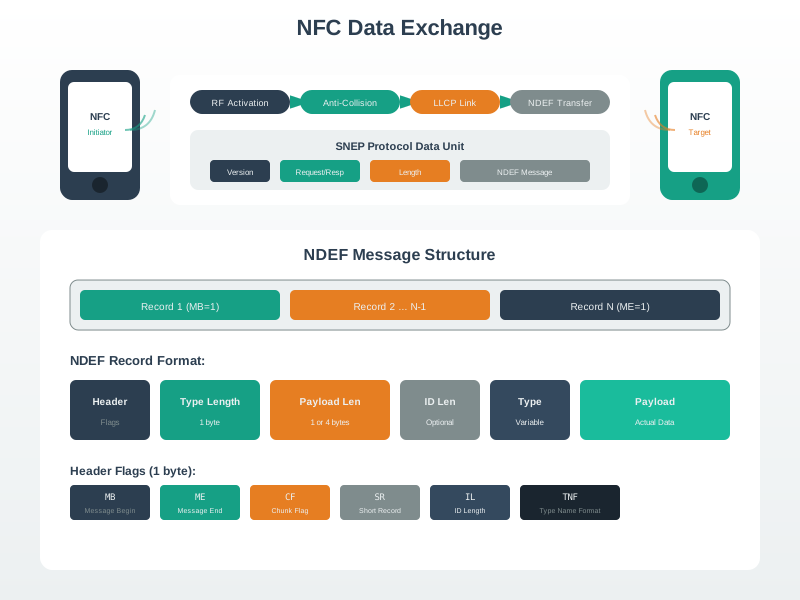
The close exchange selects a nearby target and activates the reader, but it does not prove identity, authenticity, authorization, or safety. Parsing must bound the record type and length; the app must then check a session and policy before choosing a scoped action. A fallback covers unreadable tags or unavailable services, and retest triggers include a changed label, parser, or workflow. Keep evidence from each owner: reader activation, decoded payload, session decision, and action result. The final beep or screen is an outcome, not proof that every earlier gate passed.
If you only need the intuition, this layer is enough: approve NFC as a bounded local-selection signal. Name the mode, tag or device role, payload type, parser checks, application policy, fallback, owner, and retest trigger before treating a tap workflow as ready.
The Four NFC Layers
Field and roles
The initiator creates the near field. A passive tag may harvest energy, while a powered phone, reader, or emulated card has its own operating constraints.
Protocol mode
Reader/writer, card emulation, and peer-to-peer modes assign different owners for the field, exchanged data, credentials, replay controls, and audit evidence.
Payload meaning
NDEF records, tag memory, handoff references, and credential protocols must be parsed, bounded, versioned, and checked before an application acts.
Application policy
The app or backend decides whether the selected object, user, role, asset state, fallback, privacy boundary, and audit record make the action allowed.
Beginner Examples
- A setup tag can select a gateway record. It should not store a long-lived password or silently complete configuration without app policy.
- A maintenance tag can open an asset record. It does not prove the technician is authorized or that the asset state allows the requested work order.
- A contactless credential can be presented to a verifier. Treat copied identifiers, static text, and public URIs differently from managed credential protocols.
- A peer-to-peer or handover flow can reduce typing. It is not a bulk data channel and still needs validation after the handoff.
Overview Knowledge Check
12.4 Practitioner: Build the NFC Design Record
This section: Practitioner: Build the NFC Design Record — A practical NFC review record should let another engineer repeat the decision.
A practical NFC review record should let another engineer repeat the decision. It names why a deliberate tap is useful, which mode is in scope, what payload or credential is exchanged, how the parser rejects unsafe input, which application policy authorizes the next step, and what physical conditions were tested.
Early design may record assumptions and required tests. A release review should replace assumptions with evidence from representative tags, phones, readers, labels, enclosures, app versions, network states, fallback paths, and support procedures. Keep the approval narrow enough that later changes have clear retest triggers.
Worked Review: Maintenance Asset Tap
A maintenance team wants technicians to tap equipment labels with managed phones. The safe design uses reader/writer mode and stores an HTTPS asset reference, not a password or private credential. The app checks the approved host, path pattern, asset identifier format, payload length, technician session, role, work-order state, and audit rule before allowing any action.
The approval statement should stay narrow: this tag selects this asset record under the reviewed label placement and phone conditions. It does not authenticate the technician, prove the equipment is genuine, approve service, or remain valid after label material, app parser, asset-state policy, or mounting changes.
Example Review Record
Practitioner Knowledge Check
12.5 Under the Hood: Handoffs and Failure Boundaries
This section: Under the Hood: Handoffs and Failure Boundaries — NFC systems fail when a lower-layer observation is treated as a complete application decision.
NFC systems fail when a lower-layer observation is treated as a complete application decision. Field coupling can work while the wrong tag is selected. A tag can return a valid NDEF record that points to an unapproved host. A credential can be presented while the verifier lacks freshness, revocation, or audit policy. A release test can pass on a desk and fail after a label is mounted near metal or hidden behind dense material.
The review should preserve enough handoff evidence to diagnose where the claim stopped being proven: physical coupling, activation, payload parsing, credential handling, application state, privacy, fallback, or operations. That separation keeps NFC approvals from expanding beyond the evidence.
Diagnosis Pattern
- Name the failing boundary. Separate unreadable tag, multiple targets, unsupported record, wrong host, stale asset reference, unauthorized action, privacy issue, and installed-placement failure.
- Check the closest lower proof. If the app opens the wrong record, inspect payload parsing before changing antennas. If reads are intermittent, inspect label placement and phone orientation before changing authorization policy.
- Change one variable at a time. Tag type, record size, lock state, surface material, phone case, app parser, session rule, and fallback flow can each change the evidence trail.
- Write the unsupported claim. If the test covered one label, one phone fleet, or one payload schema, keep approval limited to that boundary.
Under-the-Hood Knowledge Check
12.6 Summary
This section: Summary
- NFC is a 13.56 MHz near-field technology for deliberate local interactions, not a general proof of identity or authorization.
- Reader/writer, card-emulation, and peer-to-peer modes have different field owners, data owners, trust boundaries, and evidence requirements.
- NDEF makes common tag records portable, but it does not provide secrecy, authenticity, freshness, authorization, or anti-cloning by itself.
- A production NFC design should record workflow intent, mode, payload checks, application policy, physical placement, fallback, owner, and retest triggers.
- Most NFC failures become easier to diagnose when the review separates field coupling, mode activation, payload parsing, policy, and operations.
12.7 Key Takeaway
This section: Key Takeaway — Approve NFC only when the tap is tied to a bounded workflow: local selection, validated payload, application policy, fallback, owner, and retest evidence.
Approve NFC only when the tap is tied to a bounded workflow: local selection, validated payload, application policy, fallback, owner, and retest evidence.
12.8 See Also
This section: See Also
NFC Modes and Protocols
Separate reader/writer, card-emulation, peer-to-peer, handover, tag technology, and trust boundaries.
NFC Tags and NDEF Format
Plan tag type, record format, capacity, write state, validation, replacement, and read-back evidence.
NFC Tag Programming
Turn NFC payload planning into safe write, read-back, controller, and release workflows.
NFC Security and Comparisons
Compare NFC with neighboring technologies while keeping proximity, payload, credential, and relay boundaries explicit.
Find help
3 reviewed answers.
Where should I start in a module?
Open the module page from the sidebar to see its chapters in order. Use the module map to return to a topic you need.
Modules and pathsReviewed
What can I try when a project does not work?
Check the symptom, then work through the diagnostic steps. Keep the error message and the smallest example that reproduces it.
When you are stuckReviewed
How do interactive examples work?
Use the interactive guide to check how examples and simulations work before changing your project.
Interactive examples guideReviewed