17 NFC Security and Alternatives
More
Depth: Practitioner
Progress saves as you read. Mark sections complete as you go; your progress appears in the sidebar.
17.1 Start With the Story
This section: Start With the Story — Picture a worker tapping a label before opening a storage cage.
Ask What the Tap Actually Proves
Picture a worker tapping a label before opening a storage cage. Being close to the reader may show intent, but a copied label could still point to the wrong object. The first question is which claim comes from distance and which claim needs a protected check.
BLE means Bluetooth Low Energy, a short-range radio designed for low-power links. RFID means radio-frequency identification, a family of radio tag and reader systems. UWB means ultra-wideband, a radio method that can support precise ranging.
Copy a static record, repeat an old exchange, relay it from farther away, replace the label, and try the fallback path. Record identity, freshness, user confirmation, range evidence, policy result, and final action. Reject proximity as proof of trust by itself.
This runway does not prove that one radio or code is secure in every setting. The deeper sections compare tap, scan, session, ranging, tag, relay, privacy, fallback, and release evidence.
NFC is easy to overtrust because the user is close to the reader. Close range can help with intent, but it does not automatically prove confidentiality, authorization, freshness, tamper resistance, or relay protection.
Read this chapter by comparing what each alternative proves. NFC, QR, BLE, UWB, and RFID all expose different risks, so the useful review names the threat, the fallback, and the evidence that makes the chosen interaction safe enough.
17.2 In 60 Seconds
This section: In 60 Seconds — NFC is useful when a deliberate tap should select an object or credential, but short range is only one control.
NFC is useful when a deliberate tap should select an object or credential, but short range is only one control. QR codes are easy to copy and photograph. BLE provides longer sessions but needs pairing, key handling, and reconnect policy. UWB can support precise ranging when the devices and protocol support it. RFID can scan many assets, but identity and authorization still depend on the tag and backend model. Choose by trust boundary: what can be copied, what proves freshness, what can be relayed, and what evidence the release will capture.
17.3 Learning Objectives
This section: Learning Objectives
By the end of this chapter, you will be able to:
- Compare NFC, QR, BLE, UWB, and RFID security boundaries without treating range as the whole security model.
- Distinguish static tag data, signed or dynamic tag data, and credential-based authentication.
- Explain relay, tamper, clone, and privacy risks for NFC-centered IoT workflows.
- Select controls such as signed records, challenge-response, user confirmation, backend validation, and fallback paths.
- Define release evidence for security-sensitive tap, scan, range, and reader workflows.
17.4 Quick Check: NFC Comparison
This section: Quick Check: NFC Comparison
17.5 Prerequisites
This section: Prerequisites
Before diving into this chapter, you should be familiar with:
- NFC Modes and Protocols: Reader/writer, card emulation, handover, activation, and NDEF boundaries.
- NFC Tags and NDEF: Tag data, NDEF planning, validation boundaries, and release checks.
- RFID Security and Privacy: Tag identity, reader policy, tracking risk, and backend validation.
17.6 Start With the Boundary
This section: Start With the Boundary — Security comparisons fail when they ask which technology is “secure” in the abstract.
Security comparisons fail when they ask which technology is “secure” in the abstract. Start with the trust boundary instead: what crosses into the application, what can be copied, and what proves the action is fresh and allowed.
Figure 17.1 compares what a tap, scan, BLE session, UWB range, and RFID read can establish.
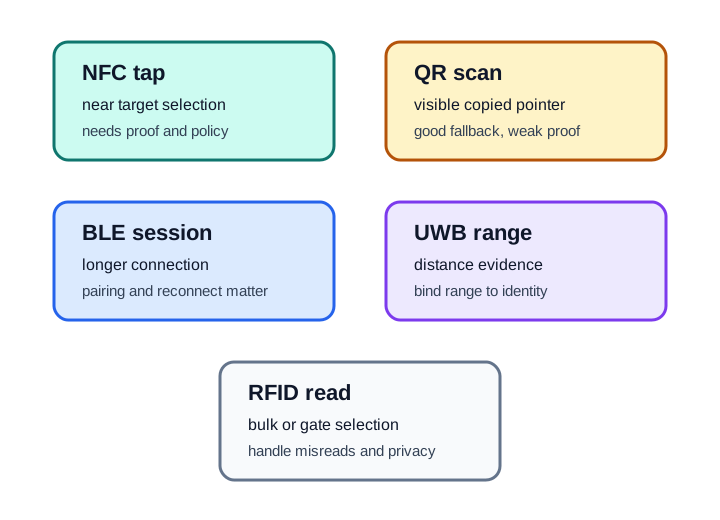
An NFC tap gives nearby target selection but still needs proof and policy. A QR scan can carry a visible pointer and serve as a fallback, though a copied code is weak authenticity evidence. BLE supports a longer session but needs pairing and reconnect behavior; UWB can provide distance evidence only when bound to an identity. RFID can select many objects at a gate, with misread and privacy risks to manage. Choose the medium whose observation answers the task, then keep authorization at the same policy gate for every input path.
Compare technologies by the weakest boundary in the workflow, not by the strongest feature in the brochure. A dynamic credential can be undermined by a weak fallback. A strong NFC tap can be undermined by trusting an unsigned URL. A precise range estimate can be undermined if it is not bound to the right device identity.
17.7 Static Data, Dynamic Proof, and Credentials
This section: Static Data, Dynamic Proof, and Credentials — Figure 17.2 separates static tag data from dynamic proof and credential policy.
NFC security reviews should separate three very different things that are often described as “the tag.”
Figure 17.2 separates static tag data from dynamic proof and credential policy.
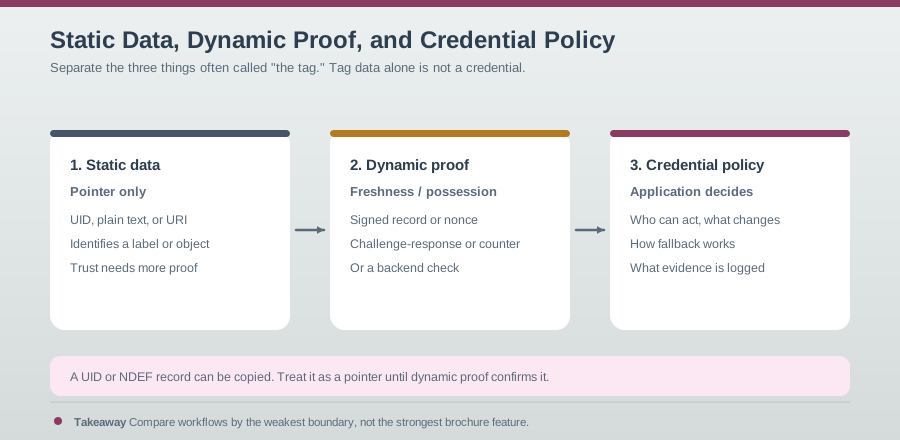
A UID, plain text, or URI can point to an object, but it can be copied and should not authorize protected work. A dynamic signed record can add freshness or possession evidence when a verifier checks it. Credential policy still decides whether the person, device, and current state permit an action. Keep those decisions separate in the log: what was read, what cryptographic or backend proof passed, and what policy allowed. A successful fresh proof does not override a revoked role or unsafe equipment state. This map prevents a tag identifier from being mistaken for a complete credential.
17.8 Tag Data Is Not a Credential
This section: Tag Data Is Not a Credential — Reader/writer mode often starts with tag data.
Reader/writer mode often starts with tag data. That data can be useful without being trusted:
- A maintenance tag can carry an asset ID, while the maintenance app checks whether the user can open or update the record.
- A product tag can carry a signed proof, while the backend verifies the signature and rejects stale or unexpected counters.
- A commissioning tag can carry setup data, while the app asks the device to prove it is the intended target before joining a network.
- A fallback QR code can carry the same object ID, but the application should mark the evidence source so support teams know whether the user tapped or scanned.
17.9 Card Emulation Is a Credential Interface
This section: Card Emulation Is a Credential Interface — Card emulation changes the trust model.
Card emulation changes the trust model. The device or card is not just a data label; it participates in a credential protocol expected by a reader. Review who owns the credential, which reader applications are accepted, how user presence is enforced where needed, and how denied requests are logged.
17.10 Handover Moves the Risk
This section: Handover Moves the Risk — NFC handover moves a setup token to another bearer.
NFC handover moves a setup token to another bearer. The follow-on connection still needs peer binding, session protection, retry policy, and user-visible failure handling. A successful tap is only the start of the proof chain.
17.11 Threats and Controls
This section: Threats and Controls — The most useful NFC security review maps each threat to a control and to the evidence that proves the control works.
The most useful NFC security review maps each threat to a control and to the evidence that proves the control works.
Figure 17.3 pairs each NFC threat with a testable control.
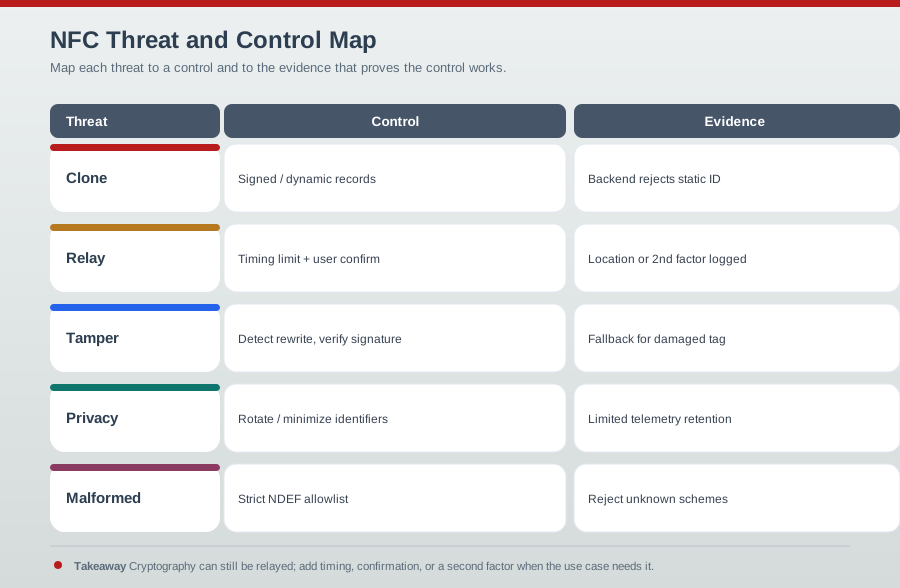
The map in Figure 17.3 pairs each NFC threat with a control and a testable result. Signed or dynamic records can expose a clone when the backend rejects a reused static identity. A timing limit and user confirmation help with relay risk, but cryptography by itself does not rule out a relay. Signature checks and rewrite detection address tampering; identifier minimization and limited telemetry retention address privacy. A strict NDEF allowlist rejects unknown schemes or malformed payloads. Keep the denial log, fallback for a damaged tag, and owner for each control. Listing controls without the reject or recovery evidence would leave the threat review incomplete.
Do not approve a high-impact action only because an NFC tap happened. The tap is a useful intent signal, not a complete authorization decision. The application still needs to validate the data, the user, the target, and the requested action.
17.12 Tap Intent Is Not Confidentiality
This section: Tap Intent Is Not Confidentiality — The most common NFC security belief is that a few-centimetre operating range makes interception irrelevant.
The most common NFC security belief is that a few-centimetre operating range makes interception irrelevant. That is the wrong boundary. The operating range is short because a passive tag needs a strong field, but eavesdropping can happen from farther away with better antennas, and the NFC RF layer is not the application security layer. NFC’s genuine advantage is deliberate tap intent, not automatic confidentiality or authorization.
Consider a smart tool cabinet with three entry paths: an NFC service tag on each drawer, a QR fallback label for phones without NFC, and a BLE lock controller that releases the latch. The NFC tag should not say “open drawer 4” as a trusted command. A safer design treats the tap as a selector: asset=cabinet-12-drawer-4, input=nfc, and a signed or backend-validated proof if the tag supports one.
Figure 17.4 treats a public tag as a route to context, not a secret.
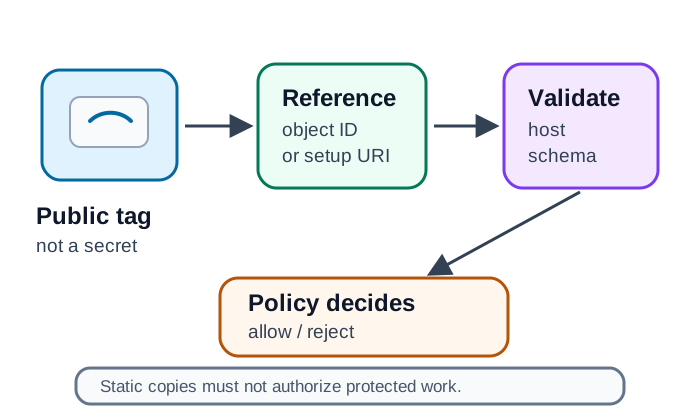
The cabinet example in Figure 17.4 reads asset=cabinet-12-drawer-4 from a public tag. Those bytes select an object; they are not an instruction to open it and are not shown as an NDEF memory dump. The app validates the host or schema, and verifies a signature when proof is available, before asking backend policy. The backend checks the signed-in technician, asset state, reservation, and lock health; only then can it issue a short-lived release instruction to the BLE controller. A copied static tag can point to the same drawer, so it must never grant protected work by itself.
The phone then asks the backend whether this signed-in technician may check out that tool at this time. The backend sends a short-lived release instruction to the BLE controller only after asset state, user role, reservation state, and lock health all match.
The comparison changes when fallback is used. A QR scan can select the same drawer, but it is easier to photograph or replace, so the backend should record input=qr_fallback and may require stronger user confirmation or supervisor approval. UWB can add distance evidence between the phone and cabinet, but it still needs to bind to the same identity and action. RFID can inventory tagged tools after the door closes, but that inventory evidence should reconcile checkout rather than authorize opening by itself.
17.13 Attack Evidence for Tap Workflows
This section: Attack Evidence for Tap Workflows — The relay attack is the important one for proximity claims.
Three attacks are worth naming explicitly because each maps to different release evidence:
| Attack | What it does | Defense evidence |
|---|---|---|
| Eavesdropping | Passively captures an exchange from farther than tap distance. | Application-layer encryption or no plaintext secrets on the tag. |
| Data corruption or modification | Jams, alters, or rewrites bits or tag content. | Integrity checks, authenticated messages, readback tests, and rejection logs. |
| Relay | Forwards a legitimate badge or credential exchange over a longer link. | Timing bounds, distance bounding, transaction limits, user confirmation, or second factor. |
The relay attack is the important one for proximity claims. The attacker does not break the cryptography; they extend the wire by presenting a genuine credential to a genuine reader that are in different places. That is why proximity alone is not authentication for valuable actions.
For the cabinet example, release testing should produce one row per attempted input: valid NFC tag, copied NFC UID, modified NDEF URL, QR fallback, stale signed payload, denied technician, offline backend, BLE lock unavailable, and unexpected RFID inventory result. Each row should name the parser result, proof result, policy decision, user message, and audit event.
Make every weaker path visible. A support dashboard should be able to answer how many openings used NFC, how many used QR fallback, how many were denied for malformed payloads, how many were denied by policy, and how many reached the BLE controller but failed at the lock. Those categories prevent field fixes from becoming invisible security bypasses.
17.14 Compare Interaction Models
This section: Compare Interaction Models — A reliable comparison decomposes the proof chain into four checks.
Choosing between NFC, BLE, QR, UWB, and RFID is really choosing an interaction model:
| Question | NFC | BLE | QR code |
|---|---|---|---|
| Range | Centimetres for the tap. | Often 10 metres or more. | Line of sight to a camera. |
| Setup | No pairing; tap and act. | Discovery, pairing, reconnect, and permission state. | Point, scan, parse, and validate. |
| Power | Can power a passive tag. | Both ends need power. | Printed media needs no power. |
| Intent | High because the user taps. | Lower because connections can happen at distance. | Medium because the user aims a camera. |
| Weakness | No RF encryption guarantee and relay risk. | Pairing, identity, and reconnect attack surface. | Trivially photographed, copied, or swapped. |
A reliable comparison decomposes the proof chain into four checks. First, input integrity: can the byte string, URL, UID, advertisement, or range report be copied or altered? Second, freshness: does the message include a nonce, counter, signature, challenge-response, or online state check that rejects replay? Third, target binding: does the proof refer to the cabinet, drawer, lock, or credential that will actually change state? Fourth, authorization: does application policy decide that this user may perform this action now?
Those checks explain why swapping technologies does not automatically fix a design. NFC without proof fails at input integrity. QR without backend validation fails the same way. BLE with weak reconnect policy may pass input integrity but fail target binding if the phone talks to the wrong lock. UWB can strengthen proximity evidence, but if the range report is not bound to the credential and action, it is only a measurement. RFID inventory can catch a missing tool after the fact, but it is usually too broad and asynchronous to authorize a specific human action.
17.15 Relay and Proximity Check
This section: Relay and Proximity Check
17.16 Comparing NFC With Alternatives
This section: Comparing NFC With Alternatives — The right comparison depends on the workflow, not on a generic technology ranking.
The right comparison depends on the workflow, not on a generic technology ranking.
17.17 Selection Questions
This section: Selection Questions
Use these questions before choosing a technology:
- What is being selected? A person, asset, credential, physical location, device, or service?
- What can be copied? Plain tag content, visible code, BLE advertisement, RFID identifier, or handover token?
- What proves freshness? Counter, nonce, signature, challenge-response, online lookup, or recent user confirmation?
- What can be relayed? NFC and credential protocols can be forwarded unless timing or context checks are part of the design.
- What is the fallback? QR, manual code, support flow, retry, or supervised override?
- What gets logged? Selected technology, parse result, policy decision, fallback used, and reason for rejection.
17.18 Folded Security Comparison Notes
This section: Folded Security Comparison Notes — Security comparisons should compare attack paths, not brand labels.
Security comparisons should compare attack paths, not brand labels. Preserve these boundary rules:
| Pattern | Main risk | Control evidence |
|---|---|---|
| Public NFC tag or QR code | Copied or replaced pointer. | Approved host checks, schema validation, tamper inspection, and backend policy gate. |
| BLE handoff after tap | Pairing, reconnect, identity rotation, or permission confusion. | Device identity, session binding, permission prompt review, and disconnect behavior. |
| UWB-assisted action | Distance evidence used as standalone approval. | UWB result bound to device identity, user intent, and the action being authorized. |
| RFID inventory flow | Bulk misreads, hidden reads, and privacy exposure. | Reader placement, read-zone tests, exception handling, and privacy logging. |
| NFC credential flow | Relay, lost device, stale credential, or weak fallback. | Dynamic proof, revocation, retry limits, fallback labeling, and audit trail. |
A service tag and an access credential are different designs. A service tag can expose an asset reference that an app validates. An access credential needs issuer, verifier, freshness, revocation, replay handling, and failure telemetry. Do not let the same “tap” language hide that boundary.
17.19 Folded Security Best-Practice Notes
This section: Folded Security Best-Practice Notes — When stronger proof is required, use a credential or authenticated tag pattern with freshness, revocation, relay handling, and audit.
Use these rules when turning comparison results into a release design:
| Best practice | Reason |
|---|---|
| Treat public tag content as untrusted input. | Static URLs, UIDs, and text records can be copied, replaced, or replayed. |
| Keep secrets and changing state outside NDEF. | The app, secure element, reader, controller, or backend should own authorization and current state. |
| Fail closed on unexpected records. | Unknown hosts, record types, payload lengths, MIME types, or schema versions should not trigger hidden commands. |
| Read back and mount-test final tags. | A tag written correctly on a bench can fail after locking, label overlay, metal mounting, or phone-case changes. |
| Log tap, proof, policy, fallback, and action separately. | Reviewers need to know whether the tap was observed, the payload was accepted, the policy allowed it, and the action ran. |
When stronger proof is required, use a credential or authenticated tag pattern with freshness, revocation, relay handling, and audit. Short NFC range is a useful usability boundary, but it is not a complete security control.
17.20 Fallback and Failure Handling
This section: Fallback and Failure Handling — Fallback is part of the security design, not only a usability feature.
Fallback is part of the security design, not only a usability feature. A fallback path can preserve service when tags fail, but it can also become the easiest way around the stronger control.
Figure 17.5 sends every input path through parsing and the same authorization policy.
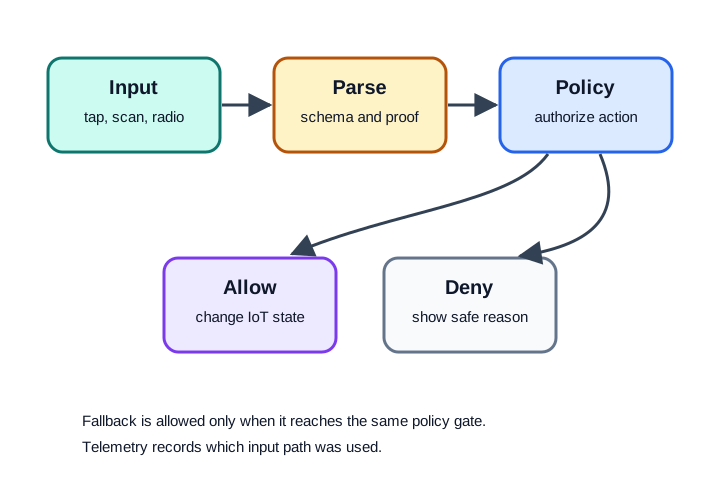
A tap, scan, or alternate radio input first supplies data for schema and proof checks. Policy then allows or denies the requested action and records the reason. A fallback is safe only if it reaches that same gate; a manual code path that skips policy would create a weaker route into the product. Telemetry should identify which input path was used so failures and misuse can be reviewed. Test both a legitimate fallback and a rejected request on each supported path. The result to preserve is the policy and action outcome, not merely the fact that an input was captured.
Good fallback design includes:
- A fallback that is explicitly labeled in telemetry so teams can see when the stronger path is bypassed.
- The same application-policy gate for NFC, QR, BLE, RFID, and manual entry paths.
- Clear user messages for unsupported tag, malformed data, proof failed, action denied, and retry needed.
- A support path for damaged labels or replaced devices that does not silently approve a weaker identity claim.
17.21 Release Evidence
This section: Release Evidence — Release evidence should prove that each comparison claim survives field conditions and negative tests.
Release evidence should prove that each comparison claim survives field conditions and negative tests.
Figure 17.6 asks whether NFC security claims survive negative and field tests.
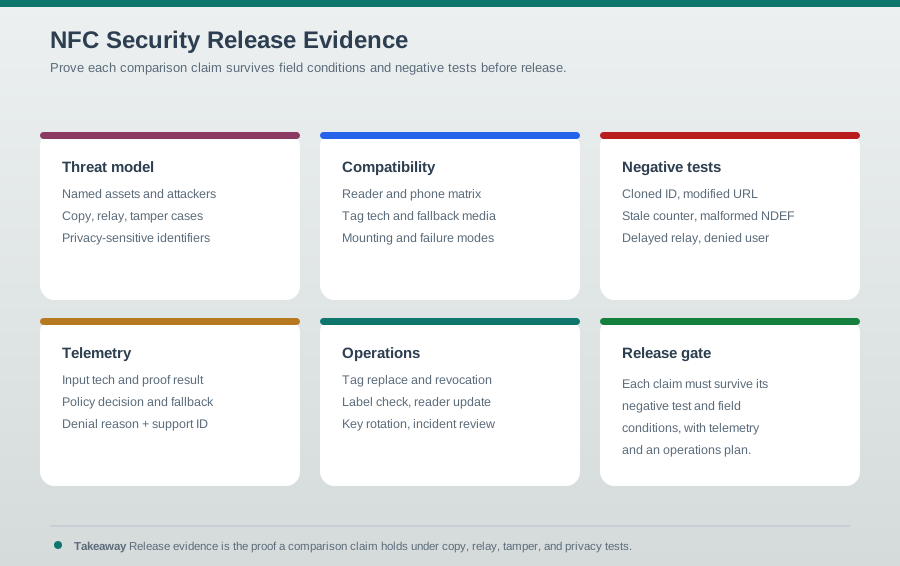
The threat model names assets, copying, relay, tamper, and privacy-sensitive identifiers. A compatibility matrix records readers, phones, tag technology, fallback media, and mounting conditions. Negative tests should show how the app rejects a copied static identifier, malformed data, an unauthorized session, or a stale proof. Field tests then check the intended surface and workflow. Keep the logs and fallback result with the release scope and retest trigger. A secure-sounding tag type cannot replace evidence that the complete reader, verifier, policy, and physical placement behave as claimed.
17.22 Knowledge Check
This section: Knowledge Check
17.23 Match Threats to Controls
This section: Match Threats to Controls
17.24 Order a Security Comparison Review
This section: Order a Security Comparison Review — Inspect the real NFC contactless reader in use below.
Inspect the real NFC contactless reader in use below.

Common Pitfalls
This section: Common Pitfalls
QR fallback is useful, but it is also easy to duplicate and place somewhere else. Fix: route QR and NFC through the same validation path and log when fallback was used.
A UID or serial-like value may help route a lookup, but it is not a credential by itself. Fix: require signed data, dynamic proof, challenge-response, or backend policy for actions that matter.
Relay attacks forward legitimate messages and may not break cryptography. Fix: add timing, context, user presence, or second-factor controls for high-impact actions.
The strongest technology can still fail in the field. Fix: define fallback, denial, retry, and support paths before release, and verify that weaker paths cannot silently bypass policy.
17.25 Design Review Checklist
This section: Design Review Checklist
Before approving an NFC security comparison, confirm:
- Boundary: The chapter or design names what crosses from tag, reader, scan, radio, or ranging layer into application policy.
- Copy risk: Static data and visible labels are treated as copyable unless additional proof is present.
- Freshness: The design names the nonce, counter, signature, challenge-response, or backend state check used to reject stale data.
- Relay: The design states whether relay matters and which timing, context, or second-factor controls apply.
- Privacy: Stable identifiers, logs, and telemetry are minimized and justified.
- Fallback: Weaker paths are visible, policy-gated, and tested.
- Evidence: Negative tests and support diagnostics are captured before release.
17.26 Summary
This section: Summary
NFC security comparisons are strongest when they separate proximity, proof, and policy:
- NFC provides a deliberate tap, not automatic authorization.
- QR is useful as a visible fallback, but it is easy to copy and replace.
- BLE supports longer sessions, but pairing, identity, permissions, and reconnect behavior become the main review points.
- UWB can add ranging evidence when supported, but range evidence must bind to identity and policy.
- RFID fits inventory and gate reads, but bulk reads bring misread and privacy risks.
- Release evidence should include threat model, negative tests, fallback behavior, telemetry, and operations readiness.
17.27 Key Takeaway
This section: Key Takeaway — NFC security depends on proximity plus controls: protect tag content, reader trust, backend actions, user consent, replay risk, and device-loss scenarios.
NFC security depends on proximity plus controls: protect tag content, reader trust, backend actions, user consent, replay risk, and device-loss scenarios.
17.28 Concept Relationships
This section: Concept Relationships
Builds On:
- NFC Modes and Protocols - Mode boundaries, NDEF, activation, and handover behavior.
- NFC Tags and NDEF - Tag data, NDEF structure, validation boundaries, and release checks.
- RFID Security and Privacy - Reader/tag identity, privacy, and backend validation.
Enables:
- NFC Apps Simulation Lab - Practical validation of tag parsing and fallback behavior.
- NFC Real-World Applications - Credential, relay, and reader-policy review for controlled spaces.
- NFC Tag Programming - Write, read back, and release NFC tag workflows.
Related Concepts:
- Handover shifts risk to another bearer instead of completing the full session over NFC.
- Static identifiers need policy checks before they can drive IoT state.
- Fallback media should be visible in telemetry and tested as part of release.
17.29 See Also
This section: See Also
Internal References:
- NFC Tags and NDEF - Tag structure, payload planning, and validation evidence.
- NFC Communication and IoT Integration - Backend integration, event routing, and policy ownership.
- Bluetooth Security Pairing Methods - BLE identity, permission, and session considerations.
- RFID Standards and Protocols - RFID families and reader behavior.
17.30 Try It Yourself
This section: Try It Yourself — Boundary Review: Pick one tap-to-open or tap-to-configure workflow.
Boundary Review: Pick one tap-to-open or tap-to-configure workflow. Write down what the NFC tag carries, what the application validates, what the user sees on failure, and what telemetry is emitted.
Fallback Test: Create an NFC tag and a QR fallback that both identify the same test asset. Verify that both paths reach the same policy gate and that logs distinguish tap from scan.
Negative Test: Modify one character in an NDEF URI, replay an old signed payload if your lab has one, or scan a copied QR label. Confirm that the application rejects the input and explains the failure safely.
Comparison Exercise: Compare NFC, QR, BLE, UWB, and RFID for an equipment checkout workflow. Choose one primary input and one fallback, then justify the controls and release evidence.
17.31 What’s Next
This section: What’s Next
Find help
3 reviewed answers.
Where should I start in a module?
Open the module page from the sidebar to see its chapters in order. Use the module map to return to a topic you need.
Modules and pathsReviewed
What can I try when a project does not work?
Check the symptom, then work through the diagnostic steps. Keep the error message and the smallest example that reproduces it.
When you are stuckReviewed
How do interactive examples work?
Use the interactive guide to check how examples and simulations work before changing your project.
Interactive examples guideReviewed