3 RFID System Components
More
Depth: Practitioner
Progress saves as you read. Mark sections complete as you go; your progress appears in the sidebar.
3.1 Start With the Story
This section: Start With the Story — Picture a tagged medicine box crossing a receiving door twice but appearing once in stock.
Follow One Box Through the Doorway
Picture a tagged medicine box crossing a receiving door twice but appearing once in stock. Radio frequency means the part of the spectrum used to carry the tag signal. Radio frequency identification (RFID) means identifying an object from data carried by that tag; it does not by itself prove which business event should be accepted.
Name the tag, antenna, reader, filter, and application handoff. Test a clean pass, a weak read, a duplicate read, and a nearby cross-read without changing the box or doorway.
Keep raw observations, reader settings, times, filter decisions, and the accepted event. This proves one read zone and handoff rule, not every object or site; the deeper sections examine components, memory, range, filtering, and evidence boundaries.
Start with one product moving through a reader zone. The tag stores an identity, the antenna shapes the field, the reader gathers observations, middleware filters duplicates, and the application decides whether a business event happened.
This chapter is the component walk-through for that chain. Each part matters because a weak tag, bad antenna aim, noisy reader setting, or loose middleware rule can change the meaning of the event before anyone sees it.

3.2 Overview: RFID Components Form One Evidence Chain
This section: Overview: RFID Components Form One Evidence Chain — An RFID system is not only a tag and a reader.
An RFID system is not only a tag and a reader. A reviewable system includes the object being identified, the tag and attachment, the reader and antennas, the read zone, the middleware that filters repeated observations, and the application that turns a clean event into a workflow decision.
The beginner mistake is to approve each component in isolation. A tag that reads on a bench can fail on metal, liquid, stacked packaging, or a moving carton. A strong reader can create false events if antenna geometry is too broad. Middleware can hide or create errors if duplicate reads, cross-reads, and exception cases are not recorded.
Use a simple receiving-door example. A pallet carries 24 tagged cases and passes through one doorway. If the reader reports 31 raw observations, the question is not whether RFID "worked" 31 times. The component review asks which 24 observations represent the 24 cases, which 7 observations are duplicates, whether any expected case is missing, and whether a nearby staged pallet was also observed. If middleware collapses the 31 reads into 24 accepted case events, the acceptance record should still keep the reader, antenna, timestamp window, duplicate rule, and exception result. Otherwise a later dispute cannot distinguish a clean receiving event from a lucky pile of raw reads.
This is why the evidence chain has a direction. The object and tag prove identity only inside the tag's limits. The antenna and reader prove that a tag was observable inside a radio field, not that the business action happened. Middleware proves that observations passed filtering rules. The application proves that a workflow state changed for a named reason. A good pilot records counts at each boundary: 24 expected cases, 31 raw observations, 24 accepted case events, 0 missing cases, 7 duplicate observations suppressed, and 0 neighboring-pallet events accepted.
Figure 3.1 traces a cabinet tag from radio response to inventory decision.
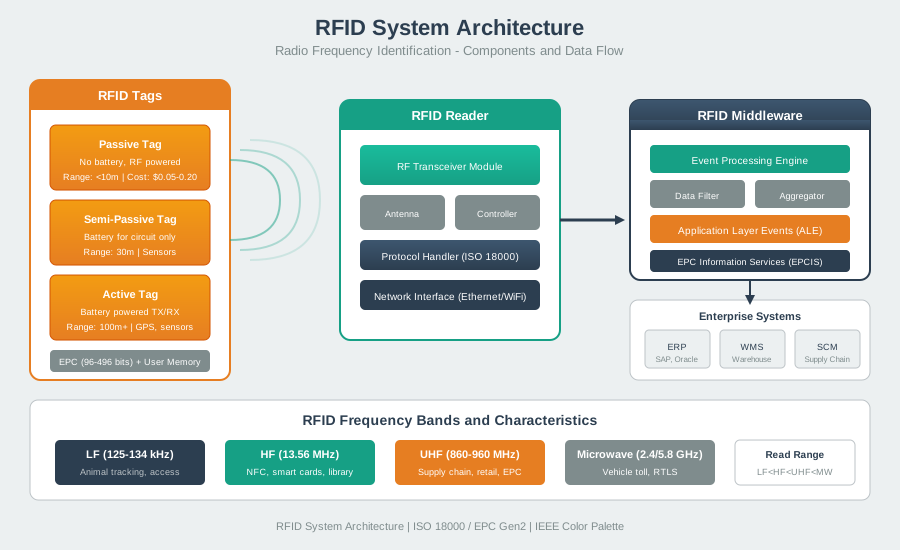
The cabinet example in Figure 3.1 follows a tag ID through the radio, reader, middleware, and application. Eighteen tools produce 63 raw observations; those observations are not a tool count. The reader adds its identity and time. Middleware removes duplicates and applies zone rules, yielding 18 accepted cabinet tools and no accepted reads from three nearby tools. The application then creates one inventory event per physical tool. Keep the raw count, accepted set, exclusion result, and event rule together. If the application count is wrong, those layers show whether the fault arose in the field, filter, or workflow mapping.
If you only need the intuition, this layer is enough: RFID quality is a system property. Tags, antennas, readers, middleware, and applications must all support the same business event.
Component Evidence Families
Object and tag
Records what is being identified, how the tag is encoded and attached, and whether materials, orientation, lifecycle, and privacy are acceptable.
Reader and antenna
Records reader settings, antenna placement, field shape, power, region, firmware, and where reads should and should not happen.
Middleware
Records duplicate filtering, timing windows, reader identity, direction logic, confidence rules, and exception handling.
Application
Records the workflow meaning: received, returned, released, counted, denied, inspected, or flagged for manual review.
Beginner Example
A portal reader sees the correct tagged cases, but it also sees cases waiting beside the door. The component stack is not ready. The review needs antenna placement, power, shielding, reader timing, tag motion, and middleware zone rules that match the doorway event.
Overview Knowledge Check
3.3 Practitioner: Build the Component Review Record
This section: Practitioner: Build the Component Review Record — A practical RFID component review starts with the business event, then works backward to the physical stack.
A practical RFID component review starts with the business event, then works backward to the physical stack. The record should explain which observation should change a business state, which objects and tags are in scope, where reads are accepted, how raw reads are filtered, and who owns later changes.
3.3.1 How It Works: Component Selection Sequence
Component selection begins with the business event, not the reader catalogue. Name the exact action—such as receive, return, release, locate, or deny—then describe the object material, mounting, motion, tag lifecycle, privacy exposure, and likely exceptions. That evidence determines whether the observation should be an intentional tap, a short shelf or cabinet zone, a directional portal, a handheld audit, or wider area presence. Only after choosing that pattern should the review place antennas, set the acceptance window, and specify how middleware handles repeats, misses, direction, unknown tags, and manual exceptions. Finish by naming the operational owner, diagnostics, replacement rule, privacy control, and retest trigger.
The choice becomes concrete in Figure 3.2. Compare its labelled zones before approving reader power or filtering, because each zone treats a radio observation as a different kind of business evidence.
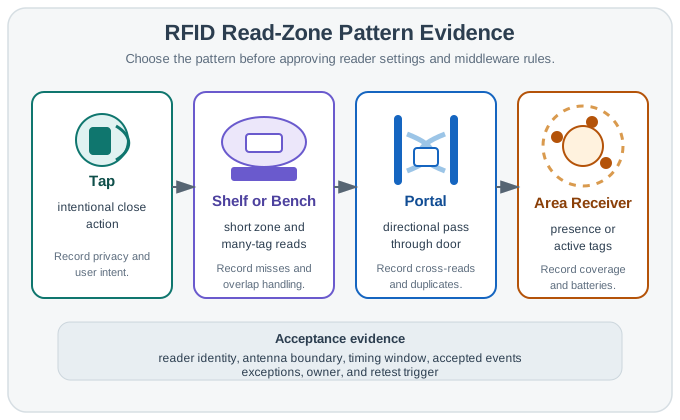
In Figure 3.2, Tap begins with an intentional close action, making user intent and privacy part of acceptance. Shelf or Bench widens the problem to short-zone, many-tag reads, so misses and overlap handling must be recorded. Portal changes the evidence to a directional pass and makes cross-reads and duplicates decisive, while Area Receiver is about presence, coverage, and batteries rather than a doorway event. The shared Acceptance evidence bar then reconnects every pattern to reader identity, antenna boundary, timing window, exceptions, ownership, and retest. That is the component-selection sequence in operational form: define the event shape first, then choose hardware and middleware capable of proving it.
Practitioner Example
A tool checkout cabinet differs from a dock-door portal. The cabinet review should include shielding, reader timing, tool overlap, tag attachment durability, access identity, missing-tool exceptions, audit trails, and what happens when a tool is unreadable. The approval should name the cabinet and tool set, not claim RFID solves every custody workflow.
Component Ledger
Worked Review: Receiving Doorway
A receiving doorway approves a received event only for cases crossing the doorway under the reviewed flow. Evidence should include representative cases, tag position, pallet wrap, traffic direction, antenna placement, reader settings, duplicate window, partial-read rule, nearby-door behavior, exception queue, and retest triggers for packaging, layout, firmware, or business-rule changes.
Practitioner Knowledge Check
3.4 Under the Hood: Every Handoff Can Change Meaning
This section: Under the Hood: Every Handoff Can Change Meaning — Under the hood, an RFID system moves through handoffs.
Under the hood, an RFID system moves through handoffs. An object is associated with a tag. The tag couples with an antenna field. The reader decodes observations. Middleware filters those observations. The application turns a filtered event into business state. Each handoff proves something, and each handoff can also lose context.
The safest review keeps raw read evidence separate from business event evidence. A reader can decode a tag and still observe the wrong zone. Middleware can remove duplicates and still map a tag to the wrong state. A tag memory decision can expose privacy or create stale state even when radio reads are reliable.
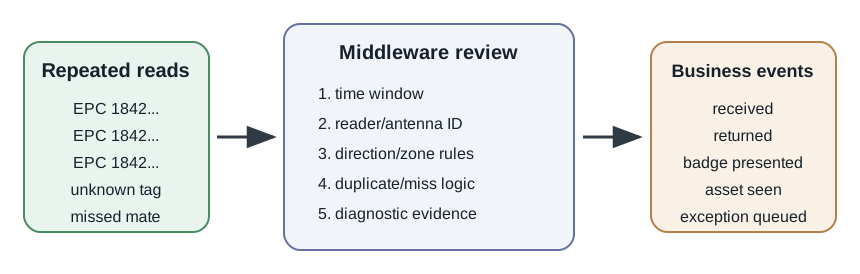
A useful diagnostic ledger keeps four identifiers separate: object identifier, tag memory value, reader/antenna identifier, and business event identifier. Suppose tag EPC-A is seen by antenna door-2-left at 10:00:01, 10:00:02, and 10:00:04. Those three raw observations may become one accepted event if the duplicate window is 5 seconds and the zone rule says door-2-left belongs to receiving. If the duplicate window is accidentally set to 1 second, the same raw evidence could become three events. If door-2-left is mapped to returns instead of receiving, the raw radio evidence is still true, but the business state is wrong.
The handoff arithmetic is small but important. With a 5-second duplicate window, observations at 0.0 s, 0.8 s, and 3.9 s collapse into one event because each is inside the same window. An observation at 7.2 s may start a new candidate event. That candidate should not automatically become a second receiving event unless the workflow allows repeated entries and the direction or zone evidence supports it. The same principle applies to missed mates: if a kit expects 12 tags and the reader accepts 11, middleware should create an exception, not silently mark the kit complete. Component reviews fail when these rules live only in code or reader presets instead of in an acceptance record that operations can retest.
Failure-Boundary Checks
Object-to-tag
Check identifier issuance, memory use, attachment, material effects, lifecycle, replacement, privacy, and decommissioning.
Tag-to-reader
Check frequency family, coupling behavior, antenna placement, power, region, reader settings, orientation, population, and movement.
Reader-to-middleware
Check timestamp, reader identity, antenna identity, repeated observations, network delivery, diagnostics, batching, and exception rules.
Middleware-to-application
Check event schema, object mapping, workflow update, audit evidence, user notification, privacy rule, manual override, and owner.
Memory and Identity Review
Tag memory is not an application database. Use the expected identifier field for stable identity, treat access controls as controlled security functions, and keep mutable process state in systems that can audit and correct it unless the workflow has a specific tag-resident data requirement.
Diagnosis Pattern
- Name the failing symptom. Separate missed reads, extra reads, duplicate events, object mapping errors, privacy issues, and stale application state.
- Inspect the closest boundary first. A wrong application event usually starts with filtering or mapping; an unread tag usually starts with object, tag, antenna, or reader evidence.
- Change one variable at a time. Tag model, attachment, reader power, antenna position, firmware, object motion, and duplicate windows can each alter the evidence trail.
- Narrow the approval. If the pilot covered one doorway or one tag population, keep the release claim inside that boundary.
Under-the-Hood Knowledge Check
3.5 RFID Tag Type Selection
This section: RFID Tag Type Selection
3.5.1 Start With the Story
Choose From the Read Zone Backward
Picture a warehouse team choosing a tag because it worked when held near a desk reader. On a metal cage at the loading door, the same label is missed and workers enter records by hand. The tag family was chosen before the real job was drawn.
Radio-frequency identification (RFID) uses radio signals to identify a tagged object. Begin with the event that must be recorded: crossing a door, sensing a condition, or reporting presence across an area. Mark object material, mounting place, read distance, movement, nearby tags, memory, privacy, and who replaces a battery if one exists.
Pilot the choice on the real object in the worst useful position. Turn it, cover it, move it at working speed, crowd the read zone, and repeat the event. Count missed, extra, and duplicate reads and keep the exact reader and tag setup.
One pilot does not promise every site or lifetime. The deeper sections compare passive, battery-assisted, and active choices and show how form, upkeep, and evidence turn a read into a dependable workflow.
A tag choice is really a promise about power, distance, surface, memory, cost, and lifetime. A passive label on a carton, a battery-assisted tag on an asset, and an active beacon on equipment all create different evidence and different maintenance obligations.
Use this chapter to choose the tag from the job backward. Name the object, read zone, material, handling, memory, and replacement path first, then decide which tag type can prove the claim without hiding an operational cost.
3.5.2 In 60 Seconds
RFID tag type is a workflow decision. Passive tags fit controlled read zones where the reader energizes the tag. Battery-assisted passive tags add onboard power for sensing or logging while still using reader-driven communication. Active tags use their own transmitter or beacon behavior when the asset must report from an area rather than only at a checkpoint. The best choice is the one that can be piloted with the real object, material, mounting method, reader layout, battery plan, privacy boundary, and exception process.
3.5.3 Learning Objectives
By the end of this chapter, you will be able to:
- Distinguish passive, battery-assisted passive, and active RFID tags by power source and communication behavior.
- Explain why tag form factor, attachment, and surrounding material can matter as much as the tag family.
- Select a tag type from workflow evidence instead of generic performance claims.
- Review tag memory and sensor choices without overloading the tag with application state.
- Build a tag lifecycle record that covers encoding, commissioning, monitoring, replacement, and decommissioning.
3.5.4 Quick Check: RFID Tag Fit
3.5.5 Tag Types By Power And Behavior
RFID tags are easier to choose when you separate three questions:
- How does the tag get power?
- How does it communicate?
- When does the workflow need evidence?
Use Figure 3.3 to answer the first two questions before thinking about range. Read across the three tag families in power-source order, then compare how each returns data and what operational burden follows.
Figure 3.3 compares passive, battery-assisted, and active tags by power and workflow.
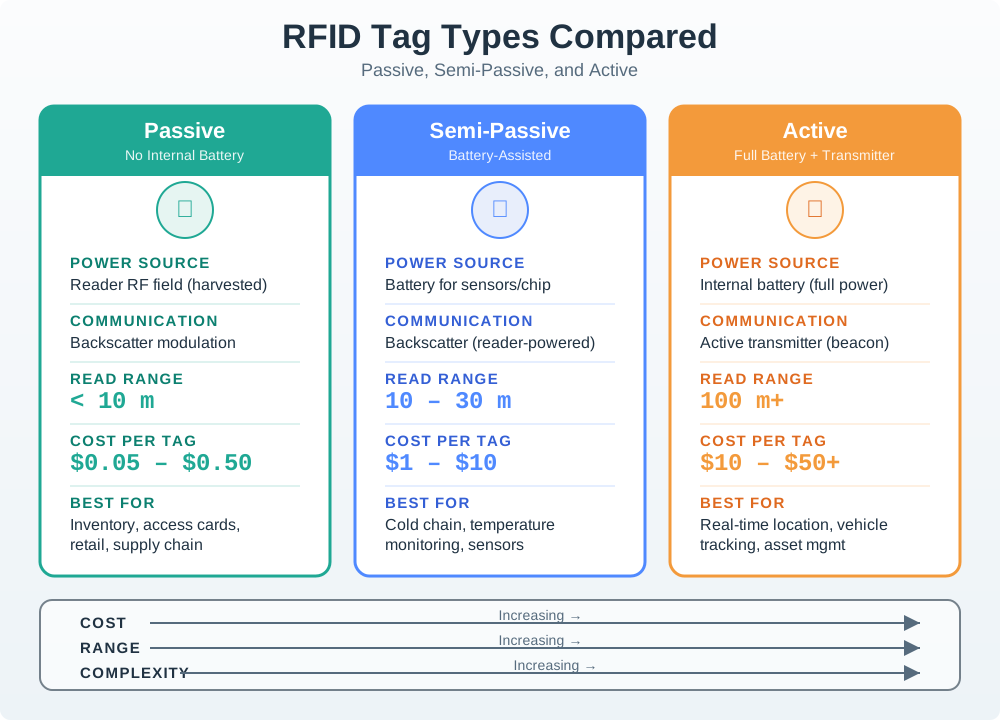
A passive tag harvests energy from the reader field and responds by changing the reflected signal. A battery-assisted or active design changes which part of the tag is powered and how often it can report, but it also adds battery and maintenance questions. The examples belong to different read patterns, such as a controlled dock check or a broader tracked area. Choose a candidate from the required event and object motion, then test it on the real material with the planned reader. A tag-type label cannot guarantee a particular range or maintenance life.
In Figure 3.3, passive tags form the baseline: the reader field powers the tag and the reply is backscatter, so evidence exists only in a planned read zone. Battery-assisted passive tags add local power for sensing or chip operation but still depend on a reader interaction for their reply. Active tags power their own transmitter and can announce presence beyond fixed checkpoints, at the cost of battery, receiver, configuration, and decommissioning work. That progression connects power and radio behaviour to the workflow examples below; “contains a battery” is not enough to decide what evidence a tag can provide.
3.5.9 Workflow Evidence Drives Tag Family
Every RFID tag decision comes down to two linked questions: where does the tag get its energy, and how does it send data back? Those two answers define the three families: passive, battery-assisted passive (BAP), and active. Range, size, cost, battery life, and support work follow from that power-and-transmit choice.
A passive tag harvests all its energy from the reader’s field and answers by backscatter, reflecting the reader’s carrier. An active tag carries a battery and its own transmitter, so it can beacon without waiting for a reader field. BAP sits between them: it has a battery for sensing, memory, or stronger internal operation, but still replies by backscatter. Getting this framing right stops the common mistake of assuming “has a battery” means “long range.”
Turn that framing into a workflow test before looking at a catalog. If 120 tagged cases move through a dock portal and the business event is “received at this doorway,” passive UHF can be a sensible first candidate because the cases pass a controlled reader zone. The pilot record might say: 120 expected cases, 118 accepted reads, 2 manual exceptions, and 0 neighboring cases accepted. That is a tag-and-zone acceptance record, not just a tag selection.
If the same organization wants to know whether a refrigerated tote exceeded a threshold during a 36-hour trip, the tag needs onboard sensing or logging between handoff reads. A BAP sensor tag can fit because its battery powers the sensing side while the reader still collects data at planned checkpoints. If a yard trailer must report presence without passing any gate, active tags or another location system are the right family to evaluate because the asset has to announce itself into an area.
A useful selection sentence is specific: “Use passive UHF labels for carton receiving at dock 3 after the portal pilot proves reads and exceptions; use BAP sensor tags for cold-chain totes when the handoff reader collects identity plus excursion status; evaluate active tags only for assets that must be found away from checkpoints.” One sentence separates three families, three evidence needs, and three support models.
3.5.10 Selection Path
Start with the business event, not with a tag catalog. Figure 3.4 orders the decision so that object and workflow evidence constrain the tag family before package features or vendor claims enter the review.
Figure 3.4 delays tag approval until the real object and read pattern have been tested.
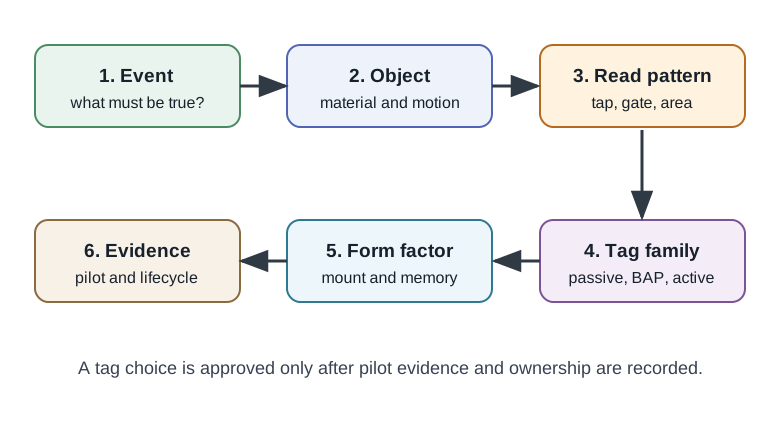
The selection path in Figure 3.4 starts with the business event: what must the system prove about an object? Material, motion, and environment then constrain coupling and durability. The read pattern decides whether a tap, checkpoint, inventory zone, or area beacon supplies the evidence. Only after those facts should a team compare passive, battery-assisted, active, or another technology and choose a mount and memory size. Pilot reads, misses, stray reads, and lifecycle ownership close the choice. A catalogue range claim is not a site result, so approve the tag only when the installed pattern meets the event requirement.
In Figure 3.4, the business event defines what must be proved; the object and environment expose coupling, durability, and privacy constraints; and the read pattern decides whether evidence comes from a tap, checkpoint, inventory zone, or area beacon. Only then choose passive, battery-assisted passive, active, or a different technology. Form factor follows the physical fit, while pilot evidence and the lifecycle record test whether the choice remains supportable. The ordered review prevents a catalogue range claim from becoming the system requirement.
Use this sequence:
- State the event the tag must support: identify, count, receive, release, locate, monitor, or audit.
- Document the object and environment: material, shape, mounting, liquids, metal, people, cleaning, heat, motion, and privacy exposure.
- Choose the read pattern: deliberate tap, shelf read, doorway pass, handheld audit, cabinet read, conveyor read, or area presence.
- Choose the tag family: passive, battery-assisted passive, active RFID, or another technology if RFID is not the right fit.
- Choose the form factor and memory behavior.
- Pilot representative items and record settings, misses, duplicates, exceptions, and retest triggers.
This order prevents the common mistake of selecting a tag type from a generic promise and then discovering that the real object, reader layout, or support process does not match.
3.5.11 Family Comparison And Support Burden
The family comparison should include radio behavior and operational burden.
| Property | Passive | BAP or semi-passive | Active |
|---|---|---|---|
| Power source | Reader RF field only | Battery powers local electronics | Battery powers electronics and transmitter |
| How it replies | Backscatter | Backscatter | Own transmitter or beacon |
| Typical UHF behavior | Controlled read zones and item tagging at scale | Better sensitivity or sensing at planned reads | Area presence, RTLS, vehicles, and high-value assets |
| Service life | No tag battery service | Battery-limited | Battery-limited |
| Cost and size | Lowest and smallest | Middle | Highest and largest |
Passive range is short because the link is limited at both ends: the reader must deliver enough power to turn the tag on, and then recover a very weak reflected signal. A BAP tag removes much of the forward-link limit by powering its own chip, so it can wake and answer at lower field strength without becoming a transmitter.
Practitioners should add lifecycle arithmetic to the table. Passive labels can be practical for high-volume disposable packaging because there is no battery service queue. Battery-powered tags need an owner. If a pilot approves 250 reusable sensor tags with a 24-month service interval, operations should plan for about 250 / 24 = 10.4 tags per month to be inspected, rotated, or replaced, plus spares for damage and loss. If no one owns that queue, the tag family is not approved even when the radio pilot looks good.
Form factor needs the same discipline. A label that reads well on dry cardboard may fail on a foil-lined pouch or a metal tool. The review should include a small matrix: object material, tag package, mounting method, read pattern, accepted reads, missed reads, duplicate reads, and failure owner. For example, a tool-room pilot might test 30 tools with on-metal hard tags, require 30 / 30 reads inside the cabinet zone, and require 0 reads when the tool is on the staging cart outside the zone. That evidence is stronger than a generic “on-metal tag selected” line.
Memory choices also belong here. A tag with user memory is not automatically better than a simple EPC label. If the workflow only needs a stable asset identifier, keep mutable state in the backend where corrections are auditable. Use tag-resident data when the object must carry status through disconnected handoffs, and write the rewrite, privacy, and conflict rules before deployment. The practical result is a tag record that names family, package, encoding, memory use, reader settings, exception path, lifecycle owner, and retest trigger.
3.5.12 Form Factor And Attachment
Tag family is only part of the choice. The same tag chip can behave very differently in different packages and mounting positions. Inspect the form-factor diagram Figure 3.5 from the actual object and attachment method to a package choice and then to the pilot evidence needed to approve it.
Figure 3.5 connects tag packaging to material, handling, and privacy risks.
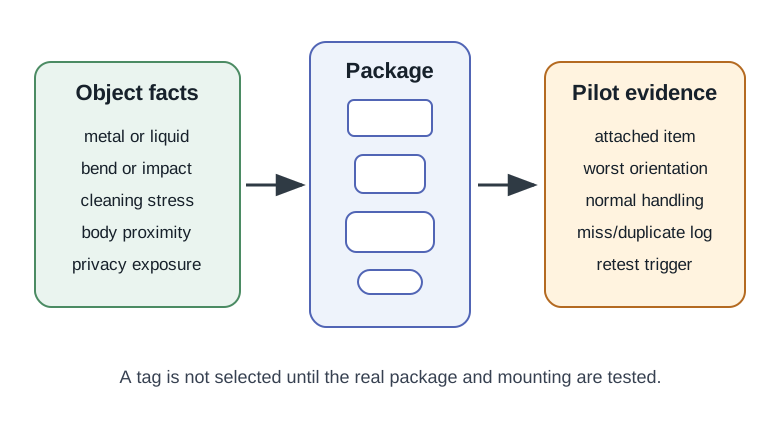
The form-factor view in Figure 3.5 begins with object material, shape, motion, handling, and privacy exposure. Those facts narrow package choices such as a label, hard tag, on-metal tag, or embedded tag. Adhesive, screws, spacing, folds, and orientation are part of the RF design because mounting can change antenna coupling even when the chip is identical. Pilot evidence then checks reads, misses, stray reads, and damage on the real object. Record the final mount and a retest trigger for packaging or placement changes. A bench pass on an unmounted tag does not establish field fit.
In Figure 3.5, inspect the object material, shape, motion, and handling conditions first. Those inputs constrain whether a label, hard tag, on-metal construction, embedded package, or harsh-process design can keep its antenna coupled and survive service. Next inspect the attachment method, because adhesive, spacing, screws, folds, and orientation can change the RF result even when the chip is unchanged. The final pilot branch reconnects package choice to measured reads, misses, stray reads, and damage under representative conditions.
Review the physical fit:
- Label or inlay: Useful for flat packaging when handling, bending, and material effects are acceptable.
- Hard tag: Useful when the tag needs mechanical protection, screws, ties, adhesive, or reusable mounting.
- On-metal tag: Designed for objects where ordinary tags are detuned by metal.
- Embedded tag: Built into a product, tool, badge, garment, or container during manufacturing or preparation.
- Harsh-process tag: Selected for cleaning, heat, moisture, chemicals, impact, or repeated handling.
- Implant-style tag: Used only in controlled domains where close read behavior, safety, and identity process are well defined.
Figure 3.6 provides a close-range physical reference for that coupling problem. Look at the reader coil before imagining where a tag antenna will sit on the real object.
The reader module in Figure 3.6 shows the square coil and host pins used in a close tag test.

The printed coil must couple to the antenna in the selected tag form factor; the pin header carries power and data to the microcontroller. The photograph can identify those parts, but it cannot prove a tag will read through the final package or on metal, liquid, or a curved object. Record the interface wiring, tag orientation, material, and distance for a normal read and a deliberate miss case. Recheck after mounting the tag on the actual item. That test turns a visible reader coil into evidence for the intended interaction.
In Figure 3.6, the square copper coil occupies most of the reader board, while the connector pins lead to the host electronics. A compatible tag must present its own antenna within the field with suitable alignment and separation; metal, folds, enclosure parts, or an unsuitable mounting surface can weaken that coupling. The image connects the form-factor options in Figure 3.5 to the physical reason attachment trials must use the final object rather than a loose tag on a bench.
Photo: JrawX, CC0.

Good pilots include bad cases. Test the worst likely attachment, orientation, stacking, handling, and environmental conditions, not only the neat demonstration sample.
3.5.13 Selection Workflow: Memory, Identity, and Sensors
Tag memory should support identification and the workflow, not replace the business system.
Design rules:
- Keep the primary identifier stable and compatible with the readers and partners that must read it.
- Use TID or chip identity as supporting evidence when clone resistance or chip verification matters.
- Use user memory only when data must travel with the object and the privacy and rewrite rules are acceptable.
- Keep mutable process state in auditable backend systems unless there is a strong reason to store it on the tag.
- Treat sensors as evidence sources that need calibration, timestamping, ownership, and exception handling.
Old tag class shorthand appears in some legacy material, but design reviews should name the actual standard, tag product behavior, memory behavior, and support plan being used. For UHF passive deployments, EPC Gen2 / ISO 18000-63 language is usually more useful than old class labels.
3.5.14 Lifecycle Evidence
Tag selection is incomplete until the lifecycle is owned. Inspect the loop in Figure 3.7 from encoding and attachment through commissioning, monitoring, replacement, and decommissioning, with extra service obligations for battery-powered families.
Inspect Figure 3.7 and ask which record prevents a replaced or retired tag from creating a second asset identity.
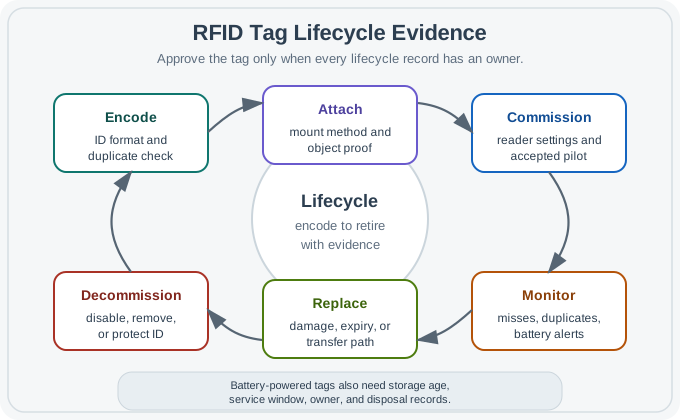
Read Figure 3.7 from tag code to final removal. The first step sets a unique ID and data form. Attachment and setup then bind that ID to a real item and an approved reader plan. Ongoing checks find missed reads, copies, unknown IDs, and weak cells. A tag swap must keep the old identity history; it must not create a second asset by mistake. Final removal retires or guards the ID and deals with any cell. The full life tests whether the chosen tag type still works for years after the pilot.
Lifecycle records should cover:
- Encoding: Who issues identifiers, what format is used, and how duplicates are prevented.
- Attachment: How the tag is mounted, protected, and verified on the real object.
- Commissioning: Which reader settings, antennas, firmware, and test evidence were accepted.
- Monitoring: How missed reads, duplicate reads, weak batteries, and unknown identifiers are detected.
- Replacement: How failed, damaged, expired, or transferred tags are handled.
- Decommissioning: How identifiers are disabled, retired, removed, or privacy-protected when the asset leaves the process.
For battery-powered tags, the lifecycle record must also include storage time, activation rules, expected service window, replacement owner, and disposal path.
3.5.15 Example: Cold-Chain Case Tag
A reusable cold-chain case needs identity at receiving doors and a temperature-excursion flag from transport. The best initial candidate is not automatically an active tag. If the case is only read at planned handoff points, a battery-assisted passive sensor tag may fit better: the onboard power supports sensing and logging, while the doorway reader collects the identity and status during the handoff.
Review evidence should include:
- Representative case material, contents, condensation, and tag mounting.
- Whether the handoff reader can reliably collect both identity and sensor status.
- What the tag records when it is not in a reader field.
- Battery age and activation process.
- What happens when temperature evidence is missing, late, or inconsistent.
- Whether privacy or custody rules limit who can read the tag.
If the case must be located continuously across a facility, or if no planned read points exist, the design may need active RFID, UWB, BLE beacons, or another location system. The tag choice follows the evidence requirement.
3.5.16 Backscatter, Transmitters, And Battery Evidence
BAP and active tags both have batteries, so people often treat them as the same class with different range. They are not. The difference is physical and regulatory. A backscatter tag, whether passive or BAP, only reflects the reader’s carrier. It does not generate its own radio emission, so it works inside the reader’s field and its range is bounded by how weak a reflection the reader can detect. An active tag runs a transmitter, so it must comply with transmit rules, drains its battery faster, and can reach across a room or yard because it is not relying on a faint reflection.
That is why a cold-chain sensor tag that must last a shipment is usually BAP: battery for the temperature sensor and memory, backscatter for lower-cost planned reads. An asset-tracking beacon that must be found anywhere in a warehouse is active because the asset has to announce itself without being in a reader field.
The acceptance evidence changes with the radio behavior. A passive or BAP tag needs a reader field at the moment of communication, so the test asks whether the intended reader zone can energize, query, and decode the tag population. An active tag needs receiver coverage and a beacon policy, so the test asks whether receivers hear enough beacons, whether the area estimate is good enough, and whether battery and privacy controls are owned. A beacon every 5 seconds produces 60 / 5 = 12 transmissions per minute. A beacon every 60 seconds produces one transmission per minute. The right interval is an operations decision, not a tag-family slogan.
For BAP sensing, the arithmetic is different. If a cold-chain tag logs every 10 minutes for a 48-hour trip, it creates 48 * 60 / 10 = 288 samples before the receiving reader collects the record. The pilot should prove that the tag stores the needed samples, the handoff read retrieves identity plus excursion status, and missing sensor evidence enters an exception queue. A passive label cannot create those between-read samples. An active tag could report periodically, but then the design must justify receiver coverage, transmit settings, battery service, and identifier exposure.
3.5.17 Checkpoint: Common Mistakes
- Choosing from a generic read-distance promise: Real performance depends on the object, material, attachment, antenna layout, reader settings, and workflow.
- Confusing battery-assisted with active: A battery-assisted passive tag can log or power electronics, but it does not necessarily beacon by itself.
- Ignoring form factor: A tag selected in a spreadsheet can fail after bending, washing, mounting, stacking, or exposure.
- Overusing user memory: Tag-resident data can create privacy, synchronization, and rewrite problems.
- Forgetting decommissioning: Tags and identifiers need a retirement process, especially when assets leave controlled custody.
- Skipping exception design: Unknown tags, duplicate identifiers, failed batteries, and missed reads need an owner.
3.5.18 Checkpoint: Review Checklist
Before approving a tag type, confirm that the team can show:
- The business event and read pattern.
- The object, material, attachment method, and environmental stress.
- The selected tag family and form factor.
- Identifier, memory, sensor, and privacy decisions.
- Pilot evidence with representative good and bad cases.
- Reader settings and middleware assumptions connected to the tag choice.
- Lifecycle ownership for encoding, commissioning, monitoring, replacement, and retirement.
3.5.19 Knowledge Check
3.5.20 Quick Check: BAP Versus Active
3.5.21 Match Tag Types To Roles
3.5.22 Order The Tag Selection Review
3.5.23 Checkpoint: Summary
RFID tag choice is not a simple passive-versus-active preference. Passive tags fit engineered read zones. Battery-assisted passive tags add onboard power for sensing or logging while still depending on planned reads. Active tags fit area reporting and autonomous beacon behavior. Every choice needs evidence from the real object, attachment method, environment, reader layout, memory behavior, privacy boundary, and lifecycle plan.
3.5.24 Key Takeaway
RFID tag type selection should match power source, memory, form factor, environment, read range, lifecycle, cost, and standards requirements.
3.5.25 Checkpoint: Concept Relationships
- Tag family affects reader choice, antenna layout, battery ownership, privacy exposure, and support work.
- Form factor connects the tag chip to the real object and environment.
- Memory behavior connects identity design to backend records and partner interoperability.
- Sensor behavior adds calibration, timestamp, exception, and battery responsibilities.
- Lifecycle evidence keeps tag performance reviewable after deployment conditions change.
3.6 Checkpoint: Summary
This section: Checkpoint: Summary — RFID system components should be reviewed as one evidence chain.
RFID system components should be reviewed as one evidence chain. Tags identify objects, antennas shape where reads occur, readers control the air interface, middleware turns repeated observations into events, and applications decide what those events mean.
The quality gate is evidence from the real workflow: objects, materials, motion, tag attachment, reader settings, read-zone boundaries, filtering rules, privacy limits, support ownership, and retest triggers.
3.7 Key Takeaway
This section: Key Takeaway
Approve RFID components only when tags, antennas, readers, middleware, applications, owners, and retest rules all support the same bounded business event.
3.8 Related Chapters: See Also
This section: Related Chapters: See Also
RFID Fundamentals and Operation
Review the core RFID evidence boundary across tags, readers, antennas, read zones, and events.
RFID Tag Types
Choose passive, battery-assisted, and active tags from power, form factor, lifecycle, and workflow evidence.
RFID Frequency Bands
Connect LF, HF, UHF, and specialized RFID behavior to component choices and read-zone fit.
RFID Design and Deployment
Turn component choices into pilot design, antenna placement, exception paths, and acceptance evidence.
Find help
3 reviewed answers.
Where should I start in a module?
Open the module page from the sidebar to see its chapters in order. Use the module map to return to a topic you need.
Modules and pathsReviewed
What can I try when a project does not work?
Check the symptom, then work through the diagnostic steps. Keep the error message and the smallest example that reproduces it.
When you are stuckReviewed
How do interactive examples work?
Use the interactive guide to check how examples and simulations work before changing your project.
Interactive examples guideReviewed