11 RFID Industry Applications
More
Depth: Practitioner
Progress saves as you read. Mark sections complete as you go; your progress appears in the sidebar.
11.1 Start With the Story
This section: Start With the Story — Picture a pallet counted twice because two doors heard the same tag.
Prove One Item Crossed the Right Read Zone
Picture a pallet counted twice because two doors heard the same tag. A reader event is not yet proof of the business event the operator cares about.
Radio-frequency identification uses radio tags and readers to identify marked items; it is shortened to RFID.
Move one known item through the correct zone, a nearby wrong zone, a missed read, and a repeated read. Keep tag and reader identities, time, RFID band, antenna and zone, raw reads, filter version, business event, exception, and owner.
This test covers one flow and site layout, not every material or industry. The deeper sections match tags, readers, zones, filters, privacy, safety, and fallback work to each application.
A retail shelf, factory station, loading dock, hospital cabinet, library gate, and cold-chain workflow can all use RFID, but they do not ask RFID to prove the same thing. Each application has its own denominator for success.
Read the examples as patterns for evidence, not as copy-paste deployments. For each setting, ask what must be identified, which false event would matter, and what record would convince an operator that the read zone fits the workflow.
11.2 Learning Objectives
This section: Learning Objectives
By the end of this chapter, you should be able to:
- Compare RFID application patterns across retail, manufacturing, logistics, healthcare, access, cold-chain, and maintenance workflows.
- Select LF, HF, UHF, or active location approaches based on read zone, item material, mobility, and evidence needs.
- Explain how reader placement and middleware filtering turn raw tag reads into useful business events.
- Identify privacy, safety, and access boundaries before tag reads trigger operational decisions.
- Define fallback, exception handling, and rollout validation evidence for industry RFID deployments.
11.3 Quick Check: RFID Industry
This section: Quick Check: RFID Industry
11.4 Prerequisites
This section: Prerequisites — This chapter assumes you know the basic RFID frequency bands, passive versus active tags, and reader/tag roles.
This chapter assumes you know the basic RFID frequency bands, passive versus active tags, and reader/tag roles. These chapters provide the foundation:
- RFID Fundamentals and Standards for frequency bands, tag types, and protocol vocabulary.
- RFID Hardware Integration for reader, antenna, and gateway basics.
- RFID Design and Deployment for site surveys, tag selection, and deployment planning.
11.5 Application Pattern Map
This section: Application Pattern Map — RFID works best when the read event matches the operational question.
RFID works best when the read event matches the operational question. A dock door asks “which shipment crossed this threshold?” A workcell asks “which job is here now?” A hospital storeroom asks “which asset was last seen in this zone?” Each question needs different evidence.
Inspect Figure 11.1 and ask which read event can actually prove the operational question in each industry pattern.
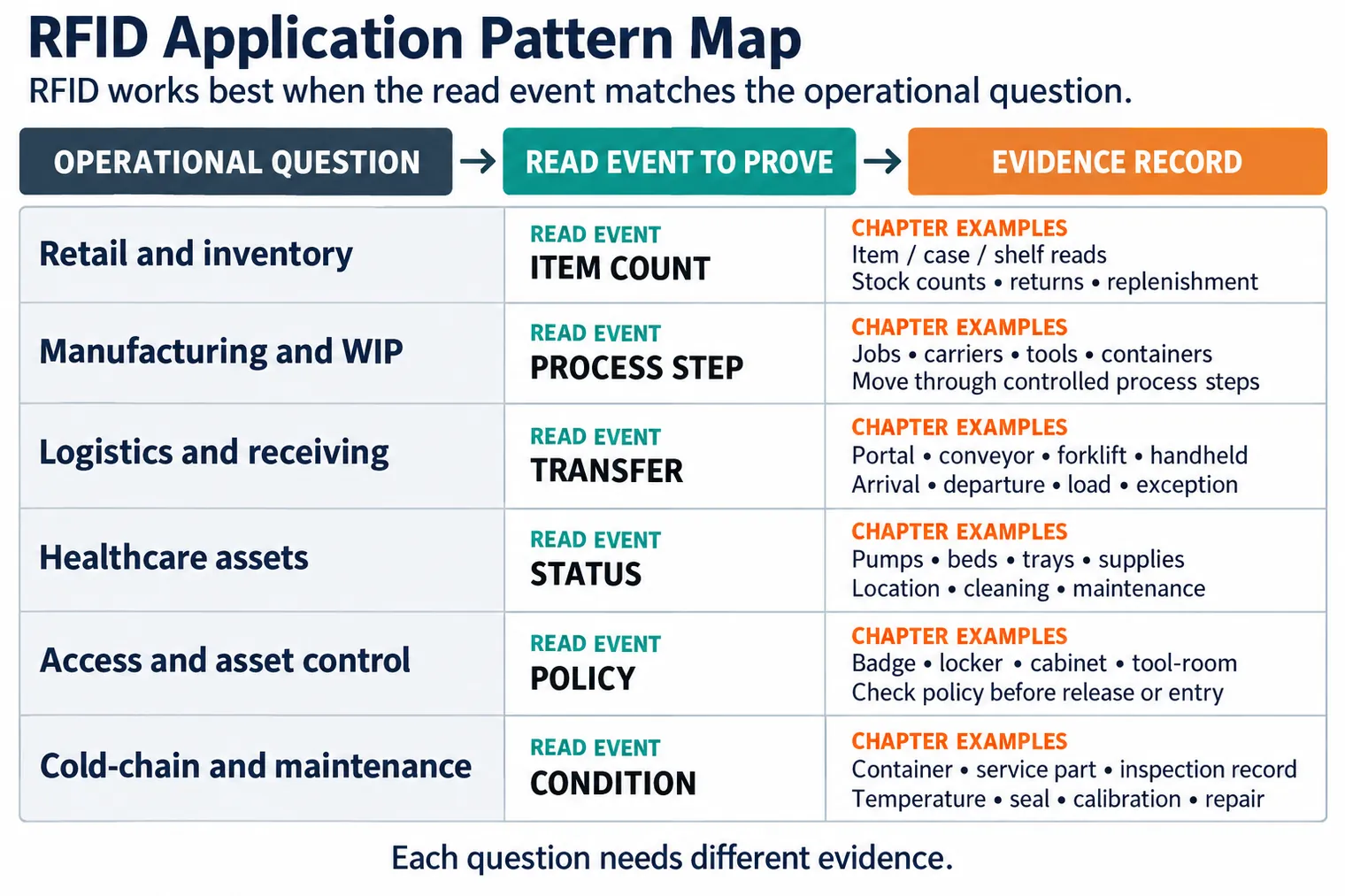
Read Figure 11.1 by pairing each operational question with its event and evidence record. Retail item reads support counts and replenishment; manufacturing process-step reads track jobs, tools, or carriers. Logistics portal or handheld reads support arrival, departure, and transfer exceptions. Healthcare status reads concern location, cleaning, or maintenance, while access reads require a policy decision before release. Cold-chain and maintenance records add condition, seal, calibration, or repair evidence. The tag technology is shared, but the proof obligation changes with the workflow.
11.6 Match the Pattern to the Read Zone
This section: Match the Pattern to the Read Zone — Do not start by buying tags.
Do not start by buying tags. Start by naming the read zone and the event that will be trusted. Read zones are physical boundaries, not just antenna locations.
Figure 11.2 links each RFID use to a distinct read-zone question.
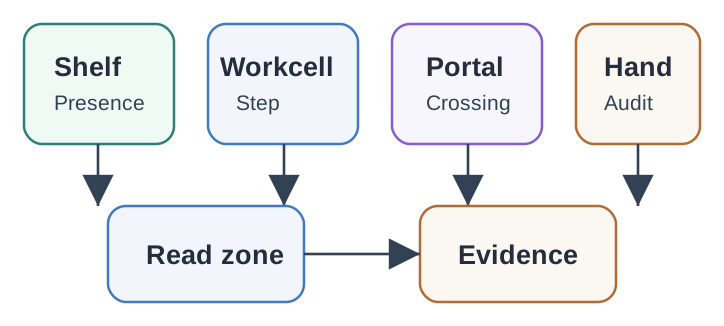
A shelf reader tests presence, a workcell reader tests a process step, and a portal tests a crossing. A handheld reader supports an operator audit rather than a continuously watched zone. Cabinet and mobile-zone patterns add their own movement and enclosure conditions. The labels in the map describe intended events, but an antenna read only reports a tag observation. For each pattern, walk target and boundary tags through the real zone, then compare observations with the expected business event. Keep placement, missed reads, neighboring reads, and the rule that converts a sighting into an action.
11.7 Frequency and Tag Fit
This section: Frequency and Tag Fit — The same industry may use more than one approach.
Frequency choice follows the physical problem:
The same industry may use more than one approach. A hospital may use HF wristbands, UHF supply cabinets, and active tags on high-value mobile equipment. A manufacturer may use UHF carriers at portals and HF tags at close operator stations. The review question is not “which RFID is best?” It is “which read event has enough evidence for this decision?”
11.8 Evidence Records
This section: Evidence Records — Raw reads are noisy.
Raw reads are noisy. Useful systems create an evidence record that explains why a business event was accepted, denied, or sent to exception handling.
Figure 11.3 shows what turns a tag sighting into a business event.
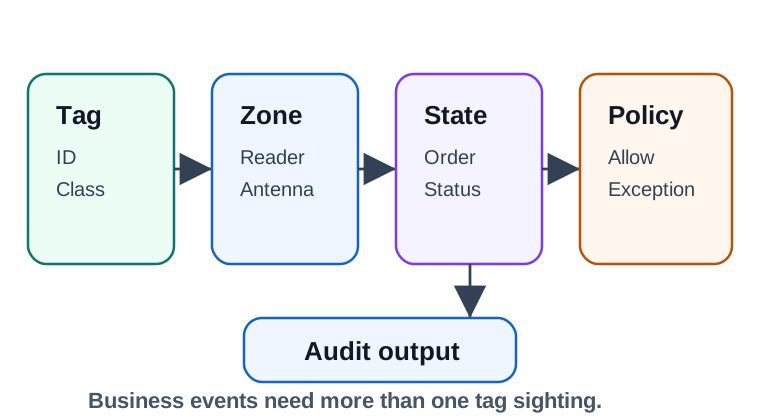
The tag identifier and class establish which object was seen; the zone, reader, and antenna say where that observation came from. State and order add the expected process context. Policy then decides whether the observation is allowed, duplicate, out of sequence, or an exception, and the audit output records that decision. A single successful read cannot prove a shipment arrived or a tool was returned. Test a normal tag path and a neighboring or repeated read, then compare the raw observations with the filtered event. That record lets a reviewer challenge the rule rather than trust a dashboard count.
11.9 Identity and Event Visibility
This section: Identity and Event Visibility — A raw RFID read is just “antenna 3 saw this number at 10:03.” Industry value comes from identity and event standards layered on top of the read.
A raw RFID read is just “antenna 3 saw this number at 10:03.” Industry value comes from identity and event standards layered on top of the read. An EPC identity scheme makes the number mean a specific object, and EPCIS events record what happened to that object. Together they turn reader output into supply-chain visibility, provenance, and recall evidence.
The key conceptual step is item-level identity. A retail barcode carries a GTIN that names a product class, such as a 500 ml bottle of a given brand. An RFID EPC can carry an SGTIN, which combines the GTIN with a serial number and names this individual bottle. Serialization is what lets a system follow one unit through packing, receiving, movement, sale, quarantine, or return.
Consider a food distributor that tags each case with an SGTIN and each pallet with an SSCC. A portal read at the receiving dock should not simply increment inventory. The event needs the EPCs read, the dock-door read point, the expected purchase order, the aggregation between 24 case SGTINs and one pallet SSCC, the shipment state, and the exception rule for missing or unexpected cases. If the reader sees 23 expected cases and one unknown case, the useful industry event is not “24 tags read”; it is “receipt held for reconciliation with one unexpected EPC.”
The payoff appears during a recall. If serial 0614141.812345.6789 is affected, the system can query where that SGTIN was packed, received, moved, split from its pallet, sold, quarantined, or returned. A class-level GTIN can only say which product type is involved. The serialized EPC plus event history narrows the action to the individual unit and its downstream aggregations, provided the read events were validated instead of treated as raw sightings.
That same split protects privacy and safety. A tag sighting can support a decision, but workflow policy still decides whether an action, alert, recall, release, or audit update is allowed.
11.10 EPC Identity Schemes and Where They Fit
This section: EPC Identity Schemes and Where They Fit — Choosing the scheme is choosing what the tag means.
Choosing the scheme is choosing what the tag means. Put SGTINs on trade items, an SSCC on the pallet or logistics unit that aggregates them, and an SGLN on the dock door or location that reads them all.
| Scheme | Identifies | Applied to |
|---|---|---|
| SGTIN | A serialized trade item, built from GTIN plus serial | Individual products or cases |
| SSCC | A logistic unit | Pallets and shipping containers |
| SGLN | A location | Warehouses, dock doors, shelves, or business locations |
| GIAI / GRAI | An individual or returnable asset | Reusable totes, tools, equipment, or returnable transport items |
These identities are stored in the tag EPC memory in the binary format defined by the EPC Tag Data Standard and are commonly written as URIs such as urn:epc:id:sgtin:0614141.812345.6789. Use one scheme per real-world object. In the distributor example, a case tag should use an SGTIN because the case is a trade item. The pallet or mixed load should use an SSCC because it is a logistics unit. A reusable insulated tote should use a GRAI or GIAI-style asset identity because it is tracked across trips. The receiving dock and quarantine cage should be represented as locations, not as trade items.
A practical evidence record for one receipt can be small and precise: readPoint=SGLN dock-07, bizStep=receiving, parent=SSCC pallet-118, children=24 SGTINs expected, 23 seen, 1 unknown, disposition=hold. The application can then quarantine the pallet, create an exception task, and preserve raw portal reads for support. The tag scheme determines the noun; the business step and disposition determine what the system may do with that noun.
The field checklist should verify that selected schemes match the label print, backend master data, middleware parser, and exception dashboard. If the portal emits a tag value that cannot be resolved to the expected SGTIN, SSCC, or asset identity, the safest result is an exception queue entry, not a guessed receipt or silent discard.
11.11 EPCIS Events for Provenance and Recall
This section: EPCIS Events for Provenance and Recall — EPCIS, or Electronic Product Code Information Services, is the GS1 standard for capturing and sharing events so trading partners see the same history.
EPCIS, or Electronic Product Code Information Services, is the GS1 standard for capturing and sharing events so trading partners see the same history. Every event answers four questions: what EPCs were involved, when the event happened, where it happened, and why it matters in business terms.
Figure 11.4 follows a product identifier through custody observations.
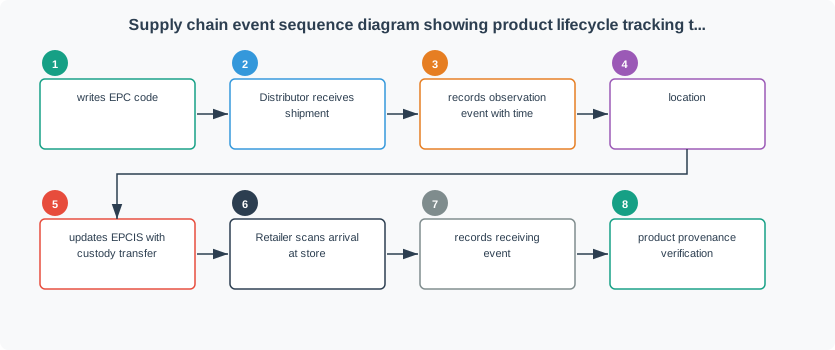
The producer writes an EPC, the distributor records receipt and an observation with time and location, and a later custody update becomes an EPCIS event. The retailer’s arrival scan adds another observation and receiving event. Each stage needs an actor, place, time, and business meaning. A radio read alone only says that a tag responded. Compare adjacent records to find a missing handoff or duplicate event before claiming a complete lifecycle. The sequence matters because custody is built from accepted events at different organizations, not from one tag identifier appearing repeatedly.
Different EPCIS event types capture different actions. An ObjectEvent observes items. An AggregationEvent packs cases onto a pallet by linking child SGTINs to a parent SSCC. A TransactionEvent ties goods to a purchase order or shipment. A TransformationEvent records inputs becoming a new product. When a recall hits, the team queries EPCIS for events touching the affected SGTIN and can see which pallets, locations, and dispositions were involved.
A minimal event chain for the distributor might start with an AggregationEvent at packing: 24 case SGTINs are associated with one pallet SSCC. A later ObjectEvent at the warehouse dock records the pallet and visible case EPCs at the receiving read point. If the pallet is broken down, a new aggregation or disaggregation event records which cases left the pallet. If one case is quarantined, an ObjectEvent records the quarantine business step and disposition. This is why EPCIS is not a reader log; it is a business-event log keyed by standardized identities.
The arithmetic in review is about completeness. If an ASN says the pallet should contain 24 serialized cases and the portal sees 23 expected SGTINs plus 1 unknown SGTIN, the match rate for expected children is 23 / 24 = 95.8%, but the business decision is still not complete because the unknown case changes custody risk. If a handheld audit later sees the missing expected SGTIN in the quarantine cage, the reconciliation record should connect that manual evidence to the original receipt exception rather than silently rewriting the portal event.
This structure generalizes across industries. Manufacturing uses the same idea to bind serialized parts to route steps and quality holds. Healthcare assets use it to bind location sightings to cleaning or maintenance state. Tool control uses it to bind issue and return events to a user and cabinet. The RFID read is the sensor observation; the industry application is the event model, exception path, and evidence policy built around that observation.
11.12 Quick Check: SGTIN and EPCIS
This section: Quick Check: SGTIN and EPCIS
11.13 Industry Review Patterns
This section: Industry Review Patterns
11.14 Retail and Inventory
This section: Retail and Inventory — Retail RFID often focuses on item availability, stockroom movement, returns, and misplaced items.
Retail RFID often focuses on item availability, stockroom movement, returns, and misplaced items. The design should separate a tag read from a stock truth. Nearby shelves, tag orientation, dense displays, returns bins, dressing rooms, and handheld audit reads can all produce ambiguous events. The system should reconcile repeated reads, expected planogram or location data, point-of-sale state, and manual corrections before it updates operational stock.
11.15 Manufacturing and Work-in-Progress
This section: Manufacturing and Work-in-Progress — Manufacturing RFID tracks carriers, jobs, containers, tooling, or serialized parts through process steps.
Manufacturing RFID tracks carriers, jobs, containers, tooling, or serialized parts through process steps. A valid WIP event normally needs tag identity, station identity, route step, operator or machine context, and quality state. RFID should not let a carrier skip a required process, bypass hold status, or hide a failed inspection. If tags are exposed to heat, chemicals, metal, vibration, or washdown, the physical tag and placement need representative testing.
11.16 Logistics, Receiving, and Shipping
This section: Logistics, Receiving, and Shipping — Logistics deployments use dock portals, conveyor readers, forklift readers, handheld audits, and sometimes vehicle-mounted readers.
Logistics deployments use dock portals, conveyor readers, forklift readers, handheld audits, and sometimes vehicle-mounted readers. The hard part is not seeing a tag once; it is deciding which business event the read proves. Direction, load association, trailer or container context, duplicate filtering, and missed-read exception paths matter. A good system can say whether a tag was received, staged, loaded, shipped, or merely seen near the wrong zone.
11.17 Healthcare and Life-Science Workflows
This section: Healthcare and Life-Science Workflows — Healthcare and life-science RFID must keep identity, safety, and status boundaries clear.
Healthcare and life-science RFID must keep identity, safety, and status boundaries clear. Asset location is different from patient care authorization. A cabinet read is different from medication administration approval. A specimen or blood-product read needs chain-of-custody and status evidence, not just a tag identifier. Designs should include cleaning state, calibration state, quarantine state, and manual fallback when a tag is missing or unreadable.
11.18 Library and Media
This section: Library and Media — Library and media workflows use RFID to make checkout, return, shelf audit, and anti-theft review faster, but the tag read still needs circulation state.
Library and media workflows use RFID to make checkout, return, shelf audit, and anti-theft review faster, but the tag read still needs circulation state. Returned items may be damaged, reserved, or routed to another branch. Shelf scans may see nearby carts or patron-handled items. A reviewable design records item identity, station type, return routing, anti-theft state, damaged-item handling, and privacy-retention rules before it updates a catalog or audit record.
11.19 Access, Cabinets, and Controlled Assets
This section: Access, Cabinets, and Controlled Assets — Access cards, cabinets, tool cribs, and controlled storage use RFID as an identity or object-selection input.
Access cards, cabinets, tool cribs, and controlled storage use RFID as an identity or object-selection input. The tag read should be checked against user role, item status, time, location, supervisor rules, and return requirements. For sensitive assets, a UID or static tag value is not enough authority by itself. The controller should decide what can be opened, removed, issued, returned, or denied.
11.20 Cold-Chain, Field Service, and Maintenance
This section: Cold-Chain, Field Service, and Maintenance — Cold-chain and maintenance workflows combine RFID with condition, seal, route, calibration, or service data.
Cold-chain and maintenance workflows combine RFID with condition, seal, route, calibration, or service data. The tag can bind the physical object to a record, while sensors, logs, or inspections supply state evidence. A cold-chain tag read should not erase a temperature exception. A maintenance tag should not mark work complete unless the required inspection, parts, and sign-off evidence are present.
11.21 Worked Review: Mixed Industrial Rollout
This section: Worked Review: Mixed Industrial Rollout
A regional operations team wants one RFID program covering receiving docks, retail stockrooms, assembly workcells, mobile medical equipment, and field-service tools. They want a single dashboard, but each site has different read zones, materials, privacy constraints, and exception workflows.
11.22 Review Record
This section: Review Record
11.23 Review Decision
This section: Review Decision — The dashboard can be shared, but the evidence model should not be identical for every industry pattern.
The dashboard can be shared, but the evidence model should not be identical for every industry pattern. Receiving can accept a portal event only after zone and direction checks. WIP should require route and quality state. Healthcare assets need cleaning, maintenance, and patient-safety boundaries. Tool control needs issue and return policy. The rollout should pilot representative materials and read zones before the team treats the data as operational truth.
11.24 Rollout Validation
This section: Rollout Validation — Inspect Figure 11.5 and ask which changed condition forces the deployed workflow back through review and retest.
Inspect Figure 11.5 and ask which changed condition forces the deployed workflow back through review and retest.
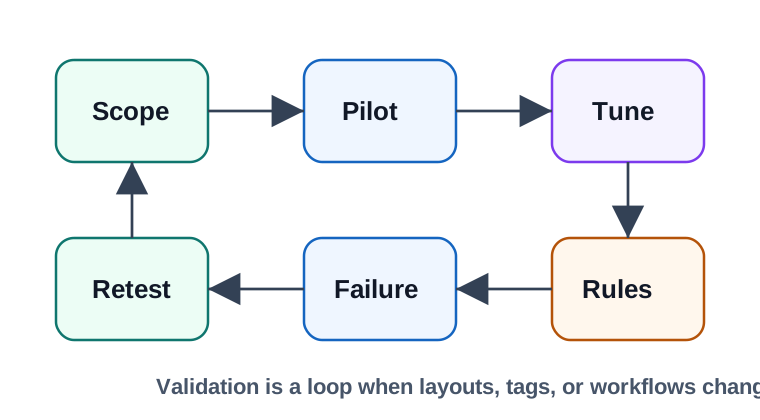
Follow Figure 11.5 from one event claim into a field pilot. Use typical items, liquids, metal, dense stacks, carts, and work habits. RF tuning adjusts the antenna, shield, power, angle, place, and read time. The middle layer then deals with copies, direction, expected state, faults, and repair of records. Fault drills add missed, extra, damaged, wrong-zone, offline, override, and privacy cases. The review saves the antenna map and staff training. A change to package, hardware, firmware, tag, layout, or work flow starts a new review and test.

11.25 Common Pitfalls
This section: Common Pitfalls
- Counting reads as truth too early. Raw tag sightings need zone, state, and duplicate filtering before they become inventory, movement, or custody events.
- Using one tag strategy for every industry. Retail apparel, metal tools, wet products, badges, specimens, and mobile assets need different tag forms and tests.
- Skipping exception workflows. Missed reads, damaged tags, extra reads, and manual overrides are normal operating cases, not rare edge cases.
- Ignoring privacy and safety boundaries. RFID should not silently track people, authorize care, release controlled assets, or bypass process holds without explicit policy.
- Trusting lab read ranges. Real read zones depend on materials, orientation, antenna placement, nearby readers, packaging, and workflow timing.
11.26 Knowledge Check
This section: Knowledge Check
11.27 Quick Check: Industrial Read-to-Event Boundary
This section: Quick Check: Industrial Read-to-Event Boundary
11.28 Matching Quiz: Application Patterns
This section: Matching Quiz: Application Patterns
11.29 Ordering Quiz: RFID Industry Rollout
This section: Ordering Quiz: RFID Industry Rollout
11.30 Checkpoint: Summary
This section: Checkpoint: Summary
- RFID industry applications differ by event, read zone, material, workflow state, and evidence requirement.
- Retail, manufacturing, logistics, healthcare, access, cold-chain, and maintenance patterns need different tag and reader choices.
- Reader placement is a business-event design problem: shelf, workcell, portal, handheld, cabinet, and mobile-zone reads prove different things.
- Middleware should filter duplicates, validate zones, check expected state, and route exceptions before updating systems of record.
- Privacy, safety, fallback, rollout validation, and retest triggers are part of the design, not afterthoughts.
11.31 Key Takeaway
This section: Key Takeaway — RFID application fit depends on workflow, read-zone shape, tag population, materials, standards, integration, and exception handling in the real operating environment.
RFID application fit depends on workflow, read-zone shape, tag population, materials, standards, integration, and exception handling in the real operating environment.
Find help
3 reviewed answers.
Where should I start in a module?
Open the module page from the sidebar to see its chapters in order. Use the module map to return to a topic you need.
Modules and pathsReviewed
What can I try when a project does not work?
Check the symptom, then work through the diagnostic steps. Keep the error message and the smallest example that reproduces it.
When you are stuckReviewed
How do interactive examples work?
Use the interactive guide to check how examples and simulations work before changing your project.
Interactive examples guideReviewed