27 Z-Wave Routing and Healing
More
Depth: Practitioner
Progress saves as you read. Mark sections complete as you go; your progress appears in the sidebar.
27.1 Start With the Story
This section: Start With the Story — A Z-Wave route fails at the worst time: after furniture moves, a repeater is unplugged, a sleeping sensor misses a wake window, or a device sits at the edge of coverage.
A Z-Wave route fails at the worst time: after furniture moves, a repeater is unplugged, a sleeping sensor misses a wake window, or a device sits at the edge of coverage. The routing story is really a troubleshooting story.
Read this chapter by following one command across the network. Separate classic source routes, repeaters, repair behavior, sleeping endpoints, and Long Range direct paths so the evidence points to the real fault.
27.2 In 60 Seconds
This section: In 60 Seconds — Classic Z-Wave routing is source-routed.
Classic Z-Wave routing is source-routed. A sending node uses stored route evidence, places the route in the frame, and each repeater forwards to the next listed hop. The successful route becomes the route to try first next time. When direct or stored routes fail, the network can try alternate routes and then use Explorer Frame discovery as a last resort. Mains-powered always-listening devices are the classic mesh backbone; sleepy battery devices and Z-Wave Long Range endpoints do not strengthen that backbone.
27.3 Learning Objectives
This section: Learning Objectives
By the end of this chapter, you should be able to:
- Explain how a classic Z-Wave source route is selected, carried, acknowledged, and remembered.
- Identify which devices can act as repeaters and which devices should be treated as non-routing endpoints.
- Describe how failed acknowledgements, alternate routes, Explorer Frames, and rediscovery fit into route repair.
- Distinguish a targeted route repair from a broad network rediscovery or “heal” operation.
- Explain why sleeping and frequently listening endpoints need special validation steps.
- Contrast classic Z-Wave mesh routing with Z-Wave Long Range star behavior without treating LR as a repeater upgrade.
- Build a troubleshooting evidence packet from route, neighbor, acknowledgement, and physical-change observations.
27.4 Quick Check: Z-Wave Routing
This section: Quick Check: Z-Wave Routing
27.5 Checkpoint: Core Ideas
This section: Checkpoint: Core Ideas
- Source route: the selected path is carried in the transmitted frame instead of being decided independently at every hop.
- Repeater: an always-listening classic Z-Wave node that can forward routed traffic for other nodes.
- Last Working Route (LWR): the most recently successful route a node can try before less proven alternatives.
- Explorer Frame: a discovery frame used when known routes no longer reach the target.
- Rediscovery or heal: a controller action that rebuilds route and neighbor evidence after topology changes or repeated failures.
- Sleeping endpoint: a battery device that wakes for events or scheduled communication and normally does not repeat traffic.
- Frequently Listening endpoint: a low-power endpoint that can be reached by wake-up beams but still does not act as a route repeater.
- Z-Wave Long Range endpoint: an LR node that uses direct star communication with the gateway rather than classic mesh routing.
27.6 Source Routing, Not Hop-by-Hop Routing
This section: Source Routing, Not Hop-by-Hop Routing — Classic Z-Wave repeaters do not run a full distributed routing decision for every packet.
Classic Z-Wave repeaters do not run a full distributed routing decision for every packet. The route is selected before transmission and included in the frame. Each repeater reads its position in the route and forwards to the next listed node.
Figure 27.1 shows how a hop list becomes tested route evidence.
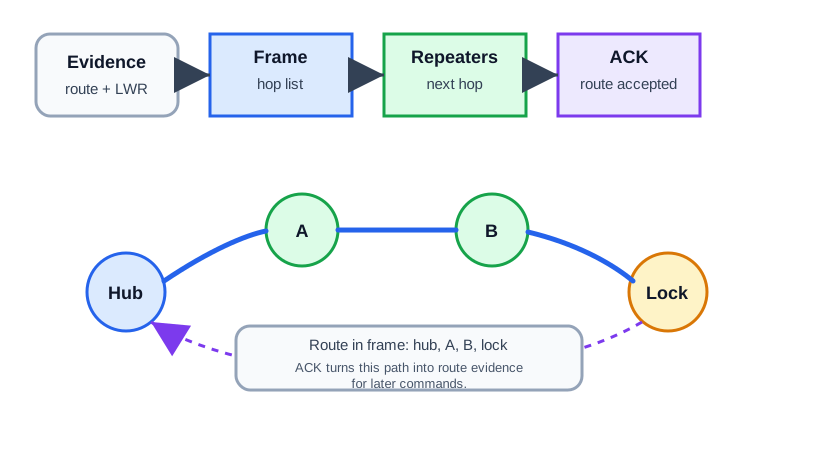
The source route in Figure 27.1 is chosen by the hub from stored route and Last Working Route evidence. The frame carries an ordered hop list through repeaters A and B to the lock; each repeater forwards to its specified next hop. An acknowledgement from the destination confirms that this path delivered the command and can inform later route choices. A repeater does not independently choose a better hop for that frame. Keep the hop list, ACK, node state, and time together. If a later command fails, compare its route with the last working one rather than assuming the cached path remains valid.
The practical review question is not “can the controller see a route on a diagram?” It is “what evidence proves the route works from the installed location?”
A useful source-route record includes:
- the destination node;
- the route or repeater sequence the controller reports, if exposed;
- whether the last command received an acknowledgement;
- whether retries or alternate routes were needed;
- whether the route changed after repair;
- the physical location of any repeater the route depends on;
- a timestamp after the device was installed, moved, repaired, or replaced.
If a route depends on a removable smart plug, record that dependency. If someone unplugs it later, the route evidence may become stale even though the controller and destination device are still healthy.
27.7 Source Route Evidence Is an Installed-Location Claim
This section: Source Route Evidence Is an Installed-Location Claim — Read every Z-Wave route as an installed-location claim, not as a generic topology fact.
Read every Z-Wave route as an installed-location claim, not as a generic topology fact. A route that worked while a device was paired on a desk is not the route that matters after the device is screwed into a door frame, moved behind a metal appliance, or placed on the far side of masonry.
Two rules shape classic Z-Wave mesh evidence:
- A source route can use up to four repeaters between source and destination.
- Only mains-powered, always-listening classic nodes can repeat routed traffic for other nodes.
That means the visible node count can overstate the actual backbone. A house might show one controller, nine mains-powered switches and plugs, four FLiRS locks or thermostats, and sixteen sleepy sensors. The app reports thirty nodes, but the classic route backbone is only the nine always-listening devices. The FLiRS and sleepy endpoints can be destinations; they are not the devices that carry another endpoint’s command.
A defensible route record names the path, not just the status. A front lock might be accepted only after the controller records a working path through Node 6, the stair switch, and Node 14, the entry switch, receives an acknowledgement, and updates that path as the Last Working Route. If the same lock later routes through a movable smart plug, the evidence packet should say so because the route depends on an outlet that may be unplugged.
The repeater limit is also an acceptance constraint. A path such as controller -> garage plug -> stair switch -> hall plug -> entry switch -> lock is already using four repeaters before the destination. If reliable delivery needs one more bridge, the fix is not another sleepy sensor. It is a better placed mains-powered repeater, a changed controller location, or a different topology choice.
27.8 Repeaters and the Classic Mesh Backbone
This section: Repeaters and the Classic Mesh Backbone — In classic Z-Wave, the reliable backbone is built from always-listening devices that can forward traffic.
In classic Z-Wave, the reliable backbone is built from always-listening devices that can forward traffic. Product category alone is not enough. A wall switch, plug-in module, thermostat, or dedicated repeater may be part of the backbone when the device and controller expose it as a routing node. A battery contact sensor, motion sensor, button, or handheld remote should normally be treated as an endpoint, not as a path-building device.
Repeater placement has two jobs:
- Coverage: place repeaters where they bridge the controller to rooms, floors, garages, or exterior doors.
- Diversity: avoid making critical devices depend on one fragile repeater, one outlet, or one route through a high-loss area.
Good repeater evidence is measured after installation. Inclusion from a bench, desk, or temporary outlet is not enough if the device will be moved to a different room. After relocation, the route record should be rebuilt and verified from the installed location.
27.9 Sleeping and Frequently Listening Endpoints
This section: Sleeping and Frequently Listening Endpoints — Sleeping endpoints conserve energy by turning the radio off most of the time.
Sleeping endpoints conserve energy by turning the radio off most of the time. Frequently listening endpoints wake briefly to check for wake-up beams. Both behaviors affect routing and troubleshooting.
Inspect Figure 27.2 and ask which listening modes can strengthen the classic routing backbone.
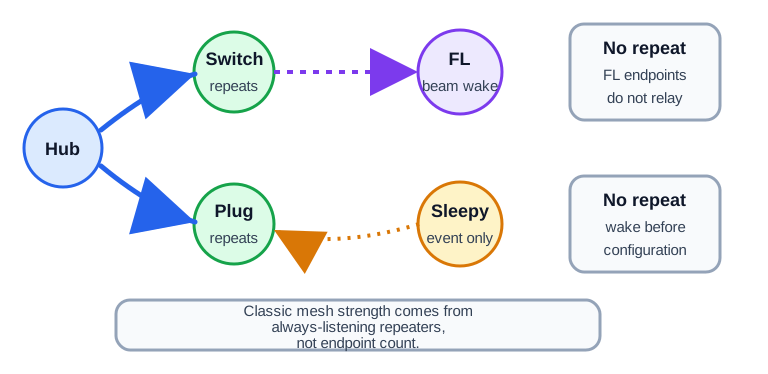
Read Figure 27.2 from the hub to each device type. A mains-powered device may stay awake and relay traffic if its role allows it. A device that wakes often can hear a wake-up beam, but it does not relay normal or Explorer traffic. A sleeping end device talks only after it wakes. Setup may need a manual wake step. The count at the end shows the network effect. Twenty sensors plus two repeaters still make a two-repeater backbone, not a mesh with twenty-two routing nodes.
Use these rules during review:
- Always-listening devices can participate in classic routing when their role supports repeating.
- Frequently listening devices can be reached by wake-up beams, but they do not repeat routed or Explorer traffic.
- Non-listening sleeping devices cannot be awakened by another node on demand; they communicate when they wake.
- Configuration changes, interviews, and route evidence for sleeping devices may require manual wake-up.
- A battery device that reports its own event is not evidence that it can repeat for other devices.
This distinction prevents a common design error: counting all devices as if they all strengthen the mesh. Twenty sensors plus two repeaters is still a two-repeater backbone.
27.10 Route Repair and Healing
This section: Route Repair and Healing — Route repair starts when a command path stops producing the expected acknowledgement.
Route repair starts when a command path stops producing the expected acknowledgement. A controller or sending node may try the last working route, then other known routes, and then Explorer Frame discovery when known routes fail.
Figure 27.3 starts with the last working route and ends with a tested command.
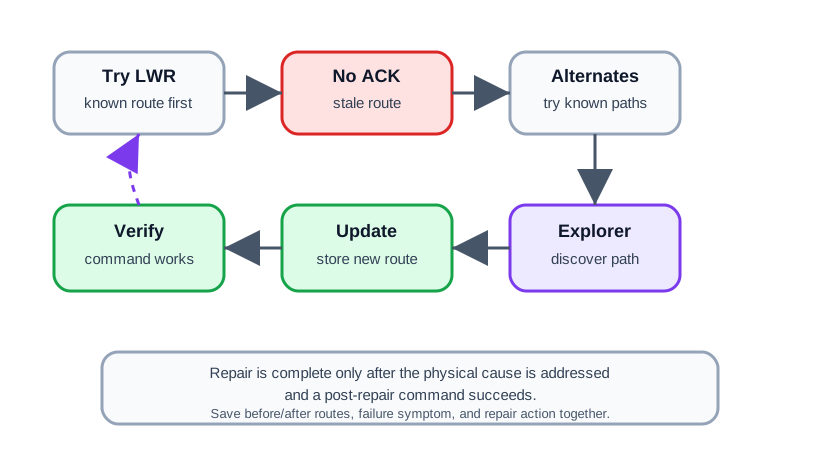
The repair loop in Figure 27.3 tries the Last Working Route, then known alternatives after a missing acknowledgement. Explorer discovery may find a new path, which the controller stores and tests with a real command. That test matters more than a successful discovery message: the post-repair command must reach the device. Record the old route, failure symptom, alternate attempts, physical cause, and new route. A moved or unplugged repeater may require a physical fix before software repair holds. Keep the before and after evidence so a later failure can be tied to a changed path rather than a generic heal action.
Treat “heal” as an evidence-building operation, not as a ritual button press. The repair action should match the symptom:
- One moved repeater: repair or rediscover affected nodes and verify routes that used the old location.
- One sleepy sensor missing configuration: wake the device and finish the interview before changing repeater placement.
- Multiple unreachable nodes after a hub move: run broader route rediscovery and inspect the backbone.
- A failed or removed node still appears in routes: remove or replace the failed node, then rediscover routes.
- Repeated latency with no obvious failed node: inspect retries, packet error evidence, repeater count, and RF link margin if the controller exposes it.
The strongest repair evidence is a before-and-after record: previous route, failure symptom, action taken, new route or health state, and a successful command from the installed location.
27.11 When Known Routes Fail
This section: When Known Routes Fail — Real homes change.
Real homes change. Furniture moves, a plug-in repeater is unplugged, a controller is relocated, a metal appliance appears near a route, or a battery device waits for a manual wake-up. Z-Wave route recovery should be read as layered evidence rather than as one “heal” button.
- A node first tries its Last Working Route, the path that succeeded before.
- If that fails, it tries other known routes from the controller’s routing table.
- If known routes fail, Explorer Frame discovery can search for a fresh path.
| Mechanism | How the path is found | Evidence to save |
|---|---|---|
| Last Working Route | Previously acknowledged path | Prior route, failure time, acknowledgement result |
| Alternate source route | Controller route table | Attempted route, retry result, changed dependency |
| Explorer Frame | Bounded live discovery through repeaters | Discovered route, hop count, duplicate-suppressed search result |
| Rediscovery or heal | Rebuilt route and neighbor evidence | Scope, reason, before/after route state, post-repair command |
Use the narrowest repair that matches the evidence. Suppose Node 24, a front-door lock, stops acknowledging commands at 09:12. The controller first tries the Last Working Route through Node 6 and Node 14. It then tries a known alternate through Node 6, Node 11, and Node 14. If both fail, the evidence points to a local path problem, not a reason to exclude every device.
The repair checklist is: confirm Node 6 and Node 14 are powered in their installed locations, check whether a plug-in repeater was moved, wake the lock only if interview or configuration evidence is missing, then run targeted route repair for the affected node group. If a new route through Node 8 and Node 14 acknowledges commands, record that before-and-after path and the physical change that made it work.
Choose a broad heal only when the evidence is broad: a controller relocation, several failed routes after renovations, a removed node still appearing across many paths, or a deliberate backbone redesign. A broad rediscovery can produce useful route tables, but it can also hide the original cause if it is run before anyone records the failed path.
Sleeping devices add one more step. If a window sensor has a stale interview, wake it on schedule or manually before treating routing as broken. If a FLiRS lock receives a beam but commands fail after that, focus on the always-listening route to the lock area and on security or interview evidence, not on whether other battery devices are nearby.
27.12 Explorer Frames Are Controlled Flooding
This section: Explorer Frames Are Controlled Flooding — Pure source routing has a weakness: if the controller’s map is stale, every precomputed route can fail and the message is stuck.
Pure source routing has a weakness: if the controller’s map is stale, every precomputed route can fail and the message is stuck. Explorer Frames are the last-resort discovery mechanism. When a node exhausts known routes, it broadcasts an Explorer Frame that neighboring always-listening nodes rebroadcast under a hop limit. Duplicate suppression and the route limit keep the search bounded.
This is why classic Z-Wave meshes can be predictable and self-healing. Most commands use cheap precomputed source routes with bounded latency. When topology has shifted, Explorer Frame discovery can repair the path without a full network heal. The result still needs acceptance evidence: the new path, the acknowledgement, the endpoint role, and the installed-location dependency.
Walk through the failure. The controller sends to Node 24 using cached route controller -> 6 -> 14 -> 24. Node 6 forwards, but Node 14 no longer hears the frame because a powered repeater near the entry was moved. The sender gets no acknowledgement, so it tries another stored route. When stored options fail, an Explorer Frame asks nearby always-listening nodes to propagate the search while suppressing duplicates and respecting the route limit.
If Node 8 hears the Explorer Frame and can reach Node 14, the destination can return a discovered path such as controller -> 8 -> 14 -> 24. The sender then uses that route and caches the successful result as fresh route evidence. If the route only works through a portable plug, the repair is operationally fragile even though the protocol found a path. The evidence packet should include the physical role of each repeater.
Explorer Frames cannot make every case healthy. If all candidate paths would require more than four repeaters, the topology is too stretched for classic routing. If the only nearby devices are sleepy sensors, there is no forwarding backbone. If the failed node is excluded, unpowered, region-incompatible, or waiting for a manual wake-up, route discovery cannot fix the underlying state.
Long Range changes this logic. An LR endpoint should be evaluated as a direct gateway link with its own signal and support evidence; it does not participate in the classic Explorer Frame repeater chain. In a mixed installation, write down whether each endpoint is classic mesh or LR before adding repeaters.
Accept a routing repair only after the new path, acknowledgement, endpoint role, and installed-location dependency are all recorded.
27.13 Check Explorer Frame Recovery
This section: Check Explorer Frame Recovery
27.14 Troubleshooting Evidence Packet
This section: Troubleshooting Evidence Packet — Z-Wave troubleshooting gets weaker when it is based on screenshots that only say “offline” or “busy.” Build a packet that explains the route failure in terms an installer or future maintainer can retest.
Z-Wave troubleshooting gets weaker when it is based on screenshots that only say “offline” or “busy.” Build a packet that explains the route failure in terms an installer or future maintainer can retest.
Figure 27.4 records node, power, route, and failure context for a retest.
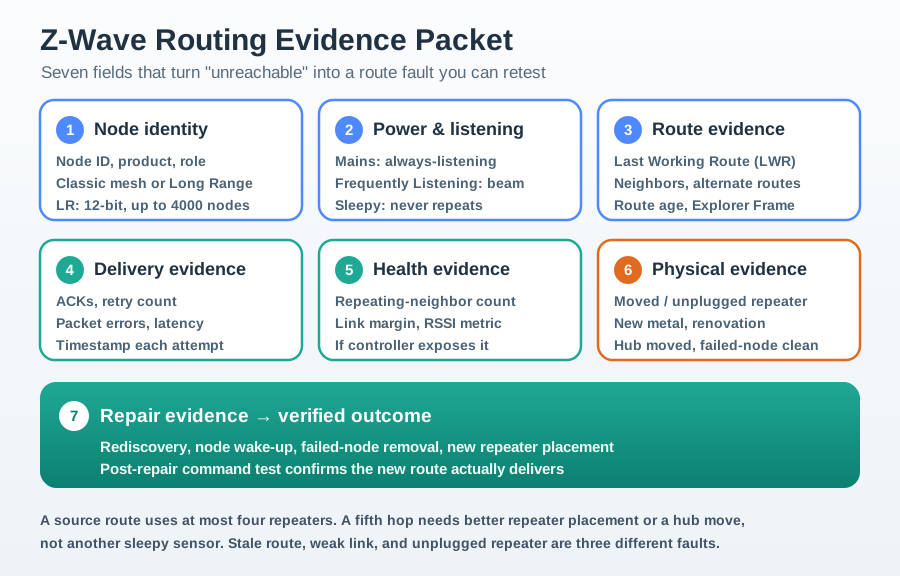
The packet in Figure 27.4 begins with node identity and whether the device belongs to classic mesh or Long Range. Power and listening state explain why a sleeping node cannot act as a repeater. Last Working Route, neighbors, alternatives, and route age show the path the controller knew. Timestamped acknowledgements and retries show delivery, while link metrics and physical changes may explain a failure. The repair field records a wake, rediscovery, repeater move, or failed-node cleanup, then a post-repair command. Calling a device reachable without the delivered command would leave the route result unverified.
Include these items when available:
- Node identity: node ID, product name, device role, and whether it is classic mesh or Long Range.
- Power and listening state: mains-powered, always listening, frequently listening, or non-listening sleepy.
- Route evidence: last working route, reported neighbors, alternate route attempts, failed route entries, or route age.
- Delivery evidence: acknowledgements, retry count, packet error history, latency, and timestamps.
- Health evidence: repeating-neighbor count, link margin, or RSSI-style metrics if exposed by the controller.
- Physical evidence: moved devices, unplugged repeaters, new metal appliances, renovations, hub relocation, or failed-node cleanup.
- Repair evidence: rediscovery action, node wake-up action, failed-node removal, new repeater placement, and post-repair command test.
Do not let a single metric carry the whole diagnosis. A low signal reading, a stale route, and an unplugged repeater are different problems even if the app surfaces each as “unreachable.”
27.15 Classic Mesh vs Z-Wave Long Range
This section: Classic Mesh vs Z-Wave Long Range — Z-Wave Long Range changes the topology.
Z-Wave Long Range changes the topology. It is designed for direct gateway-to-endpoint star communication, not classic multi-hop mesh routing. Z-Wave Alliance material describes LR as using a 12-bit address space with support for up to 4000 nodes, while classic Z-Wave uses the smaller classic node space. The more important routing point is that LR nodes do not become repeaters for classic routes.
Figure 27.5 contrasts a repeater path with a direct Long Range link.
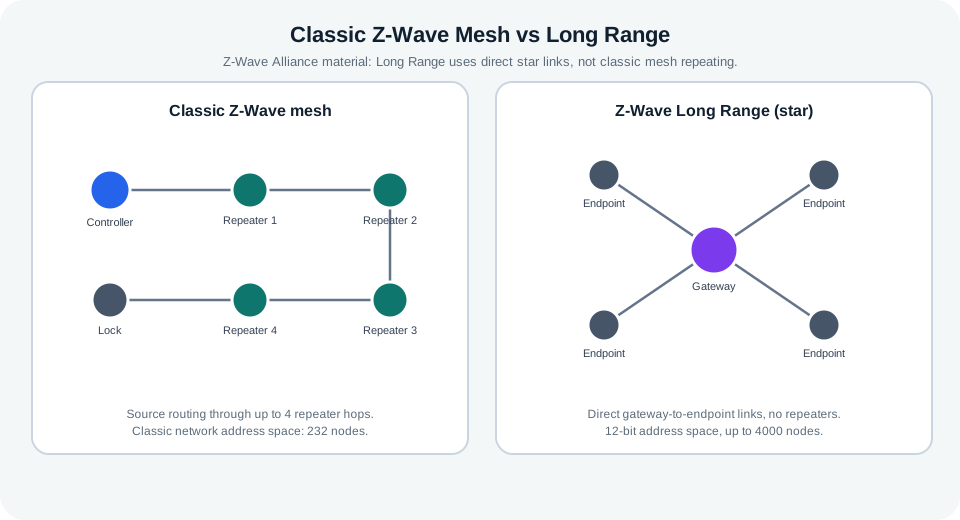
The classic mesh example sends a lock command through a source route with repeaters, so each forwarding node can affect the result. The Long Range side uses a direct link from controller to endpoint, with no classic repeater chain. Those shapes need different tests: remove or fail a repeater and check the classic route, then test the direct endpoint from its final location. Keep mode support, node identity, route, acknowledgment, and receiver result together. A higher node capacity or a longer link claim does not prove the installed lock command works under the chosen topology.
Use this contrast in design reviews:
- Classic mesh solves reach by placing always-listening repeaters where they create useful paths.
- Long Range solves reach by using direct gateway links when both the gateway and device support LR.
- A mixed network needs a per-device record: classic mesh or LR, repeater or endpoint, security class, and installed-location evidence.
- Adding an LR endpoint does not improve the classic mesh for a nearby classic sleeping sensor.
- Adding a classic repeater does not help an LR endpoint unless the endpoint also has a classic mesh mode and is configured to use it.
The right choice depends on topology evidence, regional support, controller support, and device role. Avoid numeric range promises unless they come from the specific hardware, region, antenna, installation height, and acceptance test.
27.16 Checkpoint: Limits to Keep Visible
This section: Checkpoint: Limits to Keep Visible — These limits are not reasons to avoid Z-Wave.
Classic Z-Wave has useful limits that should be visible in routing records:
- The classic node address space supports 232 nodes in one network.
- Official Z/IP architecture material describes classic source routing through up to four repeater nodes.
- Multi-destination traffic does not provide the same acknowledgement evidence as singlecast traffic, so critical delivery should be verified with singlecast follow-up.
- Regional frequency plans matter; a device that is correct for one region may not be usable in another.
- Repeaters are useful only when they are powered, included, compatible, and placed where they connect useful parts of the network.
- Route repair can find a working path, but it cannot overcome a missing backbone, an unpowered device, a region mismatch, or a device that is asleep when the operation requires it to be awake.
These limits are not reasons to avoid Z-Wave. They are the constraints that make a routing review honest.
27.17 Worked Example: Smart Plug Moved
This section: Worked Example: Smart Plug Moved — A home has a controller in the utility room, an in-wall switch near the stairs, a plug-in module in the upstairs hallway, and a battery lock at the front door.
A home has a controller in the utility room, an in-wall switch near the stairs, a plug-in module in the upstairs hallway, and a battery lock at the front door. The lock works for months. Then someone moves the plug-in module to a basement outlet. The lock starts reporting late or unreachable.
Evidence before repair:
- The lock is a battery endpoint, so it is not part of the repeater backbone.
- The hallway plug was a classic repeater and appears in the reported route.
- The route fails after the plug is moved.
- The basement location does not provide the same bridge to the front door.
Good repair action:
- Confirm the plug is still powered and included.
- Decide whether the plug should return to the hallway or a different mains-powered repeater should be added near the route.
- Run route repair or rediscovery for affected nodes after final placement.
- Wake the lock if the controller needs to finish interview or configuration work.
- Test a lock command from the installed location and record the new route evidence.
Poor repair action:
- Re-include every device without understanding the moved repeater dependency.
- Add another battery sensor and expect the mesh to improve.
- Run repeated heals while the key repeater is still unplugged or in the wrong room.
- Treat an app status change to “online” as acceptance without a post-repair command test.
27.18 Knowledge Check
This section: Knowledge Check
27.19 Match the Evidence
This section: Match the Evidence
27.20 Order the Repair
This section: Order the Repair
27.21 Checkpoint: Summary
This section: Checkpoint: Summary — Classic Z-Wave routing depends on source routes, repeaters, acknowledgements, and route evidence that can become stale when the physical network changes.
Classic Z-Wave routing depends on source routes, repeaters, acknowledgements, and route evidence that can become stale when the physical network changes. Always-listening classic devices form the repeater backbone; sleeping and frequently listening endpoints need different validation because they do not repeat routed traffic. Route repair should be evidence-driven: observe the failed route, fix physical causes, run targeted repair or rediscovery, then verify the updated route. Z-Wave Long Range is a star-topology option, not a classic mesh repeater layer.
27.22 Key Takeaway
This section: Key Takeaway — Z-Wave routing depends on device placement, powered repeaters, network healing, security, and diagnostics rather than a simple range claim.
Z-Wave routing depends on device placement, powered repeaters, network healing, security, and diagnostics rather than a simple range claim.
27.23 Checkpoint: Concept Relationships
This section: Checkpoint: Concept Relationships
Builds on:
- Z-Wave Architecture and Devices: Home ID, Node ID, controller roles, repeaters, sleeping endpoints, and Long Range topology.
- Z-Wave Overview and Fundamentals: Z-Wave purpose, regional constraints, certification context, and protocol fit.
- Network Topologies: mesh, star, and hybrid topology tradeoffs.
Prepares for:
- Z-Wave Network Planning and Acceptance: turning routing evidence into a placement and acceptance plan.
- Z-Wave Simulation and Evidence Guide: testing route failure and repair scenarios.
- RPL Routing Modes: comparing source routing with another constrained-network routing model.
Compares with:
- Zigbee Fundamentals and Architecture: a different low-power mesh architecture and route model.
- Thread Network Architecture: an IPv6 mesh where routing responsibilities and border-router roles differ from Z-Wave.
27.25 Checkpoint: Try It Yourself
This section: Checkpoint: Try It Yourself
Pick one Z-Wave device in a real or proposed installation and build a route evidence card:
- Is the device classic mesh or Long Range?
- Is it always listening, frequently listening, or non-listening sleepy?
- Which repeaters, if any, does its route depend on?
- What physical change would most likely break that route?
- What evidence would prove a repair worked?
Find help
3 reviewed answers.
Where should I start in a module?
Open the module page from the sidebar to see its chapters in order. Use the module map to return to a topic you need.
Modules and pathsReviewed
What can I try when a project does not work?
Check the symptom, then work through the diagnostic steps. Keep the error message and the smallest example that reproduces it.
When you are stuckReviewed
How do interactive examples work?
Use the interactive guide to check how examples and simulations work before changing your project.
Interactive examples guideReviewed