16 NFC IoT System Integration
More
Depth: Practitioner
Progress saves as you read. Mark sections complete as you go; your progress appears in the sidebar.
16.1 Start With the Story
This section: Start With the Story — Picture a nurse tapping a medicine cabinet with a phone.
Treat the Tap as a Request, Not Permission
Picture a nurse tapping a medicine cabinet with a phone. The tap can identify the cabinet and start a request, but it should not decide by itself that the door may open. The system must connect the person, cabinet, intended action, current conditions, and final result.
Near Field Communication (NFC) is a short-range link used during a deliberate close tap. A gateway is a device that passes a local event into another service path. Record what the tag says, who made the tap, which rule checks the request, which part performs the action, and what the audit record must contain.
Try the correct user, the wrong user, two quick taps, a copied tag value, a lost service link, and a phone restart. The system should keep identification separate from permission, avoid duplicate action, deny unsafe cases, and show a clear offline result.
This tap test does not prove every tag, phone, or cabinet. The deeper sections show event fields, policy placement, privacy, replay defence, fallback, and release evidence across the full integration path.
An NFC tap becomes an IoT system when it crosses into an app, gateway, policy service, event stream, device command, or maintenance record. The tag might start the story, but it should not silently own the decision.
Use this chapter to trace the integration path. Follow the tap through offline behavior, identity checks, policy, event handling, and operational evidence so the final action is deliberate and reviewable.

16.3 Learning Objectives
This section: Learning Objectives
By the end of this chapter, you should be able to:
- Design an NFC-to-IoT integration boundary that separates tag data from authorization.
- Define a compact event contract for tap events, gateway reads, application links, and controller actions.
- Choose where policy should live across mobile apps, local gateways, controllers, brokers, and backend services.
- Plan lab validation for offline operation, duplicate taps, replay risk, fallback, privacy, and audit records.
- Produce release evidence for NFC IoT integrations without relying on brittle throughput, cost, or vendor assumptions.
16.4 Quick Check: NFC IoT Integration
This section: Quick Check: NFC IoT Integration
16.5 Integration Boundary
This section: Integration Boundary — Start by naming what the tap is allowed to do.
Start by naming what the tap is allowed to do. In most IoT systems, the tap identifies context; another layer decides the action.
Figure 16.1 separates tap context from action authority.
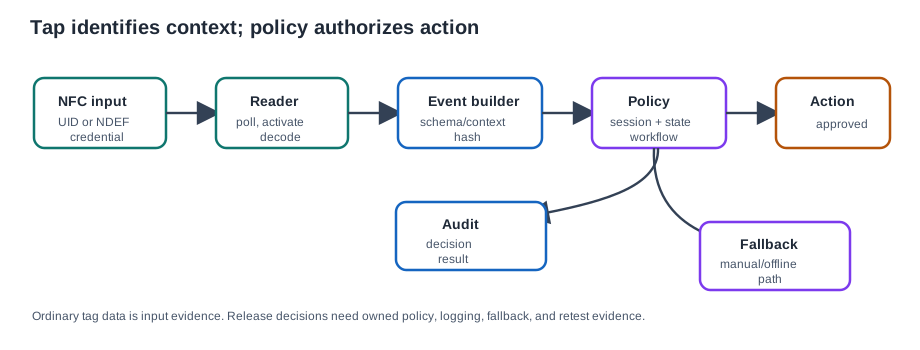
The reader polls, activates, and decodes a UID, NDEF record, or credential. An event builder adds schema and context before the application checks session, state, and workflow policy. Only an approved decision reaches the action path, and the audit record keeps the decision and result. The close tap helps select a nearby target; it does not establish that the user may act on it. Test a valid tap, a malformed payload, and a policy denial, then compare the event and action logs. Those cases show whether the boundary prevents an unreviewed tap from becoming an IoT command.
16.6 NFC Starts the Workflow, Not the System
This section: NFC Starts the Workflow, Not the System — NFC moves only small amounts of data slowly over a few centimeters, so its highest-value role in IoT is often bootstrapping a faster radio or authenticated workflow.
NFC moves only small amounts of data slowly over a few centimeters, so its highest-value role in IoT is often bootstrapping a faster radio or authenticated workflow. A deliberate tap can hand over the information a device needs to join Wi-Fi, pair over Bluetooth, open a Thread commissioning path, or request a backend setup token. That replaces brittle setup screens and pairing PINs with “tap to connect” while keeping the bulk data on the carrier that is designed for it.
The tap does two useful things at once: it proves physical intent because the user touched this exact device, and it transfers setup material out of band from the network being joined. That does not make the tag an authority. It makes the tap a strong selector for a setup workflow that still needs session checks, policy checks, and audit evidence.
Figure 16.2 shows where NFC setup ends and another carrier begins.
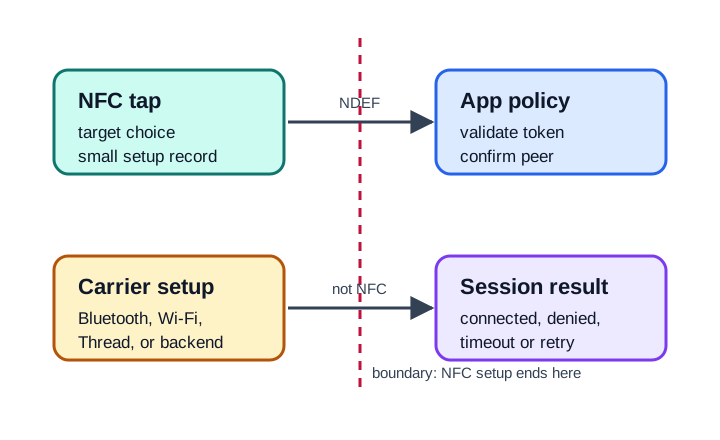
The boundary in Figure 16.2 begins with an NFC tap that selects a target and transfers a small setup record. App policy must validate that record and confirm the peer before any later carrier starts. Bluetooth, Wi-Fi, Thread, or a backend then carries configuration or service traffic; its connected, denied, timeout, or retry result is not an NFC result. For the gateway example, the app checks the URI host and asset ID, binds the tap to the technician’s session, and asks for a short-lived onboarding token. Keep the tap event, policy decision, carrier outcome, and fallback as separate records so duplicate taps do not create duplicate work.
Use a gateway commissioning example. A technician taps a gateway label and the phone reads an NDEF URI such as https://ops.example/setup/GW-142. The app should not blindly configure that gateway. It should decode the URI, verify the host and object reference, bind the tap to the signed-in technician session, ask the backend for the current work-order state, and then request a short-lived onboarding token. The token can carry the Wi-Fi or BLE setup path for this gateway; the tag itself should not contain a reusable network password or permanent authority.
The integration is a chain with visible boundaries. NFC selects the device and transfers a compact setup hint. The app or gateway builds a tap event with reader identity, payload hash, schema version, and idempotency key. The policy service decides whether this user may commission this asset now. BLE or Wi-Fi carries the bulk configuration and later telemetry. The audit stream records the tap, the decision, the action result, and the fallback path. When those responsibilities are separate, a duplicate tap can refresh the same workflow instead of creating a second service record, and an offline app can present a designed fallback instead of guessing.
16.7 Event Contract
This section: Event Contract — A tap event should be small enough to review and stable enough to replay in tests.
A tap event should be small enough to review and stable enough to replay in tests. Do not publish raw, unbounded tag data directly into application actions.
16.8 Contract Rules
This section: Contract Rules
16.9 Gateway and Application Flow
This section: Gateway and Application Flow — The integration path depends on whether the tap is handled by a mobile app, a fixed gateway, an embedded reader, or a credential path.
The integration path depends on whether the tap is handled by a mobile app, a fixed gateway, an embedded reader, or a credential path. The same review questions still apply.
Figure 16.3 follows a tap into a routed, policy-checked event.
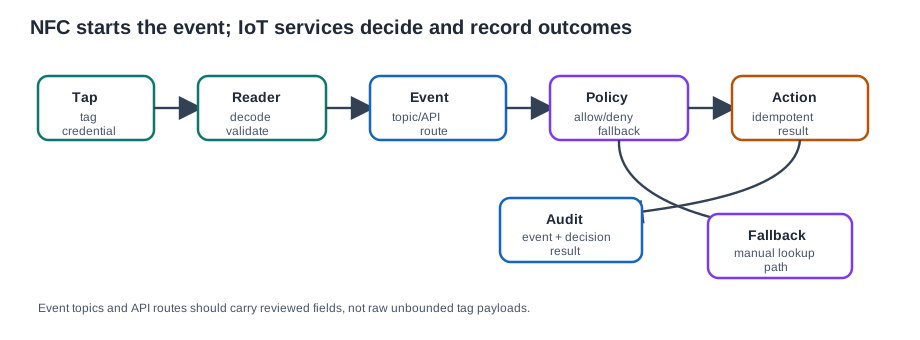
The tag or credential is decoded and validated by the reader before an event is sent to a topic or API. Policy then decides whether the event is allowed, denied, or sent to a fallback path. An allowed action must be idempotent so a repeated tap or retry does not cause an extra physical effect. The audit record joins the input event, decision, and observed result. Trace a duplicate and an offline case as well as a normal tap. The radio exchange starts the workflow, but the service path supplies authorization and outcome evidence.
16.10 Minimal Bridge Shape
This section: Minimal Bridge Shape — The bridge should publish a reviewed event, not a magic command.
The bridge should publish a reviewed event, not a magic command. Keep the example small enough that students can see the ownership boundary.
16.11 Connection Handover and Setup Tokens
This section: Connection Handover and Setup Tokens — The NFC Forum Connection Handover standard defines how a tap bootstraps another carrier.
The NFC Forum Connection Handover standard defines how a tap bootstraps another carrier. The NFC record is the handoff, not the long-running channel.
| Form | How it works | Example |
|---|---|---|
| Static handover | A tag holds an alternative-carrier record or setup reference. | Tap a printed tag to start a guest Wi-Fi or device setup workflow. |
| Negotiated handover | Two active devices exchange Handover Request and Handover Select records to agree on a carrier. | Tap a phone to a speaker to pair over Bluetooth. |
The handover NDEF message can carry alternative carrier records, such as Bluetooth out-of-band pairing data or Wi-Fi setup material, so the phone learns exactly how to connect without the user typing it. The bulk data then flows over BLE, Bluetooth, Wi-Fi, Thread, or the backend. This is why “tap to pair” can feel instant even for a device that streams audio: the stream is Bluetooth, and NFC carried only the setup evidence.
A release-quality handover test should include both the radio path and the ownership boundary. For a sensor hub, the lab might use a static tag that carries an onboarding URL plus a device reference, not a shared building Wi-Fi password. The mobile app follows the URL, authenticates the user, requests a one-use setup token, then opens a BLE session to write network settings to the hub. Expected evidence includes decoded tag reference, token issued for the same hub, BLE connection established to the matching device identity, configuration write acknowledged, token consumed once, and audit row stored.
Work through the failure cases before field release. If the same tag is tapped twice in 10 seconds, the idempotency key should return the existing setup workflow rather than issuing two active tokens. If the phone is offline, the app should either deny commissioning or use a documented cached policy with an expiry and a sync requirement. If the tag points to an approved host but the gateway is already assigned to another site, policy must reject even though the NDEF record is syntactically valid. These checks distinguish an IoT integration from a convenient link opener.
Keep the data contract small. A useful event can include tap_id, device_ref, reader_id, schema, payload_hash, session_id, network_state, and idempotency_key. It should avoid direct personal identifiers in topic names or tag payloads. For example, an MQTT topic like site/14/nfc/tap with a redacted event body is easier to govern than alice-smith/GW-142/tap. The policy engine can join internal identifiers later, while the transport layer carries only what subscribers need.
16.12 Architecture Choice
This section: Architecture Choice — Avoid choosing local or backend policy from preference alone.
Avoid choosing local or backend policy from preference alone. Use evidence: network availability, action criticality, revocation needs, privacy, latency tolerance, audit requirements, and support ownership.
Figure 16.4 compares local and backend policy placement.
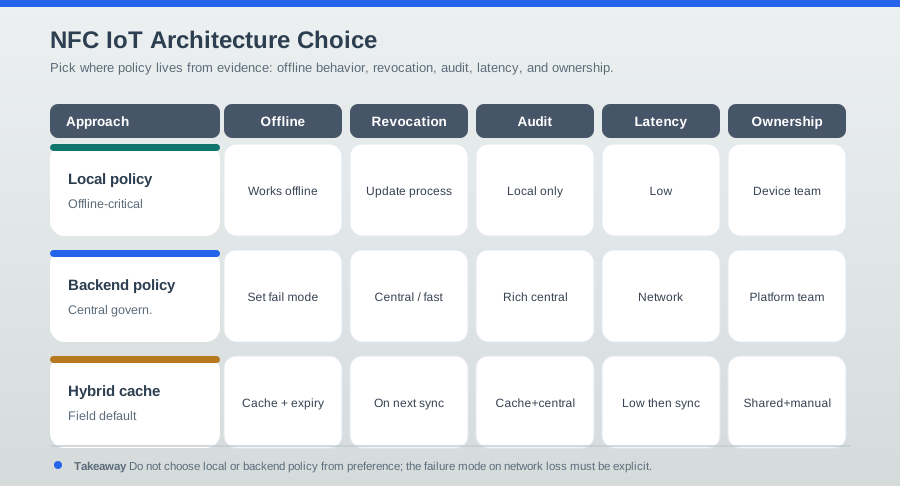
A local policy can support an offline-critical action with low latency. Its update and revocation process belongs to the device team. Backend policy centralizes decisions and audit but depends on connectivity for the action unless a fallback is defined. A hybrid path must say which decisions may be made locally and how later records reconcile. Compare offline behavior, revocation speed, audit completeness, latency, and ownership against the actual workflow. A successful tap does not choose the policy home; a denied or disconnected test makes the tradeoff visible.
16.13 Energy Harvesting and Battery-Less Commissioning
This section: Energy Harvesting and Battery-Less Commissioning — NFC can also power the device it configures.
NFC can also power the device it configures. Energy-harvesting NFC front ends, such as NTAG devices with an I2C bridge and an energy-harvesting output, rectify the reader’s 13.56 MHz field into a small supply. That can be enough to wake a microcontroller, read a sensor, or store a short configuration record with no battery installed. The same tap provides the data channel and the temporary power.
That unlocks two patterns. Battery-less commissioning lets a phone wake a headless unpowered device, deliver Wi-Fi or configuration data through an NFC-to-I2C bridge, store it, and then leave normal power to run the device later. Tap-to-read lets an unpowered product wake just long enough to return a sensor value or diagnostic. A field-detection pin can also let a powered device sleep until an NFC field appears, spending nothing until someone taps.
The hard engineering detail is the power budget, not the phrase “battery-less.” Treat harvested energy as a measured resource for one short transaction. A release note should show the measured harvested voltage under the final enclosure, the load current for the wake/write/sleep sequence, the worst-case write time, and whether the tap still succeeds when the user moves the phone slightly.
Do the arithmetic with measured values from the actual hardware. If the wake-and-store sequence draws 2.8 mA at 1.8 V, the load is about 5.0 mW. If the lab measurement at the planned tap position only supports 4.0 mW continuously, the design has negative steady-state margin and must not be released as battery-less commissioning. If a storage capacitor covers the shortfall, the evidence should show the capacitor voltage before and after the write, not just a successful demo video. If the final product adds a metal bracket that weakens coupling, the measurement must be repeated with that bracket installed.
Energy harvesting also changes the failure model. A normal powered gateway can retry, log locally, and use a network fallback. A battery-less label may brown out halfway through a write, so records need a version, checksum or integrity marker, and a safe “not configured” state. The mobile app should treat an interrupted tap as incomplete until it reads back the stored configuration or receives a signed confirmation through the later BLE or Wi-Fi path. That readback step prevents a field team from mistaking a partial NFC write for a commissioned IoT device.
16.14 Quick Check: Connection Handover
This section: Quick Check: Connection Handover
16.15 Lab: Gateway Replacement Workflow
This section: Lab: Gateway Replacement Workflow
A maintenance team adds NFC labels to gateways. A technician tap should open the correct gateway service record, show replacement steps, create an audit record, and allow replacement only when the work order and session permit it.
16.16 Lab Plan
This section: Lab Plan — Read the plan as a sequence of evidence handoffs.
Read the plan as a sequence of evidence handoffs. Begin with the objective and the approved HTTPS tag payload, then exercise both reader paths so the mobile and service-desk routes are not silently treated as equivalent. Next, apply every policy check before the replacement action: host, schema, released-tag record, technician session, work-order state, and idempotency each closes a different boundary. Run the listed failure tests after the successful path, because an unknown tag, duplicate tap, offline app, unsupported schema, or already-replaced gateway must produce an intentional result. Finish by collecting the decoded payload, decision, audit row, fallback result, and retest trigger as one release record. That order connects the lab to the chapter’s central claim: an NFC tap starts the workflow, while application policy decides what may happen.
16.17 Review Steps
This section: Review Steps
16.18 Release Evidence
This section: Release Evidence — Release evidence should prove the integration does what was approved, not merely that a reader detected a tag.
Release evidence should prove the integration does what was approved, not merely that a reader detected a tag.
Figure 16.5 lists the records needed to release an NFC-triggered action.
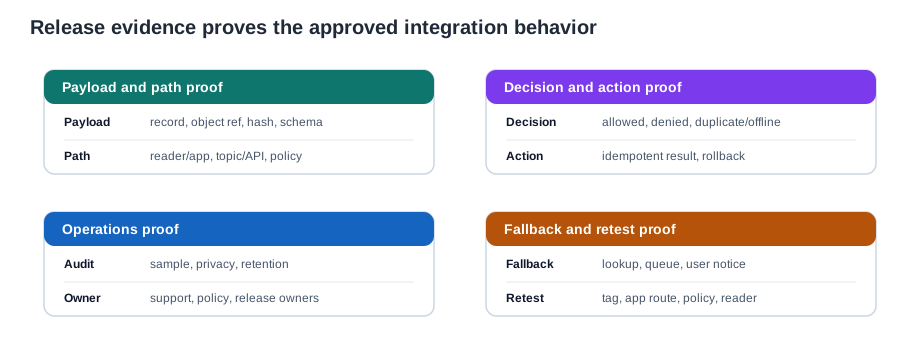
Payload proof identifies the NDEF record or object reference, hash, and schema; path proof names the reader or app, topic or API, and policy checkpoint. Decision evidence covers allowed, denied, duplicate, and offline cases. The action record must show an idempotent result or rollback, while operations evidence keeps a sampled audit and owner. Run those cases against the intended deployment path, not only a parser test. The release claim can then say which tap and policy combinations were checked and what happens when a reader, network, or action fails.
16.19 Common Pitfalls
This section: Common Pitfalls
- Using UID as authority. A UID can identify a record, but it should not be the only proof for sensitive actions.
- Publishing raw tag values. Normalize, validate, bound, and redact event fields before they enter brokers, logs, or dashboards.
- Ignoring duplicate taps. NFC users often tap twice when feedback is slow. Design refresh, confirmation, or idempotent behavior.
- Forgetting offline behavior. Decide whether to deny, cache, queue, fallback, or allow a limited local action before field release.
- Mixing parse and policy. A correctly decoded tag can still be unauthorized for the user, asset state, location, or workflow.
16.20 Knowledge Check
This section: Knowledge Check
16.22 Matching Quiz: Integration Evidence
This section: Matching Quiz: Integration Evidence
16.23 Ordering Quiz: NFC IoT Tap Flow
This section: Ordering Quiz: NFC IoT Tap Flow
16.24 Summary
This section: Summary
- NFC IoT integration should separate tag parsing from authorization.
- A tap event needs schema, reader context, validation result, policy decision, idempotency, and audit fields.
- Mobile apps, fixed gateways, embedded controllers, brokers, and backend services have different ownership boundaries.
- Local, backend, and hybrid policy choices should be justified by offline behavior, revocation, audit, privacy, and support evidence.
- Release evidence should prove payload, path, decision, action, fallback, owner, and retest behavior.
16.25 Key Takeaway
This section: Key Takeaway — NFC-IoT integration works best when NFC handles enrollment, configuration, service access, or proof-of-presence while longer-range networks carry ongoing telemetry.
NFC-IoT integration works best when NFC handles enrollment, configuration, service access, or proof-of-presence while longer-range networks carry ongoing telemetry.
16.26 What’s Next
This section: What’s Next
Find help
3 reviewed answers.
Where should I start in a module?
Open the module page from the sidebar to see its chapters in order. Use the module map to return to a topic you need.
Modules and pathsReviewed
What can I try when a project does not work?
Check the symptom, then work through the diagnostic steps. Keep the error message and the smallest example that reproduces it.
When you are stuckReviewed
How do interactive examples work?
Use the interactive guide to check how examples and simulations work before changing your project.
Interactive examples guideReviewed