28 Z-Wave Acceptance
More
Depth: Practitioner
Progress saves as you read. Mark sections complete as you go; your progress appears in the sidebar.
28.1 Start With the Story
This section: Start With the Story — Picture a door sensor that joins beside the controller but misses events from its final wall.
Prove the Installed Route, Not the Pairing Table
Picture a door sensor that joins beside the controller but misses events from its final wall. A device list cannot prove that the installed path works.
A gateway means the boundary system that joins local devices to another network or service. Mark which devices reach it directly, which can relay, and which sleep through most network activity.
Test join, command, status, obstruction, power cycle, and removal from the installed positions. Keep device role, security class, route, time, retries, result, and support note so another person can repeat the acceptance run.
This check covers one layout and set of devices, not every radio change. The deeper sections cover roles, placement, security, inclusion, route health, and maintenance.
A practical Z-Wave deployment is accepted only when the installed devices prove they can join, communicate, secure their commands, survive normal placement, and leave a support record. Pairing a device beside the hub is just the first clue.
Use this chapter as an acceptance plan. Classify roles, place the backbone, include devices with the right security, validate from installed locations, and record route evidence for future maintenance.
28.2 In 60 Seconds
This section: In 60 Seconds — A practical Z-Wave design is not accepted just because every device appears in the controller app.
A practical Z-Wave design is not accepted just because every device appears in the controller app. A good plan identifies which devices can repeat classic mesh traffic, where sleeping endpoints depend on those repeaters, which devices need S2 Access Control, which devices use classic mesh versus Z-Wave Long Range, and what evidence proves the installed network is healthy. Classic Z-Wave planning is mostly about backbone placement and route evidence. Z-Wave Long Range planning is mostly about direct gateway reach, controller support, and device support.
28.3 Learning Objectives
This section: Learning Objectives
By the end of this chapter, you should be able to:
- Build a Z-Wave deployment inventory that separates controllers, classic mesh repeaters, sleeping endpoints, access-control devices, and Z-Wave Long Range endpoints.
- Place mains-powered classic mesh devices where they create useful paths instead of merely adding device count.
- Assign S2 security classes based on physical-access risk and authentication capability.
- Sequence inclusion so the backbone exists before edge battery devices depend on it.
- Diagnose failed inclusion, incomplete interviews, stale routes, and sleepy-device symptoms without rebuilding the whole network first.
- Define acceptance evidence for a Z-Wave installation, including security class, route health, wake-up behavior, and operating records.
28.4 Quick Check: Z-Wave Practical
This section: Quick Check: Z-Wave Practical
28.5 Planning Inputs
This section: Planning Inputs — Figure 28.1 carries a Z-Wave installation from inventory to route proof.
Start every practical Z-Wave design with five records:
- Device inventory. List product type, power source, installed location, regional frequency, supported inclusion method, security support, and whether the device is classic mesh or Z-Wave Long Range.
- Topology intent. Decide whether each device is part of the classic mesh, a Z-Wave Long Range star endpoint, or a mixed deployment that needs both behaviors documented.
- Backbone plan. Mark always-listening mains-powered classic mesh devices before judging reach to locks, sensors, detached spaces, basements, and exterior doors.
- Security plan. Reserve S2 Access Control for devices that control physical entry. Use S2 Authenticated for normal authenticated devices. Treat S2 Unauthenticated and legacy modes as exceptions that require a reason.
- Acceptance evidence. Define the route, interview, wake-up, and backup evidence needed before the installation is handed over.
Figure 28.1 carries a Z-Wave installation from inventory to route proof.
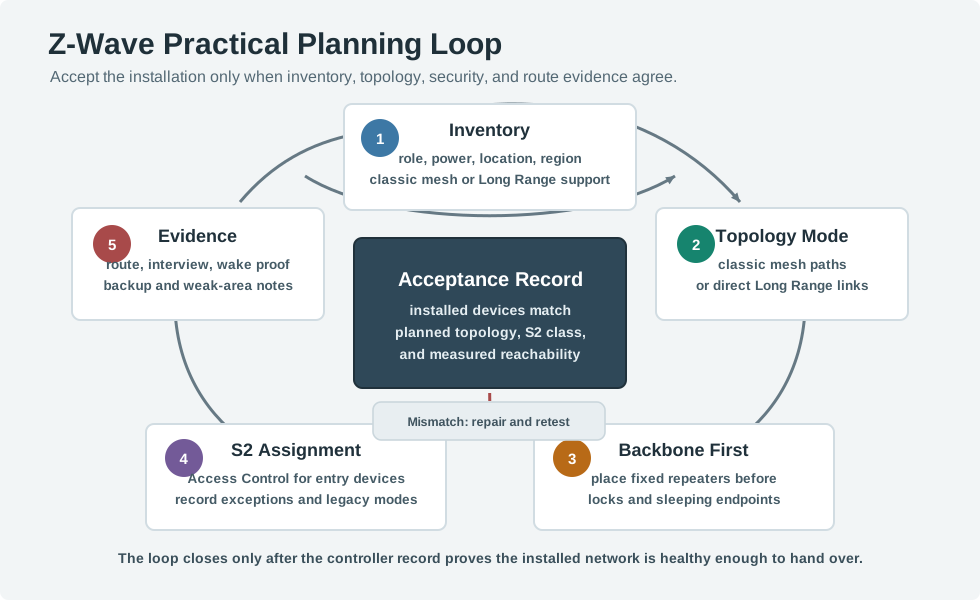
Inventory records each device’s role, power source, location, region, and classic or Long Range support. The topology choice then sets repeater or direct-link expectations. Place the fixed backbone before including locks and sleepy sensors, and record each device interview and security result. Route validation checks edge rooms and sleeping-node behavior on the installed layout. Keep failures, backups, and owner notes with the final acceptance decision. A list of included devices cannot prove that a door lock or leak sensor will report through the route the household depends on.
These five records must be read as one plan. Inventory establishes power state, region, and topology capability; topology intent determines whether repeaters or direct Long Range links matter; the backbone plan then exposes weak installed paths. Security assignment and acceptance evidence close the loop for the actual endpoint role. If any record disagrees with the installed device or route, use the mismatch branch and retest rather than allowing a successful app command to stand in for the missing evidence.
28.6 Selection Workflow: Device Role Review
This section: Selection Workflow: Device Role Review — Classify devices by network responsibility, not by product marketing name.
Classify devices by network responsibility, not by product marketing name.
Controller
- Owns inclusion and exclusion.
- Assigns network addresses inside the Z-Wave network.
- Coordinates security inclusion, interviews, route repair, and device health views.
- Needs backup and migration planning because it holds the operating record for the network.
Classic mesh repeater
- Is usually mains powered and always listening.
- Can forward classic Z-Wave frames for other classic mesh nodes.
- Creates useful paths around walls, appliance shadows, long hallways, and moved devices.
- Should be installed and verified before edge endpoints are accepted.
Sleeping endpoint
- Is usually battery powered.
- Wakes for local events, periodic reports, or manual wake actions.
- Usually does not repeat traffic.
- May report events reliably while still ignoring configuration changes until it wakes.
Access-control device
- Controls a physical boundary such as a lock, gate, strike, or garage entry.
- Needs the strongest available Z-Wave security class supported by the controller and device.
- Deserves stronger route evidence than a convenience light or plug.
Z-Wave Long Range endpoint
- Uses direct gateway-to-device star communication rather than classic mesh repeating.
- Can coexist with classic Z-Wave in compatible systems, but it should not be counted as a classic mesh repeater.
- Requires explicit controller, device, regional, and inclusion-method support.
28.7 Placement Review
This section: Placement Review — The common planning error is counting every node as if it strengthens the mesh.
The common planning error is counting every node as if it strengthens the mesh. A set of battery sensors can be valuable, but it does not create a backbone. Count the devices that are actually awake and able to repeat classic mesh traffic.
Inspect Figure 28.2 and ask which installed devices strengthen the classic mesh and which remain coverage endpoints only.
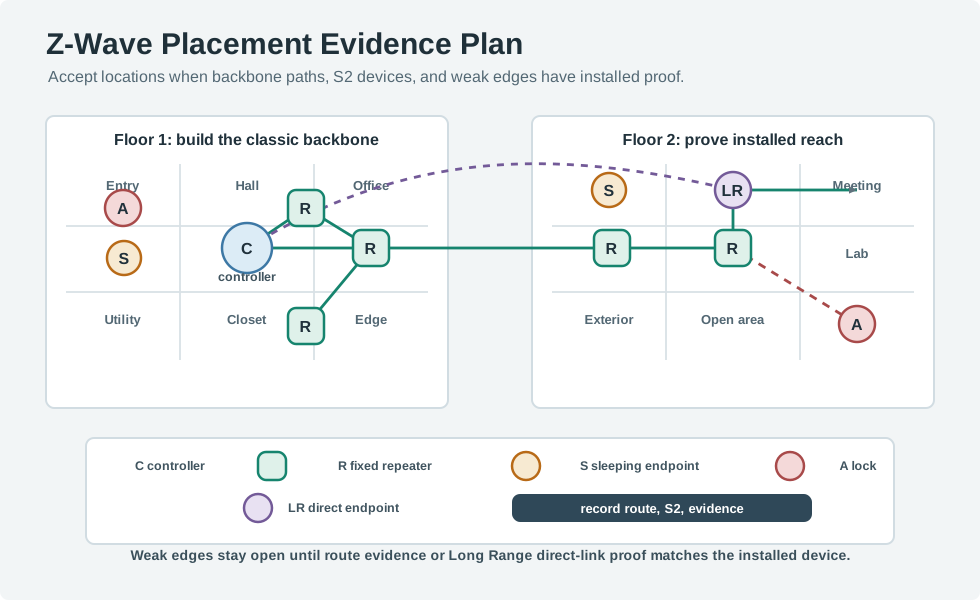
Read Figure 28.2 from the controller through the mains-powered classic repeaters, then test the weak path to the lab before placing sleeping endpoints. The chapter example reconciles its inventory as nodes: one controller, eleven always-listening backbone devices, and twenty-one battery endpoints. The backbone itself is in-wall switches, smart plugs, and a powered thermostat. The Long Range endpoint uses a direct gateway link, so it must not be counted as a classic repeater.
Use these placement rules during review:
- Put repeaters where they bridge areas, not only where outlets are convenient.
- Prefer installed-location inclusion for repeaters when the controller and device support it.
- If a device must be included near the controller and then moved, run route repair or equivalent health checks after relocation.
- Do not make a lock or other access-control device depend on one removable plug if a fixed in-wall repeater can provide the path.
- Check regional device support before purchase. A product with the right name but wrong regional radio plan is not a planning shortcut.
- Keep metal enclosures, dense appliances, low utility spaces, and detached structures on the risk list until route evidence proves they work.
28.8 Always-On Devices Define the Backbone
This section: Always-On Devices Define the Backbone — A reliable Z-Wave network is planned around power, because power decides who can repeat.
A reliable Z-Wave network is planned around power, because power decides who can repeat. Mains-powered devices listen continuously and form the classic mesh repeater backbone. Battery devices sleep to save energy and generally do not repeat for other nodes. The practical planning question is not “where are my sensors?” but “do my always-on devices form a connected mesh that reaches every critical location within the route budget?”
Make the count explicit. A two-floor house might have 1 controller, 8 in-wall switches, 2 smart plugs, 1 powered thermostat, 3 locks, and 18 battery sensors. The installation has 33 nodes, but the classic mesh backbone is only the 11 always-listening devices: 8 + 2 + 1 = 11. The 21 battery-powered locks and sensors matter for coverage goals, but they are not the devices that carry other nodes’ traffic.
Now map those 11 repeaters by location. If 7 are clustered in the kitchen and living room, only 4 remain to bridge the hallway, upstairs rooms, garage wall, and exterior entry. Moving one smart plug from behind a TV to the stairwell may improve the architecture more than buying more battery sensors, because it changes the route backbone instead of only adding endpoints.
Use the same logic for acceptance priorities. If the front lock, garage controller, and upstairs hallway sensor are the three most important endpoints, each needs an explicit path story. A lock with two possible fixed repeaters is stronger than a lock that only works through one plug in a movable outlet. A sleepy hallway sensor may tolerate delayed configuration, but its event reports still need a tested path back to the controller.
The acceptance decision is therefore concrete: a plan is not complete until it shows which devices are repeaters, which devices are sleeping endpoints, which physical-entry devices need stronger security, and which installed locations still need route or direct-link evidence.
28.9 Security Assignment
This section: Security Assignment — S2 security is not a single label.
S2 security is not a single label. It separates network keys and inclusion rules into classes. The practical decision is to match the class to device risk and authentication capability.
Figure 28.3 assigns an S2 class from the device’s action risk.
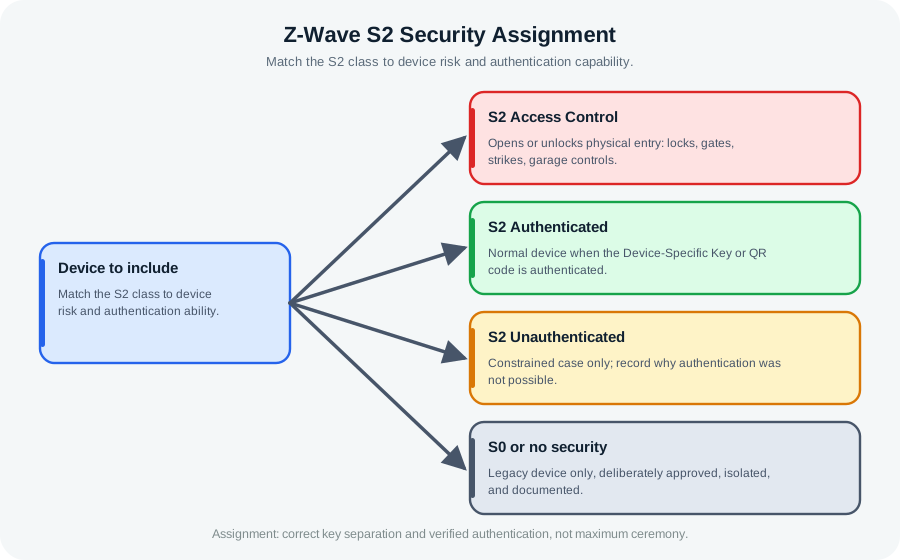
The security plan in Figure 28.3 assigns the front lock on node 18 to S2 Access Control, with a test from the actual door. The mains hall switch and sleeping window contact may use S2 Authenticated when their DSK or QR authentication succeeds. A legacy device needs a deliberate, isolated, documented exception rather than a silent downgrade. Record the device role, installed place, code check, assigned class, and inclusion result together. If authentication fails, stop and investigate before route repair. A healthy radio link cannot compensate for the wrong security class on an access device.
Apply the policy this way:
- S2 Access Control: use for devices that can open, unlock, release, or otherwise control physical entry.
- S2 Authenticated: use for normal devices when the controller and device can authenticate the Device-Specific Key or QR code.
- S2 Unauthenticated: treat as an exception for constrained cases where authentication is not possible. Record why it was accepted.
- S0 or no security: avoid for new designs unless a legacy device is deliberately approved, isolated, and documented.
Do not assign a higher class just to make a spreadsheet look safer. The goal is not maximum ceremony everywhere; it is correct key separation, verified authentication, and a record that lets a maintainer understand why each device was included that way.
28.10 FLiRS, Sleeping Sensors, and Command Latency
This section: FLiRS, Sleeping Sensors, and Command Latency — Power state also changes command latency.
Power state also changes command latency. A mains device is available immediately. A pure sleeping sensor wakes on events, scheduled intervals, or a manual wake action. A battery actuator such as a lock sits between those behaviors: it is a FLiRS device, a Frequently Listening Routing Slave, that briefly wakes at a fixed interval to check for a wake-up beam.
| Type | Listening behavior | Repeats for others? | Practical reachability |
|---|---|---|---|
| Mains-powered device | Always listening | Yes, when certified and configured as a classic mesh repeater | Available immediately |
| FLiRS battery actuator | Briefly checks for a beam about every 250 ms or 1 s | No | Low-latency command response through a nearby always-listening path |
| Sleeping sensor | Wakes on its own schedule, event, or manual wake | No | Commands wait until the next wake event |
Use that distinction to sequence inclusion. First include the fixed mains-powered repeaters in their installed locations and confirm they interview correctly. Then add critical FLiRS or access-control devices, because their command latency depends on having a nearby always-listening path. Finally add sleeping sensors and wake them when configuration or interview evidence is required.
For a practical record, write rows such as: Node 12, upstairs hall switch, mains powered, repeats, installed at stair landing; Node 18, front lock, FLiRS, S2 Access Control, tested from the door; Node 27, window contact, sleeping sensor, wakes on open or close and manual wake. Those rows explain what each device can do for the network and what evidence proves it is accepted.
Security assignment follows the role. A light switch may use an authenticated class and serve as a repeater. A lock should be treated as an access-control endpoint and validated more strictly. A sleepy contact sensor should not be judged by instant command response because it is designed to wake around events, not listen all day.
This section:

This section:
28.11 Selection Workflow: Inclusion Sequence
This section: Selection Workflow: Inclusion Sequence — Use a sequence that builds evidence as the network grows.
Use a sequence that builds evidence as the network grows.
- Prepare the record. Confirm regional frequency, controller firmware, device support, SmartStart or manual inclusion method, and security target.
- Create or verify the controller network. Confirm backups before a large installation or migration.
- Include fixed repeaters first. Add in-wall switches, fixed modules, powered thermostats, and dedicated repeaters that form the classic mesh backbone.
- Validate repeaters at installed locations. Check interviews, command response, and any route or neighbor evidence exposed by the controller.
- Add access-control devices. Include locks, gates, strikes, and garage controls with the intended S2 class and extra route validation.
- Add sleeping endpoints. Include sensors after their supporting paths exist. Manually wake them when configuration or interview evidence is needed.
- Repair and verify. Run route repair or controller health checks after moving repeaters, replacing failed devices, or adding major backbone devices.
- Record acceptance evidence. Store network size, topology mode, security class, failed-node cleanup, backup method, and known RF risk areas.
28.12 Troubleshooting Flow
This section: Troubleshooting Flow — Most practical failures have a small set of causes.
Most practical failures have a small set of causes. Work through them before excluding large groups of devices or factory-resetting a working network.
Figure 28.4 checks common inclusion faults before resetting the network.
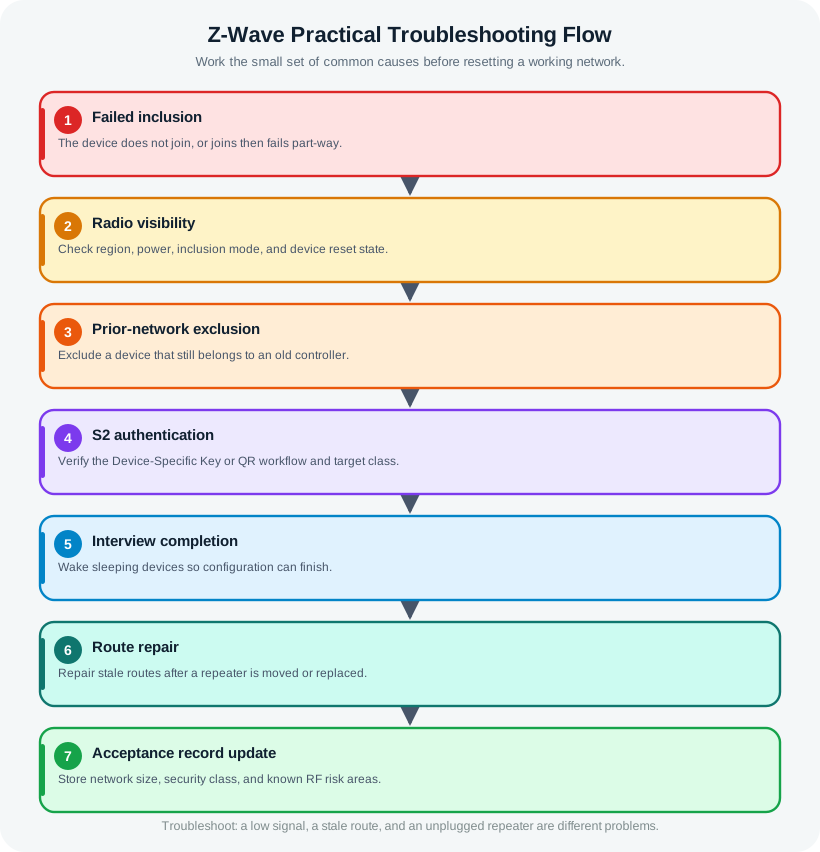
The path in Figure 28.4 finds the failed step: radio sighting, old network state, S2 code check, device interview, or route delivery. A sleeping device may need a wake to finish setup. Waking it cannot fix a wrong region or failed code check. The chapter trace fails at security after inclusion starts, so route repair comes too soon. Record hub support, installed place, code result, interview state, and later command delivery before any reset. After the fault is fixed, the acceptance record must show the new security class, route, and a working command from the real location.
The device is not discovered.
Check regional frequency, power, inclusion mode, device reset state, and whether the controller supports the device’s classic mesh or Long Range mode. A wrong regional device will not be fixed by route repair.
The device starts inclusion but fails security.
Check the Device-Specific Key or QR workflow, the target S2 class, controller support, and whether the device still belongs to an old network. Excluding a device from any controller can clear many stale associations, but use the device manual for final reset behavior.
The device includes but the interview is incomplete.
Check whether the device is asleep, out of reach at the installed location, waiting for manual wake-up, or using command classes the controller does not fully expose. A sleeping endpoint may need a wake action before configuration evidence is complete.
The device responds slowly after moving a plug or switch.
Assume route evidence may be stale. Restore the moved repeater, add a better fixed repeater, or run route repair and verify the new path.
A lock works from nearby but fails at the door.
Treat it as a placement and route-evidence problem. Verify the nearby repeater is mains powered, on the same network, and able to repeat classic mesh traffic. If the device is Long Range, verify direct gateway reach instead of adding classic repeaters.
28.13 Hop Budget and Acceptance Evidence
This section: Hop Budget and Acceptance Evidence — Because only mains-powered classic devices repeat and routes are capped at 4 hops, coverage is a backbone problem.
Because only mains-powered classic devices repeat and routes are capped at 4 hops, coverage is a backbone problem. Lay out always-powered switches, plugs, modules, and powered sensors so that every critical location sits within a short chain of them. A FLiRS lock also needs a mains repeater within direct radio range; it cannot lean on other battery devices to relay. Sub-GHz propagation helps through ordinary walls, but thick masonry, foil insulation, appliances, metal doors, and utility spaces still create weak paths that a well-placed fixed repeater must solve.
Acceptance should be measurable. After inclusion, run the controller’s health check or network heal, review assigned route and hop-count evidence where the controller exposes it, confirm that no critical device sits at the 4-hop edge without margin, and verify that FLiRS devices respond within the expected command latency. If a device only succeeds at the edge of the hop budget or drops during heal, add or reposition a mains repeater instead of hoping the radio will cope.
Review each route as an evidence chain. If the controller reaches a front lock through a hall switch and then an entry switch, record that installed path and the fact that both intermediate devices are mains powered. If the only observed path runs through a removable smart plug, record that dependency and decide whether to replace it with a fixed repeater. The problem is not the number of nodes; it is whether a critical route depends on movable or weak backbone devices.
Run one practical stress check before handoff. Unplug one non-critical smart plug or move one portable repeater back to its intended outlet, then confirm the lock, garage control, and farthest sensor still have acceptable evidence. If one change breaks a critical path, the network needs another fixed mains device or a revised placement plan before acceptance.
Long Range changes the evidence, not the need for evidence. A Long Range endpoint does not consume classic mesh hops and should not be counted as a classic repeater. It needs direct gateway reach, regional support, controller support, security inclusion, and installed signal evidence. A mixed deployment should say which endpoints are classic mesh and which are Long Range so future troubleshooting does not add classic repeaters to solve a direct-star problem.
Accept the Z-Wave plan only when every critical endpoint has both security evidence and installed reachability evidence for its actual topology mode.

28.14 Capacity and Scaling
This section: Capacity and Scaling — Classic Z-Wave has a 232-node network limit.
Classic Z-Wave has a 232-node network limit. That number is a boundary, not a target. Practical designs should leave room for replacement devices, failed-node cleanup, and future additions.
For larger or multi-unit deployments, choose deliberately among:
- separate Z-Wave networks per dwelling, tenant, floor, or operational boundary;
- a higher-level integration layer that supervises multiple smaller Z-Wave networks;
- Z-Wave Long Range where direct star reach, controller support, regional support, and larger address space are the right fit;
- a different protocol when the use case needs IP routing, streaming data, or very high device churn.
Current public Z-Wave Long Range material describes a larger address space and up to 4000 nodes at the specification level. Implementation, controller, region, and device support can still impose a lower practical limit, so record the actual supported mode instead of assuming every Z-Wave product behaves the same way.
28.15 Worked Example
This section: Worked Example — The design should not rely on the controller in the equipment closet reaching every edge device directly.
Consider a two-floor small office with a controller in the equipment closet, in-wall lighting controls across both floors, contact sensors on exterior doors, a garage entry controller, a thermostat, and motion sensors in corridors.
Inventory outcome
- Controller: one gateway or hub.
- Classic mesh repeaters: fixed in-wall lighting controls and any mains-powered thermostat or module that the controller confirms can repeat.
- Sleeping endpoints: contact and motion sensors.
- Access-control endpoints: garage entry and any locks or strikes.
- Risk areas: equipment closet shielding, stairwell transition, garage wall, and any exterior entry.
Planning decision
The design should not rely on the controller in the equipment closet reaching every edge device directly. Place repeaters near the stairwell, near the garage boundary, and near the far corridor before adding sleeping sensors.
Inclusion decision
Include and validate the fixed repeaters first. Add the access-control endpoint only after its nearby repeater is proven. Add sleeping sensors last, waking them as needed so interviews and configuration evidence complete.
Acceptance decision
Accept the installation only after the controller record shows the intended security class, no unresolved failed nodes, route or health evidence for the garage and far corridor, successful event reports from sleeping endpoints, and a current controller backup.
28.16 Knowledge Check
This section: Knowledge Check
28.17 Check FLiRS Planning
This section: Check FLiRS Planning
28.18 Match the Concepts
This section: Match the Concepts
28.19 Order the Deployment Steps
This section: Order the Deployment Steps
28.20 Common Pitfalls
This section: Common Pitfalls — Treating every device as a repeater.
Treating every device as a repeater. Sleeping endpoints may be useful sensors, but they do not create the classic mesh backbone.
Using security class as a substitute for placement. S2 protects communication; it does not fix weak route evidence.
Skipping prior-network cleanup. Used, tested, or moved devices often need exclusion before a clean inclusion.
Moving repeaters after acceptance. A relocated plug or switch can invalidate routes that looked healthy during handoff.
Mixing classic mesh and Long Range without records. Mixed deployments are workable only when each device’s topology mode and support are documented.
28.21 Checkpoint: Summary
This section: Checkpoint: Summary — Z-Wave practical planning turns architecture into an accepted installation.
Z-Wave practical planning turns architecture into an accepted installation. The essential work is to inventory devices, separate classic mesh repeaters from sleeping endpoints, choose classic mesh or Z-Wave Long Range deliberately, assign S2 security classes by risk, include devices in an evidence-building order, and record route or direct-link health before handoff. The strongest designs avoid brittle range assumptions and instead prove that the installed network works from the installed locations.
28.22 Key Takeaway
This section: Key Takeaway — Practical Z-Wave deployments need a record for device compatibility, secure inclusion, network health, automation logic, and maintenance access.
Practical Z-Wave deployments need a record for device compatibility, secure inclusion, network health, automation logic, and maintenance access.
28.23 Checkpoint: Concept Relationships
This section: Checkpoint: Concept Relationships
Builds on:
- Z-Wave Architecture and Devices: Home ID, Node ID, controller role, classic mesh repeaters, sleeping endpoints, and Z-Wave Long Range topology.
- Z-Wave Overview and Fundamentals: protocol purpose, ecosystem position, regional support, and device certification context.
- Network Topologies: mesh, star, and hybrid topology tradeoffs.
Prepares for:
- Z-Wave Routing and Healing: source routing, failed acknowledgements, Explorer frames, repair, and route diagnostics.
- Z-Wave Simulation and Quiz: practice with route behavior and failure recovery.
- Zigbee Fundamentals and Architecture: compare Z-Wave’s planning model with another smart-home mesh.
28.25 Checkpoint: Try It Yourself
This section: Checkpoint: Try It Yourself — Sketch a real home, lab, or office as a simple floor plan.
Sketch a real home, lab, or office as a simple floor plan. Mark the controller, fixed mains-powered devices, sleeping endpoints, access-control devices, and any Long Range endpoints. Then answer:
- Which devices actually create the classic mesh backbone?
- Which endpoints depend on a single repeater or direct gateway path?
- Which devices need S2 Access Control rather than S2 Authenticated?
- Which devices would need route repair if moved?
- What evidence would you require before accepting the installation?
Find help
3 reviewed answers.
Where should I start in a module?
Open the module page from the sidebar to see its chapters in order. Use the module map to return to a topic you need.
Modules and pathsReviewed
What can I try when a project does not work?
Check the symptom, then work through the diagnostic steps. Keep the error message and the smallest example that reproduces it.
When you are stuckReviewed
How do interactive examples work?
Use the interactive guide to check how examples and simulations work before changing your project.
Interactive examples guideReviewed