14 Mobile Phone Gateway Fundamentals
More
Depth: Practitioner
Progress saves as you read. Mark sections complete as you go; your progress appears in the sidebar.
A technician scans a pump tag in a basement, reads its temperature and walks upstairs to regain an outside connection. The phone is the only carrier of that service record during the walk. The phone screen must distinguish a local save from an accepted upload.
14.1 A Phone Owns a Managed Boundary
This section: A Phone Owns a Managed Boundary — Picture a repair worker walking up to a pump.
A Phone Must Own Its Boundary
Picture a repair worker walking up to a pump. A phone reads a nearby tag and later sends a service record. If the phone sleeps, loses permission, or leaves the site, the central system must not invent a healthy pump.
A gateway is a managed bridge between nearby devices and a wider service. The product owner should name which devices may connect, what each reading means, what the phone changes, and what approved record leaves. The phone’s user, power state, movement, and software version are part of that promise.
Test a valid device, an unknown one, a lost permission, a weak outside link, a repeated upload, and a phone replacement. Preserve source identity, time, unit, quality, and final state. Show gaps clearly.
Give the worker a visible state for each step: nearby device found, reading checked, record waiting, record sent, or action needed. A spinning symbol is not enough. The worker must know whether it is safe to leave the pump and what to do if the phone cannot finish.
Make support possible from the saved record. It should show the phone and app version, the nearby source, the time read, the time sent, and the reason for any rejection. Keep personal phone facts out unless they have a stated job.
A phone has many radios, but that does not make it reliable infrastructure. Practitioner builds the release and support plan. Under the Hood examines local links, buffering, translation, identity, and failure recovery.
A mobile phone is not a gateway just because it has Bluetooth, Wi-Fi, cellular, storage, and an app. It becomes a gateway when a release assigns it responsibility for a controlled boundary: nearby device data enters on one side, and a reviewed, translated record leaves on the other through an approved path. The moment a phone holds that responsibility, it must be treated like infrastructure — reviewed, owned, and evidenced — even though it runs on a personal or shared device that can walk out of the building.
That framing matters because a phone gateway has two qualities a fixed gateway does not. Its availability is conditional: it can move, sleep, enter low-power mode, lose a permission, or simply leave the deployment area. And the data it forwards passes through a translation step, so protocol translation alone is not enough — the gateway must also preserve identity, time, unit, quality, state, security, and well-defined failure behavior, or the upstream system receives data that looks valid but means something else.
Picture a technician walking up to a pump, letting the phone hear a nearby tag, and later trusting the cloud record. The gateway is the part that makes that trust defensible: it says which tag was allowed, what the reading meant, and how absence, sleep, retry, or permission loss was handled without quietly changing the record. That is why the translation contract, suitability review, and release evidence stay visible all the way through the chapter.
If you only need the intuition, this layer is enough: a phone gateway is a reviewable boundary, not a convenience. Decide which devices may connect, what record leaves, whose meaning must be preserved, and what happens when the phone is unavailable — before you rely on it.
Inspect Figure 14.1 with one question from the “nearby devices”–“ble tags, nfc scans” decision: how does “Nearby devices” constrain “BLE tags, NFC scans”? The answer supports The phone is a gateway only when it owns the reviewable boundary: nearby device facts enter, the phone preserves meaning through a translation contract, and approved or degraded-mode records leave with evidence.

Read Figure 14.1 with “Nearby devices” as the anchor; treat “BLE tags, NFC scans” as the first comparison. Then connect “accessories, sensors” with “Source facts”. Those labels make The phone is a gateway only when it owns the reviewable boundary: nearby device facts enter, the phone preserves meaning through a translation contract, and approved or degraded-mode records leave with evidence a traceable part of the “nearby devices”–“ble tags, nfc scans” decision, not an unsupported assertion.
Three Mobile Roles, Kept Separate
A phone can play three related roles, and mixing them casually hides responsibility. As a gateway it bridges external devices — receive, translate, validate, buffer, and upload. As an edge node it collects data from its own sensors (motion, location, image, audio) under permission and privacy rules. As a fog node it processes locally — features, summaries, alerts, or inferences — before cloud handoff, with version and evidence records. This chapter is about the gateway role; the others are covered in the edge and fog chapter.
The One-Minute View
A boundary, not a phone
Responsibility for a reviewed boundary is what makes a phone a gateway, not the radios it happens to have.
Translation must keep meaning
Identity, time, unit, quality, and state must survive translation, or the upstream record is quietly wrong.
Availability is conditional
The phone can move, sleep, lose permission, or run flat; the release must define degraded behavior and recovery.
Beginner Examples
Read the Beginner Examples material as a decision path rather than as isolated entries. First identify the operating condition in each entry and keep its units, timing, source, and assumed system state attached to it. Next compare the entries at the point where responsibility changes between device, gateway, network, analytic service, and operator; that hand-off is where apparently similar choices often produce different outcomes. Then follow the failure case: ask what becomes stale, delayed, unavailable, or unsafe, who detects it, and what evidence permits recovery. Finally connect the result to the chapter's running design record by naming the selected behavior, the rejected alternative, the measurement that justifies the choice, and the condition that forces a recheck. That order turns the examples or comparison into an auditable engineering argument.
- A technician's managed phone uploads equipment-tag status only during a supervised site visit — a clear gateway boundary tied to a context.
- A fitness band relays heart-rate data through the wearer's phone to a cloud service — the phone is the gateway, the band is the device.
- "The phone can see the sensor over Bluetooth" describes a capability; "the phone is responsible for translating and uploading that sensor's data" describes a gateway role.
Overview Knowledge Check
If you can explain why boundary responsibility, not radios, defines a gateway, you have the core idea. Continue to Practitioner for the gateway functions and when a phone is the right choice.
14.2 Make the Boundary Reviewable
This section: Make the Boundary Reviewable — A mobile gateway release should define each function in operational terms, not as a block diagram.
A mobile gateway release should define each function in operational terms, not as a block diagram. The chain runs from discovery to a reviewable upload, and every link is a place where meaning or availability can be lost.
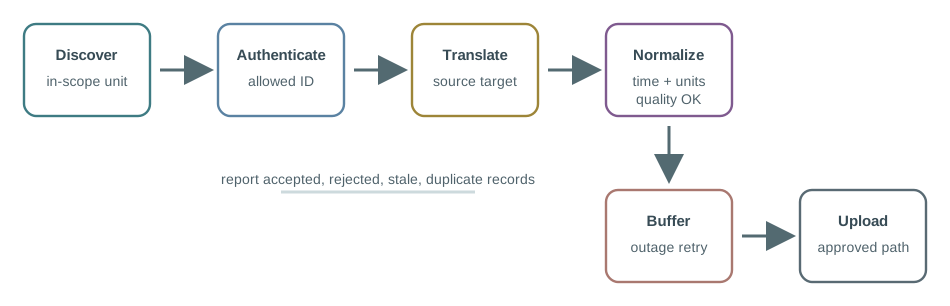
Figure 14.2 shows discovery, authentication, translation, normalization, buffering, upload, and evidence reporting in the gateway function chain.
The Translation Contract
Protocol translation can silently damage meaning, because a BLE characteristic, NFC payload, QR scan, or accessory record may not map cleanly into the upstream JSON, MQTT, or platform model. A translation contract makes the mapping explicit and testable. It should answer: which source field maps to each target field; which unit, scale, precision, and range are allowed; which timestamp is measurement time versus gateway-receipt time versus upload time; which source metadata is preserved; which records are rejected rather than transformed; and which sample records prove the mapping. The classic silent failures — replacing sensor time with phone time, stripping a quality flag, or collapsing a multi-state value into a generic status — all pass an upload check while corrupting the decision downstream.
Suitability: Good Fit, Caution, Prefer Dedicated
A mobile gateway is neither better nor worse than a dedicated one in the abstract; it is appropriate when its operating conditions match the use case.
To ground the “good fit”–“person or vehicle carries it” decision through “offline buffering is acceptable” in visible evidence about “Good fit”, inspect Figure 14.3. Its named elements “Good fit” and “person or vehicle carries it” frame the claim that Suitability is a judgment about availability and supervision, not about the phone’s raw capability.
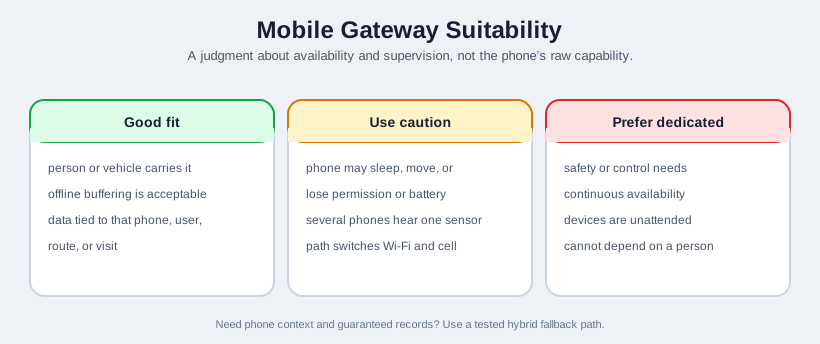
Read Figure 14.3 from “Good fit” to “person or vehicle carries it”. Next, trace “offline buffering is acceptable” into “data tied to that phone, user”. This ordering shows why Suitability is a judgment about availability and supervision, not about the phone’s raw capability. For the “good fit”–“person or vehicle carries it” decision, record “Good fit” as the starting condition and reopen “data tied to that phone, user” if “offline buffering is acceptable” changes.
Good fit
A person or vehicle is expected to carry the gateway, offline buffering is acceptable, and the data is naturally tied to that phone, user, route, or visit.
Use caution
The phone may sleep, move, lose permission, or run low on battery; several phones may hear the same sensor; the upload path may switch between Wi-Fi and cellular.
Prefer dedicated
Safety, security, or control depends on continuous availability, devices are unattended, or gateway ownership cannot depend on a person carrying a phone.
When a workflow needs the richer context a phone provides and essential records even when the phone is absent, use a hybrid pattern: the phone adds context such as scan evidence, GPS enrichment, or user observations, while a fixed or scheduled fallback path preserves the core record — provided that fallback is owned, tested, and included in the release evidence.
Practitioner Knowledge Check
If you can define the functions, write the translation contract, and judge suitability with a hybrid fallback when needed, you can stop here. Continue to Under the Hood for failure modes and the release evidence that proves them.
14.3 Prove Meaning Through Failure
This section: Prove Meaning Through Failure — The deeper layer is about the ways a mobile gateway fails that a fixed gateway does not, and the evidence that proves the release handles them.
The deeper layer is about the ways a mobile gateway fails that a fixed gateway does not, and the evidence that proves the release handles them. The single most important principle: a successful upload proves only that a message arrived — it does not prove that the message still means what the source measured.
Mobile Gateways Fail Differently
A fixed gateway mostly fails when the network or the hardware fails. A phone gateway fails in human and platform ways: it leaves the sensor area; it enters airplane, low-power, or background-restricted state; the user revokes Bluetooth, location, camera, storage, or network permission; an app update, OS update, reboot, logout, or device replacement changes behavior; two phones report the same source record; local storage fills before upload resumes; or an upload succeeds but the cloud rejects the translated record. For each, the release must say whether the result is local buffering, a rejected record, degraded service, a user notification, a cloud alert, or failover to another gateway.
Duplicates and Idempotent Upload
When several phones can hear the same sensor, the same reading can be uploaded more than once. Dedup needs a stable source identity and a sequence or message identifier so the cloud can recognize a repeat, and uploads should be idempotent so a retry after an uncertain network result does not create a phantom second reading. Without this, a fleet of helpful phones inflates counts and corrupts downstream aggregates.
Bounded Buffering and the Security Boundary
Buffering during outages is essential, but it must be bounded: a storage limit, a stale threshold beyond which a record is no longer worth uploading, and explicit retry, duplicate, and rejection behavior. Unlimited buffering fills the device and can destroy its ability to recover. And because the phone now holds cached device records and upload credentials, it is a trust boundary: those cached records and credentials must be protected at rest, and the upload path must be authenticated, or the convenience of a phone gateway becomes a data-exposure risk.
Start the evidence review for the “gateway evidence”–“boundary record” decision: inspect Figure 14.4. Two labels deserve attention—“gateway evidence” and “Boundary record”—because they bound The release evidence map ties the boundary, allowlist, translation contract, buffer and upload policy, security boundary, and acceptance drills together.
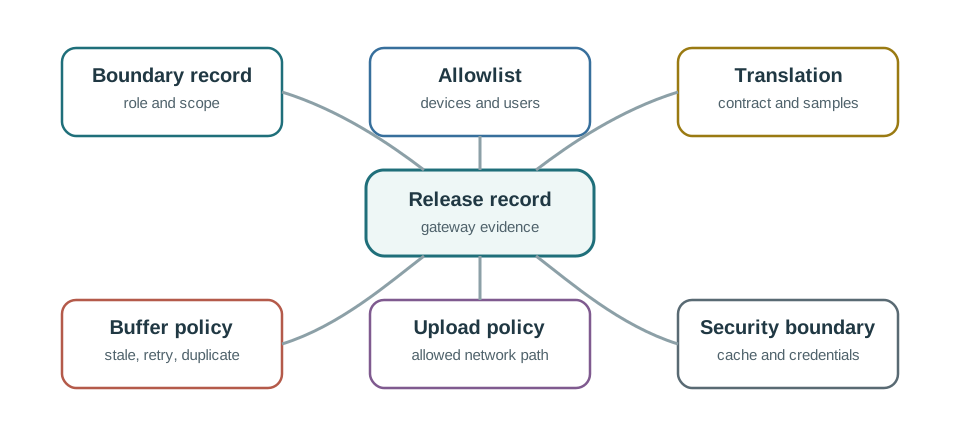
Inspect “gateway evidence” on Figure 14.4, compare “Boundary record”, then ask what carries “role and scope” into “Allowlist”. Their answers support The release evidence map ties the boundary, allowlist, translation contract, buffer and upload policy, security boundary, and acceptance drills together while keeping the “gateway evidence”–“boundary record” decision connected to observable evidence.
The Release Evidence Pack
The minimum evidence pack therefore includes the gateway boundary record, the device allowlist or enrollment rule, the translation contract with source and normalized samples, the timestamp/unit/quality/state/identity preservation rules, the buffer policy, the upload policy with allowed networks and security mode, permission and background-mode evidence for the target fleet, and acceptance drills for outage, movement, permission loss, duplicate records, rejected upload, and recovery.
Common Pitfalls
Read the Common Pitfalls material as a decision path rather than as isolated entries. First identify the operating condition in each entry and keep its units, timing, source, and assumed system state attached to it. Next compare the entries at the point where responsibility changes between device, gateway, network, analytic service, and operator; that hand-off is where apparently similar choices often produce different outcomes. Then follow the failure case: ask what becomes stale, delayed, unavailable, or unsafe, who detects it, and what evidence permits recovery. Finally connect the result to the chapter's running design record by naming the selected behavior, the rejected alternative, the measurement that justifies the choice, and the condition that forces a recheck. That order turns the examples or comparison into an auditable engineering argument.
- Treating phone presence as guaranteed. Phones move, sleep, update, and lose permission; the release must define degraded behavior and recovery.
- Assuming translation preserves meaning. A successful upload proves arrival, not that identity, time, unit, quality, and state survived.
- Using a phone for unattended critical service. Always-on safety, security, and control usually need dedicated infrastructure or a documented fallback.
- Ignoring permissions and background limits. Gateway functions can stop when permissions change or background execution is restricted; test those states explicitly.
- Unbounded buffering and unprotected caches. Bound the buffer and protect cached records and upload credentials as a trust boundary.
Under-the-Hood Knowledge Check
At this depth, a mobile gateway is a conditional boundary that must prove both meaning and availability. Define the functions, write the translation contract, bound the buffer, protect the cache, plan for the phone-specific failures, and keep acceptance drills as evidence. A trustworthy review asks not whether the phone can connect once, but whether it preserves meaning and availability well enough for the use case.
14.4 Leave the Pump with a Saved Reading, Not a Spinner
This section: Leave the Pump with a Saved Reading, Not a Spinner — Assume the nearby sensor reports 315 with scale 0.1 °C per count.
Assume the nearby sensor reports 315 with scale 0.1 °C per count. The translation yields 31.5 °C. The gateway record should retain the source identifier, raw value, scale, normalized unit and collection time. A phone clock at upload time cannot replace the time when the technician took the reading, because the pump may have changed while the record waited.
For an illustrative buffer bound, allow 200 saved records at 160 bytes each before database overhead. The useful stored data totals 200 × 160 bytes = 32,000 bytes. If the app already holds 199 records, it has room for one more under that policy. At the buffer boundary, an explicit full response preserves the distinction between refused collection and a saved pump visit.
Read Figure 14.2 along discovery, authentication, translation, normalization, buffering and upload. The pump tag being visible completes only discovery. Authentication establishes which nearby source may cross the gateway boundary. The saved record crosses the local storage boundary before the outside service can acknowledge it. The phone should show these steps as different worker-visible states.
Predict the result when the operating system stops the app after the local save. If the save is durable, the phone can resume the pending upload later. A phone app holding records only in memory does not provide durable-save evidence. Next, lose the server acknowledgement after it accepts the record. A retry should carry the same record identity so the receiving service can recognize it rather than create a second visit.
Permission loss is another boundary test. If nearby-device access is revoked, the app should explain that collection cannot continue, while still showing the state of records already saved. It must not mark the pump healthy merely because the outside account remains signed in.
This module’s gateway role is conditional on a person, a device and an operating system. The example shows why a supervised service round can tolerate delayed upload while an always-on alarm may need fixed infrastructure. Background execution and storage behaviour must be tested on the supported phone and app versions; the byte calculation alone does not prove them.
14.5 Summary
This section: Summary
- A phone is a gateway when a release makes it responsible for a controlled boundary, not because it has the radios; it must then be reviewed like infrastructure.
- Keep the three mobile roles separate: gateway (bridge external devices), edge node (use the phone’s own sensors), and fog node (process locally before cloud handoff).
- The gateway function chain is discover, authenticate, translate, normalize, buffer, upload, and report evidence, and each link can lose meaning or availability.
- Protocol translation is not enough; a translation contract must preserve identity, unit, scale, the correct timestamp, quality, and state, with sample records and rejection rules.
- Suitability is a judgment about availability and supervision: good fit for mobile, supervised workflows; caution for conditional availability; prefer a dedicated gateway for always-on safety and control.
- A hybrid pattern lets a phone add context while a fixed, owned fallback preserves essential records when the phone is absent.
- Mobile gateways fail in human and platform ways, so handle duplicates with idempotent upload, bound the buffer, and protect cached records and credentials as a trust boundary.
- The release evidence pack covers the boundary, allowlist, translation contract, buffer and upload policy, permission and background behavior, and acceptance drills for outage, movement, permission loss, duplicates, rejected upload, and recovery.
A mobile gateway is a conditional boundary, not a convenience. The question is never whether the phone can connect once, but whether the release proves it preserves meaning across the translation and stays available enough for the use case. Make the boundary explicit, keep meaning through the contract, plan for the phone-specific failures, and accept the gateway only when the acceptance drills back it up.
14.6 See Also
This section: See Also
Mobile Gateway Challenges
Review the battery, mobility, offline, operating-system, and privacy constraints in depth.
Mobile Gateway Edge & Fog
Decide which tasks run on the phone, on nearby infrastructure, or in the cloud.
Mobile Gateway Protocols Lab
Apply the translation contract and function chain in a hands-on protocol lab.
IoT Interoperability Challenges
Use the interoperability review layer before accepting a gateway as release-ready.
Find help
3 reviewed answers.
Where should I start in a module?
Open the module page from the sidebar to see its chapters in order. Use the module map to return to a topic you need.
Modules and pathsReviewed
What can I try when a project does not work?
Check the symptom, then work through the diagnostic steps. Keep the error message and the smallest example that reproduces it.
When you are stuckReviewed
How do interactive examples work?
Use the interactive guide to check how examples and simulations work before changing your project.
Interactive examples guideReviewed