13 Pub/Sub and Topic Routing
More
Depth: Practitioner
Progress saves as you read. Mark sections complete as you go; your progress appears in the sidebar.
A greenhouse probe publishes humidity without knowing which dashboard, alarm service, or archive will use it. The topic broker matches that topic message to a topic and routes copies to interested subscribers. Pub/sub design succeeds when the topic names, payload contract, and delivery behavior remain clear as consumers change.
13.1 Publishers Speak to Topics, Not People
This section: Publishers Speak to Topics, Not People — Picture a school sensor posting an air-quality notice.
Prove Who Receives Each Copy
Picture a school sensor posting an air-quality notice. A broker is the service that matches a named message route to interested readers. A gateway is a device or service that joins different networks or data forms. The sensor may know neither the dashboard nor the gateway, so the route and access rules must carry the promise.
Write one message with its source, topic, unit, source time, age limit, access group, saved-copy rule, and expected readers. Name who owns the route when a new reader or bridge is added.
Test an exact route, a broad wildcard, no reader, two readers, an old saved copy, a duplicate, and a reader that returns after an outage. Check that approved readers receive the right copy and that unapproved readers receive none. A match proves routing, not permission or useful action.
Keep urgent room action local if the broker is late. The shared route can inform many users, but it should not become the only path to an immediate safety step.
This opening does not choose a topic tree or delivery level. Practitioner designs names, filters, and records. Under the Hood examines match rules, saved state, queue behavior, replay, access limits, and bridge failures.
Start with a notice board. A sensor pins a note under a named topic, and anyone with the right subscription sees a copy. The sensor does not know whether the subscriber is a dashboard, an automation rule, or a gateway bridge. That makes pub/sub flexible, but it also means the topic name has to carry the contract clearly enough that the broker can route the right message to the right readers, bound fan-out, review each wildcard filter, and make replay behavior explicit.
In publish-subscribe messaging, a publisher does not name the consumer it is talking to. It publishes a message to a named topic and moves on. A broker compares that topic against the active subscription filters and delivers a copy to each subscriber whose filter matches. The publisher does not know who, if anyone, is listening, and the subscriber does not know who produced the value. That decoupling is the whole point of pub/sub — and it is also where the risk lives.
Contrast this with request-response, where the sender names the receiver and waits for a reply. Pub/sub trades that direct relationship for flexibility: any number of consumers can subscribe to the same data without the publisher changing. The cost of that flexibility is that the topic name becomes the contract. Once dashboards, automations, and bridges depend on a topic, renaming a level or changing its meaning silently breaks them, because nothing on the publisher side knows they exist.
If you only need the intuition, this layer is enough: a broker routes messages automatically, but the engineering work is proving that the right consumers receive the right messages under normal, delayed, replayed, and failed conditions — and that the topic names they depend on are stable.
A simple mental model has five parts: a publisher contract (topic format, payload schema, timestamp, retain and delivery intent), a topic matcher (exact topics and wildcard filters), broker state (active subscriptions, retained messages, queued messages, dead-letter routes), a subscriber contract (filter scope, maximum delivery quality, duplicate handling), and a bridge output that forwards into another protocol, queue, database, or automation.
Inspect Figure 13.1 to see what the publisher knows, what the broker decides, and what a topic match still cannot authorize.
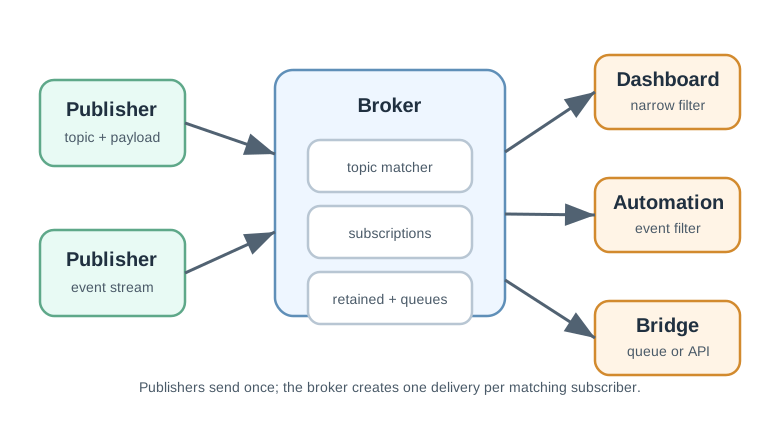
In Figure 13.1, start with one publisher sending to a named topic rather than to a named consumer. The example topic gives the event a stable route while keeping the sender unaware of who is listening. At the broker, the topic matcher compares that publication with exact and wildcard subscription filters held as broker state. Each match creates a separate delivery, allowing an automation rule and a gateway bridge to receive their own copies. Stop at the final warning: matching is a routing result, not an authorization decision. The design must still prove that every subscriber is allowed to receive the full topic scope its filter selects.
Start With the Broker's Job
Topics, not addresses
Publishers send to topics; the broker matches filters and fans out copies. No one names the other side directly.
A topic name is a contract
Once consumers depend on a topic, its level order and meaning cannot change without breaking them.
Matching is not authorization
The real question is not whether a filter matches a topic, but whether the consumer is allowed to receive everything it matches.
Everyday Topic Routes
Read the Everyday Topic Routes material as a decision path rather than as isolated entries. First identify the operating condition in each entry and keep its units, timing, source, and assumed system state attached to it. Next compare the entries at the point where responsibility changes between device, gateway, network, analytic service, and operator; that hand-off is where apparently similar choices often produce different outcomes. Then follow the failure case: ask what becomes stale, delayed, unavailable, or unsafe, who detects it, and what evidence permits recovery. Finally connect the result to the chapter's running design record by naming the selected behavior, the rejected alternative, the measurement that justifies the choice, and the condition that forces a recheck. That order turns the examples or comparison into an auditable engineering argument.
- A meter publishes to
plant-a/line-2/meter/mtr-17/power; an energy service subscribes to a filter and receives a copy without the meter knowing it exists. - A new dashboard can subscribe to existing telemetry with zero changes on the device side, which is the convenience pub/sub is built for.
- "The broker delivered the message" is not the same as "only the authorized consumers received it and the topic name will not change underneath them."

Overview Knowledge Check
If you can explain why topics, not addresses, connect the two sides, you have the core idea. Continue to Practitioner for topic trees, wildcards, and delivery choices.
13.2 Design Topic Names Like an API
This section: Design Topic Names Like an API — Read the Design Topic Names Like an API material as a decision path rather than as isolated entries.
Read the Design Topic Names Like an API material as a decision path rather than as isolated entries. First identify the operating condition in each entry and keep its units, timing, source, and assumed system state attached to it. Next compare the entries at the point where responsibility changes between device, gateway, network, analytic service, and operator; that hand-off is where apparently similar choices often produce different outcomes. Then follow the failure case: ask what becomes stale, delayed, unavailable, or unsafe, who detects it, and what evidence permits recovery. Finally connect the result to the chapter’s running design record by naming the selected behavior, the rejected alternative, the measurement that justifies the choice, and the condition that forces a recheck. That order turns the examples or comparison into an auditable engineering argument.
Because topic names are a routing API, design them deliberately. A stable hierarchy puts the most stable routing dimensions first, so that consumers can subscribe to a meaningful slice with a simple filter. A common shape is site / area / device-role / device-id / metric-or-event, giving topics such as plant-a/line-2/meter/mtr-17/power and plant-a/line-2/valve/vlv-04/state.
Five topic-design rules keep the contract healthy:
- Routing dimensions first. Put site, area, tenant, or device role early, where consumers filter on them.
- Keep volatile values out of early levels. A value that changes often, high in the tree, breaks stable subscriptions.
- No secrets, tokens, or personal data in topic names. Topic names are routinely logged, so anything in them can leak.
- Version schemas deliberately, in the payload or a chosen topic level, never through accidental naming drift.
- Separate telemetry, command, event, and status paths, because they carry different authorization and retention rules.
Wildcard Filters and the Authorization Question
MQTT-style filters use two wildcards: + matches exactly one topic level, and # matches the remaining levels and must be the final segment of the filter. A filter that matches more topics is not automatically better; the decisive review question is whether the subscriber is allowed to receive every topic the filter can match.
Delivery Quality and Retained State
Delivery quality (QoS) and retained messages are tools, chosen per data flow rather than as a blanket setting. QoS 0 is fire-and-forget, good for high-rate telemetry where the next value soon replaces the last and the consumer tolerates loss. QoS 1 retries until acknowledged, so it can deliver duplicates and the consumer must handle them. QoS 2 adds a handshake to avoid duplication on that exchange, justified only when the extra cost pays for itself. A retained message stores the last value on a topic so a matching new non-shared subscriber receives the last stored value when its subscription permits retained delivery — ideal for status or a configuration pointer, but a hazard for commands.
Practitioner Knowledge Check
If you can design a stable topic tree, scope wildcard filters to the authorization boundary, and pick delivery quality per flow, you can stop here. Continue to Under the Hood for fan-out, end-to-end delivery semantics, and retained-command risk.
13.3 What the Broker Cannot Promise Alone
This section: What the Broker Cannot Promise Alone — The deeper layer is about the things a broker does not solve for you: scaling fan-out, end-to-end exactly-once, and the replay behavior of retained state.
The deeper layer is about the things a broker does not solve for you: scaling fan-out, end-to-end exactly-once, and the replay behavior of retained state. Each is a place where a routing design that passed a happy-path test fails under load or after a restart.
Fan-Out and Backpressure
One publication can produce many deliveries, one per matching subscriber. Fan-out is useful, but a broad subscription feeding a slow consumer can build a backlog faster than the consumer drains it. For each topic family, estimate the expected number of matching subscribers, decide what happens when one consumer is slow or disconnected, and put a bounded behavior behind it — a queue limit, a drop policy, or backpressure — rather than letting an unbounded backlog form silently.
QoS Is a Hop Behavior, Not End-to-End Exactly-Once
The most common misconception is that a high QoS guarantees each message is processed exactly once across the whole pipeline. It does not. QoS governs the delivery exchange between the broker and a client; it says nothing about a bridge that retries, a consumer that restarts after partial processing, or a database write that repeats. End-to-end exactly-once effect is an application property, built from a stable message identifier, a source identifier, a timestamp, and a consumer-side idempotency rule that recognizes a repeat and does not act on it twice. Treat QoS as one input to reliability, not the whole answer.
Retained Messages and the Replay Trap
In MQTT 5, a retained message is sent on subscribe only when its topic matches a non-shared subscription and the retain-handling option allows it. For state — "the valve is open," "the configuration pointer is X" — that is exactly what you want. For a command it is dangerous: a retained command can execute when a device reconnects long after the command was relevant, firing a stale action with no operator intent. Retain state deliberately, and treat any retained command as a special risk that needs an explicit replay and expiry rule.
Dead Letters and Observability
Messages that are malformed, unauthorized, expired, or undeliverable need a defined destination — a dead-letter route — rather than vanishing. And a routing design is only reviewable if it is observable: keep counters for matched messages, dropped messages, retries, dead letters, queue depth, and retained-state changes, so a reviewer can see fan-out and failure behavior instead of guessing.
The Routing Review Record
Under-the-Hood Knowledge Check
At this depth, pub/sub routing is a contract you must keep reviewable as the system grows. Design stable topic names, scope filters to the authorization boundary, bound fan-out, build idempotency for exactly-once effect instead of trusting QoS, treat retained commands as a replay risk, and keep counters so a reviewer can see what the broker is actually routing.
13.4 Build the Route and Watch Who Receives It
This section: Build the Route and Watch Who Receives It
13.5 Read a Topic as a Public Contract
This section: Read a Topic as a Public Contract — Follow Figure 13.1 from left to right.
Follow Figure 13.1 from left to right. The publisher sends a record to a named topic rather than to a particular application. The broker applies subscriptions and delivery rules. The dashboard, alert worker, and archive each receive the route they requested. This separation lets one consumer stop without changing the probe, but it also makes the topic tree an interface that deserves version control.
Use farm/greenhouse-2/humidity for a concrete route. A sensor publishes {"value":68.4,"unit":"%","observed_at":"10:05:20"}. A display subscribes to farm/+/humidity, while an archive subscribes to farm/#. The single-level + selects humidity from any one greenhouse name at that position. The multi-level # includes all descendant farm topics. A maintenance command must use a separate, access-controlled branch rather than hiding state-changing writes among telemetry.
Topic names should carry stable routing facts, not values that change every reading. Device or site identity often belongs in the path. Unit, quality, observation time, and schema version belong in the payload because subscribers need them to interpret each topic message. Putting 68.4 in a topic would create unbounded routes and make numeric filtering look like address selection.
Retained messages and quality of service answer different questions. A retained value can give a new dashboard the latest known state, but its observation time must reveal whether it is stale. Redelivery can protect against loss, but a duplicate-safe topic consumer still needs a topic message identifier. Neither feature proves that the humidity meaning survived a gateway translation.
Test routing with named expectations. Publish one greenhouse-2 humidity record and predict that the display and archive receive it while a temperature-only subscriber does not. Add a new greenhouse-3 record and predict that the + subscription matches it without code changes. Then deny a client permission to the command branch and confirm that the topic broker rejects its publish. Finally reconnect a subscriber and check whether the retained record exposes its original time rather than appearing newly measured.
A useful pub/sub release routing record includes topic examples, wildcard boundaries, payload schema, retained policy, delivery level, authorization rules, and evidence from an allowed and denied route. Those details make routing behavior reviewable after the subscriber list grows.
Count topic broker fan-out with identities. One publish delivered to three subscribers is one observed sensor topic message and three deliveries, not three humidity measurements. This distinction keeps volume dashboards and duplicate investigations honest.
During a topic rename, publish or bridge under a bounded migration plan and watch both subscriber groups. Remove the old route only after named consumers have moved. An indefinite dual publish can double actions and conceal abandoned clients.
13.6 Checkpoint: Summary
This section: Checkpoint: Summary
- In pub/sub, publishers send to named topics and the broker delivers copies to matching subscribers; neither side addresses the other, which is the model’s strength and its contract risk.
- A topic name is a routing contract: once consumers depend on it, the level order and meaning cannot change without breaking dashboards, automations, and bridges.
- Design a stable topic tree with routing dimensions first, volatile values later, no secrets or personal data in names, deliberate schema versioning, and separate telemetry, command, event, and status paths.
- Wildcards
+(one level) and#(trailing levels, last segment) are about matching; the real review question is whether the subscriber is authorized for everything the filter matches. - Choose delivery quality per data flow: QoS 0 for replaceable telemetry, QoS 1 with duplicate handling, QoS 2 when the handshake is justified; use retained messages for state, not commands.
- Fan-out turns one publication into many deliveries, so estimate it per topic family and bound the behavior when a consumer is slow or disconnected.
- QoS is a hop behavior, not end-to-end exactly-once; idempotency from a message id, source id, timestamp, and consumer-side rule is what makes repeated delivery safe.
- Keep a routing review record and observability counters covering taxonomy, filter scope, QoS and retain rules, fan-out, dead letters, and replay tests.
A broker routes messages automatically, but pub/sub design is the discipline of keeping that routing reviewable: stable topic names that act as a real contract, wildcard filters scoped to the authorization boundary, bounded fan-out, and idempotency rather than a QoS level for exactly-once effect. Retain state deliberately and treat retained commands as a replay hazard, then prove the route with publish, subscribe, denied-filter, and replay tests.
13.7 See Also
This section: See Also
Message Queue Fundamentals
Review buffering and queue behavior when producers and consumers run at different speeds.
Message Queue Lab Challenges
Practice diagnosing backlog, expiry, dead-letter, and duplicate scenarios.
Protocol Bridging Fundamentals
Connect target-side routing back to the gateway translation boundary.
Protocol Bridging Examples
See where routing decisions sit in building, industrial, field, and cloud patterns.
Find help
3 reviewed answers.
Where should I start in a module?
Open the module page from the sidebar to see its chapters in order. Use the module map to return to a topic you need.
Modules and pathsReviewed
What can I try when a project does not work?
Check the symptom, then work through the diagnostic steps. Keep the error message and the smallest example that reproduces it.
When you are stuckReviewed
How do interactive examples work?
Use the interactive guide to check how examples and simulations work before changing your project.
Interactive examples guideReviewed