12 Message Queue Fundamentals
More
Depth: Practitioner
Progress saves as you read. Mark sections complete as you go; your progress appears in the sidebar.
A pump sensor can produce a new pressure message while the cloud link is still sending the previous one. A message queue holds that temporary mismatch between producer and consumer. Its queue size, order, acknowledgement, and overflow rule determine whether the gateway preserves evidence or quietly loses it.
12.1 The Waiting Line Between Producer and Consumer
This section: The Waiting Line Between Producer and Consumer — Picture a factory sensor sending readings faster than a slow service can store them.
Define What Happens When the Waiting Line Fills
Picture a factory sensor sending readings faster than a slow service can store them. The waiting line hides the mismatch for a while, then reaches its limit during a fault. If no one chose what to keep, the system may freeze or lose the most useful record.
Name the producer, the consumer, the message identity, the order rule, and the largest allowed wait. Decide when work counts as accepted and what proof releases it. Write the full-line policy in advance: slow the source, reject new work, remove old work, or protect a named class. Make loss and delay visible to the operator.
Test a short burst, a stopped consumer, a repeated message, a lost acceptance reply, a priority item, and a restart with saved work. Record depth, oldest age, input and output rates, retries, drops, and final receiver state. Check that recovery does not silently repeat physical action.
One test cannot choose every storage or delivery design. The deeper sections show how envelopes, bounded buffers, ordering, acceptance, retry, priority, pressure, and recovery form a queue contract before the line fills.
Start with one ordinary scene: a device can report readings faster than the cloud service can store them. A queue is the waiting line between those two speeds. It is useful because it buys time, but it is trustworthy only when everyone knows how long the line can get, which items may leave first, what the message envelope must carry, when acknowledgment releases work, how overflow is handled, and when backpressure should slow the source.
A message queue lets a producer submit work without waiting for a consumer to finish it. The producer drops a message into the queue and moves on; the consumer picks it up when it is ready. In between, the queue owns the hard parts — ordering, buffering, acknowledgment, retry, and what to do when it fills. That decoupling is what lets a fast burst of readings survive a slow or briefly offline consumer, and it is useful only when the queue's behavior is visible and bounded.
Picture a conveyor belt between two workers running at different speeds. When the first worker speeds up, items pile on the belt; when the second catches up, the belt drains. The belt absorbs short mismatches gracefully — but it has a finite length. The single most important truth about queues follows from that: every real queue has a limit, and "keep everything" is not a policy. If you do not define what happens when the queue is full, the system will invent a behavior under pressure, usually a bad one such as crashing, blocking, or silently losing data.
If you only need the intuition, this layer is enough: a sound queue design makes five things explicit — the message envelope, the bounded buffer, the acknowledgment point, the overflow policy, and the queue-health evidence used to release and operate the flow.
The core contract has four parts. A producer contract (message id, source id, timestamp, priority, route key, schema, optional expiry) describes what goes in. A queue contract (ordering rule, capacity, durability, retry rule, overflow behavior) describes how it is held. A consumer contract (processing limit, side effect, idempotency rule, acknowledgment timing) describes how it is taken out. And a failure contract describes what happens to expired, invalid, duplicate, or repeatedly failing messages.
Start the evidence review for the “online”–“forward data immediately to cloud” decision: inspect Figure 12.1. Two labels deserve attention—“ONLINE” and “Forward data immediately to cloud”—because they bound A queue contract should state the normal path, buffering condition, replay path, and overflow decision before the system is under pressure.
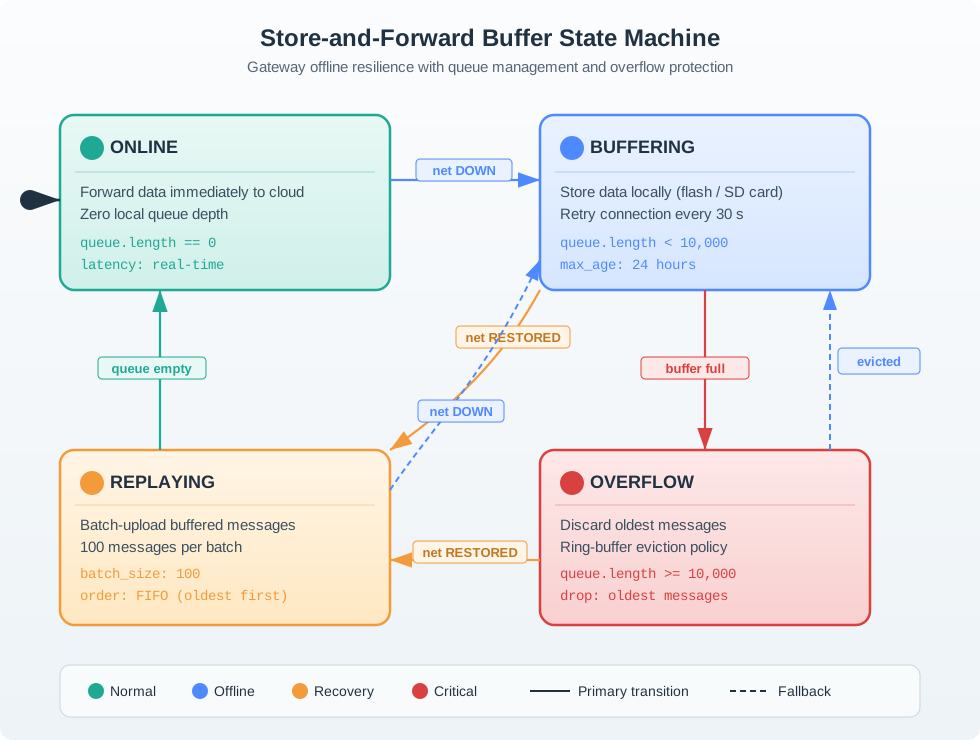
Read Figure 12.1 with “ONLINE” as the anchor; treat “Forward data immediately to cloud” as the first comparison. Then connect “Zero local queue depth” with “queue.length == 0”. Those labels make A queue contract should state the normal path, buffering condition, replay path, and overflow decision before the system is under pressure a traceable part of the “online”–“forward data immediately to cloud” decision, not an unsupported assertion.
Start With the Promise
Decouple time, not responsibility
A queue separates when work is produced from when it is consumed; it does not remove the need to define ordering, retry, and overflow.
Bounded by design
Capacity is a promise. A full queue is a decision point, so the overflow policy must be chosen, not discovered under load.
Acknowledgment is not exactly-once
Acknowledging a message marks when it can be removed; safe retry and replay still need idempotency.
Everyday Queues in IoT Gateways
Read the Everyday Queues in IoT Gateways material as a decision path rather than as isolated entries. First identify the operating condition in each entry and keep its units, timing, source, and assumed system state attached to it. Next compare the entries at the point where responsibility changes between device, gateway, network, analytic service, and operator; that hand-off is where apparently similar choices often produce different outcomes. Then follow the failure case: ask what becomes stale, delayed, unavailable, or unsafe, who detects it, and what evidence permits recovery. Finally connect the result to the chapter's running design record by naming the selected behavior, the rejected alternative, the measurement that justifies the choice, and the condition that forces a recheck. That order turns the examples or comparison into an auditable engineering argument.
- A gateway buffers sensor readings while the uplink is briefly down, then drains them when the link returns, so a short outage does not lose every reading.
- When a queue fills, dropping the oldest routine reading can be correct, because a newer measurement has already replaced it; dropping an alarm is not.
- "The message was delivered" is not the same as "the work was completed," and a queue has to know which one it is waiting for before it removes the message.
Overview Knowledge Check
If you can see why a queue must be bounded and why its full-queue behavior is a design choice, you have the core idea. Continue to Practitioner for the envelope, acknowledgment, and overflow policy.
12.2 Write the Queue Contract Before It Fills
This section: Write the Queue Contract Before It Fills — A queued message is more than its payload.
A queued message is more than its payload. The envelope carries the fields the queue needs to route, order, retry, expire, deduplicate, and observe the message. Group them in three: identity (message id, source id, sequence, timestamp) to detect duplicates, gaps, and stale work; routing (queue name, route or partition key, tenant, device role) to decide which path handles it; and handling (priority, time-to-live, retry budget, durability flag, correlation id) to decide what the queue may do under pressure or failure. Without a stable id, timestamp, and source identity, the queue cannot prove whether a replay is safe or whether a late message is still valid.
Acknowledgment: When May the Queue Let Go?
Acknowledgment answers one question — when may the queue remove a message or stop retrying it? The answer should match the side effect being protected.
Acknowledgment by itself does not guarantee end-to-end exactly-once behavior. If retry or replay is possible, the consumer still needs an idempotency rule or duplicate handling so that processing the same message twice does not double a side effect.
Overflow and Priority: What a Full Queue Does
Read the Overflow and Priority: What a Full Queue Does material as a decision path rather than as isolated entries. First identify the operating condition in each entry and keep its units, timing, source, and assumed system state attached to it. Next compare the entries at the point where responsibility changes between device, gateway, network, analytic service, and operator; that hand-off is where apparently similar choices often produce different outcomes. Then follow the failure case: ask what becomes stale, delayed, unavailable, or unsafe, who detects it, and what evidence permits recovery. Finally connect the result to the chapter's running design record by naming the selected behavior, the rejected alternative, the measurement that justifies the choice, and the condition that forces a recheck. That order turns the examples or comparison into an auditable engineering argument.
When the buffer is full, the queue must take one of a small set of defined actions, chosen for the data:
- Reject new work when the producer can safely retry later.
- Drop the oldest low-value work when a newer measurement already replaces it.
- Displace low-priority work so an urgent alert can fit in a bounded buffer.
- Expire stale work that is no longer useful past its time-to-live.
- Apply backpressure when downstream capacity is temporarily constrained and the producer can slow down.
- Dead-letter poison work when retrying the same invalid message would block healthy traffic.
Priority should protect clearly defined message families, not become a hidden way for every producer to jump the line. If everything is high priority, nothing is. Record who may set priority and keep evidence that the queue behaves correctly under pressure.
Practitioner Knowledge Check
If you can write the envelope, match the acknowledgment point to the side effect, and pick an overflow policy per data flow, you can stop here. Continue to Under the Hood for buffer internals, backpressure, and queue health.
12.3 Inside the Buffer and Its Health Signals
This section: Inside the Buffer and Its Health Signals — The deeper layer explains the mechanics behind the policy: how a bounded buffer actually tracks its contents, how backpressure differs from dropping, and why current depth is a poor measure of queue health on its own.
The deeper layer explains the mechanics behind the policy: how a bounded buffer actually tracks its contents, how backpressure differs from dropping, and why current depth is a poor measure of queue health on its own.
The Circular Buffer and the Full-or-Empty Ambiguity
A common embedded queue is a circular buffer: a fixed array where a head pointer marks the next item to remove and a tail pointer marks the next slot to write, both wrapping back to the start when they reach the end. FIFO ordering falls out naturally — the oldest accepted message is normally processed first. The classic subtlety is that the head and tail are equal in two completely different situations: when the buffer is empty and when it is full. The pointers alone cannot tell these apart, so a correct implementation keeps an explicit element count or a full flag. Getting this wrong produces a queue that either silently overwrites unread data or refuses to accept work it actually has room for.
Backpressure Versus Dropping
When ingress outruns egress, a queue can either shed load or push the limit back toward the producer. Dropping (oldest, lowest priority, or expired) keeps the consumer healthy but loses data, which is acceptable only when a newer value replaces the old one. Backpressure signals the producer to slow or pause, preserving data at the cost of slowing the source — appropriate only when the producer can actually slow down or buffer locally. Choosing between them is a data-loss decision, not a tuning knob, and it should be recorded with the reason.
Queue Health Is More Than Depth
Current depth is the most visible metric and the most misleading one. A shallow queue can still be broken if its oldest message has waited far too long, and a deep queue can be perfectly acceptable during a planned burst if consumers drain it within the target window. A trustworthy health view tracks depth alongside oldest age, in-flight (delivered-but-not-completed) count, enqueue and dequeue rates, retry and dead-letter rates, expired and dropped counts, and the dominant consumer error class. Together these tell you whether producers are outrunning consumers, whether failures are transient or repeated, and whether the overflow policy is actually being exercised.
Before release, exercise the design: a burst test (ingress spike), a restart test (durability across a process restart), a slow-consumer test (backpressure or drop behavior), an overflow test (the chosen full-queue policy), and a replay safety check (idempotent reprocessing). Record the envelope, ordering and buffer behavior, acknowledgment and durability, overflow policy, health metrics, and these test results in one review record so the queue is operable, not just functional.
Under-the-Hood Knowledge Check
At this depth, a queue is a bounded buffer with explicit policies and honest metrics. Track empty and full unambiguously, decide between backpressure and dropping as a data-loss choice, watch oldest age rather than depth alone, and prove the design with burst, restart, slow-consumer, overflow, and replay tests so delayed, retried, expired, and dropped work stays predictable.
12.4 Follow the Buffer From Arrival to Removal
This section: Follow the Buffer From Arrival to Removal — Read Figure 12.1 from the producer side.
Read Figure 12.1 from the producer side. A message enters the buffer with an identity and arrival order. The consumer takes work at its own rate, and acknowledgement marks the point at which the queue may safely remove that item. Capacity and overflow sit around this flow because a finite gateway cannot hold an unlimited difference between production and consumption.
Consider a producer sending 20 messages each second while the uplink consumer completes 15 messages each second. The backlog grows by (20-15=5) messages per second. A 300-message queue fills from empty in (300/5=60) s. Increasing capacity delays the failure but does not fix the sustained rate mismatch. The design must reduce production, increase consumption, shed data by an explicit rule, or accept a bounded operating period.
Acknowledgement defines delivery meaning. If the consumer removes a record before the server accepts it, a crash can lose that record. If removal happens only after acceptance, a crash between server storage and acknowledgement can cause redelivery. Stable message identifiers let the server recognize the second case. “At least once” delivery therefore needs duplicate-safe handling; it does not mean the physical event happened twice.
Ordering is also scoped. One FIFO queue can preserve arrival order, but parallel consumers may finish out of order. If pressure records from pump P4 must remain ordered while records from other pumps can proceed, partition by device identity. That choice prevents one slow pump stream from freezing unrelated work while retaining a meaningful sequence within P4.
Predict queue behavior before applying load. With the 20/s producer and 15/s consumer, expect 150 waiting messages after 30 s and 300 after 60 s. Pause acknowledgements after the server accepts one identified record, then expect that record to return after recovery without a second database effect. Finally, fill the queue and verify the selected overflow rule by checking exactly which identifiers remain. Counts and identities together reveal more than a chart of queue depth.
A queue policy should name capacity, ordering scope, acknowledgement point, retry delay, retry ceiling, dead-letter handling, retention, and overflow. Those are product decisions about evidence and service, not tuning details to leave at library defaults.
Priority can help an alarm pass routine telemetry, but it changes order and can starve the lower class. Give each class a bounded share or ageing rule, then test a sustained alarm load. Expiry is different from priority: an old control request may be unsafe even when it reaches the front.
Monitor both depth and age. A short queue containing one hour-old record can be more serious than a longer queue of recent samples. Alert on the oldest eligible message, rejection count, retry rate, and dead-letter growth alongside the number waiting.
Message retention should match meaning. A routine sample may expire after a newer one supersedes it, while an audit event may require durable storage. Put expiry in the message or queue policy, not in an operator’s manual. After clock correction, verify that expiry still uses a trustworthy time source and does not delete fresh work or deliver stale control.
Document message-queue ownership for stuck work. The producer can expose bad input, the queue can isolate delivery, and the consumer can reject meaning. A clear error category sends the message to the component able to correct it.
Retest that ownership path during a real consumer outage.
12.5 Summary
This section: Summary
- A message queue decouples when work is produced from when it is consumed, absorbing bursts, but only when its behavior is visible and bounded.
- Every real queue has a limit, so the full-queue behavior is a design choice; leaving it undefined lets the system invent a bad one under load.
- The contract has four parts: producer, queue, consumer, and failure, and a sound design makes the envelope, buffer, acknowledgment point, overflow policy, and health evidence explicit.
- The envelope carries identity, routing, and handling fields; without a stable id, timestamp, and source, the queue cannot judge replay safety or message validity.
- Match the acknowledgment point to the side effect: ack-on-delivery can lose work on a crash, while ack-after-processing protects it but needs idempotency for duplicates.
- A full queue chooses among reject, drop oldest, displace by priority, expire, backpressure, or dead-letter, and priority must protect specific flows rather than become a shortcut.
- A circular buffer uses head and tail pointers with wraparound, and an explicit count or full flag is required because equal pointers mean both empty and full.
- Queue health is more than depth: oldest age, in-flight count, rates, retry and dead-letter rates, and error class reveal whether the queue is truly draining; prove it with burst, restart, slow-consumer, overflow, and replay tests.
A queue is a bounded buffer with explicit policies, not an infinite safety net. Define the envelope, match the acknowledgment point to the side effect you are protecting, choose a full-queue policy deliberately, and judge health by oldest age rather than depth alone. Acknowledgment marks when work can be released; only idempotency makes retry and replay safe, and only burst, restart, slow-consumer, overflow, and replay tests prove the queue is operable under pressure.
12.6 See Also
This section: See Also
Message Queue Lab Challenges
Practice diagnosing expiry, dead-letter, deduplication, backpressure, and replay scenarios.
Pub/Sub and Topic Routing
Connect queue behavior with topic filters, fan-out, retained state, and broker routing.
Protocol Bridging Fundamentals
See where a bounded queue sits inside the gateway translation boundary.
Protocol Bridging Examples
Review how queues handle backlog and offline replay in real gateway patterns.
Find help
3 reviewed answers.
Where should I start in a module?
Open the module page from the sidebar to see its chapters in order. Use the module map to return to a topic you need.
Modules and pathsReviewed
What can I try when a project does not work?
Check the symptom, then work through the diagnostic steps. Keep the error message and the smallest example that reproduces it.
When you are stuckReviewed
How do interactive examples work?
Use the interactive guide to check how examples and simulations work before changing your project.
Interactive examples guideReviewed