45  Message Queue Lab

In 60 Seconds

Message queues buffer data between IoT producers (sensors) and consumers (cloud services) so neither side needs to be online simultaneously. MQTT QoS 0 is fire-and-forget (fastest, no guarantee); QoS 1 guarantees at-least-once delivery with ACK; QoS 2 guarantees exactly-once with a 4-step handshake. Dead letter queues capture undeliverable messages for debugging – never silently discard failed messages in production.

Key Concepts
  • Queue Lab Architecture: Test setup with a message producer (sensor simulator), message queue (RabbitMQ or Redis), and consumer (data processor) for hands-on queue behavior exploration
  • RabbitMQ Management UI: Browser-based interface for observing queue depth, consumer status, message rates, and dead letter queue contents during lab exercises
  • Message Rate Testing: Lab exercise measuring maximum sustainable throughput before queue depth grows unboundedly, revealing the consumer processing bottleneck
  • Consumer Acknowledgment Lab: Exercise demonstrating difference between auto-ack (immediate removal) and manual-ack (post-processing removal) for data loss prevention
  • Dead Letter Queue Exercise: Lab configuration deliberately producing unprocessable messages to validate dead letter routing and monitor recovery procedures
  • Queue Persistence Test: Exercise verifying that queue messages survive broker restart when durability is configured, versus the data loss that occurs with non-durable queues
  • Backpressure Simulation: Lab exercise configuring a slow consumer to observe queue fill behavior and test backpressure mechanisms
  • Queue Monitoring Setup: Configuring Prometheus/Grafana dashboards in the lab environment to visualize queue depth, consumer lag, and message throughput metrics

45.1 Learning Objectives

By the end of this chapter series, you will be able to:

  • Construct topic-based publish-subscribe messaging systems with broker routing
  • Differentiate QoS 0, 1, and 2 trade-offs and implement appropriate acknowledgment handling
  • Apply topic hierarchies with + and # wildcards for selective message filtering
  • Design message persistence and backpressure strategies for unreliable networks
  • Implement dead letter queues, deduplication caches, and flow control mechanisms
Minimum Viable Understanding
  • Message queues act as intermediary buffers between data producers (sensors, devices) and consumers (cloud services, dashboards), enabling asynchronous communication so neither side needs to be online simultaneously.
  • Pub/Sub (Publish-Subscribe) is the dominant IoT messaging pattern where publishers send messages to named topics and subscribers receive only messages matching their subscriptions – eliminating the need for direct device-to-device connections.
  • QoS levels (0 = at most once, 1 = at least once, 2 = exactly once) let you trade off between delivery speed and reliability; most IoT sensor data uses QoS 0 or 1, while critical commands like actuator control use QoS 1 or 2.

45.2 Introduction

This series covers building a message broker simulation to understand pub/sub patterns, QoS levels, topic routing, and message queuing. Message queuing is a fundamental communication pattern in IoT systems that enables asynchronous, reliable message delivery between distributed components.

Real-World Relevance

Message queues are everywhere in production IoT:

  • AWS IoT Core uses MQTT with message queuing for millions of devices
  • Azure IoT Hub implements device-to-cloud queuing with configurable retention
  • Industrial SCADA systems use message buffers to handle sensor bursts
  • Smart home hubs queue commands when devices are temporarily offline

Understanding these patterns prepares you for working with any enterprise IoT platform.

Sammy the Sensor says: “Imagine I write a letter every time I measure the temperature. But the cloud computer that reads my letters isn’t always awake. What do I do?”

Lila the LED explains: “That’s where a message queue comes in – it’s like a post office mailbox! Sammy drops his letter in the mailbox, and the cloud picks it up whenever it’s ready. The mailbox keeps the letter safe in between!”

Max the Microcontroller adds: “And with Pub/Sub, it’s even cooler! Instead of mailing a letter to one person, Sammy announces ‘New temperature reading!’ on a bulletin board called a topic. Anyone who signed up to watch that board gets the message. So the phone app, the dashboard, and the alarm system all get the reading at the same time – without Sammy needing to know who’s listening!”

Bella the Battery warns: “But be careful about QoS levels! QoS 0 is like tossing a postcard in the general direction of the mailbox – fast but it might get lost. QoS 1 is like getting a delivery confirmation. QoS 2 is like registered mail with tracking – super reliable but uses more of my precious energy. Choose wisely!”

A message queue is a software component that temporarily stores messages between a sender and a receiver. Think of it as a waiting line at a coffee shop:

  • Customers (producers) place orders (messages) in the queue
  • Baristas (consumers) pick up orders one at a time and process them
  • The queue keeps orders organized even when the shop gets busy

Why does IoT need message queues?

IoT systems face unique challenges that queues solve:

  1. Devices go offline: A sensor on a remote farm might lose connectivity. The queue holds its data until the connection is restored.
  2. Speed mismatch: Sensors may produce data 100 times/second, but the cloud can only process 10/second. The queue absorbs the burst.
  3. Many-to-many communication: Instead of wiring every sensor to every dashboard, a queue lets any device publish and any service subscribe.

Key vocabulary to know:

Term What It Means Analogy
Producer Sends messages (sensor, device) Customer placing an order
Consumer Receives messages (cloud, app) Barista making the order
Topic A named channel for messages A specific order window (“hot drinks”, “cold drinks”)
Broker Manages topics and delivery The shop manager routing orders
QoS Quality of Service level Standard vs. express vs. guaranteed delivery

The one thing to remember: Message queues let IoT devices communicate reliably even when networks are unstable, speeds differ, or components temporarily fail.

45.3 Message Queue Architecture Overview

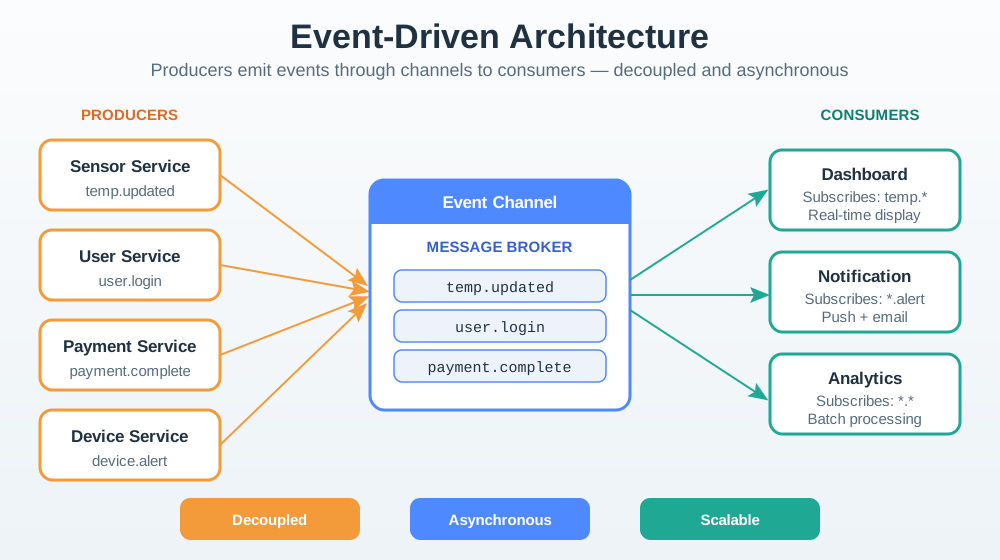
The following diagram shows how a message queue sits between IoT producers and consumers in a typical deployment:

Architecture diagram showing IoT message queue system with three producer devices (temperature sensor, motion sensor, smart actuator) on the left publishing to a central message broker containing three topic queues (sensor/temperature, sensor/motion, actuator/commands). Three consumer services (cloud analytics, mobile dashboard, alert engine) on the right subscribe to relevant topics. Arrows show publish flow from producers to broker and subscribe flow from broker to consumers.

45.4 QoS Level Comparison

Understanding the three MQTT QoS levels is essential for choosing the right reliability-performance trade-off:

Sequence diagram comparing three MQTT QoS levels. QoS 0 shows a single PUBLISH arrow from publisher to broker with no acknowledgment and a note saying 'fire and forget, may lose messages'. QoS 1 shows PUBLISH from publisher to broker followed by PUBACK from broker to publisher with a note saying 'at least once, may duplicate'. QoS 2 shows a four-step handshake: PUBLISH, PUBREC, PUBREL, PUBCOMP between publisher and broker with a note saying 'exactly once, highest overhead'.

45.5 Topic Hierarchy and Wildcard Routing

MQTT-style topic hierarchies use / separators with two wildcard types for flexible subscription patterns:

Tree diagram showing an MQTT topic hierarchy. The root is 'building' which branches into 'floor1' and 'floor2'. Each floor branches into rooms ('room101', 'room102' for floor1; 'room201' for floor2). Each room has leaf topics 'temperature', 'humidity', and 'motion'. Annotations show wildcard examples: 'building/floor1/+/temperature' matches all floor1 temperature topics using the single-level wildcard, and 'building/#' matches everything in the entire building using the multi-level wildcard.

Wildcard examples:

Subscription Pattern Matches Wildcard Type
building/floor1/+/temperature All temperature readings on floor 1 + single-level
building/floor2/# All sensors on floor 2 (any depth) # multi-level
building/+/+/motion All motion sensors on any floor/room + at two levels
building/# Every message in the entire building # at root

QoS Bandwidth Overhead Calculation for Smart Building

Consider a 10-floor building with 500 MQTT sensors, each publishing 1 reading/minute. How does QoS level affect bandwidth consumption?

Given data:

  • Sensors: 500
  • Rate: 1 reading/min = 1/60 Hz
  • Payload size: 80 bytes (sensor ID, value, timestamp)
  • MQTT header overhead: 2 bytes (fixed) + ~12 bytes (variable, topic name)

QoS 0 (fire-and-forget): \[\text{Message size} = 80 + 2 + 12 = 94 \text{ bytes}\] \[\text{TPS} = \frac{500}{60} \approx 8.33 \text{ msg/sec}\] \[\text{Bandwidth} = 94 \times 8.33 = 783 \text{ bytes/sec} \approx 0.78 \text{ KB/sec}\]

QoS 1 (at-least-once with PUBACK):

  • Additional overhead: 1 PUBACK packet (4 bytes fixed header + 2 bytes message ID = 6 bytes) \[\text{Bandwidth} = (94 + 6) \times 8.33 = 833 \text{ bytes/sec} \approx 0.81 \text{ KB/sec}\] Overhead increase: \((833-783)/783 = 6.4\%\)

QoS 2 (exactly-once with 4-step handshake):

  • Additional packets: PUBREC (6 bytes) + PUBREL (6 bytes) + PUBCOMP (6 bytes) = 18 bytes \[\text{Bandwidth} = (94 + 18) \times 8.33 = 933 \text{ bytes/sec} \approx 0.91 \text{ KB/sec}\] Overhead increase: \((933-783)/783 = 19.2\%\)

Key insight: Even with 500 sensors, total bandwidth is under 1 KB/sec – negligible on modern networks. The real cost is battery power (QoS 2 requires 3x more radio transmissions) and broker CPU cycles for state tracking.

Try It: QoS Bandwidth Overhead Calculator

Estimate MQTT bandwidth for your sensor deployment under different QoS levels. See how QoS selection affects total bandwidth and packet overhead.

45.6 Message Lifecycle in a Queue

This diagram shows the complete lifecycle of a message from production through delivery, including failure handling:

State diagram showing the lifecycle of a message in an IoT queue. The message starts in a 'Created' state, moves to 'Enqueued' when added to the queue, then to 'Dispatched' when sent to a subscriber. From Dispatched it can move to 'Acknowledged' if the subscriber confirms receipt (leading to 'Deleted'), or to 'Retry' if delivery fails. After exceeding max retries, the message moves to 'Dead Letter Queue' for manual inspection. Messages in the Enqueued state can also move to 'Expired' if their time-to-live elapses.

45.7 Chapter Overview

This topic has been organized into three focused chapters for easier learning:

45.7.1 Message Queue Fundamentals

Core queue data structures and operations for IoT message handling:

  • Message structure design (topic, payload, QoS, priority)
  • Circular buffer implementation
  • Enqueue, dequeue, and peek operations
  • Priority queue for critical messages
  • Queue statistics and monitoring

45.7.2 Pub/Sub and Topic Routing

Publish-subscribe patterns and message routing:

  • Topic hierarchies and naming conventions
  • MQTT-style wildcard matching (+ and #)
  • Subscriber management and registration
  • QoS levels 0, 1, and 2 explained
  • Retained messages for new subscribers
  • Message persistence during outages

45.7.3 Message Queue Lab Challenges

Hands-on exercises with Wokwi ESP32 simulation:

  • Complete lab code walkthrough
  • Challenge 1: Message expiry (Beginner)
  • Challenge 2: Dead letter queue (Intermediate)
  • Challenge 3: Message deduplication (Intermediate)
  • Challenge 4: Subscriber groups (Advanced)
  • Challenge 5: Flow control (Advanced)
  • Expected simulation outcomes

45.8 Choosing the Right Queue Configuration

Understanding how to select queue parameters for different IoT scenarios requires balancing multiple factors:

Decision flowchart for selecting message queue configuration in IoT. Starts with 'What is the message criticality?' branching into High (actuator commands, alerts) and Low (periodic telemetry). High criticality leads to QoS 2 with persistence enabled and dead letter queue. Low criticality asks 'Is data loss acceptable?' -- if yes, use QoS 0 with no persistence for maximum throughput; if no, use QoS 1 with short TTL and circular buffer. Each terminal node shows recommended queue depth and retention settings.

45.9 Visual Reference

Message queue architecture diagram with IoT publishers sending to a broker that routes messages through topic queues to subscribing consumer services

Message queue architecture showing publishers, broker with topic queues, and subscribers

45.10 Worked Example: Smart Building HVAC Message Queue Design

Scenario: You are designing the message queue architecture for a smart building HVAC system with 200 temperature sensors (1 reading/minute), 50 humidity sensors (1 reading/5 minutes), 30 HVAC actuators (variable-speed fans, dampers), and a central BMS (Building Management System) dashboard.

Step 1: Define the topic hierarchy

building/floor{N}/zone{M}/temperature    -- 200 sensors
building/floor{N}/zone{M}/humidity       -- 50 sensors
building/floor{N}/zone{M}/hvac/command   -- actuator commands
building/floor{N}/zone{M}/hvac/status    -- actuator status
building/alerts/{severity}               -- system-wide alerts

Step 2: Choose QoS levels per message type

Message Type QoS Rationale
Temperature readings QoS 0 High volume, periodic; missing one reading is acceptable since the next arrives in 60s
Humidity readings QoS 0 Same reasoning as temperature; 5-minute interval provides natural redundancy
HVAC commands QoS 1 Critical – a missed “turn off” command could waste energy or cause overheating
HVAC status QoS 1 The BMS needs to confirm actuator state for safety interlocking
Alerts QoS 2 Safety-critical; fire alarms, CO2 alerts must be delivered exactly once

Step 3: Calculate queue sizing

  • Sensor data rate: 200 sensors x 1/min + 50 sensors x 1/5 min = 210 messages/min = 3.5 msg/sec
  • Peak burst (all sensors report simultaneously after network recovery): 250 messages in under 1 second
  • Queue depth: 250 (burst) x 2 (safety margin) = 500 messages minimum
  • Retention: Temperature/humidity data TTL = 10 minutes (stale readings are useless for HVAC control)
  • Command queue: Depth of 100 with 1-hour retention and 3 retries before dead letter queue

Step 4: Define failure handling

  • Sensor data: Drop if queue is full (newest data replaces oldest via circular buffer)
  • Commands: Move to dead letter queue after 3 failed delivery attempts; alert the building operator
  • Alerts: Persist to disk; infinite retry with exponential backoff (1s, 2s, 4s, 8s, max 60s)

Result: This design handles normal operation at 3.5 msg/sec, tolerates 10-minute network outages without data loss for commands, and guarantees alert delivery even during extended failures.

LoRaWAN Gateway Capacity Planning with Duty Cycle Limits

A smart agriculture deployment has 200 soil moisture sensors transmitting via LoRaWAN to a single gateway. Each sensor sends 12 bytes every 15 minutes. Can one gateway handle this load under EU868 duty cycle regulations?

Given data:

  • Sensors: 200
  • Payload: 12 bytes
  • Transmission interval: 15 minutes
  • LoRaWAN: SF7BW125 (fastest data rate: 5.47 kbps)
  • EU868 duty cycle limit: 1% (max 36 seconds transmission per hour on 1% sub-bands)

Step 1: Calculate time-on-air per message

LoRaWAN packet = 12 bytes payload + 13 bytes LoRaWAN header = 25 bytes = 200 bits

\[T_{\text{packet}} = \frac{200 \text{ bits}}{5470 \text{ bits/sec}} \approx 0.0366 \text{ sec} = 36.6 \text{ ms}\]

Step 2: Calculate hourly transmissions \[\text{Messages/hour} = 200 \text{ sensors} \times \frac{60 \text{ min}}{15 \text{ min}} = 200 \times 4 = 800 \text{ messages/hour}\]

Step 3: Calculate total airtime per hour \[T_{\text{total}} = 800 \times 0.0366 = 29.28 \text{ seconds/hour}\]

Step 4: Check duty cycle compliance

EU868 1% duty cycle limit = \(3600 \times 0.01 = 36\) seconds/hour

\[\text{Utilization} = \frac{29.28}{36} = 81.3\% \text{ of duty cycle}\]

Result: PASS – the 200-sensor network uses 29.28 seconds out of the allowed 36 seconds (81% utilization), leaving 6.72 seconds (19%) headroom for retransmissions and occasional bursts. If adding more sensors, the limit is \(36/0.0366 \approx 983\) messages/hour = 245 sensors at 15-minute intervals before hitting regulatory limits.

Common Pitfalls in Message Queue Design
  1. Using QoS 2 for all messages: QoS 2 requires a four-step handshake, roughly doubling latency and tripling bandwidth usage. Reserve it for truly critical messages (billing events, safety alerts). Most sensor telemetry works fine with QoS 0 or 1.

  2. Unbounded queue depth: Without a maximum queue size, a burst of messages during a consumer outage can exhaust device memory (especially on embedded systems with 64-512 KB RAM). Always set a maximum depth and define an overflow policy (drop oldest, drop newest, or backpressure).

  3. Ignoring message expiry (TTL): A temperature reading from 2 hours ago is worse than useless – it is actively misleading. Always set time-to-live on sensor data so stale messages are automatically discarded.

  4. Topic hierarchy too flat or too deep: A flat topic like sensors forces subscribers to receive everything. A deeply nested topic like building/campus1/wing-a/floor3/zone7/room312/desk4/sensor/temperature/celsius wastes bandwidth on every message. Aim for 3-5 levels that balance specificity with efficiency.

  5. No dead letter queue: When messages fail delivery after multiple retries, they should move to a dead letter queue (DLQ) for manual inspection, not simply be dropped. Without a DLQ, you lose visibility into recurring delivery failures that may indicate hardware or network problems.

  6. Shared topic namespace without access control: In multi-tenant IoT deployments, all devices sharing a flat topic space can subscribe to each other’s data. Use topic-level ACLs (Access Control Lists) to restrict which clients can publish or subscribe to specific topic prefixes.

45.11 Knowledge Check

Scenario: A hospital patient monitoring system sends three types of messages via MQTT: vital signs (heart rate, BP), equipment status, and diagnostic logs. The network team must assign QoS levels.

Given Data:

  • Vital signs: 240 messages/hour per patient (every 15 seconds), 50 patients = 12,000 msg/hr
  • Equipment status: 12 messages/hour per device, 200 devices = 2,400 msg/hr
  • Diagnostic logs: 5 messages/hour per system, 20 systems = 100 msg/hr
  • Network: Hospital WiFi with occasional 5-10 second glitches
  • Message sizes: Vitals 80 bytes, Status 120 bytes, Logs 500 bytes

Step 1: Analyze criticality and loss tolerance

Vital signs: - Loss tolerance: ZERO for critical alerts (heart rate <40 or >120 bpm) - Routine readings: Missing 1-2 readings acceptable (next arrives in 15 seconds) - Duplicate tolerance: LOW (processing duplicate heart rate could trigger false alert)

Equipment status: - Loss tolerance: LOW (must know if ventilator fails) - Duplicate tolerance: MEDIUM (idempotent state updates)

Diagnostic logs: - Loss tolerance: MEDIUM (helpful for debugging, not critical) - Duplicate tolerance: HIGH (logs are informational)

Step 2: Calculate bandwidth for each QoS level

QoS 0 overhead: 1× message size (no ACK) QoS 1 overhead: ~1.5× (PUBLISH + PUBACK) QoS 2 overhead: ~2.5× (PUBLISH + PUBREC + PUBREL + PUBCOMP)

Vitals with QoS 2: 12,000 × 80 bytes × 2.5 = 2,400 KB/hr Status with QoS 1: 2,400 × 120 bytes × 1.5 = 432 KB/hr Logs with QoS 0: 100 × 500 bytes × 1.0 = 50 KB/hr Total bandwidth: 2,882 KB/hr = 0.8 KB/sec

WiFi capacity: 54 Mbps = 6,750 KB/sec MQTT overhead: 0.8 ÷ 6,750 = 0.01% (negligible)

Step 3: Assign QoS levels with rationale

Message Type QoS Level Rationale
Critical vitals (HR <40 or >120) QoS 2 Zero tolerance for loss or duplicate critical alerts
Routine vitals QoS 1 At-least-once acceptable, dedupe at receiver
Equipment status QoS 1 Exactly-once preferred, but duplicate “ON” is safe
Diagnostic logs QoS 0 Fire-and-forget, logs are for troubleshooting only

Step 4: Measure impact during 10-second WiFi glitch

Without QoS: - Vitals lost: 240 msg/hr ÷ 3600 × 10s × 50 patients = 33 critical readings lost - Potential missed emergency: HIGH RISK

With QoS (2 for critical, 1 for status, 0 for logs): - Critical vitals: 100% delivered (QoS 2 guarantees) - Status updates: 100% delivered (QoS 1 retries) - Diagnostic logs: ~10 lost (QoS 0), acceptable trade-off

Result: QoS strategy prevented 33 potential missed emergencies during one glitch

Key insight: Mix QoS levels by message criticality. QoS 2 for life-safety, QoS 1 for operations, QoS 0 for diagnostics.
Use Case Loss Acceptable? Duplicate Acceptable? QoS Level Bandwidth Multiplier
Critical alarms (fire, medical) NO NO QoS 2 2.5×
Actuator commands (valve open/close) NO Maybe QoS 1 1.5×
Sensor telemetry (temperature, humidity) YES (next reading in 30s) YES QoS 0 1.0×
Billing/transaction data NO NO QoS 2 2.5×
Device status (online/offline) NO YES (idempotent) QoS 1 1.5×
Debug logs YES YES QoS 0 1.0×

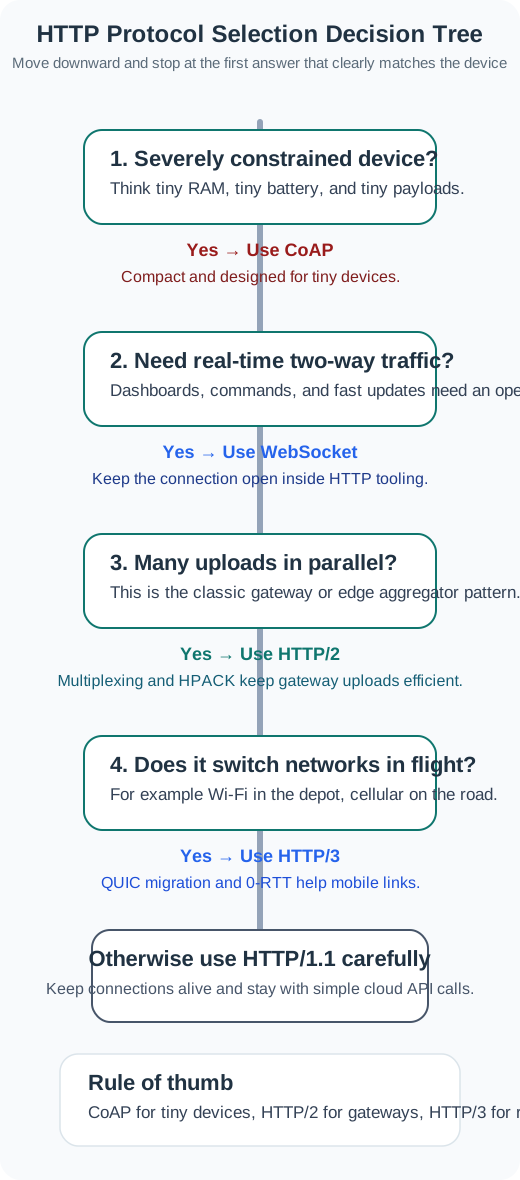
Selection decision tree:

  1. Can you tolerate message loss?
    • NO → Go to step 2
    • YES → Use QoS 0
  2. Can you tolerate duplicate delivery?
    • NO (e.g., billing, critical command) → Use QoS 2
    • YES (e.g., idempotent command, retriable event) → Use QoS 1

Cost-benefit analysis: | QoS | Reliability | Bandwidth | Latency | Battery Impact | |—–|————|———–|———|—————-| | 0 | ~98% | 1× | Lowest | Lowest | | 1 | ~99.9% | 1.5× | Medium | Medium | | 2 | ~99.99% | 2.5× | Highest | Highest |

Common Mistake: Using QoS 2 for High-Frequency Telemetry

Scenario: A solar farm used QoS 2 for all MQTT messages, including high-frequency voltage/current readings (1 sample/second from 10,000 inverters).

The mistake: QoS 2 for data where loss is acceptable

What happened:

  • Message rate: 10,000 inverters × 1 msg/sec = 10,000 msg/sec
  • QoS 2 handshake: PUBLISH + PUBREC + PUBREL + PUBCOMP = 4 packets per message
  • Total packets: 10,000 × 4 = 40,000 packets/sec
  • Broker CPU: 100% utilization handling QoS 2 state machines
  • Result: Broker crashed after 48 hours (memory exhaustion from storing 10M in-flight message states)

Why QoS 2 was wrong:

  • Voltage readings arrive every second
  • Missing one reading is harmless (next arrives in 1 second)
  • Duplicates are also harmless (analytics filters outliers)
  • QoS 2 overhead provided zero value but cost 2.5× bandwidth + CPU

Correct approach: Downgrade to QoS 0 for telemetry

# Tiered QoS strategy
if msg_type == "ALARM":  # Inverter failure alert
    qos = 2  # Exactly once
elif msg_type == "COMMAND":  # Start/stop inverter
    qos = 1  # At least once
else:  # Telemetry (voltage, current, power)
    qos = 0  # Fire and forget

After fix:

  • Telemetry: QoS 0 (98.5% delivery, acceptable loss)
  • Commands: QoS 1 (no QoS 2 state overhead)
  • Alarms: QoS 2 (critical alerts guaranteed)
  • Broker CPU: 15% average utilization
  • Bandwidth: Reduced from 400 Mbps to 160 Mbps (60% savings)

Key lesson: High-frequency telemetry should use QoS 0. Reserve QoS 2 for rare, critical messages where duplicates cause harm.

45.12 Summary

This chapter series provides a comprehensive guide to message queue concepts for IoT systems, from fundamental data structures through production-grade patterns.

Concept Key Point When It Matters
Message Queue Decouples producers from consumers via an intermediary buffer Any system where sender and receiver operate at different speeds or availability
Pub/Sub Pattern Publishers send to topics; subscribers receive from topics they registered for Multi-consumer scenarios (sensor data to dashboard + analytics + alerts)
Topic Hierarchy Slash-separated levels (building/floor1/temperature) with + and # wildcards Organizing thousands of devices in a logical, filterable structure
QoS 0 Fire-and-forget, no acknowledgment High-frequency telemetry where individual loss is acceptable
QoS 1 At-least-once with PUBACK; may duplicate Most IoT sensor data and non-critical commands
QoS 2 Exactly-once via 4-step handshake Safety-critical alerts, billing events, actuator commands
Message Persistence Store messages to disk to survive broker restart Systems requiring reliability during power or network failures
Dead Letter Queue Failed messages moved to separate queue for inspection Production systems where silent message loss is unacceptable
Backpressure Slow down producers when consumers cannot keep up Preventing memory exhaustion on resource-constrained devices
Circular Buffer Fixed-size queue that overwrites oldest entries Embedded systems (ESP32, Arduino) with limited RAM

Design principles to remember:

  1. Match QoS to message criticality – not all data deserves the same delivery guarantee
  2. Always set TTL on sensor data – stale readings cause worse decisions than missing readings
  3. Design commands to be idempotent – QoS 1 duplicates are then harmless
  4. Size queues for burst, not average – network recovery storms can generate 10-100x normal traffic
  5. Implement dead letter queues – invisible failures are the hardest to debug