Practice: Gateway Protocol Translation
More
Depth: Practitioner
Progress saves as you read. Mark sections complete as you go; your progress appears in the sidebar.
This lab belongs to Protocol Bridging Examples
Start With the Story
This section: Start With the Story — The lab is a rehearsal for a real incident review: a source device sends a value, the gateway translates it, the target route reacts, and someone later asks whether the result can be trusted.
The lab is a rehearsal for a real incident review: a source device sends a value, the gateway translates it, the target route reacts, and someone later asks whether the result can be trusted. Build the first path slowly. Map one source sample, preserve its unit and source time, choose the route, then force a timeout so the bad-quality record is as visible as the successful telemetry.
Learning Objectives
This section: Learning Objectives
By the end of this lab, you should be able to:
- Build a source-to-target mapping record for a gateway translation path.
- Normalize source samples while preserving unit, timestamp, quality, and identity.
- Choose target routes and delivery expectations for telemetry, state, and command paths.
- Define queue behavior for ordinary messages, critical messages, stale messages, and malformed messages.
- Produce lab evidence for success, timeout, duplicate, replay, and target-unavailable scenarios.
Lab Scenario
This section: Lab Scenario — You are reviewing a gateway that bridges local equipment readings into a target event route.
You are reviewing a gateway that bridges local equipment readings into a target event route. The exact protocols can vary, but the lab uses a consistent evidence pattern:
The next choice in the “source sample”–“point map” decision depends on “Normalized msg”, a boundary shown in Figure 1. Inspect “Source sample”, then set it against “Point map”, before judging One spine — source sample, point map, normalized message, queue policy, target route, evidence record — carries a good reading, a state change, and a timeout to three different evidence records.
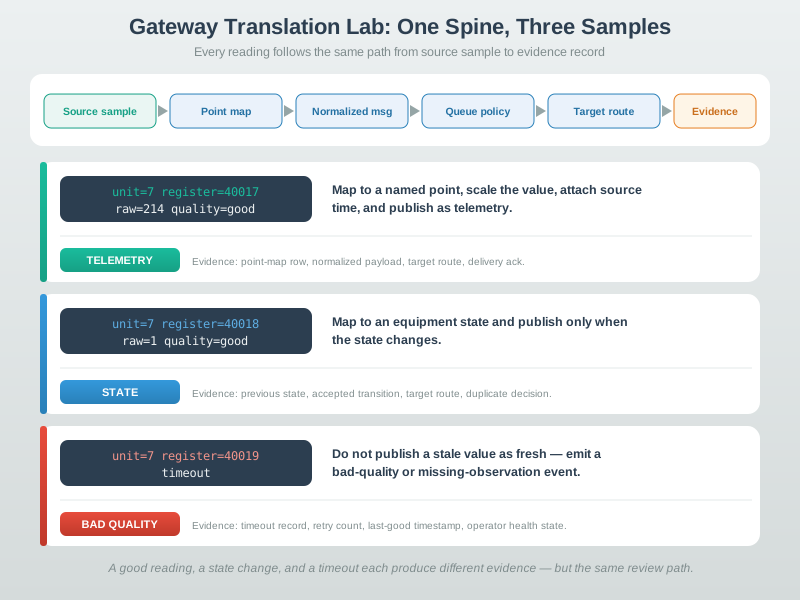
In Figure 1, notice how “Source sample” establishes the initial state; “Point map” supplies the next check. The move through “Normalized msg” reaches “Queue policy”, making One spine — source sample, point map, normalized message, queue policy, target route, evidence record — carries a good reading, a state change, and a timeout to three different evidence records observable. Return to the “source sample”–“point map” decision with “Queue policy”, and keep “Source sample” in the release record.
Your gateway receives three source samples:
Source sample Do Evidence
unit=7 register=40017 raw=214 quality=good
Map to a named point, scale the value, attach source time, and publish as telemetry.
Point-map row, normalized payload, target route, and delivery acknowledgment.
unit=7 register=40018 raw=1 quality=good
Map to an equipment state and publish only when the state changes.
Previous state, accepted state transition, target route, and duplicate decision.
unit=7 register=40019 timeout
Do not publish a stale value as fresh. Emit a bad-quality or missing-observation event.
Timeout record, retry count, last-good timestamp, and operator-facing health state.
Lab Workbench
This section: Lab Workbench — The lab workbench is a set of records, not a single tool.
The lab workbench is a set of records, not a single tool. You can complete it with a spreadsheet, notes, a local script, or a gateway configuration review.
Inspect Figure 2 with one question from the “source samples”–“unit=7 register=40017 raw=214” decision: how does “Source Samples” constrain “unit=7 register=40017 raw=214”? The answer supports Gateway translation lab workbench showing source samples, point map, normalized payload, target route, queue observation, and failure drill.
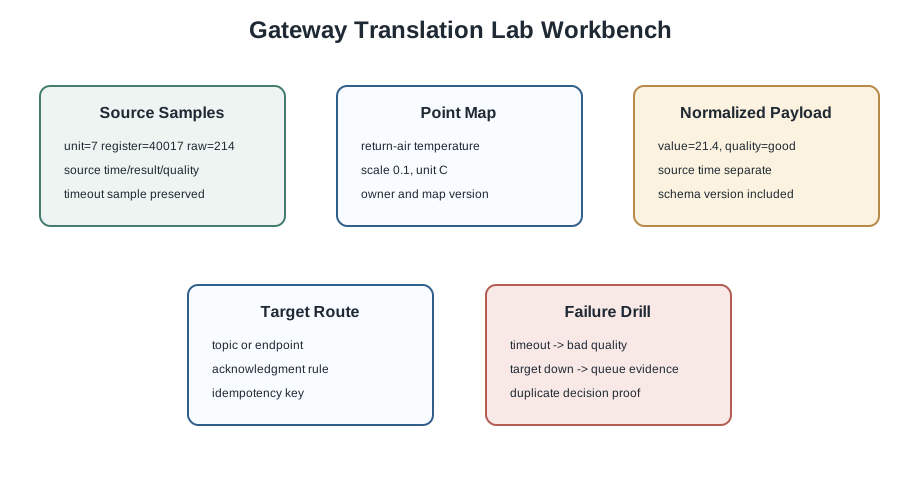
Notice how Figure 2 separates “Source Samples” from “unit=7 register=40017 raw=214”. Now move to “source time/result/quality” and finish at “timeout sample preserved”; that second step reveals why Gateway translation lab workbench showing source samples, point map, normalized payload, target route, queue observation, and failure drill. Apply the distinction when “timeout sample preserved” closes the record for the “source samples”–“unit=7 register=40017 raw=214” decision.
Prepare these artifacts:
- Source sample sheet: raw address, raw value, source timestamp, quality indicator, and read result.
- Point map: point name, unit, scale, target route, expected update rule, and owner.
- Normalization rule: how raw fields become typed internal fields.
- Queue rule: priority, maximum age, retry behavior, and dead-letter condition.
- Verification record: ordinary sample, failure sample, expected output, actual output, and reviewer decision.
Use this as a source sample, not as production code:
{
  "source": "line-2-meter-7",
  "address": "unit=7/register=40017",
  "raw_value": 214,
  "source_time": "observed-at-source",
  "quality": "good",
  "read_result": "ok"
}
The point map might scale 214 by 0.1, producing 21.4 in the target unit. The review record must show that scaling rule explicitly.
Step 1: Build the Point Map
This section: Step 1: Build the Point Map — Start with the source samples and define the mapping.
Start with the source samples and define the mapping. Do not begin with the target dashboard or route name. The source meaning comes first.
- In the source sample sheet, select
unit=7/register=40017and read its raw value and quality before naming a route. - In the point-map row, enter the point name,
Cunit,0.1scale, and the timeout quality rule. - Check that register
40018maps to state and40019to a missing-observation path, rather than reusing the temperature rule. - A local Python calculation of the sample
214 * 0.1returned21.4 C; retain the raw value beside the mapped value. - Mark the map version and owner so the subsequent message can identify the rule that produced it.
Required Fields
- Source address
- Point name
- Unit
- Scale or conversion rule
- Quality handling
- Target route
Review Question
If a source value is missing or stale, how will the target know that the point was not observed?
Done When
Every source sample can be traced to exactly one named point or one documented error path.
Example mapping row:
source: unit=7/register=40017
point: return_air_temperature_c
scale: raw_value * 0.1
target_route: site-a/mechanical/boiler-1/return-air-temperature
quality_rule: publish bad_quality event when read_result is timeout
Step 2: Normalize the Payload
This section: Step 2: Normalize the Payload — The normalized message is the gateway’s internal contract.
The normalized message is the gateway’s internal contract. It should be stable even if the source protocol or target route changes later.
- In the normalized-message record, copy the point identity,
21.4 C, source time, gateway time, quality, and mapping version into separate fields. - Compare it with the source sheet; the source time must survive the translation instead of being replaced by gateway receipt time.
- For register
40019, write a bad-quality or missing-observation event with no fresh numeric value. - The local Python check returned
gateway timeout= bad_quality; no fresh value; this is a rule check, not a live gateway trace. - Review the message against the mistakes below before using the animation’s Semantic translation view.
{
  "point": "return_air_temperature_c",
  "value": 21.4,
  "unit": "C",
  "source_time": "observed-at-source",
  "gateway_time": "received-at-gateway",
  "quality": "good",
  "source": "line-2-meter-7",
  "mapping_version": "bridge-map-01"
}
Check for these mistakes:
- The target only contains a raw register number.
- The target timestamp hides when the source was actually observed.
- Quality is dropped because the value looks valid.
- The mapping version is missing, so a future schema change cannot be traced.
Run it: Step the m2m-gateway animation below to see what a normalized message must preserve. Move through Decode the source, Preserve meaning, Rebuild delivery, and Check the boundary, and set the translation to Semantic so units and identity are preserved rather than Enriched, which adds gateway metadata. Watch the stage where the source unit, identity, and source time survive into the internal message — exactly the fields the normalized contract above must keep and the ones the mistake list warns are silently dropped.
Step 3: Choose the Target Route
This section: Step 3: Choose the Target Route — Target routes are a contract.
Target routes are a contract. A route should be stable, authorized, and specific enough for consumers to subscribe without broad catch-all filters.
- In the route ledger, assign the temperature point to the site/system/asset/point telemetry hierarchy.
- Keep the equipment-state transition on its state route; the previous state and event id help review duplicate decisions.
- Put a command request on a separate authorized route with requester identity, timeout, and audit id before any write is allowed.
- Review the target subscription scope and record the exact accepted route, rather than a broad wildcard alone.
- This is a route-design record here; verify delivery and authorization on your own gateway before claiming an operational bridge.
Route family Do Evidence
Telemetry Use a stable hierarchy with site, system, asset, and point. Example accepted route and consumer subscription scope.
State Publish only meaningful transitions and include previous state when useful. State transition sample and duplicate rejection evidence.
Command Require identity, authorization, audit record, and timeout rule before writing to a source-side device. Command request, authorization decision, target write sample, and audit id.
Telemetry forwarding and command bridging are not equally risky. A command creates a side effect. A lab record for commands must include who requested it, what they were allowed to do, how retries are bounded, and how duplicates are rejected.
Step 4: Queue and Failure Drills
This section: Step 4: Queue and Failure Drills — Translation is not complete until failure behavior is visible.
Translation is not complete until failure behavior is visible.
- In the simulator’s Scenario control, run an ordinary sample first and retain its Adapt, Normalize, Route, and Buffer observations.
- For the target-unavailable case, inspect the Buffer stage and record queue depth before and after recovery.
- A local Python queue check produced
queue depth= 1while unavailable andqueue depth= 0after recovery; these are model results, not the browser simulator’s counters. - The same local check accepted one target record from two copies of event
m7; use the simulator to test its own duplicate behavior. - If using a physical gateway, repeat the drills on your own hardware and retain source and target logs with timestamps.
Before deciding the “gateway under review”–“map, queue, publish, observe” decision, inspect “Gateway Under Review” in Figure 3 and compare it with “Map, queue, publish, observe”. That contrast matters because Gateway lab failure drills showing source timeout, malformed payload, duplicate message, target unavailable, replay, and operator evidence.
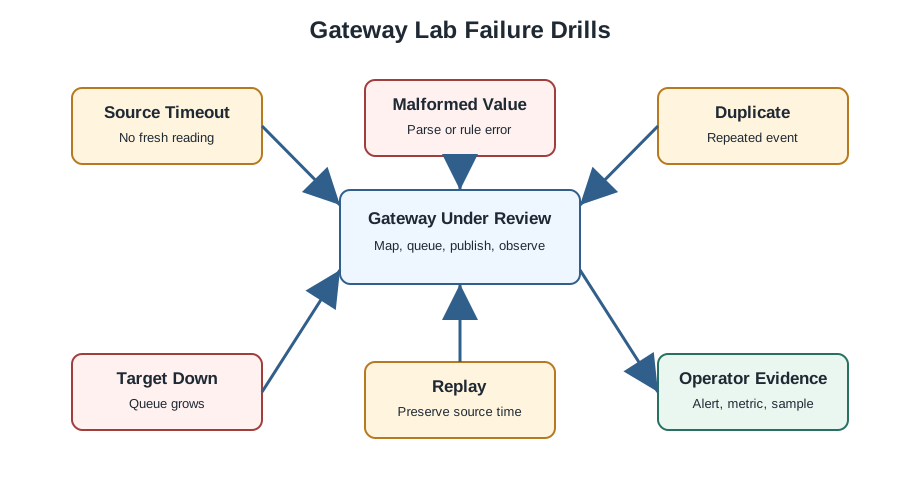
In Figure 3, notice how “Gateway Under Review” establishes the initial state; “Map, queue, publish, observe” supplies the next check. The move through “Source Timeout” reaches “No fresh reading”, making Gateway lab failure drills showing source timeout, malformed payload, duplicate message, target unavailable, replay, and operator evidence observable. Return to the “gateway under review”–“map, queue, publish, observe” decision with “No fresh reading”, and keep “Gateway Under Review” in the release record.
Run these drills:
- Source timeout: confirm the gateway emits a missing or bad-quality state rather than a fresh-looking stale value.
- Malformed source value: confirm the sample moves to an error path with raw context and rule id.
- Duplicate event: confirm the gateway accepts, rejects, or idempotently updates according to the contract.
- Target unavailable: confirm queue depth, oldest age, retry count, and drop or dead-letter behavior are visible.
- Replay after recovery: confirm source timestamps are preserved and downstream side effects remain safe.
Run it: Run these failure drills against the multi-protocol gateway simulator below. Pick a Scenario and push traffic through the Adapt, Normalize, Route, and Buffer stages, then stress the path so the Buffer stage has to hold messages when the target is slow — the Target-unavailable drill made visible as queue growth. Watch how the simulator routes and protects mixed MQTT, AMQP, HTTP, and CoAP traffic under load, so you can record the queue depth, retry, and drop behavior each drill above asks you to prove.
Lab Review Record
This section: Lab Review Record — Your final deliverable is the review record.
Your final deliverable is the review record. It should fit on one page and link every decision to evidence.
Use Figure 4 with “Source” to inspect the next step in the “source”–“raw evidence” decision. The relationship between “Source” and “Raw evidence” is what makes Gateway protocol translation lab record showing source evidence, mapping evidence, delivery evidence, failure evidence, and release decision reviewable.
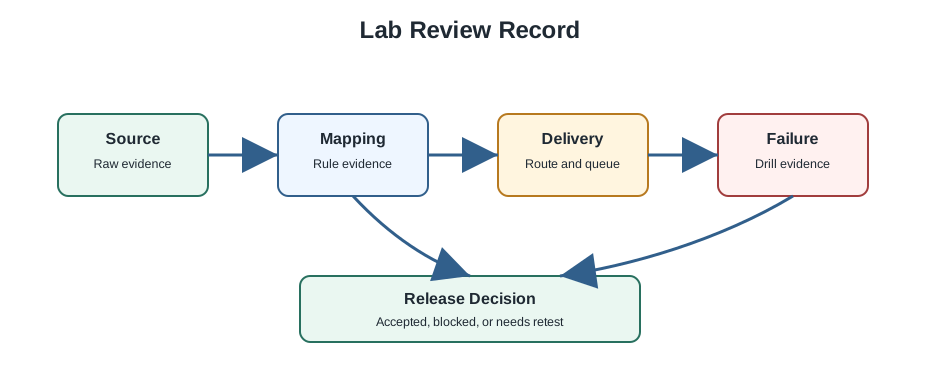
In Figure 4, notice how “Source” establishes the initial state; “Raw evidence” supplies the next check. The move through “Mapping” reaches “Rule evidence”, making Gateway protocol translation lab record showing source evidence, mapping evidence, delivery evidence, failure evidence, and release decision observable. Return to the “source”–“raw evidence” decision with “Rule evidence”, and keep “Source” in the release record.
Source Evidence
- Raw sample
- Source address
- Source timestamp
- Quality or error state
Mapping Evidence
- Point name
- Unit and scale
- Normalized payload
- Mapping version
Delivery Evidence
- Target route
- Queue policy
- Delivery expectation
- Duplicate handling
Failure Evidence
- Timeout drill
- Malformed sample
- Target-unavailable drill
- Replay result
Release Checklist
This section: Release Checklist
Before the lab is accepted, verify:
- Every source sample has a mapping row or an error path.
- Every normalized payload contains point, value, unit, source time, gateway time, quality, source identity, and mapping version.
- Every target route has an owner and an authorization boundary.
- Queue limits, retry limits, stale-message handling, and dead-letter behavior are written down.
- At least one ordinary sample and four failure samples were reviewed.
- The reviewer can reproduce the evidence without relying on memory or screenshots alone.
Knowledge Check: Release Evidence
This section: Knowledge Check: Release Evidence
Overview: Translation Includes Delivery Semantics, Not Just Format
A protocol gateway is easy to underestimate as a format converter - reshape the bytes and change the addressing. The hard part is that protocols also differ in what they promise about delivery. One side may hold a message until an acknowledgment arrives; the other may discard it after one send attempt. Bridging the bytes while ignoring those delivery semantics quietly changes the reliability of the whole path, usually for the worse.
The same trap hides in units and schemas. A source that reports temperature as an integer in tenths of a degree and a target that expects a floating-point degree value will silently disagree by a factor of ten unless the contract says otherwise. A gateway therefore needs an explicit translation contract that maps not just field names but units, encodings, and delivery semantics.
For example, a Modbus RTU meter on RS-485 might expose register 40017 = 214 with a stale or failed read flag. A Node-RED, Telegraf, or custom Python gateway might turn that into MQTT topic site-a/mechanical/boiler-1/return-air-temperature or an HTTP event for a cloud API. The lab record must show whether 214 becomes 21.4 C, which source timestamp is kept, which map version made the decision, and whether the target sees good, stale, or bad_quality.
That is why the gateway review starts with source samples instead of UI screenshots. A dashboard can look correct while the bridge has overwritten source time with gateway time, converted Fahrenheit as Celsius, dropped a quality bit, or acknowledged a source message before the target accepted it. The source sample, point map, normalized payload, queue observation, and target receipt together show whether the gateway preserved meaning across the boundary.
Intuition only: a gateway can only pass along the reliability it is actually given. It cannot recover data the source never delivered, and it can easily throw away reliability if it acknowledges too early.
Before carrying The layered lab view follows one reading from source evidence through mapping, queue behavior, target route, and release evidence into the “Source sample” design record, view Figure 1. It makes “Source sample” and “Point map” separate, inspectable parts of the “source sample”–“point map” decision.
On Figure 1, inspect “Source sample” before “Point map”. The subsequent hand-off from “Normalized msg” to “Queue policy” explains The layered lab view follows one reading from source evidence through mapping, queue behavior, target route, and release evidence. Carry that sequence into the “source sample”–“point map” decision so “Source sample” evidence, “Point map” decision, and “Queue policy” recheck remain distinguishable.
What A Contract Must Map
Addressing
Source topic or resource to target route or endpoint, including any identity mapping.
Encoding and units
Field types, scales, endianness, and timestamp formats, so a value keeps its meaning.
Delivery semantics
At-most-once, at-least-once, or exactly-once behavior, matched or explicitly downgraded across the bridge.
Failure evidence
Queue depth, retries, and drops recorded so a translation failure is visible, not silent.
Overview Knowledge Check
Practitioner: Chain The Acknowledgment To Preserve Reliability
To preserve at-least-once behavior across a bridge, the gateway must not acknowledge the source until the target has committed. The rule is: acknowledge upstream only after downstream success. Pair it with an idempotency key so that retries do not create duplicates.
Worked Example: Bridge MQTT QoS 1 To An HTTP Endpoint
The source publishes with MQTT QoS 1 (at-least-once): the broker keeps redelivering until the gateway sends its acknowledgment. The gateway translates each message into an HTTP POST to the cloud.
- The trap: if the gateway acknowledges the MQTT message immediately and then the POST fails, the message is gone - the path has been silently downgraded from at-least-once to at-most-once.
- The fix: hold the MQTT acknowledgment until the POST returns success. If the POST fails, do not acknowledge; the broker will redeliver and the gateway retries.
- The duplicate risk: a POST that succeeded but whose response was lost will be retried, so the cloud may see the same record twice. Attach an idempotency key (a source message id) so the sink deduplicates. Also apply the unit contract - for example a source value of 235 in tenths of a degree becomes 23.5 degrees on the target.
With acknowledgment chaining plus idempotency, the bridge preserves at-least-once behavior end to end and avoids duplicates, instead of quietly weakening the delivery contract.
Make the record concrete enough for another engineer to repeat. For MQTT, capture topic, QoS, packet id or application message id, retained-message policy, and broker acknowledgment timing. For HTTP, capture endpoint, status code, timeout, retry limit, idempotency key header, and the response body that proves acceptance. For a Modbus or BACnet source, capture register or object id, poll time, source-quality flag, scale, and the last-good observation. Those fields let the reviewer see exactly where a failed POST, broker reconnect, or source timeout changed the bridge state.
A practical lab can use Eclipse Mosquitto, a local HTTP test receiver such as httpbin or a small Express endpoint, and a saved Modbus sample file instead of live equipment. The important part is not the tool brand. It is that a repeated MQTT message with the same source id produces one target record, a failed HTTP request leaves the MQTT side unacknowledged or queued, and a timed-out source sample creates a target-visible quality state rather than a false fresh value.
Translation Contract Ledger
Practitioner Knowledge Check
Under The Hood: Reliability Is End To End, Not Per Hop
The deepest principle of bridging is that delivery behavior is a property of the whole path, not of any single leg. A gateway cannot manufacture reliability the source never gave it: bridging a fire-and-forget source into a durable target queue does not recover a message the source already dropped before the gateway saw it. And a gateway can destroy reliability it was given, by acknowledging one side before the other side has committed - a reliability air gap right in the middle of a nominally reliable path.
This is why per-leg semantics do not compose into an end-to-end contract by themselves. MQTT QoS 2 provides exactly-once delivery, but only between an MQTT client and its broker; it says nothing about a bridge from the broker to a different protocol. Achieving exactly-once behavior across a gateway requires idempotency at the final sink - a deduplicating key that makes reprocessing a repeated message harmless - not merely selecting the strongest QoS on one leg. The practitioner discipline is to reason about the behavior the receiver at the far end actually experiences, wire acknowledgments so no hop confirms before the next has committed, and place deduplication where the data comes to rest.
Under the hood, the gateway usually needs a small durable outbox. The outbox records source id, source timestamp, mapping version, normalized payload hash, target route, target attempt count, last error, and final disposition. Without that record, a process restart between source acknowledgment and target commit can lose the only copy of the message. With it, the gateway can resume after restart, resend unfinished target attempts, and show which messages were accepted, rejected, expired, or dead-lettered.
The bridge also needs a clear boundary between data-quality failure and delivery failure. A Modbus timeout or BACnet fault value is not the same as a failed MQTT publish or HTTP 503 response. The first should become a target-visible quality state tied to the source observation. The second should stay in queue or retry state tied to transport delivery. Mixing the two makes operators chase the wrong problem: a bad sensor looks like a network outage, or a target outage looks like bad process data.
End-To-End Reliability Rules
Cannot add reliability
A gateway cannot recover what the source dropped before it. A durable target does not fix an unreliable source.
Can remove reliability
Acknowledging upstream before the downstream commit opens a silent air gap that loses data.
Per-leg does not compose
QoS 2 on one hop is not exactly-once behavior across a bridge to another protocol.
Deduplicate at the sink
Exactly-once end to end needs idempotency where the data lands, not just a strong QoS on one leg.
Under-the-Hood Knowledge Check
Summary
This section: Summary — This lab turns protocol translation into a reproducible review.
This lab turns protocol translation into a reproducible review. The work starts with source samples, not tool configuration. A complete lab record shows the point map, normalized payload, target route, queue behavior, failure drills, and release decision. That evidence is what proves the gateway preserves meaning, timing, quality, and delivery intent.
Key Takeaway
This section: Key Takeaway — A gateway lab should prove ingress, transformation, egress, and failure handling.
A gateway lab should prove ingress, transformation, egress, and failure handling. Capture payloads, logs, errors, and timing so the bridge can be reviewed as a system boundary.