Practice: Mobile Gateway Protocols
More
Depth: Practitioner
Progress saves as you read. Mark sections complete as you go; your progress appears in the sidebar.
This lab belongs to Mobile Gateway Challenges
Minimum Viable Understanding
This section: Minimum Viable Understanding
- A lab can be evidence-based. You do not need a working hardware simulator to practice gateway review; source traces and expected outputs are enough to test the important decisions.
- Protocol success is not semantic success. A source record can be parsed and uploaded while losing unit, timestamp, quality, or identity meaning.
- Failures are part of the lab. Out-of-range values, stale records, duplicate uploads, rejected payloads, and missing permissions must be tested deliberately.
- The output is a release record. The lab ends with evidence a reviewer can use, not just a green connection message.
Learning Objectives
This section: Learning Objectives
By the end of this lab, you will be able to:
- Trace a mobile gateway path from nearby device record to upstream upload.
- Write a translation contract for source identity, value, unit, timestamp, quality, and state.
- Apply validation rules that preserve valid records and reject unsafe records.
- Define buffer, retry, stale, duplicate, and rejection behavior during outages.
- Assemble protocol lab evidence for release review.
Where This Lab Fits
This section: Where This Lab Fits — Use this lab after the gateway overview, challenge review, and edge/fog placement chapter.
Use this lab after the gateway overview, challenge review, and edge/fog placement chapter. It turns those concepts into a concrete review workflow.
Gateway boundary
Use Mobile Phone Gateway Fundamentals to define the phone gateway role and boundary.
Operational constraints
Use Mobile Gateway Challenges for mobility, offline, operating-system, permission, and privacy constraints.
Protocol evidence
Use this lab to verify translation, validation, buffering, upload, and release evidence.
Lab Scenario
This section: Lab Scenario — A managed phone collects nearby equipment-tag records during a field visit.
A managed phone collects nearby equipment-tag records during a field visit. The phone gateway receives short local records, validates them, adds visit context, buffers while offline, and uploads normalized records when the approved path returns.
The claim that Mobile gateway protocol lab workflow showing source trace, translation contract, validation, buffering, upload, and release evidence needs “trace” as a concrete check beside “local records”. Inspect Figure 1 before continuing the “trace”–“local records” decision, especially “trace” beside “local records”.
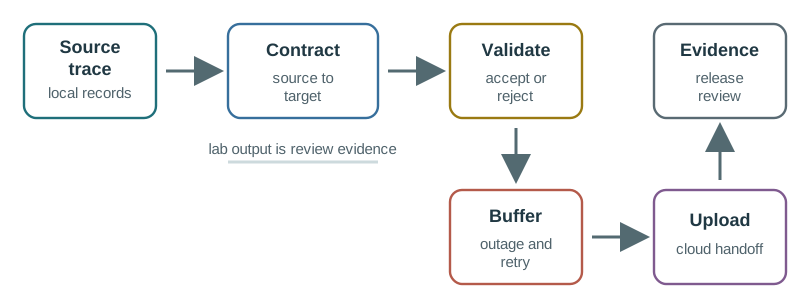
Trace Figure 1 by asking what “trace” establishes and what “local records” changes. Check “Contract” next, ending at “source to”. That progression is the mechanism behind Mobile gateway protocol lab workflow showing source trace, translation contract, validation, buffering, upload, and release evidence and the evidence order needed for the “trace”–“local records” decision.
The lab uses this source-record shape:
tag_id=T-104
metric=temp
value=7.4
unit=C
source_time=2026-06-13T09:14:22Z
quality=measured
status=ok
The cloud should receive a normalized gateway record that keeps the source meaning and adds gateway evidence:
{
  "source_id": "T-104",
  "gateway_id": "PHONE-17",
  "visit_id": "VISIT-8821",
  "metric": "temperature",
  "value": 7.4,
  "unit": "C",
  "source_time": "2026-06-13T09:14:22Z",
  "gateway_time": "2026-06-13T09:14:25Z",
  "quality": "measured",
  "state": "accepted",
  "translation_version": "tag-temp-v3"
}
Part 1: Trace The Protocol Path
This section: Part 1: Trace The Protocol Path — Start by writing the path from local source to upstream upload.
Start by writing the path from local source to upstream upload. The path should include every place the record can be changed, rejected, delayed, or duplicated.
Before deciding the “raw local source”–“parser” decision, inspect “raw local source” in Figure 2 and compare it with “Parser”. That contrast matters because Protocol trace path from nearby tag record through phone gateway parser, translation contract, buffer, upload path, and cloud record.
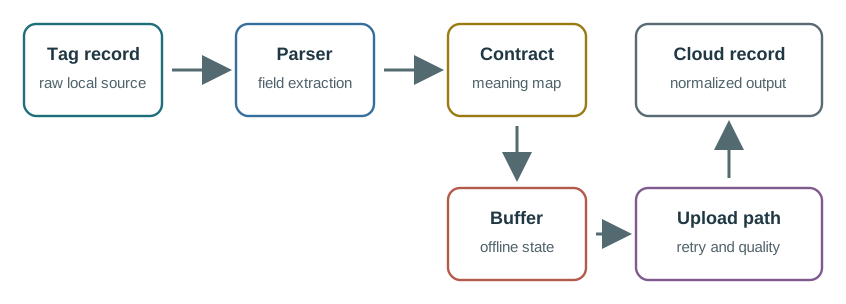
Notice “raw local source” on Figure 2 as the condition under review. “Parser” marks the adjacent responsibility, while “field extraction” leads to “Contract”. Together they explain Protocol trace path from nearby tag record through phone gateway parser, translation contract, buffer, upload path, and cloud record; preserve that division when documenting the “raw local source”–“parser” decision.
Record these fields:
- Source device identity.
- Gateway identity.
- Visit, site, route, user, or asset binding.
- Source protocol or local record format.
- Parser version.
- Translation contract version.
- Validation rule version.
- Buffer state.
- Upload path.
- Cloud record schema.
Step 1: Trace one source record
- Copy the
T-104source record above into a local text file or lab notebook; label itraw, notcloud. - On the protocol-path figure, follow that record through parser, contract, buffer, upload, and cloud schema.
- At each boundary, write the source identity, visit binding, version, and point where rejection or duplication can occur.
- The expected trace has separate source and gateway times; a single unlabeled timestamp loses provenance.
- Keep the source sample beside the trace so a reviewer can check every later transformation against it.
Part 2: Write The Translation Contract
This section: Part 2: Write The Translation Contract — The translation contract is the core of the lab.
The translation contract is the core of the lab. It proves that the gateway did not merely forward data, but preserved meaning.
The contract should specify:
tag_idmaps tosource_id.metric=tempmaps tometric=temperature.valueis copied only after range and type validation.unit=Cis preserved; no silent unit conversion is allowed unless documented.source_timeis preserved separately fromgateway_timeandupload_time.qualityis mapped to an allowed quality state.- Unknown status values are rejected or marked uncertain, not silently accepted.
- The translation version is included in the uploaded record.
Use source and target examples for every accepted mapping and every rejection case.
Run it: Prototype this contract in the translation visualizer below before you write it down. Set a Source Protocol and Target Protocol and pick a Payload Mode such as JSON object, then press Translate Message and Normalize Payload and watch the Gateway Pipeline map each source field to its target — the same source_id, metric, unit, and quality mappings the contract must pin down. Read the Translation Diagnosis to see where a mismatched unit or unknown status would be flagged rather than silently forwarded, then capture those accepted-and-rejected examples in your contract.
Step 2: Map the fields before upload
- In the translation visualizer above, choose a source and target protocol and inspect the field mapping; save the settings you used.
- The browser run showed
Translation complete: gateway pipeline recalculatedand a compatible-semantics diagnosis for its default preset. - In your contract table, map
tag_idtosource_id,temptotemperature, and preserveC, quality, and source time. - Treat the visualizer as a mapping aid; verify the chapter’s exact record with a local parser before claiming an accepted result.
- In the local fixture run, the accepted line was
ACCEPT source_id=T-104 metric=temperature value=7.4 unit=C source_time=2026-06-13T09:14:22Z. - Record
tag-temp-v3as the intended translation version and keep gateway time as a distinct field.
Part 3: Validate Records
This section: Part 3: Validate Records — Validation should reject unsafe records without discarding good records.
Validation should reject unsafe records without discarding good records. The lab uses these rules:
- Temperature value must be numeric.
- Temperature unit must be
C. - Temperature value must be within the allowed range for this workflow.
- Source time must be present and parseable.
- Quality must be one of
measured,estimated,stale, orfault. - Tag must be in the visit allowlist.
- Duplicate source records must be marked before upload.
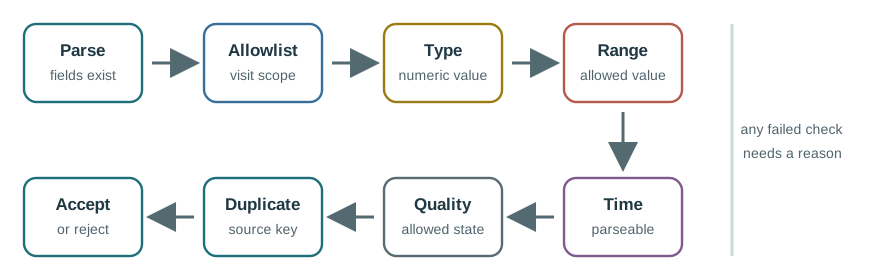
Inspect “fields exist” against “Allowlist” on Figure 3, then test the link between “visit scope” and “Type”. The two comparisons clarify Mobile gateway validation pipeline showing parse, allowlist, type, range, time, quality, duplicate, accept, and reject decisions. They also keep “fields exist” in the running decision about the “fields exist”–“allowlist” decision, tied to labelled evidence.
Review these cases:
Valid measured record
T-104 temp 7.4 C measured from the active visit allowlist is accepted and uploaded with source and gateway time.
Unknown unit
T-104 temp 45 F measured is rejected unless the contract explicitly defines conversion and evidence.
Missing identity
A record without tag_id cannot be safely bound to a source and should not enter the cloud record stream.
Duplicate retry
A repeated source sequence after upload retry is marked duplicate or idempotently ignored, not counted as a new reading.
Step 3: Reject unsafe inputs with a reason
- Run the source record through each validation rule, changing one field at a time so the failed rule is identifiable.
- For the local fixture, changing
unit=Ctounit=FreturnedREJECT unsupported_unit. - Removing
tag_idreturnedREJECT missing_tag_id; neither rejected record may enter the upload queue. - Check the visit allowlist, numeric range, parsed source time, and allowed quality before marking a record accepted.
- Save each rejected input with its reason, because an accepted output alone cannot demonstrate safe validation.
Part 4: Define Buffer And Upload Behavior
This section: Part 4: Define Buffer And Upload Behavior — The lab must include outage behavior.
The lab must include outage behavior. A phone gateway is only release-ready if the offline path is defined.
The buffer policy should answer:
- What records are stored while offline?
- What is the maximum buffer age before records become stale?
- What happens when storage is full?
- Which fields are used for duplicate detection?
- Which upload path is allowed after recovery?
- How are cloud rejections retained?
- How does the gateway report unresolved records?
Step 4: Exercise the offline retry rule
- Disconnect the upload path in your implementation or use a local queue fixture; note the outage start and queue depth.
- Give each reading a stable identity from source and source time before retrying after reconnection.
- The local fixture produced
QUEUEDon first receipt andDUPLICATEon the same key’s retry. - Record the stale threshold, full-buffer action, retry count, and cloud rejection retention rule beside the trace.
- A real phone upload still needs field verification; this fixture proves only the local duplicate decision.
Part 5: Assemble Release Evidence
This section: Part 5: Assemble Release Evidence — The final lab output is a release evidence pack.
The final lab output is a release evidence pack. It should be reviewable by someone who did not run the lab.
To ground the “protocol lab evidence”–“source samples” decision through “raw tag records” in visible evidence about “protocol lab evidence”, inspect Figure 4. Its named elements “protocol lab evidence” and “Source samples” frame the claim that Mobile gateway protocol lab release evidence map linking source samples, translation contract, validation results, buffer drill, upload records, rejection log, and release decision.
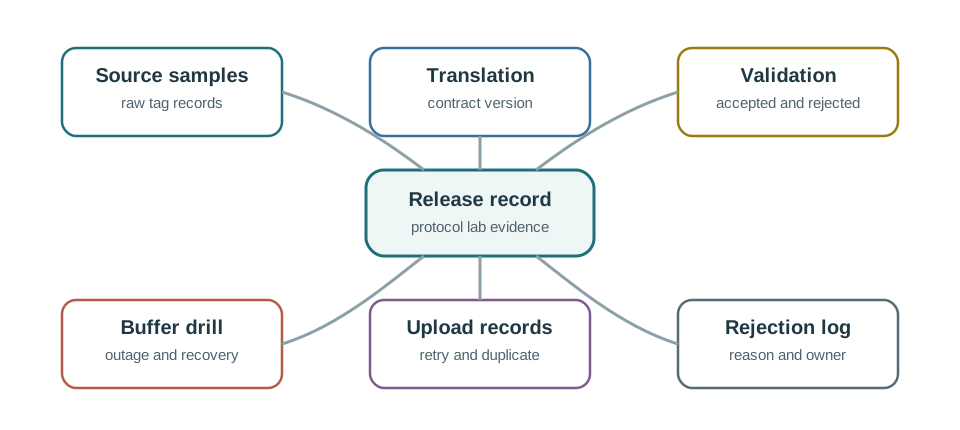
Trace Figure 4 by asking what “protocol lab evidence” establishes and what “Source samples” changes. Check “raw tag records” next, ending at “Translation”. That progression is the mechanism behind Mobile gateway protocol lab release evidence map linking source samples, translation contract, validation results, buffer drill, upload records, rejection log, and release decision and the evidence order needed for the “protocol lab evidence”–“source samples” decision.
Include:
- Source trace examples.
- Expected normalized records.
- Translation contract and version.
- Validation rules and rejection cases.
- Buffer drill with outage start, buffer depth, retry count, stale threshold, and recovery result.
- Upload record with timestamps, quality, retry, and duplicate state.
- Rejection log with reasons.
- Open risks and release owner.
Step 5: Assemble the reviewable release pack
- Put the raw sample, normalized record, mapping table, and version identifiers in one evidence folder.
- Add accepted and rejected validation inputs, preserving the exact reason for every rejection.
- Include the queue trace with outage start, depth, retries, stale threshold, and duplicate disposition.
- Compare source time with gateway and upload times rather than replacing one timestamp with another.
- Mark the release provisional until the approved phone, local protocol, and cloud path have been run together.
Lab Review Checklist
This section: Lab Review Checklist
Do not mark the lab complete until a reviewer can answer:
- Which source records were accepted, rejected, marked stale, or marked duplicate?
- Which source fields map to each cloud field?
- Which unit, timestamp, quality, state, and identity rules were applied?
- Which evidence proves the gateway preserved source measurement time?
- What happened during outage and upload retry?
- Which rejected records were retained for review?
- Which translation, validation, and schema versions were used?
- Who owns future changes to the protocol contract?
Knowledge Check
This section: Knowledge Check
Common Pitfalls
This section: Common Pitfalls
Parsing only proves the gateway could read a source record. Translation proof requires mapping identity, value, unit, time, quality, state, and rejection behavior.
A protocol lab that never tests stale, duplicate, rejected, missing, and out-of-contract records does not prove release readiness.
Replacing source time with gateway receipt time can corrupt sequence analysis. Preserve both times when the source provides a measurement time.
Retry without idempotency can duplicate accepted records. The lab should prove duplicate detection before release.
Buffer Before You Trust the Upload
This section: Buffer Before You Trust the Upload — A mobile gateway sits between field sensors that speak short-range protocols and a backhaul link that carries the data onward.
A mobile gateway sits between field sensors that speak short-range protocols and a backhaul link that carries the data onward. On a phone or a moving vehicle, that backhaul - usually cellular - is intermittent: it drops in tunnels, dead zones, and handovers. So the gateway's job is not only to translate protocols and formats; it is to hold data safely while the uplink is gone and forward it when the link returns. That store-and-forward buffer is the resource that decides whether data survives a disconnection.
The central sizing question is simple: how much data arrives during the longest expected outage, and can the gateway hold it? If the buffer is too small it overflows and data is lost; if the queue is unbounded it can exhaust memory and crash, losing everything. Neither failure shows up on a bench with perfect connectivity, which is why the lab drives real gaps.
That makes the lab evidence more specific than a connection test. The reviewer should be able to point to a source trace, the translation contract, the accepted or rejected normalized record, the queue-depth history during outage, and the upload result after reconnect. If any of those artifacts is missing, the lab has proved only that one path happened to work once.
Intuition only: a mobile gateway is a shock absorber for connectivity. Size its buffer to the worst outage times the ingest rate, and decide in advance what to drop when it fills.
Before carrying Mobile gateway store-and-forward lifecycle from collection through reconciliation into the “sensor reading” design record, view Figure 5. It makes “sensor reading” and “Timestamp” separate, inspectable parts of the “sensor reading”–“timestamp” decision.

In Figure 5, notice how “sensor reading” establishes the initial state; “Timestamp” supplies the next check. The move through “sensor and” reaches “gateway time”, making Mobile gateway store-and-forward lifecycle from collection through reconciliation observable. Return to the “sensor reading”–“timestamp” decision with “gateway time”, and keep “sensor reading” in the release record.
What The Gateway Owns
Translate
Map source protocol, encoding, and units onto the backhaul's format and route.
Buffer
Hold ingested data while the uplink is down, in RAM or spilled to flash.
Forward
Drain the buffer on reconnect, in order, without losing or duplicating records.
Account
Record queue depth, drops, and duplicates so a gap leaves evidence, not silence.
Overview Knowledge Check
Size the Buffer to the Worst Outage
This section: Size the Buffer to the Worst Outage — Size the buffer as bytes = ingest_rate x message_size x max_gap, then decide where it lives and what happens when it fills.
Size the buffer as bytes = ingest_rate x message_size x max_gap, then decide where it lives and what happens when it fills. Time to overflow for a smaller buffer is buffer_bytes / (ingest_rate x message_size).
Use measured field values rather than nominal data-sheet values. Count headers, signatures, timestamps, retry metadata, and local audit fields, because those bytes occupy the queue too. Also decide the storage tier before the test starts: RAM may be fast but volatile, flash survives process restart but has wear and encryption requirements, and an external service cannot help while the uplink is gone. A credible lab names the assumptions, drives an outage longer than the expected gap, and records whether the queue drains in order afterward.
Worked Example: A Vehicle Gateway Through A Tunnel
Field sensors deliver 20 messages per second at 200 bytes each, so ingest is 4 KB/s. The worst expected outage is a 15-minute (900 s) dead zone.
- Buffer needed: 4 KB/s x 900 s = 3600 KB = 3.6 MB to cover the full gap with no loss.
- RAM-only reality: a 1 MB RAM queue overflows in 1 MB / 4 KB/s = 250 s, about 4 minutes - well short of the 15-minute gap. The gateway must spill to flash (at least 3.6 MB) or apply a drop policy.
- Drop policy: if only current state matters, drop-oldest keeps the freshest data; if a complete record from the gap start matters, drop-newest keeps the earliest. Either way, count the drops so the loss is visible.
The lab makes this concrete: force a gap longer than the buffer can hold and confirm the overflow behaves as designed and is logged, rather than crashing or silently discarding data.
Buffer Sizing Ledger
Practitioner Knowledge Check
Reconnect Is Where Data Is Duplicated or Lost
This section: Reconnect Is Where Data Is Duplicated or Lost — Draining the buffer on reconnect is deceptively hard.
Draining the buffer on reconnect is deceptively hard. If the gateway uploads a batch and the link drops before the acknowledgment arrives, it cannot tell whether the server received the batch. Re-sending on the next reconnect gives at-least-once delivery and creates duplicates; not re-sending risks loss. The fix is to tag each record with a monotonic sequence number or message id so the server can deduplicate, turning at-least-once transport into effectively-once storage. Order matters too: a naive drain that interleaves retries with fresh data can deliver records out of sequence.
The buffer itself has two opposite failure modes. An unbounded queue never drops a record, but during a long outage it grows until it exhausts memory and the gateway crashes - losing the entire buffer, the worst possible outcome. A bounded queue cannot crash the gateway, but it must drop once full, and a silent drop is indistinguishable from data that never existed. The disciplined design bounds the queue, spills to flash to extend it, chooses drop-oldest or drop-newest deliberately, and emits a drop counter and queue-depth metric so every gap leaves an audit trail. The translation contract should state these choices explicitly rather than leaving them to whatever the library does by default.
Reconnect also creates timing problems. Sensor time, gateway receipt time, queue enqueue time, upload attempt time, and server acceptance time can all differ by minutes. The cloud should not overwrite source time with upload time, and analytics should know whether a record was fresh, stale-but-useful, or rejected as too old. The lab should therefore replay at least one lost-acknowledgment case, one out-of-order drain, one full-buffer case, and one stale-record rejection before the gateway is trusted in a moving deployment.
Failure Modes To Design Against
Duplicate on retry
A lost acknowledgment forces re-send; without sequence ids the server stores the record twice.
Out-of-order drain
Interleaving retries with fresh data can deliver records out of sequence unless ordering is preserved.
Unbounded OOM
A queue that never drops grows until memory is exhausted and the gateway crashes, losing everything.
Silent drop
A bounded queue that drops without a counter hides the loss. Emit drop and depth metrics as evidence.
Under-the-Hood Knowledge Check
-
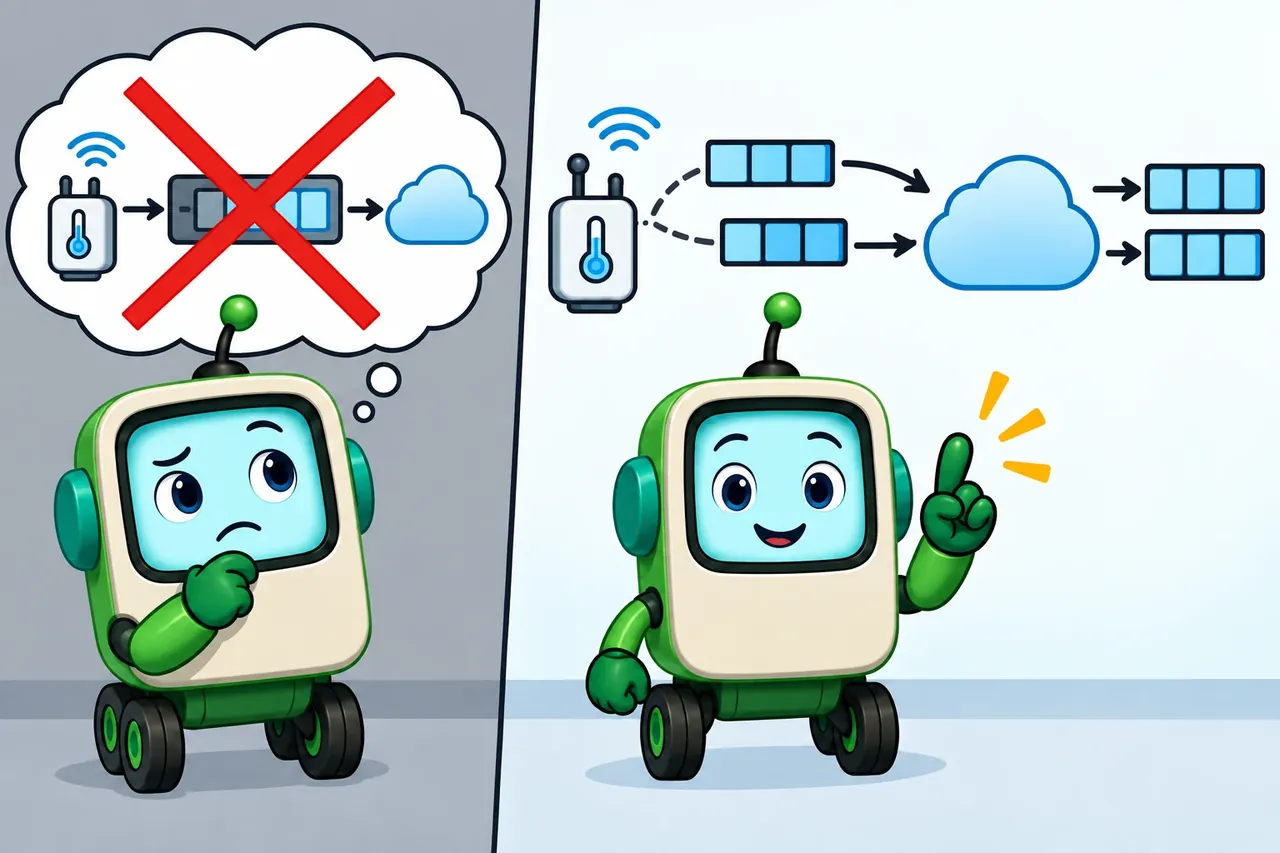
Wrong idea: move the retry buffer from flash memory to working memory. It fails because duplicates come from resending a batch with no message key, not from where it was stored.
Summary
This section: Summary — The mobile gateway protocol lab is a review exercise, not a hardware demo.
The mobile gateway protocol lab is a review exercise, not a hardware demo. It proves that a mobile gateway can preserve meaning across a protocol boundary: source trace, translation contract, validation, buffering, retry, upload, rejection evidence, and release decision. A green connection message is useful, but it is not enough.
What’s Next?
This section: What’s Next?
- Read Mobile Phone Gateway Fundamentals for the broader pathway and completion context.
- Revisit Mobile Phone Gateway Fundamentals if the gateway boundary is still unclear.
- Revisit Mobile Gateway Challenges if outage, permissions, operating-system, or mobility behavior needs more review.
Key Takeaway
This section: Key Takeaway — A mobile-gateway protocol lab should validate discovery, pairing, payload translation, permissions, disconnects, and recovery across the phone, device, and cloud path.
A mobile-gateway protocol lab should validate discovery, pairing, payload translation, permissions, disconnects, and recovery across the phone, device, and cloud path.