10 Protocol Bridging Examples
More
Depth: Practitioner
Progress saves as you read. Mark sections complete as you go; your progress appears in the sidebar.
A building thermostat, a factory controller, and a field radio can all feed the same operations service, but their messages do not carry meaning in the same way. Comparing real protocol bridge paths exposes where identity, scale, timing, and failure rules differ. These examples turn a gateway diagram into records that can be replayed.
A gateway is the boundary computer. A protocol is a set of message rules, and a payload is the application data carried inside a message.
Overview: A Bridge Translates Disagreement, Not Just Bytes
A protocol bridge connects systems that disagree — about timing, addressing, payload format, and reliability. A field sensor pushes a tiny message when it wakes; a cloud analytics service expects a steady stream with a schema. A building controller answers a poll; a dashboard wants an event. The gateway's job is to reconcile those disagreements, and the useful insight is that the pattern matters far more than the brand of gateway or cloud. Once you can name the source protocol, target protocol, normalization rule, queue behavior, security boundary, and failure mode, the specific products become interchangeable details.
The trap is to think of a bridge as a byte converter. Converting a Modbus register into a JSON field is the easy, mechanical part. The hard part is preserving meaning, timing, delivery intent, and trust across the boundary: knowing that register holds a return-air temperature in a particular unit, that a stale read must not look fresh, that a delivery may need an acknowledgement, and that arriving on a new protocol does not make the data trustworthy.
For example, a cold-room bridge might read Modbus register 40012, scale it by 0.1, label it as return-air temperature in degrees C, and publish it to building/site-a/cold-room-3/return-air. The useful record carries the source timestamp, gateway-arrival timestamp, quality flag, unit, and mapping version. If the meter times out, the bridge should publish or record a missing or bad-quality state instead of replaying the last good value with a fresh gateway time. That small discipline lets a cloud rule decide whether to alarm, hold, or retry without guessing what happened at the source.
If you only need the intuition, this layer is enough: every bridge, in every setting, can be reviewed with one boundary — a source contract, the gateway's work, a target contract, defined failure behavior, and evidence that one real reading travelled the whole path with its meaning intact.
Start Simple: Same Boundary, Different Sites
Read each example as the same handoff in a different room. A building gateway, a field gateway, an industrial gateway, and a cloud bridge all need a source sample, a point map, a normalized record, a queue decision, and failure evidence. Once that review boundary is visible, the product names and protocol names stop distracting from the engineering decision.
Before carrying Different gateway examples share one review boundary: normalize, map semantics, queue, and observe into the “Gateway Core” design record, view Figure 10.1. It makes “Gateway Core” and “Normalize” separate, inspectable parts of the “gateway core”–“normalize” decision.
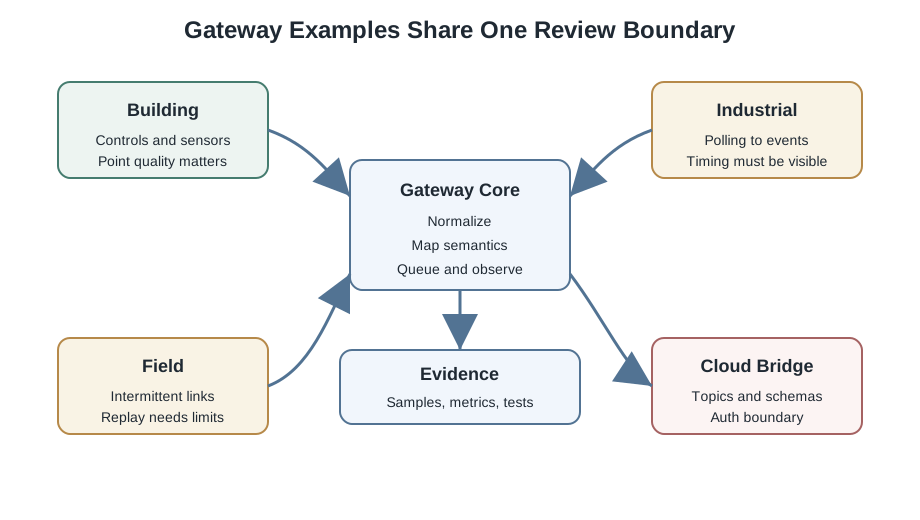
Read Figure 10.1 with “Gateway Core” as the anchor; treat “Normalize” as the first comparison. Then connect “Map semantics” with “Queue and observe”. Those labels make Different gateway examples share one review boundary: normalize, map semantics, queue, and observe a traceable part of the “gateway core”–“normalize” decision, not an unsupported assertion.
The One-Minute View: Same Boundary, Many Settings

Same review boundary
Source contract, gateway work, target contract, failure behavior, evidence — the frame is identical across every example.
Meaning over bytes
The mapping that records what a value means matters more than the format conversion that moves it.
A bridge is a trust boundary
Changing protocol does not make data trustworthy; authentication, authorization, and audit still apply on both sides.
Beginner Examples
Read the Beginner Examples material as a decision path rather than as isolated entries. First identify the operating condition in each entry and keep its units, timing, source, and assumed system state attached to it. Next compare the entries at the point where responsibility changes between device, gateway, network, analytic service, and operator; that hand-off is where apparently similar choices often produce different outcomes. Then follow the failure case: ask what becomes stale, delayed, unavailable, or unsafe, who detects it, and what evidence permits recovery. Finally connect the result to the chapter's running design record by naming the selected behavior, the rejected alternative, the measurement that justifies the choice, and the condition that forces a recheck. That order turns the examples or comparison into an auditable engineering argument.
- A building gateway turns proprietary control points into a tidy telemetry topic like
building/site-a/floor-2/zone-4/temperature. - A field gateway collects low-power sensor traffic, buffers it through an outage, and forwards a smaller cloud feed when the link returns.
- "The dashboard updated" proves a message arrived; "the value still means what the meter measured" is the claim a bridge review actually has to support.
Overview Knowledge Check
If you can see the same review boundary behind every example, you have the core idea. Continue to Practitioner for the four patterns and the translation pipeline.
Practitioner: Four Patterns and the Translation Pipeline
Real gateways combine a few recurring patterns. Learn the four below and you can review most deployments, because each one stresses a different part of the boundary.
Building controls to telemetry. A building gateway reads HVAC points, meters, and occupancy from BACnet objects, Modbus registers, or local wireless sensors, and publishes a consistent telemetry stream. The decisive design choice is semantic mapping: a raw register or object identifier does not say whether a value is a temperature, a setpoint, a fan command, or an alarm. The gateway needs a point map that records meaning, preserves engineering units and point quality, and never exposes a raw identifier like 40017 as if it were telemetry.
Industrial polling to an event stream. Industrial equipment is usually polled request-response, while analytics expects events. The bridge reconciles two timing models, and the rule is to never hide a polling delay inside the stream: separate the source measurement time from the gateway-arrival time, publish a bad-quality marker when a device times out instead of repeating the last value, and use a bounded queue so a slow target cannot mask a growing backlog.
Field gateway to cloud ingestion. A field gateway collects intermittent low-power traffic, filters routine readings, and forwards a smaller set when the network is available. Use a bounded buffer with an explicit retention rule (unbounded buffering fills storage and harms recovery), document any thresholds or deadbands so filtering stays reversible enough for the decision it serves, and give safety, alarm, and command paths priority and their own escalation rather than the routine telemetry drop policy.
Cloud bridge. A cloud bridge forwards local broker topics or queued messages into a cloud ingestion path. It needs topic mapping, an authentication method, schema validation, delivery acknowledgements, and a dead-letter path for messages that cannot be delivered or parsed.
Use Figure 10.2 with “Source” to inspect the next step in the “source”–“adapter” decision. The relationship between “Source” and “adapter” is what makes The translation pipeline traces one reading — source adapter, normalization, rules, a bounded queue, and an egress adapter — keeping an evidence tap at every stage instead of trusting only the final message reviewable.
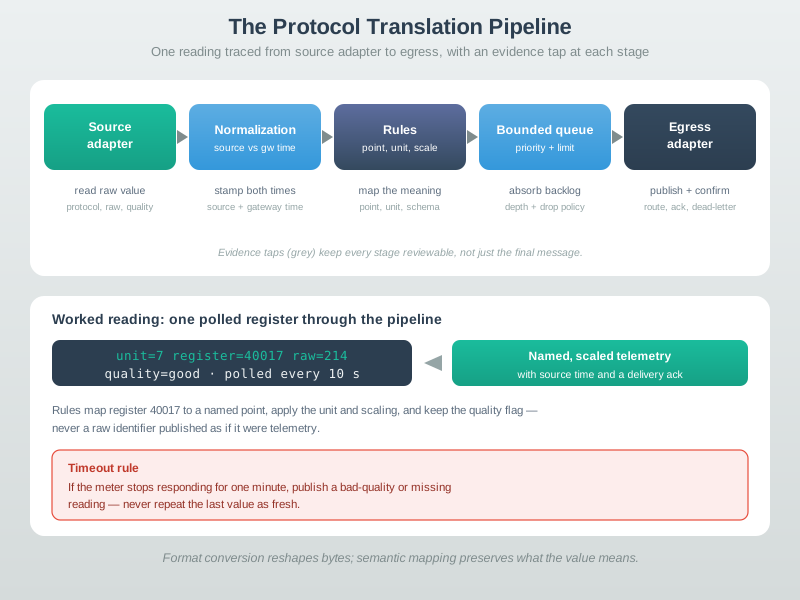
Trace the review path across Figure 10.2 from “Source” to “adapter”. From “read raw value”, it arrives at “protocol, raw, quality”. That path is evidence for The translation pipeline traces one reading — source adapter, normalization, rules, a bounded queue, and an egress adapter — keeping an evidence tap at every stage instead of trusting only the final message; retain it when revisiting the “source”–“adapter” decision.
Practitioner Knowledge Check
If you can recognize the four patterns and trace the pipeline from source adapter to egress, you can stop here. Continue to Under the Hood for the failure paths and the trust boundary.
Under the Hood: Failure Paths, Timing, and Trust
A gateway example is only as good as the failures it names. The happy path — read a value, convert it, publish it — is where every bridge looks correct. The differences that matter show up at timeout, duplicate, backlog, translation error, and offline replay, and in whether the bridge treats itself as a trust boundary.
The Five Failure Paths
A clean design names each path rather than inheriting whatever a library or broker does by default. On a timeout, mark the reading missing or bad-quality — never silently reuse an old value as if it were new. On a duplicate (a repeated event after a retry), use message identifiers, source timestamps, or idempotent state updates so the repeat is recognized. On a backlog (ingress faster than egress), apply bounded queues, priority, backpressure, or a documented drop policy. On a translation error, send the sample to a dead-letter or error path with enough context to diagnose it. On offline replay, preserve the original source timestamps and protect downstream actions from duplicate side effects.
Inspect Figure 10.3 to ask what a gateway should do, preserve, and prevent when one of its five common failure paths appears.
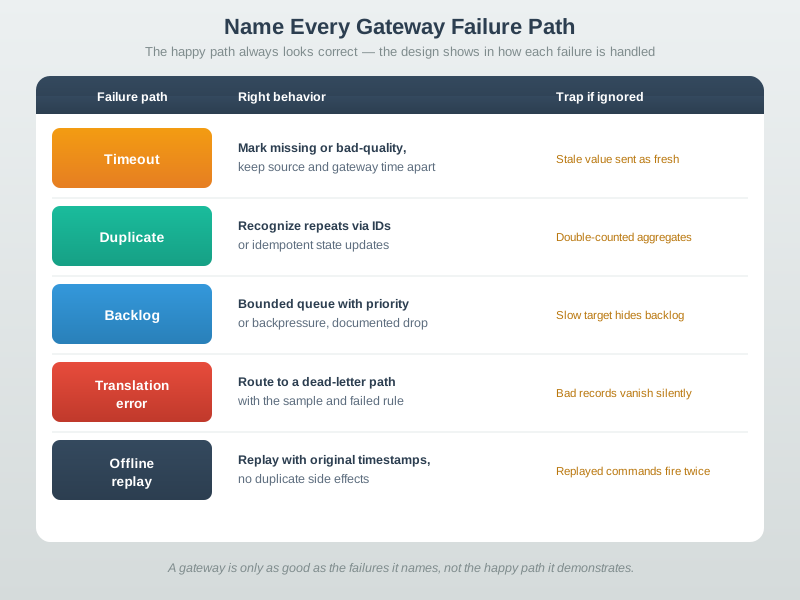
In Figure 10.3, begin with a timeout: mark the sample missing or bad-quality, and keep source time separate from gateway time so an old value cannot look fresh. Next compare duplicates with backlog. A deduplication key and captured duplicate protect aggregates, while queue depth and a declared drop or backpressure policy expose a slow target. Finish with offline replay, where preserved source timestamps and idempotent updates prevent an old command from firing twice. Each row links a failure to behavior, evidence, and consequence. That structure turns “the gateway handled it” into a claim another engineer can test after a retry, outage, or translation fault.
Timing: "No Change" Is Not "Not Observed"
The subtle bug in many bridges is conflating two very different states. A value that did not change is not the same as a value that was not observed, yet a naive bridge publishes the last value either way. Keeping the source measurement time separate from the gateway-arrival time lets a downstream consumer tell the difference, which is exactly what is needed to trust an alarm or a control decision built on the stream.
Semantic Mapping Versus Format Conversion
Format conversion turns a register or object into a JSON field; semantic mapping records what that field means — the named point, the engineering unit, the scaling, the quality. Two bridges can produce identical-looking JSON while one preserves meaning and the other ships a number with no unit and no quality flag. The review question is always whether a reviewer can trace one source reading to one normalized message and confirm the unit, the timestamp meaning, and the quality, not merely that the bytes were reshaped.
The Bridge Is a Trust Boundary
Translating data into a new protocol does not make it trustworthy. A bridge sits on a trust boundary and still needs device authentication where the source supports it, authenticated target publishing, authorization by route or topic, protected credentials, and audit logs for any command or control write. This matters most for command bridges: an unsafe control write that crosses the boundary without identity and audit evidence is the highest-impact failure a gateway can have.
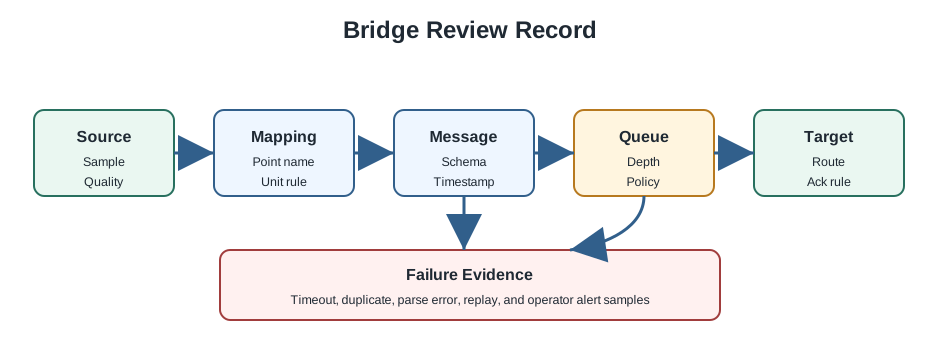
Every example should end with a small evidence record so it stays reusable when the protocol names change: source evidence (protocol, address, raw sample, timestamp source, quality indicator), mapping evidence (point name, unit, scaling, schema version, authorization boundary), delivery evidence (queue policy and depth, target route, acknowledgement expectation, duplicate and replay handling), and failure evidence (a timeout sample, a translation-error sample, offline buffer behavior, and the operator alert).
Under-the-Hood Knowledge Check
At this depth, a protocol bridge is a discipline of preserved meaning and named failures. Map semantics rather than just bytes, keep source and gateway time apart, name every failure path, treat the boundary as a trust boundary, and end with a sample that proves one reading made the whole trip. A trustworthy review traces that one reading and asks what happens when it times out, duplicates, or has to wait offline.
CAN arbitration and receiver checks narrated tour
Play silently with captions on provisional storyboard timing; narration audio is pending. Production pacing is not simulated protocol or network time. Choose Reduced motion for a complete still at each beat.
Play the tour to open the workbench. Pause, replay a beat, or read the full transcript below. Some situations cannot be shown by this teaching model; those beats provide captions only.
Full transcript — CAN arbitration and receiver checks (8 beats)
B1 — Gateway test
Imagine you are testing a gateway connected to a vehicle's shared bus. A safety command for the brakes starts at the same moment as a comfort update from the body controller. The stakes are concrete: the brake message must keep going while the competing sender yields.
Model caption: Gateway test: a brake safety command and a body-control comfort update start together.
B2 — Arbitration rule
The bus uses arbitration, meaning a decision about which sender continues. Each message has an identifier, and the senders compare those identifiers one bit at a time. A bit is a zero or a one. During arbitration, dominant zero overrides recessive one.
Model caption: Arbitration chooses a sender. Dominant 0 overrides recessive 1.
B3 — Fixed identifiers
For your test, the brake message has identifier two hundred eighty-eight. The body controller's comfort message has identifier two hundred ninety-six. Both use the standard format, with eleven identifier bits. The brake message has the lower identifier, but the bit comparison explains why it wins.
Model caption: Brake: 0x120 = 288. Body control: 0x128 = 296. Both identifiers use 11 bits.
B4 — Bit-eight decision
Starting from the beginning of the identifiers, the first seven bits match. At the eighth bit, the brake sender transmits zero and the body controller transmits one. Take the smaller of zero and one: zero. That is the bit carried by the shared bus.
Model caption: 288 → 00100100000; 296 → 00100101000. First seven bits match. At bit 8: A=0, B=1; minimum(0,1)=0.
B5 — Winner completes
The body controller sent one but reads zero, so it loses arbitration and stops transmitting. It becomes a receiver. The brake sender continues with its message intact. The body controller can retry after the winning frame finishes. Losing arbitration has allowed the safety command to continue.
Model caption: Body control sent 1, read 0, and yielded. Brake continues intact; body control can retry after completion.
B6 — Nondestructive arbitration
The misconception is that losing arbitration means a corrupted frame. It fails because the losing sender yields without damaging the winner's message. In the worked example, the comfort message stopped at the eighth identifier bit, while the brake message kept going. That is nondestructive arbitration.
Model caption: Arbitration loss: body control yields at bit 8; the brake frame remains intact.
B7 — Receiver rejects frame
A corrupted frame takes a different path. When the receiver's check disagrees with the check sent in the frame, the receiver sends an error flag. The frame is not accepted, and transmission must be tried again later. That differs from letting the brake message finish intact.
Model caption: Receiver check disagrees: error flag, frame rejected, transmission tried again later. Arbitration had already chosen the brake sender.
B8 — Arbitration and acceptance
Arbitration chooses whose message continues; a failed receiver check means the frame cannot be accepted.
Model caption: Arbitration chooses whose message continues; a failed receiver check means the frame cannot be accepted.
10.1 Compare Four Protocol translation Paths
This section: Compare Four Protocol translation Paths — Begin with Figure 10.1.
Begin with Figure 10.1. Read each topology from its source devices toward the protocol target service. Direct field connections place more protocol knowledge in the gateway. Layered or brokered paths add an intermediate contract. The drawing is not asking which topology looks tidy; it asks where protocol translation happens and which component can expose a failed handoff.
Figure 10.2 then narrows the view to one bridging record. Follow acquisition, decoding, normalization, validation, routing, and protocol target delivery in order. A valid protocol target payload at the last box is insufficient if the decoder chose the wrong byte order at the second box. Evidence should retain one sample at each important boundary.
The fields in Figure 10.4 are the comparison tool. Device identity says which physical source produced the value. Observation time differs from gateway processing time. Unit and quality preserve interpretation, while mapping version identifies the protocol translation rule. Read the bridging record before the value because 42 alone could mean temperature, pressure, a counter, or an error code.
Finally, Figure 10.3 separates visible outcomes. A source timeout, decode rejection, protocol target schema error, and denied command belong at different stages. The labelled branches prevent the vague report “the gateway failed” and point the operator toward the component that has evidence.
Apply the sequence to a factory tank. A Modbus register contains 725 with scale 0.1 kPa, so the protocol bridge derives . It publishes the tank identity, 72.5 kPa, source observation time, quality, and mapping version. If the cloud schema expects pascals, the next explicit conversion is . Keeping both rules makes the result re-derivable.
Now compare a LoRaWAN soil probe. Its frame counter helps detect a replay, while the tank’s polled Modbus source needs a separate sample identifier. Compare a building thermostat whose protocol provides a quality flag with an analogue probe that does not. The normalized records may share a protocol target shape, but their evidence cannot claim identical source certainty.
Predict one result for each diagram. Trace a known tank value through every pipeline boundary. Force a source timeout and locate its failure branch. Submit an invalid protocol target bridging record and confirm that it is rejected visibly. Send an unauthorized command and verify that it never reaches the field device. The four results show whether the examples preserve meaning in both telemetry and control directions.
Retain the four bridging examples together. Their common protocol target fields show where normalization helps, while their source samples show why one decoder cannot stand in for another. That comparison is the evidence for a reusable protocol bridge pattern.
10.2 Summary
This section: Summary — Picture a factory meter that exposes a numbered register while a cloud service expects a named temperature event.
Carry One Reading Across a Translation Boundary
Picture a factory meter that exposes a numbered register while a cloud service expects a named temperature event. A bridge can move the bytes, yet still attach the wrong unit, time, identity, or meaning. The system owner must prove that the target record means what the source measured.
Choose one real reading and draw both sides. Record source address, field meaning, unit, source time, quality, poll rule, translated name, target route, delivery state, and owner. Keep a versioned point map that explains every change. Mark which side controls commands and which side only reports.
Test a source timeout, a repeated value, a changed map, a wrong unit, a full buffer, a target outage, a restart, and replay after recovery. Check that stale data is marked, bad quality survives, duplicates are safe, and delayed records keep their event time. Trace one command back with the same care.
Keep urgent safe control on the local side when a distant target can be late. Translation does not create trust, and a successful connection does not prove meaning. Recheck identity and rights at the boundary, especially for writes.
This opening does not choose a bridge product or cover every field bus. Practitioner builds the source-to-target evidence record. Under the Hood examines polling, events, maps, buffers, delivery states, write safety, security, and replay.
- A protocol bridge reconciles systems that disagree about timing, addressing, payload format, and reliability; the pattern matters more than the vendor.
- Every example shares one review boundary: source contract, gateway work, target contract, failure behavior, and evidence that one reading travelled the whole path.
- Building bridges turn BACnet objects, Modbus registers, or wireless sensors into normalized telemetry, and the decisive choice is a semantic point map, not the byte conversion.
- Industrial bridges reconcile polling with event streams without hiding polling delay; publish bad-quality on timeout and keep source time separate from gateway time.
- Field gateways need a bounded buffer with a retention rule, documented filtering, and a priority path for safety, alarm, and command traffic.
- Cloud bridges need topic mapping, authentication, schema validation, delivery acknowledgements, and a dead-letter path.
- Name the five failure paths explicitly: timeout, duplicate, backlog, translation error, and offline replay; “no change” is not “not observed.”
- A bridge is a trust boundary, so authentication, authorization, protected credentials, and audit for control writes still apply; end every example with a source-to-target evidence record.
A gateway is judged by what it does when things go wrong, not when they go right. Map semantics rather than bytes, keep the source and gateway timestamps apart, give every failure path a named behavior, and treat the boundary as a place where trust must be re-established, not assumed. The proof a bridge actually works is a single real reading you can trace from source sample to target topic with its meaning, timing, and quality intact.
10.3 See Also
This section: See Also
Protocol Bridging Fundamentals
Review the core gateway translation model behind these examples.
Gateway Protocol Translation Lab
Apply the review record hands-on in a gateway lab chapter.
Sensor Communication Protocols
Compare the source-side sensor and equipment protocols a bridge has to read.
Pub/Sub and Topic Routing
Review the target-side topic and routing decisions on the far side of the bridge.
Find help
3 reviewed answers.
Where should I start in a module?
Open the module page from the sidebar to see its chapters in order. Use the module map to return to a topic you need.
Modules and pathsReviewed
What can I try when a project does not work?
Check the symptom, then work through the diagnostic steps. Keep the error message and the smallest example that reproduces it.
When you are stuckReviewed
How do interactive examples work?
Use the interactive guide to check how examples and simulations work before changing your project.
Interactive examples guideReviewed