Practice: Message Queue Challenges
More
Depth: Practitioner
Progress saves as you read. Mark sections complete as you go; your progress appears in the sidebar.
This lab belongs to Pub/Sub and Topic Routing
A freezer gateway loses its uplink while temperature messages keep arriving every ten seconds. The queue grows, one malformed record blocks a consumer, and operators must decide what to retry or discard. This lab turns those visible failures into bounded queue rules.
A Longer Line Does Not Fix a Stuck Message
This section: A Longer Line Does Not Fix a Stuck Message — A gateway is a device or service that joins different parts of a system.
Give Every Waiting Message an Exit Rule
A gateway is a device or service that joins different parts of a system. Picture one collecting door events faster than a remote worker can handle them. The waiting line grows. Making it longer hides the delay but does not fix the cause.
Start with the age of the oldest useful item, not just the line length. Give each message an identity, a safe lifetime, and a rule for repeated arrival. Decide where a message goes after it fails more than once. Name which work must stay in order and which can be shared.
Stop the worker, add one malformed item, send a duplicate, and restore service after a long gap. Check whether old commands expire, bad data moves aside, repeated work stays harmless, and load falls back toward the sender before memory is full.
A larger store may help a short burst, but it cannot make unsafe replay safe. The deeper sections explain expiry, isolation, repeat handling, work sharing, and pressure signals so every failure gets an explicit path.
Start with the failure you can see: the line is getting longer. The beginner mistake is to make the line longer still. A reliable queue review asks a better question first: is work waiting because the consumer is briefly busy, because one message is poisonous, because duplicates are arriving, because the delivery semantics permit retry, or because old work is no longer safe to apply?
Once a gateway puts a queue between a fast producer and a slower consumer, the obvious response to trouble is to make the queue bigger. That instinct is usually wrong. A larger buffer postpones the symptom and hides the cause: if the consumer cannot keep up, cannot process a particular message, or cannot safely process a message twice, more capacity simply means a longer line of work that is already in trouble. Queue challenges are reliability problems, not sizing problems, and they are solved by deciding what happens to work that waits too long, fails repeatedly, arrives twice, or must be reprocessed after an outage.
Think of a single-lane checkout where one shopper is stuck arguing about a price. Adding more shopping baskets behind them does not help; everyone still waits behind the one stuck transaction. That stuck transaction is a poison message, and the line behind it is head-of-line blocking. The fix is not a longer aisle. The fix is to pull the stuck shopper aside so the rest of the line keeps moving, then deal with the dispute separately and with evidence.
If you only need the intuition, this layer is enough: a healthy queue under stress answers five questions out loud — what happens when a message gets too old, where a message goes when it cannot be processed, how a message that arrives twice is recognized, when the consumer should slow intake, and whether replaying old messages is safe.
These five questions map to five named behaviors you will design and test in this lab: expiry (time-to-live for stale work), dead-lettering (isolating work that cannot be processed), deduplication and idempotency (surviving repeats), consumer scaling and ordering (sharing work without scrambling it), and backpressure (pushing the limit back toward the producer). None of them is about raw capacity. Each is about what the queue promises to do when the happy path breaks.
Do not accept A growing queue is a symptom, not a diagnosis: route each failure explicitly — expire stale work on its TTL, dead-letter poison messages, deduplicate repeats, scale while keeping order, and apply backpressure — instead of hiding the problem behind more depth as “Ingress” prose alone. Look at Figure 1 before the “ingress”–“message id + ttl” decision, where “Ingress” is explicitly distinguished from “message id + TTL”.
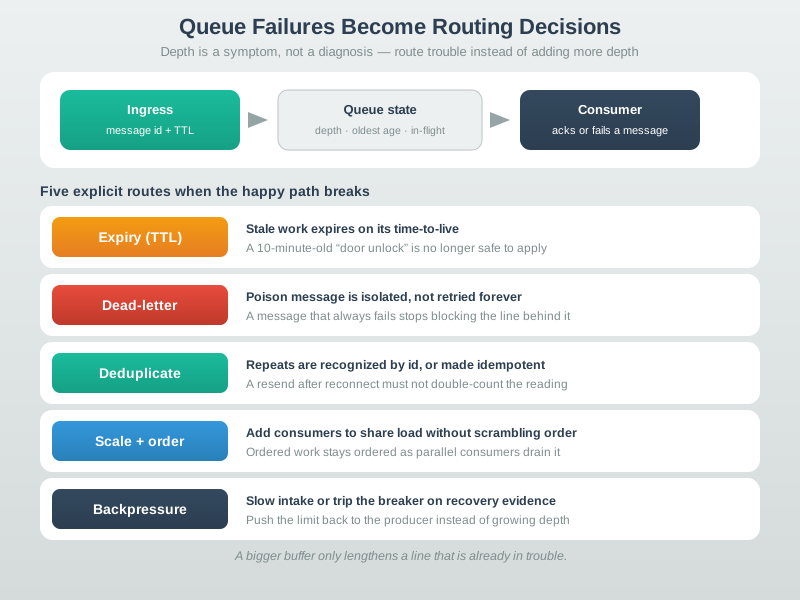
Follow Figure 1 through four named stops: “Ingress”, “message id + TTL”, “Queue state”, and “depth · oldest age · in-flight”. Their order turns A growing queue is a symptom, not a diagnosis: route each failure explicitly — expire stale work on its TTL, dead-letter poison messages, deduplicate repeats, scale while keeping order, and apply backpressure — instead of hiding the problem behind more depth into a reviewable path. In the “ingress”–“message id + ttl” decision, use the same stops to locate evidence and assign the recheck.
Start With the Failure Shape
Depth is a symptom, not a diagnosis
A growing queue can mean a brief burst, a slow consumer, or a stuck message. Depth alone cannot tell them apart, so it cannot tell you what to fix.
One bad message can stop many good ones
If a message that always fails sits at the head of an ordered flow, every message behind it waits. Isolation, not retry, keeps the line moving.
Replay is not free
Reprocessing old messages can repeat commands, alerts, or state changes. Replay is safe only when processing the same message twice is harmless.
Everyday Queue Failures
Read the Everyday Queue Failures material as a decision path rather than as isolated entries. First identify the operating condition in each entry and keep its units, timing, source, and assumed system state attached to it. Next compare the entries at the point where responsibility changes between device, gateway, network, analytic service, and operator; that hand-off is where apparently similar choices often produce different outcomes. Then follow the failure case: ask what becomes stale, delayed, unavailable, or unsafe, who detects it, and what evidence permits recovery. Finally connect the result to the chapter's running design record by naming the selected behavior, the rejected alternative, the measurement that justifies the choice, and the condition that forces a recheck. That order turns the examples or comparison into an auditable engineering argument.
- A "door unlocked" command that waited ten minutes in a queue may now be unsafe to apply; a freshness check on the timestamp matters more than delivering it eventually.
- A reading with a malformed payload fails on every retry. Retrying it forever wastes the retry budget and blocks healthy readings; it belongs in a dead-letter path for inspection.
- After a reconnect, a gateway re-sends the last few messages it was unsure about. A counter that increments per message is now wrong unless duplicates are recognized or the operation is made idempotent.
Overview Knowledge Check
If you can see why depth is a symptom and why the five failure behaviors matter more than capacity, you have the core idea. Continue to Practitioner to work the diagnostic scenarios for expiry, dead-lettering, deduplication, scaling, and backpressure.
Diagnose the Five Queue Failures From Evidence
This section: Diagnose the Five Queue Failures From Evidence — Before changing anything, fix the review boundary so every diagnosis cites the same evidence.
Before changing anything, fix the review boundary so every diagnosis cites the same evidence. A queue challenge review names the ingress contract (topic, schema, message id, timestamp, priority, time-to-live, retry policy), the queue state (depth, oldest age, in-flight count, retry count, expired count, dead-letter count), the consumer behavior (processing time, acknowledgment timing, idempotency, failure mode, ordering need), the failure side path (expire, dead-letter, reject duplicate, apply backpressure, or drop), and the replay rule (who may replay, which fields are preserved, how duplicates are prevented). With that boundary fixed, each challenge becomes a question about evidence rather than a guess.
Challenge 1: Expiry and Stale Work
A message can be valid when produced and harmful when finally delivered. A command, an alarm-clear, a location sample, or a cache update may all decay. A time-to-live (TTL) bounds how long a message stays useful, but a TTL only helps when the system records what expired and whether that expiry was expected. Silent expiry can mask a broken consumer or a queue undersized for real bursts. Decide whether an expired message routes to a dead-letter path, a metric-only drop, or a compensating action, and have the consumer check timestamp freshness before applying any side effect.
Step 1: Trace an expired command
- In the AMQP workbench below, select Stale command and press Step until the death trigger appears.
- The browser run here displayed
DEAD-LETTERED | TTL expiry | expired: route through DLX; it is a broker-behavior model, not an AMQP server receipt. - Record the original message ID, produced time, TTL, expiry time, and disposition before considering a replay.
- At the consumer, compare the command timestamp with its safety deadline; an expired command must not actuate simply because it reached the front of the queue.
- Choose a measured expiry path: dead letter for investigation, metric-only drop for replaceable telemetry, or compensation when a stale command has consequences.
Challenge 2: Dead Letters and Head-of-Line Blocking
A dead-letter queue (DLQ) isolates messages that the normal consumer cannot handle. It is evidence, not a trash can. The reason it matters is head-of-line blocking: in an ordered flow, a message that fails on every attempt holds up everything behind it. Define which failures are retriable (transient timeouts, brief downstream unavailability) and which should go straight to the DLQ (schema violations, missing authorization, unparseable payloads). When a message is dead-lettered, capture the original topic, payload, headers, source id, timestamp, retry count, error class, and consumer version, so the message can be diagnosed and, if safe, replayed later with deduplication enabled.
Step 2: Isolate a poison message before replay
- Select Bad payload in the AMQP workbench and step to DLX routing; the browser run displayed
DEAD-LETTERED | Consumer rejection | Inspect then retry. - Switch to Retry limit; the run displayed
DEAD-LETTERED | Quorum delivery limit | delivery_limit: route through DLX. - Copy the original message ID, payload, routing key, error class, retry count, and
x-deathreason into the triage record. - Repair the schema or authorization failure first, then check freshness, identity, ordering, and idempotency before approving a single replay.
- These outputs came from the browser workbench; verify the same path against your own AMQP broker metrics and consumer logs before release.

Run it: Make the dead-letter path visible in the AMQP workbench below before you write the retriable-versus-DLQ rule. Run the Bad payload and Retry limit scenarios and watch the Message path route the message onto the dead-letter exchange, then read the Decision trace to see which condition -- Reject/nack with requeue=false, Message TTL expires, or Queue length limit exceeded -- sent it there. Switch the Source queue type between Classic and Quorum to compare how a poison message is isolated so it stops blocking the healthy telemetry queued behind it.
Challenge 3: Deduplication and Idempotency
At-least-once delivery and retries can produce duplicates. There are two distinct defenses, and robust systems use both. Deduplication rejects repeated message ids at the boundary using a cache that must cover at least the retry-and-replay horizon for that flow. Idempotency makes repeated processing harmless even when a duplicate slips past the boundary, by using idempotency keys, command sequence numbers, or state-setting operations instead of relative toggles.
Step 3: Review one replayed ID and its side effect
- Write down a stable source ID and message ID for a test command, plus the latest possible retry or operator replay time.
- Send the same ID twice through your own consumer and inspect the deduplication log: the second delivery should be recognized within the replay window.
- Test an absolute state-setting command twice and confirm the protected state has one effect; a relative toggle would produce a different result.
- Compare cache retention with the longest retry-and-replay delay, not average arrival rate; evicting the ID early makes late duplicates appear new.
- No production consumer was run here. The browser workbench models routing decisions; the deduplication and side-effect proof requires your own consumer log.
Challenge 4: Consumer Groups and Ordering
Consumer groups let several workers share one queue, which raises throughput but changes which worker sees a message and can weaken ordering. The tradeoff is concrete: a single consumer gives simple ordering and simpler debugging but is capacity-limited and a single point of failure; a consumer group distributes deliveries among members, but an unacknowledged message may be redelivered to another member; and when ordering matters for a specific device, account, or asset, that entity's key must be routed consistently so related messages are not processed out of order. Ask whether each message is independent or depends on prior messages for the same entity, what key keeps related messages together, what happens when one member is slow or failing, and whether retries return to the same ordering path or move to a failure side path.
Step 4: Check per-device ordering across workers
- Publish numbered events for two device IDs and record the partition or consumer assigned to each ID.
- Pause one worker before acknowledging an event, then note whether the next event for that same device overtakes it.
- Route unrelated device IDs independently so a slow device does not stop all useful work.
- Record the retry path for a failed ordered event; reinserting it behind newer events would break the per-device sequence.
- This requires a real queue and multiple consumers; no ordering result was run in this lane, so the expected invariant remains to be verified locally.
Challenge 5: Backpressure and Circuit Breaking
Backpressure tells upstream systems that the downstream path cannot safely keep up; a circuit breaker temporarily stops delivery to a failing consumer so repeated failures do not burn the entire retry budget. The trigger must be richer than depth, because a short burst and a stuck consumer can show the same depth while needing opposite actions. Combine depth with oldest age, in-flight count, retry count, consumer error rate, and downstream latency, then choose: pause delivery when a consumer is alive but saturated, reduce producer intake when the whole downstream path is constrained, trip the breaker when immediate retry is harmful, move poison messages to the DLQ so they stop blocking, and resume on recovery evidence rather than a bare timer.
Step 5: Distinguish overflow from recovery
- In the AMQP workbench, select Burst overflow and step to the decision trace; the browser run displayed
DEAD-LETTERED | Queue overflow | maxlen: route through DLX. - Switch to Valid telemetry; it displayed
ACKED | Consumer ACK | Successful processing: no DLX publish. - On your own broker, graph depth together with oldest age, in-flight count, retries, consumer errors, and downstream latency before changing intake.
- Open the breaker on repeated downstream failures, then allow a small half-open trial and resume full delivery only after trial messages succeed.
- The browser result demonstrates routing policy only; broker pressure, breaker transitions, and safe resume need production-like consumer metrics.
Practitioner Knowledge Check
If you can set the review boundary and work each of the five challenges from evidence, you can stop here. Continue to Under the Hood for the delivery-semantics, deduplication-window, and circuit-breaker mechanics behind these decisions.
Why Replays, Windows, and Breakers Fail
This section: Why Replays, Windows, and Breakers Fail — Every queued path implements one of three guarantees, and the difference decides which challenge you must solve.
The deeper layer explains why the practitioner scenarios behave as they do: what delivery guarantees actually promise, why a deduplication window has to be sized against the replay horizon, how ordering survives parallel consumers, and how a circuit breaker moves between states.
The Three Delivery Semantics
Every queued path implements one of three guarantees, and the difference decides which challenge you must solve. At-most-once delivers and forgets; it never duplicates but can lose work on failure. At-least-once retries unacknowledged deliveries and can deliver duplicates; acknowledging before the protected side effect can still lose work. Exactly-once is the goal of having each message take effect a single time, and in distributed systems it is not granted by the transport alone — it is reconstructed at the consumer by combining at-least-once delivery with deduplication or idempotent processing. The practical consequence is blunt: if your path is at-least-once, which most reliable IoT paths are, you must design for duplicates rather than assume they cannot happen.
Why the Deduplication Window Is Sized Against Replay, Not Rate
Deduplication remembers recently seen message ids so it can reject repeats. The trap is sizing that memory by average message rate. A duplicate does not arrive at the average rate; it arrives after the event that caused it — a reconnect, a retry timeout, or an operator-initiated replay of old data. If the window is shorter than the longest delay before a duplicate can appear, the cache evicts the original id first, the late duplicate looks new, and it is processed again. The window must therefore cover the worst-case retry-and-replay horizon for that flow, and the identity it keys on must be stable across producer restarts. This is also why a flow without a stable message id and source id cannot be treated as replay-safe: there is no key to remember.
Ordering Under Parallel Consumers
Ordering and parallelism pull against each other. Strict global order across an entire queue forces effectively serial processing, which caps throughput. The common resolution is partitioned ordering: messages are grouped by a key — a device id, account, or asset — and order is preserved only within each key, while different keys process in parallel. This keeps related events in sequence without serializing unrelated work. Two design rules follow. First, a retry must not let a later message for the same key overtake the failed earlier one, or per-key order breaks; this is why retries for ordered keys are often paused or routed carefully rather than reinjected at the tail. Second, the key must actually carry the ordering meaning the application needs; choosing a key that scatters related events across partitions silently abandons the ordering guarantee you thought you had.
Circuit Breaker States and Safe Resume
A circuit breaker protects a failing downstream consumer and the retry budget by modeling three states. In closed state, traffic flows and failures are counted. When failures cross a defined threshold the breaker moves to open, and delivery is stopped so the consumer can recover instead of being hammered by retries that all fail. After a cooldown the breaker moves to half-open and allows a small number of trial messages: if they succeed it closes and normal flow resumes; if they fail it returns to open. The lesson for resume is that recovery should be proven by successful trial work, not assumed because a timer elapsed. A breaker that snaps fully open to fully closed on a clock alone tends to oscillate, re-flooding a consumer that has not actually recovered.
Common Pitfalls
Read the Common Pitfalls material as a decision path rather than as isolated entries. First identify the operating condition in each entry and keep its units, timing, source, and assumed system state attached to it. Next compare the entries at the point where responsibility changes between device, gateway, network, analytic service, and operator; that hand-off is where apparently similar choices often produce different outcomes. Then follow the failure case: ask what becomes stale, delayed, unavailable, or unsafe, who detects it, and what evidence permits recovery. Finally connect the result to the chapter's running design record by naming the selected behavior, the rejected alternative, the measurement that justifies the choice, and the condition that forces a recheck. That order turns the examples or comparison into an auditable engineering argument.
- Sizing only for average load. Average rate hides bursts, reconnect storms, downstream outages, and replay waves; size limits and dedup windows from observed burst envelopes and oldest-age targets.
- Retrying poison messages forever. Retries fix transient failures, not invalid payloads, missing authorization, or schema drift; those need a dead-letter path, not another attempt.
- Treating replay as harmless. Replay can duplicate commands, alerts, billing events, or actuation; it requires idempotency or deduplication evidence before it is allowed.
- Monitoring only depth. Depth cannot distinguish a burst from a stuck consumer; pair it with oldest age, in-flight count, retry and dead-letter rates, expiry count, and consumer error class.
Queue Reliability Review Record
Close the lab by recording the design as a release artifact so the behavior is reproducible and operable, not just functional.
Under-the-Hood Knowledge Check
At this depth, queue challenges are about guarantees and evidence. Know which delivery semantic you have, size the deduplication window against the replay horizon rather than the average rate, preserve order per key rather than globally, and resume on proven recovery rather than a timer — then record it all so delayed, failed, duplicated, and replayed work stays predictable.
Read the Failure Route Before Replaying
This section: Read the Failure Route Before Replaying — Begin with Figure 1.
Begin with Figure 1. Follow the normal message into the main queue, through the consumer attempt, and toward acknowledgement. Then follow the failure branch: a rejected or repeatedly failing record leaves the hot path and reaches the dead-letter queue. The split protects later messages from a poison record, but the dead-letter queue is not a bin to forget. It needs the original payload, failure reason, attempt count, and enough identity to repair or reject the message.
Next inspect Figure 2. Read its labelled steps in operational order: detect the failed delivery, isolate the record, inspect the cause, correct the data or consumer, replay under control, and verify the final outcome. The return arrow matters. Replaying before the defect is fixed merely sends the same poison message around the loop again.
Use a concrete outage. A sensor publishes one 240-byte record every 10 s, or six records each minute. During a 20-minute uplink loss, the gateway receives records. Their payloads occupy bytes before queue metadata. If the queue limit is 100 records, 20 records cannot fit. The lab must state whether the oldest 20 are dropped, the newest 20 are rejected, or acquisition is slowed; an unspecified overflow policy is already a failure.
Now place a malformed record at position 37. With ordered single-message processing, that record can block positions 38 through 120 if the consumer retries forever. Set a retry ceiling of three attempts. After the third failure, route position 37 to the dead-letter queue and allow position 38 to proceed. Record ordering has changed around one exception, so the consumer must know whether strict order or continued service matters more for this stream.
Predict the lab evidence before running it. First, expect 120 arrivals and a 20-record overflow under the stated limit; compare queue counters with the calculation. Second, expect record 37 to show three failed attempts and one dead-letter entry; check that positions after it continue. Third, repair the decoder and replay only that record, then confirm one accepted result and no duplicate side effect. If a counter differs, stop and explain the queue transition rather than adjusting the expected answer after the run.
The lab is complete only when normal traffic, overflow, poison-message isolation, and replay each have an observed result. A screenshot of an empty queue proves none of those states by itself.
Add one consumer crash after it performs a side effect but before acknowledgement. On restart, the queue may redeliver that record. Use its stable identifier to prove that the target stores one result, then acknowledge the repeated delivery. This challenge separates transport completion from application completion and reveals whether at-least-once behavior is safe for the chosen message.
End by reconciling counts: produced records equal acknowledged records plus queued, dead-lettered, and explicitly dropped records. Any unexplained remainder is a message whose fate the queue evidence cannot show.
Run one final burst after recovery. New live records and replayed old records now compete for the consumer. State whether live alarms take priority, whether original order is restored, and how old data is labelled. Verify that the oldest queued observation keeps its original time and that the queue returns below its warning level without hiding dead-letter items.
Inspect the dead-letter entry after the lab. It should show the original message unchanged, the decoder error, three attempt times, and replay outcome. Delete or retain it according to the written evidence policy only after the repaired result is linked.
Save the queue configuration with the counter evidence and the exact poison-message fixture used during the challenge.
Summary
This section: Summary
- Queue challenges are reliability problems, not sizing problems; a bigger buffer postpones the symptom and hides whether the cause is a burst, a slow consumer, or a stuck message.
- A useful review fixes one boundary first: ingress contract, queue state, consumer behavior, failure side path, and replay rule, so every diagnosis cites the same evidence.
- Expiry bounds stale work with a time-to-live, but only helps when expiry is recorded and the consumer checks freshness before applying side effects.
- A dead-letter queue isolates messages that cannot be processed, which prevents head-of-line blocking and preserves the context needed to diagnose and safely replay them.
- At-least-once paths produce duplicates, so they need deduplication keyed on stable ids and idempotent processing; a deduplication window must cover the replay horizon, not the average rate.
- Consumer groups raise throughput but require per-key routing to preserve ordering, and retries must not let later messages overtake a failed earlier one for the same key.
- Backpressure and circuit breakers degrade gracefully under stress; triggers must combine depth with oldest age, in-flight count, retry and error rates, and resume should follow proven recovery, not a timer.
A reviewed queue is not just deep enough; it is observable, replay-aware, and explicit about what happens when work cannot be processed normally. Decide expiry, dead-lettering, deduplication and idempotency, ordering under scaling, and backpressure before you rely on buffering, and judge health by oldest age, in-flight count, and error class rather than depth alone.
See Also
This section: See Also
Message Queue Fundamentals
Review the buffer, envelope, acknowledgment, and overflow mechanics behind these challenge scenarios.
Pub/Sub and Topic Routing
Connect queue failure handling to topic filters, fan-out, retained state, and broker routing.
Protocol Bridging Fundamentals
See how a reliable queue supports gateway translation and offline replay across protocols.