18 NFC Tag Programming
More
Depth: Practitioner
Progress saves as you read. Mark sections complete as you go; your progress appears in the sidebar.
18.1 Start With the Story
This section: Start With the Story — Picture a maintenance tag that opens the wrong asset record after it is fixed to a metal cabinet.
Read Back One Tag Before You Lock It
Picture a maintenance tag that opens the wrong asset record after it is fixed to a metal cabinet. A writer’s green tick is not enough. The team must prove what a real phone reads in the final place.
An application programming interface is a defined way for software parts to request work; API is its short name. Near field communication, or NFC, lets nearby devices exchange small records. A payload means the useful data inside a record.
Write one planned record, read it back, and compare its type, length, host, asset identity, and result. Try a full tag, a locked tag, a changed host, a second phone, and the final mounting surface before applying a permanent lock.
This runway does not make a tag a trusted credential. The deeper sections explain record planning, capacity, phone and reader code, protection choices, failure diagnosis, and release evidence.
Programming a tag is not done when the writer reports success. It is done when the record plan fits the tag, the bytes are written, the data is read back, locks or passwords are understood, and the release note says what should happen if a scan fails.
Use this chapter as a write-verify story. Plan the NDEF payload, choose the tool path, test the result on the intended reader, and leave evidence that the tag can be trusted only for the job it was designed to do.
18.2 Learning Objectives
This section: Learning Objectives
By the end of this chapter, you should be able to:
- Plan URI, Text, MIME, and external-type NDEF records for an IoT tag without storing secrets in public payloads.
- Check tag capacity, write state, and platform support before attempting a write.
- Implement safe write patterns for Android, Python/nfcpy, and PN532-based embedded readers.
- Verify a written tag by reading it back and validating the payload, type, length, and application policy.
- Diagnose common write failures caused by tag lock state, memory limits, interface wiring, antenna coupling, and mounting material.
18.3 Quick Check: NFC Tag Programming
This section: Quick Check: NFC Tag Programming
18.4 Checkpoint: Minimum Viable Understanding
This section: Checkpoint: Minimum Viable Understanding
- Programming is not just writing bytes. A safe tag write includes record planning, capacity checks, write access checks, write, read-back verification, and a release record.
- NDEF is public unless another layer protects it. Do not store passwords, access tokens, private keys, or one-time codes as ordinary NDEF text.
- UIDs and NDEF records have different jobs. A UID can identify a tag, while an NDEF record can identify content or launch an app. Neither one proves authorization by itself.
- Tag memory is tight. Small Type 2 tags work well for one URL or compact app link; larger or protected records need a tag with explicit headroom.
- The physical install matters. Metal surfaces, wet areas, phone cases, and antenna position can turn a clean desk test into a field failure.
18.5 Programming Workflow
This section: Programming Workflow — Start with a write record, not with code.
Start with a write record, not with code. The same workflow applies whether the writer is an Android phone, a USB reader, a Raspberry Pi, or a microcontroller with a PN532 module.
Figure 18.1 follows a planned NDEF message through tag release.
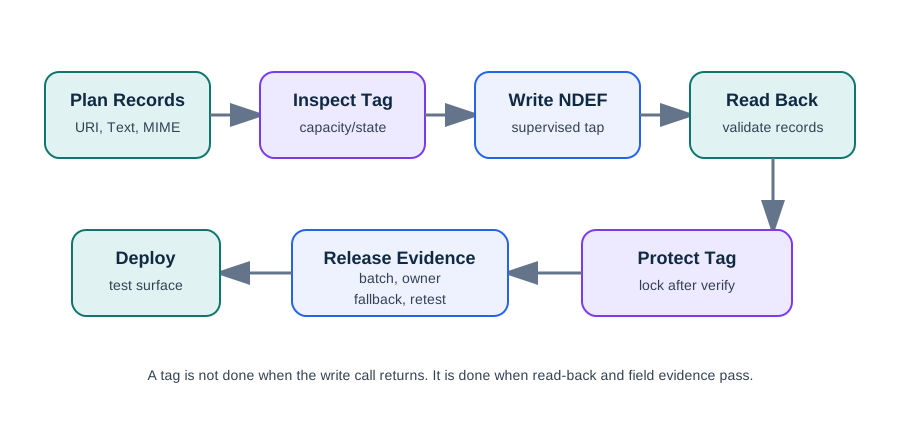
The worked tag in Figure 18.1 plans one URI record for gateway-041. Its NDEF message is 38 bytes, so the chosen tag must be formatted, writable, and have enough capacity before the write. Read back the same tag and compare record count, type, host, asset ID, and length with the plan. A write-success flag alone cannot establish that the decoded URI is correct. Only after the read-back passes should the team test the intended mounting surface and reader, apply protection, and log the batch and fallback. A mismatch blocks release and must not be locked in.
18.6 Programming Is Records Plus Lifecycle
This section: Programming Is Records Plus Lifecycle — Writing an NFC tag has two halves that are easy to blur.
Writing an NFC tag has two halves that are easy to blur. First, compose the NDEF message: choose which record types encode the behavior you want. Then decide the memory lifecycle: whether the tag stays rewritable, is password-protected, or is permanently frozen read-only. A poster sticker anyone could overwrite and a tamper-resistant asset tag may use the same records but opposite lifecycle choices.
Think about a gateway maintenance rollout before writing code. The team needs 80 labels. Each tap should open one maintenance record, show a short human label, and let the app request authenticated service actions. The tag should not contain a technician password, service command, or bearer token. A safe record plan is a URI such as https://ops.example.invalid/a/gateway-041 plus a Text record such as Gateway 041 maintenance record. The tag selects context; the app and backend decide whether the current technician may do anything privileged.
That split gives you a release checklist. Before writing, estimate encoded NDEF size and compare it with the tag’s usable capacity, leaving room for a future path or version field. During writing, reject tags that are read-only, already protected, too small, or not NDEF formatted. After writing, read the tag back with the same class of phone or reader used in the field, then compare record count, type, order, host, asset identifier, and length. Only then choose the lifecycle control: leave lab tags rewritable, password-protect a staff-maintained batch, or permanently lock public poster tags whose URL must never change.
Figure 18.2 makes read-back and policy checks part of writing a tag.
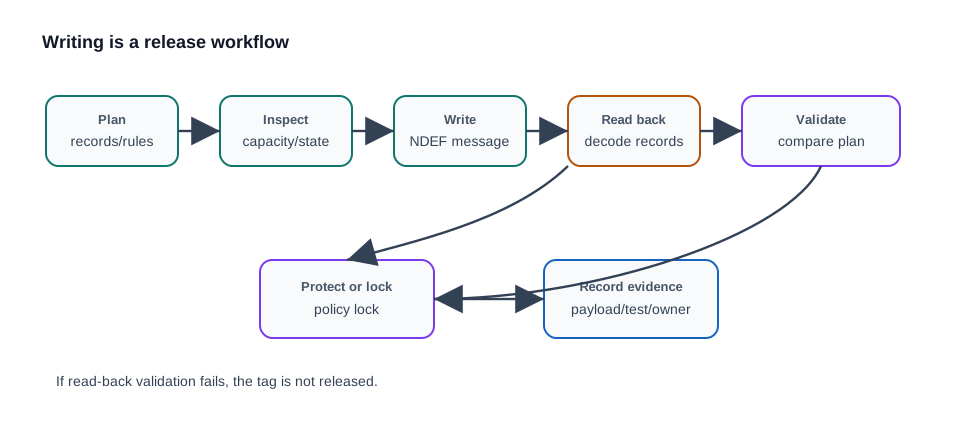
The release path in Figure 18.2 uses two planned NDEF records: a 38-byte URI for gateway-041 and a 37-byte Text label. Their combined 75 bytes are the expected message, not evidence of a physical tag capture. After writing, decode both records from the tag and compare type, order, host, asset ID, language, text, and lengths with the plan. A pass requires all fields to agree. The release record then adds tag batch, protection state, app version, target surface, and replacement plan. If the read-back differs, keep the tag writable for diagnosis and do not treat command success as approval.
The most common design error is treating the write command’s success flag as the release event. It is only one command result. The release event is evidence: written payload, decoded read-back, protection state, tag batch, app version, physical surface, and replacement procedure. That evidence is what lets a maintenance team debug a future failure without guessing whether the problem is RF coupling, a bad NDEF record, an app validation rule, or a tag that was locked too early.
18.7 NDEF Record Planning
This section: NDEF Record Planning — NDEF messages can contain multiple records, but a good programming workflow keeps the record set small and predictable.
NDEF messages can contain multiple records, but a good programming workflow keeps the record set small and predictable.
Inspect Figure 18.3 and ask which bytes and header flags a writer must set for the two-record message.
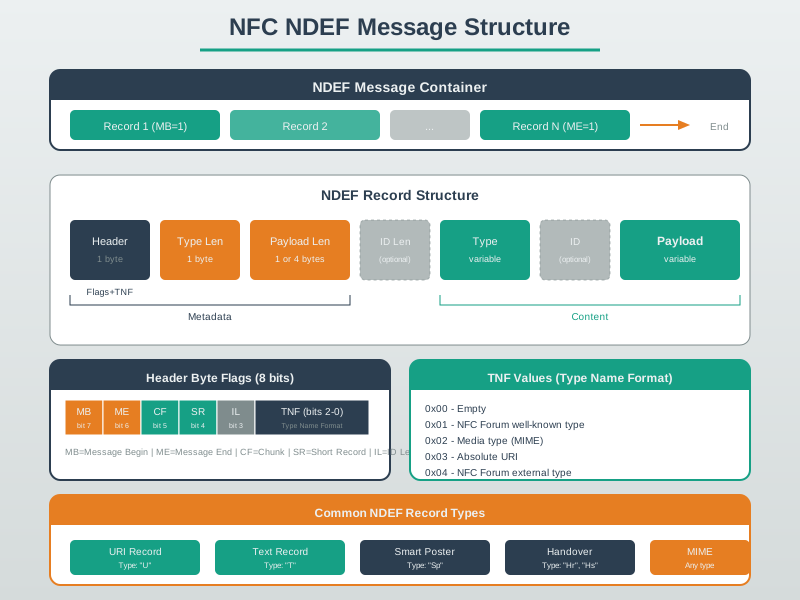
Read Figure 18.3 from the ordered message container into the short URI record. The first record sets MB and the last sets ME, while SR declares a payload below 256 bytes and IL declares an optional ID field. The worked short-record header uses one byte each for flags and TNF, type length, payload length, and URI-prefix code: bytes before the URI payload. The writer must size and verify those fields before committing the tag.
18.8 Record Types and Validation Rules
This section: Record Types and Validation Rules — The record type determines both the platform behavior and the validation rule.
The record type determines both the platform behavior and the validation rule. A message can hold several records, and order matters: the first record usually drives the primary action while later records act as fallbacks or hints. A “tap to open the app, or the web page if the app is missing” tag is one multi-record message, not two unrelated tags.
| Record | What it encodes | Detail that matters |
|---|---|---|
| URI | A link or scheme such as HTTPS, tel, or mailto | Prefix bytes can abbreviate common URI starts, so measure the encoded message rather than guessing from visible characters. |
| Text | Human-readable label, instruction, or fallback note | Carries a language code and UTF-8 or UTF-16 flag; keep it short and non-sensitive. |
| Smart Poster | A URI bundled with title, action, and optional icon | Useful when the record should say both what to show and what action to prefer. |
| Android Application Record | Android package name stored as an external type | Can guide app launch or install behavior; provide a web fallback when the app is absent. |
| Handover | Wi-Fi or Bluetooth setup material | Bootstraps a faster radio and belongs in a flow with its own credential and rotation policy. |
A practical maintenance tag might put the stable HTTPS URI first, a short Text label second, and an app-specific MIME or external-type record only when the app owns a documented schema. The validation rule should say what happens when records arrive in the wrong order, when an unknown MIME type appears, or when the URI host is not the approved host.
For a batch station, make the checks mechanical. Scan a blank tag, log its type and writable capacity, encode the planned records, and compare the encoded byte count with capacity before writing. A 40-character URL and a 30-character label usually fit a small Type 2 tag, but app-specific MIME records, icons, long JSON, and future version fields can push a design into a larger tag. Decide from the encoded message that the writer library will actually send, because URI abbreviation bytes, language codes, record headers, and text encoding all affect the result.
18.9 Capacity Rule
This section: Capacity Rule — Before writing, estimate the encoded size and keep headroom for future revision.
Before writing, estimate the encoded size and keep headroom for future revision. A simple URI tag can fit on a small Type 2 tag. A multi-record commissioning tag may need a larger Type 2, Type 4, or Type 5 tag depending on the app and reader requirements.
18.10 Android Write Pattern
This section: Android Write Pattern — Android NFC writing should happen in a foreground workflow where the user intentionally taps a tag while the app is ready to write.
Android NFC writing should happen in a foreground workflow where the user intentionally taps a tag while the app is ready to write. The app should check whether the tag already supports NDEF, whether it is writable, whether the message fits, and whether a newly formatted tag is needed.
NdefMessage buildMessage(String assetUrl, String label) {
    NdefRecord uri = NdefRecord.createUri(assetUrl);
    NdefRecord text = NdefRecord.createTextRecord("en", label);
    return new NdefMessage(new NdefRecord[] { uri, text });
}

boolean writeMessage(Tag tag, NdefMessage message) throws Exception {
    Ndef ndef = Ndef.get(tag);
    if (ndef != null) {
        ndef.connect();
        try {
            if (!ndef.isWritable()) return false;
            if (message.toByteArray().length > ndef.getMaxSize()) return false;
            ndef.writeNdefMessage(message);
            return true;
        } finally {
            ndef.close();
        }
    }

    NdefFormatable formatable = NdefFormatable.get(tag);
    if (formatable == null) return false;
    formatable.connect();
    try {
        formatable.format(message);
        return true;
    } finally {
        formatable.close();
    }
}- Use an explicit write state in the UI so the user knows when to hold the tag steady.
- Handle
TagLostExceptionand repeat the write only after the user taps again. - Validate the read-back message before showing success.
- Avoid writing credentials or secrets to NDEF records. Use the tag as a reference to authenticated app or backend policy.
18.11 Python and USB Reader Pattern
This section: Python and USB Reader Pattern — Python tools are useful for programming batches, lab stations, and maintenance tags.
Python tools are useful for programming batches, lab stations, and maintenance tags. The writer should read the tag first, reject non-writable or undersized tags, write the records, and then read the records back.
import nfc
import ndef

RECORDS = [
    ndef.UriRecord("https://ops.example.invalid/a/gateway-041"),
    ndef.TextRecord("Gateway 041 maintenance record", language="en"),
]

def on_tag(tag):
    if not tag.ndef:
        print("Tag is not NDEF formatted")
        return False
    if not tag.ndef.is_writeable:
        print("Tag is read-only")
        return False
    encoded = b"".join(ndef.message_encoder(RECORDS))
    if len(encoded) > tag.ndef.capacity:
        print("Payload does not fit this tag")
        return False

    tag.ndef.records = RECORDS
    changed = tag.ndef.has_changed
    if changed or tag.ndef is None or tag.ndef.octets != encoded:
        print("Read-back validation failed")
        return False

    print("Tag written and verified")
    return False

with nfc.ContactlessFrontend("usb") as reader:
reader.connect(rdwr={"on-connect": on_tag})nfc.ContactlessFrontend("usb") is common for supported USB readers. PN532 boards may require a serial or driver-specific connection string. Keep the exact station hardware and driver version in the deployment notes so batch writes are repeatable.
18.12 PN532 Embedded Reader Pattern
This section: PN532 Embedded Reader Pattern — An embedded reader is usually better for reading and validating tags in a product flow than for mass programming.
An embedded reader is usually better for reading and validating tags in a product flow than for mass programming. If it writes tags, keep the write flow supervised and include verification.
The PN532 reader photo in Figure 18.4 shows the antenna and interface that the tag test uses.

The printed loop antenna must couple to the tag before any NDEF read or write can be judged. The connection headers and selected I2C or serial mode then link the board to the host driver. Record the board orientation, tag distance, nearby metal, interface mode, and driver version with a supervised write and read-back. A failed read may come from RF placement before it comes from the NDEF payload. The photograph identifies the hardware boundary, but only a test on the chosen surface and reader setup can show that the programmed tag will work there.
#include <Wire.h>
#include <PN532_I2C.h>
#include <PN532.h>
#include <NfcAdapter.h>

PN532_I2C pn532_i2c(Wire);
NfcAdapter nfc(pn532_i2c);

void setup() {
  Serial.begin(115200);
  nfc.begin();
  Serial.println("Hold a writable NDEF tag near the reader");
}

void loop() {
  if (!nfc.tagPresent()) {
    delay(250);
    return;
  }

  NfcTag tag = nfc.read();
  Serial.print("UID: ");
  Serial.println(tag.getUidString());

  if (!tag.hasNdefMessage()) {
    Serial.println("No NDEF message found");
    return;
  }

  NdefMessage message = tag.getNdefMessage();
  Serial.print("Records: ");
  Serial.println(message.getRecordCount());
}- Set the PN532 board to the interface used by the sketch: I2C, SPI, or UART.
- Confirm voltage compatibility for the specific breakout board before connecting it to a microcontroller.
- Keep SDA/SCL, SPI chip select, or UART pins documented in the lab record.
- Test one known-good formatted tag before debugging application code.
18.13 Write and Verify Loop
This section: Write and Verify Loop — Write failures often look like user mistakes, but the root cause is usually a missing preflight check or a missing read-back step.
Write failures often look like user mistakes, but the root cause is usually a missing preflight check or a missing read-back step.
Figure 18.5 keeps one tag write tied to its decoded read-back.
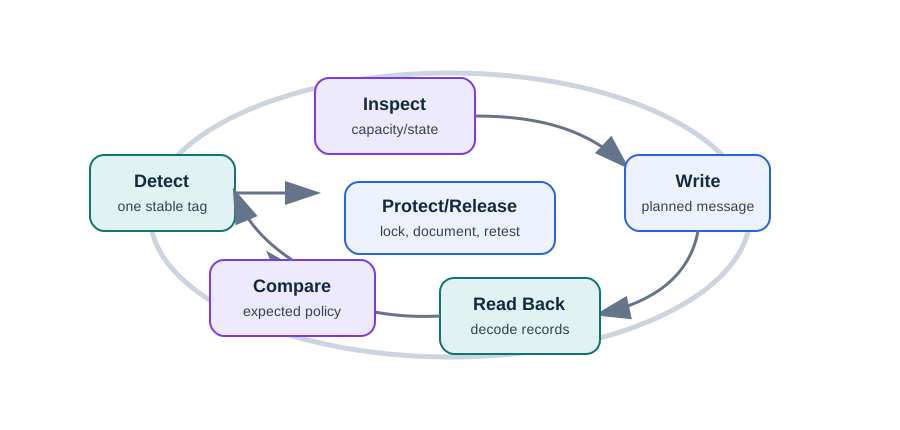
The loop in Figure 18.5 starts with one stable, NDEF-formatted writable tag. The worked message has URI then Text records and totals 75 bytes; capacity and lock bits must be checked before writing. The figure does not claim to show pre-write memory. After writing, decode the same tag and compare count, order, host, gateway-041 asset ID, text language, and length with the plan. A mismatch is a reject path, not a reason to protect the tag. Only a passing read-back supports locking or password protection, followed by a release record and replacement procedure.

18.14 Folded Implementation Record
This section: Folded Implementation Record — Implementation starts before the first write.
Implementation starts before the first write. Keep a short record beside each tag workflow:
| Record field | What it proves |
|---|---|
| Intended action | The tag selects an object or workflow; privileged action still requires app policy. |
| NDEF schema | Record type, order, version, host, length limit, encoding, and unsupported-record behavior are known before writing. |
| Platform path | Android app, Python station, PN532 reader, or production fixture has an owner and test version. |
| Write result | The tag was written, read back, decoded, compared with the expected record, and rejected on mismatch. |
| Release evidence | Tag type, capacity, lock state, reader station, app version, final mounting test, and fallback are recorded. |
For gateway replacement tags, fail closed on unknown host, unexpected record type, oversized payload, read-only tag, or missing asset ID. Do not store technician credentials, service commands, or private tokens in public NDEF records; use the tap to select context, then let the authenticated application authorize the action.
18.15 Tag Selection for Programming
This section: Tag Selection for Programming — Select tags by payload, write lifecycle, phone compatibility, environment, and security need.
Select tags by payload, write lifecycle, phone compatibility, environment, and security need.
18.16 Lock Bits and Password Protection on NTAG
This section: Lock Bits and Password Protection on NTAG — Take the common NTAG21x family as the concrete example.
Take the common NTAG21x family as the concrete example. NTAG213, NTAG215, and NTAG216 provide roughly 144, 504, and 888 bytes of user memory, respectively. Their memory model gives you two different write controls, and confusing them creates deployment bugs.
- Lock bytes set individual pages to read-only. Static and dynamic lock bits are one-way; once a page is locked, it cannot be rewritten. This is how you permanently freeze a public poster tag so visitors cannot swap its URL.
- Password protection uses a 32-bit PWD and a 16-bit PACK acknowledgement to gate writes, or sometimes reads, behind a shared secret. An authorized writer can still update the tag, so this protects an update process rather than freezing content.

“Make this tag safe” therefore has two different answers. Lock it if the content is final and must never change. Password-protect it if it must stay updatable by staff but not by the public. NTAG21x also exposes a one-way NFC counter and a Capability Container that a reader checks first to learn the memory size and whether the tag is already read-only. The Capability Container is why a careful writer inspects the tag before writing instead of blasting records at every UID it sees.
The release order matters. First inspect tag type, capacity, and write state. Then write the NDEF TLV containing the planned records. Then read back the decoded message and compare it with the plan. Only after that should you set irreversible lock bits or configure the password boundary. If a public poster tag is locked before read-back and the URL has a typo, the mistake becomes permanent.
The security boundary is narrower than many product sketches imply. A password gate on a low-cost tag is a write-control feature, not a substitute for backend authorization, and an NFC UID or public NDEF value can be copied in many practical deployments. When cloning matters, use a tag family and application protocol designed for cryptographic proof, or treat the NFC tap as a lookup key validated by an authenticated app session. Match the memory control to the consequence: lock immutable public content, password-protect supervised update batches, and move authorization out of ordinary NDEF payloads.
18.17 Check Lock Versus Password Protection
This section: Check Lock Versus Password Protection
-
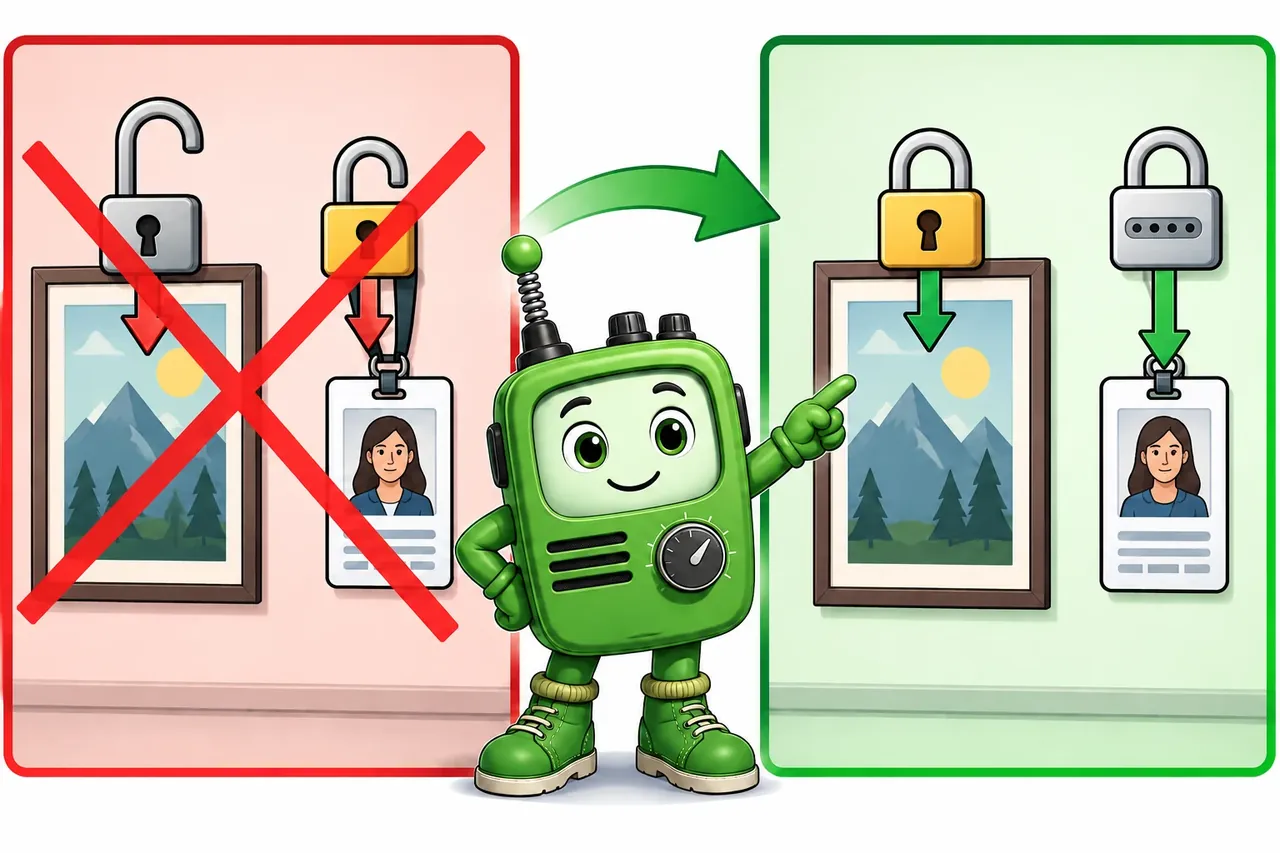
Wrong idea: use passwords on fixed posters and lock weekly staff tags. It fails because posters need permanent locks, while staff tags must stay writable under a password.
18.18 Debugging Map
This section: Debugging Map — When a tag does not work, isolate the failure layer before changing code.
When a tag does not work, isolate the failure layer before changing code.
Figure 18.7 checks the earliest failing layer before changing the tag payload.
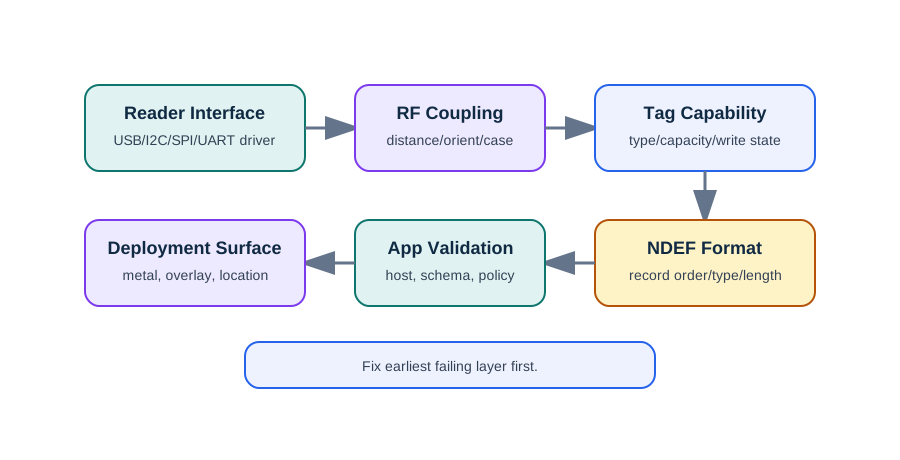
The debug map in Figure 18.7 starts before the tag: a reader interface or power fault can prevent any NFC exchange. If RF coupling works, check the tag’s NDEF support, capacity, and write state. The shown Python path stops at a read-only result, so no later write or capacity result should be inferred from it. A formatting error and a read-back type mismatch are separate failures with different fixes. After a bench pass, repeat the tap on the real case, overlay, and mounting surface. Fix the earliest failing layer and preserve its exact message before changing downstream code.
- Tag not detected. Check reader interface mode, wiring, power, antenna distance, tag orientation, and whether the tag is supported by the reader.
- Write fails. Check read-only state, password/write protection, message size, tag formatting, and whether the user moved the tag during the write.
- Phone opens the wrong app. Check URI scheme, app-link association, MIME type, record order, and whether the OS supports the intended record behavior.
- Works on the bench but not installed. Retest with the final surface, enclosure, phone case, label overlay, and user tap location.
- Security review rejects the design. Remove secrets from NDEF, move authorization to the app/backend, and add cryptographic proof where cloning matters.
18.19 Worked Example: Gateway Maintenance Tag Batch
This section: Worked Example: Gateway Maintenance Tag Batch
A plant maintenance team needs to program NFC labels for 80 gateways. A tap should open the gateway maintenance record, show a short local label, and let the app request authenticated service actions. The labels will be mounted on metal enclosures.
18.20 Record Plan
This section: Record Plan
18.21 Programming Station Checklist
This section: Programming Station Checklist
18.22 Checkpoint: Acceptance Criteria
This section: Checkpoint: Acceptance Criteria
- Every tag decodes to the expected host and asset ID.
- The tag does not contain technician credentials, service commands, or private tokens.
- The app refuses unknown hosts, unexpected record types, and oversized payloads.
- The final installation passes tap tests with the target phone models and protective cases.
- A printed asset ID or manual search path exists when NFC fails.
18.23 Knowledge Check
This section: Knowledge Check
18.24 Quick Check: Safe NFC Write Workflow
This section: Quick Check: Safe NFC Write Workflow
18.25 Matching Quiz: Programming Decisions
This section: Matching Quiz: Programming Decisions
18.26 Ordering Quiz: Program and Release a Tag
This section: Ordering Quiz: Program and Release a Tag
18.27 Checkpoint: Summary
This section: Checkpoint: Summary
- NFC tag programming is a release workflow: plan, inspect, write, read back, protect, and document.
- Android, Python, and PN532-based readers can all support tag work, but each needs explicit capacity, write-state, and error handling.
- NDEF records are useful for interoperability but should be treated as untrusted public input.
- Tag selection depends on payload size, write lifecycle, environment, phone support, and security needs.
- Production tags need field evidence from the final mounting surface and target reader devices.
18.28 Key Takeaway
This section: Key Takeaway — Programming NFC tags requires more than writing bytes: choose the tag, NDEF structure, lock policy, validation path, and update workflow together.
Programming NFC tags requires more than writing bytes: choose the tag, NDEF structure, lock policy, validation path, and update workflow together.
Find help
3 reviewed answers.
Where should I start in a module?
Open the module page from the sidebar to see its chapters in order. Use the module map to return to a topic you need.
Modules and pathsReviewed
What can I try when a project does not work?
Check the symptom, then work through the diagnostic steps. Keep the error message and the smallest example that reproduces it.
When you are stuckReviewed
How do interactive examples work?
Use the interactive guide to check how examples and simulations work before changing your project.
Interactive examples guideReviewed