14 RFID Getting Started Guide
14.2 Learning Objectives
By the end of this chapter, you will be able to:
- Explain RFID basics: Describe the reader-tag communication cycle using the Marco Polo analogy and electromagnetic coupling principles
- Classify everyday RFID: Categorize real-world RFID applications by frequency band and tag type (library books, pet chips, toll collection)
- Contrast tag types: Differentiate passive, active, and semi-passive RFID tags by power source, read range, cost, and maintenance requirements
- Justify frequency band selection: Evaluate trade-offs among LF, HF, UHF, and microwave RFID for a given deployment environment
- Distinguish identification technologies: Analyze the strengths and limitations of RFID versus barcodes versus NFC for specific IoT use cases
This guide walks you through building your first RFID project step by step. You will connect an RFID reader to a microcontroller, scan tags, and process the results. No prior RFID experience needed – think of it as your first hands-on encounter with the technology behind library book checkouts and warehouse tracking.
14.3 Prerequisites
Before diving into this chapter, you should be familiar with:
- Basic understanding of wireless communication concepts
- General knowledge of how radio waves work
This chapter is part of the RFID series:
- RFID Overview and Introduction - Index and overview
- RFID Getting Started Guide (this chapter)
- RFID Real-World Applications - Worked examples and case studies
- RFID Troubleshooting Guide - Common mistakes and interference solutions
14.4 What is RFID?
RFID = Radio Frequency IDentification
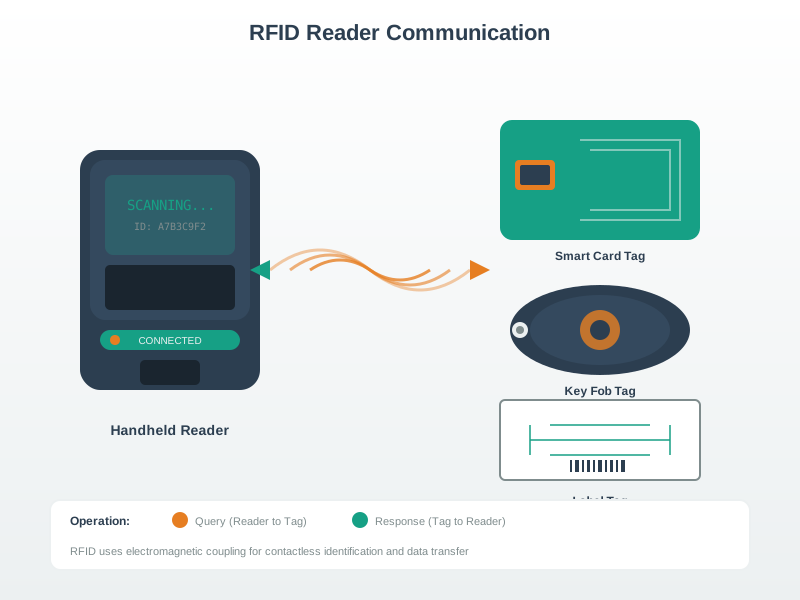
It’s a technology that uses radio waves to automatically identify and track objects. A reader sends a signal, and a tag responds with its unique ID.
You use RFID for:
- Library books (self-checkout, anti-theft)
- Pet microchips (identifying lost pets)
- Retail inventory (tracking products in stores)
- Ski lift passes (hands-free access)
- Toll collection (E-ZPass, SunPass)
- Passports (ePassports with chip)
14.5 How RFID Works: A Simple Analogy
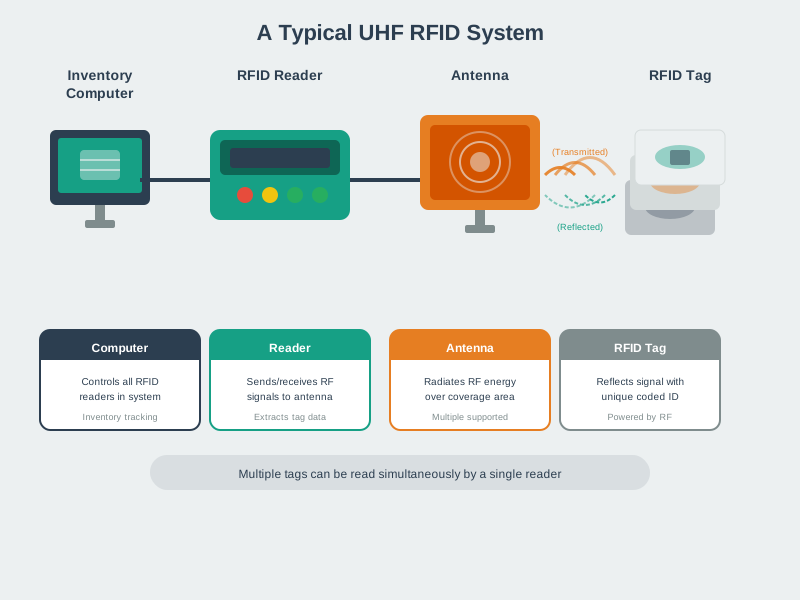
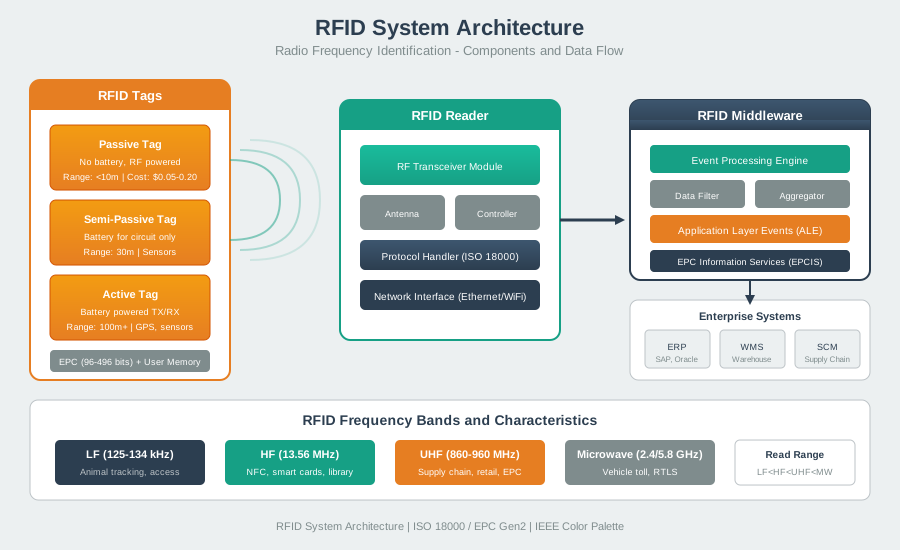
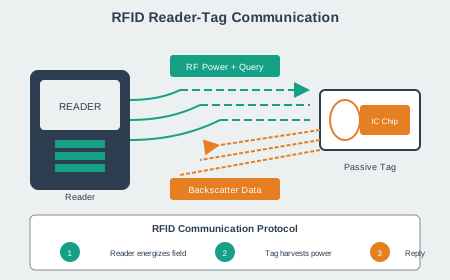
RFID visual overview: working principle, system architecture, and reader-tag communication.
Analogy: Marco Polo in a Swimming Pool
14.6 Alternative View: Interactive Sequence Diagram
The reader “calls out” and the tag “responds” with its unique identity number!
RFID is like having a magical name tag that can talk through walls!
14.6.1 The Sensor Squad Adventure: The Library Mystery
Sammy the Sensor was worried! The school library had 10,000 books, and some kept going missing. “How can we keep track of all these books?” asked Lila the LED, blinking nervously.
Max the Microcontroller had an idea: “What if every book could tell us who it is, just by walking through a special doorway?” They put tiny RFID stickers inside each book - stickers so small you couldn’t even feel them! The stickers didn’t need batteries because the magic doorway powered them with invisible radio waves.
Now whenever a book passed through the door, it would whisper its secret name - like “I’m ‘Charlotte’s Web’ - Book #7,492!” The Sensor Squad’s reader heard every whisper and knew exactly which books were coming and going. When little Tommy tried to sneak out with a book he forgot to check out, the doorway went BEEP! “Don’t worry Tommy,” said Bella the Battery, “the RFID tag just wants to make sure the librarian knows you’re borrowing that book!”
14.6.2 Key Words for Kids
| Word | What It Means |
|---|---|
| RFID | Radio Frequency IDentification - invisible name tags that talk using radio waves |
| Tag | A tiny sticker or chip with a secret number, like a superhero’s ID card |
| Reader | The special machine that asks “Who are you?” and hears the answer |
| Passive Tag | A tag with no battery - it gets power from the reader’s radio waves (like magic!) |
| Antenna | The part that sends and receives invisible radio waves |
14.6.3 Try This at Home!
The “Marco Polo” Game with a Twist:
- One person is the “RFID Reader” and covers their eyes
- Everyone else is an “RFID Tag” - each person picks a secret number (1-10)
- The Reader calls out “Who’s there?” (like sending radio waves)
- Each Tag responds with ONLY their number: “Three!” “Seven!” “One!”
- The Reader tries to identify where each number came from
This is exactly how RFID works - the reader can’t see the tags, but it hears their unique IDs! Try playing in the dark to really feel like invisible radio waves are talking.
14.7 Types of RFID Tags
There are three main types:
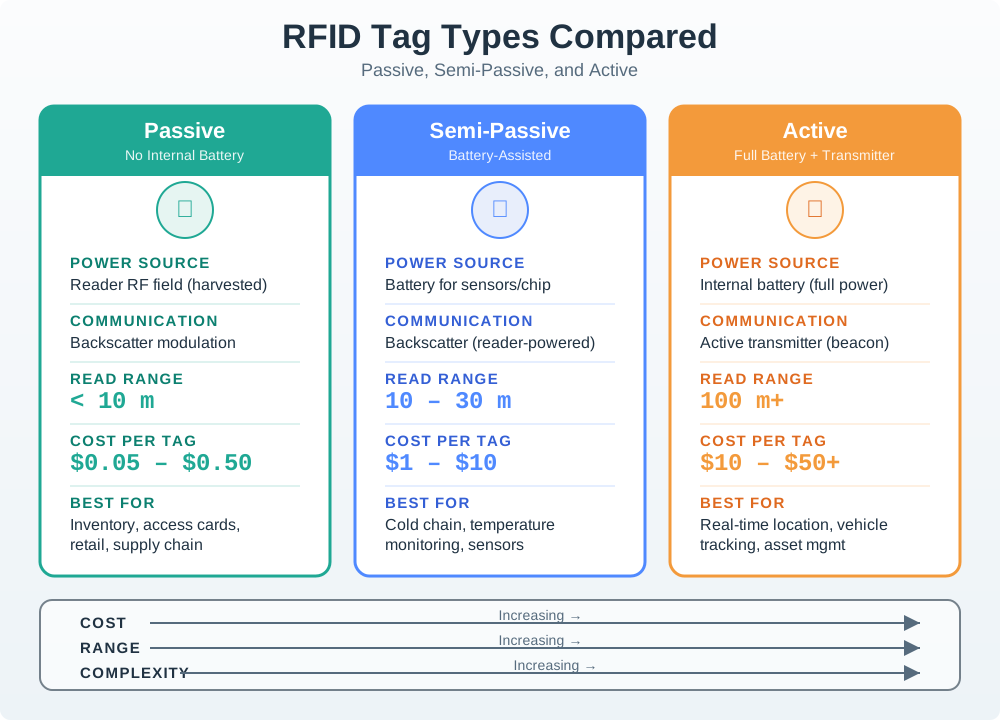
This variant helps you choose the right RFID tag type for your application:

Most IoT applications use passive tags due to their low cost and maintenance-free operation.
14.8 RFID Frequency Bands
Different frequencies = different capabilities:
| Frequency | Range | Speed | Best For |
|---|---|---|---|
| LF (125 kHz) | ~10 cm | Slow | Access cards, animal tracking |
| HF (13.56 MHz) | ~1 m | Medium | Library books, payments (NFC is HF!) |
| UHF (860-960 MHz) | ~12 m | Fast | Inventory, supply chain |
| Microwave (2.45/5.8 GHz) | ~1-20 m (often active) | Very fast | Some toll systems, RTLS |
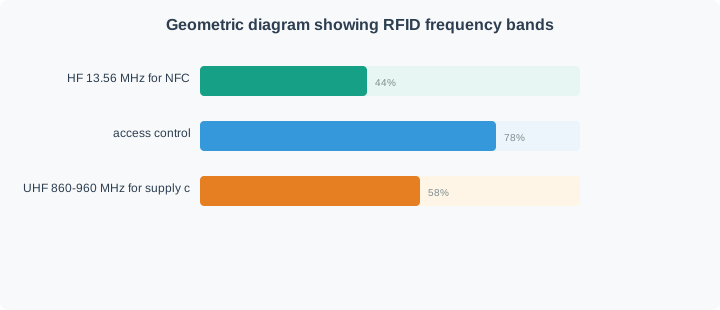
This variant helps you choose the right RFID frequency band based on your application requirements:
LF for close-range through tissue (pets, implants). HF/NFC for smartphones and medium range. UHF for long-range bulk inventory. Special metal-mount UHF tags for industrial environments.
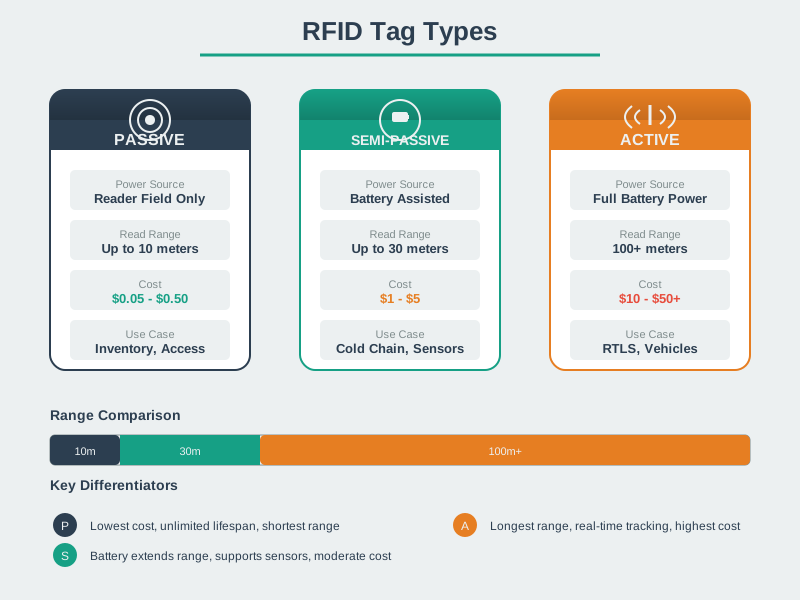
This variant compares passive, semi-passive, and active RFID tags across key dimensions:
Passive tags are cheapest and last forever but have limited range. Semi-passive add sensors with moderate battery life. Active tags provide longest range but highest cost and limited lifetime.
This variant shows the complete RFID system from tag to enterprise software:
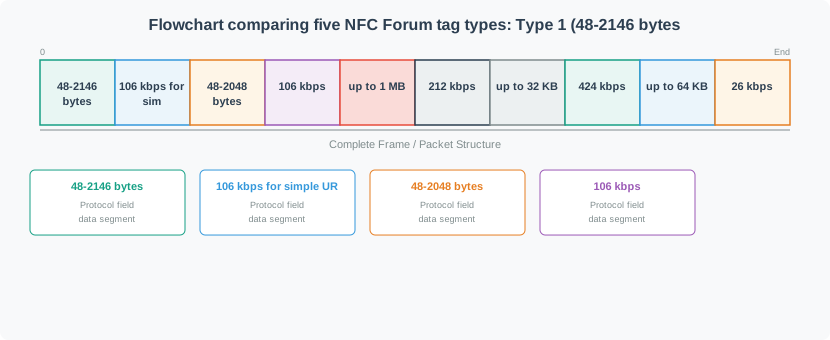
RFID systems consist of four layers: Tags (data carriers), Readers (RF interfaces), Middleware (processing and filtering), and Enterprise systems (business logic). Middleware is critical for reducing data volume and generating meaningful events.
Analogy: Different radio stations
- LF = AM radio (more tolerant to obstacles, slow data)
- UHF = FM radio (faster, but more sensitive to obstacles)
14.9 RFID vs. Barcode vs. NFC
| Feature | Barcode | RFID | NFC |
|---|---|---|---|
| Line of sight needed? | Yes | No | No |
| Read through boxes? | No | Yes | No |
| Read multiple at once? | No | Yes (anti-collision; depends on setup) | Limited |
| Range | cm-scale (line of sight) | cm-meters (passive); longer with active tags | cm-scale (a few cm) |
| Cost per tag | Very low | Low (passive) to high (active) | Low to medium (depends on chip/security) |
| Write data? | No | Yes | Yes |
Key insight: NFC is actually a type of RFID! It’s HF RFID (13.56 MHz) with standardized protocols for phones.
14.10 Real-World RFID Example: Library System
When you borrow a book:
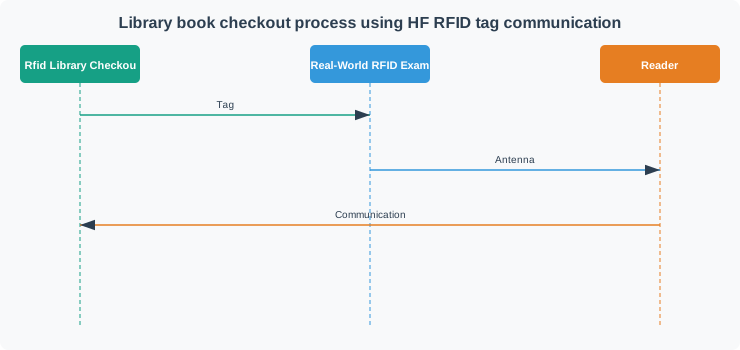
14.11 In Plain English: What RFID Really Is
14.12 Self-Check: Understanding the Basics
Before continuing, try these quick checks:
The Mistake: A retailer deploys UHF RFID tags on clothing items and expects staff to “scan” individual items by pointing a handheld reader at each tag from 10 feet away, like using a barcode scanner. In practice, the reader either misses tags entirely or reads 20 unintended tags from nearby racks.
Why It Happens: RFID marketing emphasizes “long read range” (up to 30 feet!), leading people to assume RFID is “barcodes with better range.” In reality, UHF RFID is designed for bulk reading (reading hundreds of tags at once), not precision targeting (reading exactly one tag from a distance).
The Physics Problem:
No directionality: Barcode scanners use focused laser beams. UHF RFID uses omnidirectional radio waves that spread in all directions. When you point a UHF reader at one shirt, it interrogates all tags within a 3-10 meter sphere.
Anti-collision reads ALL visible tags: UHF readers use anti-collision protocols (EPC Gen2 Q-algorithm) that deliberately inventory EVERY tag in range, not just the “closest” or “targeted” one. There is no “point and shoot” mode.
Inverse-square law: RF power drops with distance squared. A tag 3 meters away receives 1/9th the power of a tag 1 meter away. The reader ALWAYS reads closer tags first and more reliably.
When This Mistake Causes Problems:
- Retail checkout: Customer holds tagged jacket, but reader also captures tags from 5 jackets on nearby mannequins → wrong items added to cart
- Warehouse picking: Worker tries to confirm picking the right box, but reader sees 10 boxes on the shelf → cannot isolate the target
- Asset verification: Trying to verify one specific laptop in a room, but reader sees all 20 laptops → useless for individual confirmation
The Fix - Match Technology to Use Case:
| Use Case | Wrong Approach | Correct Approach |
|---|---|---|
| Individual item checkout | Point UHF reader at one item | Use HF/NFC tags (4-10 cm range) or require items in isolation zone (checkout mat where only customer’s items are present) |
| Bulk inventory count | Walk by and point at each shelf | Correct use of UHF – walk aisles with reader on, capture all tags in 1-2 passes |
| Picking verification | Point at the box you picked | Use barcode for confirmation (precision targeting) + UHF for zone-level tracking (which area has the box) |
| Asset audit | Point at one laptop to verify | Place laptop in shielded read zone (RF-blocking booth) to isolate from other tags, or use HF/NFC for tap-to-verify |
Real-World Example:
A hospital wants nurses to verify they are administering medication to the correct patient. Initial plan: put UHF tags on patient wristbands, nurse scans wristband from 3 feet away.
Problem: With 4 patients in a ward, the reader captures all 4 wristbands simultaneously. Nurse cannot tell which wristband was “scanned.”
Solution: Switch to HF/NFC wristbands. Nurse must tap the reader against the wristband (<10 cm range). This provides confirmation that the specific patient was selected, not a nearby patient.
The Lesson: UHF RFID is a bulk reading technology optimized for reading many tags quickly (inventory, logistics, access control with anti-tailgating zones). For item-level precision, use HF/NFC tags (close-proximity tap-to-read) or combine UHF with RF shielding and spatial isolation (checkout mats, Faraday cages). Never expect UHF to “aim” at a single tag like a barcode scanner – physics does not work that way.
14.13 How It Works: The Marco Polo Analogy in Detail
The “Marco Polo” game perfectly captures RFID physics — here’s why the analogy works at a technical level.
Reader shouts “Marco!” (Transmits RF Signal):
- In pool: Sound waves propagate omnidirectionally through water
- In RFID: Electromagnetic waves radiate from reader antenna (LF/HF create magnetic field, UHF creates propagating wave)
- Both diminish with distance (inverse-square law for EM, acoustic attenuation for sound)
Tags shout “Polo!” (Backscatter or Load Modulation):
- In pool: Each player uses their voice (active energy source)
- In RFID passive: Tag harvests energy from “Marco” (reader’s RF), uses it to power chip, then modulates reflection to “shout” back
- Both can respond simultaneously (anti-collision in RFID, cacophony in pool)
Reader identifies location (Decodes Responses):
- In pool: Direction of sound tells you where each player is
- In RFID: Signal strength + arrival time estimate distance (RSSI-based ranging for active tags)
Key Difference: In pool, all players have equal “voice power.” In RFID, closer tags receive more reader power and backscatter stronger signals — reader always hears closest tags best.
Scenario: You have an RC522 HF RFID reader module (13.56 MHz) commonly used with Arduino.
Given Specs:
- Reader TX power: 100 mW (typical for RC522)
- Tag: MIFARE Classic 1K card
- Tag sensitivity: -73 dBm (manufacturer spec)
Question: Will this setup achieve the advertised “up to 10 cm” read range?
Your Analysis:
- Is 10 cm realistic for HF inductive coupling?
- What factors could reduce range below 10 cm?
- How would you test actual range?
Answer: 10 cm is realistic for HF near-field coupling, but only under optimal conditions.
Why It Works:
- HF (13.56 MHz) wavelength = 22 meters
- Near-field zone = λ / (2π) ≈ 3.5 meters
- At 10 cm, we’re deep in near-field (magnetic coupling dominates)
- RC522 antenna = PCB spiral coil (~40mm diameter)
- MIFARE card antenna = similar size coil (~35mm diameter)
- Coupling efficiency peaks when coil sizes match and are aligned
What Reduces Range:
- Misalignment: Tilting card 45° reduces coupling by ~50% (5 cm effective range)
- Metal nearby: Conductive surface <5mm from tag detunes antenna (range → 3 cm)
- Thicker cards: Extra plastic/lamination adds 1-2mm distance (8 cm range)
How to Test:
- Place card flat on RC522 antenna (optimal orientation)
- Slowly lift card perpendicular to antenna
- Note distance when reader stops detecting (this is your max range)
- Repeat with 45° tilt, 90° tilt (perpendicular) — should fail at <1cm
- Measure with aluminum foil under tag → range drops to ~3-4 cm
Practical Tip: For Arduino projects, design for 5-7 cm working range, not 10 cm. This provides margin for real-world card orientation and environmental variation.
Why does HF inductive coupling work at 10 cm when wavelength is 22 m? The near-field zone boundary is \(\lambda / (2\pi)\):
\[r_{\text{near}} = \frac{\lambda}{2\pi} = \frac{22 \text{ m}}{2\pi} \approx 3.5 \text{ m}\]
At distances \(r \ll r_{\text{near}}\) (like 10 cm), magnetic field strength follows \(B \propto 1/r^3\) (dipole field), not \(1/r\) (far-field propagation). For a circular coil with 40 mm diameter carrying current \(I\) at 13.56 MHz, the magnetic field at distance \(d = 10\) cm drops by \((40\text{mm}/100\text{mm})^3 \approx 0.064\) (6.4% of coil-surface field). The RC522’s 100 mW output creates enough magnetic flux density to induce sufficient voltage in the card’s coil for the -73 dBm sensitivity threshold. Tilting 45° reduces effective coil area by \(\cos(45°) = 0.707\), cutting range to \(10 \times 0.707^{1/3} \approx 8.9\) cm (close to measured 5-7 cm with real-world losses).
Common Pitfalls
UHF RFID involves more complex RF engineering than HF at 13.56 MHz. Beginners often struggle with antenna design and read reliability. Fix: start with an NFC/HF reader (like the MFRC522 connected to an Arduino) for initial experiments, then progress to UHF once the fundamentals are clear.
Many Arduino RFID libraries only support MIFARE Classic tags. Attempting to read ISO 15693 or UHF Gen2 tags with them will fail silently. Fix: verify the library’s supported tag types against the tag types you plan to use before starting development.
Metal directly behind the reader antenna detuned it and reduces read range to near zero. Fix: mount the reader antenna on a non-metallic surface or use a spacer to provide at least 1–2 cm of clearance from any metallic enclosure.
14.14 Summary
In this chapter, you learned:
- RFID basics: Radio Frequency IDentification uses radio waves to automatically identify objects without line-of-sight
- Tag types: Passive tags (no battery, reader-powered), semi-passive (battery for sensors), and active (battery-powered transmitter)
- Frequency bands: LF (close-range, tissue-tolerant), HF/NFC (medium range, smartphones), UHF (long range, inventory), microwave (specialized)
- Technology comparison: RFID vs barcodes vs NFC - each has distinct use cases
- Real-world applications: Library systems, pet microchips, toll collection, retail inventory
14.15 What’s Next
Now that you understand RFID basics, continue with these chapters:
| Chapter | Focus | Link |
|---|---|---|
| RFID Real-World Applications | Detailed worked examples including warehouse inventory systems | Read |
| RFID Hands-On and Applications | Hardware integration, industry deployments, and lab projects | Read |
| RFID Troubleshooting Guide | Common mistakes and how to handle material interference | Read |
| RFID Fundamentals and Standards | Deep dive into technical standards and ISO protocols | Read |
| NFC Fundamentals | NFC as an HF RFID subset for smartphones and payments | Read |