22 WirelessHART Network Management
More
Depth: Practitioner
Progress saves as you read. Mark sections complete as you go; your progress appears in the sidebar.
22.1 Start With the Story
This section: Start With the Story — Picture a pressure sensor joining a busy plant network.
Picture a pressure sensor joining a busy plant network. It needs a safe path and a time to speak without drowning out other devices. The WirelessHART Network Manager is the service that plans those shared paths and times.
First confirm which sensor is asking to join. Then give it a route and a communication schedule. Watch whether messages arrive, paths weaken, or a channel becomes noisy. Test a failed relay, a late message, and a device that should no longer belong. The manager should adjust the plan and leave a record that an operator can review.
Begin with one join record. It should name the device, time, allowed role, first route, and first message. Add one health measure. Add the planned response to weak health. Remove one relay during a test. Watch the new route. Confirm that the device still meets its message need. Keep the test beside the manager change.
Use one device as a review path. Check its identity before joining. Give it more than one route when the job requires recovery. Reserve enough time for its normal messages. Leave room for management work. Watch link quality and missed slots. Change one route when evidence becomes weak. Tell the operator what changed and why. Keep the old and new plan. Test that urgent traffic still arrives during the change.
The manager is powerful, so its own failure matters. Protect its access. Save its decisions. Plan how the plant works during a restart or loss of management contact.
This simple story assumes that the manager can see enough of the network to act. Real plants may have moving equipment, interference, and maintenance mistakes. The Practitioner section follows join, route, and schedule evidence. Under the Hood explains graph choices, timing, and security limits.
The Network Manager is where a WirelessHART mesh becomes an operated system. It admits devices, assigns resources, changes routes, watches health, and turns raw network behavior into maintenance decisions.
Use this chapter by following one device join and one route change. The useful evidence is not that the mesh exists; it is that schedule changes, graph health, channel decisions, diagnostics, and operator records make the network governable.
22.2 Learning Objectives
This section: Learning Objectives
By the end of this chapter, you will be able to:
- Explain what evidence the WirelessHART Network Manager uses to maintain routes, schedules, and channel choices.
- Describe how join policy, graph routing, TDMA schedule updates, and diagnostics work together during operations.
- Review route health without making unsupported claims about uptime, delivery percentage, or failover timing.
- Plan schedule and coexistence changes with clear acceptance evidence and rollback triggers.
- Create an operations record that captures the reason, scope, revision, observations, and result of a network-management change.
22.3 Quick Check: WirelessHART Network
This section: Quick Check: WirelessHART Network
22.4 In 60 Seconds
This section: In 60 Seconds — WirelessHART network management is centralized, but it should not be treated as magic automation.
WirelessHART network management is centralized, but it should not be treated as magic automation. The Network Manager maintains a view of field devices, neighbors, graph routes, superframes, link use, and channel observations. It uses that evidence to admit devices, compute graph and schedule revisions, apply channel masks, and create diagnostics for operators.
A durable WirelessHART operation record answers five questions: what changed, why it changed, which devices and links were affected, what evidence showed the change was acceptable, and what condition would trigger rollback or another optimization cycle.

22.5 Management Boundary
This section: Management Boundary — The Network Manager is responsible for network decisions.
The Network Manager is responsible for network decisions. It does not replace good field engineering, instrument commissioning, gateway placement, or process-change control.
The management boundary includes:
- Join policy: Which device identities may join, what key material they must present, and which commissioning state they enter.
- Topology evidence: Neighbor observations, link statistics, missed reports, and route use reported by field devices and the gateway.
- Graph routing: Manager-computed graph identifiers and route options that devices use to forward traffic.
- TDMA schedule: Superframes and links that define when each communication opportunity is available.
- Channel management: Channel-use decisions based on observed interference, link quality, and coexistence policy.
- Operations records: Human-readable change records that explain the reason, scope, revision, observations, and outcome.
Inspect Figure 22.1 from the field diagnostics into the gateway-hosted managers, then back out through controlled join, graph, schedule, channel, and record revisions. The loop distinguishes measurements supplied by devices from policy decisions made at the central boundary.

The evidence loop begins with field diagnostics—neighbors, link quality, retries, queue age, missed reports, and channel observations—crossing the gateway boundary. The Network Manager turns that evidence into graph and TDMA revisions while the Security Manager owns key evidence. The loop closes only when the operations record captures the reason, baseline, action, acceptance result, and follow-up.
22.6 Join Policy
This section: Join Policy — Device admission should be handled as a controlled operation, not as a casual scan for nearby radios.
Device admission should be handled as a controlled operation, not as a casual scan for nearby radios. A join request is only one input. The Network Manager and supporting key service should also check the commissioning record, device identity, expected role, intended measurement, and allowed operating area.
Useful join evidence includes:
- Device long address and expected tag name.
- Work order or commissioning record authorizing the join.
- Join-key state and whether it is temporary or production.
- Gateway or access point that first heard the device.
- Initial neighbor list and observed link quality.
- Assigned nickname, graph, and schedule revision.
- Operator acceptance after the device has reported through the intended path.
Do not make a new device permanent just because it appears in the manager console. First confirm that its traffic is expected, its reporting period matches the process need, and its route does not overload nearby routers.
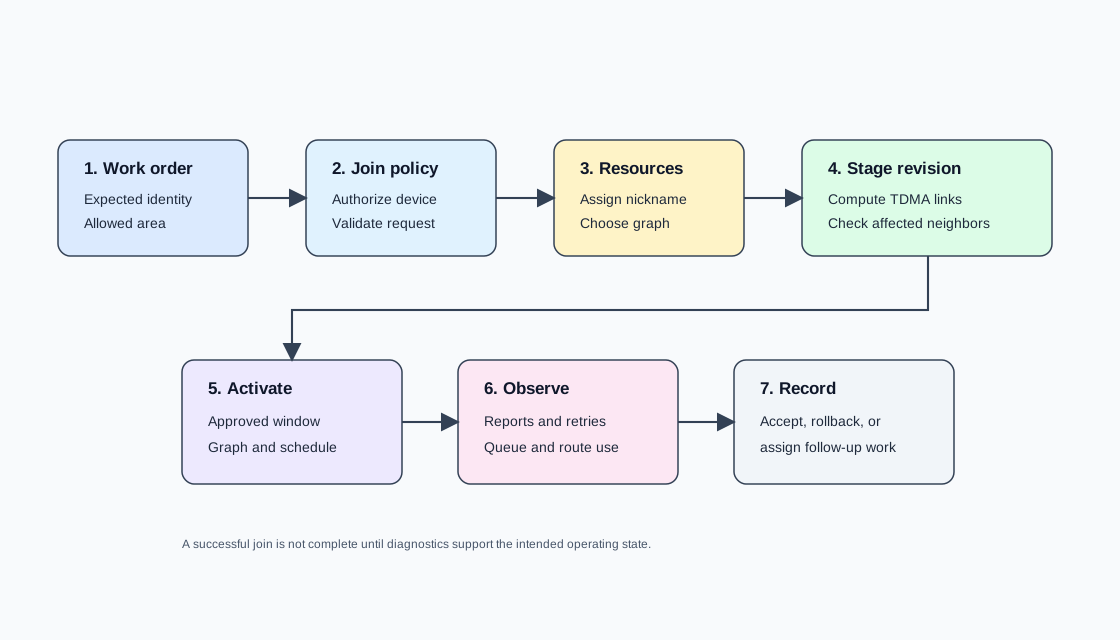
The join flow separates admission from acceptance. A work order and join policy authorize the identity; the gateway and key service validate it; only then does the Network Manager assign graph and schedule resources. Staging and post-change diagnostics remain explicit steps because a valid identity can still overload a route or consume the wrong schedule capacity.
22.7 Graph Route Health
This section: Graph Route Health — WirelessHART graph routes are manager-computed forwarding choices.
WirelessHART graph routes are manager-computed forwarding choices. The important operational question is not whether a graph exists, but whether the graph still fits the evidence seen in the plant.
Review route health with these signals:
- Neighbor diversity: The device has more than one useful next hop for the intended traffic class.
- Link trend: The relevant links are stable enough for the configured update period.
- Retry pressure: Repeated retransmissions on a link can indicate obstruction, interference, antenna orientation, or a device placement problem.
- Queue age: Queued messages waiting too long may point to congestion or an undersized schedule.
- Path concentration: Too many devices forwarding through the same router can create a local bottleneck.
- Graph revision history: Recent changes should be explainable by a work order, a device move, a channel decision, or a diagnostic finding.
When route health degrades, prefer an evidence-based change: update the graph, adjust a schedule, investigate a field obstruction, or add a planned router. Avoid repeatedly forcing optimization without recording why the previous result failed.
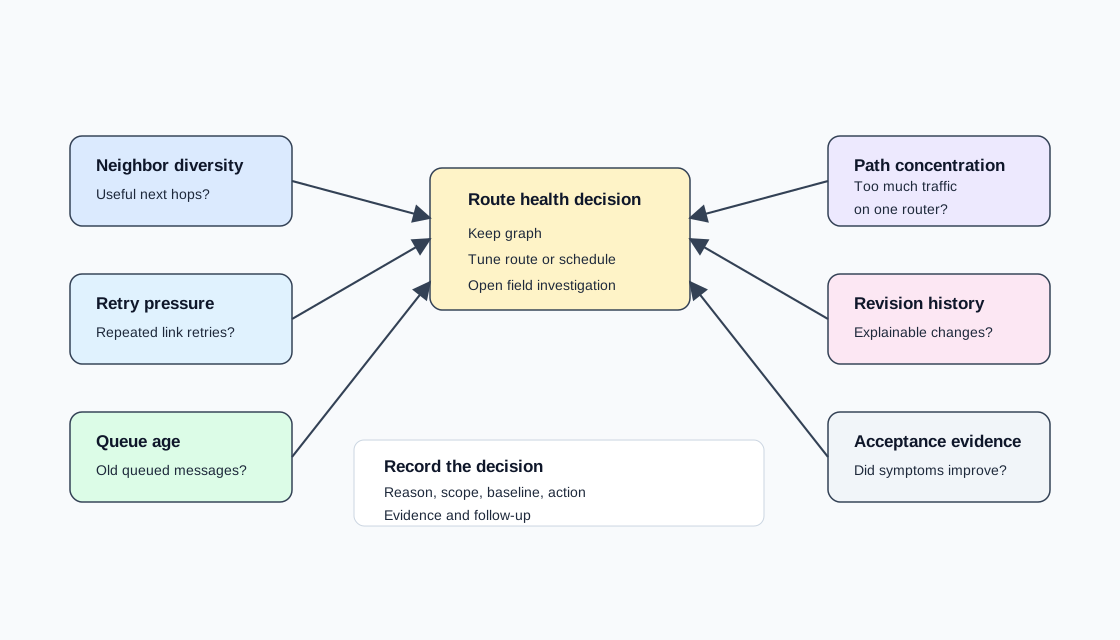
The route-health diagram groups five signals before any change is chosen. Low neighbor diversity suggests a fragile graph; rising retries or queue age can indicate link or schedule pressure; path concentration exposes an overloaded router; and revision history shows whether the condition followed a managed change. Those distinctions decide whether to tune a graph, schedule, channel mask, or physical placement.
22.8 Schedule Changes
This section: Schedule Changes — WirelessHART scheduling is a controlled resource allocation problem.
WirelessHART scheduling is a controlled resource allocation problem. A schedule change should preserve the intent of existing measurements while admitting new traffic or removing stale traffic.
Use this sequence for a schedule change:
- Define the reason for the change, such as a new device, a changed reporting period, or an overloaded route.
- Capture the baseline schedule revision and diagnostic snapshot.
- Confirm which devices, update periods, and message directions are in scope.
- Compute or request a new schedule revision.
- Stage the revision through the manager workflow.
- Activate the revision during an approved operations window.
- Observe missed reports, retries, queue age, and route use.
- Record acceptance, rollback, or follow-up action.
The acceptance criteria should be written before activation. A change is not complete until the diagnostic evidence matches the operational intent.
22.9 Coexistence and Channel Decisions
This section: Coexistence and Channel Decisions — WirelessHART uses channel hopping, but channel hopping alone is not an operations plan.
WirelessHART uses channel hopping, but channel hopping alone is not an operations plan. The manager still needs evidence about which channels are producing poor results and whether the cause is temporary, local, or plant-wide.
Review coexistence with:
- Channel observation trends from multiple devices, not a single outlier.
- Physical changes near gateways, access points, routers, or large metal structures.
- Maintenance activity that may introduce temporary RF noise.
- Changes in nearby 2.4 GHz systems.
- Whether a channel mask change improves the intended links or merely moves the problem.
Channel masks should be recorded as managed revisions. Include the baseline, the reason for the mask, affected devices, observation window, and the condition for removing or revising the mask later.
22.10 Diagnostics and Operations Records
This section: Diagnostics and Operations Records — A useful Network Manager diagnostic view should support operations, not just produce numbers.
A useful Network Manager diagnostic view should support operations, not just produce numbers. The goal is to convert raw reports into decisions.
Keep these records for every meaningful change:
- Reason: Join, removal, route health, schedule pressure, channel observation, or maintenance event.
- Scope: Device tags, graph IDs, schedule revision, gateway, and affected operating area.
- Baseline: Diagnostic snapshot before the change.
- Action: Join approval, graph update, schedule update, channel mask, or field investigation.
- Acceptance evidence: Observed reports after activation, missed report trend, retry trend, queue age, and operator sign-off.
- Follow-up: Rollback trigger, next review date, or required field work.
This record is what lets another engineer understand the network state later without relying on memory or a screenshot of a dashboard.
22.11 Common Pitfalls
This section: Common Pitfalls
-

Wrong: An optimized graph proves the live network is healthy. Refresh field proof and check busy routes.
- Treating manager optimization as proof of health: A graph can be optimized against stale or incomplete field evidence.
- Admitting devices without a commissioning record: Unknown devices create ambiguous diagnostics and make later investigations harder.
- Changing update periods without schedule review: Faster reporting consumes schedule resources and can move congestion to intermediate routers.
- Masking channels without a removal condition: A temporary coexistence response can become permanent clutter if no review date is recorded.
- Ignoring route concentration: A route can look healthy per device while a small set of routers carries too much forwarding work.
- Keeping diagnostics outside change control: If graph, schedule, or channel changes are not recorded, the next operator cannot distinguish intended behavior from drift.
22.12 Overview: One Brain Runs the Whole Mesh
This section: Overview: One Brain Runs the Whole Mesh — WirelessHART is centrally managed: a single Network Manager (usually co-located with the gateway) decides how the entire mesh behaves.
WirelessHART is centrally managed: a single Network Manager (usually co-located with the gateway) decides how the entire mesh behaves. It admits devices, builds the TDMA schedule that says who transmits in which slot, computes the routes messages follow, and continuously monitors health to adapt when conditions change. A companion Security Manager owns the keys.
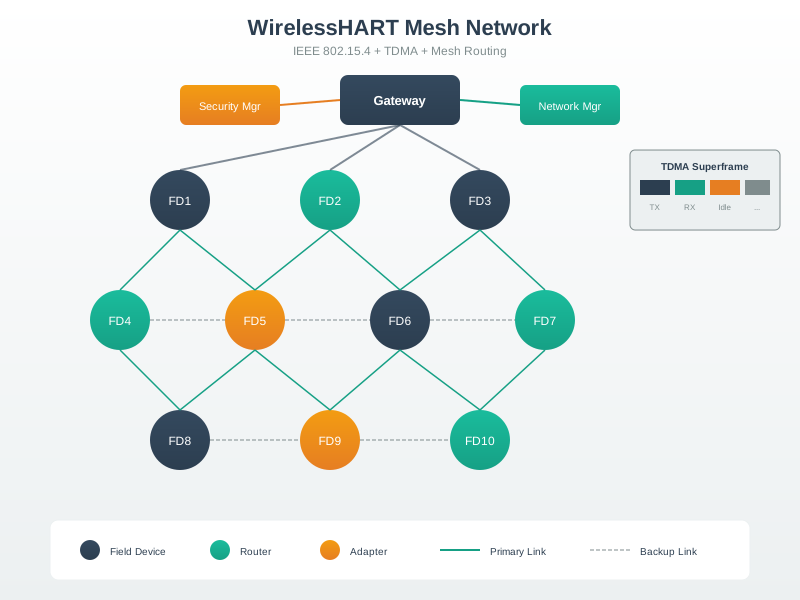
This is the opposite of an ad-hoc mesh where each node makes local routing decisions. Centralisation is what makes the network deterministic and analysable: the Network Manager has a global view and can allocate bounded, conflict-free communication opportunities for the traffic it has admitted.
Use a schedule-review example. A tank farm adds 12 WirelessHART pressure transmitters that each report every 30 seconds. If the engineering rule reserves one normal publish opportunity and one retry opportunity per device per reporting period, that is 12 x 2 = 24 upstream opportunities every 30 seconds before route-forwarding, health, management, or downstream traffic. If 8 of those devices normally forward through the same nearby router, that router may also need forwarding opportunities for those reports, so the manager has to review both endpoint load and local path concentration.
The operating record should therefore say more than "12 devices joined." It should identify the schedule revision, graph revision, device tags, expected update period, gateway, affected routers, observed missed reports, retry trend, and rollback trigger. If post-change diagnostics show that queue age rises on one router or that three devices lose route diversity, the management decision is not complete. The evidence loop continues until the schedule, graph, channel policy, and plant-data quality all match the intended operating state.
A good overview review also separates intent from outcome. The intent might be "add corrosion monitoring without cable work"; the outcome must be proven by joined devices, usable routes, assigned schedule resources, acceptable stale-value behavior, and an owner for follow-up diagnostics.
22.13 Practitioner: Graph Routing vs Source Routing
This section: Practitioner: Graph Routing vs Source Routing — Graph routing is the reliability workhorse: because the Network Manager gives each device a graph with alternate next-hops, a message can take another path when a link fails, and the mesh keeps delivering.
The Network Manager provides two routing methods for different jobs:
| Graph routing | Source routing | |
|---|---|---|
| How the path is chosen | Devices follow a pre-computed graph of paths distributed by the Network Manager | The full path is written into the message by the source |
| Redundancy | Multiple paths — reroutes around a failed link | Single fixed path, no redundancy |
| Used for | Normal operational data (reliability matters) | Diagnostics and testing a specific path |
Graph routing is the reliability workhorse: because the Network Manager gives each device a graph with alternate next-hops, a message can take another path when a link fails, and the mesh keeps delivering. Source routing is the diagnostic tool: pin a message to an exact path to test it. Together they let operators run reliably day to day and troubleshoot precisely when needed.
Practitioners should review graph health as a field-engineering question, not just a routing-table question. Suppose 18 devices are spread across a pipe rack and diagnostics show 5 devices with only one useful next hop, while another router carries forwarded traffic for 9 devices. The first finding is a route-diversity risk; the second is path concentration. The practical response may be different: rotate an antenna, move a device away from metal shielding, add a planned router, reduce a reporting rate, or stage a graph revision.
Source routing is useful when the evidence is ambiguous. If a temperature tag normally succeeds through Router A but retry pressure appears during a maintenance shift, an engineer can pin a diagnostic message through A and then through Router B to separate a path problem from a device problem. The acceptance note should record the exact path tested, the baseline retry behavior, the revised graph or schedule, and the condition that proves the change helped. Without that record, the next shift sees only a different route and cannot tell whether it was intentional or drift.
Join acceptance follows the same discipline. A device that joins with valid identity is not automatically operational. The manager should confirm tag mapping, graph assignment, schedule resources, neighbor count, channel observations, and post-join queue behavior. If a new pressure transmitter joins but increases retry counts for two established neighbors, make the surrounding network evidence part of the acceptance decision before declaring the tag permanent.
22.14 Under the Hood: Scheduling, Health, and Keys
This section: Under the Hood: Scheduling, Health, and Keys — The Network Manager's hardest job is the schedule.
The Network Manager's hardest job is the schedule. Every device reports how often it needs to communicate, and the manager assigns non-conflicting (slot, channel-offset) links across the superframes so that no two transmissions collide and every admitted device gets the bandwidth its reporting rate needs. It then keeps a live picture from health reports — link quality, missed transmissions, retries, and queue behavior — and when a link degrades it recomputes routes and slots and pushes the updates out. That closed loop is why the network is self-healing without every device making independent routing decisions.
Put the schedule accounting into a concrete review. WirelessHART uses time-slotted communication, commonly discussed in 10 ms time slots. A 1 second repeating superframe therefore has 100 slot positions per channel-offset track. That does not mean all 100 are free for one sensor: links must be assigned to the right transmitter, receiver, graph, direction, and channel offset, and routing devices need forwarding links too. If a route change causes one router to forward 6 extra reports every 30 seconds and each forwarded report is given one normal opportunity plus one retry opportunity, the local schedule needs about 6 x 2 = 12 additional forwarding opportunities per 30-second period before diagnostics and management traffic.
Security is handled by the Security Manager, which owns the key hierarchy: a join key authenticates a device onto the network, a network key secures shared or broadcast traffic, and session keys secure specific communication relationships. Keys are distributed and rotated centrally. A replacement device therefore has two independent gates: it must have acceptable identity and key material, and it must receive graph and schedule resources that keep plant data healthy.
Because management and security are centralized, the manager is a critical component, and serious deployments treat it as managed infrastructure rather than a convenience screen. The engineering evidence should include backup or redundancy expectations, the last known graph and schedule revision, who can approve joins, who can rotate keys, and how a failed manager or gateway would be detected. The same centralization that creates deterministic, secure behavior also creates an operations responsibility: every join, route, schedule, channel, and key-management change needs a record that another engineer can audit later.
Release rule: do not accept a management revision until join evidence, route diversity, schedule pressure, channel observations, key ownership, and rollback criteria are all recorded.
22.15 Knowledge Check
This section: Knowledge Check — Before opening the scored check, write one sentence that distinguishes successful admission from operational acceptance.
Before opening the scored check, write one sentence that distinguishes successful admission from operational acceptance. Your sentence should name identity evidence, assigned graph and schedule resources, and the post-join diagnostics that prove neighboring devices were not degraded.
22.16 Knowledge Check
This section: Knowledge Check
22.17 Matching
This section: Matching
22.18 Ordering
This section: Ordering
22.19 Summary
This section: Summary
- WirelessHART network management depends on evidence: joins, neighbors, routes, schedules, channel observations, and diagnostics.
- The Network Manager computes routes and schedules, but operators still need controlled admission, acceptance criteria, and records.
- Graph health should be reviewed through neighbor diversity, retry pressure, queue age, path concentration, and revision history.
- Channel masks and schedule changes should be treated as managed revisions with a reason and a review condition.
- Operations records make WirelessHART networks maintainable across shifts, maintenance windows, and later investigations.
22.20 Key Takeaway
This section: Key Takeaway — WirelessHART network management is an operating discipline: schedules, routes, joins, keys, diagnostics, and maintenance actions need clear ownership.
WirelessHART network management is an operating discipline: schedules, routes, joins, keys, diagnostics, and maintenance actions need clear ownership.
22.21 References
This section: References
- IEC 62591 WirelessHART communication network and communication profiles
- HART Communication Foundation WirelessHART system engineering guidance
- NAMUR recommendations for wireless automation in process industries
- IEC 62657 coexistence of wireless systems in industrial automation
22.22 What’s Next
This section: What’s Next — Continue with WirelessHART TDMA and Channel Hopping for the timing and channel mechanisms behind the manager decisions.
Continue with WirelessHART TDMA and Channel Hopping for the timing and channel mechanisms behind the manager decisions. Review WirelessHART Fundamentals for architecture context, or compare with ISA100.11a Fundamentals for another industrial wireless management model.
Find help
3 reviewed answers.
Where should I start in a module?
Open the module page from the sidebar to see its chapters in order. Use the module map to return to a topic you need.
Modules and pathsReviewed
What can I try when a project does not work?
Check the symptom, then work through the diagnostic steps. Keep the error message and the smallest example that reproduces it.
When you are stuckReviewed
How do interactive examples work?
Use the interactive guide to check how examples and simulations work before changing your project.
Interactive examples guideReviewed