19 NFC Real-World Applications
More
Depth: Practitioner
Progress saves as you read. Mark sections complete as you go; your progress appears in the sidebar.
19.1 Start With the Story
This section: Start With the Story — Picture a technician tapping a label on a pump.
Treat One Tap as a Request, Not Permission
Picture a technician tapping a label on a pump. The tap can find the pump record, but it must not grant anyone the right to change the pump settings.
A gateway means a device or service that joins two message paths. Near field communication, or NFC, lets nearby devices exchange small records. The app and its policy still decide what the tap may trigger.
Test one valid tap, a copied tag, a changed link, an offline phone, a wrong user, and a missing backend. Record object identity, user identity, record, policy result, action, fallback, and audit event.
This runway does not make proximity a credential or prove every phone works. The deeper sections compare payment, access, labels, setup, maintenance, trust boundaries, fallback, and release evidence.
NFC appears in payments, access, product labels, commissioning, posters, and maintenance, but the tap is only the visible moment. Behind it are credentials, records, policies, secure elements, cloud lookups, and fallback paths.
Read the applications by asking what the tap is allowed to mean. For each workflow, separate the user action from the proof, then decide which boundary carries trust and which evidence must be checked before release.
19.2 Learning Objectives
This section: Learning Objectives
By the end of this chapter, you should be able to:
- Classify real NFC deployments by operating mode, data owner, credential owner, and backend decision point.
- Explain how payment, access, product-authentication, smart-poster, commissioning, and maintenance workflows use the tap differently.
- Separate tag data, user intent, credential proof, and authorization policy in an application design.
- Identify deployment evidence needed before an NFC rollout: device support, mounting surface, fallback path, privacy review, and retest triggers.
- Choose when NFC should trigger a workflow, hand off to another radio, or be replaced by QR, Bluetooth LE, UWB, or ordinary app login.
19.3 Quick Check: NFC Real-World
This section: Quick Check: NFC Real-World
19.4 Minimum Viable Understanding
This section: Minimum Viable Understanding
- NFC is an application boundary. A tap can select an object or present a credential, but the application still needs policy, validation, logging, and fallback behavior.
- Real-world use cases split into two families. Public tag flows expose a reference or app link; credential flows prove value, access, or entitlement through a controlled issuer/verifier path.
- Short range does not equal authorization. Payment, access, and anti-counterfeit systems need dynamic proof or backend validation.
- Operational evidence matters. Tag placement, phone model support, staff workflow, replacement process, privacy review, and support scripts decide whether the rollout survives contact with users.
- NFC often starts the workflow rather than finishing it. Device pairing, commissioning, and smart-home actions commonly hand off to Bluetooth, Wi-Fi, MQTT, an app session, or a cloud API.
19.5 Application Pattern Map
This section: Application Pattern Map — Start each review by naming the application pattern.
Start each review by naming the application pattern. The same NFC radio can support very different trust boundaries.
Figure 19.1 separates public reference taps from credential and proof flows.
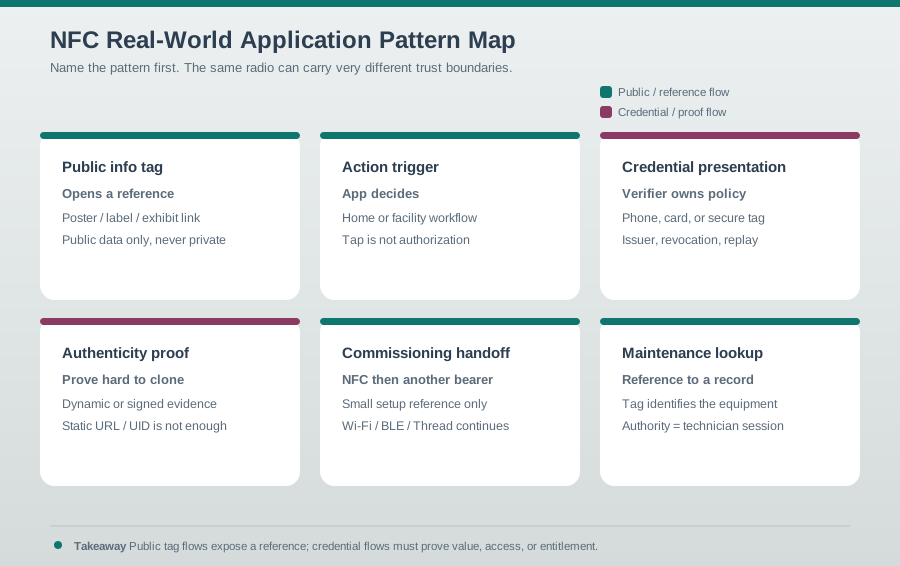
A public information tag can open a controlled reference without carrying private data. An action trigger may pass a target to an app, but the app must still decide whether the user and state permit the action. A credential flow crosses a stronger boundary: the verifier and backend policy decide access, revocation, and audit, not the radio tap alone. Identify the pattern before choosing a payload or reader. The same close-range exchange can support each use, yet the trust evidence and fallback needed for a museum label differ from those needed for a door or service action.
19.6 Payments And Access
This section: Payments And Access — Payments, transit, door access, and mobile keys are credential systems.
Payments, transit, door access, and mobile keys are credential systems. NFC supplies the close-range exchange; it does not own the whole security model.
Figure 19.2 places the access decision beyond the tap.
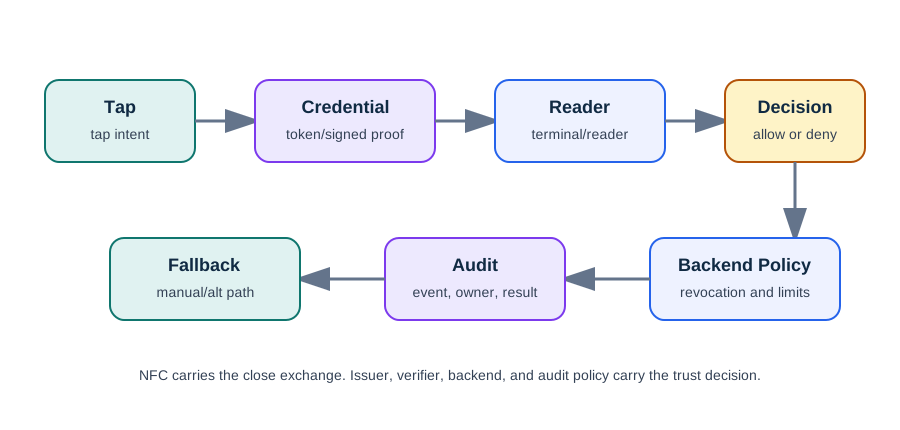
The door-access path in Figure 19.2 treats a tap as a credential presentation, not permission to unlock. The reader and verifier must reject copied, stale, malformed, revoked, or wrong-reader evidence; a static UID is not proof. Backend policy then checks the door, role, time window, workflow state, and offline rule before allowing or denying the action. Record both outcomes with the reason and reader. A duplicate tap should not cause a second unlock, and a failed NFC path needs the stated manual or app fallback. The figure describes the mechanism without supplying captured token or challenge bytes.
19.7 Review Questions For Credential Flows
This section: Review Questions For Credential Flows
- What exactly is presented over NFC: a token, application identifier, signed response, static UID, or reference?
- Where are entitlement, revocation, and rate limits enforced?
- Is the user expected to authenticate before the tap, at the tap, or after a failed attempt?
- How are relay, replay, lost device, and shared-credential scenarios handled?
- What audit data is stored, and what privacy notice or retention policy covers it?
19.8 Folded Access-Control Review Notes
This section: Folded Access-Control Review Notes — Keep tag data and credential proof separate.
For access systems, a successful NFC observation should move into a verifier and policy path:
| Step | Review evidence |
|---|---|
| Observe | Reader reports a credential presentation or tag input without assuming access should be granted. |
| Verify | Copied static values, malformed input, revoked credentials, and wrong-reader cases are rejected. |
| Authorize | Door, role, time window, workflow state, offline rule, and denial handling are checked by policy. |
| Act | The controller gives constrained feedback and handles duplicate taps without repeated unlocks. |
| Record | Allow/deny result, reason, reader, credential reference, fallback, and retest trigger are logged. |
Keep tag data and credential proof separate. A service label may hold a door reference or support lookup code, but it should not contain an unlock command, role, long-lived secret, or private personal data.
19.9 Payment Security Lives Above The NFC Radio
This section: Payment Security Lives Above The NFC Radio — NFC’s radio has no encryption, yet contactless payment can be safe because the security lives in the payment layer, not the RF layer.
NFC’s radio has no encryption, yet contactless payment can be safe because the security lives in the payment layer, not the RF layer. Each tap generates a dynamic cryptogram under EMV contactless rules, so a captured transaction cannot simply be replayed. A tokenized phone wallet presents a payment token instead of the underlying card PAN; a physical contactless card can present its PAN.
That is the concrete answer to the common question, “is it dangerous that someone could record my tap?” Even a perfect recording should be a recording of one transaction with a one-time code that is useless for a second purchase. The same boundary lesson applies outside payments. The NFC exchange gets a credential or tag reference across a few centimeters; the application decides what that reference means, whether it is fresh, and whether the user is allowed to act.
Compare three deployments. A smart poster tag in a museum may only open a public exhibit page, so the risk is mostly a bad link, stale content, or a rewritten tag. A maintenance tag on a gateway may open an asset record, but it must not grant service authority; the authenticated technician session and backend work order own that decision. A payment credential presents dynamic proof to a terminal and issuer, so it needs cryptogram validation, denial handling, audit evidence, and token lifecycle checks when tokenized.
A useful review starts by naming what the tap proves. It can prove close user intent, select a physical object, hand over a setup reference, or present a credential. It does not automatically prove identity, product authenticity, or authorization. The release evidence should name the NFC mode, payload owner, verifier owner, backend decision point, fallback path, and privacy exposure.
19.10 Cryptograms, Tokenization, And Verifier Policy
This section: Cryptograms, Tokenization, And Verifier Policy — Together they mean a tokenized contactless credential has transaction-specific proof without exposing the underlying PAN.
Two independent protections stack up in tokenized contactless payment flows:
- Dynamic cryptogram: for each transaction, the card or phone computes a unique authorization cryptogram from transaction data and a secret key. Depending on the transaction, the terminal verifies an offline cryptogram or the issuer verifies an online cryptogram. Replaying a previous tap fails because its cryptogram is stale.
- Tokenization: a tokenized wallet stores a device account number or payment token, not the underlying card PAN. Purchases run on the token, which is bound to that device; if it leaks, the underlying card is not exposed and the token can be revoked without reissuing the card.
Together they mean a tokenized contactless credential has transaction-specific proof without exposing the underlying PAN. A reviewer should look for the same pattern in any high-value NFC flow: the tap should produce bounded evidence, and the verifier should reject copied, stale, malformed, revoked, or wrong-context evidence.
For a facility access badge, the checklist is different from a poster tag. The reader should identify the credential type, pass the observed value or response to the access controller, check door rights, time window, revocation, offline rule, duplicate-tap behavior, and audit logging, then decide whether to unlock. If the system only says “UID seen, unlock,” it is treating a readable identifier as credential proof.
For public tags, the practitioner work is about content and operations rather than issuer-grade cryptography. A smart poster should use an approved host, short payload, write protection, privacy-reviewed analytics, and a replacement procedure. A maintenance tag should store an asset reference, not a role or command, and the app should reject unknown hosts, excessive payload length, unexpected record types, and retired schema versions.
19.11 Secure Element, HCE, And Card-Emulation Boundaries
This section: Secure Element, HCE, And Card-Emulation Boundaries — Inspect the real secure element chip (se/hsm key storage) below.
Inspect the real secure element chip (se/hsm key storage) below.

In card-emulation mode, the terminal exchanges ISO 7816-4 APDUs with a “card.” Where that card actually lives is the Secure Element versus Host Card Emulation decision:
| Review point | Secure Element | Host Card Emulation |
|---|---|---|
| Where the applet runs | A tamper-resistant chip, such as embedded SE or SIM. | In the phone OS or host app. |
| APDU routing | NFC controller routes terminal APDUs to the secure element. | NFC controller routes APDUs to the host app. |
| Key protection | Hardware-isolated keys. | Cloud tokenization, limited-use keys, and often a TEE. |
| Main tradeoff | Strong isolation and tighter OEM or issuer control. | More flexibility and no dedicated chip, with stronger dependence on token lifecycle and verifier checks. |
The secure-element die in Figure 19.3 makes the hardware key boundary visible.

The bond pads and dense traces show a separate silicon component. The photograph cannot prove how a particular product stores or uses keys. In this design, card-emulation keys may stay in a secure element. The chip may also run cryptographic operations instead of the host. The host still has to request an operation and interpret its result under application policy. Review the actual device configuration, key provisioning, verifier checks, and fallback before making a security claim. A close-range tap and a secure chip are different pieces of evidence.
Figure 19.4 shows the key and cryptographic operations assigned to the hardware boundary.
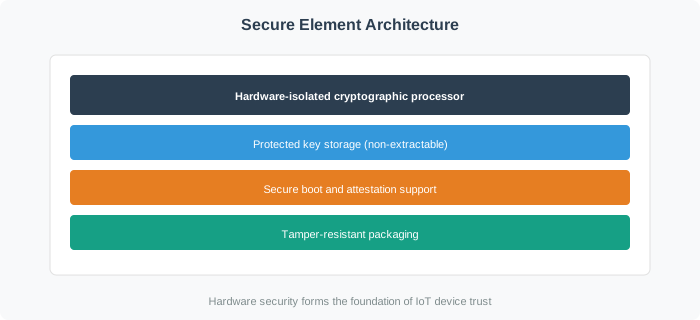
Protected key storage and isolated cryptographic processing keep sensitive operations in the secure element. The diagram also names secure boot and attestation. It names tamper-resistant packaging as another feature to check. Those features do not authorize an application action by themselves. The host, verifier, and backend still need a policy and a record of the result. In a credential trial, test provisioning, an accepted exchange, a rejected or revoked credential, and the user fallback. Keep the device and verifier evidence together so a key boundary is not mistaken for a complete access decision.
HCE, introduced in Android 4.4, let wallets emulate cards without a physical secure element by moving the applet to the host and leaning on tokenization and limited-use keys refreshed from the cloud. A secure element keeps the secret in tamper-resistant silicon. Both are valid; the choice trades hardware isolation against flexibility, and EMV payment implementations still rely on transaction-specific cryptograms, while payment-token use depends on the credential design.
The same routing idea appears in non-payment systems. A phone reading a passive maintenance tag is reader/writer mode: the phone reads NDEF, validates the host and asset reference, then asks the app or backend what the user may do. A door reader observing a mobile credential is card-emulation or credential-presentation territory: the reader sends a challenge or APDU-like exchange, then the verifier applies policy. A commissioning tag may only carry a setup reference, after which Bluetooth LE, Wi-Fi, Thread, or cloud enrollment handles the longer session.
A concrete release review can trace one tap end to end. For a gateway service label: passive tag, NDEF URI, app host validation, asset lookup, technician session, backend work-order state, allowed action, audit row, manual fallback. For a product-authentication tag: dynamic tag response, verifier app, backend issuance record, duplicate-tap or risk check, and result wording that distinguishes “record found” from “authenticity verified.” For a payment: card-emulation credential, terminal transaction data, one-time cryptogram, PAN or payment token as applicable, issuer decision, receipt or audit path.
19.12 Check EMV Replay Protection
This section: Check EMV Replay Protection
19.13 Tags For Posters, Products, And Assets
This section: Tags For Posters, Products, And Assets — Public-facing tags are easier to deploy than credential systems, but they still need controls.
Public-facing tags are easier to deploy than credential systems, but they still need controls. A bad tag can redirect users, expose private information, or make support teams chase stale labels.
Figure 19.5 follows a public tag from physical label to controlled content.
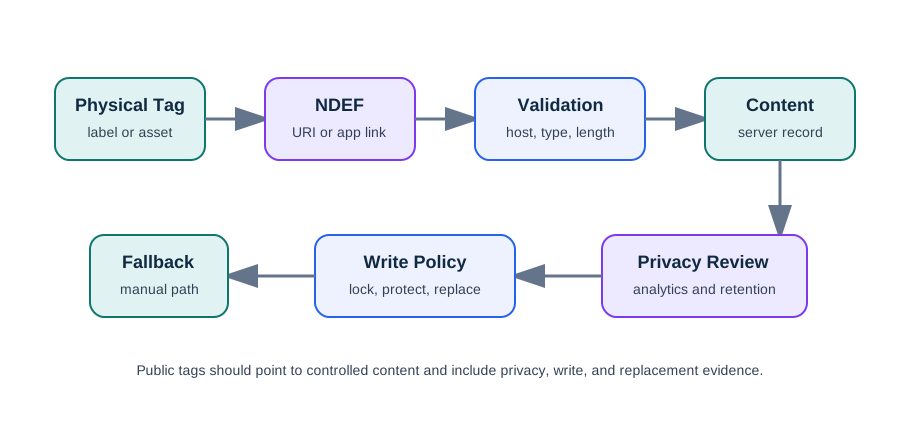
The physical tag holds an NDEF URI or app link, but the application should validate host, type, and length before opening it. Content lives in a server record that can be updated without rewriting every label. Analytics and retention need a privacy review, while write policy decides when to lock, protect, or replace the tag. A manual path lets a user reach the asset or exhibit if the tag fails. Test the mounted label and the intended phone before release. A working desk tap does not prove the link is safe or reliable on the final surface.
19.14 Smart Home And Device Commissioning
This section: Smart Home And Device Commissioning — NFC is useful when setup needs a deliberate, local gesture.
NFC is useful when setup needs a deliberate, local gesture. It can identify the device, transfer a short setup reference, or trigger a known automation. The longer-running work should happen in the app, local controller, or network protocol built for it.
19.15 Folded Smart-Home Review Notes
This section: Folded Smart-Home Review Notes — Smart-home tags identify context; they do not prove authority.
Smart-home tags identify context; they do not prove authority. Review the boundary before writing labels:
- Owners may create or revoke tags and approve sensitive actions.
- Residents may run everyday scenes within household rules.
- Children, guests, or contractors need narrower roles, expiration, and an audit trail.
- The controller owns the final decision, including rate limits, safety rules, denied actions, and fallback.
- Offline behavior must leave locks, heat, appliances, alarms, and privacy-sensitive devices in a safe state.
Retest smart-home tags after moving labels, changing scenes, replacing phones, adding guests, changing controller policy, or updating device firmware.
19.16 Example Trigger Record
This section: Example Trigger Record
19.17 Product Authentication
This section: Product Authentication — Authentication tags need stronger evidence than normal smart posters.
Authentication tags need stronger evidence than normal smart posters. A product label that only stores a fixed URL can be copied. A stronger design uses dynamic evidence and server-side checks.
Figure 19.6 separates product lookup from authenticity proof.
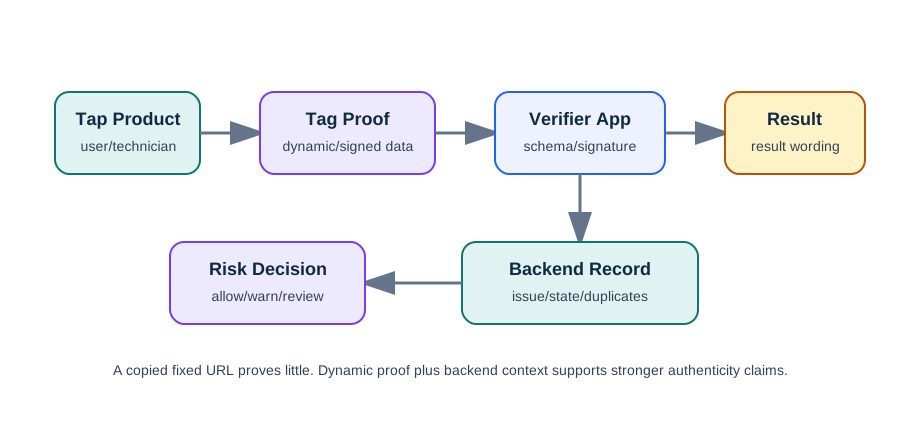
The product check in Figure 19.6 starts when a customer taps a label, but an information page from a fixed URL is easy to copy. A dynamic tag can answer a challenge or provide signed evidence; the verifier app must validate its schema and signature. The backend also checks issuance, expected product state, duplicate taps, geography, and revocation before choosing allow, warn, or review. Match the message shown to the user with that evidence strength. The figure is a conceptual sequence and supplies no message bytes or measured timing, so it cannot stand alone as a completed field authentication test.
19.18 Worked Example: Field Service NFC Rollout
This section: Worked Example: Field Service NFC Rollout
A building-operations team wants NFC labels on air handlers, gateways, and electrical panels. A technician tap should open the correct maintenance record, show the latest approved procedure, and allow a service request. The tags are mounted on mixed plastic and metal surfaces, and technicians use managed phones with protective cases.
19.19 Application Record
This section: Application Record
19.20 Release Evidence
This section: Release Evidence
19.21 Common Pitfalls
This section: Common Pitfalls
- Treating tag data as trusted. Validate all payloads, even when the tag was installed by your own team.
- Using NFC as the only fallback. Public and operational systems need a manual path when a phone model, case, or surface blocks the read.
- Putting private data on tags. Store references and retrieve protected data through an authenticated session.
- Overclaiming authentication. A static URL or UID lookup can identify an item, but it does not prove the item is genuine.
- Skipping installed-surface tests. A tag that works on a desk can fail after mounting on metal, behind glass, under a protective overlay, or near equipment.
19.22 Knowledge Check
This section: Knowledge Check
19.23 Quick Check: NFC Application Boundary
This section: Quick Check: NFC Application Boundary
19.24 Matching Quiz: NFC Application Patterns
This section: Matching Quiz: NFC Application Patterns
19.25 Ordering Quiz: Review A Real NFC Deployment
This section: Ordering Quiz: Review A Real NFC Deployment
19.26 Summary
This section: Summary
- Real NFC applications fall into public tag, action trigger, credential, product proof, commissioning, and maintenance patterns.
- Payment and access use NFC as a close-range credential exchange, but authorization depends on issuer, verifier, and backend policy.
- Smart posters, product labels, and asset tags should store validated references rather than sensitive data.
- Device setup and smart-home flows often use NFC to start a workflow, then hand off to the app, controller, or network protocol.
- A rollout is not ready until payload, security, privacy, physical installation, fallback, support, and retest evidence are recorded.
19.27 Key Takeaway
This section: Key Takeaway — Real NFC applications succeed when the physical tap, user expectation, backend action, privacy boundary, and fallback path are all designed together.
Real NFC applications succeed when the physical tap, user expectation, backend action, privacy boundary, and fallback path are all designed together.
19.28 What’s Next
This section: What’s Next
Find help
3 reviewed answers.
Where should I start in a module?
Open the module page from the sidebar to see its chapters in order. Use the module map to return to a topic you need.
Modules and pathsReviewed
What can I try when a project does not work?
Check the symptom, then work through the diagnostic steps. Keep the error message and the smallest example that reproduces it.
When you are stuckReviewed
How do interactive examples work?
Use the interactive guide to check how examples and simulations work before changing your project.
Interactive examples guideReviewed