20 WirelessHART Fundamentals
More
Depth: Practitioner
Progress saves as you read. Mark sections complete as you go; your progress appears in the sidebar.
20.1 Start With the Story
This section: Start With the Story — Imagine a pressure unit on a factory pipe.
Begin With the Plant Decision
Imagine a pressure unit on a factory pipe. Its reading must reach the control room even when metal blocks one radio path. A long radio range alone cannot prove that the warning will arrive on time.
Follow the factory pressure warning when one radio path is blocked.
-

A pressure unit must reach the control room past factory metal.
-
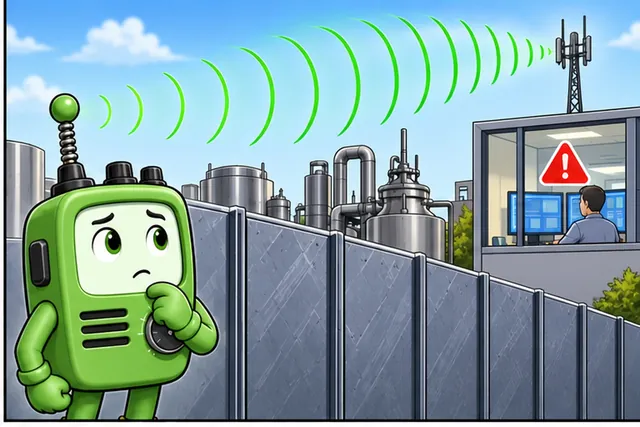
Long radio reach alone cannot promise that a warning arrives on time.
-

Block one route, add traffic, restart a device, and compare both ends.
-

A planned spare path delivers on time or marks the field reading as old.
WirelessHART is a plant radio system that gives devices planned time slots and more than one possible path. The network designer should start with the control decision. Name the reading, the latest safe arrival time, the required update rate, and what the plant does when data is missing.
Then test the installed routes. Block one path, add normal radio traffic, restart a device, and check time at both ends. Record which path changed and whether the control room marked old data instead of treating it as new.
Draw the path with the people who maintain the plant. Mark each field unit, powered helper, and control-room service. Note metal, moving equipment, and work that can change the radio space. A paper route is only a test plan until the installed path is measured.
Run the same count at quiet and busy times. Check normal reports, an urgent message, and recovery after one route is lost. Keep the result with the plant change record so later work triggers the right repeat test.
Name the owner of the schedule and the owner of the control action. They may be different teams. Both need the same time and device names when a report is late. Agree on what the screen shows while the field fact is old.
Begin with a small area, then add devices in planned groups. Watch whether the update time and battery use remain inside their limits. Stop growth when the result crosses a limit and find the cause before adding more.
This simple view leaves out the full schedule and protection process. Practitioner plans devices, managers, and field checks. Under the Hood explains channel changes, graph routes, timing, and secure joining.
A WirelessHART network is not just wireless sensors replacing cables. It is a managed industrial mesh where time slots, channel hopping, graph routes, gateways, security, and maintenance records decide whether process data is dependable.
Use this chapter from the plant-floor question outward. Ask which measurement must arrive, which manager owns the schedule, how devices join, how routes heal, and what evidence shows the network can be operated safely.
20.2 Learning Objectives
This section: Learning Objectives
After completing this chapter, you should be able to:
- Explain why WirelessHART uses a scheduled industrial mesh instead of contention-based wireless access
- Identify the responsibilities of field devices, adapters, gateways, the Network Manager, and plant applications
- Describe how time slots, superframes, channel hopping, and graph routes work together
- Frame device joining, session handling, and key management as controlled network-policy decisions
- Review deployment evidence for coexistence, maintenance, route health, and application suitability without overclaiming reliability
20.3 Quick Check: WirelessHART Fundamentals
This section: Quick Check: WirelessHART Fundamentals
20.4 In 60 Seconds
This section: In 60 Seconds — WirelessHART extends familiar HART process-instrument workflows into a managed wireless mesh.
WirelessHART extends familiar HART process-instrument workflows into a managed wireless mesh. Its core discipline is scheduled communication: the Network Manager assigns time slots, graph routes, channel use, and join policy, while the gateway connects the mesh to plant systems. A good WirelessHART design is judged by evidence - route health, retry behavior, stale-value handling, coexistence records, and maintenance procedures - not by a single radio-performance claim.

20.5 Industrial Context
This section: Industrial Context — WirelessHART is an industrial wireless standard for process instrumentation.
WirelessHART is an industrial wireless standard for process instrumentation. It keeps the HART command model familiar to process plants while replacing the wired field link with an IEEE 802.15.4 based wireless mesh. The important design choice is not “wireless instead of wires”; it is scheduled wireless with centrally managed network policy.
Use WirelessHART where the application can tolerate measured update intervals and where the network can be engineered, commissioned, and maintained as part of the plant instrumentation system. Treat it as a process monitoring and supervisory-control technology unless the complete certified system design says otherwise. Hard real-time interlocks, emergency shutdown paths, and other safety-critical functions need their own engineering basis.
WirelessHART is usually evaluated because a plant needs one or more of these outcomes:
- Add measurements where pulling new cable is difficult, intrusive, or operationally risky
- Retrofit existing HART measurement practices without replacing the host data model
- Monitor equipment condition, corrosion, temperature, pressure, or vibration at places that were previously uninstrumented
- Move temporary or rotating measurements into the control-room evidence stream
- Maintain predictable wireless access by using schedules, channel hopping, and route supervision
20.6 HART Heritage And Retrofit Fit
This section: HART Heritage And Retrofit Fit — WirelessHART took hold because it extends an installed instrumentation workflow instead of asking plants to replace it.
WirelessHART took hold because it extends an installed instrumentation workflow instead of asking plants to replace it. It preserves the HART command set and device-description model already used by host applications, asset-management tools, and technicians. The radio is important, but backward compatibility is the adoption lever.
Under the familiar application layer is a managed IEEE 802.15.4 radio system with synchronized slots, channel hopping, graph routing, and mandatory security services. Plants adopt it because it extends what they already operate, while engineering review still has to prove that update interval, route health, and stale-value behavior match the process need.
Use a retrofit example. A plant wants to add 18 temperature and corrosion monitoring points on a pipe rack where new cable trays would be disruptive. If each point reports once every 60 seconds, the application needs at least 18 successful measurement publications per minute, plus retries, health reports, join advertisements, and management traffic. If the design reserves one retry opportunity for each publication, the schedule must budget roughly 18 x 2 = 36 measurement-related opportunities per minute before normal mesh overhead.
The output should be a plant evidence record. It should state which instruments are native wireless devices, which are wired HART instruments behind adapters, which gateway exposes the values, which manager owns schedules and routes, and how the host marks stale or poor-quality values. A measurement that arrives late with degraded path evidence may still be useful for condition monitoring, while the same stale value may be unacceptable for an alarm workflow.
20.7 Operating Model
This section: Operating Model — WirelessHART networks are planned and supervised.
WirelessHART networks are planned and supervised. Field devices do not compete randomly for airtime. The Network Manager builds communication schedules and routing graphs, the gateway connects the mesh to the plant network, and each device follows assigned time and channel behavior.
Figure 20.1 separates field, mesh, gateway, and plant responsibilities.
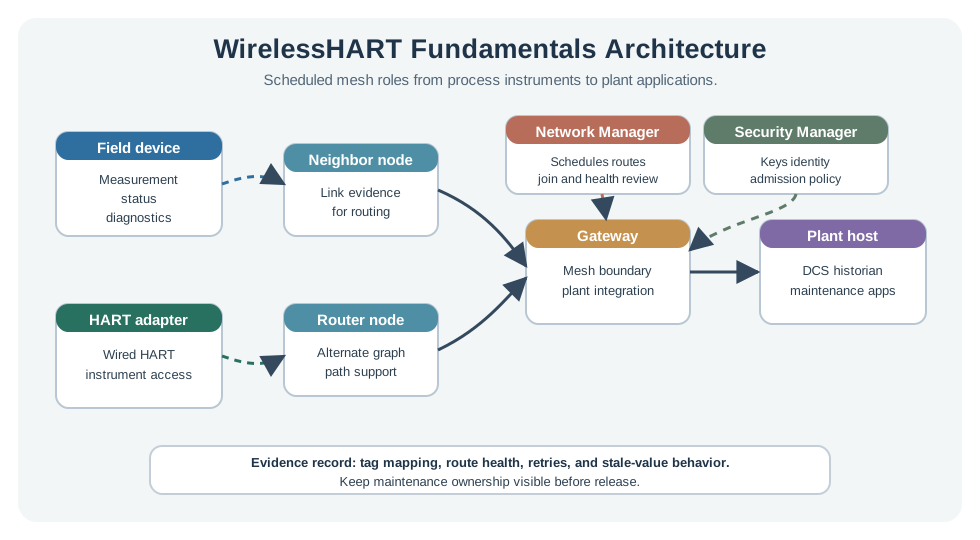
A field instrument supplies a measurement, status, or diagnostic value; a HART adapter can bring a wired instrument into the wireless path. Neighbor and router nodes provide link and alternate-path evidence before data reaches the gateway. The gateway is the boundary to plant applications, while management assigns the routes and schedule that make the path usable. Test one normal value and a changed neighbor route, then compare field reports, retries, and the plant record. A plant value alone cannot show which mesh path carried it or whether the fallback still meets the update need.
20.8 Field Devices and Adapters
This section: Field Devices and Adapters — WirelessHART field devices measure or actuate in the process area.
WirelessHART field devices measure or actuate in the process area. A field device may be a native wireless transmitter, or it may be a wireless adapter attached to an existing wired HART instrument. Each device needs enough local configuration to identify itself, join the correct network, and follow the schedule assigned by the manager.
20.9 Gateway
This section: Gateway — The gateway is the bridge between the wireless mesh and the plant systems.
The gateway is the bridge between the wireless mesh and the plant systems. It terminates WirelessHART network traffic, exposes process values and diagnostics to host systems, and provides the operational boundary where wireless evidence becomes plant data. The gateway is not just a radio; it is a managed integration point.
20.10 Network Manager
This section: Network Manager — The Network Manager is the policy brain of the mesh.
The Network Manager is the policy brain of the mesh. It learns link health, computes graph routes, assigns TDMA communication resources, supervises channel use, and coordinates device joining. In many deployments the manager function is packaged with the gateway, but the role is still conceptually distinct.
20.11 Plant Applications
This section: Plant Applications — Plant applications consume validated measurements, status, and diagnostics.
Plant applications consume validated measurements, status, and diagnostics. They should not treat every radio packet as an operational event. The application layer still needs tag context, quality status, timestamp handling, alarm policy, historian behavior, and maintenance workflows.
20.12 Component Ownership Checklist
This section: Component Ownership Checklist — The adapter is easy to underestimate.
| Component | Role |
|---|---|
| Field devices | Sensors and actuators in the process area; native wireless devices can also route for neighbors. |
| Adapters | Bring existing wired HART instruments onto the wireless network. |
| Gateway and access points | Connect the wireless mesh to the plant host or control system; access points are the gateway radios. |
| Network Manager | Forms the network, schedules communication, builds graph routes, and reviews link evidence. |
| Security Manager | Manages keys, device authentication, and admission policy. |
The adapter is easy to underestimate. It lets a plant wireless-enable a valuable wired HART transmitter without replacing the instrument or retraining the host workflow. The mesh itself is still managed rather than improvised: devices discover neighbors, the Network Manager evaluates link evidence, and routes can change when the installed environment changes.
Commissioning should be written as a component checklist, not a radio-only checklist. Suppose a pump area has 10 wireless vibration transmitters and 6 wired HART pressure transmitters using adapters. The gateway should expose all 16 process tags with quality and timestamps, while the manager should show which devices have at least two usable neighbors, which links are weak, which channels are blacklisted or avoided, and which updates are retried. If 3 of the 16 devices have only one stable neighbor, the evidence points to a route-diversity problem before it becomes a plant-data problem.
Boundary ownership matters. Field technicians may replace a battery or adapter, instrument engineers may approve tag mapping and calibration, network staff may monitor gateway connectivity, and operations may decide stale-value behavior in the historian or alarm system. A gateway outage, bad route, wrong HART tag, and expired join process should not all look like “the wireless is bad.”
20.13 Scheduled Mesh Behavior
This section: Scheduled Mesh Behavior — The result is not magic reliability.
WirelessHART combines four mechanisms:
- TDMA slots: devices transmit in assigned time windows rather than contending for access
- Superframes: repeated schedules organize periodic updates, retries, advertisements, and management traffic
- Channel hopping: each scheduled communication can use a different IEEE 802.15.4 channel, reducing dependence on one noisy frequency
- Graph routing: the manager can provide alternate paths through neighboring devices, then update routes when link evidence changes
The result is not magic reliability. It is a controlled evidence loop. The network can say which routes, channels, neighbors, retries, and device-health indicators supported a measurement.
Figure 20.2 connects a measurement requirement to links, retries, and route evidence.
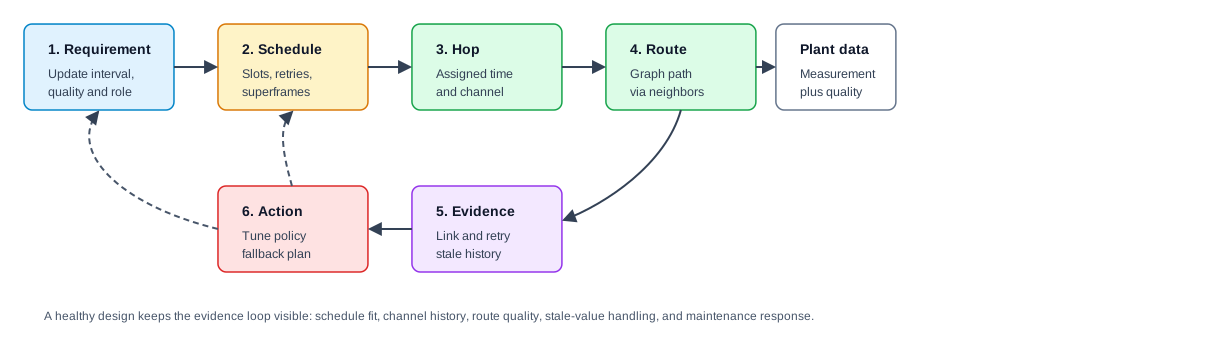
The required update interval and quality set the timing question. The schedule assigns slots, retries, and superframes; each hop needs an allocated time and channel before a graph route can carry a value through neighbors. Link and retry records then show whether reports reached the gateway fresh enough for the plant action. If a path weakens, a policy or fallback change needs another measured run. A graph drawing without forward slots is not a working route, and a schedule without receiver evidence cannot show that the process value stayed useful.
20.14 Protocol Stack View
This section: Protocol Stack View — Figure 20.3 locates WirelessHART and ISA100.11a differences above their shared mesh foundation.
WirelessHART can be read as a layered system:
- Physical layer: IEEE 802.15.4 radio in the 2.4 GHz ISM band
- Data link behavior: synchronized time slots, superframes, acknowledgements, retries, and channel hopping
- Network behavior: graph routing and source routing under manager control
- Transport and session behavior: end-to-end delivery handling and session state between communicating endpoints
- Application behavior: HART commands and process-device data models familiar to HART hosts
Figure 20.3 locates WirelessHART and ISA100.11a differences above their shared mesh foundation.

The comparison places a command-oriented HART application path on one side and ISA native objects or tunneling on the other. Both use managed wireless access, but application meaning, network adaptation, security, and gateway handling require different operating records. Follow the same process value from device through schedule or route to the plant host before treating either stack as a fit. Installed HART tools and mixed-payload requirements may lead to different choices. A shared radio layer does not prove that managers, gateways, or application procedures can be swapped.
The HART application model matters because it lets wireless instruments fit into existing process-instrumentation workflows. The scheduled wireless layers matter because they make the radio behavior observable and governable.
20.15 Joining and Session Handling
This section: Joining and Session Handling — A new WirelessHART device should not simply appear and start publishing process values.
A new WirelessHART device should not simply appear and start publishing process values. Joining is a controlled sequence:
- The device listens for network advertisements from neighbors.
- It presents identity and join credentials.
- The manager evaluates whether the device is allowed to join the network.
- The manager assigns network parameters, schedule resources, and graph routes.
- The device begins normal communication only after it has the assigned policy.
- Ongoing operation uses session state, link metrics, and diagnostics to keep the route and schedule fit for purpose.
The key point is separation of responsibilities. Device credentials allow onboarding. Session handling supports ongoing communication. Application authorization and alarm response still belong in the plant system design.
20.16 Compatibility, Join State, And Stale Values
This section: Compatibility, Join State, And Stale Values — A generic low-power wireless network could move sensor bytes, but WirelessHART wins in HART plants because industrial network cost is dominated by engineering, commissioning, and operator training.
A generic low-power wireless network could move sensor bytes, but WirelessHART wins in HART plants because industrial network cost is dominated by engineering, commissioning, and operator training. By preserving HART commands and device descriptions, WirelessHART lets the same configuration tools, asset-management software, and technicians work with wireless devices.
Security services are mandatory in normal WirelessHART operation. Device admission, session behavior, and encrypted communication are part of the system design rather than optional add-ons. The under-the-hood review is therefore a state machine: a device listens for advertisements, requests to join, proves identity with configured credentials, receives network parameters, receives schedule and graph-route resources, and then publishes process data under session and route supervision.
Figure 20.4 shows how an approved device gains roles and scheduled links.
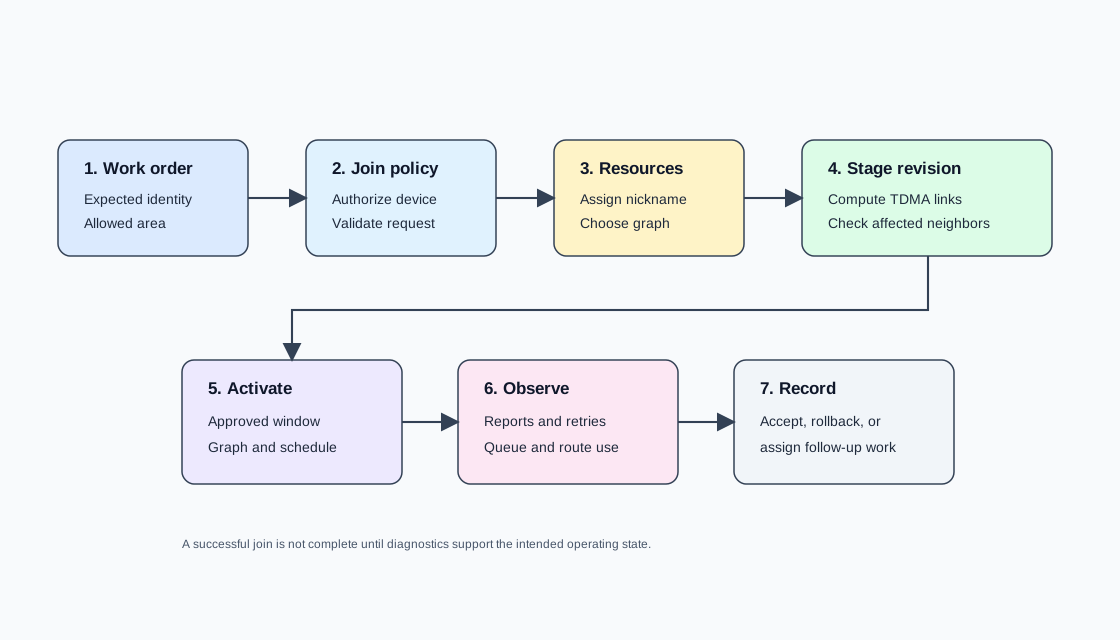
The WirelessHART path in Figure 20.4 begins with a work order naming the expected device and allowed area. Join policy validates the request before the manager assigns a nickname and graph. A staged revision computes TDMA links and checks affected neighbors; activation occurs in an approved window. Reports, retries, queue use, and route behavior then show whether the new device is operating as intended. The final record may accept, roll back, or assign follow-up work. A replacement transmitter with bad join material must fail admission, while a joined device with weak routes must remain a visible fault rather than silently feeding stale values.
If a replacement transmitter is installed with the wrong join material, it should fail before it becomes an untrusted process value. If it joins but has weak routes, it should remain visible as a diagnostic problem rather than silently degrading the historian.
If a pressure measurement is expected every 30 seconds and the host marks it stale at 90 seconds, the third missed update reaches the stale threshold. Define whether a value exactly 90 seconds old is stale; do not leave that boundary implicit. A deployment with 24 such transmitters therefore expects about 24 x 2 = 48 normal publications per minute, not counting retries and diagnostics. If route evidence shows repeated misses on one path, the manager can reroute, but the plant system still needs to know when data quality is no longer fit for the alarm or monitoring decision.
20.17 Quick Check: HART Compatibility
This section: Quick Check: HART Compatibility
20.18 Coexistence and Maintenance Evidence
This section: Coexistence and Maintenance Evidence — WirelessHART shares the 2.4 GHz band with other systems, so coexistence must be engineered and reviewed.
WirelessHART shares the 2.4 GHz band with other systems, so coexistence must be engineered and reviewed. Channel hopping helps, but it does not remove the need for site evidence. A defensible deployment records:
- Pre-deployment RF survey notes and known 2.4 GHz neighbors
- Gateway and access-point placement rationale
- Device neighbor count and route diversity
- Per-channel and per-link health history
- Retry, missed-update, and stale-value behavior under normal operation
- Maintenance steps for device replacement, key handling, firmware change, and recommissioning
- Conditions that trigger a route review, schedule change, or wired fallback
These records are more useful than a single headline reliability number. They show whether the network continues to match the process requirement.
20.19 Folded Operating Route Notes
This section: Folded Operating Route Notes — Use this chapter as the overview route for deeper WirelessHART review.
Use this chapter as the overview route for deeper WirelessHART review. Fundamentals should name the field device or adapter, gateway, Network Manager, security ownership, and host application before comparing route health or update behavior. TDMA/channel-hopping review should preserve schedule, channel, blacklist, retry, and coexistence evidence. Network-management review should preserve join policy, graph routes, weak-link diagnostics, and maintenance actions.
The operating record should answer which process variables are collected, how devices prove identity during join, how schedules and routes are assigned, which paths and channels are healthy enough for the required update behavior, and how maintenance teams see faults, route changes, stale values, and weak links.
20.20 Design Boundaries
This section: Design Boundaries — WirelessHART works best when the update interval, measurement criticality, and maintenance model match the scheduled mesh.
WirelessHART works best when the update interval, measurement criticality, and maintenance model match the scheduled mesh. It is a poor fit when the application expects high-bandwidth streams, unmanaged device mobility, millisecond closed-loop control without a certified design, or informal key distribution.
Watch for these design mistakes:
- Selecting WirelessHART only because cable is inconvenient, without defining the process value, quality state, and required update interval
- Ignoring the Network Manager’s evidence and treating the mesh as a black box
- Commissioning devices without a controlled join-key and session-handling process
- Assuming channel hopping replaces RF survey and coexistence planning
- Failing to document fallback behavior when measurements become stale or diagnostic quality drops
20.21 Quick Knowledge Check
This section: Quick Knowledge Check
20.22 Component Matching
This section: Component Matching
20.23 Join and Operation Order
This section: Join and Operation Order
20.24 Plain-Source References
This section: Plain-Source References
- IEC 62591 WirelessHART
- IEEE 802.15.4 Low-Rate Wireless Personal Area Networks
- HART Communication Protocol Specification
- WirelessHART System Engineering Guide
- ISA 100.11a industrial wireless standard
20.25 Summary
This section: Summary — WirelessHART fundamentals explain a scheduled industrial mesh where field devices, adapters, gateways, and the Network Manager cooperate through time slots, channel hopping, graph routes, joining policy, and diagnostics.
WirelessHART fundamentals explain a scheduled industrial mesh where field devices, adapters, gateways, and the Network Manager cooperate through time slots, channel hopping, graph routes, joining policy, and diagnostics. A useful review treats WirelessHART as an engineered plant network with maintenance evidence, not a generic wireless link.
20.26 Key Takeaway
This section: Key Takeaway — WirelessHART should be evaluated through managed-mesh evidence: update interval, route health, retry behavior, gateway integration, keys, and plant maintenance procedures.
WirelessHART should be evaluated through managed-mesh evidence: update interval, route health, retry behavior, gateway integration, keys, and plant maintenance procedures.
20.27 What’s Next
This section: What’s Next
- WirelessHART TDMA and Channels: Deepen the timing, superframe, and channel-diversity model.
- WirelessHART Network Management and Routing: Study graph routing, route maintenance, and Network Manager policy.
- ISA100.11a Fundamentals: Compare another industrial wireless standard.
- Zigbee Fundamentals: Contrast scheduled industrial mesh behavior with a different 802.15.4 ecosystem.
Find help
3 reviewed answers.
Where should I start in a module?
Open the module page from the sidebar to see its chapters in order. Use the module map to return to a topic you need.
Modules and pathsReviewed
What can I try when a project does not work?
Check the symptom, then work through the diagnostic steps. Keep the error message and the smallest example that reproduces it.
When you are stuckReviewed
How do interactive examples work?
Use the interactive guide to check how examples and simulations work before changing your project.
Interactive examples guideReviewed