25 Z-Wave for Smart Homes
More
Depth: Practitioner
Progress saves as you read. Mark sections complete as you go; your progress appears in the sidebar.
25.1 Start With the Story
This section: Start With the Story — Picture a hallway light that works from the wall switch but not from the far end of the house.
Prove the Light Command Survives One Lost Node
Picture a hallway light that works from the wall switch but not from the far end of the house. A protocol means the agreed rules and message order devices use to communicate.
Follow the hallway light command across a home route that can lose one node.
-
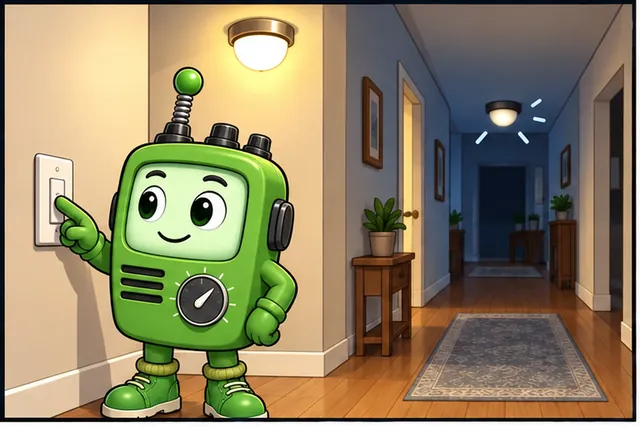
A hallway light works at the wall but not from the far end of the house.
-
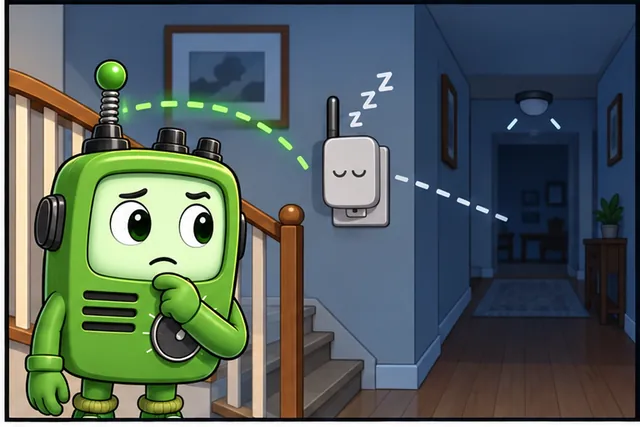
A sleeping device or failed helper may break the route.
-
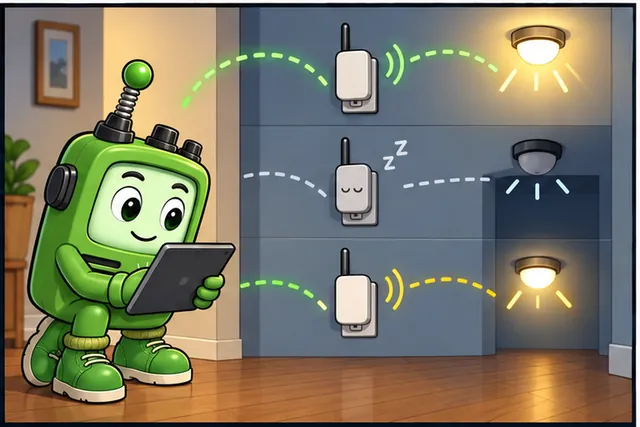
Test the normal path, one lost helper, and a device at the coverage edge.
-
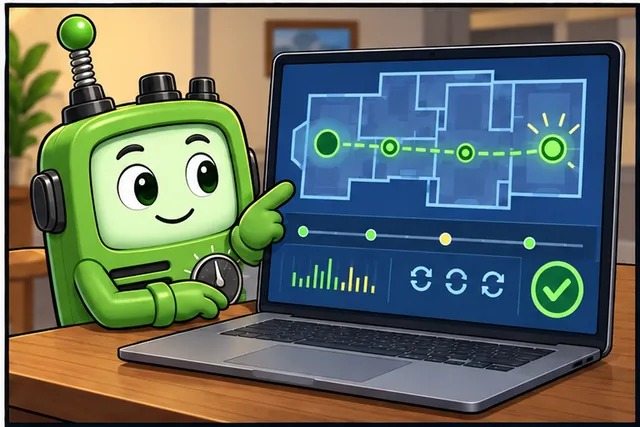
The saved map, times, retries, and final state prove this installed path.
Name the controller, included devices, radio region, route, command, and result. Test the normal path, a sleeping device, one failed repeater, and a device moved to the edge of coverage.
Keep the network map, route evidence, times, retries, and final state. This proves one installed path, not every building layout; the deeper sections explain Z-Wave roles, mesh behavior, inclusion, security, region fit, and Long Range choices.
A Z-Wave design starts in a real home or small building, not in a protocol table. The system has locks, lights, sensors, plugs, thermostats, regions, walls, batteries, hubs, and users who expect automations to work without thinking about routes.
Read this overview from that installed setting. Decide whether classic mesh or Long Range fits the device roles, region, security, and coverage evidence before choosing the next architecture, routing, planning, or simulation chapter.
25.2 In 60 Seconds
This section: In 60 Seconds — Z-Wave is a sub-GHz smart-home protocol used for lights, locks, sensors, plugs, thermostats, shades, and related automation devices.
Z-Wave is a sub-GHz smart-home protocol used for lights, locks, sensors, plugs, thermostats, shades, and related automation devices. Classic Z-Wave uses a managed mesh where mains-powered devices can repeat traffic and battery devices usually behave as sleeping endpoints. Z-Wave Long Range changes that topology: LR endpoints communicate directly with the hub in a star pattern and use a larger address space. A good Z-Wave choice is not based on brand familiarity; it is based on region, controller support, device role, security inclusion, path evidence, and whether the deployment needs classic mesh coverage or LR direct reach.

25.3 Learning Objectives
This section: Learning Objectives
By the end of this chapter, you should be able to:
- Describe Z-Wave’s role in smart-home and small-building automation.
- Separate classic Z-Wave mesh behavior from Z-Wave Long Range star behavior.
- Explain why regional frequency support must be checked before buying devices.
- Identify the first design questions for a Z-Wave deployment.
- Compare Z-Wave with Zigbee, Thread, Wi-Fi, and Bluetooth without overclaiming.
- Choose the next Z-Wave chapter based on architecture, routing, planning, or simulation needs.
25.4 Quick Check: Z-Wave Overview
This section: Quick Check: Z-Wave Overview
25.5 Core Ideas
This section: Core Ideas
- Sub-GHz radio: Z-Wave operates in region-specific sub-GHz bands rather than the 2.4 GHz band used by Wi-Fi, Bluetooth, Zigbee, and Thread.
- Classic mesh: traditional Z-Wave networks use repeat-capable, always-listening devices to extend coverage.
- Sleeping endpoint: many battery sensors wake for events or scheduled checks and do not repeat traffic.
- Home ID and Node ID: the network boundary and device addressing model used by classic Z-Wave.
- Z-Wave Plus: a certification generation that improved capabilities over earlier Z-Wave devices.
- Z-Wave Long Range: a newer mode using direct hub-to-device star links and larger address space.
- Inclusion evidence: proof that a device joined the intended network, completed interview/security steps, and works from its installed location.
25.6 What Z-Wave Is Good For
This section: What Z-Wave Is Good For — Z-Wave is strongest when the workload is small control and status traffic rather than high-throughput data.
Z-Wave is strongest when the workload is small control and status traffic rather than high-throughput data. A light switch command, lock state, thermostat setpoint, leak alert, shade command, or contact-sensor event is a good fit. Camera video, firmware image distribution, high-rate telemetry, and large payload streams are not.
Use Z-Wave when the design needs:
- local control of many low-bandwidth devices;
- a mature smart-home device ecosystem;
- sub-GHz propagation characteristics;
- controller-managed enrollment and device records;
- stable integration into hubs such as home-automation gateways;
- evidence that devices were included, interviewed, secured, and reachable.
Avoid treating Z-Wave as a generic IoT network. It is a smart-home and light-building automation protocol with specific topology, address, security, and ecosystem assumptions.
Figure 25.1 holds region, controller, workload, and route checks together.
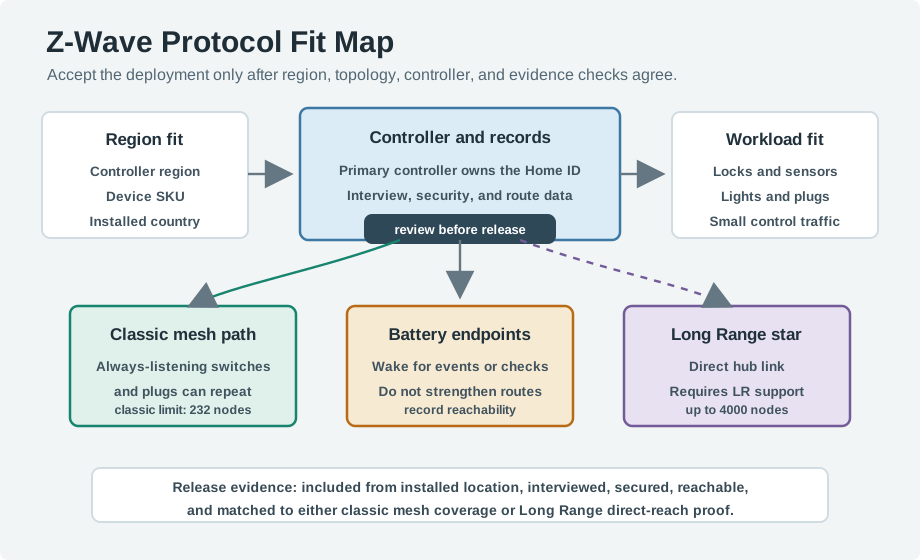
The fit map in Figure 25.1 checks the controller region, device SKU, and installed country before topology. The primary controller owns the Home ID and keeps interview, security, and route records. Always-listening switches and plugs can repeat on a classic mesh, while sleeping battery devices depend on that coverage rather than strengthening it. Long Range uses a direct hub link and requires support at both ends; its stated node limit is a protocol capacity claim, not proof of this site’s reach. Release evidence should show inclusion from the installed place, successful security and interview, and either classic route delivery or Long Range direct-reach proof.
25.7 Sub-GHz and Topology Evidence
This section: Sub-GHz and Topology Evidence — The tradeoff is data rate.
Z-Wave made one deliberate radio choice: it uses region-specific sub-GHz ISM bands, often around 908 MHz in the United States and 868 MHz in Europe, rather than the crowded 2.4 GHz band shared by Wi-Fi, Bluetooth, Zigbee, and Thread. That choice supports whole-home control traffic because lower-frequency signals often travel through walls and around building materials better than 2.4 GHz signals in the same environment.
The tradeoff is data rate. Z-Wave is designed for small commands and status events, not video or large telemetry streams. A lock command, dimmer level, leak alert, thermostat setpoint, battery report, or contact-sensor event is tiny enough that reliable range and coexistence matter more than throughput.
Older Z-Wave physical-layer descriptions often mention Gaussian frequency-shift keying and Manchester-style line coding. Treat those as radio-layer facts: they explain why the link is a narrow low-data-rate automation channel, while the controller, Home ID, Node ID, command classes, security inclusion, and route evidence explain whether the installed network is acceptable.
Use that radio choice to reason about device fit, not to skip design. Suppose a home has 2 locks, 9 in-wall switches, 4 smart plugs, and 20 battery sensors. That is 35 Z-Wave devices, but only the 13 mains-powered switches and plugs are likely to help a classic mesh as always-listening repeaters. The 20 battery sensors are useful endpoints, but they do not make the route backbone stronger.
That same home may also have one shed or gate sensor outside the normal mesh. A classic design asks whether a reliable path exists through installed repeaters; a Long Range design asks whether the hub and endpoint both support LR, use the right regional hardware, and have a tested direct link. The overview decision is a topology choice: classic mesh for many installed mains-powered devices, LR star for direct-reach endpoints, and evidence for whichever path is chosen.
25.8 GFSK Pulse Shaping and Classic Identifier Fields
This section: GFSK Pulse Shaping and Classic Identifier Fields — Keep line coding separate from modulation.
Frequency-shift keying represents bits by moving the carrier between frequency states. If the baseband symbol sequence jumps abruptly between and , its sharp edges contain high-frequency components that spread the modulated signal beyond the desired channel. Gaussian frequency-shift keying (GFSK) smooths that sequence before it drives the frequency modulator.
Let the binary symbol waveform be and a Gaussian filter have impulse response
The shaped control signal is the convolution
and the instantaneous carrier frequency becomes
Convolution turns a step between symbols into a gradual transition. The modulator therefore changes frequency smoothly instead of responding to a rectangular edge, reducing sidelobes and occupied bandwidth. The usual parameter—the Gaussian filter’s bandwidth multiplied by symbol period—expresses the trade-off: a smaller narrows the spectrum more aggressively but spreads each transition across more symbol time, increasing intersymbol interference if taken too far. The receiver and transmitter must implement the same PHY profile; pulse shaping is not a field tuning knob to change independently.
Keep line coding separate from modulation. Manchester-style coding controls transition and clock-recovery properties of the bitstream; Gaussian filtering shapes the pulses; FSK maps the shaped result into carrier-frequency deviation. Calling all three “GFSK” hides where an implementation or interoperability failure occurs.
Classic network identity is equally concrete:
| Classic field | Width | Wire-level purpose | Operational meaning |
|---|---|---|---|
| Home ID | 4 bytes (32 bits) | separates frames belonging to different classic Z-Wave networks | shared network identifier assigned/managed by the primary controller |
| Node ID | 1 byte (8 bits) | identifies a classic node within that Home ID | device address; only the protocol-defined subset is assignable, giving the familiar 232-node classic limit |
| : Classic Z-Wave identifiers must be read together, not as globally unique device identity. |
A Node ID is meaningful only with its Home ID. It is not a serial number and it can be reused in another network. Security keys, command classes, controller records, and inclusion state remain separate fields. For packet logs and fleet records, capture at least Home ID, Node ID, controller, device identity, security class, route role, and observation time so “Node 7” cannot be confused across networks or after a controller migration.
25.9 Classic Z-Wave and Z-Wave Long Range
This section: Classic Z-Wave and Z-Wave Long Range — Classic Z-Wave and Z-Wave Long Range can appear in the same product ecosystem, but they solve different topology problems.
Classic Z-Wave and Z-Wave Long Range can appear in the same product ecosystem, but they solve different topology problems.
Classic Z-Wave mesh
- Uses mesh paths through always-listening routing devices.
- Depends on repeater placement for edge rooms, basements, garages, and locks.
- Has the familiar 232-node classic network limit.
- Is useful when mains-powered devices are distributed through the building.
Z-Wave Long Range
- Uses direct hub-to-device star links instead of classic mesh repeating.
- Uses a larger 12-bit address space; official Z-Wave/Silicon Labs material describes support up to 4000 nodes.
- Requires LR-capable hub and LR-capable devices.
- Is useful when direct reach and simplified route behavior matter more than local mesh repeating.
Do not use LR claims as a reason to ignore installed evidence. A direct star link still needs region support, controller support, signal margin, security inclusion, and device interview records.
Figure 25.2 contrasts classic repeater paths with direct Long Range links.
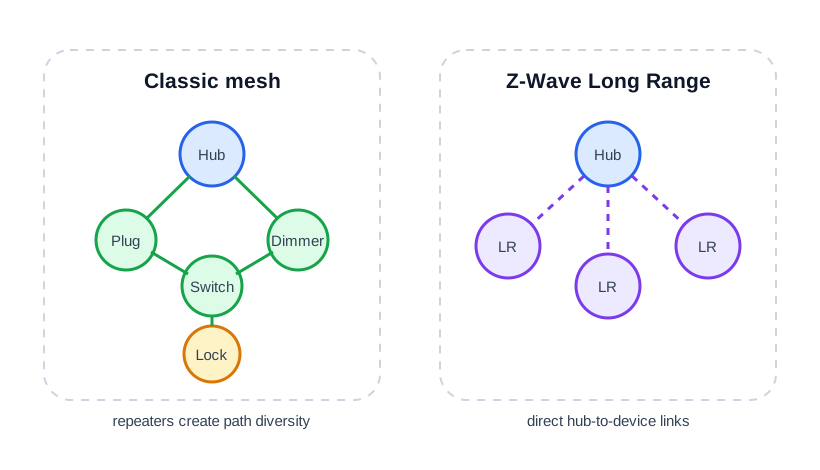
In a classic mesh, the hub can reach a lock through mains-powered plug, switch, or dimmer nodes that repeat traffic. Long Range devices use direct links back to the hub instead of that repeater chain. The two drawings create different placement and failure questions: a removed plug can alter a classic route, while a direct link must be tested from the final endpoint position. Check the controller and device support for the chosen mode, then record inclusion, route, and receiver evidence. A radio path shown on a diagram is only a candidate until the installed node responds reliably.
25.10 Network Identity and Device Roles
This section: Network Identity and Device Roles — Every classic Z-Wave network is defined by identifiers assigned by the controller.
Every classic Z-Wave network is defined by identifiers assigned by the controller.
| Identifier | Size | Meaning |
|---|---|---|
| Home ID | 32-bit | Identifies the whole network; every node in that network shares this value. |
| Node ID | 8-bit | Identifies one classic device; classic Z-Wave networks support up to 232 nodes. |
Devices take different roles. Controllers manage the network; the primary controller includes and excludes devices and holds the master node list, and some deployments can use secondary controllers. End devices are the controlled devices. Mains-powered end devices often act as routing devices that repeat classic mesh traffic. Battery devices usually act as sleeping endpoints that wake for events or scheduled checks and do not repeat for others.
Turn those identifiers into an operations record. If Node 7 is a mains-powered hallway switch, Node 8 is a front-door lock, and Node 9 is a battery contact sensor, they may share one Home ID but have different duties. Node 7 can be a useful classic repeater, Node 8 is a critical secured endpoint, and Node 9 is usually a sleepy endpoint. Treating all three as just “paired devices” hides the architecture.
A practical role table should include Node ID, product role, mains or battery power, whether it can repeat classic mesh traffic, security class, installed location, and acceptance evidence. For the 35-device example, the reviewer should be able to count 13 possible repeaters, mark the 2 locks as critical endpoints, and identify whether either lock depends on one removable plug.
The controller is part of the evidence too. A primary controller backup or migration plan matters because the Home ID and node table define the network boundary. Replacing the controller without a planned migration can turn known devices into orphaned devices that must be excluded, reincluded, interviewed, and retested.
25.11 First Design Questions
This section: First Design Questions — Before choosing devices, answer these questions.
Before choosing devices, answer these questions.
Region
- Which Z-Wave region is the controller built for?
- Do all devices match the same region?
- Is the purchase source clear enough to avoid accidental cross-region hardware?
Topology
- Is this a classic mesh, LR star deployment, or mixed deployment?
- Which devices can repeat classic mesh traffic?
- Which devices are battery endpoints?
- Are edge devices dependent on a single removable plug?
Controller
- Does the controller support the device generation, security mode, and LR mode required?
- Can the controller expose route, interview, security, and failed-node evidence?
- Is there a backup/migration plan for the controller?
Acceptance
- Did devices include from their installed locations, or was route repair run after relocation?
- Did battery devices finish interviews after being manually awakened?
- Are failed nodes removed or documented?
- Can critical devices still work after a single non-critical repeater is unplugged or moved?
25.12 Frequency and Region Fit
This section: Frequency and Region Fit — Z-Wave is sub-GHz, but “sub-GHz” is not one global frequency.
Z-Wave is sub-GHz, but “sub-GHz” is not one global frequency. Devices are produced for regional frequency plans. A device built for one region may not work legally or reliably with a controller from another region.
Instead of memorizing every country table, record three pieces of evidence:
- the controller region;
- the device region or SKU;
- the installed-country regulatory context.
That record is more useful than a copied frequency table because products and country allocations can be updated over time.
Figure 25.3 makes region compatibility a purchase and inclusion gate.
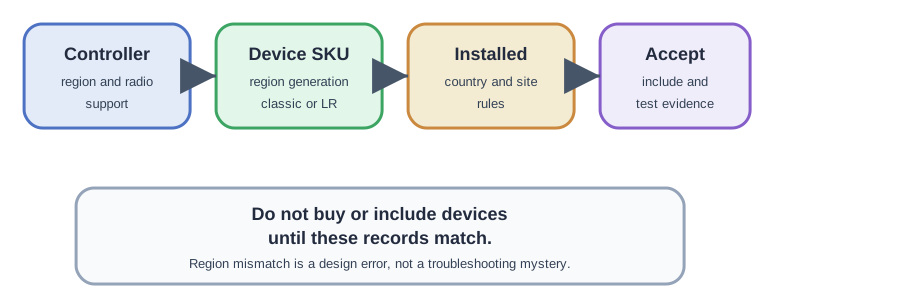
The controller’s radio region and support must match the device SKU and the country where the system is installed. The device generation and classic or Long Range capability also need to match the topology choice. Only after those facts agree should inclusion and route tests be used as evidence. A device that fails to join because its region is wrong cannot be fixed by moving repeaters or resetting a healthy network. Keep the controller, device, site, and test record together before accepting an installed path or ordering more units.
25.13 How Z-Wave Compares
This section: How Z-Wave Compares — Z-Wave is one option in a smart-home protocol portfolio.
Z-Wave is one option in a smart-home protocol portfolio.
Compared with Zigbee
- Z-Wave emphasizes a certified Z-Wave ecosystem and sub-GHz operation.
- Zigbee uses 2.4 GHz in many deployments and has a broader multi-vendor ecosystem with profile and implementation variation.
- Both require installed testing; neither should be accepted from a marketing claim alone.
Compared with Thread
- Thread is IP-based and often discussed with Matter ecosystems.
- Z-Wave is not IP-native at the device mesh layer; integration usually happens through a controller/gateway.
- Thread fit depends on border routers, IP operations, and Matter goals; Z-Wave fit depends on controller support, regional frequency, and device-role evidence.
Compared with Wi-Fi
- Wi-Fi is better for high-throughput devices and direct IP integration.
- Z-Wave is better for low-bandwidth control/status endpoints where device power, local automation, and smart-home hub integration matter.
Compared with Bluetooth
- Bluetooth and BLE fit phone-adjacent pairing, wearables, beacons, and nearby control.
- Z-Wave fits persistent installed automation with a dedicated controller and device records.
Figure 25.4 compares smart-home protocols against the workload behind a range or latency claim.
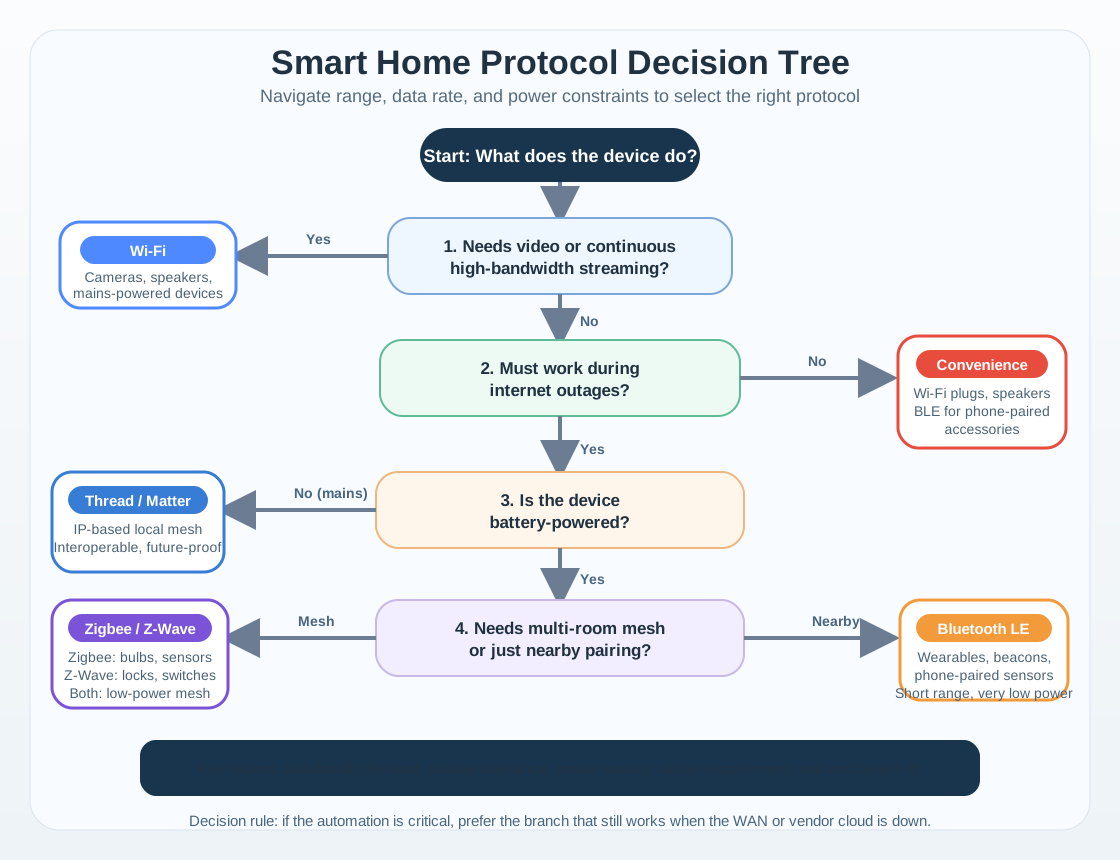
The quick-reference rows place each protocol beside a stated reach and response-time role. A lock command, periodic sensor reading, and high-bandwidth stream need different traffic behavior, so the table should guide a test question rather than settle the design alone. Range values depend on the installation, and the figure only shows bandwidth where the chapter gives a workload basis. Choose a candidate from power, response, and message needs, then test the intended endpoint and receiver in the final rooms. Keep the measured result and fallback path with the decision.
The comparison is a sequence of workload questions, not a league table. First separate continuous high-throughput traffic from low-bandwidth control and status. Then ask whether local operation during an internet outage, battery life, phone adjacency, IP routing, or an installed controller is the governing constraint. The resulting branch narrows the candidate set; regional support, security, interoperability, and installed radio evidence still decide whether the selected protocol is acceptable at this site.
25.14 Interoperability, Command Classes, and Acceptance
This section: Interoperability, Command Classes, and Acceptance — Z-Wave’s interoperability story depends on certification and standard command classes.
Z-Wave’s interoperability story depends on certification and standard command classes. Certified devices implement command classes such as Binary Switch, Multilevel Sensor, Door Lock, Notification, and Battery so a controller can learn what the device can do during interview instead of guessing from a product name.
That model is useful because a switch, sensor, lock, or dimmer should expose predictable capabilities to a certified controller even when devices come from different vendors. It does not mean every deployment is automatically reliable. Certification proves a shared protocol language; the installed network still has to prove region fit, security inclusion, role classification, route evidence, or LR direct-link evidence.
For example, a certified lock can still be unreliable if it was included near the hub, moved to a metal door, and never retested from the installed location. A dimmer can support the right command class but still be a bad repeater if it sits behind dense masonry or is unplugged during a renovation. Acceptance must join protocol evidence with placement evidence.
25.15 Quick Check: Sub-GHz Interoperability
This section: Quick Check: Sub-GHz Interoperability
25.16 Worked Example
This section: Worked Example — A homeowner wants reliable automation for locks, leak sensors, lighting scenes, and a few outdoor contact sensors.
A homeowner wants reliable automation for locks, leak sensors, lighting scenes, and a few outdoor contact sensors.
Good first review:
- Classify the workload. Locks, leak alerts, switches, and contact sensors are low-bandwidth control/status devices.
- Check region and controller support. Confirm the hub and devices are for the same Z-Wave region and that the controller supports the intended security and LR features.
- Separate classic mesh from LR. Use classic mesh devices where the house already has repeat-capable switches and plugs. Consider LR only for direct-reach outdoor endpoints when the hub and device both support it.
- Place repeaters deliberately. A plug near the front door might be a critical repeater for a lock; a random plug behind a metal appliance may not help.
- Accept by evidence. Verify inclusion, device interview, security class, route or signal evidence, and critical-device behavior after the full installed set is present.
Poor review:
- “It is Z-Wave, so all devices will work.”
- “The sensor says long range, so no installed test is needed.”
- “There are many battery sensors, so the mesh must be strong.”
25.17 Common Pitfalls
This section: Common Pitfalls — Mixing regions.
Mixing regions. A device bought from another market can have the wrong regional frequency. Check device SKU and controller region before installation.
Counting sleepy sensors as repeaters. Battery devices usually do not build the classic mesh backbone.
Assuming Long Range means mesh extension. LR is direct star communication, not a repeater path for classic mesh nodes.
Trusting app presence as acceptance. A device appearing in the controller UI is not enough. Check interview, security, route/signal evidence, and installed-location behavior.
Skipping records. If nobody records critical repeaters, failed nodes, region, security class, and controller backup status, later troubleshooting becomes guesswork.
25.18 Knowledge Check
This section: Knowledge Check
25.19 Match the Concepts
This section: Match the Concepts
25.20 Order the First Review Steps
This section: Order the First Review Steps — Check three independent compatibility boundaries before inclusion with the diagram Figure 25.5.
Check three independent compatibility boundaries before inclusion with the diagram Figure 25.5.

In the diagram Figure 25.5, match the regional SKU separates EU 868.42 from US 908.4 MHz hardware; Read identity at two scopes separates the 4 B Home ID from the 1 B Node ID. Shape before modulation then locates Gaussian filtering at the baseband-to-GFSK boundary.
Turn repeater placement into a named route experiment with the diagram Figure 25.6.

In the diagram Figure 25.6, the controller’s original path is interrupted at ×R2, so Hub H reroutes through R1, R3, and R4 to Lock L. The POWERED and BATTERY cards explain why the lock is an endpoint while the mains-powered nodes form the relay backbone.
25.21 Summary
This section: Summary — Z-Wave is best understood as a smart-home automation protocol with specific topology and evidence requirements.
Z-Wave is best understood as a smart-home automation protocol with specific topology and evidence requirements. Classic Z-Wave depends on repeat-capable mains-powered devices to create a mesh. Z-Wave Long Range adds direct star communication and larger address space, but it is not a replacement for installed validation. Region, controller support, security inclusion, device role, and route or signal evidence are the facts that make a Z-Wave design reviewable.
25.22 Key Takeaway
This section: Key Takeaway — Z-Wave is best reviewed as a managed home or building mesh where interoperability, secure inclusion, routing, and controller ownership shape reliability.
Z-Wave is best reviewed as a managed home or building mesh where interoperability, secure inclusion, routing, and controller ownership shape reliability.
25.23 Concept Relationships
This section: Concept Relationships
Builds on:
- Networking Basics: addressing, topology, and packet flow.
- Network Topologies: mesh, star, and hybrid topology tradeoffs.
- Wireless Communication Fundamentals: RF bands, interference, and link constraints.
Prepares for:
- Z-Wave Architecture and Devices: Home IDs, Node IDs, device roles, and topology evidence.
- Z-Wave Routing and Healing: source routes, route repair, and diagnostics.
- Z-Wave Network Planning and Design: placement and acceptance exercises.
- Z-Wave Simulation and Quiz: hands-on route and failure reasoning.
Compares with:
- Zigbee Fundamentals and Architecture: another smart-home mesh option.
- Thread Network Architecture: IP-based mesh and Matter-adjacent architecture.
25.24 References
This section: References
25.25 Try It Yourself
This section: Try It Yourself — Pick one room, one edge location, and one outdoor or detached location in a home or lab.
Pick one room, one edge location, and one outdoor or detached location in a home or lab. For each location, write:
- whether the device would be classic mesh or Z-Wave Long Range;
- whether it can repeat classic mesh traffic;
- which controller and region it depends on;
- what evidence would prove the device is included and reachable;
- what should be rechecked if a smart plug, switch, or controller is moved.
25.26 What’s Next?
This section: What’s Next?
- Z-Wave Architecture and Devices: understand Home IDs, Node IDs, controllers, repeaters, sleeping endpoints, and LR endpoints.
- Z-Wave Routing and Healing: review how classic mesh routes fail, repair, and produce diagnostics.
- Z-Wave Network Planning and Design: turn the overview into a placement and acceptance plan.
- Z-Wave Simulation and Quiz: practice route and failure reasoning.
Find help
3 reviewed answers.
Where should I start in a module?
Open the module page from the sidebar to see its chapters in order. Use the module map to return to a topic you need.
Modules and pathsReviewed
What can I try when a project does not work?
Check the symptom, then work through the diagnostic steps. Keep the error message and the smallest example that reproduces it.
When you are stuckReviewed
How do interactive examples work?
Use the interactive guide to check how examples and simulations work before changing your project.
Interactive examples guideReviewed