29  OSI and TCP/IP Models

In 60 Seconds

Network communication is organized into layers – 7 in the OSI model, 4 in TCP/IP – where each layer handles one function (physical transmission, addressing, routing, or application logic) and communicates only with its neighbors. When IoT connectivity fails, this layered thinking is your diagnostic tool: check Physical first (power, antenna), then Data Link (MAC address), then Network (IP assigned), then Application (service running).

29.1 Learning Objectives

By the end of this chapter, you will be able to:

  • Explain why network standards matter: Differentiate the roles of standards organizations (IEEE, IETF, ISO, ITU, OASIS, W3C) and evaluate how each enables global interoperability
  • Classify the OSI 7-layer model: Identify each layer’s function, map example protocols to the correct layer, and summarize why the model was designed as a theoretical reference
  • Apply the TCP/IP 4-layer model: Map real-world IoT protocols (MQTT, CoAP, UDP, IP, Ethernet) to their appropriate layers and explain how each layer contributes to end-to-end communication
  • Compare OSI and TCP/IP models: Construct a mapping showing how OSI layers 1-2 correspond to TCP/IP Network Access, layer 3 to Internet, layer 4 to Transport, and layers 5-7 to Application
  • Troubleshoot IoT connectivity failures: Apply the bottom-up diagnostic approach, selecting the correct layer to investigate first based on observed symptoms
MVU: Minimum Viable Understanding

Core concept: Network communication is organized into layers (OSI: 7 layers, TCP/IP: 4 layers) where each layer handles one specific function and communicates only with layers directly above and below it.

Why it matters: When IoT connectivity fails, understanding layers helps you diagnose whether the problem is physical (antenna/cable), network (IP/routing), or application (code/protocol) - each requires different troubleshooting approaches.

Key takeaway: Think “bottom-up” when debugging: check Physical layer first (is the device powered and connected?), then Data Link (MAC address visible?), then Network (IP assigned?), and finally Application (service running?).

29.2 Prerequisites

Before diving into this chapter, you should be familiar with:

  • Overview of IoT: High-level understanding of IoT devices and why networks matter
  • Data Representation Fundamentals: Binary/hex foundations that make address and header fields easier to interpret
  • Basic computer architecture: how software applications interact with operating systems and hardware

The network layer model becomes intuitive when compared to sending a letter:

Network Layer Postal Analogy What It Does
Application Letter content Your actual message
Presentation Language/encoding Translate to readable format
Session Conversation tracking Remember ongoing correspondence
Transport Tracking number Ensure delivery, handle errors
Network ZIP codes, routing Find the right city/region
Data Link Local mail carrier Deliver within your neighborhood
Physical Roads, trucks, planes The actual transport medium

29.2.1 Key terms to know:

Term Simple Definition
OSI Model A 7-layer reference model that describes how networks should work
TCP/IP Model A simplified 4-layer model that the actual internet uses
Encapsulation The process of wrapping data with headers at each layer
MAC Address A permanent hardware address burned into your network card
IP Address A logical network address that can change

Network layers are like a team of helpers who each do one special job to get your message delivered!

29.2.2 The Sensor Squad Adventure: Sammy’s Message to the Cloud

Sammy the Sensor wanted to send a temperature reading to the cloud. “It’s 25 degrees Celsius!” said Sammy. But how does a tiny number travel all the way to a computer far away?

Lila the LED explained: “Think of it like sending a present to grandma! First, you write your message - that’s the Application Layer writing ‘25 degrees.’ Then you wrap it in paper - that’s the Transport Layer making sure nothing gets lost. Next, you put grandma’s address on it - that’s the Network Layer figuring out where to send it!”

Max the Microcontroller continued: “Then the mailman picks it up from your mailbox - that’s the Data Link Layer moving it between houses on your street. And finally, the actual truck drives it on the road - that’s the Physical Layer, the wires and radio waves!”

Bella the Battery was excited: “So every message I send goes through ALL these helpers?” “Exactly!” said Sammy. “And when the cloud sends a reply back, it goes through all the layers in reverse order!”

29.2.3 Key Words for Kids

Word What It Means
Layer A helper that does one special job in getting messages delivered
OSI Model A plan with 7 helpers (layers) that shows how messages travel
TCP/IP A simpler plan with 4 helpers that the internet actually uses
Protocol Rules that everyone agrees to follow, like taking turns
Physical Layer The actual roads and wires that carry messages

29.2.4 Try This at Home!

The Layer Relay Game!

  1. Write a secret message on paper (you’re the Application Layer!)
  2. Fold it and put it in an envelope (Transport Layer protects it!)
  3. Write a friend’s name on it (Network Layer adds the address!)
  4. Pass it hand-to-hand through people (Data Link Layer moves it locally!)
  5. Walk across the room to deliver it (Physical Layer is you moving!)

Notice how each step adds something or does one job. That’s exactly how network layers work!


29.3 Networking Standards and Protocols

29.3.1 The Challenge: Interoperability

Since the 1950s, countless manufacturers have developed their own proprietary hardware and software systems: - IBM mainframes - DEC minicomputers - Apple personal computers - Cisco routers - Ericsson mobile networks - … and thousands more

The miracle: Today, all these different systems successfully communicate with each other!

The reason: Agreed-upon standards and protocols.

29.3.2 Why Standards Matter

Diagram showing the benefits of networking standards including interoperability between different vendor systems, healthy market competition through compatible products, and continued innovation by integrating new technologies with existing infrastructure

Benefits of networking standards showing how interoperability, competition, and innovation are enabled by agreed-upon protocols
Figure 29.1

Benefits:

  • Interoperability: Different systems work together seamlessly
  • Competition: Multiple vendors can build compatible products
  • Innovation: New technologies can integrate with existing infrastructure

29.3.3 Major Standards Organizations

Organization Role Key IoT Standards
IEEE Institute of Electrical and Electronics Engineers 802.15.4 (Zigbee), 802.11 (Wi-Fi), P2413 (IoT reference architecture framework)
IETF Internet Engineering Task Force TCP/IP, CoAP, 6LoWPAN, RPL
OASIS Organization for the Advancement of Structured Information Standards MQTT, AMQP
ITU International Telecommunication Union (UN agency) IoT reference architecture, cellular standards
ISO International Organization for Standardization OSI model, security standards
W3C World Wide Web Consortium Web of Things (WoT), HTTP, REST APIs
Overview of major networking standards organizations showing IEEE (electrical and electronics standards like Wi-Fi and Zigbee), IETF (Internet protocols like TCP/IP and CoAP), ISO (international standards including the OSI model), and ITU (UN telecommunications agency for cellular and IoT reference architectures)
Figure 29.2: Major networking standards organizations - IEEE, IETF, ISO, ITU


29.4 What is a Protocol?

29.4.1 Definition

A protocol is an agreed (or accepted) set of rules for a procedure.

Diagram illustrating the concept of a network protocol as a set of agreed-upon rules governing how devices communicate, analogous to human communication conventions like handshakes, turn-taking, and formal etiquette
Figure 29.3: What is a protocol: communication rules and standards

Just like human communication has protocols: - Handshakes when meeting - Taking turns speaking in conversation - Email format conventions - Telephone etiquette

Network protocols define rules for machine communication.

29.4.2 The Shopping Trip Analogy

Think of network communication like going shopping - each layer has specific procedures:

Analogy diagram mapping a shopping trip to network layers: leaving the house (preparation and addressing), transportation (physical medium and routing), navigating the store (session and presentation), and checkout (application-level transaction), showing how failure at any step prevents successful completion

Shopping trip analogy for network layers showing how each step in a shopping trip maps to a network layer function
Figure 29.4

Each layer has rules:

  1. Leave house - Take keys, wallet, shopping bag
  2. Transportation - Follow traffic laws, find parking
  3. In store - Navigate aisles, select items
  4. Checkout - Use payment method, carry groceries home

Failure at any layer means an unsuccessful trip! - Forgot wallet? Can’t buy anything - No parking? Can’t access store - Item out of stock? Trip fails

Same with network protocols - each layer must succeed for communication to work.


29.5 Introduction to Layered Network Models

29.5.1 Why Layers?

Layered networking models divide network communication processes into separate, but connected, domains (layers).

Benefits of layered network design mind map with central Layered Network Benefits node branching to four advantages: Modularity (independent layer development, easier upgrades, clear interfaces), Abstraction (hide implementation details, simplified design, focus on specific functions), Troubleshooting (isolate problems to specific layers, systematic debugging, clear responsibility boundaries), and Interoperability (standard interfaces between layers, vendor independence, protocol flexibility), illustrating how dividing complex network communication into separate functional layers enables better understanding, development, and maintenance

Benefits of Layered Network Design
Figure 29.5: Benefits of Layered Network Design

29.5.2 Benefits of Layering

1. Understanding

  • Break complex system into manageable parts
  • Learn each layer independently
  • See how parts interact

2. Development

  • Design new protocols for specific layers
  • Improve one layer without changing others
  • Modular approach enables innovation

3. Troubleshooting

  • Isolate problems to specific layers
  • “Is it Layer 1 (cable) or Layer 3 (routing)?”
  • Systematic fault-finding

IoT Example:

Problem: Temperature sensor not sending data to cloud

Troubleshooting by layer:
Layer 1 (Physical): Sensor powered? Wi-Fi antenna?
Layer 2 (Data Link): Wi-Fi connected? MAC address correct?
Layer 3 (Network): IP address assigned? Gateway reachable?
Layer 4 (Transport): MQTT connection established?
Layer 5+ (Application): Correct API credentials? Data format valid?
Layer-by-layer troubleshooting flowchart showing systematic bottom-up diagnostic approach: Layer 1 Physical checks device powered, cables connected, LEDs blinking using multimeter and visual inspection; Layer 2 Data Link checks interface up, MAC address visible, link established using ifconfig and ip link show; Layer 3 Network checks IP assigned, gateway reachable, routing working using ping and traceroute; Layer 4 Transport checks ports open, connections established, firewall rules using netstat and telnet; Layer 5-7 Application checks service running, protocol correct, authentication valid using application-specific tools, demonstrating that starting from Physical layer and working up systematically isolates network problems efficiently
Figure 29.6: Layer-by-layer troubleshooting approach showing diagnostic questions and tools at each level - start from Physical and work up until the problem is found.

29.6 OSI Model: The Theoretical Framework

29.6.1 Overview

The Open Systems Interconnection (OSI) model was developed by the International Organization for Standardization (ISO) as a conceptual framework.

Purpose:

  • Characterize communication functions of any networking system
  • Enable interoperability between diverse systems
  • Abstract away underlying technology details

Important: OSI is a theoretical model for research and teaching - not used directly in practice, but essential for understanding networking.

29.6.2 The Seven Layers

OSI 7-layer reference model showing from top to bottom: Layer 7 Application (network services for applications, examples HTTP, MQTT, CoAP), Layer 6 Presentation (data representation and encryption, examples TLS, JPEG), Layer 5 Session (manages sessions between applications, examples NetBIOS, RPC), Layer 4 Transport (reliable data transfer, examples TCP, UDP), Layer 3 Network (logical addressing and routing, examples IP, ICMP), Layer 2 Data Link (physical addressing and framing, examples Ethernet, Wi-Fi MAC), Layer 1 Physical (physical transmission of bits, examples cables, radio signals)

OSI 7-Layer Model
Figure 29.7: OSI 7-Layer Model
Layer Name Function Examples
7 Application Network processes for applications HTTP, MQTT, CoAP, DNS, SMTP
6 Presentation Data representation, encryption, compression TLS/SSL, JPEG, ASCII, JSON
5 Session Manages sessions between applications NetBIOS, RPC, PPTP
4 Transport Reliable data transfer, error recovery TCP, UDP
3 Network Logical addressing, routing, path determination IP (IPv4/IPv6), ICMP, routing protocols
2 Data Link Physical addressing, frame delivery Ethernet, Wi-Fi (MAC), PPP
1 Physical Physical transmission of bits Cables, wireless signals, voltage levels

OSI 7-layer reference model showing Application, Presentation, Session, Transport, Network, Data Link, and Physical layers with descriptions of each layer's function and example protocols

OSI Model - Standard quality PNG format

OSI model adapted for IoT showing how constrained devices utilize the protocol stack differently, with emphasis on lightweight application protocols (CoAP, MQTT), adaptation layers (6LoWPAN), and specialized physical layers (IEEE 802.15.4, LoRa)

OSI Model for IoT
Figure 29.8: OSI 7-layer reference model for network communication

29.6.3 Mnemonic Devices

Top to bottom:All People Seem To Need Data Processing” Bottom to top:Please Do Not Throw Sausage Pizza Away”

This variant shows the same 7 layers but organized around what to check when debugging network issues. Most IoT problems (80%+) occur at Layers 1-3.

OSI layers organized by troubleshooting priority showing seven layers with diagnostic focus: Layer 1 Physical checking power, cables, antennas with HIGH priority; Layer 2 Data Link checking MAC addresses, link status, switch ports with HIGH priority; Layer 3 Network checking IP addresses, routing, gateway with MEDIUM priority; Layer 4 Transport checking port numbers, connection state with LOW priority; Layers 5-7 Session, Presentation, Application checking application configuration, authentication, data format with LOW priority, emphasizing that most IoT connectivity issues occur at Physical and Data Link layers so bottom-up troubleshooting is most efficient
Figure 29.9: OSI layers viewed through a troubleshooting lens - always start at Layer 1 and work up

Pro Tip: When your IoT device won’t connect, resist the urge to start debugging application code! Check the basics first: Is it powered on? Is the antenna connected? Does it have an IP address?

29.6.4 Data Encapsulation Process

When data travels down the layers, each layer adds its own header (and sometimes trailer) information. This process is called encapsulation.

Data encapsulation process through OSI layers showing progressive wrapping: Application Layer creates Data/Message (user information), Transport Layer adds port numbers creating Segment (TCP) or Datagram (UDP), Network Layer adds IP addresses creating Packet with source and destination IP, Data Link Layer adds MAC addresses and CRC creating Frame with error detection, Physical Layer transmits as Bits (1s and 0s) over physical medium, with each layer adding its own header information encapsulating the payload from the layer above

Data Encapsulation Through OSI Layers
Figure 29.10: Data Encapsulation Through OSI Layers

Protocol Data Unit (PDU) Names:

Layer PDU Name Contains
Application Data/Message User information
Transport Segment (TCP) / Datagram (UDP) Port numbers, sequence numbers
Network Packet Source/destination IP addresses
Data Link Frame MAC addresses, error checking
Physical Bits Raw 1s and 0s


29.7 TCP/IP Model: The Practical Implementation

29.7.1 Overview

The TCP/IP (Transmission Control Protocol/Internet Protocol) model implements the layering principles of OSI for the specific protocol suite used on the Internet.

Key differences from OSI:

  • Working model (not just theoretical)
  • Four layers (combines several OSI layers)
  • Widely deployed (powers the entire Internet)
  • Flexible (doesn’t define specific physical standards)

29.7.2 The Four Layers

TCP/IP 4-layer model showing from top to bottom: Application Layer (combines OSI layers 5-7, provides network services directly to applications, examples HTTP, MQTT, CoAP, DNS, DHCP), Transport Layer (end-to-end communication and reliability, TCP for connection-oriented guaranteed delivery or UDP for connectionless best-effort), Internet Layer (logical addressing and routing between networks, IP for addressing, ICMP for diagnostics, ARP for address resolution), Network Access Layer (combines OSI layers 1-2, physical transmission and local network delivery, examples Ethernet, Wi-Fi, Bluetooth, cellular)

TCP/IP 4-Layer Model
Figure 29.11: TCP/IP 4-Layer Model

29.7.3 Layer Details

29.7.3.1 Application Layer (OSI Layers 5-7)

Purpose: Provides network services directly to user applications

IoT Protocols:

  • MQTT - Lightweight pub/sub messaging for sensors (OASIS standard)
  • CoAP - Constrained Application Protocol (HTTP-like for IoT, IETF standard)
  • HTTP/HTTPS - Web APIs for cloud connectivity
  • DNS - Domain name resolution
  • DHCP - Automatic IP configuration
  • SNMP - Network management

Implementation: Software (applications, firmware)

29.7.3.2 Transport Layer (OSI Layer 4)

Purpose: End-to-end communication, reliability, flow control

Protocols:

  • TCP (Transmission Control Protocol)
    • Reliable, connection-oriented
    • Error checking and retransmission
    • Used for: File transfer, web browsing, email
  • UDP (User Datagram Protocol)
    • Unreliable, connectionless
    • Low overhead, faster
    • Used for: Real-time sensor data, video streaming, DNS

Implementation: Operating system

29.7.3.3 Internet Layer (OSI Layer 3)

Purpose: Logical addressing, routing between networks

Protocols:

  • IP (Internet Protocol) - IPv4 and IPv6 addressing
  • ICMP (Internet Control Message Protocol) - Ping, error reporting
  • ARP (Address Resolution Protocol) - IP to MAC mapping

Implementation: Operating system

29.7.3.4 Network Access Layer (OSI Layers 1-2)

Purpose: Physical transmission and local network delivery

Technologies:

  • Ethernet - Wired LAN (IEEE 802.3)
  • Wi-Fi - Wireless LAN (IEEE 802.11)
  • Bluetooth/BLE - Personal Area Network
  • Cellular - 4G/5G mobile networks
  • LoRaWAN - Long-range, low-power IoT

Implementation: Hardware (network interface cards, drivers)

How much do TCP and UDP headers differ in size, and what does that mean for battery-powered IoT devices? Let’s quantify the cost.

Header sizes:

  • TCP header: 20 bytes minimum (no options)
  • UDP header: 8 bytes

For a 10-byte sensor payload: \(\text{TCP packet} = 20\text{ (IP)} + 20\text{ (TCP)} + 10\text{ (data)} = 50\text{ bytes}\) \(\text{UDP packet} = 20\text{ (IP)} + 8\text{ (UDP)} + 10\text{ (data)} = 38\text{ bytes}\)

Overhead comparison: \(\text{TCP overhead} = \frac{40}{50} \times 100\% = 80\%\text{ is headers}\) \(\text{UDP overhead} = \frac{28}{38} \times 100\% = 73.7\%\text{ is headers}\)

But the real difference is connection setup:

TCP 3-way handshake for EVERY new connection:

  1. SYN: 20 (IP) + 20 (TCP, no data) = 40 bytes
  2. SYN-ACK: 40 bytes
  3. ACK: 40 bytes

\(\text{Total handshake} = 120\text{ bytes}\)

UDP has NO handshake: \(\text{Total setup} = 0\text{ bytes}\)

Full transmission cost (single message with new connection):

Protocol Setup Data Packet Total Bytes
TCP 120 50 170
UDP 0 38 38

Energy calculation (LoRa radio at 120 mA TX current, SF7 at 125 kHz BW with ~5.5 kbps data rate):

  • TCP: 170 bytes = 1,360 bits at 5,470 bps = ~249 ms airtime
  • UDP: 38 bytes = 304 bits at 5,470 bps = ~56 ms airtime

\(\text{TCP energy} = 120\text{ mA} \times 0.249\text{ s} = 29.9\text{ mAs} = 0.0083\text{ mAh}\) \(\text{UDP energy} = 120\text{ mA} \times 0.056\text{ s} = 6.7\text{ mAs} = 0.0019\text{ mAh}\) \(\text{Savings} = \frac{0.0083 - 0.0019}{0.0083} \times 100\% = 77.1\%\)

At scale (1,000 sensors, 1 message/hour, 1 year = 8,760 hours):

  • TCP with reconnect: \(0.0083 \times 8{,}760 \times 1{,}000 = 72{,}708\text{ mAh} = 72.7\text{ Ah}\)
  • UDP: \(0.0019 \times 8{,}760 \times 1{,}000 = 16{,}644\text{ mAh} = 16.6\text{ Ah}\)

Battery life per sensor (2,000 mAh battery, 1 message/hour):

  • TCP (reconnect each message): \(\frac{2{,}000}{0.0083 \times 24} \approx 10{,}040\text{ days} \approx 27.5\text{ years}\)
  • UDP: \(\frac{2{,}000}{0.0019 \times 24} \approx 43{,}860\text{ days} \approx 120\text{ years}\)

Note: These theoretical values only account for TX energy. Real-world battery life is much shorter due to receive windows, sleep current, microcontroller processing, and battery self-discharge (typically 1-5 years for LoRa sensors).

With persistent TCP connection (1 handshake + keep-alives, 8,760 messages/year): \(\text{Per message} \approx 50\text{ bytes} + \text{periodic keep-alive overhead}\)

Key insight: UDP saves ~77% energy per message when TCP reconnects each time. With persistent TCP connections (as MQTT uses), the gap narrows significantly. For battery-powered IoT with sporadic transmissions, CoAP over UDP is more energy-efficient; for devices with stable connections, MQTT over TCP with persistent connections is viable.

Try It: TCP vs UDP Overhead Calculator

29.8 OSI vs TCP/IP Comparison

Side-by-side comparison of OSI 7-layer model and TCP/IP 4-layer model showing layer correspondence: OSI Application, Presentation, and Session layers (7, 6, 5) map to TCP/IP Application layer providing user-facing services; OSI Transport layer (4) maps directly to TCP/IP Transport layer handling end-to-end reliability; OSI Network layer (3) maps to TCP/IP Internet layer for routing and logical addressing; OSI Data Link and Physical layers (2, 1) map to TCP/IP Network Access layer for local delivery and physical transmission, with arrows showing the mapping relationships between theoretical OSI reference model and practical TCP/IP implementation

OSI vs TCP/IP Layer Mapping
Figure 29.12: OSI vs TCP/IP Layer Mapping

Side-by-side comparison of OSI 7-layer model and TCP/IP 4-layer model showing how layers map to each other with common protocols at each level

OSI vs TCP/IP comparison showing layer mappings and protocol examples at each level

OSI model adapted for IoT showing how constrained devices utilize the protocol stack differently, with emphasis on lightweight application protocols (CoAP, MQTT), adaptation layers (6LoWPAN), and specialized physical layers (IEEE 802.15.4, LoRa)

OSI Model for IoT
Figure 29.13: Comparison of OSI and TCP/IP layered models
OSI Layers TCP/IP Layer Function
7, 6, 5 Application User applications and services
4 Transport End-to-end reliability
3 Internet Routing and logical addressing
2, 1 Network Access Physical media and local delivery
Tradeoff: OSI (7-Layer) vs TCP/IP (4-Layer) Model Usage

Option A: Use OSI 7-layer model for detailed protocol analysis and troubleshooting - provides fine-grained separation of concerns (Session, Presentation layers explicit) Option B: Use TCP/IP 4-layer model for practical implementation and development - maps directly to real protocol stacks and operating system APIs Decision Factors: Choose OSI when teaching networking concepts, analyzing protocol interactions at each layer, or troubleshooting complex interoperability issues. Choose TCP/IP when developing applications, configuring systems, or working with actual network implementations. Most IoT development uses TCP/IP thinking, but understanding OSI helps diagnose issues where “the application works but messages are garbled” (Presentation layer) or “connections drop randomly” (Session layer).


29.9 TCP/IP in Practice: Developer Perspective

29.9.1 Software Development Example

Scenario: You’re creating a new web browser or messaging app.

What you choose:

  • Programming language (Python, JavaScript, C++)
  • Graphics framework
  • Operating systems to support (Windows, macOS, Linux, Android, iOS)
  • User interface design

What you MUST implement:

  • For web browser: HTTP/HTTPS protocols (Application Layer)
  • For messaging app: IRC or Signal Protocol (Application Layer)

What you DON’T worry about:

  • How data is transmitted (copper, fiber, wireless)
  • Router implementation details
  • Physical network topology
  • MAC address handling
Network device label showing two MAC addresses: one for the Ethernet (wired LAN) interface and one for the Wireless (WLAN) interface, illustrating that a single device can have multiple MAC addresses for different network interfaces
Figure 29.14: Label on a networking device showing two MAC addresses: Ethernet (LAN) and Wireless (WLAN)

The beauty of layering: Operating system handles Transport, Internet, and Network Access layers automatically!

Developer perspective of TCP/IP protocol stack showing the Application Layer highlighted as the developer's domain with the Transport, Internet, and Network Access layers handled automatically by the operating system and hardware, illustrating the power of abstraction in layered network design

Developer perspective of TCP/IP layers showing which layers the application developer works with versus what the OS and hardware handle
Figure 29.15
The Power of Abstraction

Layered models enable innovation by allowing developers to focus on their specific layer without understanding every detail of others.

A web developer doesn’t need to understand radio frequency modulation to build a mobile web app!

29.9.2 IoT Troubleshooting Flowchart

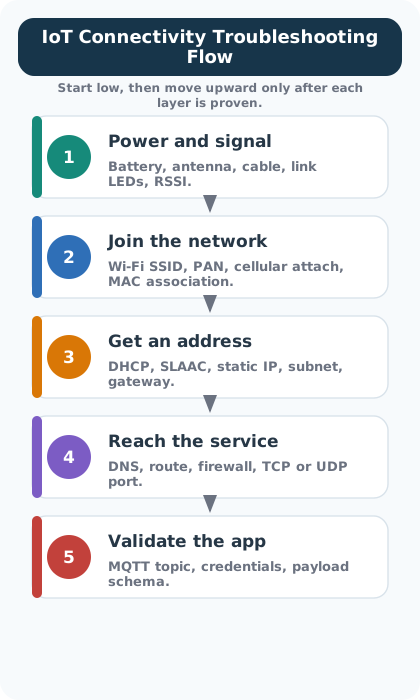
When your IoT device isn’t communicating, use this systematic layer-by-layer approach:

IoT connectivity troubleshooting decision flowchart following bottom-up layer approach: Start with Layer 1 checking device powered and LEDs on, if no then check power supply and connections, if yes proceed to Layer 2 checking Wi-Fi/Ethernet connected, if no then check SSID, password, signal strength, if yes proceed to Layer 3 checking IP address assigned, if no then check DHCP or static IP configuration, if yes check gateway ping reachable, if no then check routing and firewall, if yes proceed to Layer 4+ checking application service running, if no then check service configuration and logs, if yes then check API credentials and data format, systematically isolating problems from physical to application layers

IoT Connectivity Troubleshooting Flowchart
Figure 29.16: IoT Connectivity Troubleshooting Flowchart
Common Mistake: Starting at the Wrong Layer

80% of IoT connectivity problems are at Layers 1-3 (Physical, Data Link, Network). Resist the urge to immediately debug your application code!

Pro tip: Use these commands to check each layer:

# Layer 1: Is the device powered and transmitting?
# Check LEDs, use multimeter, check antenna connection

# Layer 2: Is the device associated with the network?
ip link show          # Linux: Check interface status
iwconfig              # Linux: Check Wi-Fi association

# Layer 3: Does the device have an IP and can reach the gateway?
ip addr show          # Check IP address
ping 192.168.1.1      # Ping your gateway

# Layer 4+: Can the application connect?
curl -v http://api.example.com/health   # Test HTTP
mosquitto_sub -t test/topic              # Test MQTT


Common Pitfalls

Reciting “Physical, Data Link, Network, Transport, Session, Presentation, Application” without understanding what each layer does is useless for design decisions. Fix: for each layer, name one protocol and one function it performs.

OSI has 7 layers; TCP/IP has 4. The OSI Application/Presentation/Session map to TCP/IP’s single Application layer. Fix: draw both models side by side with the mapping arrows shown explicitly.

TCP/IP is the protocol suite used in real networks. OSI is a reference model for understanding concepts. Fix: when describing a real protocol, map it to TCP/IP layers, and use OSI only for conceptual discussion.

29.10 Summary

Key concepts summary mind map with central Network Layering Models node branching to four main concepts: OSI 7-Layer Model (theoretical reference with Physical, Data Link, Network, Transport, Session, Presentation, Application layers for teaching and analysis), TCP/IP 4-Layer Model (practical implementation combining layers as Application, Transport, Internet, Network Access for real networks), Layering Benefits (modularity for independent development, abstraction hiding complexity, troubleshooting isolating problems, interoperability through standard interfaces), and Troubleshooting Approach (bottom-up methodology starting Physical layer checking power and cables, then Data Link checking connection, then Network checking IP and routing, finally Application checking services and configuration)

Key Concepts: OSI and TCP/IP Models
Figure 29.17: Key Concepts: OSI and TCP/IP Models

This chapter covered the foundational layered network models that enable billions of devices to communicate:

  • Standards organizations (IEEE, IETF, ITU, ISO, W3C, OASIS) create protocols that enable interoperability between diverse systems from different manufacturers
  • The OSI 7-layer model provides a theoretical framework with Physical, Data Link, Network, Transport, Session, Presentation, and Application layers - essential for understanding and teaching networking concepts
  • The TCP/IP 4-layer model (Network Access, Internet, Transport, Application) is the practical implementation that powers all modern networks including IoT deployments
  • Layered design enables modularity, independent development, and systematic troubleshooting by isolating concerns at each level
  • Bottom-up troubleshooting is the recommended approach: check Physical layer first, then work up through Data Link, Network, Transport, and finally Application
  • For IoT development, TCP/IP thinking dominates, but OSI knowledge helps diagnose subtle interoperability issues

29.11 What’s Next

Continue your journey through layered network models and IoT networking:

Topic Chapter Description
Encapsulation and PDUs Encapsulation and Protocol Data Units Learn how data is wrapped with headers at each layer, the naming conventions for PDUs (segment, packet, frame, bits), and how de-encapsulation works on the receiving side
IoT Reference Models IoT Reference Models Explore IoT-specific architectures including the ITU-T Y.2060 model, the Cisco 7-Level reference model, and how they map to OSI and TCP/IP
Hands-on Implementation Layered Models: Labs and Implementation Apply layer concepts hands-on: MAC/IP addressing exercises, ARP inspection, and Python socket programming across TCP/IP layers
Network Addressing IP Addressing and Subnetting Calculate subnet masks, CIDR notation, and configure static and dynamic (DHCP) IP addressing for IoT deployments
Routing Fundamentals Routing Protocols and RPL Understand how routers forward packets between networks and how RPL optimizes routing for constrained IoT mesh networks
Transport Protocol Selection TCP vs UDP in IoT Select the right transport protocol for your IoT use case, comparing connection overhead, reliability guarantees, and energy consumption

Scenario: Set up a smart thermostat to connect to home Wi-Fi and send temperature readings to a cloud service.

Layer-by-Layer Setup:

OSI Layer What You Configure Example
Layer 7 (Application) Cloud service account Create account at cloud.thermostat.com
Layer 6 (Presentation) (Automatic) Data format Thermostat sends JSON: {"temp": 72}
Layer 5 (Session) (Automatic) Connection keep-alive HTTPS connection stays open
Layer 4 (Transport) (Automatic) TCP ensures delivery Thermostat uses TCP port 443
Layer 3 (Network) IP addressing via DHCP Thermostat receives 192.168.1.x from router
Layer 2 (Data Link) Wi-Fi network and password Select “MyHomeWiFi”, enter WPA2 password
Layer 1 (Physical) (Automatic) Radio transmission 2.4 GHz Wi-Fi signals

What you actually configure: Network name, password, cloud account. Everything else handled automatically by firmware.

If it doesn’t work: Check Layer 1-3 first (Wi-Fi signal, password, IP assignment). 95% of home IoT issues are here.

Scenario: Deploy 50 vibration sensors in a factory using Zigbee mesh network connected to a gateway that forwards data via Ethernet to a SCADA system.

Layer-by-Layer Architecture:

OSI Layer Sensor Node Gateway SCADA Server
Layer 7 (Application) Vibration monitoring app Protocol translation (Zigbee to Modbus) SCADA HMI software
Layer 6 (Presentation) Binary sensor data Data format conversion Historian database format
Layer 5 (Session) Keep-alive packets Connection management Poll sensors every 1 min
Layer 4 (Transport) N/A (Zigbee handles reliability) TCP to SCADA TCP port 502 (Modbus)
Layer 3 (Network) Zigbee routing (mesh) IPv4: 192.168.10.50 IPv4: 192.168.10.100
Layer 2 (Data Link) IEEE 802.15.4 MAC Zigbee + Ethernet Ethernet
Layer 1 (Physical) 2.4 GHz radio 2.4 GHz radio + Cat6 cable Cat6 cable

Key Complexity: Gateway operates at multiple layers simultaneously: - Layers 1-3: Participates in Zigbee mesh (coordinator node) - Layers 3-7: Acts as Ethernet client to SCADA - Layer 7: Translates between Zigbee Application Protocol and Modbus

Troubleshooting Approach:

  1. Sensor not joining mesh: Layer 2 (check PAN ID, security keys)
  2. Sensor joined but no data: Layer 3 (check routing table)
  3. Gateway receives data but SCADA doesn’t: Layer 4+ (check firewall, Modbus config)

Scenario: Smart city deployment with 10,000 sensors using multiple protocols (LoRaWAN, NB-IoT, Wi-Fi) feeding into edge gateways that perform local analytics before sending aggregated data to cloud via 4G/5G.

Layer-by-Layer Data Flow:

Stage 1: Sensor to Edge Gateway

OSI Layer LoRaWAN Sensor NB-IoT Sensor Wi-Fi Sensor
Layer 7 Application data (12 bytes) Application data (12 bytes) CoAP (4-byte header)
Layer 6 (None) (None) CBOR binary encoding
Layer 5 (None) (None) (None - stateless)
Layer 4 (None - LoRaWAN integrated) UDP (8 bytes) UDP (8 bytes)
Layer 3 (None - no IP) IPv6 + 6LoWPAN (7 bytes) IPv4 (20 bytes)
Layer 2 LoRaWAN MAC (13 bytes) NB-IoT MAC Wi-Fi 802.11 (36 bytes)
Layer 1 LoRa modulation (SF7-12) LTE Cat-M1 2.4/5 GHz OFDM

Stage 2: Edge Gateway Processing (OSI doesn’t apply - this is data-at-rest) - Aggregate 100 sensor readings into 1 summary packet - Local ML model detects anomalies - Store raw data locally (24-hour buffer) - Forward: Summaries (every 15 min) + Alerts (immediate)

Stage 3: Edge Gateway to Cloud

OSI Layer Edge Gateway to Cloud
Layer 7 HTTPS POST with JSON (aggregated data) or MQTT (alerts)
Layer 6 TLS 1.3 encryption
Layer 5 Persistent HTTPS or MQTT connection
Layer 4 TCP port 443 (HTTPS) or 8883 (MQTT/TLS)
Layer 3 IPv4 (cellular carrier NAT) or IPv6
Layer 2 4G LTE or 5G NR MAC
Layer 1 Cellular radio (700-2600 MHz bands)

Why This Is Complex:

  1. Three incompatible Layer 1-3 stacks converge at gateway: LoRaWAN (no IP), NB-IoT (IPv6), Wi-Fi (IPv4)
  2. Edge processing sits BETWEEN protocol stacks: Data arrives as network packets, gets stored/analyzed, then re-encapsulated in different protocols
  3. Bandwidth optimization: 100 sensors x 12 bytes = 1,200 bytes raw. After edge aggregation: 50 bytes summary. 96% bandwidth reduction.
  4. Security at multiple layers:
    • Layer 2: LoRaWAN AES-128 encryption
    • Layer 3: IPsec for NB-IoT backhaul
    • Layer 6: TLS 1.3 for cloud connection
    • Layer 7: OAuth2 tokens for API authentication

Troubleshooting This System Requires Understanding ALL Layers:

  • Sensor not transmitting: L1-L3 (protocol-specific)
  • Gateway receives but doesn’t process: Edge software (above OSI)
  • Cloud doesn’t receive: L4-L7 (TCP, TLS, auth)

29.12 Worked Example: Bottom-Up Troubleshooting a Failed IoT Sensor Connection

Scenario: A building management system reports that 12 of 200 Zigbee temperature sensors on Floor 3 stopped reporting data at 2:15 PM. All 12 sensors are in the east wing. The remaining 188 sensors (including west wing of Floor 3) continue operating normally. The network uses Zigbee (802.15.4) sensors connecting through 4 routers to a floor coordinator, which sends data via Ethernet to the building management server. Apply the bottom-up OSI troubleshooting method to isolate the fault.

Layer 1 – Physical: Is there a signal?

Check Method Result
Are the 12 sensors powered? Check battery voltage via maintenance LED All 12 show green LED (battery OK)
Is the radio transmitting? Spectrum analyzer near east wing Zigbee channel 15 shows normal 802.15.4 bursts from sensors
Is the east-wing router powered? Visual inspection Router R3-East power LED is ON
Is the router’s Ethernet cable connected? Check patch panel Cable is seated in port 47

Finding: Physical layer appears healthy. Sensors are transmitting, router is powered, cable is connected. Move to Layer 2.

Layer 2 – Data Link: Can devices see each other?

Check Method Result
Do sensors associate with router R3-East? Query router’s association table 12 sensors show as “associated” (MAC addresses present)
Is the router forwarding frames? Monitor router’s frame counter TX counter is incrementing (router IS sending frames)
Does the floor coordinator see R3-East? Query coordinator’s neighbor table R3-East MAC address is NOT present
Does the coordinator see the other 3 routers? Query coordinator’s neighbor table R3-West, R3-North, R3-South all present

Finding: Data Link issue between R3-East and the floor coordinator. The router’s Ethernet interface is not visible to the coordinator. The cable is plugged in (Layer 1 OK), but the link is not established.

Deeper Layer 2 investigation:

Check Method Result
Ethernet link LED on router R3-East? Visual inspection Link LED is OFF (no link detected)
Ethernet link LED on switch port 47? Check switch front panel Port 47 LED is OFF
Cable continuity test Cable tester on patch cable Pairs 1-2 and 3-6 pass. Pair 4-5 is OPEN

Root cause found: The Ethernet cable connecting router R3-East to the switch has a broken pair. While standard 100BASE-TX only uses pairs 1-2 and 3-6 for data, this switch requires all 4 pairs for PoE (Power over Ethernet) negotiation. When pair 4-5 broke (likely from cable being pinched by a ceiling tile at 2:15 PM during maintenance), the switch disabled the port entirely as a PoE safety measure, taking down the Ethernet link even though the data pairs were functional.

Layer-by-layer diagnosis time:

Layer Time Spent Outcome
Layer 1 (Physical) 5 minutes Eliminated power and radio as causes
Layer 2 (Data Link) 8 minutes Identified missing neighbor, found cable fault
Layer 3 (Network) 0 minutes Not reached – fault isolated at Layer 2
Layer 4 (Transport) 0 minutes Not reached
Layer 7 (Application) 0 minutes Not reached
Total 13 minutes Cable replacement restores all 12 sensors

Why bottom-up worked here: A top-down approach would have started at the application layer, checking server logs, MQTT broker connections, and sensor firmware – none of which were faulty. This could waste 30+ minutes investigating software before discovering a physical cable problem. Bottom-up eliminated physical causes in 5 minutes and found the fault at Layer 2 in 8 more minutes.

Why this fault was tricky: The cable passed a basic continuity test on the data pairs (1-2, 3-6). Only testing all 4 pairs revealed the PoE-related failure. In IoT deployments with PoE-powered devices, a “good” data cable can still cause link failure if auxiliary pairs are damaged.

Key insight: The OSI layered model is not just theoretical – it is a practical diagnostic framework. By systematically checking each layer from bottom to top, you avoid the common mistake of jumping to application-layer debugging when the real problem is a 50-cent cable. In IoT deployments, the majority of connectivity failures (estimated 60-70%) originate at Layers 1-2 (physical and data link), making the bottom-up approach the most efficient diagnostic strategy.


29.13 Knowledge Check