18 Hands-On Networking Labs
MVU — Minimum Viable Understanding
Hands-on networking labs let you build and break things in a simulator so you learn what textbooks cannot teach. The Performance Lab teaches you to measure the six metrics that define network health (bandwidth, throughput, goodput, latency, jitter, packet loss), while the Packet Simulator Lab has you construct protocol data units from scratch—headers, checksums, sequence numbers, and ACK mechanisms—giving you the debugging intuition that separates theory from practice.
Sensor Squad: Networking Labs Made Simple!
Characters: Sammy the Sensor, Lila the LED, Max the Microcontroller, Bella the Battery
Sammy is sending a temperature reading to Max on the other side of the playground. But how do they know the message arrived safely?
“It’s like passing notes in class!” says Lila. “You write the note (that’s the payload), put it in an envelope with a name on it (that’s the header), and wait for a thumbs-up back (that’s the ACK).”
Max explains: “And if I don’t give a thumbs-up? Sammy sends the same note again — that’s called a retransmission!”
Bella adds: “I time how long each note takes. If it usually takes 2 seconds but suddenly takes 10, something is wrong — that’s latency and jitter! I also count how many notes never arrive at all — that’s the packet loss rate.”
Sammy finishes up: “Oh, and we add up all the letters in the note and write the total on the back. If Max adds them up and gets a different number, the note got smudged — that’s a checksum!”
In these labs, you will build your own note-passing system on a simulated ESP32 and measure how well it works — just like the Sensor Squad!
For Beginners: What Are Networking Labs?
Networking labs are hands-on exercises where you build and test small networking programs instead of just reading about them. Think of it like the difference between reading a recipe and actually cooking a meal.
Why labs matter for IoT:
- Theory isn’t enough: You can memorize that “TCP uses acknowledgments,” but building an acknowledgment system yourself teaches you why timeouts, retries, and sequence numbers are needed.
- Debugging is a skill: Real IoT devices lose packets, experience delays, and encounter corrupt data. Labs let you experience and fix these problems in a safe simulator.
- Browser-first, hardware-optional: Start with the built-in browser activities so you can change network parameters immediately. Use the optional ESP32 code later if you want to connect the concepts to hardware.
What you’ll do:
- Performance Lab: Measure how fast data travels, how much gets through, and what happens when the network gets busy.
- Packet Simulator Lab: Build your own packets with headers, checksums, and sequence numbers — the building blocks of every network protocol.
If you’re new to programming, don’t worry — every lab has complete code you can run first, then modify step by step.
18.1 Learning Objectives
By the end of this chapter, you will be able to:
- Build and interpret network simulations using browser activities and optional ESP32 experiments
- Measure network performance including latency, throughput, goodput, and packet loss
- Implement basic packet protocols with sequence numbers and acknowledgments
- Calculate checksums and verify data integrity at the receiver
- Distinguish between bandwidth, throughput, and goodput in practical measurements
- Debug network issues using simulation tools and systematic experimentation
18.2 Overview
These hands-on labs provide practical experience with fundamental networking concepts using browser-based activities first, then optional ESP32 implementations for hardware practice. Each lab includes diagrams, guided observations, and challenge exercises to deepen your understanding.
18.2.1 Lab Workflow
Use the same loop in every exercise:
- Review the concept and decide which metric or packet field you are testing.
- Run the browser activity first so you can change one variable at a time and see the effect immediately.
- Record the outcome in plain language: what changed, by how much, and why you think it changed.
- Try the optional hardware version last once you can predict the result from the simulator.
18.2.2 Packet Encapsulation Pipeline
Every networking lab involves constructing and interpreting packets. Build them in this order:
- Start with a payload such as a temperature reading or sensor status byte.
- Add header fields for version, type, length, addressing, or sequence numbers.
- Compute integrity data such as a checksum or CRC over the bytes that matter.
- Transmit and observe whether ACK or timeout behavior changes as the packet grows.
- Verify at the receiver by checking integrity, stripping headers, and recovering the original payload.
In the Packet Simulator Lab, you will implement this pipeline on the ESP32: defining your own header structure, computing checksums over the payload, and adding sequence numbers for reliable delivery.
18.3 Lab Chapters
This module is divided into focused lab chapters:
- Network Performance Measurement: Measure bandwidth, throughput, latency, jitter, and congestion using LED indicators in a guided browser-first lab. Estimated time:
~30 min. - Packet Simulator: Build packets with headers, payloads, checksums, ACKs, and retransmissions while watching state changes. Estimated time:
~30 min.
18.4 Visual Reference Gallery
Lab Prep Visuals
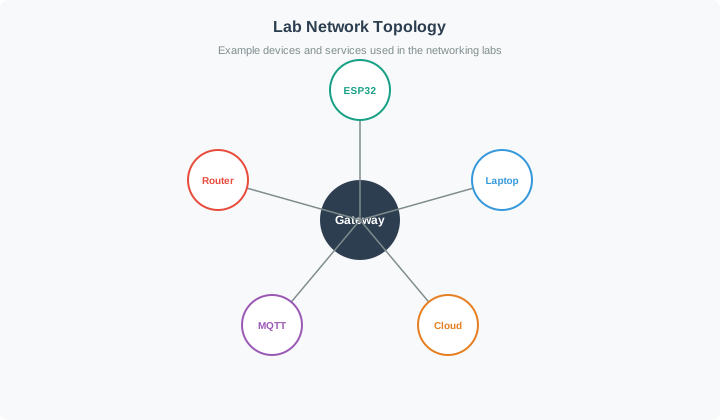
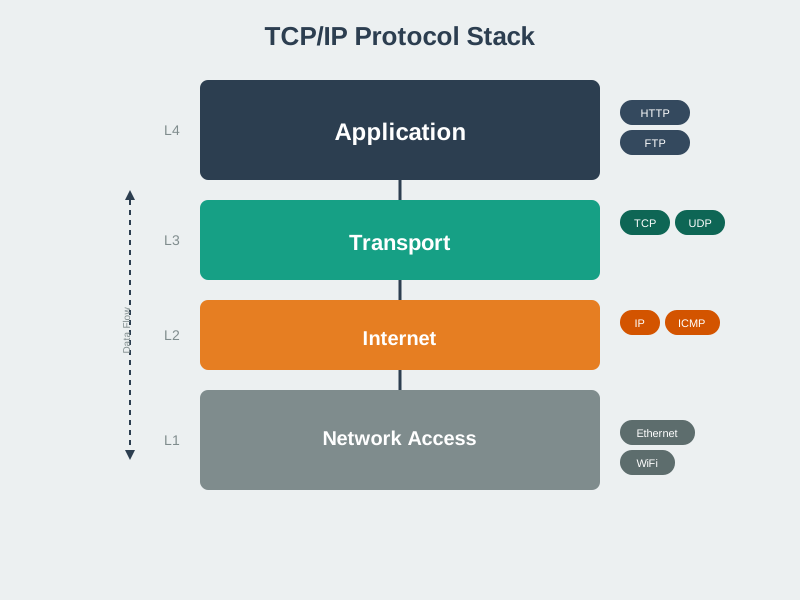
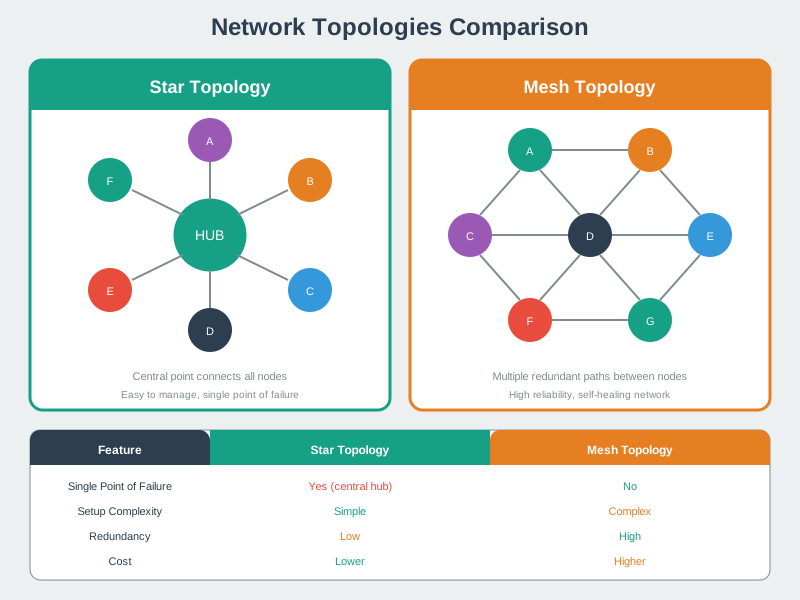
Use these visuals as a quick refresher before you start measuring or debugging.
18.4.1 Lab network topology
18.4.2 Protocol stack refresher
18.4.3 Topology choices
18.5 Quick Start Guide
18.5.1 Prerequisites
Before starting these labs, ensure you have:
- Basic understanding of networking concepts (covered in Networking Basics)
- Familiarity with ESP32 and Arduino programming
- Access to a modern browser; ESP32 hardware or an external simulator is optional
18.5.2 Recommended Learning Path
The labs are designed to be completed in order. The Performance Measurement Lab builds foundational measurement skills, and the Packet Simulator Lab builds on that understanding by having you construct the very protocol structures whose performance you just measured. After both labs, the Packet Journey Game consolidates all concepts through gamified adventure.
18.6 Key Concepts Covered
The two labs cover complementary aspects of networking: performance metrics tell you how well the network is behaving, while packet structure determines how data is organized for reliable delivery. Together, they form the foundation for understanding any IoT communication protocol.
- Performance measurement lab: focus on whether the link is healthy enough for the application.
- Packet simulator lab: focus on how headers, checksums, and ACK behavior shape the bytes on the wire.
18.6.1 Performance Measurement Lab
| Concept | Description | Why It Matters for IoT |
|---|---|---|
| Bandwidth | Maximum theoretical data rate (bits/second) | Sets the upper bound for how much sensor data you can transmit |
| Throughput | Actual measured data rate achieved | Real-world performance is always lower than bandwidth |
| Latency | Time for data to travel source to destination | Critical for time-sensitive actuator commands and control loops |
| Jitter | Variation in latency over time | High jitter breaks real-time audio/video and PID control |
| Goodput | Application-layer useful data rate | After headers and retransmissions, how much useful data gets through |
| Congestion | Network overload causing delays and losses | Common in dense IoT deployments with hundreds of sensors |
18.6.2 Packet Simulator Lab
| Concept | Description | Why It Matters for IoT |
|---|---|---|
| Packet Header | Metadata: version, type, length, sequence | Every protocol uses headers; understanding them enables debugging |
| Payload | The actual data being transmitted | Keeping payloads small saves energy on constrained devices |
| Checksum | Mathematical verification for data integrity | Corrupt data leads to wrong sensor readings and bad decisions |
| ACK/NACK | Acknowledgment protocols for reliability | Without ACKs, you never know if the gateway received your data |
| Sequence Numbers | Ordering and duplicate detection | Essential when packets arrive out of order or are retransmitted |
Try It: Goodput Efficiency Calculator
Adjust the payload size and protocol stack to see how packet overhead affects real-world network efficiency.
18.7 Knowledge Check
Test your understanding of the networking lab concepts before diving into the hands-on exercises.
Common Pitfalls
Confusing bandwidth with throughput: Bandwidth is the maximum theoretical capacity of a link (e.g., 250 kbps for IEEE 802.15.4), while throughput is the actual measured data rate, which is always lower due to protocol overhead, retransmissions, and contention. In IoT, real throughput can be as low as 10–30% of bandwidth.
Ignoring protocol overhead in IoT calculations: On constrained networks like LoRaWAN or Zigbee, a 20-byte header on a 50-byte payload means 29% overhead. Many students calculate performance using raw payload size and are surprised when real-world goodput is significantly lower.
Assuming packet loss means hardware failure: In wireless IoT environments, 1–5% packet loss is normal due to interference, multipath fading, and collisions. Your protocols must handle this gracefully with retransmissions and timeouts — don’t debug hardware when the issue is environmental.
Running a single test and drawing conclusions: Network performance varies with time of day, interference, and competing traffic. Always run multiple iterations and compute averages, minimums, maximums, and standard deviations in your lab measurements.
Forgetting byte order (endianness): The ESP32 is a little-endian processor, but most network protocols use big-endian (network byte order). If your multi-byte header fields (e.g., packet length, sequence number) are not converted with
htons()/ntohs(), the receiver will interpret completely wrong values. This is the most common “it works on one device but fails between two” bug.
Common Mistake: Treating Goodput = Throughput in Packet Overhead Calculations
The Error: “My sensor sends 1,000 bytes/second of data, so I need 1,000 bytes/second of throughput.”
Why It’s Wrong: Every packet has headers that don’t carry useful application data. The ratio of payload to total packet size determines goodput (useful data rate) vs throughput (total data rate).
Real Measurement from Lab 1 (Performance Lab):
Setup:
- Application sends: 1,000 bytes/second of sensor readings
- Transport: TCP
- Network: IPv4
- Link: Ethernet
Packet structure for a 100-byte payload:
| Packet part | Bytes | Counts as | Why it matters |
|---|---|---|---|
| Ethernet header | 14 | Overhead | Link-layer delivery information |
| IP header | 20 | Overhead | Source and destination network addresses |
| TCP header | 20 | Overhead | Reliable transport state |
| Application payload | 100 | Goodput | The useful sensor data |
| Ethernet trailer (FCS) | 4 | Overhead | Error detection for the frame |
| Total packet | 158 | Network load | 100 bytes useful data plus 58 bytes overhead |
The useful-data efficiency is 100 / 158 = 63%; the remaining 37% is protocol overhead.
For 1,000 bytes/second of application data:
| Step | Calculation | Result |
|---|---|---|
| Packets needed | 1,000 bytes/s divided by 100 bytes/packet | 10 packets/s |
| Throughput before gaps | 10 packets/s times 158 bytes | 1,580 bytes/s |
| Bit rate before gaps | 1,580 bytes/s times 8 | About 12.6 Kbps |
But wait—we forgot interframe gaps!
Ethernet also requires a 12-byte interframe gap (IFG) between packets:
| Added item | New calculation | Result |
|---|---|---|
| IFG included | 158-byte packet + 12-byte gap | 170 bytes per send |
| Throughput with IFG | 10 sends/s times 170 bytes | 1,700 bytes/s, or 13.6 Kbps |
| Extra load compared with payload | 1,700 bytes/s network load for 1,000 bytes/s useful data | 70% more traffic than the payload alone |
Worst Case: Small Packets
Same 1,000 bytes/second, but as 10-byte payloads (e.g., temperature + humidity):
| Payload size | Packets needed | Total bytes per send, including IFG | Network load | Goodput efficiency |
|---|---|---|---|---|
| 100 bytes | 10 packets/s | 170 bytes | 13.6 Kbps | 59% |
| 10 bytes | 100 packets/s | 80 bytes | 64 Kbps | 12.5% |
The small-packet case sends the same application data but creates far more network traffic because each tiny reading carries a full set of headers, trailer, and gap time.
Lab Measurement Reality Check:
Performance Lab Experiment:
- Send 10,000 bytes application data
- Measure throughput with Wireshark
- Compare goodput vs throughput
Results:
| Payload Size | Goodput | Measured Throughput | Efficiency | Overhead (% of payload) |
|---|---|---|---|---|
| 1,000 bytes | 10 KB/s | 15.8 KB/s | 63% | 58% |
| 100 bytes | 10 KB/s | 17 KB/s | 59% | 70% |
| 10 bytes | 10 KB/s | 80 KB/s | 12.5% | 700% |
Key Lesson: Smaller packets = worse efficiency.
IoT Protocol Optimization Strategies:
| Pattern | What beginners often do | What the lab should teach |
|---|---|---|
| Immediate send | Send every 4-byte temperature reading as its own packet. | Notice the packet is mostly headers, not payload. |
| Batched send | Wait until 25 readings are ready and send one 100-byte payload. | Measure the same useful data with far fewer packets and much better efficiency. |
| Design habit | Optimize for “it sends right now.” | Choose a delay budget, then batch within that budget to save bandwidth and energy. |
Improvement: 65% / 6.9% = 9.4× better network efficiency by batching.
Real-World Impact on Wireless IoT:
For battery-powered sensor on Wi-Fi: - Radio TX current: 170 mA at 3.3 V - Energy per packet: 0.170 A × 3.3 V × 5 ms = 2.8 mJ
Option A (immediate send, 4-byte packets): - Packets needed for 1,000 bytes: 250 packets - Energy: 250 × 2.8 mJ = 700 mJ
Option B (batched, 100-byte packets): - Packets needed: 10 packets - Energy: 10 × 2.8 mJ = 28 mJ
Battery life impact: 700/28 = 25× longer battery life just by reducing overhead!
Protocol Selection Based on Overhead:
| Protocol | Header Size | Best For | Avoid For |
|---|---|---|---|
| TCP/IP | 40 bytes | Payloads > 100 bytes | Tiny sensor readings |
| UDP/IP | 28 bytes | Medium payloads | Critical reliability |
| CoAP/UDP | 32 bytes | IoT constrained devices | High-bandwidth |
| MQTT/TCP | 40 + 2-5 | Pub/sub messaging | Real-time control |
| 6LoWPAN | 2-40 (compressed) | IEEE 802.15.4 networks | High throughput |
Rule of Thumb from Lab Experience:
- Payload > 200 bytes: Overhead < 20% (acceptable)
- Payload 50-200 bytes: Overhead 20-50% (plan for it)
- Payload < 50 bytes: Overhead > 50% (aggregate or use efficient protocol)
Bottom Line: Never assume “1 KB application data = 1 KB network bandwidth.” Always calculate total packet size including headers, trailers, and interframe gaps. The Performance Lab makes this visible through measurement.
Try It: Radio Energy vs. Packet Size Calculator
See how batching sensor readings dramatically reduces Wi-Fi radio energy consumption.
Putting Numbers to It
For a sensor transmitting 1,000 bytes/second with 10-byte payloads over Ethernet:
Packet structure per 10-byte payload
| Packet part | Bytes |
|---|---|
| Ethernet header | 14 |
| IP header | 20 |
| TCP header | 20 |
| Sensor payload | 10 |
| FCS trailer | 4 |
| Interframe gap | 12 |
| Total transmitted per packet | 80 |
Throughput calculation
| Question | Calculation | Result |
|---|---|---|
| How many packets per second? | 1,000 bytes/s ÷ 10 bytes/packet | 100 packets/s |
| How much data crosses the link? | 100 packets/s × 80 bytes/packet | 8,000 bytes/s, or 64 Kbps |
| How efficient is the payload? | 10 useful bytes ÷ 80 transmitted bytes | 12.5% goodput efficiency |
| How much overhead is carried? | 70 overhead bytes ÷ 10 useful bytes | 700% overhead-to-payload ratio |
For battery-powered devices at 170 mA TX current and 3.3 V with 5 ms per packet, energy per packet = 0.170 A × 3.3 V × 0.005 s = 2.8 mJ. At 100 packets/s, TX power draw = 100 × 2.8 mJ = 280 mW, giving 0.280 W × 24 h = 6.7 Wh/day of radio transmit energy. With larger 100-byte payloads, only 10 packets/s are needed, reducing TX power to 28 mW and radio energy to 0.67 Wh/day — a 10× radio energy reduction just by batching data before transmission.
18.8 Review Activities
18.8.1 Match the Concept
18.8.2 Order the Steps
18.8.3 Label the Diagram
18.8.4 Code Challenge
18.9 Summary
18.9.1 Key Takeaways
These hands-on labs bridge the gap between networking theory and practical IoT system building:
- Performance Measurement Lab: You will measure bandwidth, throughput, latency, jitter, goodput, and congestion — the six essential metrics for evaluating any IoT network. Understanding these metrics helps you choose the right protocol and diagnose problems in deployed systems.
- Packet Simulator Lab: You will construct packets from scratch with headers, payloads, checksums, sequence numbers, and ACK/NACK mechanisms — the fundamental building blocks underlying every networking protocol from MQTT to CoAP to TCP/IP.
- Practical debugging skills: By running controlled browser experiments first, you gain experience with the same kinds of problems (packet loss, corruption, delay variation) that real IoT deployments face, but in a safe, reproducible environment.
- Iterative experimentation: Each lab includes challenge exercises that encourage you to modify parameters (e.g., packet size, error rate, timeout values) and observe the effects — building intuition that cannot be gained from reading alone.
Lab Completion Checklist
Before moving on, ensure you can:
18.10 What’s Next
After completing these labs, the following chapters build directly on the measurement and packet-construction skills you have developed.
- Packet Journey Game: Packet Journey Game consolidates the full sensor-to-cloud story in one interactive walkthrough.
- Networking Fundamentals: Networking Fundamentals revisits the theory that underpins the measurements you just made.
- Network Topologies: Topologies Introduction shows how star, mesh, tree, and hybrid layouts affect latency and goodput.
- Transport Fundamentals: Transport Fundamentals compares TCP, UDP, and ACK overhead on constrained links.
- MQTT Fundamentals: MQTT Fundamentals applies packet-structure thinking to real application-layer frames.
- RPL Introduction: RPL Introduction extends these skills into multi-hop mesh routing.