22 Attenuation and RSSI
More
Depth: Practitioner
Progress saves as you read. Mark sections complete as you go; your progress appears in the sidebar.
22.1 Start With What the Signal Must Pass Through
This section: Start With What the Signal Must Pass Through — Picture a door sensor that works across an empty room but fails after a metal cabinet is installed.
Walk One Link Through the Real Building
Picture a door sensor that works across an empty room but fails after a metal cabinet is installed. Distance did not change. The material and people in the path changed the link.
A gateway means a device or service that joins two message paths. Received signal strength means the power a radio sees at its input. Received signal strength indicator, or RSSI, is the device estimate of that power. Attenuation means signal loss along the path.
Record RSSI, retries, packet result, channel, position, and time at several marked points. Close a door, add the cabinet, add people, rotate the device, and repeat. Keep margin for changes the short survey did not include.
This runway does not turn one signal reading into a coverage claim. The deeper sections explain material loss, frequency effects, path geometry, measurement limits, and site evidence for the final installation.
A link that works in open air can fail once the signal has to cross walls, glass, racks, water, soil, people, vehicles, or enclosures. Materials turn a neat distance estimate into a site-specific deployment question.
Treat RSSI and attenuation as evidence about the actual path. The learner task is to separate what physics predicts, what the site adds, and what margin remains after installation.

22.2 Overview: Walls And RSSI Are Part Of The Link, Not Afterthoughts
Wireless propagation does not stop at distance. Walls, floors, water, metal, racks, people, enclosures, and antenna orientation all change the received signal. Attenuation describes the loss added by those materials. RSSI reports the received signal level after the path has done its damage.
For IoT work, RSSI is useful when it is treated as a measurement record, not as a precise location oracle. It can show whether a link has margin, whether a device moved into a poor zone, or whether a gateway placement is weak. It should not be used alone to promise centimeter or even reliable meter-level location in reflective indoor spaces.
The important shift is to treat material loss as part of the link budget instead of a surprise discovered after installation. A short path through a reinforced wall, freezer panel, water tank, metal rack, or crowded corridor can be worse than a longer open path. Enclosures matter too: a radio that works on a bench may lose margin when the antenna is placed near a battery, metal bracket, wet housing, or grounded machine frame. The coverage question is therefore not only "how far?" but "through what, at what height, with which antenna orientation?"
Frequency changes how a signal responds to the same obstacle, not just how much free-space loss it starts with. In many building and foliage paths, lower-frequency signals typically diffract more and lose less through the same obstacle, which helps some sub-GHz deployments. This is not a promise of useful penetration through soil or water: moisture and conductivity can cause severe loss at radio frequencies. Higher-frequency signals behave more like light: they can be focused into tighter beams but typically lose more through the same material and scatter more off small objects. Atmospheric absorption and rain fade matter mainly above ~10 GHz (microwave/mm-wave backhaul) and are usually negligible in sub-6 GHz IoT link budgets.
RSSI gives the field team a way to check those assumptions. A single reading is weak evidence because fading and receiver reporting vary, but repeated readings tied to location and condition are useful. Record the gateway, device orientation, channel or spreading mode, obstacle path, and receiver threshold beside the RSSI or SNR value. That turns signal strength from an anecdote into a coverage record that can be compared with later surveys.
Use Figure 22.1 to compare free-space loss with the steeper decay caused by indoor materials.
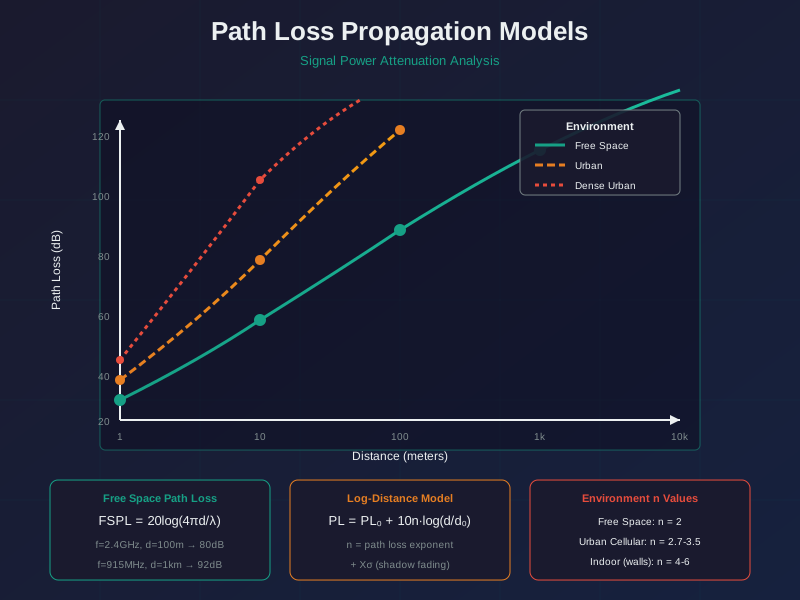
Read distance along the horizontal axis and signal attenuation along the vertical axis. The free-space curve is the lower-loss reference; indoor path loss rises faster because the path-loss exponent and wall losses are larger. In the log-distance model, doubling distance adds 10n log10(2) dB, so n = 2 adds about 6 dB, while n = 4 adds about 12 dB. A fitted exponent summarizes an environment, not each wall. Record materials, route, antenna positions, frequency, and residual variation before using the curve in a link budget.
Absorption
Some signal energy becomes heat inside material. Moisture, concrete, wood, bodies, and dense contents can increase this loss.
Reflection
Metal, reinforced concrete, machinery, and racks can bounce energy into multiple paths. Reflections can help coverage or create fading.
RSSI
RSSI is the receiver's signal-strength reading in dBm. It is useful as a trend and margin signal, but it varies with hardware, channel, orientation, and multipath.
Before blaming the room, look at Figure 22.2 and find the three material roles already inside the device.
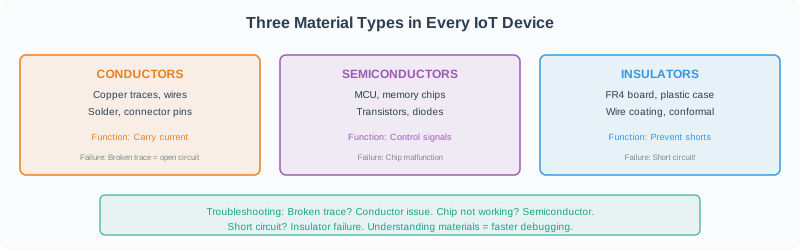
The left side is a cut-away of an ordinary board: copper traces and wires, an FR4 substrate, a silicon die in its package, and a plastic case around all of it. The right side sorts those same parts by job. Conductors carry current. Semiconductors let a circuit control and process a signal. Insulators stop current going where it should not, and keep the product safe to touch. The closing line of Figure 22.2 is the one this section needs: every device holds all three. So an antenna is never in free space. It is always near metal, board and case.
Planning rule: record the path as a set of material and placement assumptions. A range estimate without those assumptions is not a coverage plan.
22.3 Practitioner: Turn Materials Into Survey Rows
Material attenuation values from tables are starting points. The field record should describe the real path: wall type, floor crossing, rack row, enclosure material, antenna height, gateway orientation, and the measured RSSI or SNR at representative points. That record is what lets another engineer explain a weak zone later.
Build the survey like a small experiment. Pick representative locations: easy open paths, expected worst-case paths, device positions near metal or water, and the places where users actually need reliable packets. At each point, record both the path description and the radio setting. A reading taken at high transmit power, a slow data rate, or a favorable antenna angle cannot be compared directly with a reading taken under a different mode. The goal is not to collect many numbers; it is to collect enough comparable evidence to decide whether margin remains.
When the survey finds a weak zone, change one likely cause at a time when possible. Rotate the antenna, raise the gateway, move the device out of a metal shadow, change the channel, or add a gateway, then measure again. That discipline prevents teams from making a permanent layout change based on a transient RSSI dip. The record should show the condition, the intervention, and the recheck result so later maintainers can understand why the final placement was chosen.
A survey row is only useful if it feeds a sum. Figure 22.3 shows the sum each recorded loss belongs to.
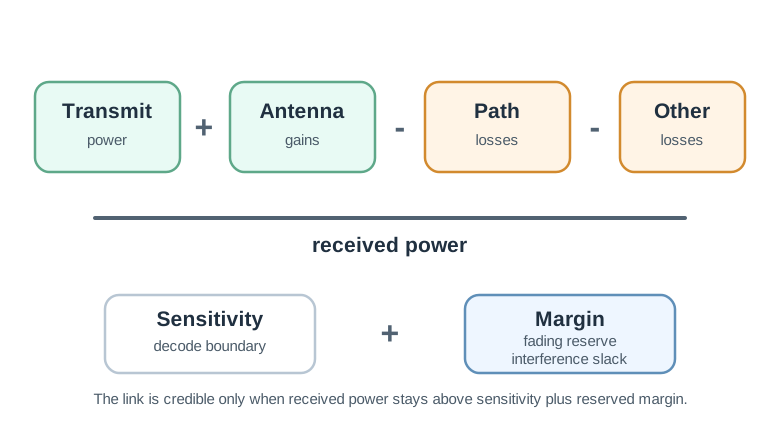
Read Figure 22.3 as one line of arithmetic. Transmit power and antenna gain are what the design adds; path loss and the other losses are what the building takes away. What survives is the received power, and on its own that number means nothing. The right-hand side supplies the test. The receiver has a sensitivity floor where it can still decode, and above that floor sits a reserve margin for fading and interference. A link passes only when received power clears both. Keeping wall loss, floor loss, and installation loss in separate survey rows matters for exactly this reason: one merged number cannot tell you which term to attack when the margin goes.
What turns a scattered set of readings into evidence someone else can reuse? Figure 22.4 breaks the survey into three jobs.
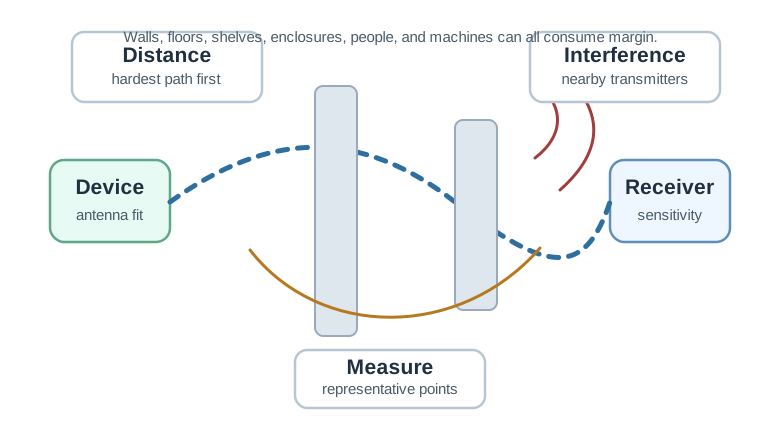
The first band of Figure 22.4 runs from the device to the receiver and hangs the site on that line: wall type, floor crossing, enclosure metal, moisture, antenna height, gateway orientation. Naming them is what lets a later engineer repeat the same path. The second band says what to write down at each point, including location, height, orientation, channel, signal strength, and noise figures where the radio reports them, so that two readings can honestly be compared. The third band is the discipline that makes the record worth keeping: log the condition, change one thing, then log the recheck. Without that band a survey collects numbers but never explains the placement it chose.
Practical caution: do not copy a single generic wall-loss number into every building. Wall composition, thickness, moisture, reinforcement, angle, and frequency can all change the actual loss.
22.4 Under The Hood: RSSI Is A Noisy Proxy
RSSI is usually a received-power indicator reported by the radio chipset. It is not a calibrated distance sensor. Different receivers report it differently, antenna orientation changes it, channel fading changes it, and reflected paths can make the same location look strong one moment and weak the next.
The log-distance model is still useful for rough reasoning: signal tends to fall as distance increases, and the path-loss exponent rises in cluttered environments. But a model should be calibrated with site measurements before it is used for room detection, asset tracking, or coverage acceptance.
The under-the-hood problem is that several different physical causes can produce the same RSSI value. A weak reading may mean longer distance, a lossy wall, antenna polarization mismatch, destructive multipath, a detuned enclosure, interference, receiver automatic-gain behavior, or a temporary obstruction. A strong reading may still be unstable if it comes from a reflected path that disappears when a door closes or a vehicle moves. RSSI is therefore a proxy for received power under a particular receiver and environment, not a unique explanation of the path.
Good engineering records keep that ambiguity visible. Use repeated samples, percentiles, SNR when available, packet-delivery results, and notes about the physical path. If the goal is coverage acceptance, the question is whether enough margin remains across representative conditions. If the goal is location, RSSI usually needs calibration, fingerprinting, multiple anchors, or a ranging technology such as time-of-flight or angle-based methods. The model should match the decision being made.
That is why a useful RSSI threshold is local. Define it with the radio, antenna, packet target, and environment that will actually be deployed.
Read Figure 22.5 to separate the three causes that can all produce the same weak reading.
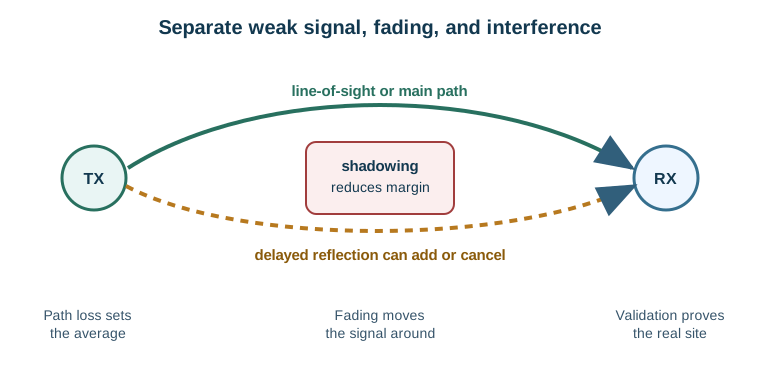
Follow the direct line from the transmitter to the receiver first. That is the main path, and path loss sets its average level. Now find the second line, the delayed reflection. It arrives late and can add to the direct signal or cancel part of it, which is why a reading moves while nothing has been switched. Shadowing is drawn separately again, because an object in the way removes margin without changing the distance. Figure 22.5 keeps these three apart on purpose. A single RSSI number cannot tell you which one you are looking at, so the site has to be measured.
Trend
RSSI trends can show that a device is moving farther from a gateway, entering a shielded zone, or losing margin after an installation change.
Calibration
Calibrate RSSI per radio family and site. A threshold that works on one gateway model or band may not transfer cleanly to another.
Limit
For precise location, use a technology designed for ranging or a site-specific fingerprinting process. RSSI alone is usually a coarse proximity signal.
If nothing moves, should the signal reading hold still? Figure 22.6 maps fifteen samples taken around one fixed transmitter.
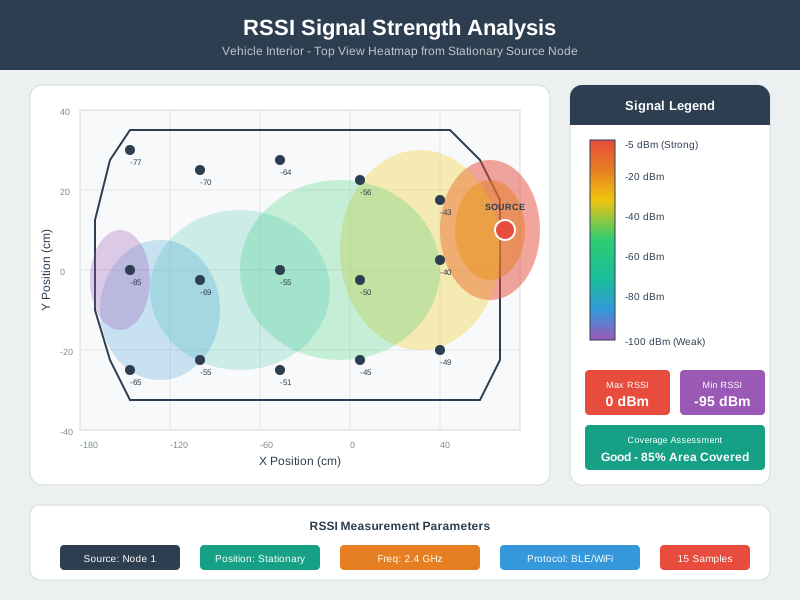
The marked source in Figure 22.6 never moves, and neither does the vehicle around it. Even so, the sampled values spread from about -40 dBm near the source to -85 dBm at the far corner, and neighbouring points differ by more than ten decibels. Read the legend beside the map to see how coarse its colour bands are. Then read the summary box, which calls the space well covered at eighty-five percent. Both statements are true at once, and that is the lesson. A single reading samples one path at one moment; it is not a property of the device. Any threshold you set from it needs several samples and a stated position.
Use Figure 22.7 to find persistent coverage valleys without treating one moving RSSI trace as a map.
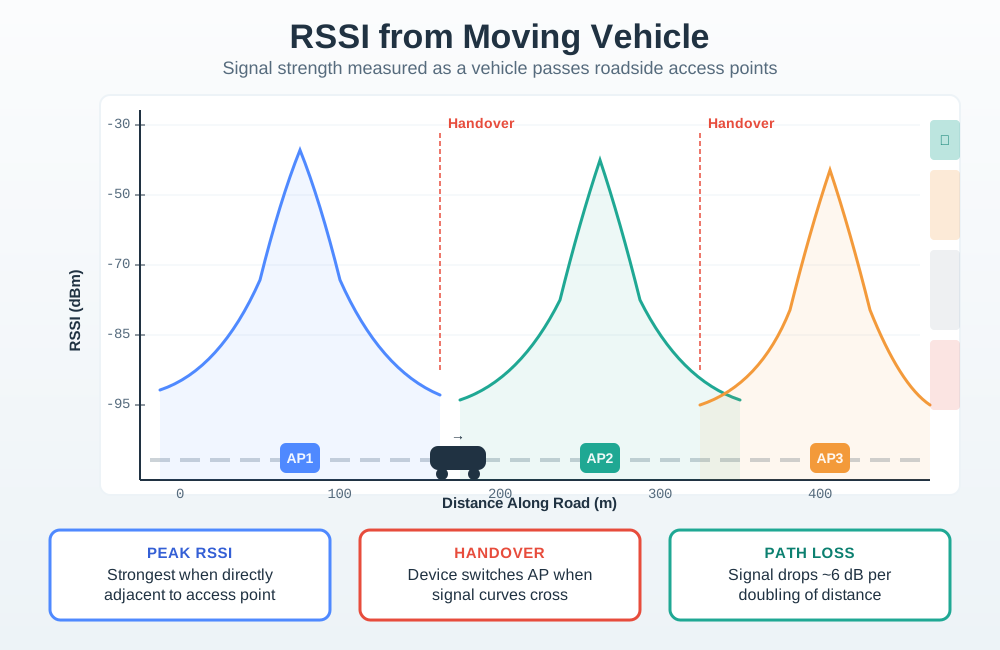
Follow RSSI against distance on the road. Look for low parts that last across more than one sample, not each short fade. A moving antenna sees shade, bounced paths, angle changes, traffic, and gateway timing. Nearby points are therefore not separate proof of coverage. Drive the route both ways and at more than one time. Keep speed, antenna site, packet result, and map point in step. A low part calls for action when retries, loss, or missed reports agree with it and repeat runs place it near the same site feature.
Model discipline: use RSSI for proximity, health, and margin trends unless the deployment has a calibrated fingerprint map or a ranging technology. Treat a single RSSI reading as a clue, not proof.
-
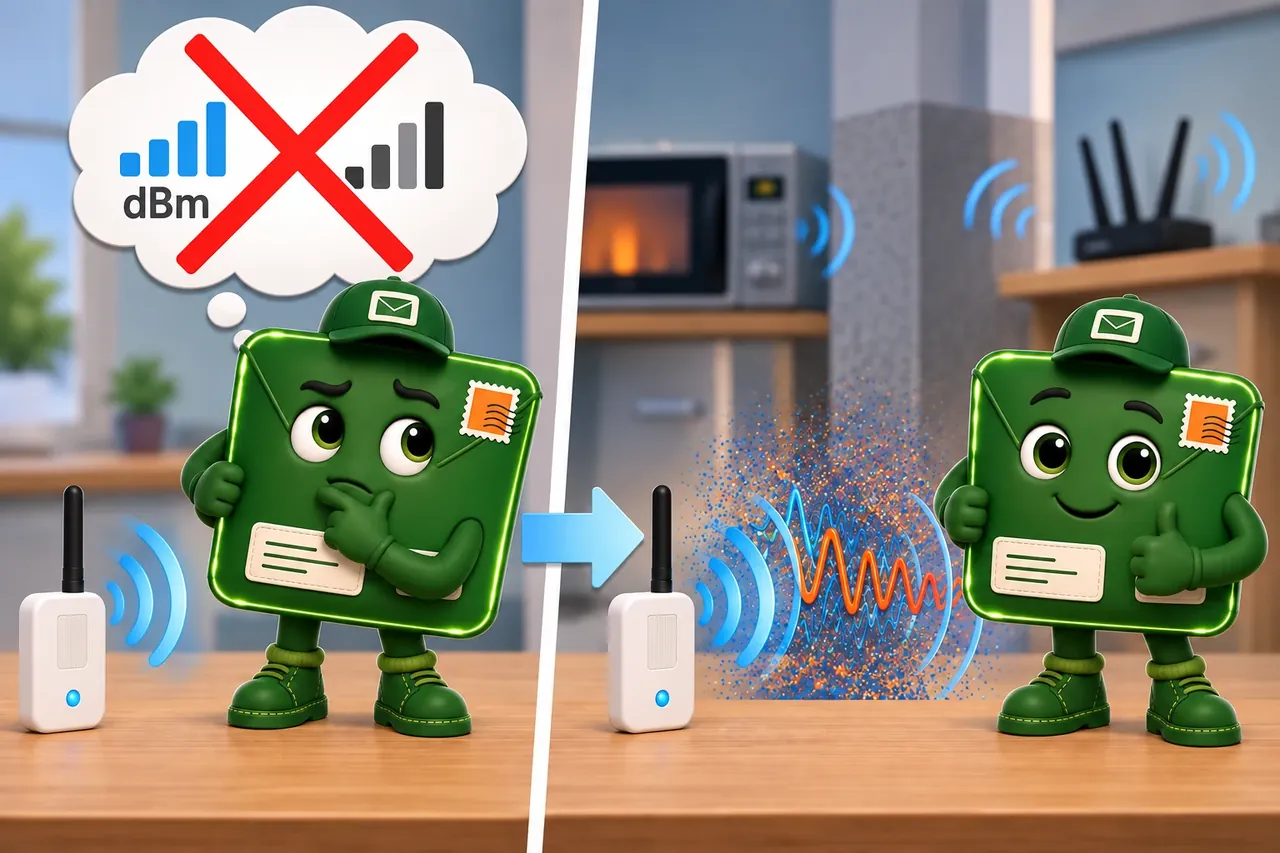
Wrong idea: radio signal strength is weak evidence because it is measured in volts. It fails because reflections, moving objects, and device calibration make one reading unstable.
22.5 Summary
This section: Summary — Attenuation is the loss added by materials, installation choices, and the surrounding environment.
Attenuation is the loss added by materials, installation choices, and the surrounding environment. RSSI is the received signal-strength reading after those effects have shaped the path. Together they help explain why an IoT link works in one room and fails in another, but they must be recorded with location, orientation, receiver mode, and site conditions. Use them to build a repeatable coverage record, then reopen the record whenever walls, racks, gateways, enclosures, or radio settings change.
22.6 Key Takeaway
This section: Key Takeaway
RSSI is useful when it is tied to a site record. Treat walls, metal, moisture, enclosures, antenna placement, receiver thresholds, and repeat measurements as part of the same coverage decision.
22.7 See Also
This section: See Also
Free-Space Path Loss
Start with the open-air baseline before adding material and installation losses.
Link Budget and Coverage Planning
Combine RSSI and attenuation assumptions with gain, loss, sensitivity, and reserve margin.
Fresnel Zones and Deployment
Check clearance and obstruction risk for longer links where geometry changes the path.
Wireless Access: Wi-Fi
Apply attenuation and RSSI records to access-point placement and indoor coverage decisions.
Find help
3 reviewed answers.
Where should I start in a module?
Open the module page from the sidebar to see its chapters in order. Use the module map to return to a topic you need.
Modules and pathsReviewed
What can I try when a project does not work?
Check the symptom, then work through the diagnostic steps. Keep the error message and the smallest example that reproduces it.
When you are stuckReviewed
How do interactive examples work?
Use the interactive guide to check how examples and simulations work before changing your project.
Interactive examples guideReviewed