16 Zigbee Security

More
Depth: Practitioner
Progress saves as you read. Mark sections complete as you go; your progress appears in the sidebar.
16.1 In 60 Seconds
This section: In 60 Seconds — Imagine a new lamp asking to join a building network.
Imagine a new lamp asking to join a building network. The safe question is not just whether it can join. The question is who approved it, which key it received, and how the owner can remove it later.
Zigbee is a low-power mesh radio system. A protocol is an agreed set of rules for how devices exchange data. A gateway is the boundary device or service that links the mesh to another network. Start with one protected action. Name who controls joining. Record how keys are held and moved. Close open joining after setup. Keep old captured messages from being accepted as new ones. Remove lost or retired devices from trust.
Ask these review questions:
- Which device may join?
- Who approves the join?
- Which key protects the path?
- Who can read or replace that key?
- Is open joining time bounded?
- Can an old message be replayed?
- What can the gateway see?
- What happens when a device is lost?
- Can the owner restore the trust role?
- Which change starts a fresh review?
Encryption alone does not prove safe operation. Practitioner records join, custody, removal, exceptions, and retest. Under the Hood covers key layers, counters, constrained devices, and recovery. Those details may tighten the first claim. They never turn a working join into proof that every later command is allowed.
Retell the trust path. A known owner opens joining. One expected device asks to join. The owner checks that device. The safe method moves a key. Joining closes again. Protected traffic begins. Old traffic stays old. Lost devices lose trust. A changed owner starts a new review.
Zigbee security review asks whether joining, key transport, traffic protection, replay handling, and operations custody are proven for the deployment boundary. A network is not secure because it names encryption or has a Trust Center. It is reviewable when the join path, key custody, gateway visibility, device removal behavior, exceptions, owners, and retest triggers are recorded.
This chapter keeps the focus on evidence. It avoids treating security as a checklist of protocol fields, a business-case calculation, or a promise that one protocol choice removes operational risk.
16.2 Learning Objectives
This section: Learning Objectives
By the end of this chapter, you will be able to:
- state a bounded Zigbee security claim,
- identify Trust Center and join-approval evidence,
- separate network-key protection from application-specific protection,
- review frame-counter and replay assumptions without overclaiming,
- record key custody, exceptions, owners, and retest triggers, and
- recognize common Zigbee security drift in deployment records.
16.3 Quick Check: Zigbee Security
This section: Quick Check: Zigbee Security
16.4 Start With a Security Claim
This section: Start With a Security Claim — Begin with the behavior being approved.
Begin with the behavior being approved.
Weak claim: the Zigbee network is encrypted.
Stronger claim: within this deployment boundary, only authorized devices can join, the Trust Center and coordinator are owned, key transport is protected by an approved join method, traffic protection matches the application risk, replay protection assumptions are recorded, exceptions are visible, removed or replaced devices reopen the review, and operations knows who owns retest.
The stronger claim can be checked. It names the boundary, security authority, join method, protected traffic, operational visibility, and change triggers.
16.5 Evidence Families
This section: Evidence Families — Use these evidence families before accepting a Zigbee security claim.
Use these evidence families before accepting a Zigbee security claim.
Trust Center custody evidence records who owns the coordinator or Trust Center role, how configuration is backed up, who can change join policy, and how replacement is approved.
Join approval evidence records how a new device is authorized, whether permit-join is bounded, whether the expected device joined, and whether unauthorized joins are visible.
Key transport evidence records how the network key reaches a joining device and whether the join method depends on a shared default assumption or a device-specific credential.
Network-key custody evidence records where the shared network key is stored, who can access it, how backup is protected, and what happens after suspected exposure.
Application-security evidence records whether sensitive commands need pairwise or application-layer protection beyond mesh-layer encryption.
Replay and counter evidence records how replay assumptions are handled after device reset, rejoin, replacement, or gateway restore.
Operations evidence records monitoring, removal, incident response, retest triggers, and the owner of each security decision.
16.6 Trust Center and Join Approval Evidence
This section: Trust Center and Join Approval Evidence — The Trust Center is the review anchor for Zigbee security.
The Trust Center is the review anchor for Zigbee security. Do not stop at naming it. Review what it controls and who controls it.
Review:
- which device or service holds the Trust Center role,
- who can open or close joining,
- how expected joiners are identified,
- what credential or authorization evidence is used,
- whether the gateway records join attempts and failures,
- how removed devices are excluded from future approval, and
- when Trust Center replacement requires retest.
Open joining is not automatically wrong, but it is not enough evidence by itself. The record should show the approved join window, the expected device, the observer, the result, and the follow-up action.
16.7 Key Transport and Key Custody
This section: Key Transport and Key Custody — Zigbee deployments commonly depend on a shared network key for mesh-layer protection.
Zigbee deployments commonly depend on a shared network key for mesh-layer protection. The security review asks how that key was delivered, stored, backed up, and protected from unauthorized use.
At the protocol layer, Zigbee security rests on symmetric AES-128 CCM* and two key scopes. The network key is shared by every node in the PAN and secures NWK-layer frames, giving mesh-wide confidentiality and integrity. Link keys are pairwise, or in legacy cases global, and secure APS-layer commands between two specific nodes. The most important APS use is join-time network-key transport from the Trust Center to a newly authorized device.
That split makes the review sharper. The reviewer should be able to name the Trust Center, identify the link key or credential that protected each join, and explain who controls the shared network key. A single shared network key means one key exposure can affect the whole mesh, so the join step and key-custody record deserve direct evidence rather than a generic “encrypted network” note.
Before comparing join methods, inspect Figure 16.1 to locate where each credential acts and where its assurance stops. The purpose is to separate an encrypted radio frame from the stronger claim that the right device joined, under an owned policy, for an approved application action.
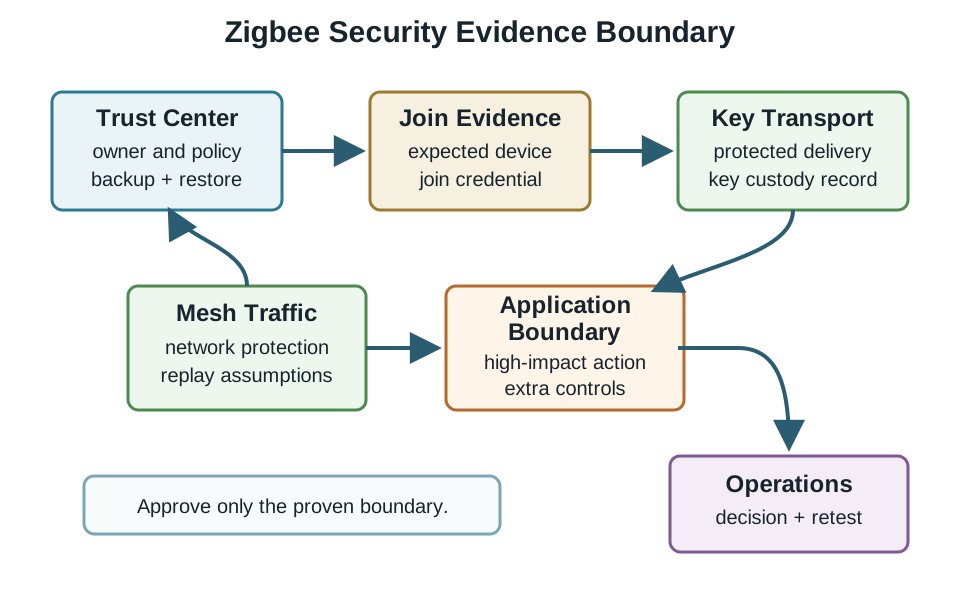
Read Figure 16.1 from the Trust Center, whose owner, policy, backup, and restore process establish authority. Join Evidence identifies the expected device and credential before Key Transport records protected delivery and subsequent custody. Mesh Traffic covers network protection and replay assumptions for member-to-member frames, but the next Application Boundary box asks whether a high-impact action needs additional controls. Operations closes the chain with a decision and retest point. The progression is the chapter’s security argument in compact form: cryptography protects traffic, while identity, custody, application scope, and lifecycle evidence determine what that protection actually proves.
Review:
- whether the joining method uses device-specific authorization evidence,
- whether a well-known or shared commissioning assumption remains,
- who can view, export, restore, or rotate key material,
- where coordinator or gateway backups are stored,
- how key exposure would be detected or handled,
- whether removed devices require key or membership action, and
- whether a backup restore preserves or weakens security state.
Avoid two common mistakes. First, do not treat encryption names as proof of key custody. Second, do not treat a successful join as proof that the correct device joined for the correct reason.
The riskiest instant in a Zigbee network’s life is a device joining, because that is when the Trust Center transports the network key to the newcomer. Two approaches protect that transport very differently. The legacy method uses a well-known default global link key, the ZigBeeAlliance09 value. Because it is public, anyone who sniffs a join secured only by that default can recover the network key and, with it, the whole mesh. One stronger static-key method uses a unique per-device install code, often carried on a QR label, to derive the join link key; the Trust Center must receive that key securely, and code custody must be reviewed. Zigbee R23 also allows dynamic key negotiation before the network key is sent.
Zigbee 3.0 supports install-code-based joining, while a centralized network’s Trust Center can require it; R23 also specifies dynamic key negotiation. For each join, record whether the network key was transported under a device-specific install-code-derived key, a dynamically negotiated key, or a public default link key. A captured default-key join exposes the transported network key until that key is replaced.
| Join method | Key protecting network-key transport | Exposure |
|---|---|---|
| Default global link key | Public ZigBeeAlliance09 value | Sniff one join and recover the network key. |
| Install code | Unique per-device derived link key | Device-specific join key; review provisioning and custody. |
16.8 Network and Application Security Boundaries
This section: Network and Application Security Boundaries — Mesh-layer encryption and application-specific protection answer different questions.
Mesh-layer encryption and application-specific protection answer different questions.
Mesh-layer evidence answers: can network members exchange protected Zigbee traffic under the approved key and policy?
Application-security evidence answers: does a sensitive command, state change, or service action need protection that remains meaningful if the shared mesh key is exposed or if a gateway is replaced?
Use application-boundary review when the behavior affects physical access, safety-relevant actuation, tenant or patient privacy, billing, or other high-impact decisions. The review does not need a device-line promise. It needs a recorded reason for whether mesh-layer protection is sufficient or whether stronger pairwise, application, gateway, or operational controls are required.
16.9 Frame Counter and Replay Review
This section: Frame Counter and Replay Review — Frame counters and message freshness checks help reject replayed traffic, but they still need review at lifecycle boundaries.
Frame counters and message freshness checks help reject replayed traffic, but they still need review at lifecycle boundaries.
Every secured Zigbee frame carries a monotonically increasing frame counter. A receiver rejects a secured frame when its counter is not greater than the last counter accepted from that sender. That mechanism defeats replay of captured frames. It also explains two operational realities: a device reset that zeroes its counter can cause neighbors to reject its frames until state is refreshed, and frame-counter rollover needs planned key action before the counter wraps.
Review:
- what happens after device reset or rejoin,
- whether a replaced device inherits identity or starts as a new member,
- whether coordinator restore changes remembered counter state,
- whether stale gateway state can hide replay symptoms,
- whether the application has a second check for high-impact commands, and
- who retests after firmware, gateway, or Trust Center change.
Do not approve replay protection from a single normal message exchange. Approve only the behavior that was tested under the lifecycle condition being claimed.
16.10 Green Power and Constrained Device Boundaries
This section: Green Power and Constrained Device Boundaries — Some Zigbee deployments include constrained or energy-harvesting devices that use simplified security behavior.
Some Zigbee deployments include constrained or energy-harvesting devices that use simplified security behavior. The review question is not whether those devices are “secure enough” in general. The question is whether their limits are acceptable for the specific action they trigger.
Green Power serves ultra-constrained, energy-harvesting devices, such as a battery-less light switch, that cannot run the full Zigbee stack. It uses a lighter security profile with a Green Power Device key, sequence-number and MIC protection, and nearby routers acting as proxies to relay its frames. That is a deliberate trade: battery-free operation comes with a different security profile from full network-key devices. Those endpoints need their own line in the security record instead of being treated as equivalent to ordinary Zigbee nodes.
Review:
- whether the constrained device sends telemetry, control, or safety-relevant commands,
- what key or credential is preloaded or provisioned,
- how duplicate or replay-like behavior is handled,
- whether nearby physical access changes the threat model,
- how replacement or recommissioning is documented, and
- whether the gateway labels constrained-device exceptions clearly.
Accept the exception only when the use case, command impact, physical context, and operations owner are recorded.
16.11 Security Review Record
This section: Security Review Record — Use a security record when approving join, key, or replay behavior.
Use a security record when approving join, key, or replay behavior.
Before filling one out, inspect the record map in Figure 16.2 as the handoff from protocol facts to a reviewable decision. It prevents a successful join or an AES label from becoming a blanket approval when the deployment boundary, exceptions, or ownership are still unknown.
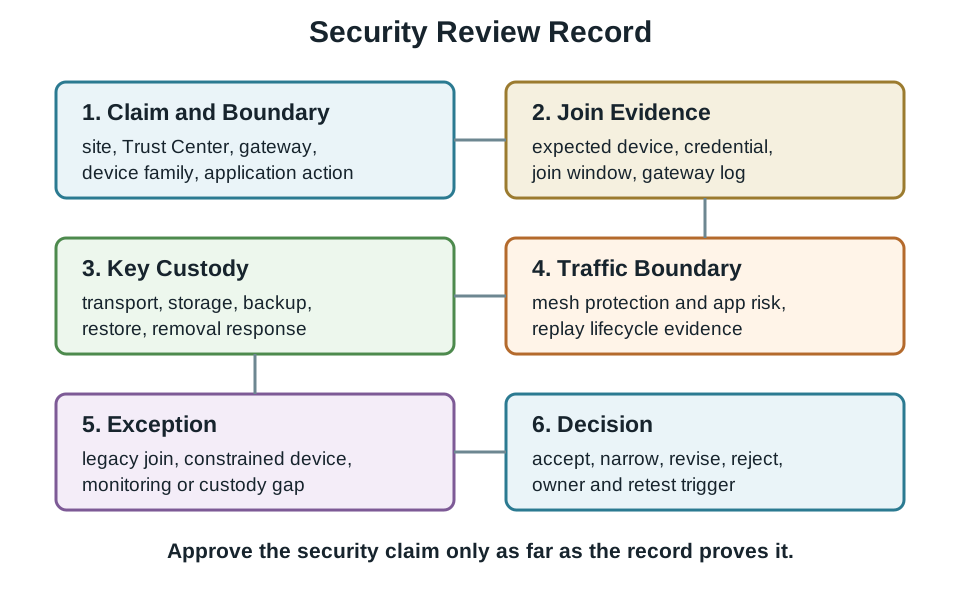
Read Figure 16.2 from 1. Claim and Boundary, naming the site, Trust Center, gateway, device family, and application action in scope. 2. Join Evidence captures the expected device, credential, join window, and gateway log, while 3. Key Custody extends the record through transport, storage, backup, restore, and removal. 4. Traffic Boundary then states what mesh protection and replay evidence cover. Any legacy join, constrained device, or monitoring gap belongs visibly in 5. Exception before 6. Decision narrows, revises, rejects, or accepts the claim with an owner and retest trigger. That order carries protocol behaviour into accountable approval without hiding a lifecycle gap.
The record should include:
- Claim: security behavior being approved.
- Boundary: site, gateway, Trust Center, device families, and application actions covered.
- Join evidence: how expected devices are authorized and verified.
- Key custody: who can store, restore, rotate, or recover key material.
- Traffic boundary: whether mesh-layer protection is sufficient for the application action.
- Replay evidence: lifecycle conditions tested, such as reset, rejoin, replacement, or restore.
- Exception: constrained device, legacy join, gateway limitation, or monitoring gap.
- Decision: accept, narrow, revise, reject, or retest.
- Owner: person or team responsible for controls and monitoring.
- Retest trigger: new device family, Trust Center replacement, gateway restore, firmware update, key exposure, policy change, or repeated unauthorized join attempt.
16.12 Worked Review: Controlled Device Join
This section: Worked Review: Controlled Device Join — Scenario: A site adds a group of new sensors.
Scenario: A site adds a group of new sensors. The gateway shows successful joins, but the record does not show whether the expected devices joined or whether the join window was closed afterward.
Review path:
- State the join boundary and expected device family.
- Check the authorization evidence used for each join.
- Confirm the gateway or Trust Center log shows expected identifiers.
- Confirm joining was closed or returned to the approved policy.
- Record any unknown join, missed log, or delayed closure as an exception.
Decision: Revise before approval when the record proves only that something joined. Approve only after expected-device evidence, join-policy closure, owner, and retest trigger are recorded.
16.13 Worked Review: Trust Center Replacement
This section: Worked Review: Trust Center Replacement — Scenario: A coordinator or gateway is replaced after failure.
Scenario: A coordinator or gateway is replaced after failure. Devices appear online, but operations cannot show whether key backup, membership state, and replay assumptions were preserved.
Review path:
- Separate availability evidence from security evidence.
- Confirm who restored coordinator or Trust Center configuration.
- Check key custody and backup handling.
- Retest representative joining, removal, protected traffic, and high-impact commands.
- Record any device family that needs rejoin, exclusion, key action, or application-level retest.
Decision: Do not approve the replacement from online status alone. Approve only the security behavior that was retested after restore.
16.14 Knowledge Check: Join Evidence
This section: Knowledge Check: Join Evidence
16.15 Matching Quiz: Security Evidence Family
This section: Matching Quiz: Security Evidence Family
16.16 Ordering Quiz: Security Review Sequence
This section: Ordering Quiz: Security Review Sequence
16.17 Common Security Drift
This section: Common Security Drift — Encryption-name drift: approving a deployment because it names AES or mesh-layer encryption.
Encryption-name drift: approving a deployment because it names AES or mesh-layer encryption.
Join-success drift: treating a successful join as proof that the expected device joined under the approved policy.
Trust Center drift: naming the coordinator without naming the owner, backup method, restore path, or replacement retest.
Key-backup drift: storing coordinator backup material without recording who can access or restore it.
Replay drift: testing only normal traffic while claiming behavior after reset, rejoin, replacement, or restore.
Application-boundary drift: assuming mesh-layer protection is sufficient for every command or application action.
Exception drift: accepting constrained-device or legacy behavior without a named boundary and owner.
16.18 Knowledge Check: Security Readiness
This section: Knowledge Check: Security Readiness
16.19 Security Evidence Checklist
This section: Security Evidence Checklist
Before accepting a Zigbee security claim, verify that the record answers these questions:
- What exact security behavior is being approved?
- Which site, gateway, Trust Center, device families, and application actions are in scope?
- Who owns the Trust Center configuration and policy?
- How are expected devices authorized before joining?
- How is permit-join or equivalent joining policy bounded?
- How is key material transported, stored, backed up, restored, and rotated or replaced?
- What happens after device removal, reset, rejoin, gateway restore, or Trust Center replacement?
- Which application actions need protection beyond normal mesh-layer evidence?
- What exceptions remain for constrained, legacy, or high-impact devices?
- Who owns monitoring, incident response, and retest?
16.20 Summary
This section: Summary — Zigbee security review is an evidence problem.
Zigbee security review is an evidence problem. Trust Center custody, join approval, key transport, key storage, replay assumptions, application-security boundaries, exceptions, and operations ownership must be recorded before a deployment claim is accepted.
The safest review posture is bounded approval. Accept the behavior that has evidence, narrow the behavior that is only partly proven, and retest after Trust Center, gateway, key, firmware, device-family, or policy changes.
16.21 Key Takeaway
This section: Key Takeaway — Approve Zigbee security only when Trust Center custody, join authorization, key transport and custody, replay lifecycle, exceptions, owner, and retest evidence support the exact behavior being released.
Approve Zigbee security only when Trust Center custody, join authorization, key transport and custody, replay lifecycle, exceptions, owner, and retest evidence support the exact behavior being released.
16.22 Concept Relationships
This section: Concept Relationships
- Trust Center and join policy: the Trust Center controls who can join, while the review record proves whether the approved join policy was followed.
- Join evidence and key transport: a join is not approved until the credential or authorization path used for key delivery is recorded.
- Network key and application boundary: mesh-layer protection can protect network traffic, but high-impact application actions may need additional evidence.
- Frame counters and lifecycle events: replay assumptions need retest after reset, rejoin, replacement, restore, or firmware changes.
- Backup and operations: coordinator recovery is useful only when backup access, restore behavior, and ownership are controlled.
16.23 What’s Next
This section: What’s Next
- Zigbee Application Profile Evidence Review connects security evidence to profile and cluster behavior.
- Zigbee Industrial Deployment Evidence Review applies Trust Center, key custody, and join-control evidence in a deployment setting.
- Zigbee Common Mistake Evidence Review reviews cross-cutting Zigbee approval mistakes.
- Thread Security and Matter Boundary Evidence Review compares security boundaries across the adjacent Thread and Matter material.
Find help
3 reviewed answers.
Where should I start in a module?
Open the module page from the sidebar to see its chapters in order. Use the module map to return to a topic you need.
Modules and pathsReviewed
What can I try when a project does not work?
Check the symptom, then work through the diagnostic steps. Keep the error message and the smallest example that reproduces it.
When you are stuckReviewed
How do interactive examples work?
Use the interactive guide to check how examples and simulations work before changing your project.
Interactive examples guideReviewed