31 Thread Network Deployment

More
Depth: Practitioner
Progress saves as you read. Mark sections complete as you go; your progress appears in the sidebar.
31.1 Start With the IPv6 Mesh Claim
This section: Start With the IPv6 Mesh Claim — Picture a school adding thirty window sensors across two floors.
Prove One Device Path From Join to Recovery
Picture a school adding thirty window sensors across two floors. A bench unit joined once, but the installer must prove that every room can join the intended network, reach the building service, recover after loss, and leave evidence that support staff can read.
Choose one sensor and trace its full path. Record the site, device identity, network data version, parent, address, border service, application result, and owner. Keep the commissioning material under named custody. State which change requires another site test.
Try a weak parent, a busy channel, loss of the border service, a power cut, a restarted leader, an old network set, and an unauthorized join. Check address and route recovery, delayed data, duplicate events, local visibility, and the time until normal service returns. Repeat from the hard rooms, not only beside the installer.
Keep any urgent building action local when a distant service may be unreachable. A formed mesh proves only one part of the system. It does not by itself prove the application, user rights, remote service, or safe fallback. Preserve source and event time across each boundary.
This opening does not tune every radio setting or certify the whole site. Practitioner builds the staged install and support record. Under the Hood examines roles, network data, route repair, border services, commissioning, and coexistence.
Use this site path check:
- Pick one hard room.
- Mark the joining proof.
- Mark the first parent.
- Mark the full path.
- Keep the set version.
- Lose the border once.
- Lose the parent once.
- Restart the root once.
- Try the wrong join.
- Time the route repair.
- Check the user result.
- Reopen after site change.
Start with the claim that a low-power mesh device can speak IP directly enough for the product need. Thread Network Deployment should help prove where IPv6 is native, where mesh behavior is managed, and where the border or application layer still sets limits.
The simple review path is join, address, route, recover, and observe. Once those steps are clear, Thread roles, security, implementation, and Matter relationships can be checked without treating the mesh as magic.
31.2 Thread Implementation Deployment Evidence
This section: Thread Implementation Deployment Evidence — Thread implementation deployment is the point where a working design becomes an operated network.
Thread implementation deployment is the point where a working design becomes an operated network. The review question is not “can a device join?” The stronger question is whether the implementation record proves the services, credentials, diagnostics, recovery behavior, and support handoff that the deployment will depend on.
This chapter focuses on implementation evidence. It avoids command manuals and product examples, because those age quickly. The durable record is the claim being deployed, the service behavior observed, the failure response, and the owner who can operate or repair the result.
31.3 In 60 Seconds
This section: In 60 Seconds
- Start with an implementation deployment claim: service behavior, site scope, device classes, and owner.
- Separate Thread mesh evidence from Border Router service, application behavior, cloud service, and Matter fabric evidence.
- Record network dataset custody before release, including who can change channel, prefix, commissioning, and recovery material.
- Review diagnostics as evidence, not as a list of commands to memorize.
- Use staged release records so limits, retest triggers, and support handoff survive the deployment meeting.
- Approve only the operational behavior that has been rendered, inspected, and tested.
31.4 Learning Objectives
This section: Learning Objectives
By the end of this chapter, you will be able to:
- Build a Thread implementation deployment record that separates claims from assumptions.
- Review Border Router services without confusing them with Thread Leader, controller, bridge, or cloud responsibilities.
- Check network dataset and commissioning custody before a deployment is handed to operations.
- Use diagnostics evidence to decide whether failures are mesh, service, commissioning, coexistence, or application issues.
- Design a staged release decision with limits, retest triggers, and support ownership.
31.5 Quick Check: Thread Deployment Readiness
This section: Quick Check: Thread Deployment Readiness
31.6 Implementation Claim Before Configuration
This section: Implementation Claim Before Configuration — Implementation deployment starts with a claim that can be tested.
Implementation deployment starts with a claim that can be tested. A claim should say what behavior is being released, where it applies, which device classes are included, which services must work, and who owns the decision after release.
Release behavior
Local control, telemetry, commissioning, diagnostics, external access, bridge handoff, or Matter application behavior.
Deployment boundary
The rooms, floors, benches, device families, network segment, or pilot group included in the implementation release.
Required services
Thread mesh, Border Router path, DNS and service discovery, controller access, application endpoint, or monitoring signal.
Release owner
The team that can approve, limit, roll back, retest, or accept operational responsibility.
Weak implementation claims hide risk. Statements such as “the Thread deployment is configured” or “the Matter device works” do not say which service was proven or which boundary remains untested.
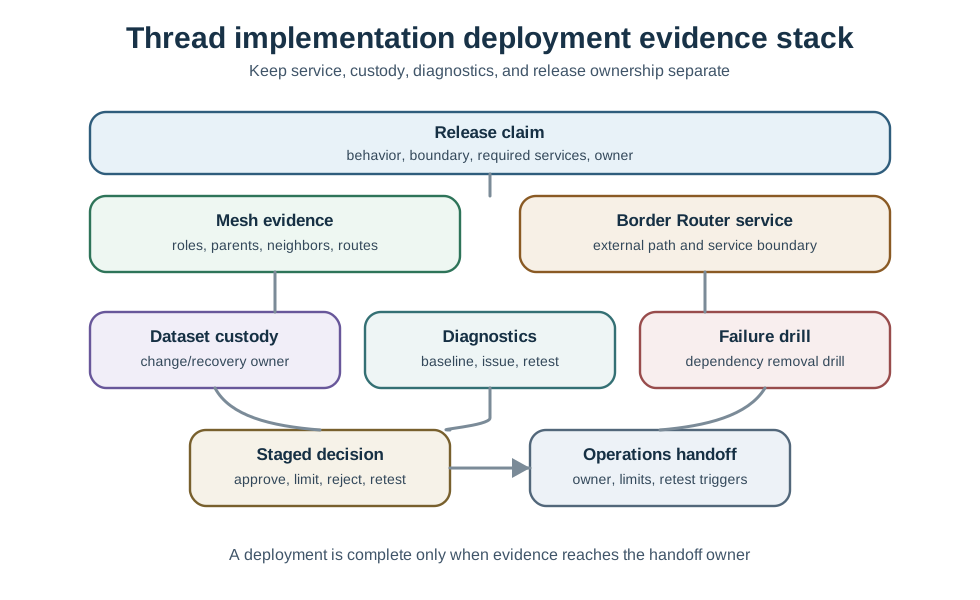
31.7 Implementation Deployment Evidence Stack
This section: Implementation Deployment Evidence Stack — Use that separation to prevent a common approval error: a successful join or controller screenshot is treated as proof for the whole implementation.
The implementation deployment evidence stack separates the release claim from the proof that supports it: mesh evidence, Border Router service, dataset custody, diagnostics, failure drill, staged decision, and operations handoff.
Use that separation to prevent a common approval error: a successful join or controller screenshot is treated as proof for the whole implementation. Each layer needs evidence that matches its responsibility.
31.8 Site Planning and Optimization Gate
This section: Site Planning and Optimization Gate — Deployment planning is part of implementation evidence when it changes the release decision.
Deployment planning is part of implementation evidence when it changes the release decision. Keep router placement, sleepy-device behavior, channel coexistence, and tuning changes tied to observed site evidence.
Site scope
Record rooms, floors, enclosures, outdoor edges, interference sources, service access, and which zones are excluded from the release.
Router backbone
Show which always-powered devices are expected to route, which weak zones depend on them, and what happens when one is unavailable.
Low-power attachment
Record parent choice, poll interval, wake behavior, message freshness, and battery evidence before tuning sleepy devices.
Coexistence and channel
Review Wi-Fi, Zigbee, BLE, microwave, enclosure, and site-noise evidence before treating channel choice as permanent.
Optimization control
Treat router count, placement, poll intervals, retries, and firmware tuning as change-controlled decisions with rollback and retest triggers.
An optimization is acceptable only when it improves the release claim without hiding coverage gaps, service delay, battery risk, or ownership.
31.9 Border Router Service Evidence
This section: Border Router Service Evidence — A Border Router provides external IP service for the Thread mesh.
A Border Router provides external IP service for the Thread mesh. It is not the same thing as the Thread Leader, the application controller, a cloud account, a commissioner, or a Zigbee bridge.
Good Border Router service evidence includes:
- The external network path that the Thread mesh is expected to use.
- The advertised route or prefix behavior when that behavior matters to the application.
- Whether name resolution, service discovery, and external access are part of the release claim.
- What local behavior continues when external service is unavailable.
- Which owner can repair, replace, or reconfigure the Border Router path.
Do not approve Border Router service with only a device inventory. The evidence should show the service boundary and the failure behavior, not just the presence of a gateway device.
31.10 External Service Translation Evidence
This section: External Service Translation Evidence — Some deployments require Thread devices to reach services that are not native to the mesh.
Some deployments require Thread devices to reach services that are not native to the mesh. Translation evidence should stay practical and bounded.
Name resolution
The record shows how the device resolves the service it needs and what happens when resolution is unavailable.
Address and route behavior
The record shows which path is advertised to the mesh and which owner can change that path.
Application dependency
The record says whether the application needs external access or can continue with local-only behavior.
Failure boundary
The record separates mesh attachment failure from external service failure and application endpoint failure.
Translation evidence should avoid brittle packet walkthroughs unless the deployment claim depends on them. Most release reviews need to know whether the service path is present, observable, owned, and recoverable.
31.11 Network Dataset and Commissioning Custody
This section: Network Dataset and Commissioning Custody — The operational dataset and commissioning artifacts are deployment responsibilities.
The operational dataset and commissioning artifacts are deployment responsibilities. If nobody owns them, field recovery depends on memory and screenshots.
Dataset owner
Who can view, protect, change, back up, or recover the operational dataset.
Channel and network changes
Which changes require review, which are emergency actions, and which require staged retest.
Commissioning authority
Who can add devices, remove devices, rotate setup material, and approve replacement hardware.
Handoff record
What operations, support, security, and implementation teams receive after release.
Implementation deployment should never depend on one person’s phone, account, laptop, or notes. The record should preserve enough custody evidence for support to recover the network without guessing.
31.12 Commissioning Custody and Dataset Transfer
This section: Commissioning Custody and Dataset Transfer — Thread network membership is defined by the operational dataset, not by device location or vendor.
Thread network membership is defined by the operational dataset, not by device location or vendor. The dataset includes the network name, Extended PAN ID, PAN ID, channel, network key, commissioning credential (PSKc), and mesh-local prefix. Two devices are part of the same Thread network when they share the same operational dataset.
Commissioning is the controlled transfer of that dataset to an authorized Joiner. The deployment record should name the Commissioner that authorizes new devices, the Joiner that is requesting access, and the Joiner Router or Border Router path that relays the commissioning exchange when needed.
Commissioner
Authorizes new devices and holds the commissioning credential that proves the Joiner is allowed to receive the dataset.
Joiner
The new device proves authorization before it receives the operational dataset and joins the mesh.
Relay path
A Joiner Router or Border Router relays commissioning messages between the joining device and the Commissioner.
Operational dataset
The shared configuration that defines the network and must be protected, backed up, changed, and recovered by an owner.
The security property that matters in deployment evidence is specific: Thread commissioning establishes an authenticated secure channel, using DTLS in the Mesh Commissioning Protocol flow, before the network key is delivered. The key is not broadcast in the clear. A pending dataset can also schedule a coordinated change, such as a channel or key update, so the mesh changes together instead of splitting into incompatible network states.
31.13 Knowledge Check: Operational Dataset Custody
This section: Knowledge Check: Operational Dataset Custody
31.14 Multi-Network and Zone Boundaries
This section: Multi-Network and Zone Boundaries — Some sites need more than one Thread network or more than one release zone.
Some sites need more than one Thread network or more than one release zone. The review should not use broad device-count rules as the main argument. Instead, it should ask why the boundary exists and what evidence proves the boundary is operationally useful.
Common boundary reasons include:
- Physical separation such as floors, buildings, labs, enclosures, or outdoor edges.
- Different ownership such as tenant areas, facility zones, or security domains.
- Different application behavior such as controls, sensing, maintenance, or test traffic.
- Fault isolation where one weak area should not remove service from another area.
- Different commissioning or support processes.
When multiple Thread networks feed one higher-level application, the implementation record should say where Thread evidence stops and where application or Matter fabric evidence begins.
31.15 Device Role and Attachment Evidence
This section: Device Role and Attachment Evidence — Thread implementation depends on device role behavior that matches the site.
Thread implementation depends on device role behavior that matches the site. The review should not force every always-on device to route, and it should not expect sleepy devices to carry the mesh.
Role evidence question: Which devices are expected to route, which are only router-eligible, which are end devices, and which parent relationships matter to the release claim?
Attachment evidence question: Which children attach near the intended area, what happens when a nearby router is unavailable, and which application behavior depends on wake or listen behavior?
The record should also identify who can repair a bad role assignment. If a device can be configured into a role that hurts the mesh, that control belongs in the release evidence.
31.16 Diagnostics Evidence Without Tool-Manual Drift
This section: Diagnostics Evidence Without Tool-Manual Drift — Diagnostics are valuable only when they answer a release question.
Diagnostics are valuable only when they answer a release question. A chapter should not turn into a command reference. Record the observation, the interpretation, and the decision.
Role and parent state
Shows whether the device is attached in a role that supports the claim.
Neighbor and route health
Shows whether the mesh has a usable path or a fragile single dependency.
Network data
Shows whether routes, prefixes, services, and commissioning-related state match the intended release.
Application trace
Shows whether the tested service actually reaches the application behavior being approved.
Strong diagnostics evidence includes a baseline, one observed issue, the likely layer, the repair action, and whether retest changed the decision.
31.17 Failure Drill and Recovery Evidence
This section: Failure Drill and Recovery Evidence — Implementation deployment needs at least one controlled recovery check.
Implementation deployment needs at least one controlled recovery check. The drill should match the release claim and avoid uncontrolled chaos.
If a release cannot tolerate even a narrow drill, the review should record that limitation. Avoid presenting untested recovery as a proven deployment feature.
31.18 Staged Release Record
This section: Staged Release Record — The second figure shows how implementation evidence becomes a release decision.
The second figure shows how implementation evidence becomes a release decision.
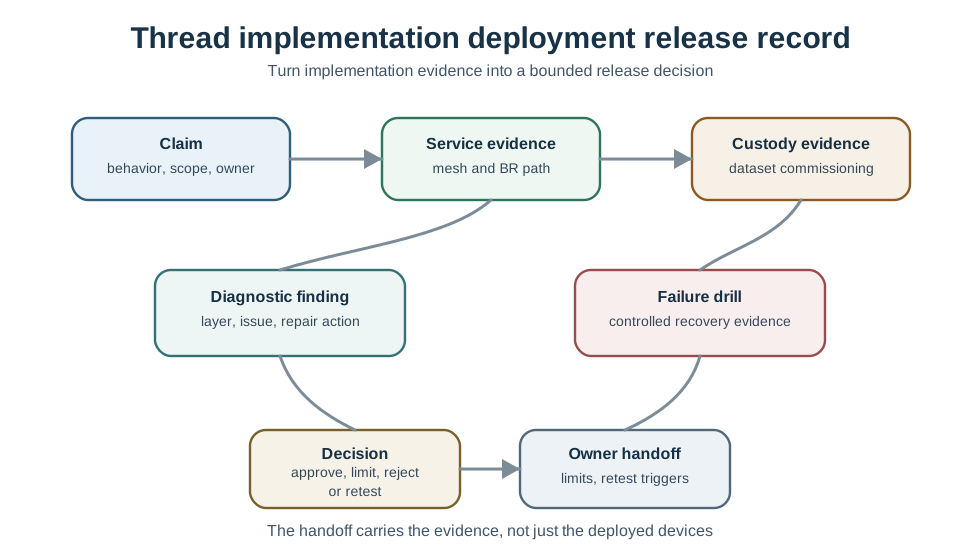
A staged release record is useful because it keeps approval smaller than the site. A pilot, floor, lab, or device family can be approved while a different zone remains under retest.
31.19 Worked Implementation Deployment Records
This section: Worked Implementation Deployment Records
Border Router service handoff
Claim: local control and external telemetry are ready for the pilot zone. Evidence: Thread attachment and local control work without external access; external telemetry depends on a documented Border Router service path; operations has the recovery owner and service check. Decision: approve pilot with external-service monitoring. Limit: do not approve remote-access behavior for unsurveyed zones.
Commissioning custody repair
Claim: a device family can be released to facilities support. Evidence gap: the team can add devices, but device removal and replacement custody are not recorded. Decision: limit release to implementation team control. Repair: document commissioning authority, removal procedure, and support handoff before broader release.
Multi-zone diagnostic split
Claim: two zones can share one application workflow. Evidence: each zone has separate mesh and Border Router evidence; application traces show the workflow works across both zones. Decision: approve the workflow with separate Thread operating records. Limit: a future zone must not inherit approval without its own mesh and service evidence.
31.20 Common Mistakes
This section: Common Mistakes
Approving a join test as release evidence
A join proves one commissioning path, not service availability, diagnostics, failure recovery, or support readiness.
Mixing role responsibilities
Leader, Border Router, commissioner, controller, bridge, and application endpoint evidence should stay separate.
Using commands without decisions
Diagnostics that do not change a release decision become tool noise rather than evidence.
Leaving dataset custody informal
If dataset, commissioning, and recovery material are not owned, the deployment is hard to repair.
Claiming all zones from one pilot
Physical layout, ownership, radio environment, and support paths can change by zone.
Treating external access as local readiness
Cloud or remote access can work while local mesh evidence remains weak, and the reverse can also be true.
31.21 Implementation Deployment Checklist
This section: Implementation Deployment Checklist
Before approving implementation deployment, confirm that the record includes:
- The release behavior, deployment boundary, required services, and release owner.
- Mesh attachment and role evidence tied to the actual device classes.
- Border Router service evidence separated from controller, cloud, bridge, and Matter evidence.
- Translation, name-resolution, or route evidence when the application depends on it.
- Dataset, commissioning, device removal, and credential custody rules.
- Diagnostics evidence with baseline, observation, interpretation, repair, and retest result.
- A controlled failure or recovery drill tied to the release claim.
- Staged decision, explicit limits, retest triggers, and operations handoff.
31.22 Knowledge Check: Release Evidence
This section: Knowledge Check: Release Evidence
31.23 Knowledge Check: Diagnostic Boundary
This section: Knowledge Check: Diagnostic Boundary
31.24 Match Implementation Evidence
This section: Match Implementation Evidence
31.25 Order the Implementation Deployment Review
This section: Order the Implementation Deployment Review
31.26 Summary
This section: Summary — Thread implementation deployment is approved by evidence, not by a successful setup screen.
Thread implementation deployment is approved by evidence, not by a successful setup screen. The record should show the release claim, mesh attachment, Border Router service, dataset custody, diagnostics, recovery behavior, staged decision, and operations handoff.
Keep each responsibility separate. Thread mesh evidence, Border Router service, controller behavior, cloud access, bridge behavior, and Matter fabric behavior can all matter, but none of them proves the others by itself.
31.27 Key Takeaway
This section: Key Takeaway — Thread Implementation Deployment Evidence should turn Thread planning into deployment evidence for commissioning, role changes, border routing, diagnostics, repair, and operational ownership.
Thread Implementation Deployment Evidence should turn Thread planning into deployment evidence for commissioning, role changes, border routing, diagnostics, repair, and operational ownership.
31.28 Concept Relationships
This section: Concept Relationships
Release claim
Connects implementation behavior to the site boundary, device classes, service dependencies, and owner.
Mesh evidence
Connects role, parent, neighbor, and route observations to the behavior being released.
Border Router service
Connects Thread to external IP paths while staying separate from controller and application evidence.
Dataset custody
Connects channel, prefix, commissioning, removal, and recovery authority to operational ownership.
Diagnostics evidence
Connects observed failures to a layer, repair action, retest, and release decision.
Staged release
Connects approval to limits, retest triggers, and operations handoff.
31.29 What’s Next
This section: What’s Next
- Thread Development and Integration - Review how implementation choices and integration work affect deployable evidence.
- Thread Network Operations - Connect deployment release records to ongoing monitoring and recovery evidence.
- Use the site planning and optimization gate in this chapter when placement and site scope need deployment review.
- Thread Comprehensive Evidence Review - Tie implementation deployment to stack, security, Matter, and boundary evidence.
- Matter Protocol Overview - Review application-layer behavior after Thread implementation evidence is bounded.
Find help
3 reviewed answers.
Where should I start in a module?
Open the module page from the sidebar to see its chapters in order. Use the module map to return to a topic you need.
Modules and pathsReviewed
What can I try when a project does not work?
Check the symptom, then work through the diagnostic steps. Keep the error message and the smallest example that reproduces it.
When you are stuckReviewed
How do interactive examples work?
Use the interactive guide to check how examples and simulations work before changing your project.
Interactive examples guideReviewed