17 Zigbee Industrial Deployment
More
Depth: Practitioner
Progress saves as you read. Mark sections complete as you go; your progress appears in the sidebar.
17.1 In 60 Seconds
This section: In 60 Seconds — Picture a sensor mesh beside welders, motors, and moving metal.
Picture a sensor mesh beside welders, motors, and moving metal. It worked after hours, then lost messages during a busy shift. The site, not the product label, sets the release boundary.
Zigbee is a low-power mesh radio system. A gateway is the boundary device or service that links the mesh to another network. Start with one plant zone and one monitoring job. Record the coordinator owner, awake router path, radio conditions, mains power, service access, and tested recovery. Keep lab proof apart from busy-site proof. Mark the exact zone and shift that the claim covers.
Use these field questions:
- Which zone is in scope?
- Which messages must arrive?
- Who owns the coordinator state?
- Which routers stay awake?
- Can staff reach them for service?
- What noise appears on a busy shift?
- What metal or motion changes the path?
- Can the gateway be replaced safely?
- How does the mesh recover?
- Which site change starts a retest?
A good test in one zone does not approve the whole plant. Practitioner records placement, coexistence, power, custody, and handoff. Under the Hood covers radio loss, identity state, and recovery details. Those deeper facts can shrink the approved zone. They never turn a quiet lab run into proof for a busy factory.
Retell the site claim. One zone is named. One shift is named. One message job is named. The awake path is known. The coordinator has an owner. The gateway has an owner. Noise is tested. Recovery is tested. Service access is planned. A site change reopens the claim.
An industrial Zigbee deployment should be approved from evidence, not from a polished factory example or a spreadsheet promise. The reviewer needs site observations, coordinator custody, router placement evidence, coexistence evidence, power and service evidence, recovery behavior, operations ownership, and retest triggers.
This chapter turns industrial deployment planning into a bounded review. It avoids exact capacity, timing, service-life, or budget promises because those values go stale quickly and depend on the site. The useful skill is knowing which evidence must be collected before a lab result can influence an industrial release.
17.2 Learning Objectives
This section: Learning Objectives
By the end of this chapter, you will be able to:
- define an industrial Zigbee deployment claim without overpromising,
- separate site evidence from lab evidence,
- review coordinator, router, joining, and gateway custody,
- identify coexistence, power-service, and recovery evidence needed for release, and
- decide whether an industrial deployment record should be accepted, revised, rejected, or retested.
17.3 Start With the Deployment Claim
This section: Start With the Deployment Claim — Begin with a claim that can be reviewed.
Begin with a claim that can be reviewed.
Weak claim: Zigbee will cover the factory reliably.
Stronger claim: within this recorded zone, with this coordinator custody model, router placement evidence, coexistence observations, service plan, and recovery test, these monitoring messages reached the intended controller with the stated limitations.
The stronger claim is not as flashy, but it is useful. It names the site boundary, the evidence used, and the conditions that make the claim stale.
17.4 Evidence Families
This section: Evidence Families — Use these evidence families before approving an industrial deployment.
Use these evidence families before approving an industrial deployment.
Site boundary evidence records the zones, structures, moving equipment, interference sources, access limits, and monitoring behaviors in scope.
Coordinator custody evidence records where network authority lives, who can change it, how backups are handled, and how recovery is practiced.
Router placement evidence records why each relay location exists, what it can hear, what it cannot hear, and what happens when a relay is unavailable.
Coexistence evidence records wireless conditions, channel decisions, noisy processes, seasonal or shift-related changes, and evidence that the deployment still has usable paths.
Power and service evidence records how nodes are powered, how maintenance is scheduled, and what failure or replacement process exists.
Application evidence records the report, command, alarm, state, or gateway-visible behavior that matters to operations.
Recovery evidence records fault drills, replacement behavior, route changes, and the conditions that require retesting.
17.5 Industrial Mesh Backbone Evidence
This section: Industrial Mesh Backbone Evidence — Reliable coverage in an industrial site comes from a well-placed backbone of mains-powered routers, not from raw transmit power.
Reliable coverage in an industrial site comes from a well-placed backbone of mains-powered routers, not from raw transmit power. Routers relay traffic and keep their radios awake, so they are the infrastructure. Battery end devices are the sensors and actuators hanging off that backbone.
Coverage and resilience are functions of router density and placement. Each added router can create alternate paths for self-healing, but only if its placement is supported by observations. The practical review question is not “will Zigbee cover the floor?” but “is there a router within reliable link range of every device, with enough overlap that losing one router does not partition the mesh?”
Before treating that backbone as ready for production, use Figure 17.1 to see how radio observations become an accountable release decision. The diagram is a review path rather than a network topology: it keeps a successful packet test from bypassing custody, maintenance, or recovery questions.
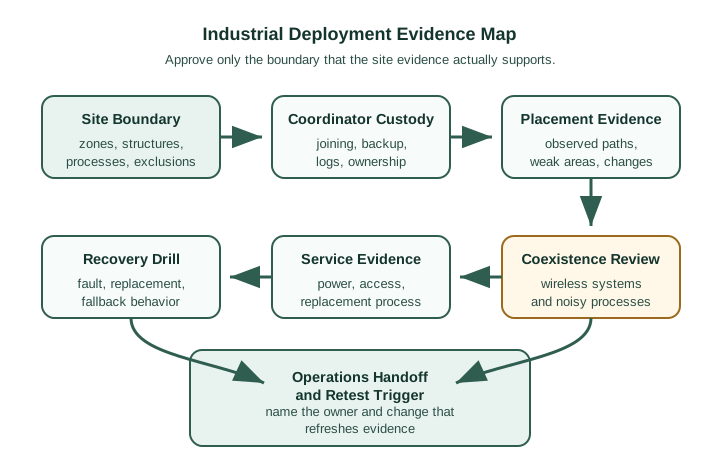
Read Figure 17.1 clockwise from site boundary. Custody names who controls the coordinator and gateway; placement and coexistence evidence then test whether the router backbone works under the site’s structures, equipment, and radio activity. Service evidence asks whether nodes remain supportable, while the recovery drill tests what happens when a dependency fails. The path ends with an operations handoff and a retest trigger because approval must remain owned after commissioning. This sequence turns the backbone question into the chapter’s running claim: reliable coverage is supported by a bounded, repeatable evidence chain, not inferred from router count alone.
17.6 Knowledge Check: Router Backbone Evidence
This section: Knowledge Check: Router Backbone Evidence
17.7 Site Boundary Review
This section: Site Boundary Review — The site boundary is the first industrial artifact to review.
The site boundary is the first industrial artifact to review.
Record:
- which production zones are in scope,
- which monitoring behaviors are in scope,
- which equipment or structures can block or reflect signals,
- which wireless systems and noisy processes share the area,
- which areas need special access or safety procedures,
- which gateway or controller owns the industrial handoff, and
- which conditions are explicitly out of scope.
If the site boundary is vague, the deployment claim is not ready. A vague boundary makes later failures look surprising even when the evidence never covered them.
17.8 Coordinator and Gateway Custody
This section: Coordinator and Gateway Custody — Industrial deployments need clear authority.
Industrial deployments need clear authority.
Review:
- where network formation authority is located,
- who can open joining,
- how joining changes are approved,
- how coordinator backup or replacement is practiced,
- how gateway configuration is versioned,
- how logs and diagnostic records are preserved, and
- who owns the handoff to operations.
Do not approve a deployment because a coordinator worked in a lab. Approve the recorded custody process that operations can repeat.
17.9 Router Placement Review
This section: Router Placement Review — Router placement is not just geometry.
Router placement is not just geometry. It is an evidence question.
For each placement area, record:
- what the router is expected to support,
- what nearby structures or equipment affect the path,
- which neighboring routers or parents were observed,
- what path changes were observed during a controlled fault,
- whether the placement creates a single fragile dependency, and
- what condition triggers a placement review.
A map is a planning aid. It is not proof of the path. The reviewed record should show what was observed.
17.10 Knowledge Check: Industrial Claim Scope
This section: Knowledge Check: Industrial Claim Scope
17.11 Coexistence and Interference Review
This section: Coexistence and Interference Review — Industrial coexistence evidence should not depend on one clean scan.
Industrial coexistence evidence should not depend on one clean scan.
Review:
- which wireless systems share the space,
- which machines or processes create changing noise,
- whether observations covered normal and stressed operating conditions,
- whether channel choices are documented with evidence,
- whether fallback or retest rules are written, and
- whether operations knows what symptom requires investigation.
Avoid universal channel rules. The right decision is the one supported by the site evidence and the retest plan.
17.12 Industrial RF and Coordinator Custody
This section: Industrial RF and Coordinator Custody — Industrial environments punish 2.4 GHz radio.
Industrial environments punish 2.4 GHz radio. Metal shelving and machinery cause multipath and attenuation, while heavy Wi-Fi use and motor noise can raise the interference floor. A deployment record needs a real site survey that measures link quality at device locations and a channel plan that places Zigbee on an evidence-supported channel, often 15, 20, 25, or 26 when those avoid the site’s Wi-Fi channels 1, 6, and 11.
The second hard fact is custody: a centralized-security Zigbee network has one Trust Center, co-located with the coordinator, for joining and key management. Joined devices also hold the shared network key. Losing the coordinator without a usable backup can disrupt Trust Center service and make restoration difficult even if existing routers keep forwarding traffic.
| Industrial factor | Risk | Mitigation |
|---|---|---|
| Metal and machinery | Multipath, attenuation, and dead spots | Site survey with LQI and denser router placement. |
| Wi-Fi and motor noise | Retries and latency | Channel plan using site evidence, often Zigbee 15/20/25/26 around Wi-Fi 1/6/11. |
| Single coordinator / Trust Center | Trust Center joining and key-update service lost; recovery needs saved coordinator state | Back up the network key and device list; rehearse recovery. |
The risk table identifies what can go wrong; Figure 17.2 shows where the corresponding proof belongs. Inspect it before choosing a channel or approving a coordinator backup so those choices remain tied to the claim and site conditions they support.
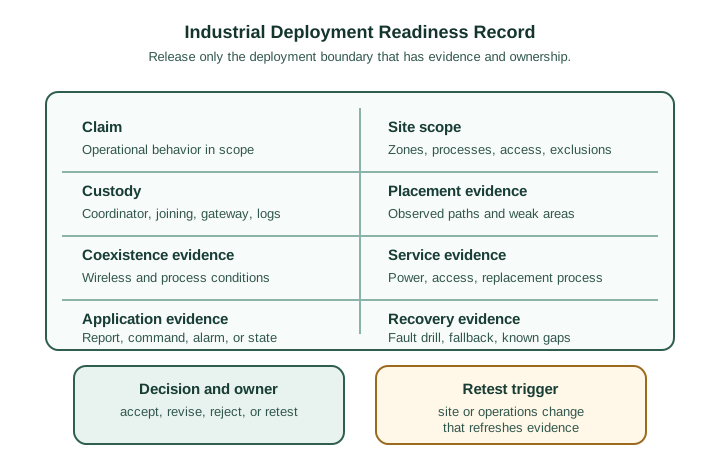
In Figure 17.2, begin with the claim and site scope so that every later observation has a boundary. Next read across custody, placement, coexistence, service, and application evidence: together they show who controls the network, whether radio paths were observed, under which interference and maintenance conditions, and whether the required application behavior occurred. Recovery evidence then challenges that evidence under failure. Only after those fields should the reviewer record a decision, owner, and retest trigger. The artifact therefore connects RF engineering to operational accountability: a good link measurement is necessary evidence, but it is not a release decision by itself.
This section:

This section:
17.13 Knowledge Check: Coordinator Custody
This section: Knowledge Check: Coordinator Custody
17.14 Power and Service Review
This section: Power and Service Review — Industrial nodes fail when service assumptions are wrong.
Industrial nodes fail when service assumptions are wrong.
Review:
- which nodes depend on fixed power and which require periodic service,
- who can access each node,
- how replacement affects identity, joining, and application behavior,
- how low-power behavior changes reporting or command availability,
- what maintenance records are collected, and
- what service condition makes the deployment evidence stale.
Do not approve long service claims from a formula alone. Approve the maintenance plan, observed behavior, and retest rule.
17.15 Readiness Record
This section: Readiness Record — Use a readiness record before release.
Use a readiness record before release.
The record should include:
- Claim: what operational behavior the deployment should support.
- Site scope: zones, processes, structures, access limits, and exclusions.
- Custody: coordinator, joining, gateway, backup, logs, and change control.
- Placement evidence: observed paths, weak areas, and route changes.
- Coexistence evidence: wireless and process conditions reviewed.
- Service evidence: power source, access, replacement, and maintenance process.
- Application evidence: report, command, alarm, state, or gateway-visible result.
- Recovery evidence: fault drill, fallback path, replacement, and known gaps.
- Decision: accept, revise, reject, or retest.
- Retest trigger: production change, controller change, topology change, service change, or new interference source.
17.16 Worked Review: Gateway Replacement
This section: Worked Review: Gateway Replacement — Scenario: A gateway replacement is proposed after a successful pilot.
Scenario: A gateway replacement is proposed after a successful pilot.
Review path:
- Record what the pilot actually approved.
- Identify which custody fields change when the gateway changes.
- Check joining control, backup state, logs, identity mapping, and application handoff.
- Retest a representative path and application behavior.
- Record unsupported zones and operations conditions.
- Update the retest trigger.
Decision: The old pilot can inform the replacement, but it cannot approve the new gateway boundary without fresh custody and application evidence.
17.17 Worked Review: Noisy Production Zone
This section: Worked Review: Noisy Production Zone — Scenario: A production zone has intermittent wireless loss during a noisy process.
Scenario: A production zone has intermittent wireless loss during a noisy process.
Review path:
- Keep the site boundary narrow to the affected zone and process.
- Compare observations during quiet and noisy operation.
- Record whether the issue is path loss, application delay, gateway interpretation, or service outage.
- Test alternate placement or routing evidence without promising a universal fix.
- Decide whether the zone is accepted with limits, revised, or retested later.
Decision: Approve only the evidence-backed zone behavior. Do not generalize the result to the whole site.
17.18 Matching Quiz: Industrial Evidence Family
This section: Matching Quiz: Industrial Evidence Family
17.19 Operations Handoff
This section: Operations Handoff — A deployment is not ready until operations knows what to do after release.
A deployment is not ready until operations knows what to do after release.
The handoff should define:
- who owns coordinator and gateway changes,
- who can open joining,
- who responds to missing reports,
- who reviews noisy-zone symptoms,
- who replaces or moves a node,
- who approves topology changes, and
- who decides when evidence must be refreshed.
If ownership is unclear, the deployment is not operationally ready even if the technical pilot worked.
17.20 PAN Identity and Recovery State
This section: PAN Identity and Recovery State — A Zigbee network is identified by a PAN ID and an extended PAN ID.
A Zigbee network is identified by a PAN ID and an extended PAN ID. Nearby networks can collide on a 16-bit PAN ID, so the extended PAN ID matters on crowded sites. Coordinator recovery is also more than swapping hardware: the replacement must restore the same network key, extended PAN ID, and ideally the device table, or devices must be recommissioned.
Recovery also depends on anti-replay state. Zigbee frame counters are expected to increase, so a coordinator that comes back with stale or reset counter state can have frames rejected until neighbors resynchronize. An industrial recovery plan should name the preserved network key, preserved extended PAN ID, preserved or rebuildable device table, and frame-counter persistence.
Inspect Figure 17.3 to test whether a recovery plan restores trust, not merely connectivity. It places the coordinator state inside a larger chain so a replacement that brings devices online cannot be mistaken for proof that joins, keys, counters, and application authority are still correct.
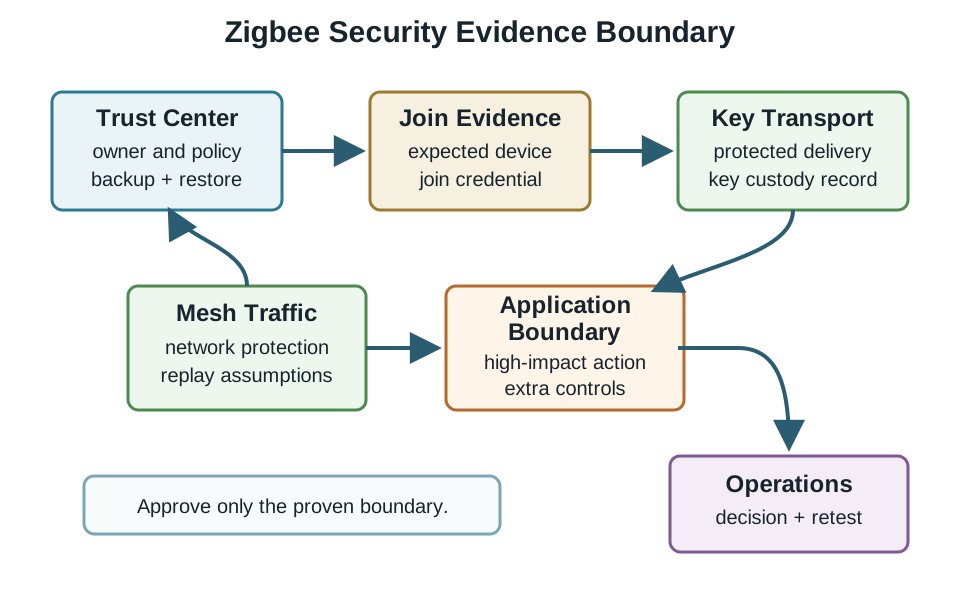
Trace Figure 17.3 from Trust Center custody through authorized joining and key transport. Those stages establish who may become a network member and how the shared key reaches that member. Continue through protected mesh traffic and the application boundary: successful decryption proves possession of network credentials, but it does not by itself prove that a high-impact command is authorized. Operations visibility, the decision owner, and the retest trigger close the loop. This ordered read explains why PAN identity, key material, device state, and replay state must be recovered together before the chapter’s deployment claim can be renewed.
17.21 Knowledge Check: Recovery State
This section: Knowledge Check: Recovery State
17.22 Ordering Quiz: Industrial Deployment Review
This section: Ordering Quiz: Industrial Deployment Review
17.23 Common Industrial Deployment Drift
This section: Common Industrial Deployment Drift — Spreadsheet drift: exact capacity, budget, or service promises replace site evidence.
Spreadsheet drift: exact capacity, budget, or service promises replace site evidence.
Map drift: a placement map is treated as proof of observed paths.
Pilot drift: a successful pilot is treated as approval for every zone and shift.
Gateway drift: bridge-visible behavior is treated as proof of Zigbee-side application behavior.
Custody drift: joining and coordinator backup are left to informal practice.
Safety drift: monitoring evidence is reused as if it approved process-control behavior.
Retest drift: site, gateway, topology, or production changes happen without refreshing evidence.
17.24 Knowledge Check: Operations Readiness
This section: Knowledge Check: Operations Readiness
17.25 Industrial Readiness Checklist
This section: Industrial Readiness Checklist
Before accepting an industrial Zigbee deployment record, confirm that it:
- states a bounded deployment claim,
- names the site scope and exclusions,
- records coordinator, joining, gateway, backup, and log custody,
- separates placement maps from observed path evidence,
- records coexistence evidence and retest rules,
- documents service access and replacement behavior,
- separates Zigbee-side application evidence from gateway-visible evidence,
- includes recovery or replacement drills,
- names the operations owner, and
- avoids exact capacity, timing, service-life, or budget promises unless those values are separately measured and maintained.
17.26 Summary
This section: Summary — Industrial deployment review is about evidence boundaries.
Industrial deployment review is about evidence boundaries. The reviewer should know what was observed at the site, who owns custody, what paths and application behaviors were tested, what coexistence and service conditions were reviewed, and what change forces retesting.
Do not let a polished industrial example become a universal design rule. Use site evidence, operations ownership, and retest triggers to keep the deployment claim honest.
17.27 Key Takeaway
This section: Key Takeaway
Accept an industrial Zigbee deployment only when the record names the site boundary, coordinator custody, router placement evidence, coexistence observations, service plan, recovery drill, owner, unsupported conditions, and retest trigger.
17.28 Concept Relationships
This section: Concept Relationships
- Zigbee Hands-On Labs Evidence Portfolio explains how lab records feed deployment review.
- Zigbee Mesh Lab Evidence Review defines the single-lab evidence structure.
- Zigbee Routing supports path and recovery evidence.
- Zigbee Security supports joining and custody review.
- Zigbee Application Profile Evidence Review supports report, command, and gateway-visible behavior review.
17.29 What’s Next
This section: What’s Next — Next, continue with Zigbee Network Formation, where joining and formation evidence are reviewed more directly.
Next, continue with Zigbee Network Formation, where joining and formation evidence are reviewed more directly.
Find help
3 reviewed answers.
Where should I start in a module?
Open the module page from the sidebar to see its chapters in order. Use the module map to return to a topic you need.
Modules and pathsReviewed
What can I try when a project does not work?
Check the symptom, then work through the diagnostic steps. Keep the error message and the smallest example that reproduces it.
When you are stuckReviewed
How do interactive examples work?
Use the interactive guide to check how examples and simulations work before changing your project.
Interactive examples guideReviewed