21 End-to-End Test Strategy
From Test Plan to Release Evidence
21.1 Start With the Release Claim
Imagine a release gate where every green check needs to trace back to a requirement, risk, fixture, environment, defect decision, and rollback plan. Testing and validation starts with the claim the product wants to make, then chooses the cheapest credible test layer that can support or reject that claim before the system reaches users.
21.2 Learning Objectives
By the end of this chapter, you will be able to:
- Convert IoT requirements into traceable verification and validation evidence.
- Choose the right test layer for firmware, hardware, network, cloud, environmental, security, and field risks.
- Separate fast regression checks from slower release-gate evidence.
- Define acceptance criteria, test fixtures, data capture, and defect rules before a test begins.
- Build release evidence that supports a reviewable go, hold, or redesign decision.
21.3 Validate Claims at the Right Layer
IoT validation fails when every claim is pushed through the same test layer. A unit test can prove a parser rejects malformed MQTT payloads. It cannot prove a battery node survives cold-start, weak Wi-Fi, queued messages, and a cloud outage. A field pilot can reveal real installation behavior. It cannot replace a repeatable regression check for a known firmware bug.
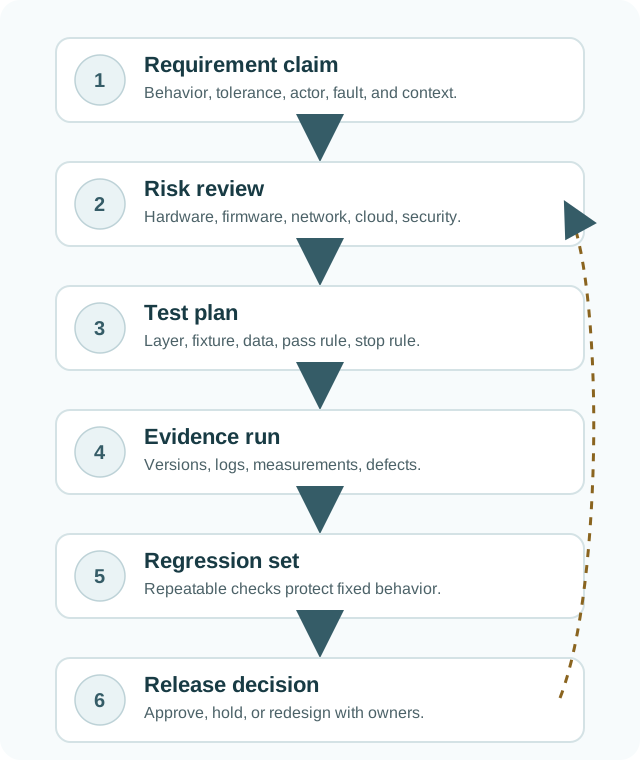
Start each validation plan by naming the claim, the risk, and the cheapest layer that can answer it credibly. Firmware logic may fit Vitest, pytest, GoogleTest, or Zephyr Twister. Driver timing may need a logic analyzer, bus capture, and hardware-in-the-loop fixture. Fleet behavior may need staged rollout telemetry, broker logs, OpenTelemetry traces, and support-runbook checks.
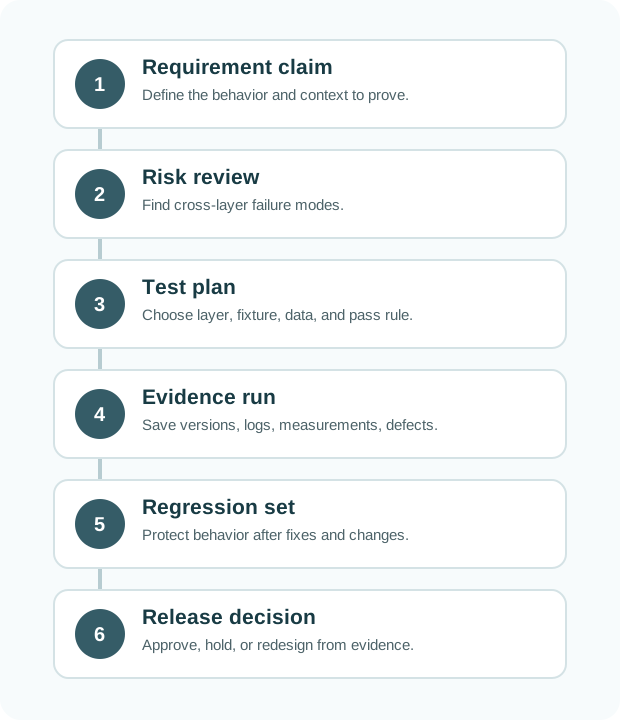
This route prevents validation from becoming a pile of disconnected screenshots. A requirement claim names behavior, tolerance, actor, fault, and context. Risk review asks which layers can break that claim: hardware, firmware, wireless, cloud, security, installation, or operations. The test plan then names the layer, fixture, data, acceptance rule, stop rule, and evidence that must be saved before anyone sees the result.
For a battery gateway, “messages are delivered after reconnect” is not one test. Unit tests can protect queue serialization and duplicate-ID logic. Integration tests can use Mosquitto or EMQX to force disconnects and retained sessions. System tests can capture firmware logs, MQTT broker logs, packet traces, cloud records, and dashboard state during network loss. Field validation can show whether real installers, weak Wi-Fi, and support workflows expose a different failure.
- Fast evidence: build checks, lint, type checks, unit tests, and simulated fault cases catch common regressions early.
- Physical evidence: HIL, bench instruments, RF checks, current traces, environmental runs, and enclosure trials test the assembled device.
- Operational evidence: staged rollout, monitoring, incident drills, rollback, privacy checks, and support workflows decide whether release is responsible.
The release decision should show the chain from claim to evidence. If an environmental chamber run is skipped, the gate should say hold, redesign, or accept a scoped waiver with owner, expiry, monitoring, and rollback criteria. A mostly green dashboard is useful context; it is not a substitute for traceability.
21.4 Choose Tools by Failure Mode
Use tool names in the plan so the layer boundary is concrete. GoogleTest can protect C++ conversion logic. Vitest can protect web-app state and widget parsing. pytest can drive Python services and hardware scripts. Robot Framework can orchestrate end-to-end flows. Zephyr Twister can exercise firmware tests across board configurations. Renode or QEMU can make firmware and system-image checks repeatable before scarce hardware is available.
For deployed IoT behavior, add the instruments that see the real boundary. Use Saleae or similar logic-analyzer traces for I2C, SPI, UART, interrupt timing, and boot sequencing. Use a Joulescope, Nordic Power Profiler, or calibrated current probe for sleep, wake, transmit, and update states. Use Wireshark, tcpdump, Mosquitto or EMQX logs, AWS IoT Core logs, Azure IoT Hub diagnostics, or MQTT broker traces when the risk crosses device, network, and cloud.
Write the validation matrix so each row can be rerun by another engineer. Include requirement ID, board revision, firmware or container image hash, fixture script version, instrument model, network profile, sample data, acceptance criterion, raw artifact path, defect link, and reviewer decision. For regulated or safety-adjacent work, add reviewer independence, hazard link, waiver expiry, and sign-off criteria.
Keep fast and slow loops separate. A pull request should run the cheapest checks that catch common regressions: lint, type checks, unit tests, contract tests, emulator scenarios, and selected negative cases. Release gates should add the slower evidence that cannot run on every change: HIL racks, environmental chamber profiles, RF attenuation sweeps, OTA interruption drills, security reviews, privacy checks, staged rollout telemetry, and support-runbook exercises.
- Map claims to layers. Put firmware, hardware, RF, cloud, security, and operations claims in separate rows.
- Name the fixture and version. Record board revision, firmware hash, script version, instrument setup, broker config, and sample data.
- Keep the failure path alive. When a defect is fixed, preserve the original failing condition as an automated check, HIL scenario, bench procedure, or release checklist item.
A useful defect closure record names the original failure, the changed artifact, the repeated condition, and the new guard. “Fixed reconnect” is not enough. “REQ-NET-03 failed on board rev B with firmware 1.8.4 during 20 percent packet loss; duplicate MQTT messages appeared after reconnect; commit abc123 changed queue IDs; the EMQX reconnect scenario and packet capture now pass” is reviewable evidence.
21.5 IoT Release Risk Is Cross-Layer
A connected device is usually a state machine spread across firmware, hardware, radio, cloud services, mobile apps, and operations. A duplicate-message defect might involve MQTT QoS behavior, packet loss, retained sessions, queue IDs, timestamp ordering, backend idempotency, and dashboard refresh. A failed OTA update might involve bootloader slots, image signatures, battery state, flash wear, interrupted downloads, schema migration, and rollback rules.
That is why a release gate needs traceability, not just pass rate. The reviewer should see which claim was tested, which state was forced, which logs and measurements were captured, which defect or waiver remains, and which owner can act if the field signal changes. A green dashboard without this chain can hide a skipped environmental run, a quarantined security test, or a failure that only appears during reconnect.
Evidence also has timing and observability limits. A firmware log can prove the device queued a reading, but it may not prove the broker accepted it once. A cloud metric can show ingestion latency, but it may not distinguish RF loss from backend throttling. A current trace can show sleep entry, but it may not prove the same behavior at low temperature or after an interrupted OTA update. Validation has to combine artifacts at the same scenario boundary.
Regression design is another hidden layer. The first failing scenario is often expensive: a bench setup, a field pilot, or a chamber run. After the root cause is understood, convert the smallest credible part into a repeatable guard. That might be a unit test for timestamp ordering, a broker-fault integration test for duplicate delivery, a HIL script for brownout recovery, or a release checklist item for environmental exposure that still needs physical hardware.
Waivers should be treated as active risk objects, not polite notes. A defensible waiver names scope, reason, expiry, owner, monitoring, rollback trigger, and the evidence that will retire it. If the waiver has no expiry or no owner, it is not release evidence; it is hidden debt.
The release decision is a systems decision. The code may be correct and the product still unsafe to deploy if monitoring cannot detect failure, support cannot recover devices, or rollback has not been exercised under poor connectivity and low power.
This is why validation belongs near design, not only at the end. Requirements, architecture, sensor selection, firmware architecture, cloud contracts, operations, and support all shape what can be tested later. A system that cannot be observed, reset, rolled back, or diagnosed is difficult to validate even when its individual components are well engineered.
21.6 Prerequisites
You should already be comfortable with:
- Design Thinking Validation: validating that the product problem and user outcome are real.
- Simulating Testing and Validation: moving from simulation evidence toward hardware and field evidence.
- Sensor Selection Process: using requirements, gates, and evidence records instead of unsupported preferences.
21.7 What This Chapter Adds
This chapter closes the design-methodology path. Earlier chapters define the problem, design the system, simulate behavior, choose parts, and build prototypes. Testing and validation asks whether the complete evidence set is strong enough to release or whether the design must loop back.
Every claim needs evidence
A requirement is not complete until a review can point to the test, fixture, result, and decision that verify it.
Use the cheapest useful test
Unit tests, integration tests, HIL, environmental checks, security tests, and field trials answer different questions.
Test the deployment context
Power, radio conditions, temperature, enclosure, firmware timing, updates, and cloud dependencies must be represented.
Release on evidence
Green dashboards are not enough. Review defects, waivers, open risks, regression coverage, and rollback plans.
A prototype demonstration can prove that a path is possible. Validation asks whether the system still satisfies the requirement under realistic inputs, tolerances, faults, updates, and operating conditions.
21.8 Map Test Claims to Release
Testing and validation starts by naming the claim that could fail. The team reviews the risk, chooses the cheapest credible test layer, captures versioned results, keeps repeatable regression checks, and uses the release gate to approve, hold, waive, or redesign.
Use the route introduced in the overview as the chapter’s evidence spine: requirement claim, risk review, test plan, evidence run, regression set, and release decision.
21.9 Verification, Validation, and Acceptance
Use the terms precisely. They are related, but they answer different review questions.
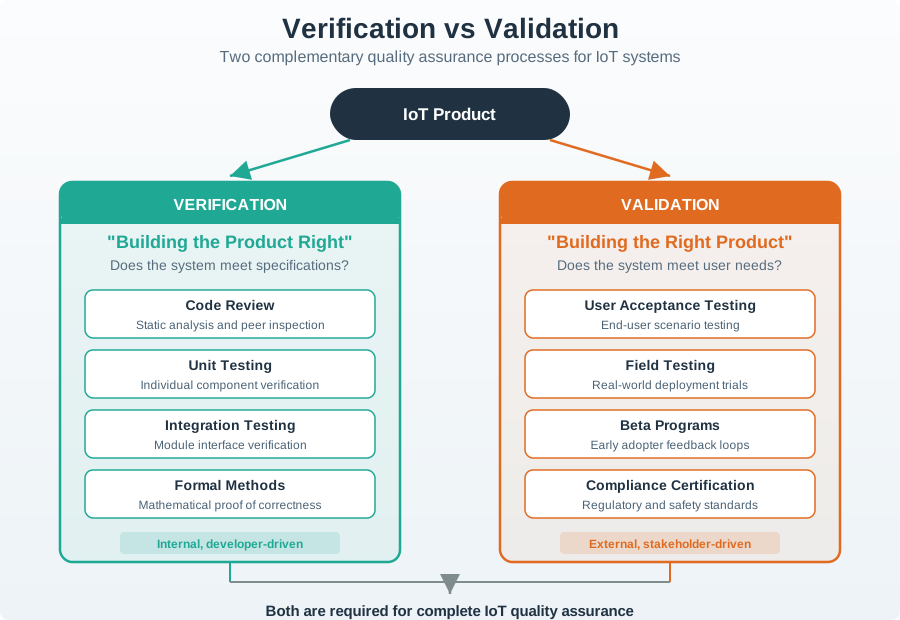
When a test fails, ask which claim it was meant to answer. A failing test without a requirement is hard to prioritize. A requirement without a test is hard to trust.
21.10 Build the Traceability Matrix
A traceability matrix is a compact map from requirement to evidence. It keeps the test program from becoming a pile of disconnected scripts and screenshots.
21.11 Choose the Right Test Layer
The test layer should match the risk. Cheap tests are valuable because they run often, but they cannot answer every IoT question.
21.12 IoT-Specific Test Conditions
IoT failures often come from cross-layer interactions. A narrow software test can miss behavior caused by power, radio, enclosure, or cloud assumptions.
State transitions
Check boot, sampling, transmit, receive, sleep, brownout, charger, update, and recovery states on the final power path.
Unreliable links
Exercise packet loss, latency, roaming, reconnect, duplicate messages, replay, clock skew, and backend outage behavior.
Environment and enclosure
Represent temperature, humidity, dust, vibration, mounting orientation, antenna placement, and user installation variation.
Rollback and recovery
Test interrupted updates, low battery, corrupted downloads, version rollback, schema migration, and fleet staged rollout controls.

Phoebe’s Why
A “Power” row in the test-condition table above is really asking a reviewer to reproduce a physics chain, not just plug in a battery. A cell’s nameplate mAh counts the charge it can push, not the energy it delivers, because energy also depends on the voltage each unit of charge was pushed at – and internal resistance sags that voltage under every transmit or actuation pulse the test rig forces. A bench run at a comfortable RF distance never has to pay that sag or the self-discharge that erodes the same nameplate charge at rest, so it can pass while the field unit runs short. The “Physical” row’s antenna placement matters here too: an antenna’s dBi gain sets how much conducted power the radio must actually spend to close a link, and a test that swaps in a reference antenna instead of the installed one is quietly testing a different current draw than the one the battery budget was approved against.
The Derivation
Energy is the integral of voltage times current, not charge times a constant:
\[E = \int V(t)\,I(t)\,dt\]
Internal resistance \(R_{int}\) sags the terminal voltage under load:
\[V_{term} = V_{oc} - I\,R_{int}\]
Only when \(V\) is treated as constant does charge become a stand-in for energy, and only after self-discharge and a design margin discount the nameplate value:
\[E(\mathrm{Wh}) \approx Q_{usable}(\mathrm{Ah}) \times V, \qquad Q_{usable} = f_{derate}\times Q_{nominal}\]
Antenna gain sets how much of that current the radio must spend to reach a fixed regulatory ceiling:
\[\mathrm{EIRP(dBm)} = P_t(\mathrm{dBm}) + G(\mathrm{dBi})\]
Worked Numbers: A REQ-PWR-04-Style Budget
The chapter names no specific cell or radio, so take a standard/typical test-rig lithium primary cell (3.6 V, 2400 mAh, \(R_{int}=3\ \Omega\) typical) and a typical 20 dBm-class radio:
- Nameplate energy: \(E = 2.400\ \text{Ah}\times3.6\ \text{V} = 8.64\) Wh
- TX pulse sag (\(I=120\) mA typical active current): \(\Delta V = 0.120\times3 = 0.360\) V, terminal voltage falls to \(3.24\) V during transmit
- Derated usable budget at 80% (standard design margin covering sag, temperature, and self-discharge): \(Q_{usable}=0.8\times2400=1920\) mAh, \(E_{usable}=0.8\times8.64=6.91\) Wh
- At an 80 \(\mu\)A sleep-average current: life \(=1920/0.080=24{,}000\) h \(=24{,}000/8760=2.74\) years
That 2.74-year figure only holds for the antenna the current was measured against. A 2.4 GHz ISM design capped at 20 dBm EIRP needs \(P_t=20\) dBm with a 0 dBi reference antenna, but only \(20-6=14\) dBm with a 6 dBi installed antenna – a \(\Delta P=6\) dB, or \(10^{6/10}=3.98\times\) less RF-stage output power for the same regulatory-limited range. A “Physical” test run against the wrong antenna measures the wrong current, and the 2.74-year figure moves with it.
Unit tests should protect firmware logic, but field behavior depends on the board, radio path, enclosure, installation, power source, cloud service, and update path. Treat each layer as one part of the evidence set.
21.13 Release Gate Evidence
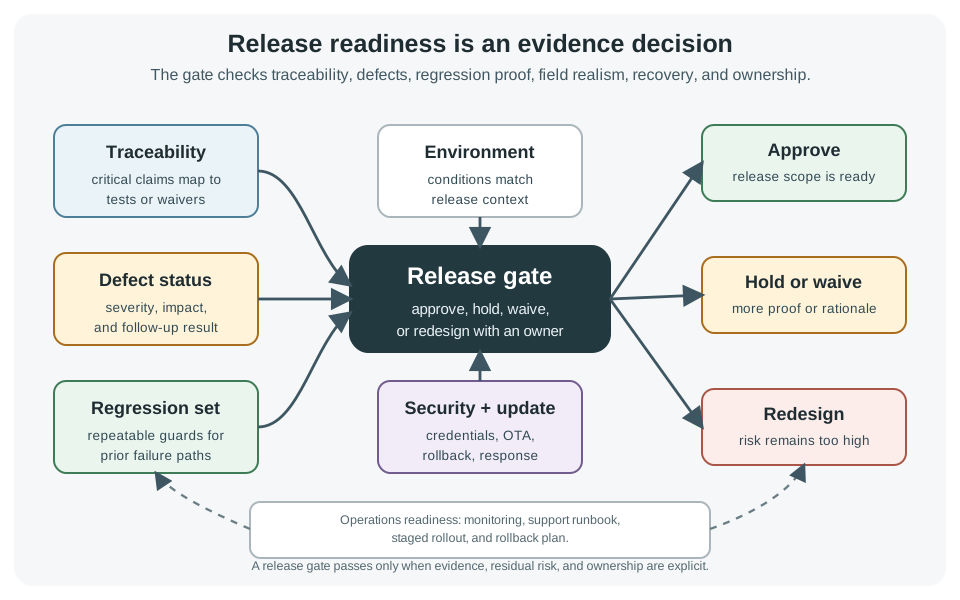
21.14 Plan Tests Before Running Them
A test plan does not need to be long. It needs to prevent ambiguity when results arrive.
21.15 Defects, Waivers, and Follow-Up Runs
Defect handling is part of validation. A release review should be able to explain what failed, what changed, and why the follow-up check is credible.
Good defect: “REQ-NET-03 failed on board rev B with firmware abc123 when packet loss was 20 percent during reconnect; duplicate cloud messages were observed; logs attached.” Weak defect: “Reconnect sometimes weird.”
21.16 Build Defect-Closure Record
Choose one failed IoT test from a project, lab, or case study and write a five-line defect-closure record before the release review:
| Field | Defect-closure record |
|---|---|
| Original failure | Requirement, symptom, setup, and evidence that showed the failure. |
| Change under test | Firmware, hardware, fixture, cloud, configuration, or procedure change being checked. |
| Repeat condition | The exact failing condition that must be repeated, including load, network, timing, or environment. |
| Regression guard | The automated check, checklist item, trace, or measurement that will catch the failure if it returns. |
| Release decision | Go, hold, waive, or redesign, with owner and next evidence needed. |
If the note cannot name the original failure evidence and the repeated condition, the defect is not ready to close.
21.17 Micro-Exercise: Pick the Test Layer
For each release claim, choose the first useful test layer and the later evidence that must still be collected:
- The MQTT payload parser rejects malformed JSON and unknown units.
- The gateway recovers after Wi-Fi loss without duplicating queued readings.
- The battery node still meets its sleep-current budget after enclosure assembly.
- The OTA rollback path works when the download is interrupted at low battery.
21.18 Metrics Without False Confidence
Metrics should guide review, not replace judgment. A large number can still be meaningless if the test does not assert the right behavior.
21.19 Application Snapshots
Use these as patterns. The exact test mix depends on safety, cost, operating environment, security exposure, and ability to recover devices after deployment.
Power and recovery
Validate sleep transitions, brownout recovery, RF reconnect, queue handling, clock behavior, and current draw on final hardware.
Stress and serviceability
Exercise environmental exposure, EMC assumptions, cabling, installation errors, fault outputs, maintenance procedure, and spare-device swap.
Update and onboarding
Test first-use setup, credential handling, poor Wi-Fi, cloud outage, interrupted update, rollback, privacy notices, and support diagnostics.
Independent review
Use stronger traceability, hazard analysis, negative testing, documented waivers, and clear human override or fail-safe behavior.
21.20 Incremental Examples
21.20.1 Protect Parser and State Machine
A first validation pass can protect isolated firmware or service logic. GoogleTest, pytest, or Vitest checks that malformed sensor payloads are rejected, timestamps are ordered, units are normalized, and the alarm state machine moves through normal, warning, alarm, mute, and clear states. The evidence is a CI run with test vectors and expected outputs. It does not prove RF behavior, current draw, enclosure performance, or cloud outage recovery.
21.20.2 Test Gateway Reconnect Layers
A gateway reconnect claim needs integration and system evidence. A Mosquitto or EMQX broker can force disconnects, duplicate deliveries, retained sessions, and delayed acknowledgements while firmware logs, MQTT broker logs, packet captures, and dashboard records are saved together. Wireshark or tcpdump shows packet behavior; OpenTelemetry, CloudWatch, Azure Monitor, or Grafana shows backend timing. If duplicate messages appear only after reconnect, the regression check should repeat that failure path instead of only rerunning happy-path unit tests.
21.20.3 Hold an OTA Release Gate
A field release for OTA firmware needs hardware, cloud, and operations evidence. Zephyr Twister, Renode, QEMU, HIL fixtures, or Robot Framework can cover repeatable update paths, but the release gate should also include bootloader slot behavior, image-signature checks, interrupted-download recovery, low-battery handling, flash-wear limits, staged rollout telemetry, rollback drill results, support runbook readiness, and owners for any accepted waiver. The release decision should say which firmware build, device cohort, monitoring alerts, and rollback trigger are covered.
21.21 Practice Checks
21.22 Common Pitfalls
Many IoT failures happen during reconnect, sleep transition, update, low battery, sensor fault, invalid data, or backend outage. Include negative and recovery cases.
Coverage can show that code ran, but it does not prove that assertions were meaningful, that edge cases were tested, or that hardware behavior is valid.
A clean bench setup can hide antenna placement, enclosure, mounting, temperature, humidity, user installation, and cloud reliability issues.
Updates can fail because of low battery, poor connectivity, interrupted downloads, incompatible data schemas, or bootloader mistakes. Test rollback before field release.
Do not close a defect only because a fix was committed. Repeat the failing scenario, save the follow-up evidence, and add regression coverage where practical.
21.23 Summary
Testing and validation turns design claims into release evidence. Start with traceable requirements, review cross-layer risks, choose the cheapest credible test layer, run tests with versioned fixtures and saved data, treat defects as evidence gaps, preserve regression coverage, and make release decisions from traceability, defect status, waivers, rollback readiness, and residual risk.
21.24 References
- ISO/IEC/IEEE 29119 Software Testing Series - official overview of the software testing standards series.
- NIST SP 800-160 Vol. 1 Rev. 1 - official systems security engineering reference for trustworthy secure systems.
- CISA Secure by Design - official secure-by-design guidance for technology manufacturers and buyers.
- GoogleTest - official C++ testing and mocking framework repository.
- Zephyr Test Runner: Twister - official Zephyr documentation for test automation across platforms and configurations.
21.25 See Also
- Simulating Testing and Validation: decide where simulation, HIL, bench, and field evidence belong.
- Accelerometer Datasheet Case Study: see how component evidence becomes release testing conditions.
- Network Traffic Analysis: use packet captures and logs when validation fails across device, network, and cloud boundaries.
- Design Patterns: move from validated behavior into reusable solution structures.
21.26 What’s Next
| If you want to… | Read this |
|---|---|
| Study detailed IoT testing methods | Testing Fundamentals |
| Automate firmware behavior with fixtures | Hardware-in-the-Loop Testing |
| Practice simulation-based validation | Simulating Testing and Validation |
| Move into reusable solution structures | Design Patterns |
| Previous | Current | Next |
|---|---|---|
| Simulating Testing and Validation | Testing and Validation | Design Patterns |
21.27 Key Takeaway
Testing finds defects; validation proves the system meets the intended need. IoT validation must include hardware, firmware, connectivity, data, security, user workflow, and field conditions.