20 From Simulation to Field Validation
Turning Model Runs Into Release Evidence
20.1 Start With the Evidence Ladder
Picture a team moving from simulated firmware to a bench rig, then to a field pilot, without losing the reason each step exists. Simulation-to-validation work builds an evidence ladder: what the model can prove, what emulation or hardware-in-the-loop must add, what bench tests still need to confirm, and what only installed field behavior can settle.
20.2 Learning Objectives
By the end of this chapter, you will be able to:
- Build a simulation-driven validation plan that connects requirements to unit, simulation, emulation, hardware-in-the-loop, system, and field evidence.
- Choose the right validation level for firmware logic, protocol behavior, physical timing, power, environmental, and release claims.
- Define model boundaries so simulation results do not overclaim what was proven.
- Package automated test results, hardware runs, logs, traces, and residual risks into a release evidence record.
- Plan regression testing and fault injection so future changes do not silently break known behaviors.
20.3 Validation as Evidence Chain
Simulation-driven validation works when each evidence level answers a different part of the release claim. Unit tests can prove parser, state-machine, and calculation behavior. Software-in-the-loop and emulators can replay deterministic firmware scenarios. Virtual integration can exercise boards, sensors, displays, protocol partners, and fault inputs. Hardware-in-the-loop, bench tests, and field pilots prove the physical and deployment behavior that models cannot.
The validation plan should say which claim is being checked, which evidence level can support that claim, and which claims remain open. A gateway-reconnect simulator can support retry and buffering logic. It does not prove flash wear, cellular outage behavior, power draw, RF range, broker load, installer workflow, or field recovery until those are checked with the right physical or operational evidence.
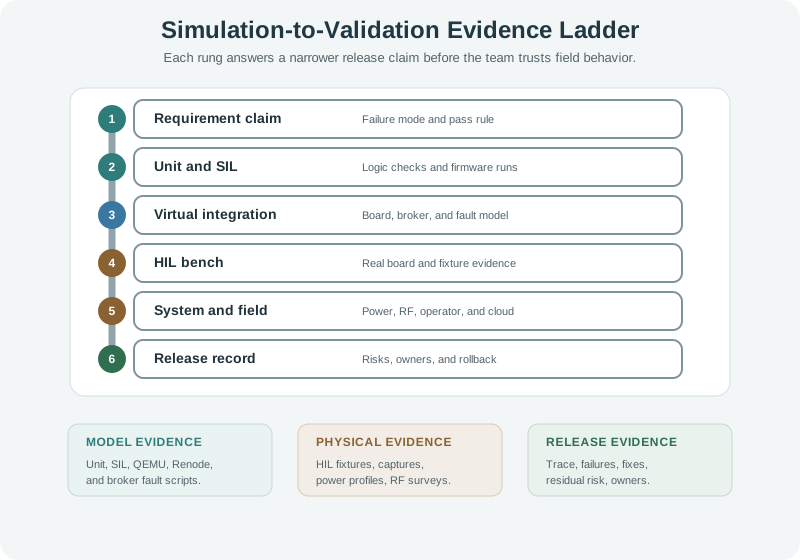
The ladder matters because IoT products fail across layers. A unit test may prove that a queue counter stops at its configured limit, while a Renode or QEMU run proves that a firmware image reaches the reconnect branch. A Wokwi or Tinkercad-style virtual board may show GPIO behavior, serial diagnostics, or simulated sensor faults. None of those proves the regulator response during a brownout, the antenna behavior in a metal enclosure, a TLS certificate rollover on the deployed broker, or the installer steps needed to recover a device in the field. The validation chain keeps those differences visible instead of collapsing every result into pass or fail.
- Model evidence: Unit tests, SIL, QEMU, Renode, virtual circuits, simulated brokers, and scripted fault inputs.
- Physical evidence: HIL fixtures, serial logs, packet captures, logic-analyzer traces, current profiles, RF surveys, and environmental tests.
- Release evidence: Requirement trace, failures, mitigations, residual risks, monitoring actions, owners, and rollback conditions.
20.4 Matrix Claims and Failure Modes
Start the matrix with claim language that can fail. “Gateway reconnects safely after broker outage” is testable. “Connectivity works” is too vague. Then assign evidence levels: unit tests for queue bounds and retry state, SIL for protocol state, virtual integration for simulated broker refusal and recovery, HIL for the gateway board under controlled network conditions, and field evidence for real backhaul, broker, cloud, and operator behavior.
Use concrete automation artifacts. PlatformIO, pytest, Robot Framework, GitHub Actions, Renode tests, QEMU scripts, MQTT brokers, packet captures, and HIL controller scripts should all preserve versioned inputs and outputs. Each run needs firmware commit, board target, dependency versions, model or fixture version, input scenario, expected result, observed result, skipped cases, and who owns any failure.
For a practical gateway release, write the matrix row before choosing the tool. If the claim is “buffered readings survive a 20-minute MQTT broker outage,” the fast checks cover queue limits, timestamp ordering, retry backoff, and serialization. The virtual run can drive CONNACK delay, DNS failure, credential rejection, and broker recovery. The HIL bench then runs the real board with the production firmware, a test broker, serial capture, packet capture, and controlled power input. The field pilot finally checks cellular behavior, operator response, cloud dashboards, and alerting under the actual deployment path.
Keep every artifact reviewable by a second engineer. A useful evidence packet includes the requirement ID, test case name, firmware image hash, board revision, model version, fixture calibration note, input script, observed log, failed assertion, skipped test reason, and residual-risk owner. If a simulated broker failure passes but the HIL run resets during reconnect, the matrix should preserve both results. The next action may be firmware backoff, flash-write reduction, power-rail measurement, watchdog tuning, or a narrower release claim.
- Pick the weakest claim first. Validate the failure mode most likely to break the release: low supply, broker outage, bad sensor data, full queue, interrupted update, or credential rejection.
- Assign the lowest useful level. Use fast unit or SIL checks for pure logic, then move to virtual, HIL, bench, or field only when the claim needs that evidence.
- Keep disagreements visible. If simulation passes and HIL fails, record the model gap, hardware issue, fixture issue, requirement gap, or release decision instead of smoothing it away.
20.5 Why Evidence Levels Fail
A failed unit test usually points to code logic. A failed emulator run may point to boot flow, configuration, scheduling, or protocol handling. A failed virtual integration run may point to pin mapping, peripheral assumptions, command sequence, or model setup. A failed HIL run may point to physical timing, voltage, sensor behavior, watchdog behavior, fixture calibration, or real firmware build differences. A failed field pilot may point to installation, backhaul, cloud latency, user workflow, support process, or environmental variation.
That difference matters because release gates need the right owner and next action. A low-supply reset failure may belong to firmware, hardware design, power supply, battery sizing, or test-fixture calibration. A reconnect failure may belong to MQTT session handling, TLS certificate state, DNS, gateway queue policy, cellular backoff, cloud broker limits, or application stale-data rules.
Root-cause evidence also has different clocks. CI results are usually tied to a commit and can rerun in minutes. HIL results are tied to fixture wiring, calibration state, firmware image, device serial number, board revision, and instrument setup. Field evidence is tied to installation date, firmware rollout cohort, radio environment, SIM profile, cloud region, broker limits, user action, and support process. A defensible release record keeps those clocks separate, so a later regression can identify whether the changed variable was code, model, fixture, hardware, site condition, or operations policy.
When model and physical evidence disagree, avoid treating one as automatically authoritative. A model may be too ideal, but the bench can also be wrong because of a stale firmware image, a bad fixture cable, a misconfigured power supply, or an uncalibrated sensor source. The technical review should ask what each evidence level actually observed: firmware state, packet sequence, boot reason, queue depth, current profile, bus trace, broker log, cloud event, support ticket, or rollback action. That observation-first approach turns disagreement into a repair path rather than a debate about which tool to trust.
- State evidence: Firmware state, queue depth, retry timer, watchdog status, update version, and boot reason.
- Interface evidence: MQTT/CoAP exchange, TCP reset, TLS handshake, DNS failure, UART/SPI/I2C trace, and HIL input script.
- Operational evidence: Field logs, incident timeline, support action, monitoring alert, rollback trigger, and residual-risk owner.
20.6 Prerequisites
You should already be comfortable with:
- Simulating Hardware Programming: virtual circuits, model boundaries, test stimuli, and hardware transfer.
- Specification Sheet Fundamentals: using datasheet limits, conditions, and assumptions in design decisions.
- Testing and Validation: requirements, pass/fail criteria, evidence records, and release gates.
- Network Traffic Analysis: using traces, logs, and measurements as review evidence.
20.7 What This Chapter Adds
The previous chapter focused on using virtual hardware to develop and exercise firmware. This chapter focuses on validation strategy: how to combine simulation, emulation, HIL, bench hardware, and field evidence without confusing one kind of evidence for another.
Requirement first
Every test should point to a requirement, risk, interface, or release claim. Untied tests become noise.
Use the right evidence level
Fast software tests, simulated peripherals, HIL rigs, bench measurements, and field pilots answer different questions.
Document model limits
A simulated pass may prove logic while leaving timing, power, RF, analog, or environmental claims open.
Release from evidence
A release gate should show passing tests, failed tests, mitigations, residual risk, and owners for unresolved work.
20.8 Build Claim-to-Release Evidence
Simulation-driven validation starts with a claim that could fail. The team chooses the fastest evidence level that can check that claim, records the model boundary, adds physical or field evidence where the model stops, and only then makes a release decision.
Use the evidence ladder introduced in the overview as a review pattern. A project may move up and down as risks are discovered. The key is to state what each layer proves.
20.9 Choose the Right Evidence Level
Use simulation where it is strong. Use hardware where physics matters. Use field trials where deployment assumptions matter.
High line coverage can still miss the wrong behavior. A meaningful test has a requirement, input condition, expected result, assertion, and evidence that would fail if the behavior were wrong.
20.10 Build the Validation Matrix
A validation matrix connects requirements, risks, test levels, and evidence. It prevents the test suite from becoming a collection of disconnected scripts.
Validation matrix row:
- claim: device buffers readings while broker is unreachable
- level: virtual integration, then HIL bench
- input: broker unavailable during normal reporting window
- expected: local queue grows within limit, retry backoff starts, no reset occurs
- evidence: simulator log, HIL serial log, broker trace, queue counter
- residual risk: flash wear and power impact need bench measurement
20.11 Simulation, HIL, and Bench Roles
Simulation-driven validation works best when each method has a clear job.
Fast behavior checks
Use software-in-the-loop or emulation to check logic, protocol handling, and regression behavior before hardware is available.
Interface rehearsal
Use virtual boards and peripherals to rehearse pin maps, display states, command sequences, and common fault inputs.
Controlled physical check
Use real firmware and real hardware while test equipment controls sensor values, power events, network conditions, or outputs.
Physical truth
Use measurement and deployment trials for current draw, timing margins, RF behavior, thermal effects, enclosure fit, and user workflow.
A useful HIL setup can be simple: one device under test, one controlled input, one captured output, and a repeatable script. The value comes from controlled physical evidence, not from an expensive fixture.
20.12 Fault Injection and Negative Testing
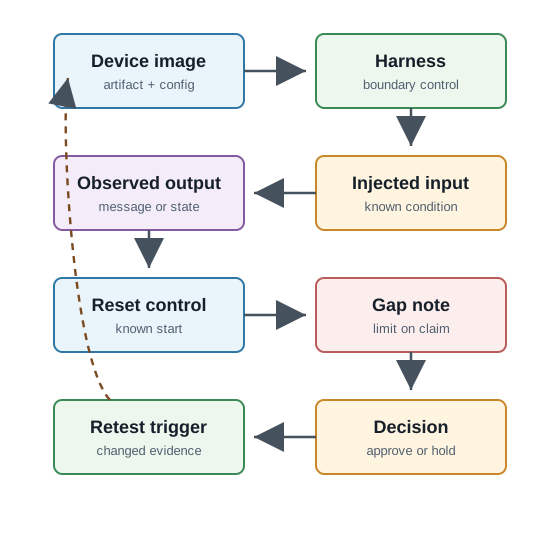
Production IoT systems fail in ways that happy-path tests never see. Simulation and HIL are useful because they make faults repeatable.
Do not only assert that a fault was detected. Assert the end state: actuator safe, queue bounded, credentials protected, retry limited, logs useful, and recovery possible.
20.13 Automation and CI Evidence
Automated validation should produce evidence, not just a green badge. The release reviewer needs enough context to understand what ran and what was outside the run.
release-evidence/
  build-record.txt
  requirements-trace.csv
  unit-test-report.xml
  emulator-run-log.txt
  virtual-circuit/
  hil-fixture-setup.md
  packet-captures/
  bench-measurements/
  residual-risk-register.md
  release-decision.md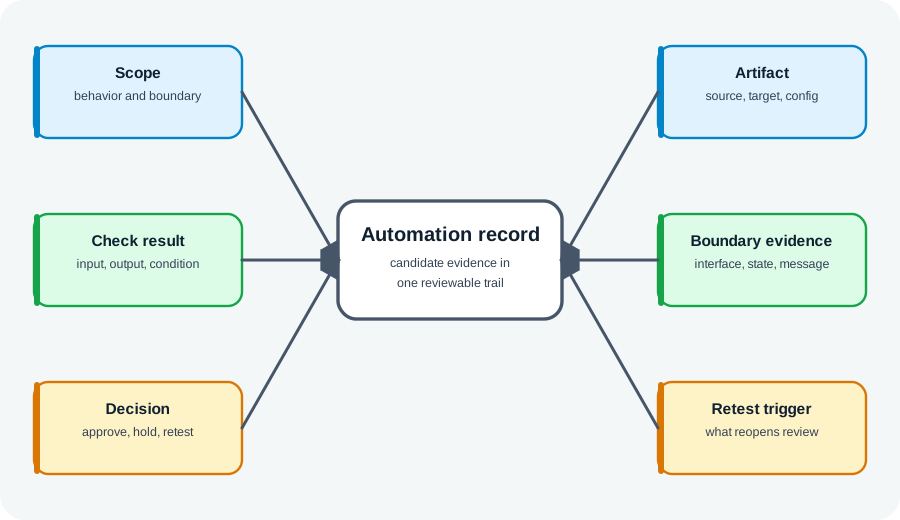
20.14 Release Evidence Gate
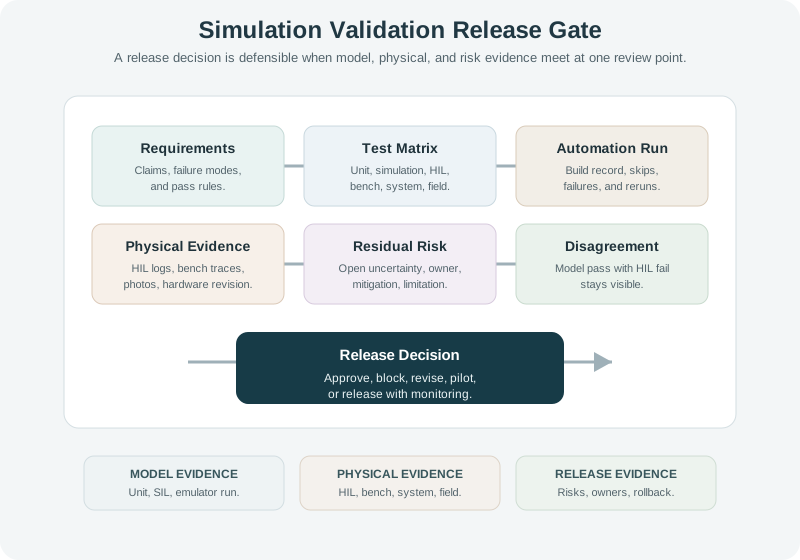
The release gate should make disagreement visible. If simulation passes but HIL fails, the disagreement is useful evidence. It points to a model gap, hardware issue, timing problem, fixture issue, or incomplete requirement.
20.15 Incremental Examples
20.15.1 Sensor Parser and Alarm State
A beginner validation pass can start with firmware logic before any fixture exists. Unit tests with PlatformIO or pytest check that a temperature parser rejects malformed values, clamps out-of-range readings, and moves the alarm state machine through normal, warning, alarm, and clear states. The release claim is still narrow: parser and state logic behave under specified inputs. Sensor accuracy, power use, display visibility, and gateway delivery remain outside the unit-test evidence.
20.15.2 Gateway Reconnect in Sim and HIL
A gateway team can combine QEMU or Renode runs with a small HIL bench. The software model drives MQTT broker refusal, DNS failure, delayed CONNACK, queue growth, and reconnect backoff. The HIL setup then repeats the reconnect scenario on the real gateway board while a test broker, serial logger, packet capture, and controlled power input collect physical evidence. If the model passes but the HIL run shows watchdog resets or flash-write pressure, the release gate should block or revise that claim.
20.15.3 Field Pilot Release Gate
A multi-site release needs evidence from CI, virtual integration, HIL, bench measurements, and field logs. GitHub Actions or another CI runner can preserve build records, Robot Framework or pytest reports, firmware images, skipped cases, and model versions. Bench evidence may include Saleae or PicoScope traces, programmable power-supply logs, current profiles, RF survey notes, packet captures, MQTT broker logs, AWS IoT Core or Azure IoT Hub events, and incident timelines. The release decision should state which sites, firmware versions, monitoring alerts, rollback triggers, and owners are covered.
20.16 Gateway Reconnect Validation
A sensor gateway sometimes stops forwarding readings after a broker outage. The team has a simulator, a gateway development board, a test broker, and a packet capture point.
The validation summary does not say “simulation passed, so release.” It says which claim passed at each level and which physical or deployment assumptions remain.
20.17 Try It Now
Rewrite this weak validation result into a release-ready statement:
“All simulator tests passed, so the device can ship.”
A stronger answer should name the requirement, validation level, model boundary, automated artifacts, HIL or bench evidence, field evidence still needed, residual risk, and the release decision or owner.
20.18 Choose the Evidence Level
For each claim, choose the lowest useful evidence level and the physical evidence needed later:
- The queue never exceeds its configured limit when the broker is offline.
- The device stays under the required current draw during sleep.
- The alert reaches the dashboard after a real cellular outage clears.
Use unit test, SIL/emulator, virtual integration, HIL bench, bench measurement, system test, or field pilot.
20.19 Practice Checks
20.20 Common Pitfalls
A simulator run, CI job, or HIL fixture is not automatically useful. Start with the requirement or risk, then choose the evidence level.
A green build can hide skipped tests, model gaps, weak assertions, missing physical evidence, or unreviewed failures. Release evidence must include what did not run.
Simulation can exercise code paths and expected sequences. It cannot replace measurement of current, timing margin, analog accuracy, RF behavior, enclosure effects, or environmental behavior.
IoT devices live with missing sensors, broker outages, power events, full queues, malformed packets, and interrupted updates. These scenarios should be part of the validation matrix.
If the test report cannot identify firmware version, model version, hardware revision, fixture setup, and requirement ID, the result is hard to defend later.
20.21 Summary
Simulation-driven testing and validation turns model runs into release evidence. A strong process starts with requirements, chooses the evidence level that matches each claim, states model boundaries, runs negative as well as normal scenarios, records automation and HIL artifacts, adds physical and field evidence where needed, and ends with a release decision that names residual risks. The goal is not to maximize the number of tests. The goal is to make each important release claim defensible.
20.22 References
- Renode Testing Documentation - official Renode documentation for repeatable emulation-based testing.
- QEMU System Emulation Documentation - official QEMU documentation for system emulation.
- GitHub Actions Documentation - official CI workflow documentation.
- PlatformIO Unit Testing - official PlatformIO unit-testing documentation.
- pytest Documentation - official Python test automation documentation.
- Robot Framework User Guide - official keyword-driven automation documentation.
20.23 See Also
- Simulating Hardware Programming: keep virtual hardware claims scoped before validation expands to HIL and bench evidence.
- Testing and Validation: connect release gates to requirement evidence and residual risk.
- Network Traffic Analysis: use packet captures and logs when simulation disagrees with field behavior.
- Specification Sheet Fundamentals: turn datasheet limits into validation conditions.
20.24 What’s Next
| If you want to… | Read this |
|---|---|
| Review physical validation in the design-methodology lane | Testing and Validation |
| Move from validation strategy to detailed test automation | Test Automation and CI/CD |
| Practice firmware unit testing | Unit Testing Firmware |
| Study integration and HIL testing in more detail | Integration Testing |
| Return to virtual hardware workflow | Simulating Hardware Programming |
| Previous | Current | Next |
|---|---|---|
| Simulating Hardware Programming | Simulation-Driven Testing and Validation | Accelerometer Case Study |
20.25 Key Takeaway
Simulation, testing, and validation form a chain: simulate to explore, test to measure, and validate to prove requirements. Each stage should produce evidence that supports the next design decision.