2  Design Thinking Introduction

2.1 Learning Objectives

By the end of this chapter, you will be able to:

  • Explain the Design Thinking Methodology: Describe the seven-phase design thinking process and justify why it matters for IoT product development
  • Apply the Problem Statement Formula: Use the “[User] needs [need] because [insight]” framework to define user-centered problems
  • Diagnose Common IoT Product Failures: Identify why building without user research leads to product failure and propose prevention strategies

Key Concepts

  • Design Thinking: A human-centered innovation methodology that prioritizes deep user understanding before solution generation; adapted for IoT to address the unique complexity of connected hardware products
  • Technology Push vs Market Pull: Technology push invents a capability then looks for users; market pull starts from user needs then finds the technology — design thinking enables market pull
  • User-Centered Design: An approach where all design decisions are evaluated by their impact on the target user, not by technical elegance or engineer preference
  • Assumption Mapping: Listing all the beliefs a team holds about user needs, technical feasibility, and business viability, then prioritizing which to test first
  • Problem Statement: A concise, user-centered description of the gap between current and desired experience; the anchor that keeps teams focused on solving the right problem
  • Iteration Mindset: The acceptance that the first solution will be wrong, and that learning from failures quickly is more valuable than trying to build the perfect solution from the start
  • IoT-Specific Design Risks: Connectivity dependency, battery life, security vulnerabilities, firmware update complexity, and hardware manufacturing tolerances — all requiring design thinking attention beyond software-only products
In 60 Seconds

Design thinking in IoT is a seven-phase human-centered methodology — Empathize, Define, Ideate, Prototype, Test, Implement, Iterate — that prevents the most common IoT product failure: building technically impressive hardware that solves a problem nobody has.

  • Evaluate Prototyping Strategies: Justify why cheap, fast prototypes validate ideas before expensive development and select appropriate fidelity levels

2.2 Prerequisites

Before diving into this chapter, you should be familiar with:

Key Takeaway

In one sentence: Spend 35% of your time understanding users before building anything - the #1 reason IoT products fail is building something nobody wants.

Remember this rule: Talk to 5 real users before writing any code. If you can’t find 5 people who want your solution, you don’t have a product - you have a hobby project.


2.3 Getting Started (For Beginners)

What is Design Thinking? (Simple Explanation)

Analogy: Design thinking is like being a detective solving a mystery before building a solution.

Instead of jumping straight to “let’s build a smart thermostat!”, you first ask: - Who has a problem? (the user) - What’s really bothering them? (the pain point) - What have others tried? (existing solutions) - How can we test our ideas cheaply? (prototypes)

Circular design thinking process diagram showing five interconnected stages: Empathize (understand users), Define (frame the problem), Ideate (brainstorm solutions), Prototype (build quick models), and Test (validate with users), with arrows indicating iterative loops between stages
Figure 2.1: Design Thinking Process: Iterative Problem-Solving Loop

This timeline variant shows the recommended time allocation for each design thinking phase, helping teams budget appropriately for user research versus building.

Timeline diagram showing recommended time investment for design thinking phases: Empathize (20%), Define (15%), Ideate (10%), Prototype (25%), and Test (30%), with visual emphasis on the 35% invested in understanding users before building
Figure 2.2: Time allocation for a 10-week project: Empathize (20%) and Define (15%) should consume 35% of time before building anything. Ideate is quick (10%). Prototyping (25%) should be iterative, not one big build. Testing (30%) is the largest phase - you should spend more time testing than building. Most failed projects invert this ratio.

Design Thinking is like being a detective and an inventor at the same time - first you figure out what problem to solve, then you create something amazing to solve it!

2.3.1 The Sensor Squad Adventure: The Playground Problem Solvers

One day, the Sensor Squad received an unusual mission from their friend Emma: “My school playground has a problem, but I’m not sure exactly what it is. Can you help?”

“We could start building something right away!” suggested an eager young robot nearby. But Sammy the Temperature Sensor had a better idea. “Wait! Before we build anything, we need to understand the problem first. Let’s be detectives!”

The Sensor Squad went to Emma’s school playground and started watching and asking questions - this is called “Empathizing.” Lux the Light Sensor noticed that kids avoided the swings on sunny afternoons. “Interesting! I sense the metal swing chains get super hot in the sun - too hot to hold!” Motio the Motion Detector observed that kids stopped playing by 2 PM even though recess wasn’t over. “I’m detecting a pattern - everyone goes to the shady area when the sun gets intense!”

“Now we understand the REAL problem,” announced Pressi the Pressure Sensor. “It’s not that the playground is boring - it’s that it gets too hot to use in the afternoon!” The Squad wrote this down as their Problem Statement: “Kids need a way to play comfortably in the afternoon because the playground equipment gets too hot in the sun.”

Now came the fun part: brainstorming solutions! The team drew wild ideas on paper: A giant robot umbrella? Spray-on cooling paint? A sensor that warns kids when equipment is too hot? “Let’s not pick just one idea yet,” said Sammy wisely. “Let’s test our favorites quickly and cheaply!”

They built three quick prototypes: (1) Cardboard shade structures held up with sticks, (2) A simple thermometer flag that shows red when things are too hot, and (3) A sign pointing to cool equipment. They tested each one with real kids during recess!

The winning idea? A combination! Kids loved the temperature flags (powered by sensors like Sammy!) AND the simple shade structures. Emma’s school built real versions, and now kids can play all afternoon. The Sensor Squad learned that the best inventions come from understanding people first!

2.3.2 Key Words for Kids

Word What It Means
Empathize Understanding how other people feel and what problems they have - like putting yourself in someone else’s shoes
Problem Statement A clear sentence that explains exactly what problem you’re trying to solve and who has that problem
Brainstorm Coming up with as many ideas as possible without judging them - even silly ideas might lead to great solutions!
Prototype A quick, simple version of your idea that you build just to test if it works - made from paper, cardboard, or anything handy

2.3.3 Try This at Home!

Be a Design Thinker Detective

Pick a “problem” in your house or school and use Design Thinking to solve it:

  1. Empathize (10 min): Watch and ask questions. Example: “I notice Mom always loses her keys.” Ask her: “When do you usually lose them? How does it make you feel?”

  2. Define (5 min): Write a problem statement: “[Person] needs [what they need] because [the reason].” Example: “Mom needs a way to always find her keys because she’s rushing in the morning and forgets where she put them.”

  3. Brainstorm (10 min): Draw at least 5 different solutions - no judging! A key-finding robot? A special hook? A beeping keychain? Keys that glow in the dark?

  4. Prototype (15 min): Pick your best idea and make a super simple version. Use paper, cardboard, LEGO, or whatever you have!

  5. Test (10 min): Let the person try your prototype. Ask them what they like and what could be better.

This is exactly what professional inventors and engineers do! The secret is to spend MORE time understanding the problem than building the solution. Many inventions fail because people built something cool that nobody actually needed!

Why Engineers Need Design Thinking

The #1 reason IoT products fail: Building something nobody wants.

Without Design Thinking With Design Thinking
“Let’s add Bluetooth!” “Do users need Bluetooth?”
“More features = better” “What’s the one thing they need?”
“I think users want…” “Let me ask users what they want”
“We’ll test when it’s done” “Let’s test with paper prototypes”

Real Example: Smart Water Bottle

Anti-pattern flowchart showing feature-first development: starting with technology ideas, adding features without user input, building expensive prototypes, discovering users do not want the product, resulting in product failure and wasted resources
Figure 2.3: Feature-First Development Anti-Pattern: Building Without Validation
User-centric development flowchart showing interview users first, identify pain points, create paper prototypes, test with users, iterate based on feedback, then build working prototype only after validation confirms user need
Figure 2.4: User-Centric Development: Iterative Testing Before Building
The Problem Statement Formula

A good problem statement follows this pattern:

[User] needs [need] because [insight].

Component Bad Example Good Example
User “People” “Office workers aged 25-45”
Need “A smart device” “A way to remember to drink water”
Insight “They’re lazy” “They lose track of time in meetings”

Complete Examples:

  • Bad: “People need a smart water bottle.”
  • Good: “Office workers need reminders to hydrate because back-to-back meetings make them forget.”
Comparison diagram showing problem statement refinement: left side shows vague statement 'People need a smart water bottle' transforming to right side specific statement 'Office workers aged 25-45 need reminders to hydrate because back-to-back meetings make them forget', highlighting user, need, and insight components
Figure 2.5: Problem Statement Refinement: From Vague to User-Specific

From Vague to Specific: Good problem statements shift from technology-focused generalities to user-focused specifics that identify who, what, and why.

Quick Prototyping Mindset

You don’t need working electronics to test an idea!

Prototype Level Time Cost What You Learn
Paper sketch 10 min $0 Does the concept make sense?
Cardboard mockup 1 hour $5 Is the size/shape right?
3D print + LEDs 1 day $20 Does it look professional?
Working prototype 1 week $100+ Does the technology work?

Rule: Don’t build expensive prototypes until cheap ones validate the idea!

Prototype fidelity progression diagram showing four levels from left to right: paper sketch ($0, 10 min) validates concept, cardboard mockup ($5, 1 hour) validates size and shape, 3D print with LEDs ($20, 1 day) validates professional appearance, working prototype ($100+, 1 week) validates technology, with validation gates between each level requiring approval before progression to next fidelity

Prototype Fidelity Ladder with Validation Gates

Key Insight: Each validation checkpoint gates progression to the next level. Failing at any level should trigger return to a cheaper prototype, not jumping ahead. This “prototype ladder” prevents the common mistake of over-investing before validating basic assumptions.

Self-Check Questions

Before diving deeper, test your understanding:

  1. Why should you interview users before building an IoT device?
    • Hint: What if you build something nobody wants?
  2. What are the five stages of design thinking?
    • Hint: E-D-I-P-T
  3. Why start with paper prototypes instead of working electronics?
    • Hint: Time and cost…

Answers explored in the chapter below!

2.3.4 Design Thinking Process Overview

The design thinking process for IoT follows a non-linear, iterative approach where each phase builds on insights from others.

Five-stage design thinking process diagram showing Empathize, Define, Ideate, Prototype, and Test connected by solid forward arrows and dotted backward arrows indicating common iteration loops where testing reveals need to return to earlier stages for refinement based on user feedback

Design Thinking Process with Iterative Feedback Loops

Key Insight: The dotted arrows show common backward loops. Testing often reveals that you need to return to earlier stages. This is expected and healthy - it means you are learning from real user feedback rather than guessing.

2.3.5 Detailed Design Thinking Visualizations

Side-by-side comparison of vague versus specific problem statements with examples showing transformation from 'people need smart homes' to 'busy parents of young children need a way to monitor home safety remotely because they cannot always be physically present when babysitters are watching their children'.

Defining Problem Example
Figure 2.6: Effective problem definition transforms vague technology wishes into actionable user needs. A well-crafted problem statement identifies specific users, their genuine needs, and the underlying reasons - enabling targeted solution development rather than feature-driven design.

Mindmap of IoT context attributes radiating from central 'User Context' node including location (indoor/outdoor, room type), time (time of day, day of week, season), activity (working, sleeping, exercising), device state (battery level, connectivity), and environment (temperature, noise, lighting).

Context Attributes for IoT
Figure 2.7: Context attributes enable IoT systems to adapt behavior based on user situation. Understanding which context dimensions matter for your application guides sensor selection, data processing requirements, and appropriate response strategies.

Hardware platform design decision flowchart showing requirements analysis leading to platform selection between off-the-shelf development boards, custom PCB design, or modular approach, with considerations for time-to-market, cost at scale, form factor requirements, and manufacturing complexity.

Designing a Hardware Platform
Figure 2.8: Hardware platform design decisions balance development speed against production optimization. Starting with development boards enables rapid prototyping, while custom PCB design optimizes for cost, size, and power consumption at manufacturing scale.

2.4 Introduction to Design Thinking for IoT

Design thinking is a human-centered, iterative approach to problem-solving that emphasizes understanding user needs, challenging assumptions, and rapidly prototyping solutions. Applied to IoT development, design thinking helps create products that solve real problems rather than implementing technology for its own sake.

MVU: User-Centered IoT Design

Core Concept: Spend 35% of project time understanding users before building - use the formula “[User] needs [need] because [insight]” to define problems worth solving. Why It Matters: The #1 reason IoT products fail is building something nobody wants; hardware mistakes are expensive to fix post-launch, making early user validation critical. Key Takeaway: Talk to 5 real users before writing any code - if you cannot find 5 people who want your solution, you have a hobby project, not a product.

Example worksheet template for defining IoT problem statements, showing structured sections for user identification, specific pain points, contextual insights, and measurable success criteria, demonstrated with smart thermostat scenario including user type (busy parents), pain point (manual temperature adjustments), and success metrics (30% reduced adjustments)
Figure 2.9: Design: DefiningProblemExample
System design diagram for environmental monitoring showing sensor selection matrix with four sensor types (DHT22 temperature/humidity, PIR motion, LDR light sensor, MQ-2 gas sensor), their placement locations (ceiling, walls, windows), communication protocols (I2C, GPIO), and connection to ESP32 microcontroller with power requirements and data rates
Figure 2.10: Design: DesignASystemSensors
Three-tier IoT architecture diagram showing edge layer with sensors and gateways performing local processing and filtering, fog computing layer with edge servers providing regional analytics and storage, and cloud backend with centralized databases and machine learning, connected by bidirectional data flow arrows indicating latency (edge: 10ms, fog: 100ms, cloud: 500ms) and processing distribution
Figure 2.11: Design: FogEdgeAndTheCloudNetwork
Definition

Design thinking for IoT is a structured, user-centered methodology for developing Internet of Things solutions that combines empathy for users, creative ideation, rapid prototyping, and iterative testing to create meaningful, functional, and desirable products.

2.4.1 Why Design Thinking Matters for IoT

User-Centered Focus: Technology serves users, not the reverse. Design thinking keeps user needs central throughout development.

Problem Definition: Many IoT projects fail because they solve the wrong problem. Design thinking ensures deep problem understanding before solutions.

Iteration Over Perfection: Rapid prototyping and testing prevents investing heavily in flawed concepts.

Cross-Disciplinary Collaboration: IoT requires hardware, software, networking, and UX expertise—design thinking facilitates team collaboration.

Risk Reduction: Validating assumptions early through prototypes reduces expensive late-stage failures.

Common Misconception: “We Can Skip User Research—We Know What Users Want”

The Myth: “Our team has IoT expertise, we’ve built products before, and we understand the problem space. User research will just slow us down—let’s start building!”

The Reality: This assumption causes 42% of IoT product failures according to CB Insights’ analysis of 101 startup autopsies. The top failure reason: “No market need” (making products users don’t want).

Quantified Real-World Example:

A smart home startup in 2019 skipped user research and built a $2.3M smart mirror with features the team thought were “obvious needs”: - Weather forecast display - Calendar integration - News headlines - Fitness tracking

What happened:

  • Manufacturing: 5,000 units produced at $460/unit
  • Sales after 12 months: 347 units (7% of inventory)
  • Customer returns: 28% (high even among purchasers)
  • Company outcome: Shutdown after 18 months, $2.1M loss

What user research would have revealed (discovered through post-mortem interviews): - Primary user concern: Mirror fogging from shower steam (87% of users) - Desired feature #1: Quick morning routine (3-minute bathroom visits) - Actual usage pattern: Users checked phones BEFORE looking at mirror (94%) - Key insight: Users didn’t want another screen—they wanted a better MIRROR with minimal distractions

The correct solution (validated by competitor who DID user research): - Simple mirror with voice control (hands-free while brushing teeth) - ONE data point: Current time and weather icon (not full forecast) - Optional: Toothbrush timer and lighting adjustments - Price: $179 vs $460 - Result: 15,000+ units sold in first year

Why this happens: Engineers and designers create mental models based on their own needs, not actual user contexts. The smart mirror team consisted of tech enthusiasts who loved data dashboards—but their target users (busy families) had completely different morning routines.

The Fix: Spend 2-5% of project budget on user research (interviews, observations, prototypes). For the smart mirror example, 10 user interviews ($3,000) would have saved $2.1M in losses. ROI: 700:1 (or 70,000%).

Validation checkpoint: If you can’t name 3 specific users you’ve interviewed and quote their exact pain points, you’re building assumptions, not solutions.

Cross-Hub Connections: Design Thinking Resources

Interactive Tools & Simulations:

  • Simulations Hub - Network Topology Visualizer (Exercise 2: test mesh vs star topologies)
  • Simulations Hub - IoT Protocol Comparison Tool (Exercise 3: evaluate LoRaWAN vs Zigbee for parking sensors)

Knowledge Assessment:

  • Quiz Hub - Design Strategies section: Test understanding of prototyping fidelity levels, timeline estimation, and risk mitigation
  • Knowledge Gaps Hub - “Requirements vs Specifications” - Common confusion addressed with examples

Video Tutorials:

  • Videos Hub - Design Thinking section:
    • “IDEO Design Thinking Process” (16 min) - Real-world shopping cart redesign demonstration
    • “IoT User Journey Mapping” (12 min) - Step-by-step empathy mapping and persona creation
    • “Hardware Prototyping Workflow” (8 min) - Breadboard to PCB to Production timeline

Application Examples: Try applying design thinking to real scenarios: 1. Smart Medication Reminder (Exercise 1 in this chapter) - Then check Knowledge Gaps Hub “Why Simple Solutions Work” 2. Construction Wearable (Exercise 2) - Cross-reference with Simulations Hub Power Budget Calculator 3. Smart Parking (Exercise 3) - Validate protocol selection with Protocol Comparison Tool

Self-Check Pathway:

  1. Complete Understanding Checks in this chapter
  2. Test knowledge with Quiz Hub Design Strategies questions
  3. Identify gaps with Knowledge Gaps Hub Design section
  4. Practice with Simulations Hub interactive tools

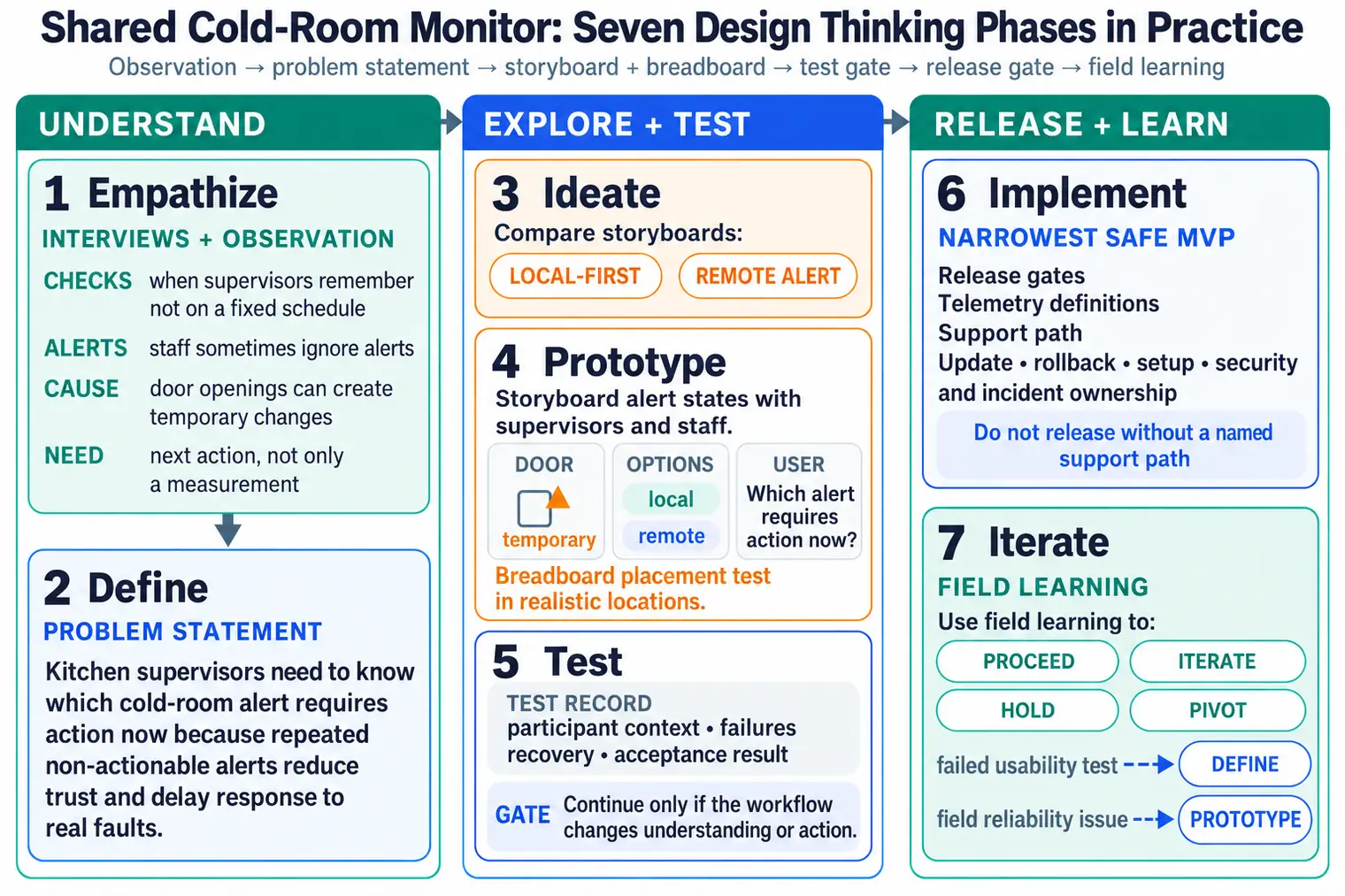
2.5 The Design Thinking Process

2.5.1 Seven-Phase Framework for IoT

Design thinking for IoT extends the traditional five-stage process with two critical phases that address the unique challenges of bringing physical, connected products to market.

1. Empathize: Understanding users and their context through observation and engagement.

2. Define: Synthesizing research into clear problem statements using “How Might We” frameworks.

3. Ideate: Generating diverse potential solutions through creative techniques like brainstorming, Crazy 8s, and mind mapping.

4. Prototype: Building quick, cheap representations—paper prototypes for interfaces, breadboard circuits for hardware, Wizard of Oz for complex behaviors.

5. Test: Gathering real user feedback through think-aloud protocols, A/B testing, and usability metrics.

6. Implement: Building the real product using MVP (Minimum Viable Product) approach with iterative development.

7. Iterate: Continuous improvement through analytics, monitoring, and user feedback loops.

Note: This process is non-linear; insights from later stages often require revisiting earlier ones. IoT products typically iterate 3-5 times through the prototype-test-implement cycle before achieving product-market fit.

Seven-phase IoT design thinking process diagram showing sequential flow from Empathize through Define, Ideate, Prototype, Test, Implement to Iterate, with dotted backward arrows indicating non-linear iteration when new insights emerge during testing or implementation
Figure 2.12: Seven-Phase IoT Design Thinking Process: Empathize to Iterate

This timeline variant shows how design thinking phases translate to actual time and resource allocation in a typical IoT product development cycle, helping teams plan realistic schedules.

Gantt-style timeline showing design thinking phases across a typical 22-week IoT project: Discovery 2 weeks, Proof of Concept 2 weeks, Functional Prototype 4 weeks, Engineering Prototype 6 weeks, Production 8 weeks, with parallel tracks for hardware, software, and testing activities
Figure 2.13: Timeline view showing realistic time investment for each design thinking phase.

Seven-Phase Design Thinking Process: The seven phases form an iterative cycle, not a linear sequence. Solid arrows show the typical forward flow, while dotted arrows represent common backward loops when validation fails or new insights emerge. The final two phases (Implement and Iterate) distinguish IoT design from pure software development, addressing manufacturing, deployment, and continuous improvement in the field.

2.5.2 Knowledge Check: Design Thinking Phases

2.6 Real-World Case Study: Smart Agriculture Sensor

This case study demonstrates how design thinking transformed a failing IoT project into a successful product by focusing on user needs rather than technology features.

Before-and-after comparison showing failed approach with $450 multi-sensor station selling only 12 units versus successful approach using design thinking leading to $29 single-purpose soil moisture sensor selling 3,400 units, highlighting how user research revealed farmers needed simple watering alerts not complex data

Smart Agriculture Sensor Case Study: Before and After Design Thinking
Key Lessons from the Case Study
  1. More features is not better - The $450 multi-sensor station failed because farmers did not need all that data
  2. User interviews reveal priorities - 15 farmer interviews showed the #1 pain point was simply knowing when to water
  3. Simple solutions win - A $29 single-purpose device outsold the complex device by 283x (3,400 vs 12 units)
  4. Price sensitivity matters - Understanding user context (small-scale farmers with tight budgets) informed pricing
  5. The pivot paid off - Investing 3 weeks in user research saved months of building unwanted features

2.7 Hands-On Exercises

30 min | Advanced | P13.C15.U01

Objective: Practice the Empathize and Define stages of design thinking by conducting user interviews and creating problem statements for a real-world IoT challenge.

Prerequisites: Access to interview subjects (family members, friends, or online forums for caregivers)

Scenario: You want to create an IoT device to help elderly people remember to take medications. But first, you need to understand the real problem!

Steps:

  1. Empathize - User Interviews (30 minutes):
    • Interview 2-3 people who are elderly OR care for elderly relatives
    • Ask open-ended questions:
      • “Walk me through your medication routine…”
      • “What frustrates you about taking/managing medications?”
      • “Tell me about a time you forgot to take medication…”
      • “How do you currently remember to take pills?”
    • Take detailed notes on what they SAY, DO, THINK, and FEEL
  2. Create Empathy Map (20 minutes):
    • Organize your notes into 4 quadrants:
      • SAYS: Direct quotes from interviews
      • DOES: Observable behaviors (e.g., “keeps pill bottles on kitchen counter”)
      • THINKS: Inferred thoughts (e.g., “worried about missing doses”)
      • FEELS: Emotions (e.g., “frustrated with complex schedules”)
    • Identify patterns and key insights
  3. Define Problem Statement (20 minutes):
    • Use the formula: [User] needs [need] because [insight]
    • Write 3-5 different problem statements
    • Example bad: “Elderly people need a smart pill dispenser”
    • Example good: “Elderly people living alone need a non-intrusive way to be reminded about medications because they fear seeming incompetent if family constantly checks on them”
  4. Identify Pain Points (15 minutes):
    • Categorize pain points:
      • Functional: “Bottles are hard to open”
      • Emotional: “Embarrassed about forgetting”
      • Social: “Don’t want to burden children”
      • Financial: “Expensive automatic dispensers”

Expected Outcome:

  • Detailed empathy map with real user insights
  • 3-5 clear, user-centered problem statements
  • List of prioritized pain points
  • Understanding that the problem is NOT “they need technology” but deeper human needs

Challenge Extension:

  • Create a persona based on your interviews (name, age, daily routine, goals, frustrations)
  • Map the user journey from “waking up” to “bedtime” identifying pain points at each stage
  • Interview someone from a different age group - how do their needs differ?

Success Criteria:

  • Problem statements focus on USER not technology
  • Empathy map reveals emotional needs, not just functional
  • You’re surprised by something users said (means you learned!)
  • Problem statements guide solutions without prescribing specific technology

Why This Matters: Most IoT products fail because they solve problems users don’t have. Empathy prevents this!

Objective: Learn to generate many ideas quickly using ideation techniques, then validate with low-fidelity prototypes before writing any code or buying hardware.

Prerequisites: Paper, markers, scissors, cardboard, Post-it notes

Scenario: Design a wearable IoT device for construction workers to detect dangerous air quality (carbon monoxide, dust).

Steps:

  1. Ideation - Generate 20 Ideas (30 minutes):
    • Set timer for 10 minutes: Brainstorm alone (no judging!)
    • Write every idea on Post-it note, aim for 10+ ideas
    • Ideas can be wild: “Helmet with lights”, “Smart gloves”, “Drone that follows worker”
    • Set timer for 10 minutes: Pair with partner, generate 10 MORE ideas combining/building on each other
    • Apply SCAMPER technique:
      • Substitute: What if sensor was on belt instead of wrist?
      • Combine: Merge with existing safety equipment?
      • Adapt: Borrow from medical monitors?
      • Modify: Make smaller? Larger?
      • Put to other use: Can it detect other hazards?
      • Eliminate: Remove the display?
      • Reverse: What if it detects GOOD air quality?
  2. Prioritize with 2x2 Matrix (15 minutes):
    • Draw Impact vs Effort matrix
    • Place each idea in a quadrant:
      • High Impact + Low Effort = Quick Win (do first!)
      • High Impact + High Effort = Major Project (plan carefully)
      • Low Impact + Low Effort = Fill-In (if time allows)
      • Low Impact + High Effort = Time Sink (avoid!)
    • Select top 3 ideas from “Quick Win” quadrant
  3. Paper Prototype - Level 1 (20 minutes):
    • For your top idea, create paper prototype:
      • Cut cardboard to shape (wearable location)
      • Draw “screen” with current air quality
      • Add buttons/controls with paper
      • Create “app interface” on phone-sized paper
    • No functionality needed - just appearance and layout
  4. User Test (20 minutes):
    • Find someone unfamiliar with your idea
    • Show them the prototype (don’t explain!)
    • Ask: “What do you think this does?”
    • Ask: “How would you check air quality?”
    • Ask: “What’s confusing? What would you change?”
    • Take notes on their feedback
  5. Iterate (15 minutes):
    • Based on feedback, improve prototype
    • Common insights:
      • “I didn’t see the button” - Make bigger
      • “I thought it was a watch” - Change location
      • “Too many options” - Simplify interface

Expected Outcome:

  • 20+ ideas generated (quantity over quality initially)
  • Clear prioritization using Impact/Effort matrix
  • Physical prototype you can hold and test
  • Real user feedback before spending $100 on hardware
  • List of improvements for next iteration

Challenge Extension:

  • Create 3 different fidelity levels:
    • Level 1: Paper sketch (5 minutes)
    • Level 2: Cardboard + colored mockup (20 minutes)
    • Level 3: 3D-printed shell + LED lights (if available)
  • Test with 5 different users - identify patterns in feedback
  • Create a “Wizard of Oz” prototype: You manually change the display while user “interacts” with device

Success Criteria:

  • Generated 20+ ideas (proves divergent thinking)
  • Prototype built in under 30 minutes (proves low-fidelity approach)
  • Received feedback that changed your design (proves testing value)
  • Can explain why paper prototyping saved time/money

Real-World Parallel: Companies like IDEO and frog design use exactly this process for million-dollar projects. You just learned their secret!

Objective: Learn realistic project planning by creating a detailed timeline, budget, and risk assessment for an IoT product from concept to production.

Prerequisites: Spreadsheet software (Excel, Google Sheets) or project management tool (Trello, Asana)

Scenario: You’ve been hired to develop a smart parking sensor for a city parking lot. 100 spaces, each needs a sensor to detect car presence, send data to cloud, and update a mobile app showing available spaces.

Steps:

  1. Define Requirements (20 minutes):
    • Functional:
      • Detect car presence (ultrasonic or magnetic sensor)
      • Send status every 30 seconds via LoRaWAN
      • Battery life: 3 years minimum
      • Weather-resistant (outdoor installation)
    • Non-Functional:
      • 99% accuracy (false positives/negatives < 1%)
      • Latency < 5 seconds from car arrival to app update
      • Unit cost < $50 (for profitability)
    • Constraints:
      • Cannot use mains power (no outlets in lot)
      • Cannot modify pavement (must be surface-mounted)
  2. Break Down Phases (30 minutes):
    • Create timeline using chapter’s framework:
      • Phase 1: Discovery (2 weeks)
        • Research existing solutions
        • Test sensor technologies
        • Select LoRaWAN gateway
      • Phase 2: Proof of Concept (2 weeks)
        • Single sensor + Arduino + LoRa module
        • Validate detection accuracy
      • Phase 3: Functional Prototype (4 weeks)
        • Custom PCB design
        • Power optimization (deep sleep)
        • Cloud backend (AWS IoT or similar)
      • Phase 4: Engineering Prototype (6 weeks)
        • 10-unit pilot deployment
        • Mobile app development
        • Field testing and refinement
      • Phase 5: Production (8 weeks)
        • 100-unit manufacturing
        • Installation
        • User acceptance testing
    • Total: 22 weeks (5.5 months)
  3. Create Budget (30 minutes):
    • Hardware Prototyping:
      • Development boards: $500
      • PCB fabrication (5 iterations): $2,000
      • Sensors and components: $1,500
      • Enclosures: $1,000
      • Total: $5,000
    • Software Development:
      • Firmware developer (3 months): $30,000
      • Backend developer (2 months): $20,000
      • Mobile app developer (2 months): $20,000
      • Total: $70,000
    • Cloud Services:
      • AWS IoT Core: $500/month x 6 months = $3,000
    • Production Units:
      • 100 sensors x $50 = $5,000
    • Certifications:
      • FCC/CE testing: $10,000
    • TOTAL PROJECT: $93,000
  4. Risk Assessment (30 minutes):
    • Identify risks and mitigation:
      • Risk 1: LoRaWAN coverage insufficient
        • Mitigation: Pre-deployment site survey, add gateways if needed
      • Risk 2: Battery life shorter than 3 years
        • Mitigation: Early power testing, optimize duty cycle
      • Risk 3: Sensor inaccuracy in rain/snow
        • Mitigation: Test in weather chamber, add sensor fusion
      • Risk 4: Component shortage (supply chain)
        • Mitigation: Qualify 2+ suppliers for critical parts
      • Risk 5: Vandalism/theft of sensors
        • Mitigation: Tamper detection, secure mounting
  5. Create Gantt Chart (20 minutes):
    • Use spreadsheet or project tool
    • Show parallel tasks (firmware + backend development)
    • Identify critical path (longest dependency chain)
    • Add 25% buffer to timeline (realistic for first IoT project)

Expected Outcome:

  • Complete project plan with phases, tasks, and milestones
  • Realistic budget broken down by category
  • Risk register with mitigation strategies
  • Visual timeline (Gantt chart or similar)
  • Understanding that IoT projects take months, not weeks!

Challenge Extension:

  • Add “Team” section: Who do you need to hire? (hardware engineer, firmware dev, etc.)
  • Create “Decision Log”: Document key decisions (Why LoRaWAN vs Sigfox? Why ultrasonic vs magnetic sensor?)
  • Build in Agile sprints: Break Phase 3 into 2-week sprints with specific deliverables
  • Add KPIs: How will you measure success? (Detection accuracy %, battery life months, user satisfaction score)

Success Criteria:

  • Timeline matches chapter’s formula: 6-12 months for moderate complexity
  • Budget includes all categories (hardware, software, labor, cloud, certification)
  • Risks identified for technical, business, and supply chain
  • Can defend timeline and budget to stakeholders

Why This Matters: Realistic planning prevents project failure. Most IoT startups fail due to underestimated timelines/budgets, not bad technology!

Template: Download IoT Project Planning Template (create your own based on this exercise)

2.8 Video Resources

Learn design thinking principles through assistive technology examples, focusing on user-centered design and accessibility considerations.

Understand the role of IoT gateways in system architecture and how to plan for edge processing, protocol translation, and data aggregation.

Video: IoT Network Design and Protocol Selection

Understanding IoT network protocols and their trade-offs is essential for successful IoT product design.

Essential Learning Resources:

Key Protocol Comparison:

Protocol Range Data Rate Power Use Case
Wi-Fi 100m Up to 9.6 Gbps (Wi-Fi 6) High (80-300mA) Home automation, high bandwidth
Bluetooth/BLE 10-100m 1-3 Mbps Low (10-15mA) Wearables, smartphone pairing
Zigbee 10-100m 250 kbps Very Low (15-30mA TX) Home automation, mesh networks
LoRaWAN 2-15 km 0.3-50 kbps Ultra Low (20-120mA TX) Smart cities, agriculture
NB-IoT 10+ km 200 kbps Low (100-300mA TX) Industrial IoT, tracking

Decision Framework:

  • Short-range + high data: Wi-Fi (video streaming, firmware updates)
  • Short-range + low power: BLE or Zigbee (sensors, wearables)
  • Long-range + low data: LoRaWAN (outdoor sensors, agriculture)
  • Long-range + cellular: NB-IoT or LTE CAT-M1 (asset tracking, industrial)
Video: IoT Prototyping Best Practices

Learn systematic approaches to IoT product development from concept to production.

Recommended Tutorials:

Prototyping Stages:

  1. Paper Prototype (1 hour): Sketch UI, test concept with users
  2. Breadboard Prototype (1-2 days): Validate hardware functionality
  3. 3D Printed Enclosure (1 week): Test form factor and ergonomics
  4. Custom PCB v1 (2-4 weeks): Test production design
  5. Pilot Production (4-8 weeks): Field testing with real users

2.9 Common Pitfalls to Avoid

Design Thinking Anti-Patterns

Avoid these common mistakes that undermine the design thinking process:

Five common design thinking pitfalls illustrated: confirmation bias (hearing only what you expect), solution jumping (designing before understanding), expert blindness (assuming you know users), prototype attachment (defending design when users struggle), and skipping iteration (manufacturing after single prototype test)

Design Thinking Anti-Patterns to Avoid
Pitfall Warning Sign Prevention
Confirmation Bias “Our interviews confirmed exactly what we thought” Ask neutral, open-ended questions; interview people who might NOT want your product
Solution Jumping Starting with “We should build…” instead of “Users need…” Complete Empathize and Define phases before any Ideation
Expert Blindness “I have 10 years in IoT, I know what users want” Every project needs fresh user research; past experience can mislead
Prototype Attachment Defending design choices when users struggle Celebrate negative feedback as learning; prototypes are disposable
Skipping Iteration “The prototype worked, let’s manufacture 10,000 units” Budget for 3-5 prototype cycles; each reveals new insights

2.10 Knowledge Check

Challenge: Healthcare providers report that 50% of patients with chronic conditions don’t take medications as prescribed, leading to $100-300 billion in preventable medical costs annually. Design an IoT solution.

Empathize Phase (Weeks 1-2): Interview 10 patients + 5 caregivers

Key insights from interviews:

  • Patient (67, diabetic): “I forget which pills I took this morning. Did I take the blue one?”
  • Caregiver (daughter): “Mom insists she’s fine, but I find full pill bottles when I visit.”
  • Patient (72, heart condition): “Those smart pill dispensers make me feel incompetent, like I’m a child.”
  • Patient (55, multiple conditions): “I take 8 different pills. Keeping track is overwhelming.”

Empathy Map Synthesis: | Says | Thinks | Does | Feels | |——|——–|——|——-| | “I’m fine managing it myself” | “I hope I took the right dose” | Keeps pills in multiple bottles | Anxious about mistakes, embarrassed about needing help |

Define Phase (Week 3): Create Problem Statement

Bad (technology-focused): “Elderly people need a smart pill dispenser with AI.”

Good (user insight-focused): “Adults with chronic conditions (55-75) need a non-intrusive way to confirm they took the correct medications because forgetting or double-dosing causes serious health complications and loss of independence.”

Ideate Phase (Week 4): Generate 20+ Solutions

Using SCAMPER technique: 1. Smart bottle cap that logs when bottle opened 2. Pill dispenser robot with voice reminders 3. Mobile app with photo confirmation 4. Smart blister pack with printed circuits 5. Ambient light system (color-coded reminder lights) 6. Wearable that vibrates at medication times 7. Voice assistant integration (“Alexa, did I take my pills?”) 8. Simple checklist app with daily reminders 9. Medication reconciliation scanner (scan bottles to confirm) 10. Family dashboard showing compliance (privacy concern!) 11-20. [Additional variations combining above…]

Prioritize with Impact/Effort Matrix:

  • High Impact + Low Effort (Quick Win): Smart bottle cap tracking + mobile app
  • High Impact + High Effort (Major Project): Full automated dispenser
  • Low Impact + Low Effort (Fill-In): Simple reminder app (already exists, not differentiated)
  • Low Impact + High Effort (Time Sink): Custom smart blister packs (manufacturing complexity)

Selected concept: Smart bottle cap + mobile app (wins on non-intrusiveness, works with existing pill bottles, minimal behavior change)

Prototype Phase (Weeks 5-6): Three Fidelity Levels

Level 1 - Paper Prototype (Day 1, $0):

  • Draw bottle cap on cardboard
  • Sketch mobile app screens on phone-sized paper
  • Show to 3 users: “Walk me through taking your morning pills with this”
  • Learning: Users want passive confirmation (“Just tell me if I forgot”), not active logging

Level 2 - Wizard of Oz (Week 5, $50):

  • 3D-print bottle cap shell (no electronics)
  • Build non-functional mobile app (Figma prototype)
  • Researcher manually logs data as user “uses” prototype
  • Learning: Users check app at bedtime (“Did I take everything today?”), not real-time

Level 3 - Functional Prototype (Week 6, $300):

  • ESP32 + accelerometer + Bluetooth in bottle cap
  • Detects bottle opening/tilting (pill dispensed)
  • Real mobile app with history + notifications
  • 5 users, 1-week field test
  • Learning: False positives are more frustrating than false negatives (users would rather miss one reminder than get nag alerts when they did take pills)

Test Phase (Weeks 7-10): Validate with 20 Users

Metrics:

  • Medication adherence: 52% baseline → 89% with smart caps (p < 0.01, statistically significant)
  • User satisfaction: 8.2/10 average (“Non-intrusive, just works”)
  • False positive rate: 3% (acceptable per user feedback)
  • Battery life: 6 months (meets “low-maintenance” requirement)

User testimonials:

  • “It’s invisible until I need it - perfect.”
  • “My daughter can check if I forgot, without nagging me daily.”
  • “Finally, peace of mind that I took the right dose.”

Implement Phase (Weeks 11-20): Build MVP

Minimum Viable Product:

  • Smart cap for top 5 most-prescribed medications (statins, blood pressure, diabetes, thyroid, antidepressants)
  • Mobile app: Daily summary, 7-day history, share with caregiver (opt-in)
  • No automated dispensing, no complex AI, no pill identification (keep it simple!)

What we DIDN’T build (avoiding feature creep): - ✗ Pill identification via camera (complex, error-prone) - ✗ Automated refill ordering (adds friction with pharmacies) - ✗ Dosage tracking (just opening detection, not counting pills) - ✗ Integration with EHR systems (regulatory nightmare for MVP)

Iterate Phase (Month 6+): Post-Launch Improvements

Analytics-driven insights after 500 users:

  • Feature request: “I forgot to bring bottle on vacation - can I mark pills as taken manually?” → Added manual entry (used by 34% of users)
  • Support tickets: “False alerts when I shake bottle” → Improved ML model to distinguish shaking from opening (false positives: 3% → 0.8%)
  • User feedback: “I have 8 medications, buying 8 caps is expensive” → Launched subscription model ($4.99/month unlimited caps vs $19.99/cap one-time)

Business Outcomes:

  • Initial target: 1,000 users in Year 1 → Actual: 4,200 users (4.2× overperformance)
  • Medication adherence improvement: 89% average (clinical grade)
  • User acquisition cost: $23 (word-of-mouth reduced paid marketing)
  • Regulatory: Classified as general wellness device (not medical), avoided FDA 510(k)

Key Takeaway: The design thinking process prevented building an “over-engineered” smart dispenser ($300, intimidating, changes user behavior) in favor of a “invisible-until-needed” smart cap ($20, non-intrusive, minimal behavior change). User research revealed that independence and dignity matter more than features.

Question Paper/Cardboard Wizard of Oz Breadboard/Dev Board Custom PCB Full Product
What can you test? Concept, layout, workflow User interactions, data flows Technical feasibility, sensor accuracy Form factor, manufacturing, cost Market readiness, reliability
Time to build 1 hour 1 day 1 week 4-6 weeks 3-6 months
Cost $0-5 $50-200 $100-500 $1,000-5,000 $50,000-500,000
What you learn Is the concept understandable? Do users grasp it? Do users actually perform tasks as expected? Are workflows intuitive? Do sensors provide accurate data? Is wireless range sufficient? Can firmware handle requirements? Is size/weight acceptable? Are there EMI issues? Can it be manufactured? Does it survive real-world use? Do customers actually buy it?
When to use Validating assumptions before spending money Testing workflows before building Proving technical feasibility before custom HW Testing market fit before mass production Launch-ready product
Failure mode Concept rejected → pivot cheaply Workflow confusing → redesign interaction patterns Sensors inaccurate → switch components, change design Form factor wrong → costly PCB respin Product fails in market → company at risk

Decision Rule: Use the LOWEST fidelity that can answer your current question. Higher fidelity = higher cost + longer time + more commitment to a design that might be wrong.

Example Progression: Smart Irrigation Controller

Stage Fidelity Question Test Method Result
Week 1 Paper sketch Do users understand “soil moisture zones”? Show 5 users drawings 4/5 confused → Simplify to “front yard” / “back yard”
Week 2 Cardboard + phone mockup Can users set watering schedule in app? Wizard of Oz with Figma prototype 5/5 complete task in <2 min → Design works!
Week 3 Arduino + soil sensor Does sensor accurately measure moisture? Field test in 3 soil types (sand, clay, loam) ±5% accuracy → Sensor acceptable
Week 5 ESP32 + custom antenna Does WiFi reach 100m to valve? Range testing in real yard 80m max range → Need mesh or LoRa instead
Week 7 Breadboard + 3D-printed enclosure Is size acceptable for outdoor mount? Show to 5 homeowners 3/5 say “too big, looks industrial” → Redesign smaller
Week 11 Custom PCB + injection-molded case Ready for beta testing? 10 users, 1-month field test 8/10 say “works great” → Go to production
Month 6 Production units (100 qty) Will customers buy at $79? Kickstarter campaign 423 backers, $33,000 raised → Market validated!

Key Insight: Each stage gates progression to the next. If Week 2 users can’t set a schedule in the prototype app, don’t build hardware yet - fix the app first. Sequential validation prevents wasting money on advanced prototypes based on flawed assumptions.

Common Mistake: Skipping Empathy Phase and Building Assumptions

The Mistake: Teams jump straight from idea to prototype without interviewing real users, assuming they know what users want based on intuition or their own experiences.

Real Example: IoT Pet Feeder Failure

Assumed Problem: “Pet owners forget to feed their pets on time.”

Built Solution: Automated smart feeder with: - Scheduled feeding times (7am, 6pm) - Mobile app to trigger feeding remotely - Camera to see pet eating - Voice playback (“Dinner time, Fluffy!”) - Cost: $129

Market Launch: 156 units sold in 6 months (expected 5,000), 34% return rate

Post-Mortem: What Users ACTUALLY Wanted:

After conducting user interviews (should have been done first!), team discovered:

What We Assumed Reality from User Interviews
Users forget to feed pets 97% of users NEVER forget to feed pets (it’s a routine, like brushing teeth)
Users want scheduled feeding 68% feed pets “when they’re hungry” (flexible timing), not on rigid schedule
Users want remote feeding while away 23% travel often enough for this to matter; they have friends/family feed pets instead
Users want to watch pet eat via camera 12% actually check camera (novelty wears off in 3 days)
Users will pay $129 for convenience 89% said “I already have a bowl, costs $5”

The REAL problems users had (discovered too late): 1. Portion control: “My dog is overweight, I overfeed him” (86% of pet owners struggle with this) 2. Multi-pet households: “One cat eats all the food before the other gets any” (44% have multiple pets) 3. Spoilage: “Wet food sits out all day and goes bad” (71% feed wet food sometimes)

What should have been built:

  • Simple portion-controlled bowl with weight sensor ($39, not $129)
  • Pet recognition to prevent food stealing (RFID collar tags)
  • Refrigerated compartment for wet food (keep fresh until feeding time)
  • Mobile app for tracking portions over time (weight management analytics)

Correct Design Thinking Approach:

  1. Empathize: Interview 10-15 pet owners FIRST
    • “Walk me through feeding your pet yesterday. What was frustrating?”
    • “Tell me about a time you worried about your pet’s eating.”
    • “Show me where you store pet food. What’s annoying about it?”
  2. Define: Synthesize insights into problem statement
    • Wrong: “Pet owners need automated feeding”
    • Right: “Multi-pet owners need a way to control portions per pet because food stealing leads to weight problems”
  3. Ideate: Generate solutions addressing the REAL problem (portion control, multi-pet)
  4. Prototype: Build cheap version (bowl + Arduino + weight sensor) to test if users actually use it
  5. Test: 10 users, 2-week field test - does it solve their problem? Would they pay for it?

Cost of Skipping Empathy:

  • Development cost: $180,000
  • Inventory (5,000 units manufactured): $385,000
  • Unsold inventory after 6 months: 4,844 units ($372,000 loss)
  • Total loss: $552,000

Cost of Proper Empathy Phase:

  • 10 user interviews @ 2 hours each: $3,000 (contractor at $150/hr)
  • Savings if pivoted based on insights: $549,000

ROI of user research: $183 saved per $1 spent on empathy research

User research ROI calculation for pet feeder example. Cost of skipping empathy: $552,000 loss from building wrong product. Cost of proper research: $3,000 for 10 interviews.

\(\text{ROI} = \frac{\text{Savings}}{\text{Investment}} = \frac{\$549,000}{\$3,000} = 183\)

Interpretation: Every $1 spent on user research saved $183 in development waste. Even if research only has 10% chance of preventing failure:

\(\text{Expected ROI} = 0.10 \times 183 = 18.3 \text{ (still excellent)}\)

Breakeven probability: Research pays for itself if failure prevention probability > \(\frac{\$3,000}{\$552,000} = 0.54\%\). With industry baseline of 42% “no market need” failures, expected value = \(0.42 \times \$549,000 - \$3,000 = \$227,580\) net benefit.

Lesson: Your assumptions are probably wrong. Talk to users BEFORE building. The cost of being wrong after you’ve manufactured 5,000 units is catastrophic.

2.11 Summary

  • Design Thinking Definition: A human-centered, iterative approach to problem-solving that emphasizes understanding user needs, challenging assumptions, and rapidly prototyping solutions
  • Seven-Phase Framework: Empathize, Define, Ideate, Prototype, Test, Implement, and Iterate form a non-linear cycle where insights trigger backward loops
  • Problem Statement Formula: “[User] needs [need] because [insight]” ensures solutions address real user pain points rather than assumed needs
  • Prototyping Mindset: Start cheap (paper/cardboard) to validate concepts before investing in expensive hardware prototypes
  • User Research ROI: 2-5% of budget on user research can prevent 42% of product failures caused by building things nobody wants
  • Time Investment: Spend 35% of project time on Empathize (20%) and Define (15%) phases before building anything

2.12 Concept Relationships

How Design Thinking Integrates with IoT Development

Design Thinking ↔︎ Engineering Process:

  • Empathize/Define → Requirements Engineering (functional + non-functional specs)
  • Ideate → Architecture Design (selecting sensors, protocols, cloud platforms)
  • Prototype → Breadboarding, PCB design, firmware development
  • Test → User acceptance testing, field trials, pilot deployments

Design Thinking ↔︎ Agile Development:

  • Design Sprint (5 days) → Validate concept before Sprint 1
  • Empathize → User Stories (“As a [user], I want [feature] so that [benefit]”)
  • Iterate → Retrospectives (inspect and adapt based on user feedback)

Common Failure Modes Prevented:

  • No user research → “No market need” (42% of startup failures per CB Insights)
  • Solution-first thinking → Overengineered products users can’t understand
  • Skip prototyping → Expensive manufacturing mistakes (10x-100x cost multiplier)
  • No iteration → Product stagnates, competitors win with continuous improvement

2.13 See Also

Related Resources

Next Steps in This Series:

Cross-Module Applications:

Interactive Learning:

2.14 What’s Next

Continue to Empathize and Define to learn detailed techniques for user research, empathy mapping, pain point identification, and creating actionable problem statements using the HMW and POV frameworks.

Previous Current Next
Design Thinking and Planning Design Thinking Introduction Empathize and Define