6 Agile and Risk Management
More
Depth: Practitioner
Progress saves as you read. Mark sections complete as you go; your progress appears in the sidebar.
6.1 Start With the Risk That Can Break the Sprint
This section: Start With the Risk That Can Break the Sprint — Picture a team building a cold-room alarm.
Make the Sprint End With a Decision
Picture a team building a cold-room alarm. By Friday, the screen is polished and every task is closed, but nobody has tested the weak radio path behind the freezer door. The work looks complete while the largest release risk remains open.
Write the risky claim in plain words: the alarm reaches the duty phone within the agreed time from the worst planned location. Give the claim an owner, a test setup, an expected result, and a date for review. Shape the sprint around that evidence instead of around a list of parts to finish.
Run the test with the door open, closed, and moving. Delay the service, repeat an alert, change the phone user, and record the result. At review, choose one outcome: accept the claim, narrow it, change the design, or stop the release until new evidence exists.
This sprint does not retire every product risk. The deeper sections show how a risk register, work limits, acceptance rules, sourcing checks, and release records keep later cycles tied to the most important uncertainty.
Imagine a sprint that closes every task but still cannot answer whether the radio link survives a freezer door, whether the battery budget is real, or whether the alert reaches the duty phone. Agile risk work starts with the assumption that can hurt the release most, then shapes the sprint goal around evidence instead of activity.
6.2 In 60 Seconds
This section: In 60 Seconds — Agile is useful for IoT only when it creates evidence faster than the project creates risk.
Agile is useful for IoT only when it creates evidence faster than the project creates risk. A sprint that produces only status updates is not agile. A sprint that proves battery draw, radio range, cloud ingestion, enclosure fit, supply alternatives, security assumptions, and user workflow risk is useful.
Risk management is the discipline that decides what must be tested first. Agile cadence is the discipline that makes that testing repeatable. For hardware-heavy IoT work, the strongest process blends iterative discovery with explicit gates: prototype evidence, lab evidence, sourcing evidence, compliance evidence, security evidence, and a Definition of Done that prevents quality from drifting.

6.3 Learning Objectives
This section: Learning Objectives
After this chapter, you should be able to:
- Build an IoT risk register that records cause, effect, owner, trigger, mitigation, evidence, and decision date.
- Use qualitative probability and impact ratings without pretending weak estimates are precise forecasts.
- Adapt Scrum concepts such as Product Goal, Sprint Goal, Increment, and Definition of Done to hardware and firmware work.
- Use Kanban flow and work-in-progress limits for lab queues, supplier qualification, certification, and integration work.
- Decide when a design sprint is appropriate for user or product uncertainty and when engineering validation is required.
- Create a release packet that links agile work items to risk retirement evidence.
6.4 Agile Retires Risk
This section: Agile Retires Risk — Agile practice helps IoT teams when each cycle closes a named uncertainty.
Agile practice helps IoT teams when each cycle closes a named uncertainty. A sprint should not merely move tickets. It should prove whether a sensor, radio, enclosure, firmware path, cloud path, security control, or field workflow can meet the next project decision.
The risk register gives the work its order. The backlog turns high-risk assumptions into testable increments. Each increment needs a named owner and a measurement that can change the next decision. The Definition of Done prevents the team from accepting work that has code but no measurement, no trace, no review, or no recovery plan.
For a classroom environmental monitor, the first useful agile question is not “how many features did we finish?” but “which uncertainty became smaller?” A one-week cycle might prove that an ESP32-S3 can read a BME280, survive a missing-sensor boot, publish through MQTT QoS 1 over TLS, and recover after Wi-Fi drops. That evidence reduces hardware, firmware, network, and cloud risk at once. A different cycle might discover that the enclosure blocks airflow or that the dashboard freshness rule hides stale readings. In that case the sprint still helped because it exposed a boundary the plan had missed.
The practical habit is to write each backlog item as a learning claim. “Build battery dashboard” becomes “show whether the dashboard can distinguish fresh samples, stale samples, missing samples, and low-battery samples before the pilot review.” That wording keeps the team focused on the decision the evidence must support.
- Product risk: The user workflow, installation sequence, dashboard interpretation, support model, or business promise may be wrong.
- Engineering risk: Battery life, RF range, memory use, thermal behavior, enclosure fit, firmware update, or gateway reliability may fail under real conditions.
- Release risk: Certification, sourcing, security operations, data retention, incident response, or field support may not be ready when the product ships.
Challenge Agile Retires Risk with the visual in Figure 6.1. It traces the chapter’s concrete defect cascade across hardware, firmware, connectivity, cloud/service state, and the application: a marginal sensor connection can create firmware retries; retries drain the battery; battery drain causes missed network joins; the dashboard then looks stale and can trigger a support incident. The cloud/service row shows the boundary state and evidence that helps locate the source instead of blaming only the final symptom.
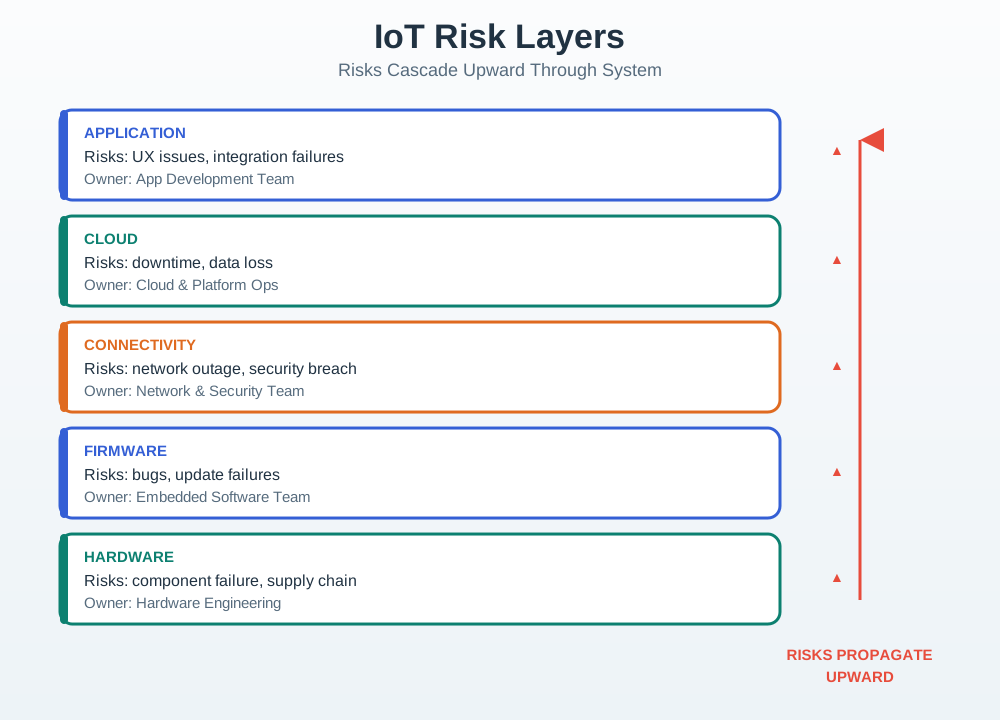
Read Figure 6.1 from the numbered red cascade into the evidence trail below it. The final dashboard symptom is useful, but it is not enough to identify the source. Source samples, firmware counters, broker acknowledgements, cloud validation failures, and the operations alert let the team decide which layer owns the risk and which backlog item should change next.
6.5 Retire One Assumption per Sprint
This section: Retire One Assumption per Sprint — Write the Sprint Goal as a decision the team needs to make.
Write the Sprint Goal as a decision the team needs to make. For example: “prove that an ESP32-S3 node can publish temperature readings over MQTT QoS 1 through TLS to AWS IoT Core while surviving a Wi-Fi outage and watchdog restart.” That goal is stronger than “finish telemetry story” because it names the device, transport, failure mode, service boundary, and acceptance evidence.
Attach a hardware-aware Definition of Done to each risky increment. A battery sprint might require a Joulescope or Nordic Power Profiler trace, sleep-current measurement, sensor warm-up profile, and projected duty cycle. A radio sprint might require RSSI/SNR samples, packet-loss counts, antenna placement notes, Wireshark or broker logs, and a repeatable test route. A security sprint might require device identity, certificate rotation, OTA rollback, audit events, and a recovery procedure.
Keep the increment small enough that the evidence can be reviewed in the sprint review. A LoRaWAN range risk might use one node, one gateway, a fixed spreading-factor plan, a mapped walk route, and a table of RSSI, SNR, frame count, and missed uplinks. A cloud-ingestion risk might use one topic, one schema version, one rejected payload, and one dashboard query that proves freshness. The team should leave the review with a decision: retire the risk, reduce it with a follow-up test, accept it with an owner, transfer it to a supplier, or block the backlog item until stronger evidence exists.
- Choose the risk first. Start with the assumption that can most damage cost, schedule, safety, security, or field adoption.
- Limit the increment. Use one node, one gateway or broker, one service path, and one measurable failure mode before adding scope.
- Close with a decision. Mark the risk retired, reduced, accepted, transferred, or still blocked, and update the backlog immediately.
6.6 IoT Agile Fails at Boundaries
This section: IoT Agile Fails at Boundaries — The hidden cost in IoT planning is boundary mismatch.
The hidden cost in IoT planning is boundary mismatch. Firmware may pass a unit test but miss an MQTT retransmission edge case. A BLE GATT workflow may work in a demo but fail when connection intervals, phone background limits, or pairing recovery are included. A LoRaWAN prototype may pass uplink tests but run into ADR behavior, downlink scarcity, regional duty-cycle limits, or gateway backhaul outages.
Agile controls must therefore expose state across layers. Firmware state includes watchdog resets, brownout handling, heap use, flash wear, and OTA slot health. Network state includes join success, retry counts, queue depth, RSSI/SNR, TLS session failures, and broker acknowledgements. Service state includes schema version, alert latency, retention rule, dashboard freshness, permission model, and incident handoff.
The reason boundary evidence matters is that IoT defects cascade. A marginal sensor connection can create firmware retries, which drain the battery, which causes missed network joins, which makes a dashboard look stale, which triggers a support incident. If the sprint evidence records only the final dashboard symptom, the team fixes the wrong layer. If it records source samples, firmware counters, broker acknowledgements, cloud validation failures, and the operations alert, the team can decide which layer owns the risk and which backlog item should change next.
This is why mature teams connect agile boards to engineering telemetry. A ticket closes only when the related trace, log, capture, test report, or operator runbook is attached, and when the owner has named the next risk state. Without that evidence, “done” is just a workflow label.
- Embedded boundary: FreeRTOS or Zephyr tasks, interrupt timing, I2C/SPI/UART errors, flash configuration, watchdog policy, and update rollback.
- Network boundary: MQTT QoS semantics, CoAP confirmable messages, BLE reconnect behavior, Thread route changes, LoRaWAN airtime, and Wi-Fi roaming.
- Operations boundary: Grafana dashboards, Prometheus alerts, AWS IoT Core or Azure IoT Hub policies, certificate expiry, log retention, and field-support runbooks.
6.7 Agile and Risk Belong Together
This section: Agile and Risk Belong Together — IoT projects combine software uncertainty with physical constraints.
IoT projects combine software uncertainty with physical constraints. Firmware can change daily. PCB fabrication, enclosure tooling, sensor qualification, radio testing, and certification can take longer. That mismatch is where risk hides.
Short cycles are not an excuse to skip evidence. For IoT, the Definition of Done must include the proof the product needs: measurements, traces, logs, test reports, schematic reviews, threat checks, and owner sign-off when a risk is accepted.
6.8 Convert Risk to Sprint Evidence
This section: Convert Risk to Sprint Evidence — The useful unit of agile risk work is not a meeting, a ticket, or a demo.
The useful unit of agile risk work is not a meeting, a ticket, or a demo. It is a risk that moves because the team collected stronger evidence.
First: Write the risk as a cause-and-effect claim. “Battery life is risky” is vague. “The ESP32-S3 node may miss the 18-month service interval because sensor warm-up and Wi-Fi reconnect current are unmeasured” gives the team something to test.
Next: Choose the workflow that fits the constraint. Use a sprint goal for firmware or cloud increments, Kanban for lab queues and supplier qualification, a design sprint for user workflow uncertainty, and a formal gate when compliance, safety, or release approval depends on evidence.
Then: Name the evidence before starting the work. A power risk might need a Joulescope or Nordic Power Profiler trace, a radio risk might need RSSI/SNR and packet-loss logs, and a cloud risk might need MQTT broker acknowledgements, schema validation failures, and dashboard freshness checks.
After that: Close the loop with a decision. Retire, reduce, accept, transfer, or reopen the risk, then update the backlog so the next sprint does not repeat the same uncertainty.
6.9 Incremental Examples
This section: Incremental Examples — Beginner Example: A classroom sensor prototype uses an ESP32 board and a BME280 over I2C.
Beginner Example: A classroom sensor prototype uses an ESP32 board and a BME280 over I2C. The first risk is not market fit; it is whether the board, sensor, wiring, and firmware path can produce stable readings. A useful sprint captures the board profile, I2C address scan, serial log, and one unplugged-sensor failure case before moving to enclosure or dashboard work.
Intermediate Example: A gateway prototype publishes telemetry with MQTT over TLS to AWS IoT Core, Azure IoT Hub, Mosquitto, or EMQX. The risk is no longer only “can it publish once.” The sprint should test reconnect behavior, QoS choice, duplicate handling, certificate expiry path, payload schema rejection, and dashboard freshness after a Wi-Fi outage.
Advanced Example: A field pilot combines Zephyr or FreeRTOS firmware, signed OTA updates, a LoRaWAN or cellular backhaul, battery service targets, and support operations. The team may need sprint increments for firmware behavior, Kanban lanes for lab and supplier queues, and release gates for security, compliance, and operations readiness. The agile method is useful only if each layer leaves reviewable evidence.
6.10 Risk Register
This section: Risk Register — A risk register is useful only when it drives action.
A risk register is useful only when it drives action. Avoid vague entries such as “hardware might be late.” Write the cause, effect, trigger, owner, mitigation, and evidence needed to close the risk.
risk:
  id: sensor-source-01
  cause: only_one_qualified_pressure_sensor
  effect: pilot_build_blocked_if_sensor_allocation_changes
  trigger: supplier_lead_time_exceeds_build_window
  owner: hardware_lead
  mitigation: qualify_second_source_and_pinout_adapter
  evidence: evaluation_report, firmware_driver_test, revised_bom
  decision: mitigate_this_sprint
6.11 Probability-Impact Ranges
This section: Probability-Impact Ranges — Probability-impact matrices are useful for triage, but weak numbers can become false confidence.
Probability-impact matrices are useful for triage, but weak numbers can become false confidence. Use ratings, ranges, and supporting observations unless the team has data strong enough for a numerical model.
6.12 Expected Loss Is a Conversation Starter
Expected-loss worksheets can compare mitigation choices, but the inputs are often rough. Use them to reveal assumptions, not to pretend a single number proves the future. Record the evidence behind the rating.
Inspect Figure 6.2 and ask what evidence would be strong enough to move the named risk into a different state.
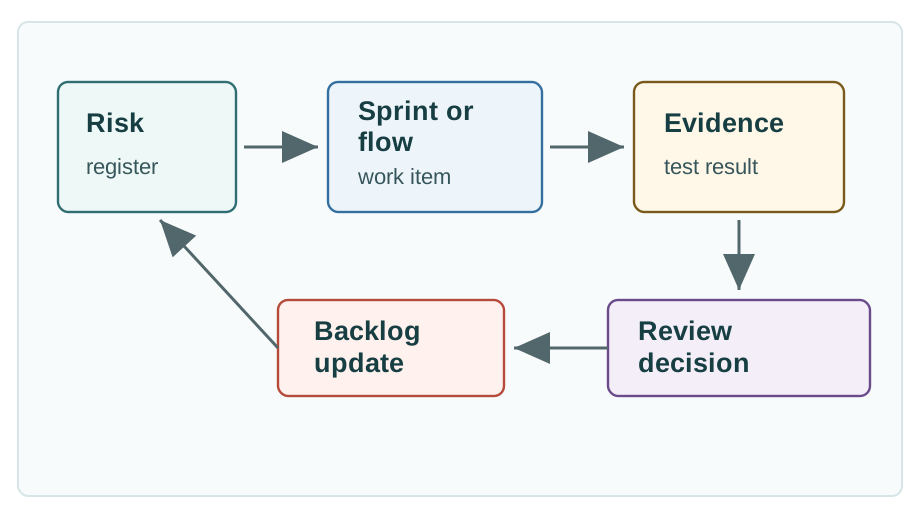
Read Figure 6.2 from the named risk into test planning. The risk register supplies cause, effect, trigger, owner, mitigation, and required evidence, so the sprint, Kanban item, design sprint, or formal gate has a testable purpose. The middle stage collects an appropriate artifact—for example a power trace, radio-loss log, or broker acknowledgement—instead of treating completed work as evidence by itself. Review then retires, reduces, accepts, transfers, or reopens the risk. Finally, the backlog update carries that decision into the next sprint. This closes the chapter’s governance loop: a rough expected-loss estimate can prioritize work, but only recorded evidence and an explicit risk-state decision should change the plan.
6.13 Concept Check: Risk Entry Strength
This section: Concept Check: Risk Entry Strength
6.14 Scrum Adaptation for IoT
This section: Scrum Adaptation for IoT — Scrum is a lightweight framework for adaptive work.
Scrum is a lightweight framework for adaptive work. The official Scrum Guide centers empiricism, transparency, inspection, adaptation, Product Goal, Sprint Goal, Increment, and Definition of Done. For IoT, those ideas help only when the increment includes cross-layer evidence.
Follow Figure 6.3 from backlog planning through hardware, firmware, cloud work, integration testing, and the review that feeds the next sprint.
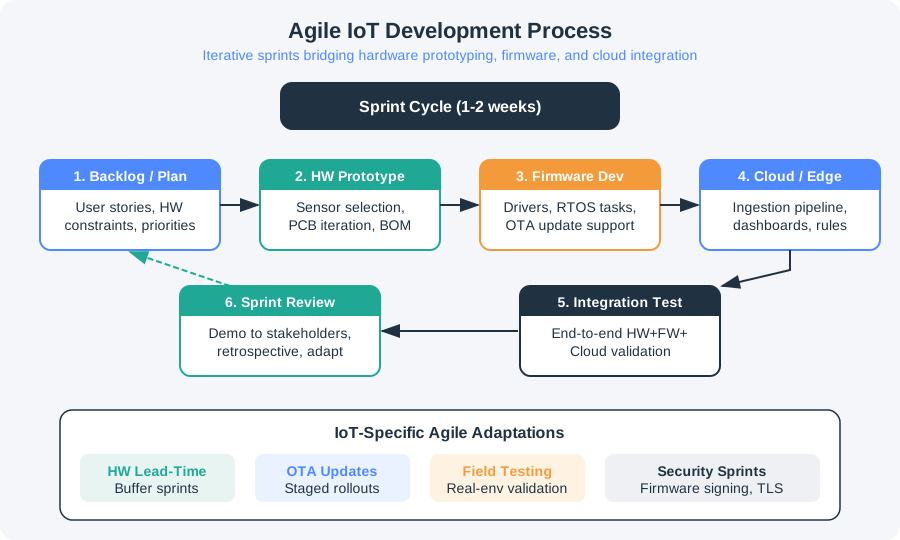
Read the lower adaptation row in Figure 6.3 after tracing the sprint cycle above. Hardware lead-time needs buffer sprints, while OTA updates need staged rollouts. Field testing and security sprints add checks that keep the cycle tied to deployment conditions. The row changes the plan, not just its labels: each slow part, field risk, or release gate must appear in the backlog before the team commits to the next sprint goal.
Name the product outcome: reliable sensor pilot, certified gateway, validated installation workflow, or secure firmware update path.
Choose a goal that retires a real risk, not a list of disconnected tasks.
A usable increment may be a measured prototype, validated firmware path, tested cloud pipeline, or reviewed design package.
Done should include evidence such as test logs, power traces, radio captures, security checks, and sprint review decisions.
6.14.1 Hardware-Aware Definition of Done
For a software-only feature, Done might mean tested, reviewed, integrated, and documented. For an IoT increment, Done often needs additional proof.
Do not stretch sprints until they become phase gates. Keep the learning cadence short, but use flow lanes and explicit dependencies for work that must wait on fabrication, shipping, lab slots, or certification.
6.15 Kanban Flow for Hardware Constraints
This section: Kanban Flow for Hardware Constraints — Kanban is useful when work waits in queues: lab test slots, procurement, PCB review, firmware integration, certification evidence, enclosure changes, or customer installation feedback.
Kanban is useful when work waits in queues: lab test slots, procurement, PCB review, firmware integration, certification evidence, enclosure changes, or customer installation feedback. The key is to visualize the workflow, limit work in progress, and actively manage blocked items.
Inspect Figure 6.4 and ask where a delayed lab slot or unowned test would remain visible to the team.
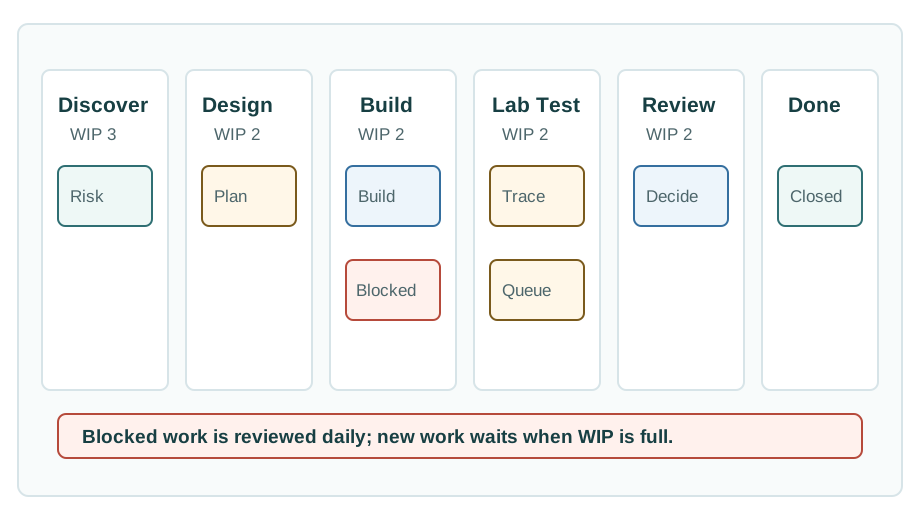
Read Figure 6.4 from discovery through design, build, lab test, and review. Discovery names the question, owner, expected decision, and test design before work enters the constrained lanes. Design and build preserve the version, bill of materials, code branch, and fixture needed to interpret the result. The lab stage adds conditions, traces, sample size, and a pass or fail outcome, while review decides what happens to the risk. Work-in-progress limits keep scarce engineering and lab capacity from being overcommitted. The blocked-work rail is the operational safeguard: procurement, access, or evidence delays stay visible until resolved rather than being disguised as progress. Done means the risk state and backlog actually changed.
6.16 Design Sprints for Product Uncertainty
This section: Design Sprints for Product Uncertainty — Design sprints can be useful when the team needs fast evidence about users, workflow, installation, service experience, onboarding, dashboard interpretation, or buying assumptions.
Design sprints can be useful when the team needs fast evidence about users, workflow, installation, service experience, onboarding, dashboard interpretation, or buying assumptions. They are not a substitute for radio testing, power profiling, safety analysis, or manufacturing review.
Validate problem framing, interface, field workflow, dashboard comprehension, service journey, or install sequence.
Do not use a design sprint to claim battery life, RF compliance, certification readiness, or manufacturability.
User feedback should become backlog items, risk entries, lab tests, or named follow-up decisions.
Capture hypothesis, prototype, participants, observations, decision, and follow-up test needs.
6.17 Iterative Work With Real Gates
This section: Iterative Work With Real Gates — The common mistake is presenting Agile and Waterfall as opposites.
The common mistake is presenting Agile and Waterfall as opposites. IoT projects often need both iterative learning and explicit gates. The issue is not which label sounds better. The issue is whether the process reveals risk early and preserves evidence.
6.18 Label the Agile Risk Evidence
This section: Label the Agile Risk Evidence
6.19 Code Challenge: Risk-Gated Sprint Record
This section: Code Challenge: Risk-Gated Sprint Record
6.20 Concept Check: Process Fit
This section: Concept Check: Process Fit
6.21 Common Pitfalls
This section: Common Pitfalls
6.21.1 Calling Status Meetings Agile
Daily status does not reduce risk by itself. A useful cadence connects discussion to a named uncertainty, the evidence needed to assess it, and the decision that follows. Reporting completed tasks can leave release risks open when the relevant measurements or tests have not happened.
Use the risk register to identify what needs attention, then make the next build or test serve that question. Keep owners, blocked work, and required evidence visible so the discussion can change priorities or expose a dependency. Review the resulting traces, logs, or test reports and decide whether to retire, reduce, accept, transfer, or reopen the risk. Carry that decision into the backlog so the next cycle reflects what the team learnt.
6.21.2 Letting Hardware Wait Outside the Board
PCB fabrication, supplier quotes, lab slots, fixtures, and certification feedback should remain visible on the team’s board. These activities can take longer than firmware changes, and their delays affect when integration work or evidence review can proceed. Hidden queues create false confidence because completed software tasks may leave essential hardware dependencies unresolved.
Represent waiting and blocked work in the workflow, with an owner and the evidence needed for the next decision. Use explicit dependencies for fabrication, shipping, lab access, and certification, while retaining a short learning cadence. Kanban lanes and work-in-progress limits help the team manage constrained capacity. Keep procurement, access, and evidence delays visible until resolved, then review the result and update the risk state and backlog.
6.21.3 Definition of Done Is Not a Box
Done must match the product risk. A card is not done because it moved columns. It is done when the required evidence exists and the responsible owner accepts the result.
6.21.4 Design Sprints for Proof
A design sprint can validate a workflow or product assumption by gathering evidence about users, installation, onboarding, service experience, or dashboard interpretation. Its findings can guide changes to product direction and the backlog. For an installer who needs help to complete onboarding, a design sprint or field-workflow prototype is an appropriate way to investigate the uncertainty.
Radio compliance, battery life, durability, safety, and production yield require engineering evidence beyond that scope. Match the claim to the required radio testing, power profiling, safety analysis, or manufacturing review. Record the risk owner, required evidence, and decision rule before accepting the result. A useful workflow finding can inform development while the remaining technical risks stay open for their own tests and release decisions.
6.21.5 Risk Scores Need Uncertainty
Risk scores help prioritize investigation and compare mitigation choices, but their usefulness depends on the evidence behind the ratings. Weak probability or impact estimates can make an exact-looking result appear more certain than the available observations justify. Use qualitative ratings or ranges when the data does not support a numerical model, and record confidence and assumptions alongside the assessment.
Link the assessment to a named owner and the next test needed to reduce uncertainty. An expected-loss estimate can start a discussion about priorities; changing the risk state requires recorded evidence and an explicit review decision. After reviewing the result, update the risk register and backlog, including the date or event that should trigger another assessment.
6.22 Release Checklist
This section: Release Checklist
Cause, effect, trigger, owner, mitigation, evidence, confidence, and decision date are current.
Sprint increments include measurements, tests, logs, review artifacts, and owner acceptance.
Lab, supplier, certification, integration, and review queues have WIP limits and blocked-item owners.
Hardware, firmware, cloud, security, compliance, manufacturing, and support risks have closure records.
Any accepted risk has a named owner, reason, trigger, contingency, and next review date.
Evidence changes the backlog, design, risk register, schedule, or release decision.
Choose one open risk from a current IoT prototype or pilot and complete a one-row gate record before moving it to done.
| Gate field | Record |
|---|---|
| Risk and owner | Name the risk, the accountable owner, and the product or release decision it affects. |
| Evidence required | List the measurement, test log, review artifact, supplier confirmation, or user workflow result needed to reduce the risk. |
| Decision rule | Write the pass, mitigate, hold, or stop condition in one sentence. |
| Next trigger | Name the calendar date, lab result, field event, or backlog change that reopens the risk. |
Accept the gate only when the evidence, decision rule, owner, and next trigger are all visible in the backlog or release packet.
6.23 Micro-Exercise: Pick the Right Control
This section: Micro-Exercise: Pick the Right Control — First: A mobile installer cannot complete onboarding without help: use a design sprint or field-workflow prototype before changing the firmware.
For each signal, choose the management control that should act first:
First: A mobile installer cannot complete onboarding without help: use a design sprint or field-workflow prototype before changing the firmware.
Next: Three cards are waiting for the same battery-profile lab bench: use a Kanban lane with WIP limits and a visible blocked state.
Then: A release claims signed OTA rollback works: use a gate with a failed-update test, boot-slot evidence, and rollback log before release approval.
6.24 Self-Assessment
This section: Self-Assessment
6.25 Summary
This section: Summary — Agile and risk management reinforce each other when the team treats every cycle as a chance to produce evidence.
Agile and risk management reinforce each other when the team treats every cycle as a chance to produce evidence. For IoT, that evidence must cross software, hardware, data, security, supply, regulatory, and field-use boundaries.
The strongest approach is not a pure methodology label. It is a disciplined operating model: visible risk register, evidence-based Definition of Done, WIP-limited flow for constrained work, design sprints for the right uncertainties, and release gates that prevent quality drift.
6.26 Concept Relationships:
This section: Concept Relationships: — First: Design Thinking Project Planning introduces project structure, resources, and milestone thinking.
First: Design Thinking Project Planning introduces project structure, resources, and milestone thinking.
Next: Design Thinking Validation explains how evidence should change product direction.
Then: Design Thinking Implement and Iterate builds on sprint evidence and continuous learning.
After that: End-to-End Test Strategy expands the test evidence needed for hardware, firmware, and system release.
Also inspect: Specification Sheet Fundamentals helps turn component uncertainty into specific risk entries and tests.
6.27 What’s Next
This section: What’s Next
| If you need to… | Read next |
|---|---|
| Plan the broader design-thinking path | Design Thinking Project Planning |
| Validate product assumptions with users | Design Thinking Validation |
| Turn sprint learning into implementation | Design Thinking Implement and Iterate |
| Build stronger test evidence | End-to-End Test Strategy |
| Review hardware component risk | Specification Sheet Fundamentals |
6.28 Official References
This section: Official References — First: Principles behind the Agile Manifesto - early delivery, changing requirements, frequent delivery, technical excellence, simplicity, and reflection.
First: Principles behind the Agile Manifesto - early delivery, changing requirements, frequent delivery, technical excellence, simplicity, and reflection.
Next: The 2020 Scrum Guide - Scrum definition, empiricism, Scrum Team, events, artifacts, Sprint, and Definition of Done.
Then: The Kanban Guide - workflow visualization, active workflow management, WIP, and flow improvement.
After that: Google Design Sprint Kit - design sprint methodology for fast product and user learning.
Also inspect: ISO 31000:2018 Risk management - principles, framework, process, and current status of the risk management standard.
6.29 Key Takeaway
This section: Key Takeaway — Agile planning in IoT should reduce uncertainty without hiding hardware risk.
Agile planning in IoT should reduce uncertainty without hiding hardware risk. Iterate quickly, but keep explicit risk registers for supply, power, certification, security, field access, and integration dependencies.
Find help
3 reviewed answers.
Where should I start in a module?
Open the module page from the sidebar to see its chapters in order. Use the module map to return to a topic you need.
Modules and pathsReviewed
What can I try when a project does not work?
Check the symptom, then work through the diagnostic steps. Keep the error message and the smallest example that reproduces it.
When you are stuckReviewed
How do interactive examples work?
Use the interactive guide to check how examples and simulations work before changing your project.
Interactive examples guideReviewed