Design IoT network topologies (star, mesh, tree, hybrid) with validated connectivity, link characteristics, and node placement strategies
In 60 Seconds
Network design assessment validates whether a proposed IoT network topology meets requirements for coverage, capacity, reliability, and energy efficiency before deployment — using simulation metrics like packet delivery ratio and end-to-end latency to identify and fix design weaknesses.
Implement discrete-event network simulations to model packet transmission, routing protocols, collision detection, and queuing delays
Select appropriate simulation tools (NS-3, Cooja, OMNeT++) based on network scale, protocol requirements, and validation needs
Analyze network performance using metrics including Packet Delivery Ratio (PDR), end-to-end latency, throughput, energy consumption, and network lifetime
Validate simulation models against real deployments, identifying discrepancies and refining propagation models for accurate performance prediction
For Beginners: Network Simulation Assessment
This chapter reviews design methodology concepts for IoT engineering. Think of it as a preflight checklist – ensuring you have the design skills and processes needed before embarking on a real IoT project that involves real resources, timelines, and stakeholders.
The following Python implementation demonstrates a complete framework for IoT network design and simulation, including topology modeling, packet simulation, and performance analysis.
Network Design and Simulation Framework
A network design and simulation framework for IoT enables modeling topologies, analyzing packet flow, and predicting performance before deployment. Key concepts include:
Topology Models: Star, mesh, tree, cluster-tree, and hybrid topologies with node placement, link characteristics (range, bandwidth, latency), and connectivity validation.
Packet Simulation: Discrete-event simulation of packet transmission, collision detection, retry logic, and queuing delays. Models CSMA/CA, time-slotted access, and priority-based scheduling.
Routing Protocols: Implement and compare routing algorithms (shortest-path, flooding, geographic routing, RPL) with metrics for hop count, latency, energy consumption, and reliability.
Performance Analysis: Calculate end-to-end latency, throughput, packet delivery ratio, energy consumption per node, and network lifetime estimates.
Failure Scenarios: Test resilience by simulating node failures, link outages, congestion, and interference. Measure network recovery time and alternative path availability.
Optimization: Iteratively adjust node placement, transmission power, duty cycles, and routing parameters to meet latency/energy/reliability requirements.
For production implementation, use specialized network simulators: ns-3 for detailed protocol simulation, OMNeT++ with INET framework for wireless networks, Cooja for Contiki/Contiki-NG sensor networks, or MATLAB for mathematical network analysis. These tools provide validated PHY/MAC models, extensive protocol libraries, and visualization capabilities.
Explore how network parameters affect simulation outcomes. Adjust transmission power, node count, and traffic patterns to see their impact on performance metrics.
Show code
viewof txPower = Inputs.range([0,20], {value:10,step:1,label:"TX Power (dBm)"})viewof nodeCount = Inputs.range([10,500], {value:100,step:10,label:"Number of Nodes"})viewof pathLossExp = Inputs.range([2.0,4.5], {value:2.7,step:0.1,label:"Path Loss Exponent (n)"})viewof packetRate = Inputs.range([1,100], {value:10,step:1,label:"Packets/hour per node"})// Calculate derived metricsmaxRange = {const sensitivity =-90;// dBmconst pathLossRef =40;// dB at 1mconst linkBudget = txPower - sensitivity;returnMath.pow(10, (linkBudget - pathLossRef) / (10* pathLossExp)).toFixed(1);}networkLoad = {const packetsPerSecond = (nodeCount * packetRate) /3600;return packetsPerSecond.toFixed(2);}expectedPDR = {// Simplified collision modelconst G = (nodeCount * packetRate *0.5) /3600;// offered loadconst throughput = G *Math.exp(-2* G);const pdr =Math.min(100, (throughput / G) *100);returnisNaN(pdr) ?0: pdr.toFixed(1);}avgLatency = {const baseLatency =20;// ms baseconst hopLatency =50;// ms per hopconst avgHops =Math.ceil(Math.log2(nodeCount) /2);return (baseLatency + avgHops * hopLatency).toFixed(0);}html`<div style="background: linear-gradient(135deg, #2C3E50 0%, #16A085 100%); color: white; padding: 20px; border-radius: 8px; margin: 20px 0;"> <h4 style="margin-top: 0; color: white;">Simulation Performance Predictions</h4> <div style="display: grid; grid-template-columns: repeat(auto-fit, minmax(200px, 1fr)); gap: 15px; margin-top: 15px;"> <div style="background: rgba(255,255,255,0.1); padding: 15px; border-radius: 6px; border-left: 4px solid #E67E22;"> <div style="font-size: 0.9em; opacity: 0.9;">Max Communication Range</div> <div style="font-size: 2em; font-weight: bold;">${maxRange} m</div> </div> <div style="background: rgba(255,255,255,0.1); padding: 15px; border-radius: 6px; border-left: 4px solid #3498DB;"> <div style="font-size: 0.9em; opacity: 0.9;">Network Load</div> <div style="font-size: 2em; font-weight: bold;">${networkLoad} pkt/s</div> </div> <div style="background: rgba(255,255,255,0.1); padding: 15px; border-radius: 6px; border-left: 4px solid #16A085;"> <div style="font-size: 0.9em; opacity: 0.9;">Expected PDR</div> <div style="font-size: 2em; font-weight: bold;">${expectedPDR}%</div> </div> <div style="background: rgba(255,255,255,0.1); padding: 15px; border-radius: 6px; border-left: 4px solid #9B59B6;"> <div style="font-size: 0.9em; opacity: 0.9;">Avg Latency</div> <div style="font-size: 2em; font-weight: bold;">${avgLatency} ms</div> </div> </div> <div style="margin-top: 15px; padding: 10px; background: rgba(0,0,0,0.2); border-radius: 4px; font-size: 0.9em;"> <strong>Interpretation:</strong> ${ expectedPDR >95?"Excellent PDR - network parameters well-configured for reliable operation.": expectedPDR >85?"Good PDR - acceptable for most applications, but consider increasing TX power or reducing node density for critical systems.":"Low PDR - high collision risk. Add gateways, reduce transmission frequency, or increase TX power."}${parseFloat(avgLatency) >200?" Average latency exceeds 200ms - may not meet real-time requirements. Consider star topology or reduce hop count.":parseFloat(avgLatency) >100?" Moderate latency suitable for monitoring applications.":" Low latency suitable for control applications."} </div></div>`
Understanding the Calculator
Max Communication Range: Calculated using the log-distance path loss model: \(\text{Range} = 10^{(\text{Link Budget} - 40\text{ dB}) / (10n)}\), where link budget = TX power - RX sensitivity (-90 dBm).
Network Load: Total packets per second = (Nodes × Packet Rate) / 3600. Higher loads increase collision probability.
Expected PDR: Uses Aloha collision model \(S = G e^{-2G}\) where \(G\) is offered load. PDR degrades rapidly when \(G > 0.5\).
Average Latency: Estimates end-to-end delay as base latency (20ms) + hop count × hop delay (50ms). Hop count estimated as \(\lceil \log_2(N) / 2 \rceil\).
Try different configurations: - High-density mesh (500 nodes, 10 dBm): Notice PDR drops due to collisions - Low-power sensors (100 nodes, 0 dBm): Range limited to ~10m - Indoor environment (n=3.0): Range decreases significantly vs. free space (n=2.0)
19.2 Knowledge Check
Test your understanding of design concepts.
Quiz 1: Comprehensive Network Design and Simulation Framework
19.3 Conclusion
Network simulation transforms IoT design from guesswork to data-driven decision making. By validating topology choices, propagation models, and routing protocols in software before physical deployment, you can identify bottlenecks, optimize parameters, and predict real-world performance with statistical confidence.
The simulation workflow follows three phases: model creation (selecting appropriate propagation models and traffic patterns), validation (running 30+ iterations with different random seeds for statistical rigor), and deployment verification (comparing simulated predictions against pilot measurements to refine models).
Choose your simulation tool based on project scale and fidelity needs: NS-3 for large-scale research (100,000+ nodes), Cooja for code-level WSN firmware testing, OMNeT++ for modular protocol development, or commercial platforms for enterprise features. Remember that simulation accuracy depends on model fidelity—always calibrate propagation parameters with real measurements and validate predictions against pilot deployments before full-scale rollout.
Network design and simulation are indispensable tools for successful IoT deployments. By modeling networks in software before physical implementation, designers validate performance requirements, optimize parameters, identify bottlenecks, reduce risk, and make data-driven decisions.
The choice of simulation tool depends on project needs: NS-3 for research and large-scale studies, Cooja for WSN and embedded code testing, OMNeT++ for modular protocol development, or commercial tools for enterprise deployments. Effective simulation requires careful attention to model fidelity, realistic traffic patterns, proper statistical analysis, and validation against real-world measurements.
Quiz 2: Comprehensive Review
19.6 Network Planning Worksheet
Plan Your IoT Network Deployment
Use this comprehensive worksheet to systematically design and simulate your IoT network before deployment.
19.6.1 Step 1: Requirements Gathering
Question
Your Answer
Impact
Number of devices?
___
Scale, cost, simulation complexity
Coverage area (m²)?
___
AP/gateway count, range requirements
Indoor/Outdoor?
___
Propagation model, equipment rating
Data rate needed?
___
Protocol choice, bandwidth planning
Latency requirement?
___
Architecture, QoS configuration
Power availability?
___
Battery vs wired, duty cycling
Budget per device?
___
Technology options, feasibility
Reliability (% uptime)?
___
Redundancy, mesh vs star
19.6.2 Step 2: Protocol Selection Matrix
Based on your requirements, score each option (1-5, where 5 = best fit):
Simulated latency lower → Add queuing delays, MAC contention overhead
Simulated battery life higher → Include routing overhead, idle listening power
Putting Numbers to It
For a LoRaWAN deployment with 1,000 sensors transmitting 20-byte packets every 10 minutes, we can calculate the expected collision probability using the Aloha model.
\[
P_{\text{collision}} = 1 - e^{-2G}
\]
Worked example: With airtime \(T = 0.5\) seconds (SF7, 125 kHz), transmission rate \(\lambda = 1/(600\text{s})\) per device, offered load \(G = 1000 \times (1/600) \times 0.5 = 0.833\). Thus \(P_{\text{collision}} = 1 - e^{-2(0.833)} = 1 - e^{-1.666} = 1 - 0.189 = 0.811\) or 81%. This predicts severe congestion—adding gateways or reducing frequency is essential before deployment.
19.6.10 Step 10: Simulation Iteration Log
Track simulation runs to understand parameter sensitivity:
Run
Nodes
TX Power
Routing
PDR
Latency
Notes
1
50
0 dBm
AODV
85%
120ms
Baseline - low PDR
2
50
10 dBm
AODV
94%
115ms
Higher TX improved PDR
3
50
10 dBm
RPL
96%
95ms
RPL better than AODV
4
100
10 dBm
RPL
91%
145ms
Scales but higher latency
5
100
14 dBm
RPL
97%
130ms
✓ Meets requirements
…
Optimal configuration (from simulation):
Nodes: _____
TX power: _____ dBm
Routing: _____
Expected PDR: _____%
Expected latency: _____ ms
19.6.11 Step 11: Failure Scenario Testing
Scenarios to simulate:
Scenario
Description
PDR Impact
Latency Impact
Recovery Time
Single node failure
Random node dies
% → %
_ms → _ms
___s
Gateway failure
Primary gateway down
% → %
_ms → _ms
___s
10% node failure
Widespread outage
% → %
_ms → _ms
___s
Channel interference
Wi-Fi congestion added
% → %
_ms → _ms
N/A
Network partition
Area disconnected
% → %
_ms → _ms
___s
Mitigation strategies validated in simulation:
Dual gateways → PDR maintained at ___% during gateway failure
Mesh routing → Network recovers in ___s from 10% node failure
Frequency hopping → Interference resistance improved by ___%
19.6.12 Step 12: Documentation and Handoff
Deliverables from simulation phase:
Handoff to deployment team:
Recommended topology: _________________
Optimal protocol: _________________
TX power setting: _____ dBm
Gateway count: _____
Expected PDR: _____%
Expected latency: _____ ms
Battery lifetime estimate: _____ months
Match the Network Metric to Its Definition
Order the Network Simulation Assessment Steps
Label the Diagram
💻 Code Challenge
19.7 Summary
Network Topology Design: IoT networks employ star topologies for simplicity and low latency, mesh topologies for redundancy and extended range, tree topologies for hierarchical aggregation, or hybrid approaches combining strengths of multiple patterns based on application requirements
Simulation Tools: NS-3 provides comprehensive protocol modeling for large-scale research (100,000+ nodes), Cooja enables code-level WSN simulation with actual firmware, OMNeT++ offers modular development, while commercial tools like OPNET support enterprise deployments with professional features
Performance Metrics: Key metrics including Packet Delivery Ratio (PDR), end-to-end latency, throughput, energy consumption, and network lifetime must be quantified through simulation to validate that designs meet application requirements before physical deployment
Propagation Modeling: Accurate radio propagation models (log-distance path loss, shadowing, multipath) are essential for realistic simulations, with path loss exponents of 2-4 depending on environment (free space vs. indoor vs. urban)
Routing and Routing Tables: Building routing tables using shortest-path algorithms (Dijkstra) enables packet forwarding, though hop-count metrics may be suboptimal in environments with varying link quality requiring link-quality-aware routing
Validation and Verification: Comparing simulation results with real deployments validates model accuracy, with differences of 1-2% (e.g., 98.5% measured vs. 99% simulated PDR) confirming simulation fidelity while accounting for real-world variability
Optimization Strategies: Reducing latency through gateway placement and priority queuing, improving throughput via channel allocation and load balancing, enhancing reliability with redundancy and error correction, and extending battery life through duty cycling and energy-aware routing
The following AI-generated visualizations provide alternative perspectives on network design and simulation concepts.
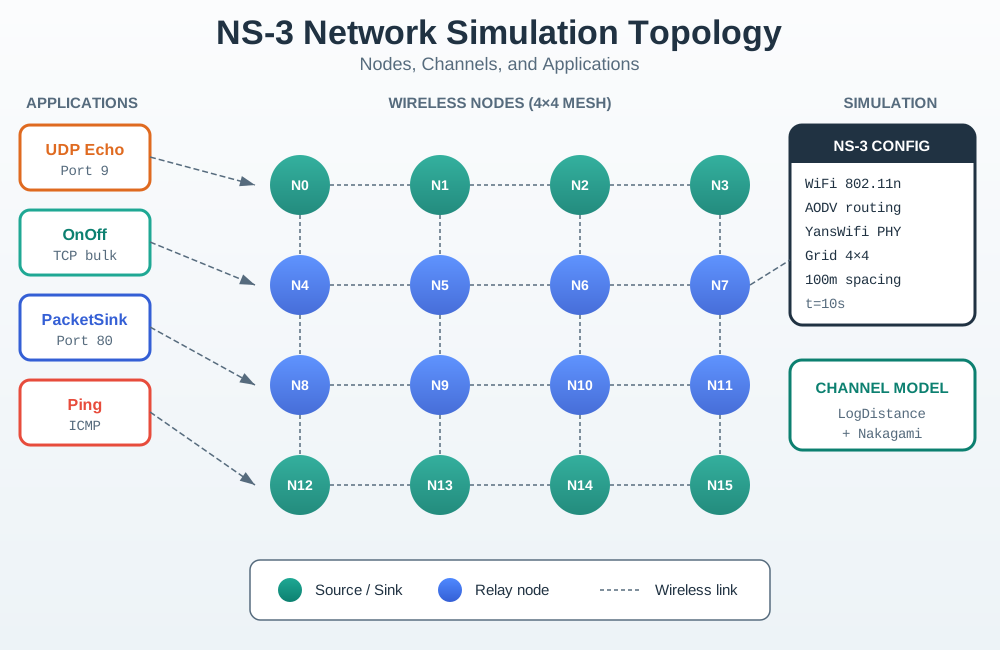
NS-3 Network Topology
Figure 19.1: NS3 Topology
NS-3 provides comprehensive network simulation capabilities, enabling validation of routing protocols, channel models, and network performance before physical deployment.
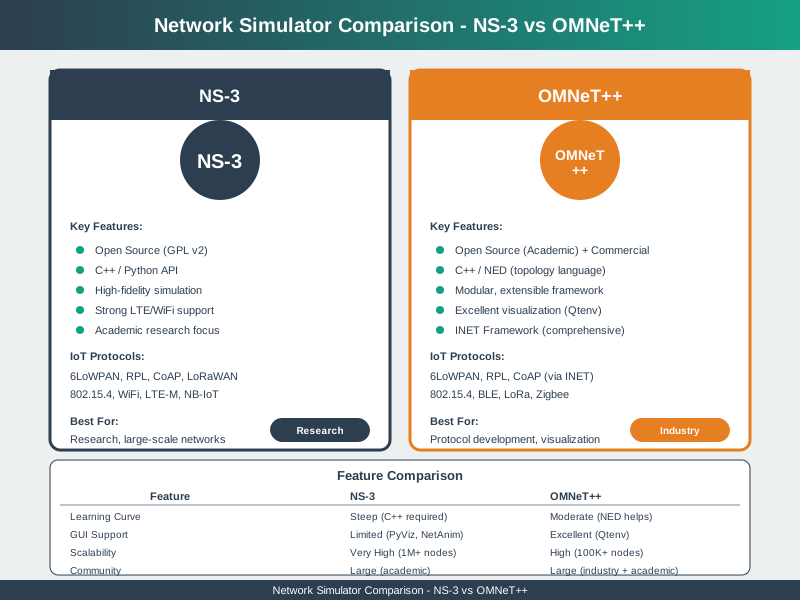
Network Simulator Comparison
Figure 19.2: Network Simulator Comparison
Choosing the right network simulator depends on project requirements, protocol support, scale, and team expertise.
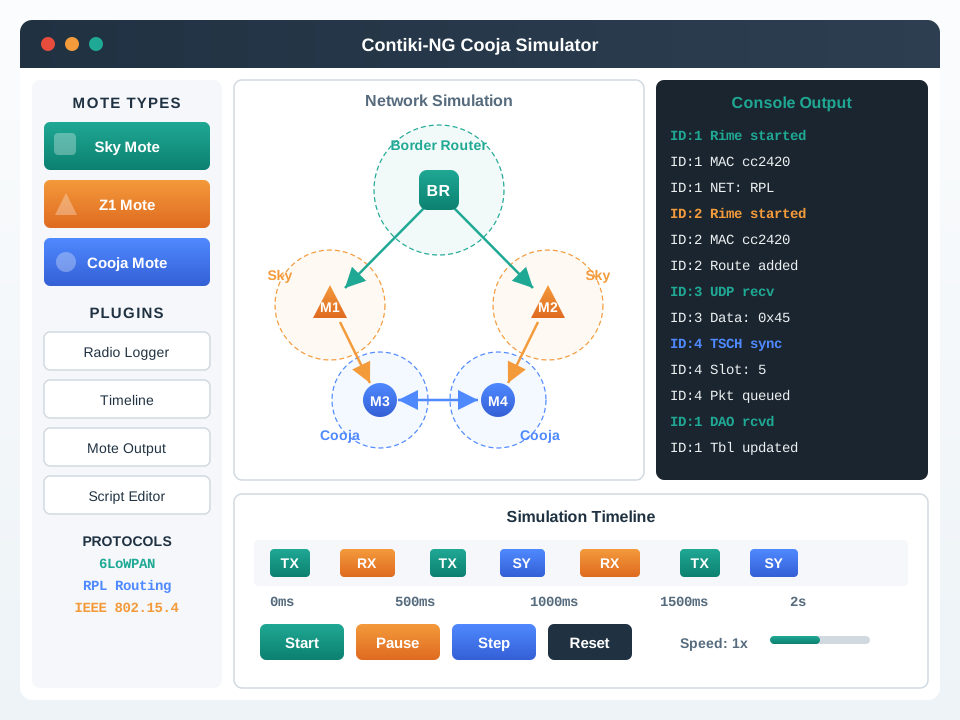
Contiki Cooja WSN Simulator
Figure 19.3: Contiki Cooja
Cooja enables testing actual Contiki firmware on emulated hardware, providing higher fidelity than abstract simulation for wireless sensor networks.
Worked Example: Calculating LoRaWAN Collision Probability with Aloha Model
A smart city deployment plans 5,000 parking sensors transmitting 20-byte status updates every 10 minutes to 4 LoRaWAN gateways. Will packet collisions become a bottleneck?
Given parameters:
Devices (N): 5,000
Transmission rate (λ): 1 packet per 600 seconds = 0.00167 packets/second per device
Total offered load (G): N × λ × T_pkt = 5,000 × 0.00167 × 0.5 = 4.175
Aloha collision model (LoRaWAN uses unslotted Aloha): Throughput (S) = G × e^(-2G) = 4.175 × e^(-8.35) = 4.175 × 0.000236 = 0.000985
Interpretation: Throughput ≈ 0.001 means only 0.1% of offered load succeeds! With G > 0.5, collisions dominate. Packet Delivery Ratio = S/G = 0.000985/4.175 = 0.024% (catastrophic failure).
Solution: Add more gateways or reduce transmission frequency. With 20 gateways instead of 4: - Load per gateway: 5,000/20 = 250 devices → G = 0.209 - Throughput: S = 0.209 × e^(-0.418) = 0.209 × 0.658 = 0.1375 - PDR = 0.1375/0.209 = 65.8% (acceptable for non-critical data)
This calculation predicted the deployment would fail before spending $500,000 on hardware.
Decision Framework: Selecting Propagation Models for IoT Simulation Accuracy
Environment
Model
Path Loss Exponent (n)
Best For
Limitations
Free Space
Friis
2.0
Outdoor LoRa, satellite, theoretical upper bound
Overestimates indoor range 3-5×
Indoor Office
Log-Distance
2.5-3.0
Smart buildings, enterprise Wi-Fi, Zigbee mesh
Doesn’t model specific room layouts
Dense Urban
Okumura-Hata
3.5-4.5
Smart city NB-IoT, cellular IoT, street-level sensors
Computationally expensive for large sims
Factory (Metal)
Two-Ray Ground + shadowing
3.0-4.0
Industrial WSN, WirelessHART, steel structures
Requires site-specific calibration
Forest/Vegetation
ITU Vegetation
4.0-6.0
Agriculture, environmental monitoring
Seasonal variation not captured
Selection criteria:
Match environment to model (never use free space for indoors)
Calibrate with real measurements if possible (measure RSSI at 3-5 distances)
Common Mistake: Running Simulation Once with One Random Seed
What they do wrong: An engineer configures a 200-node Zigbee mesh simulation, runs it once, observes 96% Packet Delivery Ratio, and reports to stakeholders: “Our network will achieve 96% reliability.”
Why it fails: A single simulation run represents one possible outcome given random node placement, random traffic timing, and random collision patterns. That 96% might be best-case, average-case, or worst-case — you don’t know. Real deployments will experience variance.
Correct approach: Run 30+ simulations with different random seeds and report confidence intervals:
for(int run =0; run <30; run++){ RngSeedManager::SetSeed(1); RngSeedManager::SetRun(run);// Changes random sequence// ... run simulation, collect PDR}// Calculate mean, std dev, 95% CI
Real-world example: A consultant ran a single NS-3 simulation showing 94% PDR for a factory mesh network. The client deployed based on this number. Actual measured PDR: 87%. The 7% gap caused 13% of alarm messages to fail, violating safety requirements and requiring a $125,000 network redesign. Post-analysis found that running 30 seeds showed 94% ± 8% (86-102% range), which would have flagged the risk. The single run happened to be unusually optimistic. Statistical rigor costs 30× simulation time but prevents million-dollar mistakes.
Concept Relationships: Network Design Assessment in IoT Engineering
1. Accepting PDR > 95% as “Good Enough” Without Analyzing Failure Patterns
A 95% PDR may sound acceptable, but if the 5% failures are concentrated at certain nodes or time periods, the reliability may be worse than the average suggests. Always analyze failure distribution across nodes and time before declaring the design validated.
2. Validating Only Best-Case Topology Without Stress Testing
Assessing a network design at nominal load with all nodes functional gives no insight into resilience. Always include at minimum: (1) 20% node failure scenarios, (2) peak traffic load (2× nominal), (3) gateway reboot recovery time. Designs that pass only best-case scenarios frequently fail in production.
3. Not Verifying Link Symmetry
IoT radio links are often asymmetric — a node can receive from the gateway but the gateway cannot receive from the node (or vice versa) due to transmit power differences. Validate both uplink and downlink link quality, not just connectivity in one direction.
4. Over-Relying on Simulation Without Pilot Deployment
Simulation models approximate reality; they do not capture all interference sources, multipath effects, or human-caused obstructions. Always validate simulation predictions with a small pilot deployment in the actual environment before full-scale network installation.
19.10 What’s Next
The next section covers Network Traffic Analysis, which examines how to capture, monitor, and analyze the actual traffic flowing through your IoT networks. Understanding real traffic patterns complements simulation and enables optimization and troubleshooting of deployed systems.