4 Ideate, Prototype, and Test
More
Depth: Practitioner
Progress saves as you read. Mark sections complete as you go; your progress appears in the sidebar.
4.1 Start With the Cheapest Honest Test
This section: Start With the Cheapest Honest Test — Imagine a team debating three IoT ideas around a whiteboard while the riskiest assumption is still unknown.
Imagine a team debating three IoT ideas around a whiteboard while the riskiest assumption is still unknown. A good prototype is not the fanciest artifact; it is the smallest honest test that can show whether a user trusts the alert, whether a reading separates real events from noise, or whether an integration path can work before the team spends more money.
4.2 Learning Objectives
This section: Learning Objectives
By the end of this chapter, you will be able to:
- Convert How Might We prompts into multiple solution directions before selecting an architecture.
- Screen ideas with impact, effort, risk, and evidence criteria instead of enthusiasm alone.
- Choose a prototype fidelity that answers the current learning question without overbuilding.
- Design Wizard-of-Oz, breadboard, and functional trials for IoT workflows.
- Run usability and field tests that produce evidence for pivot, iterate, or proceed decisions.
4.3 Prototype the Uncertainty
This section: Prototype the Uncertainty — After Define, the team should have a problem frame, not a chosen architecture.
After Define, the team should have a problem frame, not a chosen architecture. Ideation keeps several paths alive long enough to compare them: no-device service change, local indicator, phone workflow, gateway rule, cloud alert, computer-vision check, predictive model, or custom hardware. The first prototype should expose the biggest unknown without pretending to be the final product.
For IoT, a prototype can target the service path, interface, device behavior, connectivity path, data model, or support workflow. A Figma flow may answer whether a technician understands an escalation. A Wizard-of-Oz test may answer whether an automation pattern is useful. An ESP32, RP2040, nRF52840, Raspberry Pi, or Wokwi prototype may answer whether a sensor, radio, or power assumption is credible.
A strong ideation session therefore starts with evidence constraints rather than feature wishes. For a medication adherence concept, separate options such as a packaging reminder, caregiver escalation flow, BLE pill-cap sensor, weight-scale dock, NFC check-in, or pharmacy refill service. For a warehouse safety concept, compare floor markings, wearable haptics, forklift telematics, UWB ranging, camera analytics, and supervisor workflow changes. The point is not to make every option equally likely; it is to keep the team from choosing the most familiar implementation before testing the risk that matters.
Low fidelity is acceptable when it protects learning quality. A storyboard can test whether a user trusts an alert. A clickable Figma flow can test whether the next action is understood. A Node-RED mock connected to Mosquitto can test alert timing. A bench prototype with a BME280, load cell, or ToF sensor can test whether raw readings separate real events from noise. Each step should close one uncertainty and create a decision record that says what changed, what remains unproven, and why the team is allowed to spend more on the next artifact.
The loop in Figure 4.1 moves from a research question to a test; let evidence guide the next step.
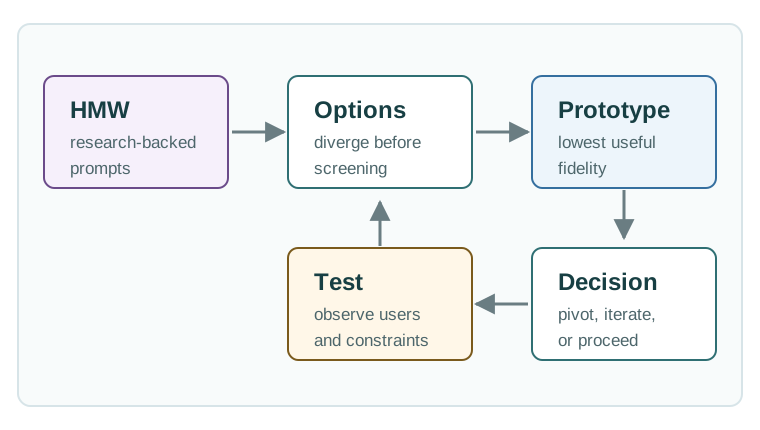
The route in Figure 4.1 links a problem to test options; check what the results support.
- Option boundary: Generate different mechanisms before screening so the team does not default to sensor plus dashboard.
- Prototype boundary: Name what the artifact can and cannot prove before interpreting the result.
- Commitment boundary: Move to higher fidelity only when the prior test changed the risk profile enough to justify cost.
4.4 Match Fidelity to the Failure Mode
This section: Match Fidelity to the Failure Mode — The right prototype depends on what could make the concept fail.
The right prototype depends on what could make the concept fail. If users cannot classify alert urgency, build a clickable workflow. If the automation does not exist yet, run a Wizard-of-Oz scenario. If the sensor reading is noisy, build a bench rig with known inputs. If the radio path is uncertain, test range, packet loss, RSSI/SNR, retry behavior, and gateway recovery before polishing the app.
Use concrete tools, but do not let the tool pick the question. Figma, Framer, Miro, FigJam, Node-RED, Home Assistant, Mosquitto, AWS IoT Core, Azure IoT Hub, Grafana, InfluxDB, Wokwi, PlatformIO, Arduino IDE, Saleae-style logic capture, Joulescope, and Playwright can all be useful. The useful part is the learning boundary: what assumption is being tested, what counts as success, and what the team will change if the result is poor.
Write the test script as a scenario with states, faults, and observer prompts. A provisioning study should include a good QR scan, failed scan, denied Bluetooth permission, wrong Wi-Fi password, gateway offline state, and factory-reset recovery. An alert study should include a true positive, false positive, stale sensor value, delayed notification, escalation to the wrong role, and manual override. A field pilot should define who installs the device, what logs are collected, how consent is handled, when support intervenes, and which defects stop the pilot.
Screen ideas with a table that balances user value, risk reduction, build effort, privacy exposure, maintenance load, and evidence strength. This keeps “easy to build” from winning against “important to learn.” It also helps mixed teams make tradeoffs: firmware may need a bench rig, UX may need a clickable escalation flow, data engineering may need a simulated payload stream, and operations may need a support runbook. The winning prototype is the smallest credible artifact that makes the next decision less speculative.
- Name the riskiest assumption. Choose from comprehension, installation, sensing, connectivity, power, privacy, accessibility, maintenance, or operations.
- Select the smallest credible artifact. Use storyboard, clickable flow, Wizard-of-Oz service, breadboard, dev kit, simulator, or field pilot only when it answers that assumption.
- Script realistic faults. Include offline device, stale data, low battery, denied permission, blocked sensor, delayed notification, and manual override states.
- Decide the next move. State whether the result changes the problem frame, interaction model, device design, data path, support workflow, or release plan.
4.5 Tests Need State, Payload, Timing
This section: Tests Need State, Payload, Timing — Even a low-fidelity prototype should model the states that matter.
Even a low-fidelity prototype should model the states that matter. For an alert workflow, use pending, watch, act, escalate, acknowledged, muted, offline, stale, recovered, and support-needed states. For provisioning, model QR scan, BLE discovery, Wi-Fi join, Matter commissioning, credential failure, retry, and factory reset. These states make user tests and technical tests comparable.
When the prototype includes software or hardware, record the interfaces that shape later work: MQTT topic, JSON payload, device-shadow field, REST endpoint, WebSocket message, firmware version, battery voltage, sampling interval, timestamp source, sequence number, retry count, and notification channel. That detail prevents a successful demo from hiding an untestable architecture.
The same discipline applies to measurements. A sensing prototype should log signal range, calibration condition, false positive, false negative, latency, power draw, thermal behavior, and environmental sensitivity. A workflow prototype should log task success, alert classification, acknowledgement time, recovery path, accessibility issue, and participant confusion.
Use the prototype to expose coupling before production design starts. If a demo hard-codes cloud credentials into firmware, that is a security and manufacturing finding. If an alert depends on an always-online phone, that is a reliability finding. If a dashboard shows an inferred occupancy state without confidence, freshness, or source, that is a data-quality finding. Record those findings in the backlog as architecture constraints, not as vague “UX polish” or “technical debt” notes.
The final test record should include the scenario, participant or device context, artifact version, firmware hash if applicable, input data, observed state transitions, payload examples, failures, and decision. A Playwright trace, MQTT capture, Grafana panel, CSV log, video clip, support-ticket note, and participant quote can all belong in the same evidence packet when they answer the same assumption. That packet is what lets the team decide whether to pivot the concept, revise the interaction, change sensor placement, alter the data path, add a support control, or proceed to a higher-fidelity prototype.
- State model: Prototype normal, pending, fault, offline, stale, overridden, acknowledged, recovered, and support-needed behavior.
- Payload model: Track source, timestamp, freshness, confidence, actor, channel, and command outcome.
- Measurement model: Pair user-task metrics with technical metrics so the team can see whether the concept or the implementation failed.
4.6 Why This Stage Matters
This section: Why This Stage Matters — After Empathize and Define, the team should have a user, a need, and an insight.
After Empathize and Define, the team should have a user, a need, and an insight. That does not yet justify a custom PCB, cloud service, mobile app, or machine-learning model. The job of this stage is to create options and test assumptions before the project commits to expensive architecture decisions.
4.7 Ideate From Evidence
This section: Ideate From Evidence — Ideation should start from the Point-of-View statement and How Might We prompts created in the previous chapter.
Ideation should start from the Point-of-View statement and How Might We prompts created in the previous chapter. The goal is divergence first, then evidence-based screening. A team that evaluates too early usually chooses the most familiar solution, not the best one.
Create Options
Generate alternative device, service, interface, data, and non-IoT solutions before choosing one path.
Compare Evidence
Score options by user impact, effort, uncertainty, privacy, safety, maintenance, and testability.
Answer One Question
Build only what is needed to test the current riskiest assumption.
Record the Decision
Decide whether to pivot, iterate, proceed, or gather missing evidence.
4.8 Ideation Techniques
This section: Ideation Techniques — Use structured techniques to avoid converging on the first obvious sensor-plus-dashboard idea.
Use structured techniques to avoid converging on the first obvious sensor-plus-dashboard idea.
If every idea has the same sensor, app, cloud dashboard, and notification pattern, the team has not really diverged. Create at least one low-tech option, one local-first option, one service-only option, and one deliberately simpler connected option.
4.9 Screen Ideas Without Freezing Too Early
This section: Screen Ideas Without Freezing Too Early — Impact-effort screening is useful, but IoT teams also need to examine risk and evidence.
Impact-effort screening is useful, but IoT teams also need to examine risk and evidence. A high-impact idea can still be a poor first prototype if it hides safety, privacy, support, or manufacturability risk.
4.10 Prototype Fidelity
This section: Prototype Fidelity — Prototype fidelity is not a maturity badge.
Prototype fidelity is not a maturity badge. It is a fit between the learning question and the artifact. Use the cheapest prototype that produces credible evidence.
Prototype fidelity should follow the question the team needs to answer. In Figure 4.2, a storyboard tests whether people can classify alert scenarios and understand the action; it cannot prove sensor timing or durability. A clickable interaction test can expose task success, acknowledgement time, and confusion, while leaving automation unproved. The sensor bench then measures signal quality, latency, power, and range, but says little about installation or manufacturing. A field pilot adds operations and support in context without proving full market demand. Move to the next form only when its added realism can close the current evidence gap.
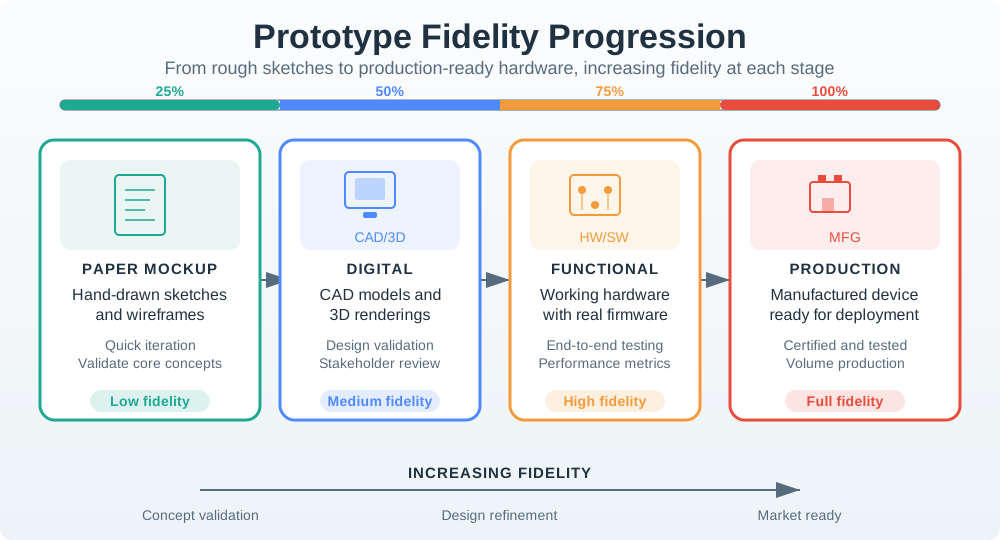
The ladder in Figure 4.2 moves from sketches to field trials; add realism only when the question needs it.
4.11 Wizard-of-Oz for IoT
This section: Wizard-of-Oz for IoT — Wizard-of-Oz testing is useful when the team wants to test a behavior before implementing the automation.
Wizard-of-Oz testing is useful when the team wants to test a behavior before implementing the automation. A human quietly performs part of the system’s work while the user interacts with a believable prototype.
Examples:
First: A researcher manually sends an alert when a mock device “detects” a condition.
Next: A technician receives a simulated maintenance recommendation before the model exists.
Then: A support operator manually classifies field images while users think the workflow is automated.
After that: A local display is updated by the facilitator while the sensor logic is still being designed.
Do not deceive participants about risk, safety, privacy, or real operational consequences. Explain the simulation in consent materials or debriefing, and never use Wizard-of-Oz automation where a participant might rely on it for safety-critical action.
4.12 Test Design
This section: Test Design — Testing should begin with a clear assumption.
Testing should begin with a clear assumption. Avoid vague sessions such as “show users the prototype and see what they think.” Ask what decision the test is meant to support.
4.13 Worked Example: Equipment Alert Redesign
This section: Worked Example: Equipment Alert Redesign — Proceed to technical feasibility only if users can classify the alert, explain the action, and identify who owns the next step.
Problem frame:
HMW prompts:
- How might we show alert urgency without overwhelming operators?
- How might we include enough context for a technician to decide remotely?
- How might we make normal recovery behavior visible instead of triggering a fault?
- How might we preserve event history without requiring manual incident notes?
Ideation output:
Prototype sequence:
- Storyboard three real alert scenarios with technician decision points.
- Build a clickable mockup showing watch, act, and escalate states.
- Run Wizard-of-Oz tests where the facilitator changes alert context based on a scripted machine scenario.
- Build a dev-kit sensor test only after users can make the correct decision from the alert context.
Test gate:
Proceed to technical feasibility only if users can classify the alert, explain the action, and identify who owns the next step. If they cannot, improve the alert language and escalation workflow before adding sensing complexity.
4.14 Evidence Record
This section: Evidence Record — Each test should produce a compact record that can travel with the backlog item.
Each test should produce a compact record that can travel with the backlog item.
The next Evidence Record decision depends on Figure 4.3. Follow No confirmation appears to Duplicate tickets, then read the Finding → Decision → Next Check row. The worked record shows how observed behavior and service impact turn into a bounded prototype change and a focused retest.
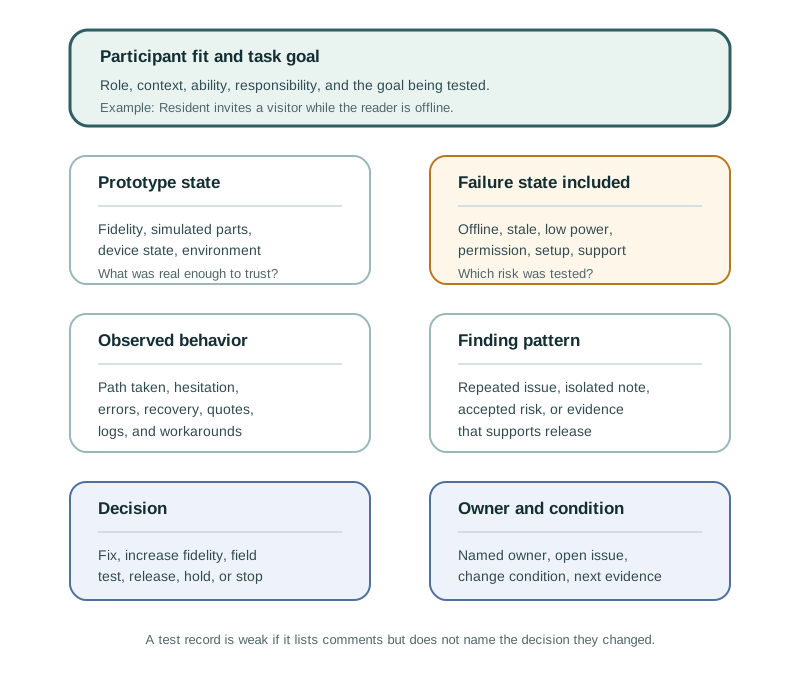
In Figure 4.3, the test conditions are kept separate from the observed event order: the delayed network state is part of the test plan, while the observed failure is that no confirmation appears and users press repeatedly. The decision then adds clear request received, already reported, and staff assigned states before a focused check with network delay included. This makes the Evidence Record concrete without claiming more causality or timing than the test actually observed.
4.15 Knowledge Check
This section: Knowledge Check
4.16 Code Challenge: Prototype Test Gate
This section: Code Challenge: Prototype Test Gate
4.17 Common Pitfalls
This section: Common Pitfalls
If the team judges ideas as they are created, the session collapses into familiar architecture choices. Separate idea generation from idea screening.
Custom hardware, polished apps, and cloud automation can hide weak assumptions. Match prototype fidelity to the question being tested.
“Do you like it?” is weaker than watching a user complete a realistic task. Observe behavior first, then ask follow-up questions.
IoT prototypes must test offline behavior, low power, false alerts, recovery, permissions, privacy, and support paths before release gates.
4.18 References
This section: References — First: ISO 9241-210:2019: human-centred design principles and lifecycle activities for interactive systems.
First: ISO 9241-210:2019: human-centred design principles and lifecycle activities for interactive systems.
Next: GOV.UK Service Manual: User research: practical guidance for research methods, sessions, analysis, and privacy.
Then: Google Design Sprint Kit: structured sprint method for moving from challenge framing to prototype and test.
After that: NIST SP 800-213: IoT cybersecurity requirement planning that should shape prototype and release gates.
4.19 See Also
This section: See Also
4.20 What’s Next
This section: What’s Next — Continue to Implement and Iterate after your team has tested the riskiest assumptions, recorded the evidence, and chosen whether to pivot, iterate, or proceed.
Continue to Implement and Iterate after your team has tested the riskiest assumptions, recorded the evidence, and chosen whether to pivot, iterate, or proceed.
4.21 Summary
This section: Summary — Ideation, prototyping, and testing turn defined problems into candidate IoT solutions.
Ideation, prototyping, and testing turn defined problems into candidate IoT solutions. Early prototypes should test the riskiest assumptions about sensing, connectivity, power, interaction, and user value before full implementation.
4.22 Key Takeaway
This section: Key Takeaway — Prototype to answer a question, not to impress.
Prototype to answer a question, not to impress. The best early IoT prototypes expose whether the sensing path, data path, user workflow, or physical installation assumption is wrong.
Find help
3 reviewed answers.
Where should I start in a module?
Open the module page from the sidebar to see its chapters in order. Use the module map to return to a topic you need.
Modules and pathsReviewed
What can I try when a project does not work?
Check the symptom, then work through the diagnostic steps. Keep the error message and the smallest example that reproduces it.
When you are stuckReviewed
How do interactive examples work?
Use the interactive guide to check how examples and simulations work before changing your project.
Interactive examples guideReviewed