3 Empathize and Define
More
Depth: Practitioner
Progress saves as you read. Mark sections complete as you go; your progress appears in the sidebar.
3.1 Start With the Frustrated User
This section: Start With the Frustrated User — Picture a cold-room operator who notices a warning after stock has already warmed.
Observe the Whole Problem Before Naming the Product
Picture a cold-room operator who notices a warning after stock has already warmed. The first request is for another sensor, but the real failure may be a late screen, unclear ownership, or a handoff at shift change. Starting with a device can hide the work people are trying to complete.
Follow one real task from trigger to outcome. Record what the person sees, says, does, waits for, and decides. Mark the tools, places, other people, and service limits involved. Keep direct observation separate from your interpretation, and ask permission before collecting personal or sensitive details.
Compare several cases, including a smooth day and a failure day. Test an early problem statement with users: who is affected, what outcome is blocked, under which conditions, and how success would be observed. Remove any proposed feature from the wording and see whether the need still makes sense.
This research cannot represent every user or future setting. The deeper sections show how interviews, observation, empathy maps, pain points, journeys, and a bounded problem statement turn field evidence into a responsible design direction.
Picture an operator who knows a cold room is drifting out of range but has no trustworthy timeline, owner, or next action. Empathize-and-define work turns that messy moment into evidence: who is affected, what they are trying to decide, which pain points are real, and what success would look like before a device, dashboard, or alert workflow is designed.
3.2 Learning Objectives
This section: Learning Objectives
By the end of this chapter, you will be able to:
- Plan field research for an IoT product without biasing users toward a preselected device or feature.
- Separate what users say, think, do, and feel so the team can distinguish evidence from inference.
- Convert observations into pain points, personas, journey moments, and clear problem frames.
- Write Point-of-View statements and How Might We prompts that keep the solution space open.
- Define success metrics that combine user outcomes with IoT constraints such as reliability, privacy, installation, and maintenance.
3.3 Empathy Changes Architecture
This section: Empathy Changes Architecture — In IoT, empathize and define work should change what the team builds.
In IoT, empathize and define work should change what the team builds. Field research may reveal that the problem is not “add a sensor” but “make responsibility visible after hours,” “make setup recoverable without Wi-Fi,” or “avoid exposing bystanders in a shared space.” Those insights affect hardware placement, radio choice, local feedback, notification routing, and support operations.
The Define stage turns messy field notes into a problem frame that engineering can act on. A good Point-of-View statement names the user, context, need, and reason without prescribing BLE, LoRaWAN, Wi-Fi, MQTT, computer vision, a dashboard, or a mobile app before the team knows which path fits the situation.
For example, a facilities team that asks for a “smart freezer sensor” may really need a freezer-loss recovery workflow. Interviews may show that overnight staff cannot identify which freezer alarm is real, that the Wi-Fi access point drops when a metal door closes, and that the person who can move stock does not receive the alert. The problem frame then becomes an operational handoff problem with sensing, networking, escalation, and accountability parts. That frame may lead to a DS18B20 probe plus door switch, local buzzer mute, battery-backed gateway, MQTT QoS 1 publish, SMS escalation, and a support playbook instead of only a nicer dashboard.
The same discipline prevents over-engineering. If the evidence says the pain is two minutes of uncertain setup during installation, the first prototype may be a paper provisioning flow, a Figma status screen, or a bench ESP32 that shows pairing states clearly. If the pain is auditability after an incident, the prototype may be an event log and acknowledgement model before any enclosure design. Empathy work is therefore not a soft preface to real engineering; it is the mechanism that decides which engineering risk is worth spending time on next.
Inspect Figure 3.1 to see how observed work and recent events can change the architecture instead of merely supplying personas or guesses about user preference.
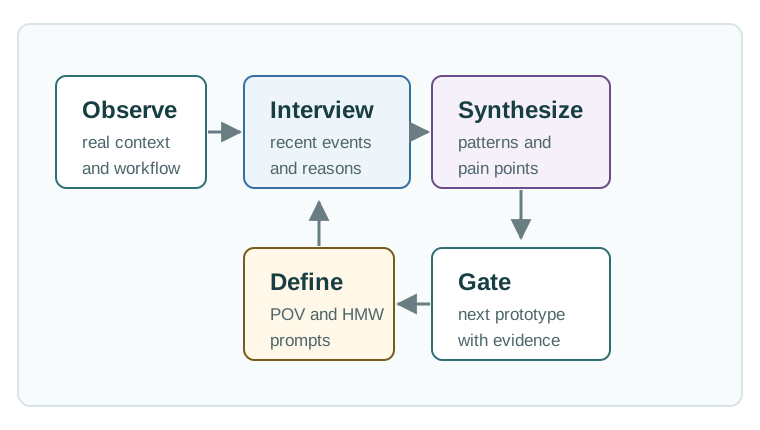
Read Figure 3.1 from field watch and recent-event talks to the first claim. Those sources preserve what people and systems did before the team names a pattern. The next step states the person, wanted change, and key limit. The proof gate then allows only a trial that can test the largest open risk. For a freezer alarm, weak Wi-Fi and no clear night owner may justify a local light, receipt step, and call tree before a rich screen. Record the source, place, conflict, problem, trial, pass rule, owner, and next field check. If the result breaks the frame, return to the field.
- Person boundary: Include installer, maintainer, support agent, data subject, alert recipient, and buyer when those roles affect the product.
- Place boundary: Capture power, mounting, enclosure, light, noise, weather, network coverage, safety, and shared-space constraints before choosing hardware.
- Decision boundary: Frame the decision or action that must improve, then let sensing, connectivity, automation, and UI follow from that decision.
3.4 Research the Whole Service Path
This section: Research the Whole Service Path — A useful IoT research plan follows the event from origin to response.
A useful IoT research plan follows the event from origin to response. For a cold-room alert, that path may include probe placement, door state, local display, gateway connectivity, MQTT publish, cloud rule, APNs or FCM notification, shift handoff, acknowledgement, support ticket, and incident closeout. Interviewing only the person who wants the dashboard misses most of that path.
Use mixed methods: contextual inquiry for the physical task, interviews for intent and trust, support-ticket review for repeated failures, telemetry review for timing and state gaps, and a journey map for handoffs. Tools such as Miro, FigJam, Figma, Jira, Linear, Zendesk, Node-RED, Home Assistant, AWS IoT Core, Azure IoT Hub, or a simple MQTT broker can support the work, but the artifact is only useful if it preserves context and points to a next decision.
Plan the research sample around roles and failure modes, not around convenience. For a home-energy monitor, the sample may need a renter, homeowner, installer, call-centre agent, utility program manager, and someone who opts out of sharing fine-grained data. For an industrial vibration monitor, include maintenance technicians, line supervisors, safety staff, network administrators, and the person who signs the downtime report. Each interview should separate observed facts from interpretation: “the gateway LED was red for three hours” is evidence; “operators do not care about reliability” is usually a weak inference.
Strong field notes connect a quote or observation to a decision the team must make. A photo of the mounting location informs enclosure ingress rating, cable strain relief, antenna clearance, and tamper risk. A support-ticket cluster about failed pairing informs BLE provisioning recovery, QR-code fallback, captive-portal wording, and what diagnostics the agent needs in Zendesk. A telemetry gap around shift changes informs alert throttling, role routing, and acknowledgement ownership. The output should be a traceable board of evidence, assumptions, open questions, and prototype tests, not a decorative persona poster.
- Recruit by role and scenario. Include the person who installs, uses, maintains, receives alerts, appears in data, and owns operational risk.
- Observe failure and recovery. Ask how the team handles offline devices, stale readings, dead batteries, pairing failure, false alerts, and manual override.
- Map the information path. Trace what the device knows, what the app shows, who receives messages, and who can safely act.
- Define success before ideation. Name the user outcome, technical behavior, privacy constraint, and support requirement that a later prototype must test.
3.5 Findings to System Constraints
This section: Findings to System Constraints — Research findings become useful when they map to system constraints.
Research findings become useful when they map to system constraints. “Technicians check the local display before opening the app” can become a requirement for device-side status, readable labels, offline diagnostics, and local acknowledgement. “Residents worry about who sees leak data” can become role-based access, retention limits, and a clear sharing model.
Translate each insight into actors, states, events, and measurements. Actors may include device, gateway, user, installer, automation rule, support agent, and external service. States may include unpaired, provisioning, normal, pending, offline, stale, faulted, acknowledged, overridden, and recovered. Events need timestamps, source, confidence, freshness, and ownership so later prototypes can test the real workflow.
The output should be a small constraint set that links user need to technical behavior: BLE provisioning must recover after a failed QR scan; Matter commissioning must explain what failed; a device shadow or twin must show desired versus reported state; an alert rule must avoid paging the wrong role; and a support console must show firmware, battery, last heartbeat, and recent command outcomes.
Make the constraint set precise enough that a prototype can fail honestly. A vague finding such as “users need trust” is not testable. A stronger constraint says that after a sensor misses three reporting intervals, the interface must show stale status, last successful heartbeat, battery estimate, network path, and next recovery action within one screen. A vague finding such as “installation is confusing” becomes a commissioning state machine with entry criteria, timeout handling, retry copy, and logs for QR scan, BLE pairing, Wi-Fi credential exchange, cloud claim, and first telemetry publish.
This translation also exposes privacy and safety obligations early. If research shows that the device observes a shared corridor, the data model needs purpose limitation, field-level retention, access roles, and possibly edge redaction before cloud upload. If an alert can trigger a physical response, the system needs confidence thresholds, duplicate suppression, audit records, manual override, and clear ownership for who acts. The Define stage is complete only when the team can point from every major product claim to an observed need, a system behavior, a measurable outcome, and a prototype or field test that can prove or disprove the assumption.
- Finding to state: Turn observed confusion into explicit product states, labels, and recovery paths.
- Finding to metric: Measure task completion, correct alert classification, setup recovery, acknowledgement time, and privacy comprehension.
- Finding to prototype: Choose paper flow, Figma screen, bench device, MQTT mock, or field pilot based on the current uncertainty.
3.6 Why Empathize Comes First
This section: Why Empathize Comes First — IoT products operate in messy physical environments.
IoT products operate in messy physical environments. A device may be installed by one person, configured by another, monitored by a third, and affect people who never touch the app. Discovery therefore has to include the full service context, not only the buyer or the most enthusiastic user.
The main risk is not that the team cannot build the device. The main risk is building a device that fits the team’s imagined workflow instead of the real one.
3.7 Research Scope for IoT
This section: Research Scope for IoT — Start by naming the people and contexts that may change the problem definition.
Start by naming the people and contexts that may change the problem definition. A narrow participant list creates a narrow product.
Person Doing the Task
The person whose workflow, effort, risk, or decision should improve because of the product.
Person Who Sets It Up
The person who mounts, pairs, powers, calibrates, labels, or explains the device.
Person Who Keeps It Working
The person who replaces batteries, responds to faults, updates firmware, or handles support calls.
Person Impacted by Data
The person who receives alerts, appears in data, is evaluated by metrics, or owns the risk.
If the team has only interviewed the buyer, it has not finished empathy work. IoT products often fail at installation, support, maintenance, privacy, or alert response rather than at the feature demo.
3.8 Research Methods
This section: Research Methods — Use more than one method when the stakes are high or the context is unfamiliar.
Use more than one method when the stakes are high or the context is unfamiliar. Interviews reveal stories and motivations. Observation reveals behavior and workarounds. Support records reveal repeated failure patterns. Field trials reveal what changes under real constraints.
3.9 Interview Guide
This section: Interview Guide — Good interview questions ask for behavior, context, and recent examples.
Good interview questions ask for behavior, context, and recent examples. Poor questions ask users to design the product for you.
Field research can collect sensitive information about homes, workplaces, habits, health, safety, security, and operations. Explain what will be recorded, get informed consent, minimize identifiable data, and avoid collecting details the team does not need.
3.10 Empathy Maps
This section: Empathy Maps — An empathy map is a synthesis tool, not a decoration.
An empathy map is a synthesis tool, not a decoration. It helps the team compare direct quotes, inferred thoughts, observed behaviors, and emotional signals. The most useful insights often appear when the quadrants disagree.
Start with Says in Figure 3.2, where direct quotes preserve the user’s words, then compare Thinks, which records inferred concerns. Below, Does records observed actions, while Feels captures emotional signals. Investigate disagreements between the quadrants before defining the problem.

View Figure 3.2 as a hand-off: Empathy Map Evidence first uses Empathy Map Evidence to hold review evidence, Says then highlights Says, and Thinks finally highlights Thinks. For Empathy Maps, these labelled responsibilities give The empathy map separates interview quotes, inferred concerns, observed actions, and emotional signals so the team can compare evidence types before defining the problem its place in the running narrative.
3.11 From Evidence to Pain Points
This section: From Evidence to Pain Points — Pain points should connect evidence to a user outcome.
Pain points should connect evidence to a user outcome. Avoid writing them as missing features.
Pain points usually fall into several categories:
First: Functional: the task is slow, unreliable, physically hard, or error-prone.
Next: Emotional: the user feels anxiety, embarrassment, distrust, or loss of control.
Then: Operational: the handoff, maintenance, support, or compliance process breaks down.
After that: Financial: the current process wastes time, materials, energy, or service visits.
Also inspect: Social or privacy-related: the product affects relationships, surveillance concerns, dignity, or accountability.
3.12 Personas and Journey Moments
This section: Personas and Journey Moments — A persona is useful only when it comes from real evidence.
A persona is useful only when it comes from real evidence. It should not become a fictional biography. Keep it compact and operational.
Evidence-Based Segment
Name the role, goals, context, constraints, technical comfort, and decision criteria. Tie each claim to research evidence.
Critical Situation
Show the moment where the user makes a decision, receives an alert, performs setup, or recovers from failure.
Design Boundary
Record physical, social, technical, safety, privacy, or support constraints that shape the solution space.
Next Research Need
Name what the team still does not know before ideation, prototyping, or architecture commitment.
3.13 Define the Problem
This section: Define the Problem — The Define stage turns research into a problem frame that can guide ideation and prototype testing.
The Define stage turns research into a problem frame that can guide ideation and prototype testing.
Point-of-View formula:
The need should be a verb phrase, not a product. The insight should come from evidence, not the team’s preference.
3.14 How Might We Prompts
This section: How Might We Prompts — How Might We prompts bridge Define and Ideate.
How Might We prompts bridge Define and Ideate. They should be open enough to invite options and constrained enough to keep the team tied to evidence.
Examples:
First: How might we help field technicians confirm a device is healthy when the network is unavailable?
Next: How might we let caregivers know that a routine is on track without making the user feel watched?
Then: How might we help operators distinguish urgent alerts from noisy background events?
After that: How might we make setup recoverable for a non-expert installer in a physically constrained space?
3.15 Define Success Metrics
This section: Define Success Metrics — Success metrics should reflect the problem frame.
Success metrics should reflect the problem frame. In IoT, the metric set should combine user outcomes with device, data, and service constraints.
3.17 Evidence Record
This section: Evidence Record — Use a short record after each research and synthesis cycle.
Use a short record after each research and synthesis cycle. Keep it brief enough that the team will maintain it.
A research finding becomes useful when its context can be carried into a testable choice. In Figure 3.3, the observation says researchers are unsure who owns after-hours response. The role and context fields place that finding with researchers using shared cold rooms after hours. The risk is slow response even when data exists, so the requirement names escalation roles and visible acknowledgement. The evidence field asks whether alerts show owner, context, and acknowledgement state. A future change in after-hours responsibility is the retest trigger. Keep those fields together so a reviewer can trace the requirement back to the field finding.
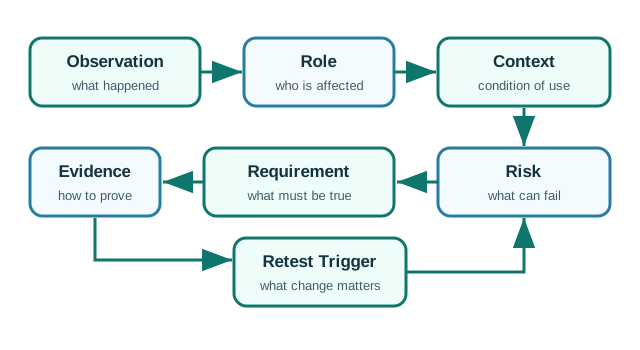
The record in Figure 3.3 links a user finding to a test; check its role and context.
3.18 Knowledge Check
This section: Knowledge Check
-
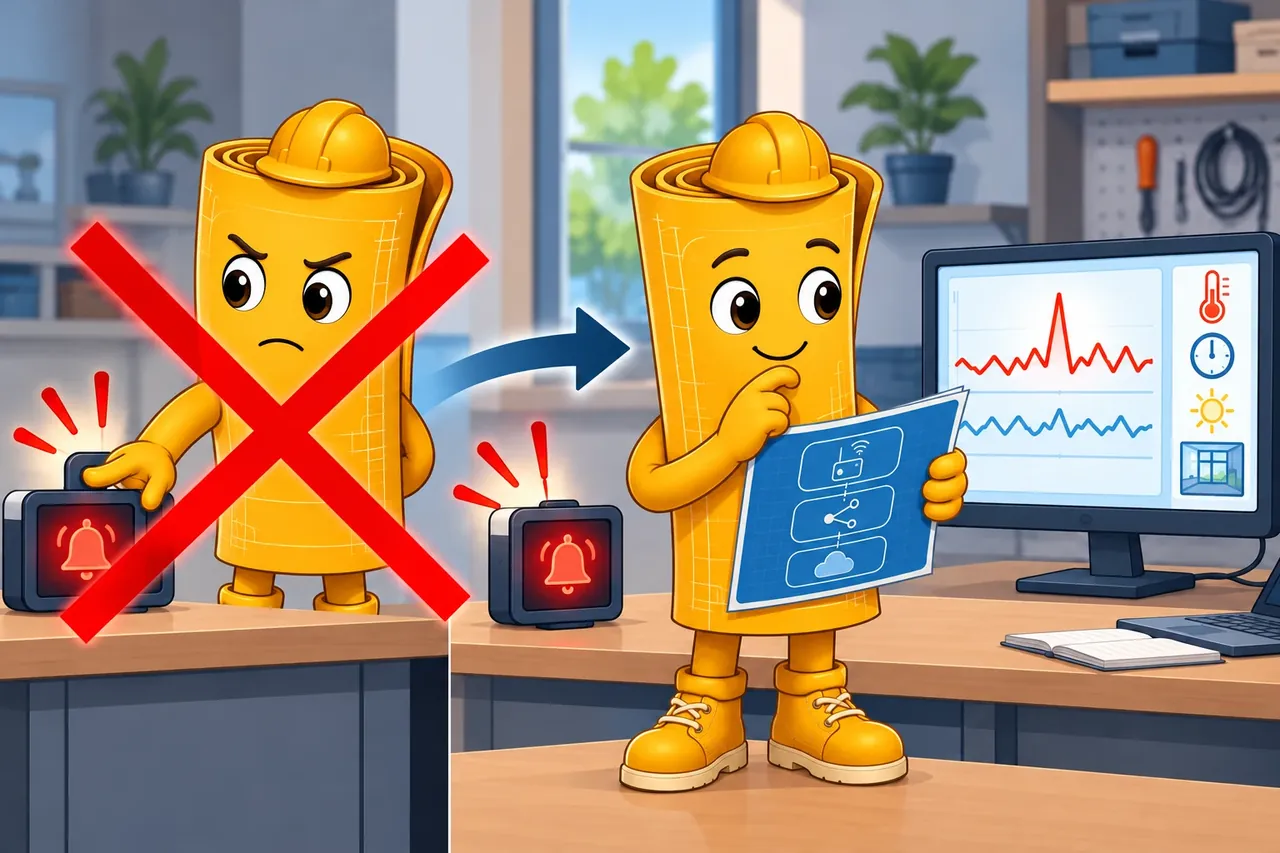
Wrong idea: remove an alert because workers silence it. It fails because the team must first learn whether noise, timing, wording, or missing context caused that behavior.
3.19 Code Challenge: Research Insight Record
This section: Code Challenge: Research Insight Record
3.20 Common Pitfalls
This section: Common Pitfalls
Questions such as “Would you use a smart sensor for this?” produce weak evidence because users often answer politely or speculate. Ask about recent behavior, current workarounds, and actual constraints instead.
The Thinks and Feels quadrants often contain inference. Mark uncertain interpretations and test them in later sessions.
“Users need an app” or “users need a sensor” skips Define and jumps to a solution. Rewrite the frame as a user need and research insight.
An IoT product may succeed in a demo and fail in the field if setup, calibration, power, cleaning, firmware updates, and support are not part of empathy work.
3.21 References
This section: References — First: ISO 9241-210:2019: human-centred design principles and lifecycle activities for interactive systems.
First: ISO 9241-210:2019: human-centred design principles and lifecycle activities for interactive systems.
Next: GOV.UK Service Manual: User research: practical guidance for planning research, running sessions, methods, analysis, and privacy.
Then: NIST SP 800-213: IoT device cybersecurity requirements planning from the device perspective.
After that: Google Design Sprint Kit: structured sprint method for testing assumptions after problem framing.
3.22 See Also
This section: See Also
3.23 What’s Next
This section: What’s Next — Continue to Ideate, Prototype, and Test after your team has a research-backed POV statement, a small set of How Might We prompts, and success metrics that connect user outcomes with IoT constraints.
Continue to Ideate, Prototype, and Test after your team has a research-backed POV statement, a small set of How Might We prompts, and success metrics that connect user outcomes with IoT constraints.
3.24 Summary
This section: Summary — The empathize and define stages translate real user context into a focused IoT problem statement.
The empathize and define stages translate real user context into a focused IoT problem statement. This includes observing workflows, identifying pain points, defining stakeholders, and separating symptoms from root needs.
3.25 Key Takeaway
This section: Key Takeaway — Do not start IoT design with a sensor list.
Do not start IoT design with a sensor list. Start with the user, environment, decision, and failure consequence, then define the problem the system must solve.
Find help
3 reviewed answers.
Where should I start in a module?
Open the module page from the sidebar to see its chapters in order. Use the module map to return to a topic you need.
Modules and pathsReviewed
What can I try when a project does not work?
Check the symptom, then work through the diagnostic steps. Keep the error message and the smallest example that reproduces it.
When you are stuckReviewed
How do interactive examples work?
Use the interactive guide to check how examples and simulations work before changing your project.
Interactive examples guideReviewed