9 IoT Decision Validation
More
Depth: Practitioner
Progress saves as you read. Mark sections complete as you go; your progress appears in the sidebar.
9.1 Worked Example: The Go/No-Go Question
This section: Worked Example: The Go/No-Go Question — Inspect the story panels and ask which failed gate should revise or stop the connected-room-sensor pilot.
Inspect the story panels and ask which failed gate should revise or stop the connected-room-sensor pilot.
-

Name the care need and the stop rule before adding features.
-

Test lost links, late alerts, and how new staff respond.
-

Choose go, revise, or stop from the gates that passed.
Read the three story panels from the care need and stop rule to the explicit decision. The first panel places the desired outcome beside a condition that would halt the work, keeping validation from assuming success. The second tests distinct failure modes: a lost link, a late alert, and a new staff member attempting the response path. Those observations cover technical delivery and real operation rather than collapsing them into one score. The last panel permits go, revise, or stop according to the gates that passed. This is the chapter’s validation argument in miniature: a polished dashboard is not approval, and every result must be able to change scope or disposition.
Make the Pilot Earn the Next Step
Picture a care team deciding whether to add connected room sensors. The pilot dashboard looks polished, but staff still make the same manual checks and no one owns late alerts. A working device has not yet proved a useful service.
Write the decision before collecting more features. Name the user need, the simpler alternative, the claimed benefit, the people affected, the safe limit, and the evidence that would support go, revise, or stop. Keep technical success separate from user value, daily operation, cost, and risk.
Test one claim at a time. Lose the link, delay a reading, remove remote access, create a false alert, ask a new staff member to respond, and include repair effort. Record what happened, who acted, what remained uncertain, and which gate failed. A failed gate should change the plan rather than disappear inside an average score.
This small validation cannot predict every site or long-term cost. The deeper sections show how need, connectivity, freshness, security, operation, alternatives, and lifecycle evidence form a reviewable go or no-go brief.
Imagine a review where the team must decide whether to install more connected sensors or stop after a small pilot. Validation is the discipline for that decision: name the claim, gather user and technical evidence, compare cost and risk, and make the go/no-go call from what the system proved rather than what the team hoped would happen.
9.2 Learning Objectives
This section: Learning Objectives
By the end of this chapter, you will be able to:
- Decide whether an IoT solution is necessary, or whether a simpler alternative can satisfy the user need.
- Test connectivity, freshness, remote access, intelligence, lifecycle cost, security, and operational readiness as separate validation gates.
- Build a validation brief that turns user evidence, technical evidence, and cost evidence into a go/no-go decision.
- Record evidence gaps and decision outcomes so future teams can update the project without restarting the design process.
Key Concepts
This section: Key Concepts — First: Validation gate: A decision point where the team reviews evidence and chooses to proceed, narrow scope, change approach, gather more evidence, or stop.
First: Validation gate: A decision point where the team reviews evidence and chooses to proceed, narrow scope, change approach, gather more evidence, or stop.
Next: IoT necessity: The proof that networked sensing, actuation, or data exchange is required for the user outcome, not merely attractive as a feature.
Then: Freshness need: The required age of data at the moment a user or system acts on it.
After that: Remote actor: A person or service that must read, control, audit, or support the system from outside the device location.
Also inspect: Simpler alternative: A manual, mechanical, local-only, or batch-sync approach that may solve the problem with less lifecycle burden.
Finally: Lifecycle cost: The continuing effort and expense of deployment, connectivity, hosting, maintenance, support, security updates, data retention, and retirement.
Finally: Decision summary: A short artifact that states the validation decision, evidence used, rejected alternatives, unresolved assumptions, and next gate.
9.3 Validate Connected Behavior Need
This section: Validate Connected Behavior Need — Validation asks whether IoT is necessary for the user outcome.
Validation asks whether IoT is necessary for the user outcome. A connected sensor is justified when networked data, remote action, automation, or shared visibility changes a decision that matters. If the same outcome can be reached with a checklist, QR code, local display, periodic inspection, or batch upload, the simpler path may be the better design.
The validation decision should be explicit. Proceed when connectivity, freshness, remote access, and lifecycle ownership are all needed and testable. Narrow when only part of the connected system is justified. Stop or simplify when the IoT layer adds cost, support burden, privacy risk, or failure modes without changing the user action. The decision is strongest when the team can point to evidence for each gate instead of relying on enthusiasm for connected devices.
Inspect Figure 9.1 and ask which answer could remove connectivity from the proposed product.
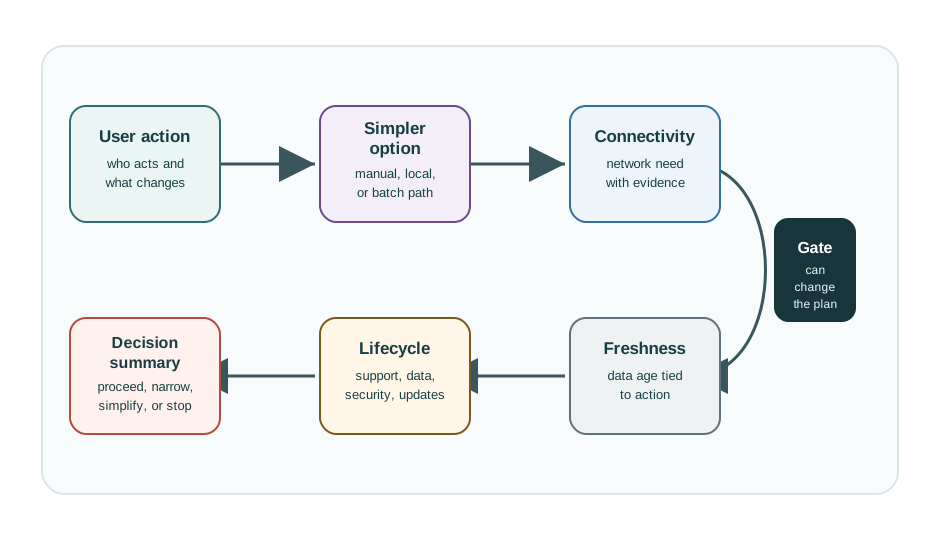
Read Figure 9.1 from proof of the user need to the simple-choice check. A local screen, set inspection, or batch record may change the needed act well enough. If so, stop the network path there. If not, the next gate asks what the link adds. The fresh-data gate sets how old a reading may be when someone acts. Remote access names who must read, control, audit, or support the system off site. The life-cycle gate assigns updates, security, storage, recovery, and final removal. A weak gate may simplify, narrow, or stop the project; it must not just add another burden.
For example, a school may want restroom occupancy sensing to reduce cleaning complaints. Validation does not start by selecting sensors. It asks whether complaints depend on real-time occupancy, delayed service records, vandalism detection, supply levels, or staffing handoff. A door counter, PIR sensor, mmWave presence sensor, QR complaint form, or scheduled inspection route each changes a different decision. If custodial staff only review reports at the end of the day, a live dashboard may be unnecessary. If supervisors must redirect staff within minutes, freshness and alert ownership become central.
A validation brief should also state the burden that comes with connectivity. That includes device installation, calibration, battery replacement, Wi-Fi or LoRaWAN coverage, cloud storage, access control, privacy signage, maintenance tickets, and retirement. The question is not “can we connect it?” The question is “does the connected path create enough decision value to justify the operational system around it?”
- Necessity: The connected behavior solves a decision problem that a local or manual alternative cannot solve well enough.
- Freshness: The data age required by the user action is known, not guessed.
- Ownership: Someone can operate, secure, update, and retire the system after deployment.
9.4 Gate IoT Decisions One by One
This section: Gate IoT Decisions One by One — Use concrete gates instead of a general approval meeting.
Use concrete gates instead of a general approval meeting. A cold-room project might compare manual thermometer logs, a BLE data logger, a Wi-Fi ESP32 node with an SHT31 sensor, and a LoRaWAN node with a DS18B20 probe. Each option should be judged against the same user action: who notices a temperature excursion, how quickly they act, and what proof they need later.
For a connected option, validate the whole service path. The test should include sensor placement, calibration tolerance, sample interval, MQTT or CoAP transport, TLS identity, broker or cloud ingestion, InfluxDB or TimescaleDB storage, Grafana or web dashboard freshness, alert delivery, operator acknowledgement, and recovery steps for outage or sensor failure.
Practitioners should write gate evidence in comparable units. A manual-log option might require two weeks of completed temperature sheets, exception handling notes, and audit acceptance. A BLE logger option might require download interval, staff time, missing-record rate, and export format. A connected option might require MQTT retained-message behavior, certificate rotation rehearsal, dashboard stale-state display, SMS or email escalation, and acknowledgement records. Using the same decision window across all options prevents the connected prototype from being judged by richer evidence than the simpler alternatives.
The go/no-go meeting should end with a record that another team can review. Keep the problem statement, rejected alternatives, measured freshness requirement, privacy boundary, support owner, lifecycle estimate, open risks, and next review trigger together in the same decision summary. A Jira issue, GitHub issue, Notion page, Confluence page, or versioned Markdown record can work, but screenshots alone are weak evidence because they rarely preserve configuration, failure behavior, and ownership.
- Challenge the alternative. Compare IoT with manual, mechanical, local-only, and batch-sync options before selecting devices.
- Measure the decision window. State whether the action needs seconds, minutes, hours, or only end-of-day review.
- Price the lifecycle. Include connectivity fees, hosting, certificates, OTA updates, support time, replacement stock, retention, and retirement.
9.5 Go/No-Go as Systems Contract
This section: Go/No-Go as Systems Contract — A validation decision is not only a product choice.
A validation decision is not only a product choice. It is a contract between device behavior, network behavior, data governance, security, operations, and user workflow. If any layer lacks an owner or acceptance condition, the decision is not ready for pilot.
Make the contract inspectable. Device evidence covers sensor tolerance, warm-up, fault state, battery or power supply, firmware version, watchdog behavior, and OTA rollback. Network evidence covers Wi-Fi coverage, LoRaWAN airtime, NB-IoT or LTE-M availability, MQTT QoS, retry behavior, TLS certificates, and gateway backhaul. Service evidence covers schema validation, timestamp quality, alert latency, dashboard freshness, access control, retention, and incident response.
Under the hood, validation fails when the acceptance record cannot be traced to runtime evidence. A payload schema should identify units, timestamp source, device identifier, firmware version, and fault fields. A cloud ingestion path in AWS IoT Core, Azure IoT Hub, ThingsBoard, or a self-hosted broker should preserve rejection logs and versioned rules. A dashboard should show stale data differently from normal data, and an alerting path should distinguish sensor fault, network outage, rule misconfiguration, and operator non-response. Those distinctions matter because each failure has a different owner.
The validation contract should also test reversal. If the team chooses to stop, narrow, or simplify, the evidence should say which assumption failed and what will be retired or deferred. If the team proceeds, the same record should name pilot limits, data retention, certificate lifecycle, update responsibility, privacy review, support queue, and the trigger for retest. A connected product that cannot be safely narrowed or retired is already carrying technical debt before launch.
- Proceed: The connected path changes the user decision and each lifecycle owner accepts a measurable responsibility.
- Narrow: One connected behavior is justified, but analytics, automation, or fleet expansion should wait.
- Simplify: A local display, NFC/QR workflow, BLE logger, scheduled inspection, or CSV batch import meets the need with less burden.
This section:
This section:
9.6 Prerequisites
This section: Prerequisites
- Empathize and Define: User evidence and problem framing.
- Ideate, Prototype, and Test: Prototype evidence and test gates.
- Project Planning: Project briefs, assumption maps, risk registers, and decision logs.
9.7 How It Works: Validate the IoT Decision
This section: How It Works: Validate the IoT Decision — IoT validation is a controlled challenge to the proposed solution.
IoT validation is a controlled challenge to the proposed solution. The team starts with the user outcome, compares simpler alternatives, tests whether connected behavior is necessary, and records the evidence behind the decision.
The framework follows five practical questions:
A project can pass user validation but fail IoT validation. That does not mean the problem is unimportant. It may mean the right answer is a simpler device, a local workflow, a batch report, or a service change rather than a fully connected system.
Use Figure 9.2 when user evidence supports a need but does not yet prove that a full IoT system is the right response. The matrix compares Full IoT Connected + Smart, Smart Device Local + Automated, and Manual / Basic No Electronics against the same validation questions.
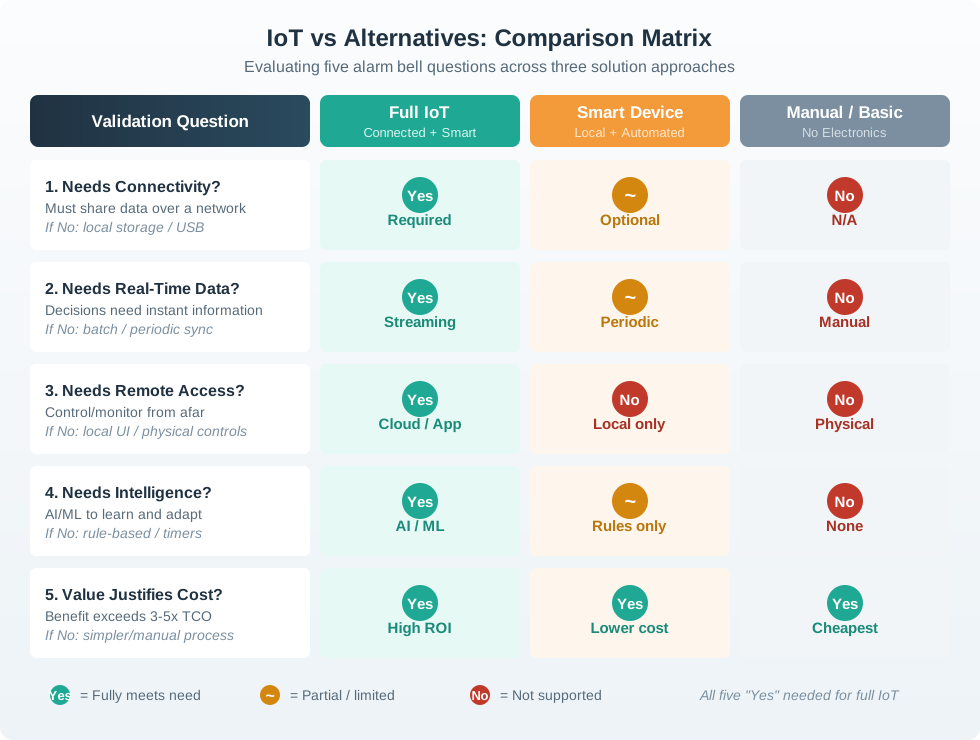
Across Figure 9.2, test whether the outcome truly needs network sharing, real-time data, remote access, and adaptive intelligence, then ask whether its value justifies three-to-five times total cost of ownership. A No on connectivity can redirect the design to local storage or USB; a No on immediacy can permit batch synchronization; a No on remote access can retain physical controls; and a No on learning can replace AI with bounded rules or timers. The legend makes the decision explicit: full IoT needs all five conditions, while a local smart device or a manual process may meet the validated need at lower operational cost. Compare those alternatives with the same user scenario and acceptance limits, including setup, outage, maintenance, privacy, training, accessibility, and recovery, so the connected option does not receive an easier test. Run the comparison with the people who install, operate, receive, support, and pay for the outcome, because their cost and failure evidence can change the selected column. Record the evidence and owner for every answer, the affected user action, latency or access limit, privacy boundary, installation and support cost, failure mode, and the next test. Validation is successful when it selects the simplest defensible solution, even when that reshapes or removes the connected architecture the team first imagined.
9.8 The Validation Gates
This section: The Validation Gates — Use these gates before committing to architecture, procurement, pilot deployment, or public launch.
Use these gates before committing to architecture, procurement, pilot deployment, or public launch.
9.9 Compare Simpler Alternatives First
This section: Compare Simpler Alternatives First — Validation should not compare one IoT design against nothing.
Validation should not compare one IoT design against nothing. Compare it against the least complex solution that could plausibly solve the problem.
The gates in Figure 9.3 compare manual and connected choices; check the proof for each.
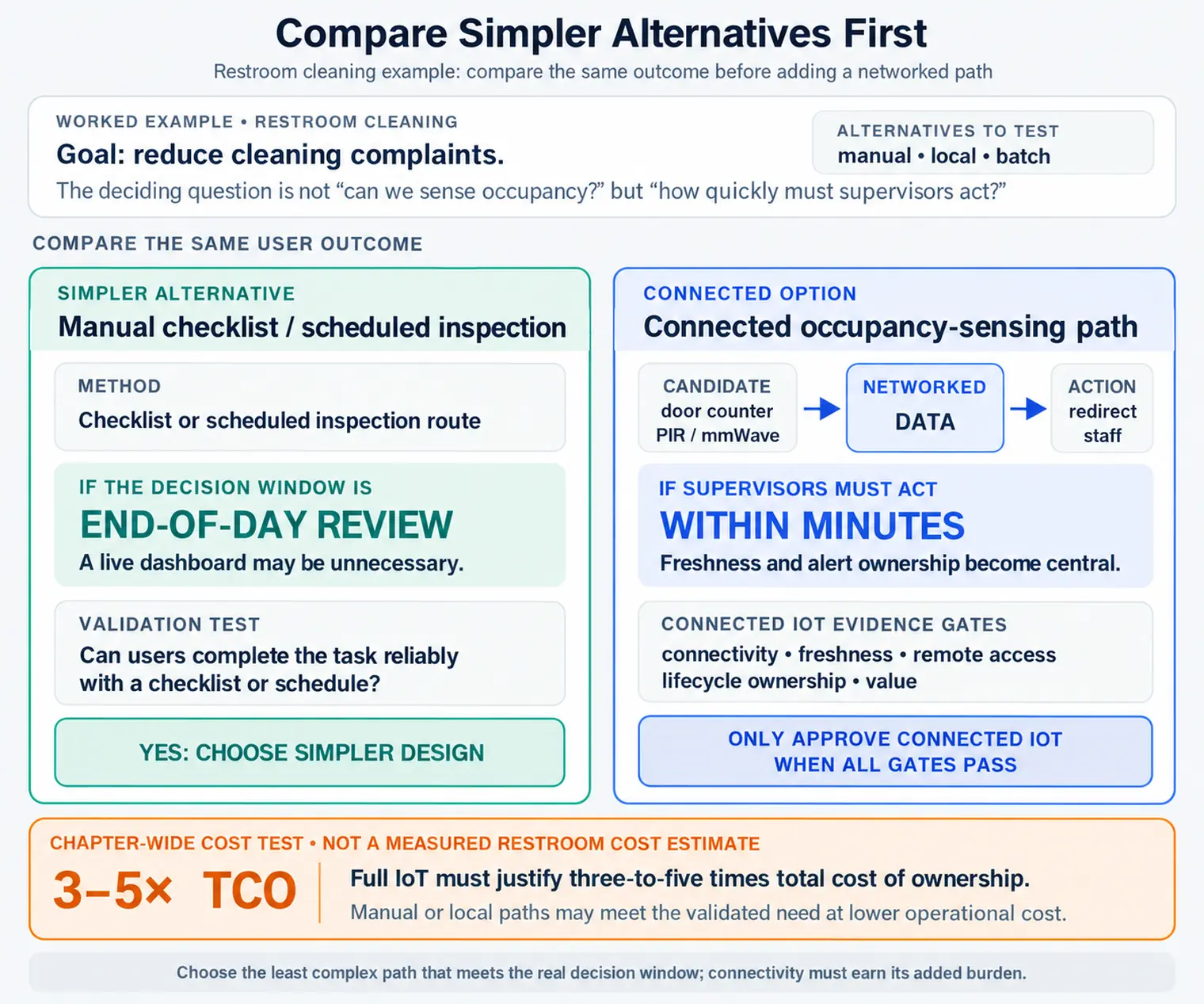
The choices in Figure 9.3 can proceed, narrow, simplify, or stop; check proof before adding a link.
If the non-connected version solves most of the user problem, the connected version needs strong evidence for the remaining value. Do not add network, cloud, mobile, or automated decision features unless they change an important user or operational outcome.
9.10 Incremental Examples
This section: Incremental Examples
9.10.1 Local Temperature Display
A single storage room may only need a local display and a manual log if the operator is always on site and the decision window is slow. Validation should compare a DS18B20 or SHT31 probe with a local display against a connected ESP32 or Raspberry Pi Pico W node. If the user action is “check before loading stock” and delayed review is acceptable, full cloud connectivity may not be justified.
9.10.2 Exception Alert Pilot
A multi-room cold-storage team may need connected exception alerts because the right responder is not always beside the room. Validation should test sensor placement, calibration label, Wi-Fi or LoRaWAN coverage, MQTT delivery, timestamp quality, dashboard freshness, and acknowledgement workflow. A narrow pilot can keep connected alerts and review history while leaving predictive analytics out of scope until there is stronger evidence.
9.10.3 Multi-Site Lifecycle Decision
A regional facilities program needs a stronger validation contract before fleet rollout. The brief should compare local HMI, BLE logger, batch CSV import, and full IoT paths; test LTE-M/NB-IoT or LoRaWAN availability; name device identity and TLS certificate ownership; define OTA update and rollback tooling such as Mender, RAUC, or AWS IoT Jobs; and assign retention, incident response, replacement stock, and retirement owners. The decision may be proceed for one site, narrow the analytics scope, or simplify remote control into read-only monitoring.
9.11 Build the Validation Brief
This section: Build the Validation Brief — The validation brief is the handoff artifact that makes the decision reviewable.
The validation brief is the handoff artifact that makes the decision reviewable. It should fit into the project planning decision log and be easy for a later maintainer to update.
User action statement
Who acts, in what context, using what information, and what improves when they act?
Simpler option comparison
What manual, local, or batch solution was compared, and why was it accepted or rejected?
Freshness and trust need
How fresh and trustworthy must the data be, and how will uncertainty be shown to users?
Lifecycle readiness
Who owns operations, security, support, data retention, update failures, and retirement?
9.11.1 Validation Brief Fields
9.12 Lifecycle Cost Without False Precision
This section: Lifecycle Cost Without False Precision — Validation should include lifecycle cost, but early estimates should not pretend to be exact.
Validation should include lifecycle cost, but early estimates should not pretend to be exact. Use cost categories and ownership questions first. Add numerical estimates only when the project has real supplier, staffing, deployment, and service evidence.
If the project budget only mentions hardware and initial development, the validation is incomplete. Connected systems also need owners for updates, outages, access control, data retention, replacement, and retirement.
9.13 Cold-Room Monitoring Validation
This section: Cold-Room Monitoring Validation
A food storage team is considering connected temperature monitoring for several cold rooms. Operators currently check readings during rounds and record exceptions manually. The proposed solution is a connected sensor network with alerts and compliance history.
User action statement
Operators need to identify a temperature excursion, confirm whether the reading is trustworthy, and follow the escalation path before product handling decisions become uncertain.
Validation gates
| Gate | Evidence | Decision |
|---|---|---|
| User action | Operators showed when they would act, when they would ignore an alert, and when they would call facilities. | Keep alert workflow in scope. |
| Connectivity | The food safety lead and facilities technician need access when away from the room, and the compliance history must be reviewable later. | Connectivity is justified for alert routing and review history. |
| Freshness | A delayed report would not support the escalation path during active storage. | Use fresh alerts for exceptions, but batch normal history. |
| Simpler alternative | Local display helps the operator on site, but it does not notify the remote support path or preserve the review record. | Use local display plus connected exception path. |
| Lifecycle | Facilities owns device recovery, food safety owns retention, security owns device identity, and operations owns escalation. | Proceed to a limited pilot only if the runbook passes a non-builder test. |
Decision summary
First: Decision: Proceed with a narrow connected pilot for exception alerts and audit review.
Next: Rejected option: Local-only thermometer logs, because they do not support remote escalation or review.
Then: Narrowed scope: Normal readings can be summarized; exception events require fresher handling.
After that: Open risk: Sensor placement and confidence messaging must be tested in the actual cold-room environment.
Also inspect: Next gate: Pilot readiness review after device recovery, data trust, and alert action tests.
9.14 Go/No-Go Decision Outcomes
This section: Go/No-Go Decision Outcomes
A validation review should produce one of these outcomes:
Evidence supports connected design
Move to planning or pilot with named assumptions, owners, and gate criteria.
A simpler option satisfies the need
Use manual, local, or batch behavior and document why full connectivity was rejected.
Only part of the system needs IoT
Keep connected behavior for the critical slice and remove speculative features.
Evidence is too weak
Run a targeted test before architecture or procurement decisions become expensive.
9.15 Validation Readiness Checklist
This section: Validation Readiness Checklist — Use this checklist before moving from validation into project planning or a pilot.
Use this checklist before moving from validation into project planning or a pilot.
9.16 Try It Now
This section: Try It Now — A stronger answer should name the user action, simpler alternative, data freshness window, remote actor, lifecycle owner, evidence gap, and the decision outcome that could stop, simplify, narrow, or continue the project.
Rewrite this weak validation statement into a reviewable gate:
“We need a real-time IoT dashboard for all sites.”
A stronger answer should name the user action, simpler alternative, data freshness window, remote actor, lifecycle owner, evidence gap, and the decision outcome that could stop, simplify, narrow, or continue the project.
9.17 Micro-Exercise: Choose the Gate Outcome
This section: Micro-Exercise: Choose the Gate Outcome — First: A local alarm satisfies the operator action, but managers asked for a cloud dashboard.
For each case, choose proceed, simplify, narrow, learn more, or stop:
First: A local alarm satisfies the operator action, but managers asked for a cloud dashboard.
Next: Exception alerts are justified, but predictive analytics has no field evidence yet.
Then: Remote review is necessary, but no team owns credential rotation or device retirement.
9.18 IoT Necessity and Freshness
This section: IoT Necessity and Freshness
Common Pitfalls
This section: Common Pitfalls
A connected prototype can work technically and still fail validation if no one changes an important decision or behavior because of it.
“Real time” should describe a decision window. If delayed data still supports the action, live data may add cost, power use, and support burden without improving the outcome.
Without a manual, local, or batch alternative in the review, the connected design can look justified simply because it has no competitor.
Pilots create real devices, data, credentials, and support expectations. Do not expand a pilot when ownership of updates, outages, data, and retirement is still vague.
9.19 Summary
This section: Summary — First: IoT validation asks whether connected behavior is necessary for the user and operational outcome.
First: IoT validation asks whether connected behavior is necessary for the user and operational outcome.
Next: The key gates are user action, connectivity, freshness, remote access, simpler alternatives, lifecycle ownership, and decision summary.
Then: A project may be important but still not need full IoT; validation can simplify or narrow the solution.
After that: Lifecycle cost is more than hardware and initial development. It includes support, updates, connectivity, cloud, security, data, replacement, and retirement.
Also inspect: Good validation ends with a documented decision: proceed, simplify, narrow, learn more, or stop.
References
This section: References — First: International Organization for Standardization.
First: International Organization for Standardization. ISO 9241-210:2019 Ergonomics of human-system interaction.
Next: GOV.UK Service Manual. Start by learning user needs.
Then: National Institute of Standards and Technology. NISTIR 8259A, IoT Device Cybersecurity Capability Core Baseline.
After that: National Institute of Standards and Technology. SP 800-213, IoT Device Cybersecurity Guidance for the Federal Government.
Also inspect: Cybersecurity and Infrastructure Security Agency. Secure by Design.
9.20 See Also
This section: See Also — First: Project Planning: turn validation outcomes into scope, risk, and ownership gates.
First: Project Planning: turn validation outcomes into scope, risk, and ownership gates.
Next: Ideate, Prototype, and Test: gather the prototype evidence needed before validation decisions.
Then: End-to-End Test Strategy: connect validation gates to repeatable test evidence.
After that: Network Design Methodology: validate connectivity assumptions before selecting architecture.
9.21 What’s Next
This section: What’s Next — Continue to Network Design and Simulation Index to move from product validation into network architecture, simulation, and deployment planning.
Continue to Network Design and Simulation Index to move from product validation into network architecture, simulation, and deployment planning.
| Previous | Current | Next |
|---|---|---|
| Project Planning | IoT Validation Framework | Network Design and Simulation Index |
9.22 Key Takeaway
This section: Key Takeaway — Validation should prove that the IoT system works for users, in the target environment, over realistic time.
Validation should prove that the IoT system works for users, in the target environment, over realistic time. Lab success is only one input; field reliability, maintainability, and user trust also need evidence.
Find help
3 reviewed answers.
Where should I start in a module?
Open the module page from the sidebar to see its chapters in order. Use the module map to return to a topic you need.
Modules and pathsReviewed
What can I try when a project does not work?
Check the symptom, then work through the diagnostic steps. Keep the error message and the smallest example that reproduces it.
When you are stuckReviewed
How do interactive examples work?
Use the interactive guide to check how examples and simulations work before changing your project.
Interactive examples guideReviewed