By the end of this chapter series, you will be able to:
Navigate Datasheet Sections: Identify and locate key sections (electrical characteristics, timing diagrams, pinouts) in component datasheets
Interpret Electrical Specifications: Understand voltage ranges, current requirements, and power consumption values for component selection
Read Timing Diagrams: Analyze timing relationships between signals to ensure proper interface design
Key Concepts
Absolute Maximum Ratings: Limits that must never be exceeded even instantaneously; exceeding any rating can permanently damage the component even if it doesn’t immediately fail
Recommended Operating Conditions: The ranges within which all specified performance parameters are guaranteed; operation outside these conditions is not covered by the datasheet specifications
Electrical Characteristics Table: The table specifying minimum, typical, and maximum values for voltage, current, timing, and performance parameters; always design to worst-case values, not typical
Timing Diagram: A waveform illustration showing the required sequence and timing relationships between signals (clock, chip select, data) for a digital interface
Register Map: A table describing all programmable registers in a digital device, their addresses, default values, and the function of each bit field
Package Dimensions Drawing: The mechanical drawing showing physical dimensions, pad sizes, and landing pattern for PCB footprint creation
Application Circuit: A reference schematic in the datasheet showing the manufacturer’s recommended circuit for using the component; the starting point for your own design
In 60 Seconds
Reading a component datasheet is the foundational skill for IoT hardware engineering: it requires interpreting electrical characteristics, timing diagrams, register maps, and absolute maximum ratings to confirm that a component will work correctly and safely in your specific circuit design before purchasing or integrating it.
Evaluate Sensor Accuracy: Interpret accuracy, precision, resolution, and linearity specifications for sensor selection
Calculate Power Requirements: Compute total power budget based on component specifications and operating conditions
Compare Components: Use datasheet specifications to make informed decisions between alternative components
For Beginners: Reading a Specification Sheet
Design methodology gives you a structured, proven process for creating IoT systems from initial concept to finished product. Think of it like following a recipe when cooking a complex meal – the methodology tells you what to do first, how to handle each step, and how to bring everything together into a successful final result.
Sensor Squad: Reading My Report Card!
“A specification sheet – or datasheet – is basically my report card,” said Sammy the Sensor. “It tells you everything about me: my voltage needs, how accurate I am, how fast I respond, what temperatures I can survive, and more. If you do not read it, you might give me too much voltage and fry me!”
Max the Microcontroller added, “The five most important things to find are: supply voltage (how much power to give), operating temperature range (where it works), accuracy (how precise it is), interface type (how it talks to me – I2C, SPI, analog), and current consumption (how much of Bella’s energy it drinks).”
Lila the LED shared a tip: “Pay attention to ‘typical’ versus ‘maximum’ values. Typical is what you will usually see. Maximum is the worst case that the manufacturer guarantees it will never exceed. Always design for the worst case, or you will have nasty surprises!” Bella the Battery agreed, “If the datasheet says typical current is 1 milliamp but maximum is 5 milliamps, plan for 5. Otherwise, I will run out of charge way earlier than expected!”
Interactive: Datasheet Navigator
20.2 Chapter Overview
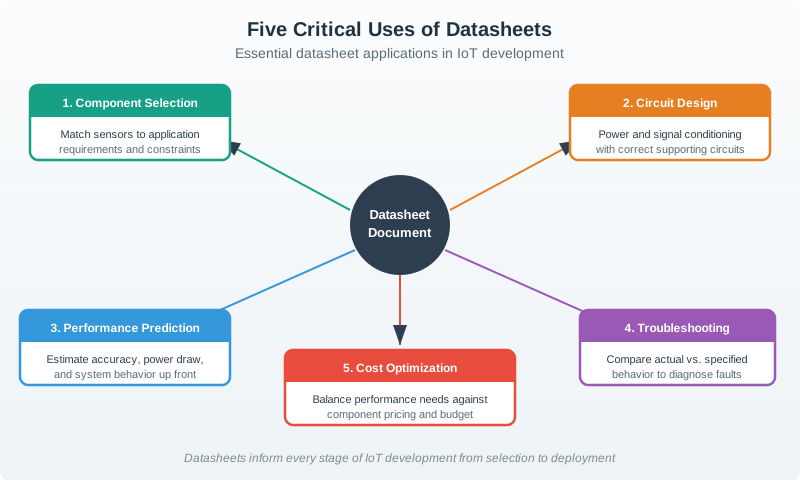
Understanding how to read and interpret specification sheets is a critical skill for IoT developers. This chapter series covers:
Component Selection: Choose the right sensor for your application requirements
Circuit Design: Design proper supporting circuitry (power, signal conditioning)
Performance Prediction: Estimate accuracy, power consumption, and behavior
Troubleshooting: Diagnose problems by comparing actual vs specified performance
Cost Optimization: Balance performance requirements with component costs
Graph diagram
Figure 20.1: Five critical uses of datasheets in IoT development: selecting appropriate sensors and components matching application requirements, designing proper supporting circuitry with correct power and signal conditioning, predicting system performance including accuracy and power consumption, troubleshooting by comparing actual behavior against specifications, and optimizing cost by balancing performance needs against component pricing to achieve project budget goals.
20.3 Chapter Series
This topic has been organized into four focused chapters:
Worked Example: Selecting a Temperature Sensor for Cold Chain Monitoring
Scenario: Designing a refrigerated truck monitoring system. Requirements: -40°C to +85°C range, ±0.5°C accuracy, 2-minute response time, 10-year battery life on CR2032 (220 mAh).
Step 1: Find Candidates
Sensor
DS18B20
TMP117
SHT40
Manufacturer
Maxim
Texas Instruments
Sensirion
Interface
1-Wire
I2C
I2C
Range
-55°C to +125°C
-55°C to +125°C
-40°C to +125°C
Accuracy (spec)
±0.5°C (-10°C to +85°C)
±0.1°C (-20°C to +50°C)
±0.2°C (0°C to +75°C)
Resolution
12-bit (0.0625°C)
16-bit (0.0078°C)
14-bit (0.01°C)
Supply Voltage
3.0-5.5V
1.7-5.5V
1.08-3.6V
Active Current
1.5 mA
135 μA
800 μA
Sleep Current
1 μA
150 nA
0.15 μA
Conversion Time
750 ms (12-bit)
15.5 ms
8.2 ms
Price (1k qty)
$1.20
$2.80
$1.65
Step 2: Check Critical Failure
DS18B20 accuracy at -40°C: Datasheet shows ±2°C outside -10°C to +85°C range → FAILS requirement (±0.5°C needed)
TMP117 accuracy at -40°C: ±0.3°C from -55°C to +125°C → PASSES
SHT40 accuracy at -40°C: ±0.3°C from -40°C to +125°C → PASSES
Eliminate DS18B20.
Step 3: Calculate Power Consumption
Reading interval: 1 read every 120 seconds
Putting Numbers to It
Calculate battery life with proper duty-cycle energy accounting for TMP117 vs SHT40 sensors:
TMP117 energy per reading cycle (2-minute interval):
Try adjusting the parameters to see how active current, sleep current, and reading interval affect battery life. Notice how sleep current dominates the energy budget for long reading intervals!
Step 4: Cost Analysis
For 100-truck fleet with 4 sensors per truck (400 total): - TMP117: 400 × $2.80 = $1,120 - SHT40: 400 × $1.65 = $660
Savings: $460
Step 5: Make Decision
Winner: SHT40
Rationale: - Meets accuracy spec at full -40°C to +85°C range - Battery life exceeds requirement by 12× - 41% cheaper than TMP117 ($460 savings for 400 units) - Bonus: Also measures humidity (may enable future features)
Verification: Order 5 samples, test at -40°C in freezer chamber, confirm ±0.5°C accuracy before production order.
Decision Framework: When to Trust “Typical” vs “Maximum” Specs
Not all datasheet specifications are equal. This framework helps you decide which values to use for design calculations.
Specification Type
Use “Typical” If…
Use “Maximum” If…
Real-World Guidance
Supply Voltage
NEVER
ALWAYS
Design for min/max limits. Device may see 3.6V (charged battery) to 2.0V (depleted). Use max voltage for power dissipation, min voltage for logic levels.
Supply Current (Active)
Risk analysis, rough estimates
Battery life, power supply sizing
A sensor with “5 mA typ, 10 mA max” could draw 10 mA in cold temperatures. Use max for battery/power design.
Supply Current (Sleep)
NEVER
ALWAYS
Sleep current determines battery life. “1 μA typ, 10 μA max” means 10× shorter life at max. Always design for max.
Accuracy at 25°C
Initial calibration
NEVER
The “±0.5°C” accuracy is usually only guaranteed at 25°C. Check temperature coefficient!
Accuracy Over Temp Range
NEVER
ALWAYS
If datasheet says “±1°C (-40°C to +85°C)” that’s the guaranteed accuracy. Use this value.
Response Time (τ63%)
Application notes
NEVER
“Typical” response time is under ideal conditions (high airflow). Max accounts for still air and thermal mass.
ADC Resolution
Feature marketing
Effective resolution (ENOB)
A “24-bit ADC” is marketing. Effective Number of Bits (ENOB) is usually 18-20 bits due to noise. Check ENOB spec.
Communication Speed
Throughput estimates
Timing calculations
“400 kHz I2C” is max clock. Use it for worst-case timing analysis, but actual throughput depends on ACK delays.
Price
NEVER
Volume pricing at your quantity
Price varies 2-10× with volume. Use pricing for your production quantity (100, 1k, 10k, 100k).
Golden Rules:
For reliability: Always use maximum/worst-case
For performance: Use typical for marketing claims, maximum for guarantees
For power: Always use maximum current consumption
For temperature: Check derating curves—accuracy degrades at temperature extremes
Example Calculation:
Wrong (using typical):
Sensor: 2 μA typ, reads every 60s
Battery: 220 mAh
Life = 220 mAh / 0.002 mA = 110,000 hours = 12.5 years
Right (using maximum with margin):
Sensor: 10 μA max (datasheet) × 1.2 safety margin = 12 μA
Battery: 220 mAh × 0.85 (aging/temperature derating) = 187 mAh
Life = 187 mAh / 0.012 mA = 15,583 hours = 1.8 years
Reality check: 12.5 years vs 1.8 years = 7× overestimate using typical!
Key Insight: If your design barely meets requirements using “typical” specs, it will fail in production using real devices with “maximum” specs.
Common Mistake: Ignoring Temperature Derating
The Mistake: An engineer selects a temperature sensor with “±0.5°C accuracy” from the front page of the datasheet. The application monitors freezer temperatures from -20°C to +5°C. In testing, measured accuracy is ±2.5°C—5× worse than expected!
Why It Happens:
Datasheets often highlight “best-case” specifications on the front page, with fine print buried inside:
Front Page (what you see first):
High-Accuracy Digital Temperature Sensor
±0.5°C Accuracy
-40°C to +125°C Range
Page 7 (what you need to read):
Accuracy Specifications:
±0.5°C (typ) @ 25°C
±1.0°C (max) @ 0°C to +70°C
±2.0°C (max) @ -40°C to 0°C
±2.5°C (max) @ +70°C to +125°C
The “±0.5°C” only applies at 25°C room temperature! At -20°C, the guaranteed accuracy is ±2.0°C.
Quantified Impact:
Application
Assumed Spec
Real Spec
Consequence
Freezer monitor (-20°C target)
±0.5°C
±2.0°C
Fails to detect +2°C spoilage threshold
HVAC thermostat (18-26°C)
±0.5°C
±1.0°C
Acceptable (within comfort range)
Industrial oven (150°C)
±0.5°C
±5.0°C (extrapolated)
Completely useless for control
Other Common Derating Scenarios:
ADC Accuracy vs. Temperature:
ESP32 ADC: ±2% (typ) at 25°C → ±5% at 85°C
12-bit ADC (4096 codes) effective becomes 10-bit at high temp
Battery Capacity vs. Temperature:
CR2032: 220 mAh at 25°C → 110 mAh at -20°C (50% loss!)
Alkaline AA: 2500 mAh at 25°C → 500 mAh at -20°C (80% loss!)
Crystal Oscillator Frequency vs. Temperature:
Typical: ±20 ppm at 25°C
Over -40°C to +85°C: ±50 ppm (2.5× worse)
Impact: 1 second/day error → 2.5 seconds/day
Sensor Response Time vs. Temperature:
DHT22: 2s (typ) at 25°C → 8s at -10°C (4× slower)
Thermal time constant increases as viscosity of air changes
The Fix:
Read the ENTIRE datasheet, especially:
“Electrical Characteristics Over Temperature”
“Typical Performance Curves”
Application notes on temperature effects
Look for derating curves (graphs showing performance vs. temperature)
Add margin: If your application operates at temperature extremes, design for 2× worse specs
Test at temperature: Don’t trust room-temperature bench testing. Use thermal chambers or freezers to validate at actual operating conditions.
Verification Checklist:
Real-World Example:
Nordic Semiconductor nRF52832 datasheet:
Supply current: 5.3 mA (typ) at 25°C
Supply current: 6.8 mA (max) at 85°C
Designing for “typical” at room temp would underestimate current by 28% in a hot environment!
Match the Datasheet Section to Its Information
Order the Spec Sheet Reading Process
Label the Diagram
💻 Code Challenge
20.5 Summary
Reading specification sheets is foundational to successful IoT development. The chapters in this series progress from basic vocabulary and datasheet navigation through real-world case studies to systematic selection processes and industry-specific applications.
Key Principle: Always design for worst-case (maximum) specifications, not typical values. “Typical” is marketing; “Maximum” is engineering.
1. Designing to Typical Values Instead of Worst-Case
Datasheet typical values represent median behavior at 25°C with a specific supply voltage. Production devices vary — some will be slower, some draw more current, some have lower output voltage. Always design to the minimum or maximum value as appropriate, with margin.
2. Ignoring Absolute Maximum Ratings for Transient Events
ESD strikes, hot-plug events, and power supply transients can momentarily exceed a component’s absolute maximum ratings. Even a 1 ns overvoltage can cause latent damage that fails weeks later. Add TVS diodes and series resistors on all I/O lines exposed to the outside world.
3. Using One Supplier’s Datasheet for Another Manufacturer’s “Compatible” Part
Alternative-source components with the same part number from a different manufacturer may have different electrical characteristics, package dimensions, or register maps despite claiming compatibility. Always verify with the actual datasheet from the manufacturer whose part is in your BOM.
4. Not Checking Environmental Derating
Component specifications are often given only at 25°C. At 85°C, capacitors may lose 50% of their rated capacitance, resistors drift 1–5%, and IC performance may degrade significantly. Check the datasheet’s temperature derating graphs for all critical parameters.