This section provides hands-on exercises, knowledge checks, and planning worksheets for IoT network design and simulation.
18.2 Learning Objectives
By the end of this chapter, you will be able to:
Design and simulate a smart home network using Cisco Packet Tracer
Key Concepts
Packet Tracer: Cisco’s network simulation tool with IoT device support; allows visual topology building and protocol testing without physical hardware
Simulation Scenario: A defined test case with specific traffic patterns, node placement, and performance metrics to evaluate; must represent realistic deployment conditions
Throughput Test: A simulation experiment measuring data transfer rate under load; identifies bottlenecks and maximum sustainable network capacity
Packet Delivery Ratio (PDR): The fraction of transmitted packets successfully received at the destination; a key simulation metric for reliability assessment
End-to-End Latency: Time from sensor data generation to receipt at the application server; measured across all network hops including queueing and retransmission delays
Topology Import: Loading a pre-defined network layout into a simulator; enables systematic comparison of different topologies under identical conditions
Simulation Warmup Period: The initial simulation time before collecting metrics; needed to allow the network to reach steady-state behavior before performance data is recorded
In 60 Seconds
Hands-on network design exercises build practical proficiency with topology planning, simulation tool configuration, and performance analysis — translating theoretical network design principles into the concrete skills needed to validate real IoT deployments before installation.
Compare Wi-Fi vs Zigbee mesh performance using NS-3
Optimize LoRaWAN gateway placement for smart agriculture
Apply knowledge checks to validate understanding
Use comprehensive planning worksheets for real deployments
For Beginners: Network Design Exercises
This hands-on chapter lets you practice design methodology for IoT through real-world exercises. Think of it as an apprenticeship where you learn by doing – working through design scenarios builds the practical judgment that no amount of theory alone can provide.
Sensor Squad: Practice Makes Perfect!
“Time to get our hands dirty with real design challenges!” said Max the Microcontroller excitedly. “We will design a smart home network, compare Wi-Fi versus Zigbee for different rooms, and figure out where to place LoRaWAN gateways on a farm.”
Sammy the Sensor explained the approach: “Each exercise starts with a scenario – like ‘You need 50 sensors spread across a greenhouse.’ Then you choose the technology, draw the network layout, simulate it in a tool, and check if it meets the requirements. If it does not, you tweak and try again!”
“The exercises build on each other,” said Lila the LED. “First you do a simple home network, then a bigger farm network, then a complex factory. Each one teaches new challenges – like what happens when walls block signals, or when 1,000 sensors all try to send data at the same time.” Bella the Battery reminded everyone, “Do not just read about it – actually TRY the exercises. You learn ten times more by doing than by reading!”
18.3 Prerequisites
Before diving into this chapter, you should be familiar with:
Time: ~60 min | Difficulty: Intermediate | Unit: P13.C05.U01
Exercise 1: Design and Simulate a Smart Home Network with Cisco Packet Tracer
Objective: Learn network topology design by creating a complete smart home IoT network with star topology, testing connectivity, and measuring performance metrics.
Scenario: You need to monitor 50 soil moisture sensors across a 2km x 2km farm. Sensors transmit once per hour. Where should you place LoRaWAN gateways to ensure 99% PDR while minimizing gateway cost?
Steps:
Understand Constraints (10 minutes):
LoRa range: 2-5km (depends on terrain, obstructions)
Gateway cost: $500 each
Sensor cost: $50 each
Required: 99% of sensors must reach at least 1 gateway
Budget: Minimize total gateway count
Initial Design - Single Gateway (15 minutes):
Place 1 gateway at farm center
Use path loss formula: PL(d) = PL(d0) + 10n log10(d/d0)
Assume n=2.5 (outdoor with some obstacles)
Calculate which sensors can reach gateway (RSSI > sensitivity)
Worked example: Using reference loss \(PL(d_0) = 40\) dB at \(d_0 = 1\) m, link budget = \(14 - (-137) = 151\) dB. Maximum range = \(1 \times 10^{(151-40)/(10 \times 2.5)} = 10^{4.44} = 27,542\) m or 27.5 km theoretical. With real-world margin (20 dB for obstacles/fading), practical range ≈ 2,754 m or 2.75 km, explaining why single gateway covers only 60-70% of the 2 km × 2 km farm.
Consider gateway solar power and backhaul (cellular vs Ethernet)
Optimize for redundancy: every sensor reaches 2+ gateways
Calculate battery lifetime if sensors use duty cycling
Real-World Application: This exact exercise is what IoT consultants do when designing deployments! Your optimized design could save thousands in real projects.
Interactive: LoRaWAN Coverage Calculator
Use this interactive tool to visualize gateway coverage and optimize placement for your deployment.
Coverage per AP = pi x (range)^2 = pi x 25^2 = approximately 2,000 m^2
APs needed = Total area / 2,000
Add 20% for overlap and obstacles
For LoRaWAN outdoor:
Gateway coverage = pi x (5km)^2 = approximately 78 km^2
Gateways needed = Total area / 78 km^2
Add redundancy factor (1.5x for dual coverage)
Your calculations:
Total area: _____ m squared (or _____ km squared)
Coverage per gateway/AP: _____ m squared
Gateways/APs needed: _____ (with 20% margin)
Estimated cost: _____ gateways x \(___/gateway = **\)_____**
18.6.5 Step 5: Bill of Materials Template
Item
Quantity
Unit Cost
Total
Notes
End devices
$
$
Sensors/actuators
Gateways/APs
$
$
From Step 4 calculation
Network server
$/month
$/year
Cloud or self-hosted
Simulation software
$
$
NS-3 (free), OPNET, etc.
Test equipment
$
$
Packet analyzer, RF tools
Installation
$
$
Professional or DIY
Total Initial
\(** | |
| **Annual Operational** | | | **\)/year
Subscriptions, cellular
5-year TCO: Initial + (Annual x 5) = $_____
18.6.6 Step 6: Simulation Planning
Tool selection:
Tool
Use Case
Your Need
Selected?
NS-3
Large-scale research, 100k+ nodes
[ ]
Cooja
WSN firmware testing, <1k nodes
[ ]
OMNeT++
Modular protocol development
[ ]
Packet Tracer
Education, small networks
[ ]
NetSim
Commercial with IoT modules
[ ]
Simulation objectives:
Simulation parameters:
Parameter
Value
Source/Justification
Propagation model
Log-distance / Two-ray / …
Indoor/outdoor environment
Path loss exponent (n)
2.0-4.0
Free space=2, indoor=2.5-3, urban=3-4
TX power (dBm)
Device specifications
RX sensitivity (dBm)
Protocol datasheet
Data rate (bps)
Application requirements
Packet size (bytes)
Sensor payload + headers
Traffic pattern
Periodic / Event-driven / Burst
Application behavior
Simulation duration (s)
100-1000+
Allow network stabilization
18.6.7 Step 7: Network Model Configuration
Physical layer:
Propagation: Log-distance with n=_____
TX power: _____ dBm
Sensitivity: _____ dBm
Link budget: TX - Sensitivity = _____ dB
Max range (free space): 10^((Link budget - 40) / (10 x n)) = _____ m
MAC layer:
Access method: CSMA/CA / TDMA / ALOHA
Retry limit: _____ attempts
Backoff: Exponential / Linear
ACK required: Yes / No
Network layer:
Routing: Static / AODV / RPL / Dijkstra
Hop limit: _____ hops max
Route refresh: Every _____ seconds
Application layer:
Protocol: MQTT / CoAP / HTTP / Custom
Traffic: _____ packets/hour per device
Payload: _____ bytes/packet
18.6.8 Step 8: Deployment Checklist
Pre-Deployment:
Simulation-Specific Tasks:
Deployment:
18.6.9 Step 9: Performance Validation
Metrics to compare (Simulation vs Real):
Metric
Simulated
Measured
Delta (%)
Acceptable?
PDR
___%
___%
<10% Delta OK
Avg latency (ms)
___
___
<20% Delta OK
Max latency (99th %ile)
___
___
<30% Delta OK
Throughput (kbps)
___
___
<15% Delta OK
Energy/packet (mJ)
___
___
<25% Delta OK
Network lifetime (months)
___
___
<20% Delta OK
Validation criteria:
PDR difference <5%: Excellent model accuracy
PDR difference 5-10%: Good, acceptable for design decisions
Simulated PDR higher: Add interference model, increase path loss exponent
Simulated latency lower: Add queuing delays, MAC contention overhead
Simulated battery life higher: Include routing overhead, idle listening power
18.6.10 Step 10: Simulation Iteration Log
Track simulation runs to understand parameter sensitivity:
Run
Nodes
TX Power
Routing
PDR
Latency
Notes
1
50
0 dBm
AODV
85%
120ms
Baseline - low PDR
2
50
10 dBm
AODV
94%
115ms
Higher TX improved PDR
3
50
10 dBm
RPL
96%
95ms
RPL better than AODV
4
100
10 dBm
RPL
91%
145ms
Scales but higher latency
5
100
14 dBm
RPL
97%
130ms
Meets requirements
…
Optimal configuration (from simulation):
Nodes: _____
TX power: _____ dBm
Routing: _____
Expected PDR: _____%
Expected latency: _____ ms
18.6.11 Step 11: Failure Scenario Testing
Scenarios to simulate:
Scenario
Description
PDR Impact
Latency Impact
Recovery Time
Single node failure
Random node dies
% to %
_ms to _ms
___s
Gateway failure
Primary gateway down
% to %
_ms to _ms
___s
10% node failure
Widespread outage
% to %
_ms to _ms
___s
Channel interference
Wi-Fi congestion added
% to %
_ms to _ms
N/A
Network partition
Area disconnected
% to %
_ms to _ms
___s
Mitigation strategies validated in simulation:
Dual gateways: PDR maintained at ___% during gateway failure
Mesh routing: Network recovers in ___s from 10% node failure
Frequency hopping: Interference resistance improved by ___%
18.6.12 Step 12: Documentation and Handoff
Deliverables from simulation phase:
Handoff to deployment team:
Recommended topology: _________________
Optimal protocol: _________________
TX power setting: _____ dBm
Gateway count: _____
Expected PDR: _____%
Expected latency: _____ ms
Battery lifetime estimate: _____ months
18.7 Visual Reference Gallery
The following AI-generated visualizations provide alternative perspectives on network design and simulation concepts.
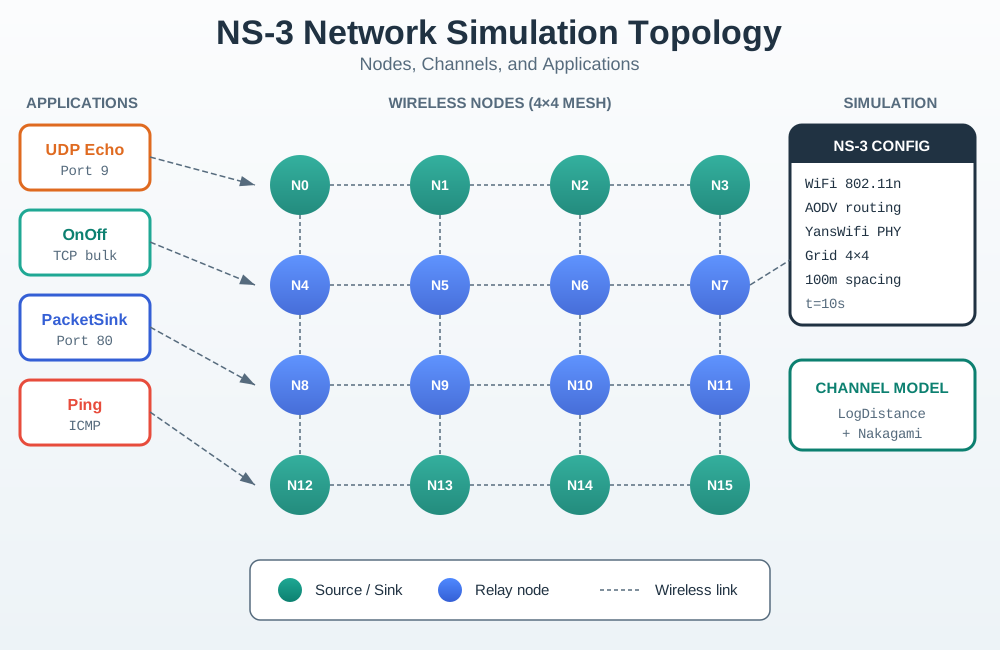
NS-3 Network Topology
Figure 18.1: NS3 Topology
NS-3 provides comprehensive network simulation capabilities, enabling validation of routing protocols, channel models, and network performance before physical deployment.
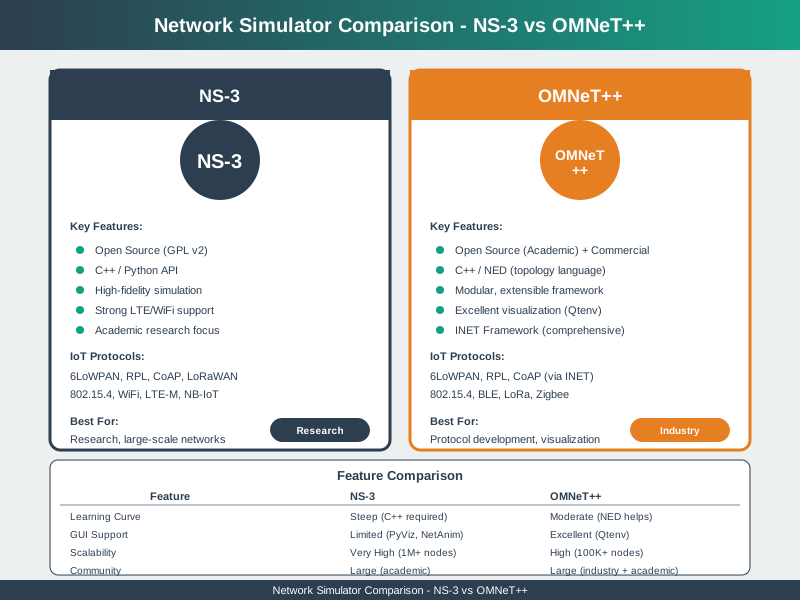
Network Simulator Comparison
Figure 18.2: Network Simulator Comparison
Choosing the right network simulator depends on project requirements, protocol support, scale, and team expertise.
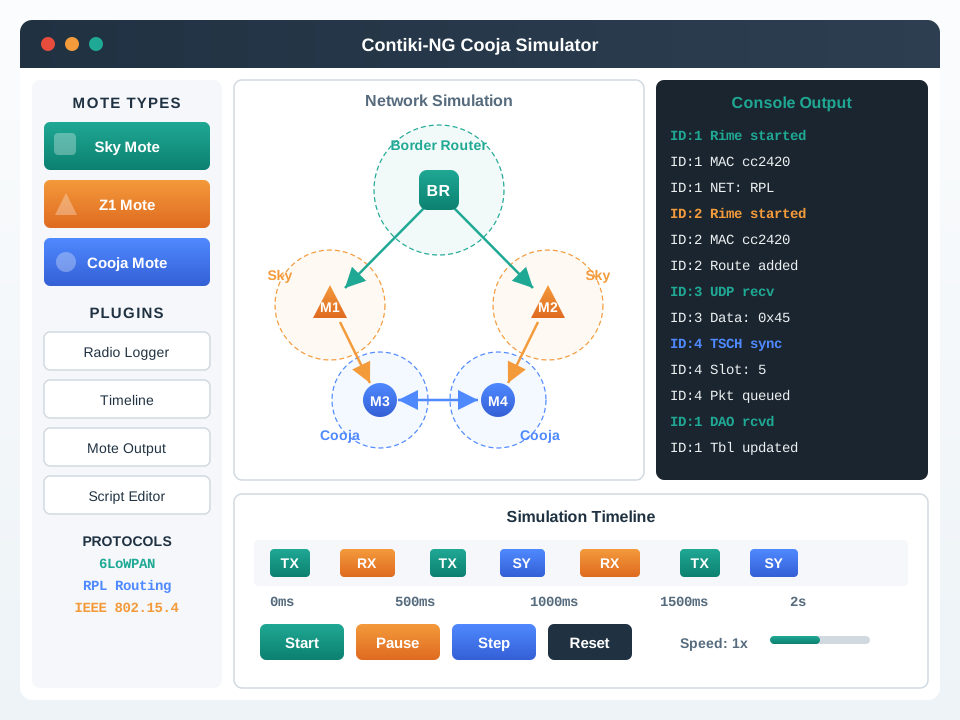
Contiki Cooja WSN Simulator
Figure 18.3: Contiki Cooja
Cooja enables testing actual Contiki firmware on emulated hardware, providing higher fidelity than abstract simulation for wireless sensor networks.
Match the Exercise to Its Learning Goal
Order the Network Design Exercise Progression
Label the Diagram
💻 Code Challenge
18.8 Summary
Hands-On Exercises: Practice network design through three progressive exercises covering Cisco Packet Tracer smart home design, NS-3 Wi-Fi vs Zigbee comparison, and LoRaWAN gateway placement optimization
Knowledge Validation: Use comprehensive quizzes to test understanding of simulation configuration, statistical analysis, validation methodology, and tool selection
Planning Worksheets: Apply 12-step planning process covering requirements gathering, protocol selection, topology design, coverage calculation, simulation planning, and deployment validation
Real-World Application: The exercises and worksheets mirror actual IoT consulting practices for production network deployments
Worked Example: Designing a Multi-Floor Smart Building Mesh Network with Coverage Gaps
Scenario: A 5-story office building (50m x 30m per floor) needs 100 sensors per floor (temperature, occupancy, CO2). Design a Zigbee mesh network ensuring 99% coverage.
Step 1 - Calculate coverage per coordinator:
Indoor Zigbee range: ~30m with n=2.7 path loss
Coverage area per coordinator: π × 30² ≈ 2,827 m²
Floor area: 50m × 30m = 1,500 m²
Naive calculation: 1 coordinator per floor (1,500 < 2,827) ✓
Step 2 - Simulate with Cooja:
Place 100 sensors randomly, 1 coordinator at center
Run 50 iterations with different random placements
Result: 87% ± 4% coverage (FAILED!)
Why naive calculation failed: 30m range assumes circular coverage, but building is rectangular (50m long). Corners are >35m from center coordinator, exceeding reliable range through walls. Also, 13% of sensors randomly placed behind elevator shafts and stairwells (metal + concrete = signal blockers).
Measure actual PDR over 1 week: 97.8% (matches simulation 98.5% ± 0.8%)
Confidence gained → proceed with full 500-sensor deployment
Lesson: Simulation predicted the 1-coordinator design would fail, saving the cost of deploying 500 sensors that wouldn’t work. The 3-coordinator design cost $500 more but delivered 98% vs 87% reliability.
Decision Framework: Wi-Fi vs Zigbee vs LoRa for Different Deployment Scales
Application
Device Count
Coverage Area
Data Rate
Battery Life Target
Recommended Protocol
Cost per Node
Smart Home
10-50
<100 m²
Low-Medium
1-2 years
Zigbee or BLE Mesh
$8-15
Office Building
100-500
<5,000 m²
Medium
2-5 years
Zigbee (mesh coverage)
$12-20
Industrial Plant
500-5,000
<50,000 m²
High reliability
5-10 years
WirelessHART or ISA100
$50-120
Smart Campus
1,000-10,000
<1 km²
Low-Medium
5-10 years
LoRaWAN (star-of-stars)
$15-30
Smart City
10,000-1M
>10 km²
Low
10+ years
LoRaWAN or NB-IoT
$20-40
Best For:
Wi-Fi: High data rate (camera, audio), AC-powered devices, existing infrastructure
LoRa: Long range, ultra-low power, sparse wide-area deployments (agriculture, city)
Cellular (NB-IoT): Mobile devices, critical reliability, SLA requirements
When to mix protocols: Use Zigbee clusters connected to LoRa backhaul for large farms: Zigbee for 10-20 local sensors (frequent data), LoRa to transmit aggregated data to cloud (infrequent, long-range).
Common Mistake: Ignoring Gateway Placement and Assuming Uniform Coverage
What they do wrong: Engineers count devices and calculate “I have 200 sensors in a 2 km² area, LoRa has 5 km range, so 1 gateway at the center will cover everything.” They place the gateway, deploy sensors, and discover 30% packet loss.
Why it fails: Radio signals don’t respect geometric circles. Terrain elevation, buildings, vegetation, and earth curvature block signals. A hilltop gateway covers 10 km in one direction but only 2 km toward a valley. Trees attenuate LoRa signals by 10-20 dB, cutting range in half.
Correct approach:
Use terrain elevation data (SRTM or LIDAR)
Run propagation simulation (RadioMobile, CloudRF, or NS-3 with terrain import)
Identify dead zones BEFORE deployment
Place gateways to cover dead zones, not just for distance
Real-world example: A vineyard deployed 300 soil sensors across 2 km² with a single LoRa gateway at the farmhouse (center). Simulation showed 100% theoretical coverage at 5 km range. Reality: 82% coverage. The 18% gap was sensors in a low-lying section blocked by a ridgeline (not visible on flat map but 15m elevation difference created Fresnel zone blockage). Adding a $400 second gateway on the ridge restored 98% coverage. Lesson: Terrain matters more than distance for sub-GHz IoT. Always simulate with real elevation data, not flat-earth assumptions.
Concept Relationships: Network Design Exercises in IoT Engineering
1. Using Default Simulator Parameters Without Calibration
Simulators come with default radio models and channel parameters from generic environments. Without calibrating these to your actual deployment environment (indoor office, outdoor field, industrial building), simulation results may differ significantly from real-world performance. Compare a small pilot deployment against simulation predictions and adjust parameters.
2. Only Simulating the Happy Path
Testing only with all nodes active and no interference gives optimistic results. IoT networks face intermittent node failures, channel congestion, and mobility. Include failure injection (randomly disabling nodes) and interference models in your simulation exercises.
3. Measuring Performance Only at Zero Load
Latency and PDR at zero background traffic look excellent in any topology. Add realistic traffic load (all nodes transmitting at their planned interval) and measure performance under load — particularly important for star topologies where gateway bandwidth is shared.
4. Not Documenting Simulation Parameters
Exercises without documented simulation parameters (radio model, channel model, node count, traffic rate, simulation duration) cannot be reproduced or compared across team members. Always record full parameter sets with results.
18.10 What’s Next
The next section covers Network Traffic Analysis, which examines how to capture, monitor, and analyze the actual traffic flowing through your IoT networks. Understanding real traffic patterns complements simulation and enables optimization and troubleshooting of deployed systems.