10 Online Hardware Simulators
More
Depth: Practitioner
Progress saves as you read. Mark sections complete as you go; your progress appears in the sidebar.
Online hardware simulators run a model of a microcontroller, sensor, or circuit in a browser, with no local toolchain and no physical parts. You wire a board, drop in firmware, and watch it run in seconds, and you can share the whole thing as a link. That convenience is real and useful — but convenience is not fidelity, and a hosted model is still a model.
This chapter treats online simulators the way the rest of the module treats evidence: a browser run is trustworthy only when its model boundary, scenario, observed behavior, and the specific physical questions it cannot close are recorded alongside the result.
10.2 Overview: Convenience Is Not Fidelity
This section: Overview: Convenience Is Not Fidelity — An online hardware simulator hosts a model of a microcontroller-class board and common peripherals in the browser.
An online hardware simulator hosts a model of a microcontroller-class board and common peripherals in the browser. You assemble a circuit, load firmware, and run it — without installing a toolchain, soldering anything, or owning the part. Browser-based simulators such as Wokwi and Tinkercad Circuits make this immediate and shareable, which is genuinely valuable for learning, for quick scenario checks, and for handing a runnable example to another reviewer.
The single most important idea is to separate two things that feel similar but are not: convenience and fidelity. A hosted simulator is fast, accessible, and easy to share — that is convenience. None of that changes the fact that it runs a model, and a model represents some behavior and simplifies the rest. The result is bounded by what the online model represents, so a passing browser run is "the firmware logic behaved this way against a controlled, modeled input," not "the device works." Convenience makes the model easy to reach; it does not make the model more like reality.
If you only need the intuition, this layer is enough: online simulators are fast, shareable models that run firmware and circuits in a browser. Their evidence is bounded by the model, so a useful run records the project reference, the scenario, what was observed, and the specific physical questions — analog, radio, power, timing — the model could not close.
Think of a flight-simulator app on a phone versus a certified full-motion simulator. Both are models of flying, and the phone app is far more convenient. No one would sign off a pilot on the phone app, because convenience and fidelity are different axes. An online hardware simulator sits at the convenient end: excellent for exploring logic and interfaces, not a substitute for the analog and physical fidelity a real board provides. Trace Figure 10.1 to separate the browser result from the later hardware claim.
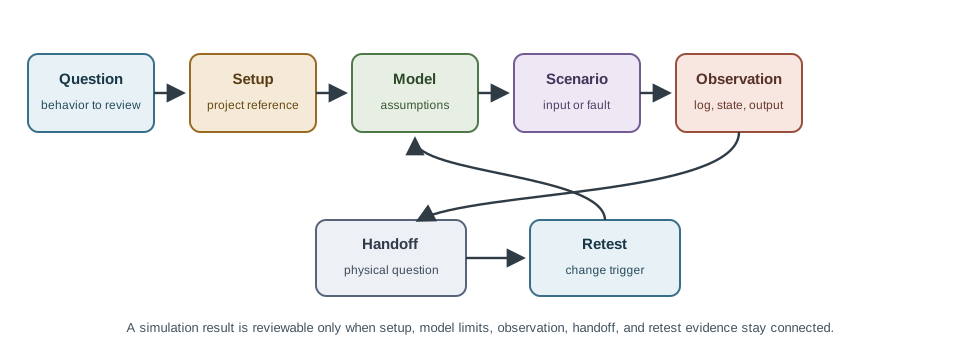
Read Figure 10.1 from the test question into simulator setup, model boundary, scenario input, and observation. Those stages produce a reviewable browser result. Continue to the hardware handoff and retest trigger: they name the physical effect the model cannot prove and the change that invalidates the recorded result. The final two stages keep convenience honest, connecting fast collaborative experiments to the chapter’s broader rule that evidence must remain bounded by model fidelity.
The One-Minute View
Instant and shareable
No toolchain, no parts, no setup; a scenario runs in the browser and travels as a link another reviewer can open.
Still a model
Convenience does not add fidelity; inputs are often idealized and the result holds only inside the model boundary.
Name the handoff
Analog, radio, power, calibration, timing, and mechanical behavior stay open as specific hardware questions.
Beginner Examples
Read these examples as a progression from the simplest observation to the boundary that still needs evidence. Begin with this case: a learner wires a sensor and an LED in the browser and confirms the firmware turns the LED on above a threshold — logic checked, no parts needed. Then examine how a reviewer opens a shared simulator link to reproduce a colleague's firmware behavior without rebuilding the project locally. Finish by considering how a controlled invalid reading is injected to confirm the firmware reaches its error path — easy in the browser, awkward on a bench. Together, the examples connect an intuitive result to a bounded engineering claim.
Overview Knowledge Check
If you can separate "easy to reach" from "close to reality," you have the core idea. Continue to Practitioner for what online simulators are good for and the record that keeps a run reviewable.
10.3 Practitioner: What They Close, What They Hand Off
This section: Practitioner: What They Close, What They Hand Off — Online simulators earn their place on bounded questions you can phrase as a repeatable scenario, and they fail when a claim depends on physical behavior the model never represented.
Online simulators earn their place on bounded questions you can phrase as a repeatable scenario, and they fail when a claim depends on physical behavior the model never represented. Knowing which side of that line a question falls on is most of the skill.
What an Online Simulator Cannot Close
Do not use a browser pass to close claims that depend on physical effects outside the model: sensor calibration and drift, radio propagation and antenna placement, power transitions and supply margin, analog noise and tolerance, thermal behavior, connector or enclosure fit, and event-order effects the model does not represent. Each of these becomes a hardware handoff, and the handoff should be specific. "Needs a hardware test" is weak; "validate the sensor startup response on the physical board, because the online model injects a controlled value" tells the next reviewer exactly what to do. Inspect Figure 10.2 to preserve that distinction.Before accepting a browser simulation, inspect Figure 10.2 to separate the repeatable logic observation from the physical behavior the online model cannot represent.
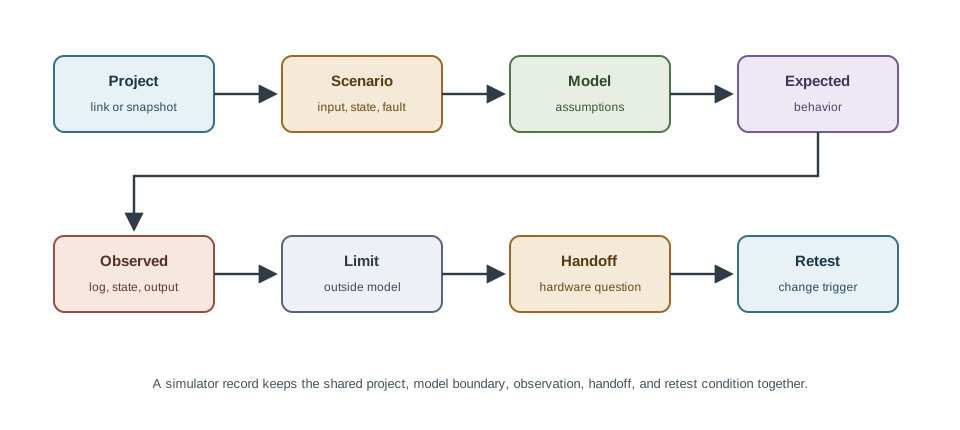
Read Figure 10.2 from the shared project link and test inputs. Another reviewer can use them to repeat both the normal and invalid runs. Compare the expected rejection and status event with the output; do not record only “pass.” Then read the model limit. The injected value is ideal, so start-up and out-of-range behavior on a real sensor remain open. The handoff names that board test in clear terms. Last, note the triggers for changes to state logic, sensor model, message shape, or real behavior. The record keeps useful logic proof while leaving physical claims outside the browser model.
Read Figure 10.2 from the project reference and scenario so another reviewer can reopen the same run. Next compare model assumptions, expected behavior, and observed behavior. Finish with the model limit, named hardware handoff, and retest trigger; these fields prevent a browser-only pass from closing a physical claim. The record completes the chapter’s hand-off narrative by carrying useful online evidence forward without claiming fidelity the simulator does not have.
Worked Example: A Sensor Error Path
Suppose a firmware change should reject an invalid sensor value and publish a status event. An online simulator can exercise that path with a controlled normal input and a controlled invalid input, and the run can record that the firmware accepted the valid value, rejected the invalid one, and emitted the expected status. That is solid logic evidence — but the record must state that the sensor value was an injected, idealized input. So the open question becomes specific: "confirm the real sensor's startup and out-of-range behavior on the physical board, because the online model used a controlled value." The firmware decision path can be accepted for review; the physical sensor behavior stays a named handoff, and retest is required if the state logic, sensor model, message shape, or real sensor behavior changes.
Practitioner Knowledge Check
If you can phrase a question as a scenario, keep the record, and write a specific handoff, you can stop here. Continue to Under the Hood for the reproducibility and fidelity mechanisms behind these tools.
10.4 Under the Hood: Reproducibility, Idealized Models, and the Reality Gap
This section: Under the Hood: Reproducibility, Idealized Models, and the Reality Gap — The deeper layer is about why a confident browser pass can still mislead.
The deeper layer is about why a confident browser pass can still mislead. Three mechanisms matter: how hosted projects threaten reproducibility, how online models idealize inputs, and how the reality gap applies even to a tidy shared link.
A Shared Link Is Not Automatically a Record
The convenience that makes online simulators shareable also creates a reproducibility trap. A link points at a hosted project that can change — firmware edited, components swapped, the platform itself updated — so a link without a captured snapshot, firmware revision, scenario name, and expected observation is not durable evidence; it is a pointer that may not show tomorrow what it showed today. A reviewer who receives only a runnable link can see that something runs, but cannot tell which change it represents or what it was meant to prove. Preserve the project reference, the revision, the scenario, and the expected and observed behavior, so the finding survives after the browser tab closes.
Online Models Idealize to Stay Accessible
To run instantly in a browser and stay easy to use, online simulators typically model at a functional or behavioral level rather than reproducing analog physics or exact device timing. Inputs are often clean, controlled values; a modeled sensor may have no noise or drift, a modeled supply may never sag, and timing may be approximate. Those idealizations are exactly what make the tool fast and approachable — and each one is a place where browser behavior can diverge from a real board. The skill is to record the idealizations so a reviewer knows which physical effects were assumed away.
The Reality Gap Still Applies
The gap between simulated and real behavior — the reality gap, or sim-to-real gap — does not disappear because the model is hosted and convenient. Firmware tuned until it is perfect in a browser simulator can still misbehave on hardware that has the noise, timing, and analog dynamics the model omitted. The defense is the same as for any model: treat the online result as bounded, validate the behavior that matters on a real board before trusting it, and write the handoff that names the physical question the browser could not answer.
Common Pitfalls
Review these failure modes in the order they can weaken or invalidate the result. Begin with Treating a shared link as evidence. Without a snapshot, revision, and scenario, a link is a pointer, not a record. Then examine Reading convenience as fidelity. Instant and shareable does not mean close to the real board. Then examine Trusting idealized inputs. Controlled values hide the noise, drift, and tolerance a real sensor brings. Then examine Claiming real-time behavior. Functional timing is not interrupt-accurate or analog-accurate. Finish with Vague handoffs. "Needs a hardware test" does not tell the next reviewer which physical behavior to check. This sequence connects each warning to the evidence a reviewer should demand before accepting the claim.
Under-the-Hood Knowledge Check
At this depth, an online simulator is a convenient front door to a model, not a shortcut around fidelity: pin the project so the result is reproducible, record the idealized inputs, keep real-time and analog claims off the browser run, and validate on hardware what the model could not. The strongest online-simulation evidence states the snapshot, the scenario, what was observed, and the specific physical question it handed onward.
10.5 Summary
This section: Summary — Online hardware simulators run firmware and circuits in a browser with no toolchain or parts, which makes them fast, accessible, and shareable.
Online hardware simulators run firmware and circuits in a browser with no toolchain or parts, which makes them fast, accessible, and shareable. Convenience and fidelity are different axes: being hosted and instant does not make a model more like reality, so a browser pass is bounded evidence, not proof the device works. They are well suited to firmware logic, interface and message checks, fault and edge injection, and collaboration, when each run is phrased as a repeatable scenario. They cannot close claims that depend on physical behavior the model omits — calibration, radio, power, analog noise, thermal, mechanical, and event-order effects — which become specific hardware handoffs. A shared link is not automatically a record: a hosted project can change, so preserve a pinned snapshot, firmware revision, scenario, and expected and observed behavior. Online models idealize inputs to stay accessible, so they typically model functional behavior rather than analog physics or real-time timing; record the idealizations. The reality gap still applies, so validate the behavior that matters on a real board and write a handoff that names the physical question the browser could not answer.
Online simulation tools should be used with clear assumptions about model fidelity, reproducibility, collaboration, and what the result cannot prove. A browser run is evidence only when the pinned project, scenario, observed behavior, and the specific hardware handoff are recorded.
10.6 See Also
This section: See Also
Hardware Simulation Fundamentals
The model-boundary, scenario, and hardware-handoff discipline that every simulator run depends on.
Emulation & Debugging
Step up to running the actual firmware image on an emulated platform for register-level debugging.
Network Simulation Tools
Move from a single modeled board to many nodes, links, and traffic at scale.
Find help
3 reviewed answers.
Where should I start in a module?
Open the module page from the sidebar to see its chapters in order. Use the module map to return to a topic you need.
Modules and pathsReviewed
What can I try when a project does not work?
Check the symptom, then work through the diagnostic steps. Keep the error message and the smallest example that reproduces it.
When you are stuckReviewed
How do interactive examples work?
Use the interactive guide to check how examples and simulations work before changing your project.
Interactive examples guideReviewed