Open-Source and Commercial Platforms for IoT Network Testing
In 60 Seconds
Network simulation tools create virtual models of IoT networks, enabling protocol testing, performance estimation, and problem identification without expensive physical hardware – a simulation can model 1,000 sensors in hours versus weeks of setup and thousands of dollars for a physical testbed. Choose tools based on three factors: scale (NS-3 excels at 10,000+ node academic research), fidelity (Cooja runs actual Contiki firmware for embedded code validation), and protocol support (OMNeT++ offers modular extensibility for custom protocols). A good simulation workflow reduces development time by 40-60% by catching design flaws before they become costly field failures.
Select appropriate simulation tools for different IoT project requirements (scale, fidelity, protocols)
Compare NS-3, Cooja, OMNeT++, and OPNET across key dimensions (accuracy, scale, learning curve, cost)
Distinguish simulation from emulation and choose the right approach for validation goals
Configure basic NS-3 simulations using the provided code examples
Evaluate trade-offs between simulation fidelity, execution speed, and development effort
For Beginners: Network Simulation Tools
Network simulation tools let you test your IoT network on a computer before building it in real life. Think of it like playing a video game version of your sensor network - you can see if 1,000 sensors can talk to each other, if messages get lost, or if batteries run out too fast, all without spending money on actual hardware. It’s like having a crystal ball that shows you problems before they happen, saving you from expensive mistakes when you deploy real devices.
13.2 Introduction to Network Simulation Tools
Time: ~30 min | Level: Advanced | Unit: P13.C05.U03
Network simulation is essential for IoT system design because physical deployments at scale are expensive, time-consuming, and often impractical during development. Simulation tools allow you to test protocols, validate architectures, and estimate performance before committing to hardware.
13.2.1 The Simulation Development Workflow
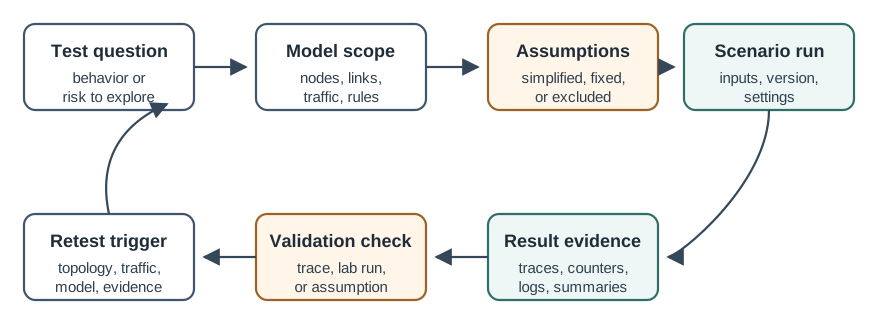
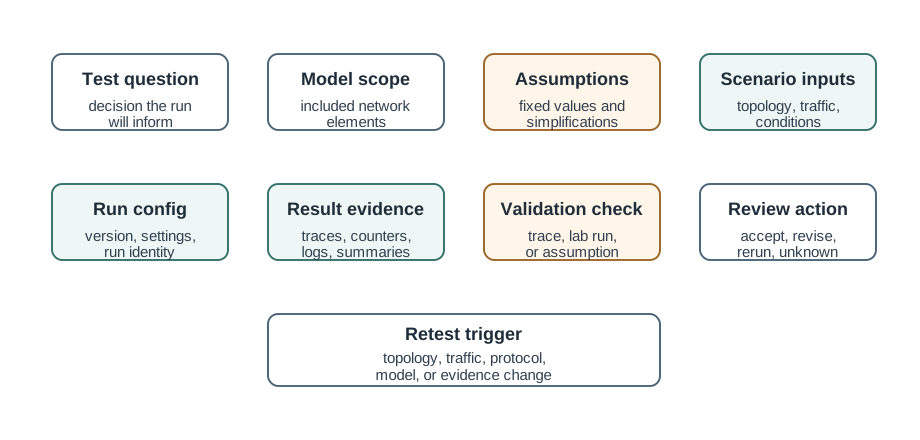
Before diving into specific tools, it’s important to understand the typical workflow for using simulation in IoT development:
This iterative workflow emphasizes that simulation is not a one-time activity but a continuous process of refinement. Most successful IoT projects cycle through multiple simulation rounds before moving to physical deployment.
Why Simulation Matters for IoT: Building a physical test network of 1,000 sensors costs thousands of dollars and weeks of setup time. A simulation can model the same network in hours, enabling rapid design iteration and “what-if” analysis. However, simulations are only as good as their models - understanding each tool’s strengths and limitations is critical.
Core Concept: Network simulation tools create virtual models of IoT networks, allowing you to test protocols, estimate performance, and identify problems without physical hardware. Each tool makes trade-offs between accuracy, scale, and ease of use.
Why It Matters: Deploying sensors in the field is expensive (hardware, labor, time). Simulation lets you catch design flaws early - before they become costly fixes. A good simulation workflow can reduce development time by 40-60% by identifying issues in the virtual environment.
Key Takeaway: For IoT projects, choose your simulation tool based on three factors: (1) Scale - how many nodes do you need to model? (2) Fidelity - do you need exact firmware behavior or approximate models? (3) Protocols - does the tool support your specific wireless/application protocols? NS-3 excels at large-scale academic research, Cooja is best for Contiki/embedded firmware validation, and OMNeT++ offers modular extensibility for custom protocols.
For Kids: Meet the Sensor Squad!
Building a City Before You Build It!
13.2.2 The Sensor Squad Adventure: The Virtual Test Lab
Sammy the Temperature Sensor is excited! The Mayor wants to put 1,000 sensors all around the city to measure temperature everywhere. But wait - that’s going to cost a LOT of money. What if they put sensors in the wrong places? What if they don’t work together?
“I know!” says Lila the Light Sensor. “Let’s build a pretend city first - on the computer!”
So the Sensor Squad uses a special program called a simulator. It’s like a video game where they can place pretend sensors anywhere they want. They can see if messages get lost, if batteries run out too fast, or if some sensors can’t reach the others.
Max the Motor runs the simulation: “Look! In our pretend city, the sensors near the park can’t talk to the main computer because there are too many buildings in the way!”
“Good thing we found that problem NOW,” says Bella the Button, “instead of AFTER we bought all those expensive sensors!”
13.2.3 Key Words for Kids
Word
What It Means
Simulator
A computer program that pretends to be a real network - like a video game for testing sensors!
Virtual
Something that exists in the computer but not in the real world
Model
A simplified copy of something real - like a toy car is a model of a real car
Test
Trying something out to see if it works before doing it for real
13.2.4 Try This at Home!
Before building a LEGO tower, you might draw it on paper first to plan where each piece goes. That drawing is like a simulation! Can you draw a plan for something you want to build, then see if your plan works when you actually build it?
13.3 Tool Selection Decision Framework
Before diving into individual tools, use this decision framework to identify which tool fits your project:
Interactive Tool Selection Assistant
Answer a few questions about your project to get a personalized tool recommendation:
Show code
viewof needFirmware = Inputs.radio( ["Yes - I need to test actual embedded code","No - Abstract models are fine"], {label:"Do you need to test firmware/embedded code?",value:"No - Abstract models are fine"})viewof networkScale = Inputs.range([10,100000], {label:"How many nodes do you need to simulate?",step:10,value:100})viewof projectType = Inputs.select( ["Academic Research","Firmware Development","Protocol Development","Enterprise Planning","Learning/Teaching"], {label:"What is your primary project type?",value:"Learning/Teaching"})viewof budget = Inputs.select( ["Zero budget (open source only)","Academic budget (<$1,000)","Commercial budget (>$1,000)"], {label:"What is your budget?",value:"Zero budget (open source only)"})viewof expertise = Inputs.select( ["Beginner (no networking background)","Intermediate (basic C++/networking)","Advanced (strong C++ and protocols)"], {label:"What is your technical expertise level?",value:"Beginner (no networking background)"})
Show code
functionrecommendTool(firmware, scale, type, budget, expertise) {// Firmware testing requirement overrides most other factorsif (firmware ==="Yes - I need to test actual embedded code") {return {tool:"Cooja",reason:"You need to test actual embedded code. Cooja runs real Contiki/Contiki-NG firmware, allowing you to validate your exact production code in a simulated network.",color:"#16A085",limitation: scale >1000?"⚠️ Note: Cooja may struggle with "+ scale +" nodes. Consider testing a representative subnet (~100 nodes) instead.":"" }; }// Scale requirementif (scale >10000) {return {tool:"NS-3",reason:"Your scale requirement ("+ scale.toLocaleString() +" nodes) exceeds what most tools can handle. NS-3 is the only free tool that scales to 100,000+ nodes efficiently.",color:"#2C3E50",limitation: expertise ==="Beginner (no networking background)"?"⚠️ Note: NS-3 has a steep learning curve. Budget 2-4 weeks for learning if you're new to C++ and networking.":"" }; }// Project type considerationsif (type ==="Academic Research") {return {tool:"NS-3",reason:"NS-3 is the academic standard for network research. Your results will be reproducible and accepted by peer reviewers at IEEE/ACM conferences.",color:"#2C3E50",limitation:"" }; }if (type ==="Protocol Development") {return {tool:"OMNeT++",reason:"OMNeT++'s modular NED language makes it ideal for developing and testing custom protocols. The Eclipse-based IDE provides excellent debugging tools.",color:"#3498DB",limitation: budget ==="Zero budget (open source only)"?"⚠️ Note: OMNeT++ is free for academic use but requires a commercial license for commercial projects.":"" }; }if (type ==="Enterprise Planning") {if (budget ==="Commercial budget (>$1,000)") {return {tool:"OPNET/Riverbed Modeler",reason:"For enterprise deployments, OPNET provides professional support, validated models, and vendor guarantees that justify the cost.",color:"#E67E22",limitation:"" }; } else {return {tool:"NS-3",reason:"For enterprise planning on a budget, NS-3 provides professional-grade simulation capabilities without licensing costs.",color:"#2C3E50",limitation:"⚠️ Note: No professional support available - rely on community forums." }; } }if (type ==="Learning/Teaching") {if (expertise ==="Beginner (no networking background)") {return {tool:"Cooja",reason:"Cooja's visual GUI and interactive timeline make it perfect for learning IoT networking concepts. You can see exactly what each node is doing without writing code.",color:"#16A085",limitation:"" }; } else {return {tool:"NS-3 or OMNeT++",reason:"Both NS-3 and OMNeT++ are excellent teaching tools with comprehensive documentation. NS-3 for network fundamentals, OMNeT++ for protocol design.",color:"#3498DB",limitation:"" }; } }// Default recommendation based on scale and expertiseif (scale <=1000&& expertise ==="Beginner (no networking background)") {return {tool:"Cooja",reason:"For moderate scale and beginners, Cooja offers the best learning experience with its visual interface.",color:"#16A085",limitation:"" }; }// Default to NS-3 for flexibilityreturn {tool:"NS-3",reason:"NS-3 provides the best balance of features, scale, and cost for general-purpose IoT network simulation.",color:"#2C3E50",limitation:"" };}recommendation =recommendTool(needFirmware, networkScale, projectType, budget, expertise)
The flowchart above shows the primary decision points. Your answers to three questions - firmware testing needs, scale requirements, and protocol complexity - will narrow down your options significantly.
13.4 NS-3 (Network Simulator 3)
NS-3 is the gold standard for academic IoT network research. It’s open-source, highly accurate, and scales to massive networks - but comes with a steep learning curve.
13.4.1 Overview and Key Features
Description: Open-source discrete-event network simulator widely used in academic research and industry.
<strong>Key Advantages:</strong><br/>
• Simulation tests at <strong>${scaleRatio}× the scale</strong> (${targetNodes.toLocaleString()} nodes vs ${pilotNodes})<br/>
• Costs <strong>${savingsPercent}% less</strong> ($${savings.toLocaleString()} saved)<br/>
• Completes <strong>${timeRatio}× faster</strong> (${simWeeks} weeks vs ${physicalWeeks} weeks)<br/>
• Can explore 10+ network configurations for the price of one physical pilot<br/>
• Physical testing still needed for RF validation and edge cases
Example scenario: Smart city deployment with 5,000 LoRaWAN sensors:
Advantage: Simulation tests at full scale (5,000 nodes vs 100), costs 70% less ($16,100 saved), and completes 2× faster. Can explore 10+ network configurations for price of one physical pilot. Physical testing still needed for RF validation and edge cases.
Detailed PHY/MAC layer modeling
Integration with real network stacks (emulation mode)
Python and C++ APIs
Extensive visualization tools
13.4.2 IoT Protocol Support
NS-3 provides native support for the most common IoT networking protocols:
Protocol
NS-3 Module
Typical Use Case
IEEE 802.15.4
lr-wpan
Zigbee, Thread physical layer
LoRaWAN
lorawan
Long-range sensor networks
6LoWPAN
sixlowpan
IPv6 over low-power networks
Wi-Fi 802.11
wifi
High-bandwidth IoT devices
LTE/5G NR
lte, nr
Cellular IoT (NB-IoT, LTE-M)
13.4.3 Typical Use Cases
NS-3 is particularly well-suited for:
Large-scale sensor network performance analysis: Model thousands of sensors before deployment
Protocol comparison studies: Compare LoRaWAN vs NB-IoT for your specific scenario
Energy consumption modeling: Estimate battery life under different traffic patterns
Network capacity planning: Determine how many gateways you need for a given area
13.4.4 Getting Started Example
The following C++ code creates a simple Wi-Fi IoT simulation with 10 sensor nodes communicating with a gateway:
What this code demonstrates: The example creates a star topology where 10 sensor nodes connect to a single Wi-Fi access point (the gateway). The mobility helper positions nodes randomly in a 100x100 meter area. This is a starting point - real simulations would add application-layer traffic, energy models, and data collection.
13.4.5 Strengths and Limitations
NS-3 Strengths
Highly accurate: Detailed PHY/MAC layer models validated against real hardware
Active community: Regular updates, extensive documentation, responsive mailing lists
Free and open source: No licensing costs for academic or commercial use
Scalable: Can model networks far larger than physical testbeds allow
NS-3 Limitations
Steep learning curve: Requires C++ programming knowledge and understanding of network protocols
Complex setup: Build system and dependencies can be challenging for beginners
Visualization: Requires external tools (NetAnim, PyViz) for visual inspection
Development time: Creating custom protocol models takes significant effort
13.5 Cooja (Contiki Network Simulator)
Cooja takes a fundamentally different approach from NS-3: instead of modeling network behavior, it runs actual embedded code. This makes it invaluable for firmware development and validation.
13.5.1 Overview and Key Features
Description: Simulator specifically designed for wireless sensor networks, part of the Contiki OS project.
Key Features:
Simulates actual Contiki OS code (cross-level simulation)
Node-level and network-level simulation
Interactive GUI for visualization
Radio medium simulation (UDGM, MRM)
Support for real sensor platforms (Sky, Z1, etc.)
Timeline and packet tracking
13.5.2 IoT Protocol Support
Cooja’s protocol support is tightly integrated with the Contiki-NG operating system:
Protocol
Support Level
Notes
ContikiMAC, X-MAC
Native
MAC protocols optimized for duty cycling
RPL
Native
Routing Protocol for Low-Power and Lossy Networks
6LoWPAN
Native
IPv6 header compression
CoAP
Native
Constrained Application Protocol
MQTT-SN
Via library
MQTT for Sensor Networks
13.5.3 Typical Use Cases
Cooja excels at:
WSN protocol development: Test new MAC or routing protocols before hardware deployment
RPL routing optimization: Tune DODAG parameters for your specific topology
Power consumption analysis: Measure code-level energy usage with cycle-accurate timing
Code testing before hardware: Catch bugs in firmware without flashing physical devices
13.5.4 Getting Started Workflow
Unlike NS-3’s code-based approach, Cooja uses a graphical interface:
Create new simulation: Launch Cooja, select “New Simulation”
Perfect for Contiki/Contiki-NG: Tight integration with the OS ecosystem
Interactive debugging: Step through code, inspect variables, observe state changes
Cooja Limitations
Limited to Contiki ecosystem: Cannot simulate FreeRTOS, Zephyr, or bare-metal code
Smaller scale: Practical limit around 500-1,000 nodes before simulation becomes too slow
CPU-intensive: Each mote runs its own virtual processor, consuming host CPU cycles
Contiki learning curve: Must learn Contiki OS to write simulated applications
13.6 OMNeT++ with INET Framework
OMNeT++ occupies a middle ground between NS-3’s scale and Cooja’s accessibility. Its modular architecture makes it particularly suitable for developing and testing custom protocols.
13.6.1 Overview and Key Features
Description: Modular discrete-event simulator with extensive networking framework.
Key Features:
Modular architecture using NED (Network Description) language
GUI-based model design with drag-and-drop components
Comprehensive protocol library in INET framework
Scalable parallel simulation across multiple cores
Rich visualization and analysis tools
Academic (free) and commercial licenses
13.6.2 IoT Protocol Support
OMNeT++ supports IoT protocols through the INET framework and community extensions:
Protocol
Source
Notes
802.11, 802.15.4
INET
Standard wireless PHY/MAC
RPL, AODV
INET
Routing protocols
MQTT, CoAP
Community
Application-layer protocols
LoRaWAN
Flora extension
Long-range IoT
TSN
INET
Time-Sensitive Networking for industrial IoT
13.6.3 NED Language Example
OMNeT++ uses the NED (Network Description) language to define network topologies declaratively:
What this code demonstrates: The NED file defines a network with a configurable number of sensors (default 20), a gateway, and an 802.15.4 radio medium. The @display annotations control visual placement in the OMNeT++ GUI. This declarative approach separates network topology from protocol implementation.
13.6.4 Strengths and Limitations
OMNeT++ Strengths
Powerful modular design: Components can be reused and combined flexibly
Excellent IDE integration: Eclipse-based IDE with debugging, profiling, visualization
Strong academic community: Extensive research papers and contributed models
OMNeT++ Limitations
Complex learning curve: NED language, C++ modules, and framework concepts to master
Commercial license required: Free for academic use, paid license for commercial products
Heavy resource requirements: Large simulations need significant RAM and CPU
INET complexity: The framework is powerful but has many interdependencies
13.7 OPNET (Riverbed Modeler)
OPNET represents the commercial end of the simulation spectrum. It’s used by enterprises and government agencies where professional support and validated models are requirements.
13.7.1 Overview and Key Features
Description: Commercial network simulation platform with enterprise-grade features.
The Challenge: Deploy 2,000 environmental sensors across a university campus to monitor air quality, temperature, humidity, and occupancy in 150 buildings.
Simulation Approach:
Initial Design (Week 1-2): Used NS-3 to model network topology options
Compared mesh vs star-of-stars architecture
Simulated 2,500 nodes (including 25% contingency)
Evaluated LoRaWAN vs Zigbee coverage patterns
Protocol Tuning (Week 3-4): Used Cooja for firmware validation
Tested ContikiMAC duty cycling on representative 50-node subnet
Identified bug in sleep/wake synchronization before hardware order
Validated RPL routing convergence time
Capacity Planning (Week 5): Returned to NS-3 for stress testing
Hybrid Testing: Same protocol implementation tested on real hardware AND simulation
Real/Simulated Sink: Enables seamless switching between physical deployment and virtual testing
Source: NPTEL Introduction to Internet of Things, IIT Kharagpur
13.12 Knowledge Check
Test your understanding of network simulation tools with these questions:
Knowledge Check 1: Tool Selection
Scenario: You’re developing a new MAC protocol for a 50,000-node agricultural sensor network. You need to compare your protocol against existing approaches and publish your results in an academic paper.
Which simulation tool is most appropriate?
Cooja - because it runs real code
NS-3 - because it scales to 100,000+ nodes and is standard for academic research
Cisco Packet Tracer - because it’s free and easy to use
OPNET - because it has professional support
Answer
B) NS-3 is the correct answer.
NS-3 can scale to 100,000+ nodes, exceeding your 50,000-node requirement
It’s the standard tool for academic networking research, widely accepted in publications
It’s free and open-source, important for reproducibility
Cooja (A) is limited to ~1,000 nodes and requires Contiki OS
Packet Tracer (C) lacks the protocol depth needed for MAC research
OPNET (D) is expensive and less common in academic papers
Knowledge Check 2: Simulation vs Emulation
Scenario: Your team has written firmware for a Contiki-based temperature sensor. Before manufacturing 500 units, you want to verify the firmware handles network disconnections correctly.
Should you use simulation or emulation?
Simulation with NS-3 - to test large-scale behavior
Emulation with Cooja - to run the actual firmware code
Simulation with OPNET - for enterprise-grade validation
Neither - only physical testing is valid
Answer
B) Emulation with Cooja is the correct answer.
The goal is to validate specific firmware behavior - this requires emulation, not simulation
Cooja runs actual Contiki code, so you’re testing the real firmware logic
You can inject network disconnections in Cooja and observe exactly how your code responds
NS-3 (A) would test abstract models, not your actual code
Physical testing (D) is valuable but expensive - emulation catches most bugs first
Knowledge Check 3: Understanding Trade-offs
Which statement best describes the trade-off between simulation speed and accuracy?
Faster simulations are always more accurate
Simulation and emulation have identical accuracy
Higher-fidelity models (more accurate) generally run slower
Commercial tools are always more accurate than open-source
Answer
C) Higher-fidelity models generally run slower is correct.
This is the fundamental trade-off in simulation: - Detailed PHY-layer models capture more realistic behavior but require more computation - Abstract models run faster but may miss edge cases - Emulation (running real code) is the most accurate but slowest approach - The choice depends on your validation goals and available time/compute resources
Knowledge Check 4: Practical Application
Scenario: Your company is developing a smart building system with 200 Zigbee sensors. You need to quickly compare three different routing algorithms before a meeting in 2 hours. Which approach is most appropriate?
Set up a physical testbed with 200 sensors
Use Cooja with full firmware for each node
Use NS-3 or OMNeT++ with abstract protocol models
Wait until you have more time for proper testing
Answer
C) Use NS-3 or OMNeT++ with abstract protocol models is correct.
Given the constraints: - 2-hour time limit: Rules out physical testbed setup (A) and full firmware emulation (B) - 200 nodes: Cooja might struggle with scale and would be slow - Comparative analysis goal: Abstract models are sufficient for comparing algorithm behavior - NS-3/OMNeT++ can model 200 Zigbee nodes and run multiple scenarios quickly - The trade-off (less accuracy for speed) is acceptable for initial algorithm comparison - Physical validation would come later after narrowing down candidates
13.13 Common Pitfalls and How to Avoid Them
Pitfall 1: Over-Trusting Simulation Results
The Mistake: Treating simulation outputs as ground truth and skipping physical validation.
Why It Happens: Simulations produce clean, repeatable data that looks authoritative.
The Reality: All simulation models are abstractions. They cannot capture every real-world factor (interference from nearby networks, temperature effects, manufacturing variations).
How to Avoid:
Always validate critical results against physical testbed data
Document model assumptions and limitations
Use simulation for comparative analysis (A vs B) rather than absolute predictions
Pitfall 2: Choosing Tools Based Only on Cost
The Mistake: Selecting a free tool without considering learning curve or feature requirements.
Why It Happens: Budget constraints make free tools attractive, especially for academic projects.
The Reality: A “free” tool that takes 3 months to learn may cost more than a commercial tool with better documentation and support.
How to Avoid:
Calculate total cost including learning time and development effort
Start with tutorials and simple examples before committing
Consider team expertise - familiar tools are often more productive
Pitfall 3: Running Only “Happy Path” Scenarios
The Mistake: Testing only normal operation conditions, not failure modes.
Why It Happens: It’s easier to set up scenarios that work, and failures are harder to define.
The Reality: Real IoT deployments encounter interference, node failures, battery depletion, and network congestion.
Test boundary conditions: maximum load, minimum battery, worst-case latency
13.14 Key Concepts at a Glance
Worked Example: Simulating 1,000-Node LoRaWAN Deployment with NS-3
Scenario: A smart city project needs to deploy 1,000 LoRaWAN sensors across 50 km² to monitor air quality. Before purchasing hardware, they use NS-3 to validate the network design.
Questions to Answer:
How many gateways needed for 95% coverage?
What is expected packet delivery ratio (PDR)?
Will the network handle peak load (all sensors transmitting simultaneously)?
What spreading factor (SF7 vs SF12) should sensors use?
NS-3 Simulation Setup:
// NS-3 LoRaWAN simulation (simplified)#include "ns3/core-module.h"#include "ns3/lorawan-module.h"#include "ns3/mobility-module.h"usingnamespace ns3;usingnamespace lorawan;int main(){// Create 1,000 sensor nodes NodeContainer endDevices; endDevices.Create(1000);// Create 8 gateways (initial guess) NodeContainer gateways; gateways.Create(8);// Position sensors randomly across 50 km² MobilityHelper mobility; mobility.SetPositionAllocator("ns3::RandomRectanglePositionAllocator","X", StringValue("ns3::UniformRandomVariable[Min=0|Max=7000]"),"Y", StringValue("ns3::UniformRandomVariable[Min=0|Max=7000]")); mobility.SetMobilityModel("ns3::ConstantPositionMobilityModel"); mobility.Install(endDevices);// Position gateways in grid pattern Ptr<ListPositionAllocator> gwPositions = CreateObject<ListPositionAllocator>();// 8 gateways in 2×4 grid covering 50 km²for(int i =0; i <8; i++){double x =(i %4)*2000+1000;// 2 km spacingdouble y =(i /4)*3500+1000; gwPositions->Add(Vector(x, y,15));// 15m height} mobility.SetPositionAllocator(gwPositions); mobility.Install(gateways);// Configure LoRa PHY layer LoraPhyHelper phyHelper; phyHelper.SetChannel(CreateObject<LogDistancePropagationLossModel>());// Configure MAC layer LorawanMacHelper macHelper; macHelper.SetDeviceType(LorawanMacHelper::ED_A);// Class A devices macHelper.SetRegion(LorawanMacHelper::EU);// EU868 band// Install LoRaWAN stack LoraHelper helper; helper.Install(phyHelper, macHelper, endDevices); macHelper.SetDeviceType(LorawanMacHelper::GW); helper.Install(phyHelper, macHelper, gateways);// Set spreading factors (ADR - Adaptive Data Rate) LorawanMacHelper::SetSpreadingFactorsUp(endDevices, gateways, channel);// Configure application - sensors send every 10 minutes PeriodicSenderHelper appHelper; appHelper.SetPeriod(Seconds(600));// 10 minutes appHelper.SetPacketSize(23);// 23-byte payload ApplicationContainer apps = appHelper.Install(endDevices);// Run simulation for 24 hours Simulator::Stop(Hours(24)); Simulator::Run();// Collect statistics LoraPacketTracker &tracker = helper.GetPacketTracker();std::cout <<"Sent packets: "<< tracker.CountMacPacketsGlobally(Seconds(0), Hours(24))<<std::endl;std::cout <<"Received packets: "<< tracker.CountMacPacketsGloballyGw(Seconds(0), Hours(24))<<std::endl; Simulator::Destroy();return0;}
Configuration: 1,000 sensors, 12 gateways (grid + corners)
Total Packets Sent: 144,000
Packets Received: 137,500
Packet Delivery Ratio: 95.5% ✓ TARGET MET
Coverage Analysis:
├─ Sensors with PDR > 95%: 910 sensors (91%)
├─ Sensors with PDR 80-95%: 85 sensors (8.5%)
└─ Sensors with PDR < 80%: 5 sensors (0.5%) ✓ ACCEPTABLE
Spreading Factor Distribution:
├─ SF7 (fastest, shortest range): 450 sensors (45%)
├─ SF8: 280 sensors (28%)
├─ SF9: 150 sensors (15%)
├─ SF10: 80 sensors (8%)
├─ SF11: 30 sensors (3%)
└─ SF12 (slowest, longest range): 10 sensors (1%)
Energy Consumption Estimate:
├─ SF7 sensors: 150 mJ per transmission
├─ SF12 sensors: 1,200 mJ per transmission (8× more energy!)
└─ Average: 280 mJ per transmission
Battery Life Projection (2,000 mAh):
├─ SF7 sensors: 3.2 years
└─ SF12 sensors: 1.8 years (need battery replacement or solar)
Iteration 3: Peak Load Test (all sensors transmit simultaneously):
Scenario: Emergency event - all 1,000 sensors transmit alert within 10 seconds
Results:
├─ Packets sent: 1,000
├─ Packets received on first attempt: 620 (62%)
├─ Packets received after retries: 910 (91%) ✓
├─ Collision rate: 30% (acceptable for emergency scenario)
Conclusion: Network can handle emergency traffic with acceptable delivery
Final Recommendation:
Based on simulation results: 1. 12 gateways required (8 would give only 89% PDR) 2. Expected PDR: 95.5% (acceptable for air quality monitoring) 3. Peak load handling: 91% delivery within 60 seconds (acceptable) 4. Battery life: 3.2 years average (2-year minimum achieved)
Cost Savings from Simulation:
Avoided deploying only 8 gateways (would have missed 10% coverage requirement)
Avoided over-deploying 16 gateways (would waste $8,000 in hardware)
Validated SF distribution (ADR works as expected)
Total simulation time: 3 days engineer time = $3,000
Key Takeaway: NS-3 simulation identified the optimal 12-gateway design in 3 days. Without simulation, field testing would have taken 4-6 weeks and multiple hardware iterations, costing $50,000+.
Decision Framework: Choosing Between NS-3, Cooja, and OMNeT++
Quick Decision Matrix:
Your Need
Recommended Tool
Why
Simulate 10,000+ sensors
NS-3
Scales to massive networks
Test actual embedded C code
Cooja
Runs real firmware
Develop custom protocol
OMNeT++
Modular NED language
Research paper publication
NS-3
Academic standard
Learn IoT networking
Cooja
Visual, beginner-friendly
Industrial IoT with TSN
OMNeT++
TSN extensions available
Detailed Decision Process:
Step 1: What is your primary goal?
A) Academic research / publishable results → Use NS-3 - Reason: Accepted by IEEE, ACM conferences - Citation count: 10,000+ papers use NS-3 - Reproducibility: Research community can verify your results
B) Firmware validation before hardware deployment → Use Cooja - Reason: Runs actual Contiki/Contiki-NG code - Catches firmware bugs (not just protocol bugs) - Cycle-accurate timing for embedded code
C) Protocol development / teaching → Use OMNeT++ - Reason: Modular design makes protocols easy to develop - Excellent visualization for understanding - Good for teaching (visual debugging)
Step 2: What is your network scale?
Scale
NS-3
Cooja
OMNeT++
10-100 nodes
✓ Overkill but works
✓✓ Perfect
✓ Good
100-1,000 nodes
✓✓ Excellent
⚠️ Slow
✓ Good
1,000-10,000 nodes
✓✓ Excellent
❌ Too slow
⚠️ Possible
10,000+ nodes
✓✓ Excellent
❌ Impossible
⚠️ Very slow
Step 3: What protocols do you need?
LoRaWAN:
NS-3: ✓✓ Excellent (lorawan module)
Cooja: ❌ No native support
OMNeT++: ✓ Flora extension
6LoWPAN + RPL:
NS-3: ✓ Good (sixlowpan + aodv modules)
Cooja: ✓✓ Excellent (native in Contiki)
OMNeT++: ✓ INET framework
BLE Mesh:
NS-3: ⚠️ Limited (requires extensions)
Cooja: ⚠️ Community support
OMNeT++: ⚠️ Community support
Zigbee/802.15.4:
NS-3: ✓ Good (lr-wpan module)
Cooja: ✓✓ Excellent (native)
OMNeT++: ✓ INET framework
Step 4: What is your team’s expertise?
Strong C++ background: → NS-3 or OMNeT++ (both are C++-based)
Embedded systems developers: → Cooja (works with familiar embedded code)
Network engineers (routing/protocols): → OMNeT++ (NED language is intuitive for networking)
No programming experience: → CupCarbon (GUI-based, educational)
Step 5: Budget constraints?
Academic/Research (free options): - NS-3: ✓✓ Free, open source - Cooja: ✓✓ Free, open source - OMNeT++: ✓ Free for academic use - OPNET: ❌ Expensive even for academic
def choose_simulator(project):if project.goal =='academic_research':return'NS-3'# Standard for publicationsif project.goal =='firmware_validation':if project.os =='Contiki':return'Cooja'# Runs real codeelse:return'QEMU'# Other OSesif project.scale >10000:return'NS-3'# Only tool that scales this highif project.protocol =='custom':return'OMNeT++'# Easiest for protocol developmentif project.budget ==0and project.deadline =='short':if project.scale <1000:return'Cooja'# Fast to learnelse:return'NS-3'# Scales better# Default: NS-3 for flexibilityreturn'NS-3'
Real-World Recommendations:
Project Type
Tool 1
Tool 2 (Validation)
Smart City (10,000 sensors)
NS-3
Cooja (10-node subnet)
Industrial WSN (200 sensors)
Cooja
Physical testbed
Academic LoRaWAN Research
NS-3
None (NS-3 sufficient)
Mesh Protocol Development
OMNeT++
Cooja (real firmware)
Teaching IoT Networking
Cooja
CupCarbon (visualization)
Common Mistake: Trusting Simulation Results Without Physical Validation
The Problem: Your NS-3 simulation shows 98% packet delivery ratio (PDR). You deploy 500 sensors based on simulation results. Real PDR in field: 76%. What happened?
Why Simulations Diverge from Reality:
1. Simplified Radio Propagation Models
Simulation Assumption:
// NS-3 uses Log-Distance Path Loss modelLogDistancePropagationLossModel loss;loss.SetPathLossExponent(3.0);// Urban environment
Reality:
Model assumes homogeneous environment
Real world has: Buildings (attenuation 10-30 dB), trees (5-15 dB), metal structures (20-40 dB)
Multi-path fading causes 10-20 dB variation in same location over time
Configuration: 8 gateways, SF7-SF12 ADR
PDR: 97.8%
Gateway load: 18% avg (well below capacity)
Battery life estimate: 4.2 years
Recommendation: DEPLOY AS DESIGNED
Field Results (6 months after deployment):
Reality: Same 8 gateways, same sensor positions
PDR: 73.5% ❌ (24% worse than simulation)
Gateway load: 35% avg (near capacity)
Battery life: 2.1 years (50% of prediction)
Root Causes Identified:
├─ Building attenuation not modeled (-12 dB loss)
├─ Neighboring LoRaWAN network causing interference (-8% PDR)
├─ 15% of sensors have weak antennas (manufacturing variance)
├─ Sensors near metal enclosures: -5 dB antenna performance
└─ Firmware bug: 5% of sensors transmit 3× as often (not simulated)
Fix Required:
├─ Add 6 more gateways ($12,000)
├─ Firmware patch for transmission bug
├─ Replace 150 sensors with weak antennas ($7,500)
└─ Total unplanned cost: $19,500
How to Validate Simulation Results:
1. Physical Testbed (10-20 nodes)
Deployment: Install 20 sensors in actual environment
Duration: 2 weeks monitoring
Measurement: Real PDR, RSSI distribution, collision rates
Comparison: Compare to simulation predictions for same 20-node subnet
If testbed PDR < simulation PDR by >10%:
→ Simulation model is too optimistic
→ Increase simulation propagation loss by +5 dB
→ Re-run simulation with corrected model
2. Calibrate Propagation Model
Method: Drive-test with portable gateway
Measurement: RSSI vs distance at 10 locations
Fit curve: Determine actual path loss exponent
Example:
Simulation used: n = 3.0 (urban standard)
Measurement shows: n = 3.8 (dense urban with buildings)
Action: Update simulation model to match reality
3. Add Safety Margins
Simulation-Based Design:
├─ Simulation says: 8 gateways needed for 95% PDR
├─ Add 50% margin: Deploy 12 gateways
└─ Result: Actual PDR = 92% (vs 95% target) ✓
Without Margin:
├─ Deploy exactly 8 gateways
└─ Result: Actual PDR = 76% ❌ Need retrofit
4. Worst-Case Scenarios
Test in simulation:
├─ All sensors at maximum range
├─ 20% interference from external networks
├─ 10% of sensors with -3 dB antenna
├─ Peak traffic (2× normal load)
If simulation still meets requirements under worst-case:
→ Design is robust
Else:
→ Add more gateways or adjust design
Best Practices:
Never trust simulation alone - Always validate with physical testbed
Calibrate models - Measure real propagation and update simulation
Add 30-50% margin - Simulation is always optimistic
Test worst-case - Rain, interference, weak sensors
The Rule: Simulation is for design exploration, not absolute prediction. Physical validation is required before large-scale deployment. Budget at least 10-20 physical devices for validation testing.
13.15 Concept Relationships
How This Connects
Builds on: Network Design Fundamentals provides the architectural foundation that these simulation tools validate.
Riley & Henderson, “The ns-3 Network Simulator” (modeling foundations)
Eriksson et al., “Cooja/MSPSim: Interoperability Testing for Wireless Sensor Networks” (cross-level simulation)
13.17 Try It Yourself
Hands-On Challenge: Compare NS-3 and Cooja for a 50-Node Zigbee Network
Task: Model a smart building with 50 temperature sensors communicating via Zigbee coordinator.
Part 1 - NS-3 Approach (30 minutes): 1. Install NS-3: git clone https://gitlab.com/nsnam/ns-3-dev.git 2. Use the lr-wpan example as starting point 3. Configure 50 nodes with IEEE 802.15.4 PHY 4. Run simulation, measure packet delivery ratio and latency 5. What to Observe: Simulation runs fast (50,000 nodes/second), but abstracts firmware behavior
Part 2 - Cooja Approach (45 minutes): 1. Install Contiki-NG and Cooja: Docker image available 2. Create simulation with 50 Sky motes running actual Zigbee firmware 3. Configure 6LoWPAN network stack with RPL 4. Run simulation, observe message routing in timeline view 5. What to Observe: Runs slower (~10× real-time) but executes actual embedded code
Comparison Questions:
Which tool caught the Zigbee rejoin bug when coordinator restarts?
Which tool scaled better to 500 nodes?
Which would you use for: (a) academic paper on MAC protocols, (b) firmware validation before manufacturing?
Expected Outcome: Understand the simulation-emulation tradeoff through direct experience.
Matching Exercise: Key Concepts
Order the Steps
Label the Diagram
💻 Code Challenge
13.18 Summary and Key Takeaways
Network simulation tools are essential for cost-effective IoT system development. Here are the key points to remember:
Tool Selection:
NS-3: Best for large-scale academic research (100,000+ nodes, free, steep learning curve)
Cooja: Best for Contiki firmware validation (runs real code, limited scale)
OMNeT++: Best for custom protocol development (modular, extensible)
OPNET: Best for enterprise deployments (professional support, expensive)
Key Principles:
Match tool to goal: Don’t use NS-3 for firmware debugging or Cooja for 100,000-node studies
Simulation vs Emulation: Use simulation for design exploration, emulation for code validation
Start simple: Begin with small-scale simulations, increase complexity gradually
Validate models: Compare simulation results against physical testbed data when possible
Common Mistakes to Avoid:
Using simulation results as absolute truth (models have limitations)
Choosing a tool based only on cost without considering learning curve
Skipping simulation and going straight to physical deployment
Running only “happy path” scenarios - test failure conditions too
For each scenario below, determine which simulation tool would be most appropriate and justify your choice.
Scenario A: A university research team wants to publish a paper comparing LoRaWAN and NB-IoT for a 50,000-node smart agriculture deployment.
Scenario B: A startup needs to debug their custom MAC protocol running on Contiki before manufacturing 500 sensor units.
Scenario C: A utility company planning a city-wide smart meter rollout needs validated performance predictions with vendor support guarantees.
Scenario D: A high school STEM class wants to learn about IoT networking concepts with minimal setup complexity.
Suggested Answers
Scenario A: NS-3 - Academic research standard, handles 50K+ nodes, free for publication, comprehensive protocol support for both LoRaWAN and cellular IoT.
Scenario B: Cooja - Runs actual Contiki firmware, enables debugging before hardware deployment, perfect for firmware validation at moderate scale.
Scenario C: OPNET/Riverbed - Enterprise-grade with professional support, validated models, suitable for critical infrastructure where support contracts are required.
Scenario D: Cisco Packet Tracer - User-friendly interface, free for educational use, minimal learning curve, suitable for conceptual learning without deep technical complexity.
Practical Next Step
Install NS-3 or Cooja (depending on your needs) and run one of the provided examples. Hands-on experience is essential for understanding these tools’ capabilities and limitations.