19 CI/CD Tooling and Monitoring
More
Depth: Practitioner
Progress saves as you read. Mark sections complete as you go; your progress appears in the sidebar.
19.1 Start With the Dashboard That Looks Green
This section: Start With the Dashboard That Looks Green — Imagine a rollout dashboard where the pipeline is green and the error counter is flat.
Imagine a rollout dashboard where the pipeline is green and the error counter is flat. That can still be a dangerous picture if the updated devices have not checked in, or if the signals are not tied to the exact artifact under review. Monitoring earns its place in CI/CD by connecting pipeline evidence to device evidence, then treating silence, late data, and ownerless alerts as release decisions rather than background noise.
19.2 Overview: Seeing What Happened, in the Pipeline and in the Field
This section: Overview: Seeing What Happened, in the Pipeline and in the Field — Monitoring is the evidence layer that tells you what actually happened — both inside the pipeline that built a release and out on the devices that received it.
Monitoring is the evidence layer that tells you what actually happened — both inside the pipeline that built a release and out on the devices that received it. Without it, a release is fire-and-forget: the build went green, the artifact shipped, and then silence. With it, every step leaves a record you can trace, and the devices themselves report back so a release decision rests on observed behavior rather than hope.
It has two halves that must connect. Pipeline observability shows the build, test, artifact, and gate signals for a candidate. Fleet observability shows how that candidate behaves once it is running on real devices. The first proves the change was built and checked; the second proves it works where it counts. A green dashboard that shows only the pipeline half is the classic trap — it confirms the code compiled and passed tests, but says nothing about whether the change is visible and healthy on a device.
If you only need the intuition, this layer is enough: monitoring connects what the pipeline did to what the devices did, so a release decision is backed by evidence on both sides. A passing pipeline is necessary but not sufficient; you also need device-side signals tied to the exact candidate.
Think of a hospital patient monitor and chart. The vital-sign traces are continuous numbers, the nurse's notes are timestamped events, and the record of a patient's journey through departments shows where a problem began. Good observability gives a system the same three views, so you can both watch for known trouble and investigate something new.
To connect a pipeline result with what the fleet actually did, trace Figure 19.1 before deciding whether an alert belongs to the build, the rollout, or device operation.
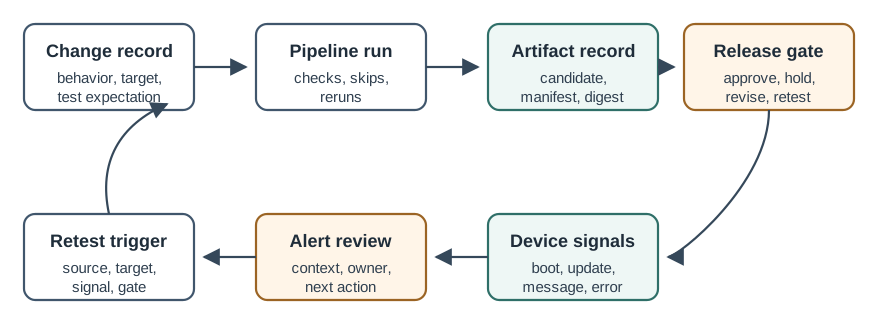
Follow Figure 19.1 from the change record through the pipeline run and artifact identity. The release gate establishes which candidate entered which cohort; device signals then show its real behavior, and alert review turns those observations into a bounded decision. The retest trigger closes the loop by sending a finding back to the appropriate check. This ordered chain is what prevents a green pipeline from being mistaken for healthy field operation.
19.2.1 The One-Minute View
Two halves, connected
Pipeline signals prove the change was built and tested; fleet signals prove it behaves on real devices.
Green is not enough
A passing pipeline says nothing about whether the change is visible and healthy on a device.
Tie signals to the candidate
Device evidence is only useful when it can be attributed to the exact artifact and version under review.
19.2.2 Beginner Examples
Read these examples as a progression from the simplest observation to the boundary that still needs evidence. Begin with this case: a build is green and unit tests pass, but no device has reported the new behavior yet, so the release is not actually validated in the field. Then examine how a device error count is a continuous number; a specific crash entry is an event; together they tell more than either alone. Finish by considering how an alert that says only "something is wrong" is far less useful than one that names the candidate, the signal, and who should act. Together, the examples connect an intuitive result to a bounded engineering claim.
19.2.3 Overview Knowledge Check
If you can explain why both halves are needed, you have the core idea. Continue to Practitioner for the pillars of observability and how to wire alerts to a gate.
19.3 Practitioner: The Pillars, the Tools, and Useful Alerts
This section: Practitioner: The Pillars, the Tools, and Useful Alerts — Observability is commonly described by three kinds of telemetry, and each answers a different question.
Observability is commonly described by three kinds of telemetry, and each answers a different question. Metrics are numbers over time — counts, rates, and gauges such as error rate, connection count, or battery level — cheap to store and ideal for trends and thresholds. Logs are discrete timestamped events that explain what happened at a moment. Traces follow one request or operation across components, showing where time went and where it broke. Metrics tell you something is wrong, logs and traces help you find why.
19.3.1 Tools by What They Preserve, Not by Name
Tool names change; responsibilities do not. Review each category by the evidence it keeps, not by how attractive its dashboard looks. The chain has to let a reviewer connect a source change to a tested artifact, to a gate decision, to device behavior, and back to a retest trigger — all pointing at the same candidate.
Inspect Figure 19.2 to see which identifiers must join pipeline evidence to field signals before comparing tool categories.
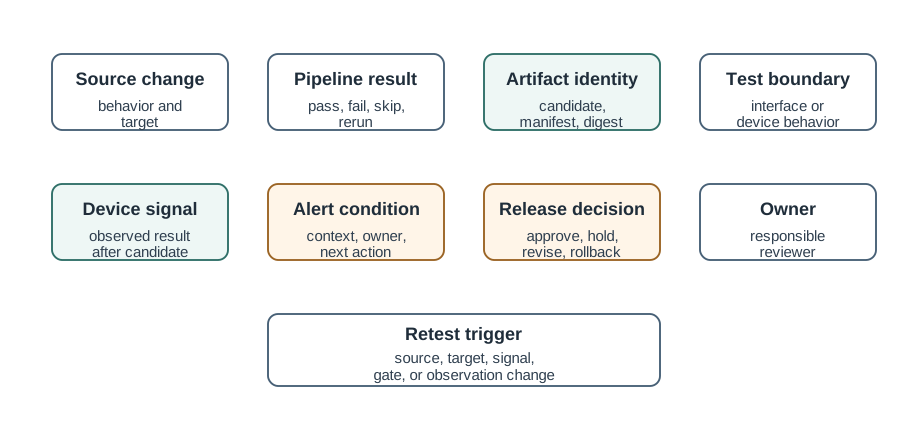
Read Figure 19.2 from source change and pipeline result to immutable artifact identity, test boundary, device signal, and alert condition. Those fields let a reviewer determine whether field behavior came from the candidate that passed the gate. Decision, owner, and retest trigger then close the feedback loop. This record connects changing tool names to stable evidence responsibilities rather than dashboard preference.
19.3.2 Make Alerts Worth Trusting
An alert exists to provoke a useful action. The strongest alerts are symptom-based — they fire on device- or user-impacting conditions (devices going offline, errors climbing, a release wave degrading) rather than on every internal cause — and they are actionable, carrying the candidate, the observed signal, the comparison basis, the owner, and the next step. Alerts that fire too often train people to ignore them, so a real failure scrolls past unread; this alert fatigue is why noisy, ownerless alerts are worse than none. Define what healthy means as measurable indicators up front, and let those indicators feed the rollout gate, because monitoring is exactly what grades a staged rollout and signals when to pause.
19.3.3 Practitioner Knowledge Check
If you can place the three pillars, review tools by what they preserve, and write actionable alerts, you can stop here. Continue to Under the Hood for what makes IoT telemetry uniquely hard.
19.4 Under the Hood: Why IoT Telemetry Is Hard to Trust
This section: Under the Hood: Why IoT Telemetry Is Hard to Trust — IoT monitoring is not just web monitoring on small computers.
IoT monitoring is not just web monitoring on small computers. Three properties make it harder: devices are constrained and often offline, their signals arrive late and time-skewed, and the most dangerous failures produce no signal at all. Each one can make a confident dashboard wrong.
19.4.1 You Cannot Log Everything
Bandwidth, power, storage, and sometimes data cost are all limited, so a device cannot stream verbose logs the way a server can. Telemetry has to be designed: aggregate on the device, sample, and buffer during disconnection to send later. High-cardinality, per-device detail can also overwhelm a backend and run up real cost, so metrics are usually aggregated and only the signals that answer a real question are kept. The discipline is to decide in advance which indicators define health and to collect those well, rather than collecting everything poorly.
19.4.2 Signals Arrive Late, Out of Order, and Time-Skewed
A device that was offline sends its buffered telemetry when it reconnects, so events can arrive minutes or hours after they happened and out of order relative to other devices. Device clocks can drift, so a device timestamp may not match server time. Correlating a fleet-wide picture therefore needs care: distinguish event time from arrival time, expect gaps, and avoid concluding a release is healthy simply because the bad news has not arrived yet.
19.4.3 Silence Is the Most Dangerous Signal
A device that crashes, bricks, or loses power cannot report that it failed, so the worst outcomes show up as an absence of telemetry, not an error spike. Watching only error rates measures the devices healthy enough to talk and misses the ones that went dark — the same survivorship blind spot that undermines a staged rollout. A trustworthy fleet monitor alerts on missing expected check-ins and on a drop in reporting population, treating a cohort going quiet as a strong negative signal. And none of the fleet evidence means anything unless telemetry carries the build or version identity, so behavior can be attributed to the exact candidate rather than guessed.
19.4.4 Common Pitfalls
Review these failure modes in the order they can weaken or invalidate the result. Begin with Reading a green pipeline as release health. The fleet half, tied to the candidate, is what proves field behavior. Then examine Trying to collect everything. Constrained devices need designed, aggregated telemetry, not verbose logs. Then examine Calling a release healthy too early. Buffered, late-arriving data means absence of bad news is not good news. Then examine Counting only errors. A silent cohort can mean dead devices; alert on missing check-ins. Then examine Untagged telemetry. Without a version stamp, device behavior cannot be attributed to a candidate. Finish with Alert fatigue. Noisy, ownerless alerts get ignored, so real failures slip through. This sequence connects each warning to the evidence a reviewer should demand before accepting the claim.
19.4.5 Under-the-Hood Knowledge Check
At this depth, IoT monitoring is the discipline of trustworthy evidence under hard constraints: design telemetry that fits the device, separate when something happened from when you heard about it, treat silence as a signal, and stamp every observation with the version it came from. The strongest monitoring connects pipeline and fleet evidence to one candidate, alerts in a way people still trust, and tells a reviewer exactly what to do next.
19.5 Join a Green Build to a Failing Fleet
This section: Join a Green Build to a Failing Fleet — For CI/CD monitoring, a firmware pipeline is green, yet field gateways begin rebooting after the new image reaches cold sites.
For CI/CD monitoring, a firmware pipeline is green, yet field gateways begin rebooting after the new image reaches cold sites. Figure 19.1 connects build evidence, release identity, deployment state, device telemetry, and the next engineering decision. Figure 19.2 shows the fields needed to join one alert back to a version and cohort.
In this field-monitoring tool, count 1,000 updated gateways and 1,000 controls over one hour. At the CI/CD reboot boundary, if 35 updated devices reboot but only 5 controls reboot, the rates are (35/1000=3.5%) and (5/1000=0.5%). The monitoring cohort is showing seven times the control rate. This monitoring comparison is more useful than a green average dashboard because it preserves firmware identity and rollout group.
19.5.1 Predict the Monitoring Query
Link every monitoring alarm to its exact deployed artifact.
Alert thresholds should name their time window as well as their count. Five reboots in one minute suggests a different IoT event from five reboots across a month. The monitoring tool should preserve both the raw events and the grouped rate used by the alert.
CI/CD monitoring uses deployment time as a before-and-after boundary. Compare the same hardware cohort before version 4.2, then compare it with controls during the same cold hour. That split helps separate firmware effect from a site-wide temperature change.
- Predict: Reboots rise only on battery model B after version 4.2. What dimensions should the CI/CD record retain? Check: Firmware version, hardware model, power state, deployment time, and reboot reason connect the field fault to the release.
- Predict: The pipeline logs expire before a delayed field alarm arrives. Can monitoring still prove which artifact was tested? Check: Not reliably. Artifact digest and gate evidence need retention long enough for the IoT failure window.
19.6 Summary
This section: Summary — Bring the chapter together by following one candidate across both halves of the evidence loop.
Bring the chapter together by following one candidate across both halves of the evidence loop. Pipeline observability proves that the candidate was built and tested, but fleet observability must then show that the same version is visible and healthy on real devices; a green build dashboard alone cannot make that field claim. Metrics reveal changing conditions, while logs and traces help explain why they changed. Judge tools by whether they preserve that chain—change links, immutable artifact identity, test results including skips, attributable device signals, actionable alerts, and the gate decision—rather than by their brand or dashboard.
Finish at the constrained fleet boundary. Device telemetry may be sampled, buffered, late, out of order, or time-skewed, so an absence of reported errors is not proof of health. Alerts therefore need a symptom, an owner, and a next action, and the monitoring record must treat missing check-ins or a shrinking reporting population as signals in their own right. Carrying version identity with every observation closes the loop by tying a silent or degraded cohort back to the exact candidate that must be paused, rolled back, or retested.
CI/CD monitoring should connect builds, deployments, device health, errors, versions, and rollback signals into one release record that points at a single candidate. It earns trust only when telemetry is designed for constrained, intermittently connected devices, when silence and missing check-ins are treated as signals rather than good news, and when every alert tells a named owner exactly what to do next.
19.7 See Also
This section: See Also
CI/CD Fundamentals for IoT
The build-test-gate evidence path that monitoring tools must preserve and trace.
Rollback & Staged Rollouts
How monitoring signals grade a rollout wave and decide when to pause or roll back.
OTA Update Architecture for IoT
The update and recovery state that fleet telemetry must report and attribute to a version.
Find help
3 reviewed answers.
Where should I start in a module?
Open the module page from the sidebar to see its chapters in order. Use the module map to return to a topic you need.
Modules and pathsReviewed
What can I try when a project does not work?
Check the symptom, then work through the diagnostic steps. Keep the error message and the smallest example that reproduces it.
When you are stuckReviewed
How do interactive examples work?
Use the interactive guide to check how examples and simulations work before changing your project.
Interactive examples guideReviewed