3 Hardware-in-the-Loop IoT Tests
More
Depth: Practitioner
Progress saves as you read. Mark sections complete as you go; your progress appears in the sidebar.
3.1 Start With the Story: Make the Real Board Face a Repeatable World
This section: Start With the Story: Make the Real Board Face a Repeatable World — Picture a pump controller that fails only when power drops during a write.
Replay One Hard Fault on the Real Board
Picture a pump controller that fails only when power drops during a write. A desk test may miss the timing. The team needs a safe rig that can cause the same fault and observe the same pins again.
A microcontroller means the small computer inside the controller. Firmware means the software stored on it. Hardware-in-the-loop testing keeps that real board in a controlled test world.
Set a known start state, inject the power drop, observe the output, reset, and repeat. Record board image, input time, pin result, stored state, recovery, and any part supplied only by the rig.
This runway does not reproduce every field condition. The deeper sections explain harness boundaries, signal timing, fault injection, observation, reset, repeatability, and the limits of modeled evidence.
Some defects only appear when the real device is running: an interrupt arrives during a write, a brown-out resets the board halfway through a transaction, or a pin changes faster than the firmware expected. A host-only test can describe those cases, but it cannot prove the actual board responds correctly.
Start simple: keep the device real and make the world around it controlled. A HIL rig injects inputs, observes outputs, resets the device, and records the result so the same hard situation can be replayed. The claim is powerful because real hardware is in the loop, and bounded because the harness is still a model of the world.
3.2 Overview: A Real Device Inside a Controlled World
This section: Overview: A Real Device Inside a Controlled World — Hardware-in-the-loop testing connects a real device — the actual microcontroller running the actual firmware — to a controlled harness that feeds it inputs and watches its outputs.
Hardware-in-the-loop testing connects a real device — the actual microcontroller running the actual firmware — to a controlled harness that feeds it inputs and watches its outputs. Instead of deploying the device into the real world, where conditions are unpredictable and faults are dangerous or rare, you wrap it in a rig that can supply any sensor reading, simulate the surrounding system, and trigger faults on command, while recording exactly what the device did. The device cannot tell it is being tested; it sees signals on its pins and responds as it would in the field.
The technique comes from control engineering, where a controller for an engine, motor, or vehicle is connected to a simulated version of the thing it controls before it is ever trusted with the real machine. IoT borrows it for the same reason: it keeps the one thing that pure software testing can never provide — the real device, with its real timing, interrupts, and electrical behavior — while keeping the surroundings repeatable and safe. The trade is that everything around the device is now a model, and the evidence is only as good as that model and the harness boundary.

Test Tessa
“A demo proves it can work once; a test proves it keeps working — bring the field, not the bench.”
Through this chapter, Tessa asks the rig the same question every time: what did it inject, what did it observe, and what did it only model?
If you only need the intuition, this layer is enough: HIL runs the real firmware on real hardware, but inside a controlled rig that injects inputs, observes outputs, and can trigger faults repeatably. It catches what host-only tests miss, yet its claim is bounded by what the harness can inject, observe, and reset.
Think of a flight simulator built for the autopilot computer rather than the pilot. The real autopilot, with its real software and chips, flies a simulated aircraft. Engineers can trigger an engine failure, an iced sensor, or a wind shear on demand and watch the real computer respond — none of which they could safely do with a real aircraft full of passengers. HIL does this for an IoT device. Inspect Figure 3.1 to see how a controlled world repeatedly drives the real board.
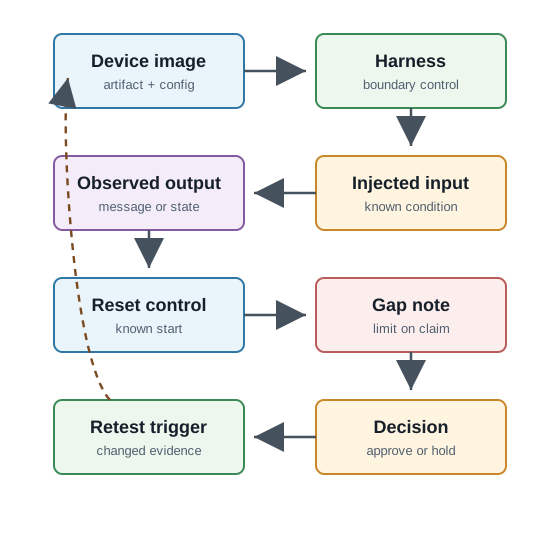
Follow Figure 3.1 from the device image and harness boundary to an injected input, observed output, and reset control. The image identifies the real candidate under test; the harness boundary names what is modeled; observation compares the board’s response with the expected behavior; and reset restores a known state before repetition. Finish at the gap note, decision, and retest trigger. This loop connects realistic hardware behavior to reproducible evidence without pretending that the harness represents every field condition.
The One-Minute View
Real device, modeled world
The firmware and hardware are real; the sensors, network, and surroundings are supplied by a controlled harness.
Repeatable and safe
The rig can inject faults and rare conditions on demand and rerun them, which the real world cannot do reliably or safely.
Bounded by the harness
The claim only covers what the harness can inject, observe, and reset; everything else is a gap to record.
Beginner Examples
Read these examples as a progression from the simplest observation to the boundary that still needs evidence. Begin with this case: a rig drives a voltage that stands in for a temperature sensor crossing an alarm limit, and checks the device raises the alarm. Then examine how a rig cuts the simulated power for a moment to confirm the device recovers to a known state instead of hanging. Finish by considering how a rig holds a bus line in an error condition the firmware must detect, which would be hard to create on a normal bench. Together, the examples connect an intuitive result to a bounded engineering claim.
Overview Knowledge Check
If you can explain "real device, modeled world, bounded by the harness," you have the core idea. Continue to Practitioner for how a rig injects, observes, and resets.
3.3 Practitioner: Building the Loop and Reading Its Evidence
This section: Practitioner: Building the Loop and Reading Its Evidence — A HIL rig has three jobs: inject inputs into the device, observe its outputs, and model the world the device thinks it is in.
A HIL rig has three jobs: inject inputs into the device, observe its outputs, and model the world the device thinks it is in. Injection drives the device's input pins and buses with controlled signals — a programmable voltage standing in for a sensor, an emulated bus partner, a switchable power supply. Observation captures the device's outputs — messages, log lines, state changes, pin levels — at a defined monitor point. The model is whatever the surrounding system is supposed to be doing, from a fixed stimulus up to a full simulated plant.
Open Loop or Closed Loop
The simplest rigs are open loop: inject a fixed stimulus, then observe the response. They are easy to build and reason about, and they suit threshold, parsing, and recovery checks. A closed-loop rig goes further: the harness models a system that reacts to the device's outputs in real time, so the device's action changes its next input, just as it would in the field. Closed-loop HIL is what catches control and timing defects that only appear when the device and its environment influence each other continuously — and it is also where real-time fidelity matters most, because the model must keep up with the device's deadlines.
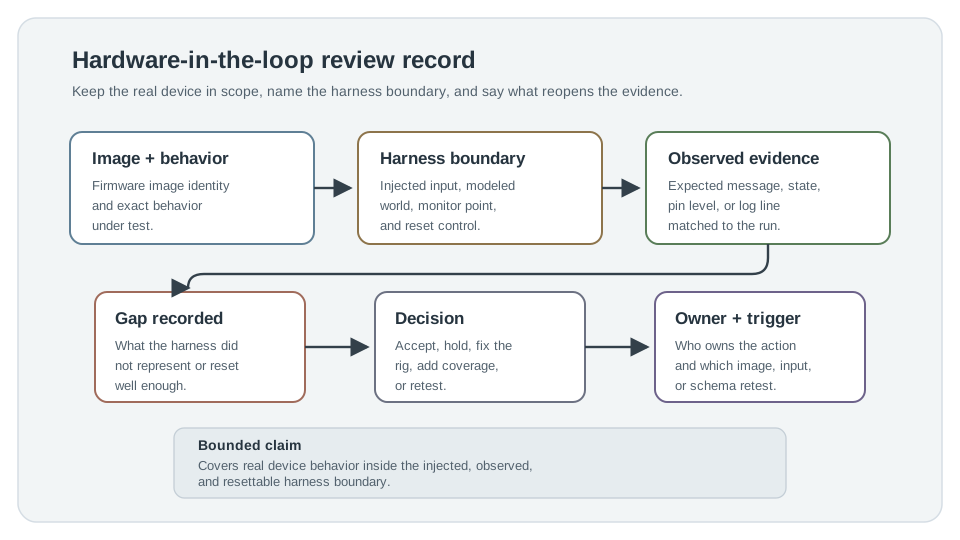
Read Figure 3.2 from image identity and harness boundary into reset control and observed evidence. The first fields identify the real candidate and the modeled surroundings; reset makes each open- or closed-loop scenario repeatable; and observations capture the board’s response. Finish at the known gap, decision, owner, and retest trigger. That record connects the richer closed-loop behavior to a bounded claim without hiding timing or physical effects the harness does not represent.
Fault Injection Is the Reason to Use HIL
The strongest case for HIL is exercising conditions you cannot safely or repeatably create otherwise: a sensor stuck, open, or shorted; a brownout mid-write; a bus glitch; a dropped link at the worst moment. These are exactly the situations field units meet and benches rarely reproduce. A reset or isolation control is what makes such tests repeatable — each run must start from a known device state, or the evidence cannot be compared run to run.
Tessa’s Field Check
- Bench says: open loop injects a fixed stimulus and observes the response — easy to build, suited to threshold and recovery checks.
- Field adds: closed loop models a system that reacts to the device's outputs in real time, changing its own next input.
- Stamp when: the rig exercises a sensor stuck, open, or shorted, or a bus glitch that benches rarely reproduce.
Reading a HIL Record
So for an alarm-threshold change, the strong record ties the tested image to the candidate, names the injected signal and monitor point, shows the observed alarm message against the expected one, notes that the harness did not represent every physical sensor behavior, and lists what reopens the review. If the rig cannot reset the device reliably between runs, the right call is a hold or retest — not because HIL was wrong, but because the evidence is not yet repeatable enough for the claim.
Practitioner Knowledge Check
If you can build a loop, inject a fault, and read a record for scope and reset control, you can stop here. Continue to Under the Hood for why HIL catches what simulation cannot, and where its own model still lies.
3.4 Under the Hood: Why Real Hardware, and Where the Rig Still Models
This section: Under the Hood: Why Real Hardware, and Where the Rig Still Models — HIL exists because pure software simulation models the developer's idea of the hardware, while HIL exercises the hardware itself.
HIL exists because pure software simulation models the developer's idea of the hardware, while HIL exercises the hardware itself. But HIL is not reality either: it replaces the physical environment with a model, and that model has assumptions. Understanding both halves — why the real device matters, and where the rig still approximates — is what keeps HIL evidence honest.
What Only Real Silicon Shows
A host simulation runs the firmware logic, but it does not reproduce the device's true interrupt latency, the race between an interrupt and the main loop, a peripheral register that behaves differently from its datasheet, analog conversion error, brown-out behavior, or timing jitter under real clocks. These effects emerge from the actual chip and board, and they are a frequent source of bugs that pass every host test and fail in the field. HIL puts the real device in the loop precisely so these timing and electrical behaviors are exercised, not assumed.
Real-Time Fidelity Is a Correctness Condition
When the harness models a system that reacts to the device, the model must meet the device's real-time deadlines. If the simulation side lags — computes the next input too slowly — the device sees timing that would never occur in the field, and the test can fail for a reason that is not a device defect, or pass because a real race never got a chance to happen. This is why control-grade HIL runs the plant model on a real-time system: a missed deadline on the rig invalidates the run. Non-real-time HIL is still useful for open-loop and functional checks, but its limits should be recorded.
The Harness Is a Model With Its Own Lies
A programmable voltage standing in for a sensor is cleaner than a real sensor: no drift, no noise spectrum, no settling curve, no failure mode the real part has. A simulated bus partner answers more perfectly than a real one. So a green HIL run can still miss a defect that only a real, imperfect sensor or a real environment would trigger. The rig can even introduce its own artifacts — ground loops, electrical loading, or timing skew between the injection and capture instruments — that look like device behavior but are the harness. This is the boundary where HIL hands off to environmental and physical testing for real temperature, vibration, and interference, and to field trials for the uncontrolled real world.
Tessa’s Field Check
- Bench says: a programmable voltage stands in for a sensor — no drift, no noise spectrum, no failure mode the real part has.
- Field adds: real noise and drift, plus real temperature, vibration, and EMI the harness can only approximate.
- Stamp when: the record cross-checks an independent measure, since ground loops or capture skew can look like device behavior but are the harness.
Common Pitfalls
Review these failure modes in the order they can weaken or invalidate the result. Begin with Treating one HIL pass as a blanket approval. The claim covers only what the harness injected, observed, and reset. Then examine Ignoring real-time fidelity. A lagging plant model produces false passes and false failures in closed-loop runs. Then examine Trusting an idealized signal. A clean injected voltage is not a real sensor; some defects need the real part or environment. Then examine Blaming the device for harness artifacts. Ground loops and capture skew can masquerade as device faults. Finish with Reusing stale evidence. A HIL result expires when the image, harness, input, or message contract changes. This sequence connects each warning to the evidence a reviewer should demand before accepting the claim.
Under-the-Hood Knowledge Check
At this depth, HIL is a deliberate trade: keep the real device so real timing, interrupts, and I/O are exercised, and accept that the surroundings are a model whose fidelity and real-time behavior bound the claim. The strongest HIL evidence states which real behavior it proved, which conditions the harness modeled, and which physical and field questions it deliberately handed onward.
3.5 Summary
This section: Summary — Hardware-in-the-loop testing runs the real firmware on the real device while a controlled harness injects inputs, observes outputs, and models the surrounding world, often in real time.
Hardware-in-the-loop testing runs the real firmware on the real device while a controlled harness injects inputs, observes outputs, and models the surrounding world, often in real time. It keeps what host-only testing cannot provide — real timing, interrupts, and electrical behavior — while making rare and dangerous conditions repeatable and safe to trigger. A rig injects signals, observes a defined monitor point, and models the environment; open-loop rigs use a fixed stimulus, while closed-loop rigs let a real-time model react to the device’s outputs. Fault injection is the strongest reason to use HIL: stuck or shorted sensors, brownouts, and bus glitches that benches rarely reproduce, with reset control making each run start from a known state. HIL exists because pure simulation models the developer’s idea of the hardware, while real silicon shows interrupt races, register quirks, conversion error, and timing jitter that host tests miss. The harness is itself a model: idealized signals, a plant that must meet real-time deadlines, and possible artifacts like ground loops or capture skew bound and can distort the claim. A strong HIL record names the image, the harness boundary and reset control, the observed versus expected result, the gap, the decision, and the retest trigger; it hands physical and field questions to environmental testing and field trials.
Hardware-in-the-loop testing is valuable when real signals, timing, faults, and controller responses can be exercised repeatably on the actual device. It earns trust only when the harness boundary, real-time fidelity, and reset control are honest, and when the record states which real behavior it proved and which conditions remained a model handed off to environmental and field testing.
3.6 See Also
This section: See Also
Integration Testing for IoT Systems
Settle component contracts before a real device boundary is added to the loop.
Hardware Simulation Fundamentals
The pure-software counterpart HIL complements, and what each one can and cannot show.
Environmental & Physical Tests
Real temperature, vibration, and interference that a HIL harness can only approximate.
Find help
3 reviewed answers.
Where should I start in a module?
Open the module page from the sidebar to see its chapters in order. Use the module map to return to a topic you need.
Modules and pathsReviewed
What can I try when a project does not work?
Check the symptom, then work through the diagnostic steps. Keep the error message and the smallest example that reproduces it.
When you are stuckReviewed
How do interactive examples work?
Use the interactive guide to check how examples and simulations work before changing your project.
Interactive examples guideReviewed