13 Field Trials and Validation
More
Depth: Practitioner
Progress saves as you read. Mark sections complete as you go; your progress appears in the sidebar.
13.1 Start With One Real Site and One Question
This section: Start With One Real Site and One Question — Picture a field sensor that works in two dry rooms but fails in the damp pump room.
Prove the Release Claim at a Named Site
Picture a field sensor that works in two dry rooms but fails in the damp pump room. A successful demo cannot stand in for the missing condition.
Fix its version, device group, site envelope, observation window, and halt rule before the trial starts.
Run installation, normal use, weak link, power loss, fault, and recovery at the chosen sites. Keep device identity, firmware, site, time, observations, incidents, changes, and decision so another team can audit the trial.
This evidence supports only the tested build, sites, and window. The deeper sections develop sampling, ethics, operations, retest triggers, and release judgement.
Imagine sending a small batch of sensors into the first real building, farm, or pump room. A field trial is not trying to “see what happens” in a vague way. It is trying to answer one release question with named devices, known firmware, chosen sites, recorded observations, and a decision it can defend afterward.
Lab, integration, environmental, and security testing each reduce risk in controlled conditions. A field trial is where the system finally meets the thing no lab fully reproduces: real users, real sites, real networks, and real installation. It is the last and most realistic validation gate before broad release — and it is a controlled evidence activity, not a soft launch. A trial has a defined question, selected sites, a known device build, an observation plan, an incident workflow, and a decision record.
The strength of field evidence is also its limit: it is specific. A trial tells you how a particular build behaved at particular sites over a particular window. That is invaluable for catching installation friction, operational mismatches, and diagnostic gaps the lab cannot show — and it is dangerous if stretched into a claim that every future site will behave the same. The conclusion must stay inside the site envelope and the build that produced it.
For example, a water-quality sensor pilot might include 12 devices across three pump rooms for six weeks, using one firmware build and one installation checklist. A release decision can cite missed samples, installer notes, battery drain, and gateway retries from those rooms. It cannot claim the same behavior for outdoor tanks, a different antenna, a new firmware build, or a winter deployment until those conditions are tested or explicitly excluded.
Start simple: define the question, the build, the site envelope, the telemetry and human observations, the halt criteria, and the retest trigger before the devices leave the team. That keeps the field trial bounded before the first installation.

Test Tessa
“A demo proves it can work once; a test proves it keeps working — bring the field, not the bench.”
In this chapter, Tessa reads a trial like a lab notebook from the wild — and her stamp never travels beyond the sites, build, and window that earned it.
If you only need the intuition, this layer is enough: a field trial validates the system in its real operating context, as a controlled activity with a question and a plan, not a casual early launch. Treat the result as evidence bounded to the sites and build you actually trialed. Use Figure 13.1 to see how that bounded question becomes a decision.
Before treating a site visit as a trial, follow Figure 13.1 to see the question, contextual boundary, observation, and decision that make it reviewable.
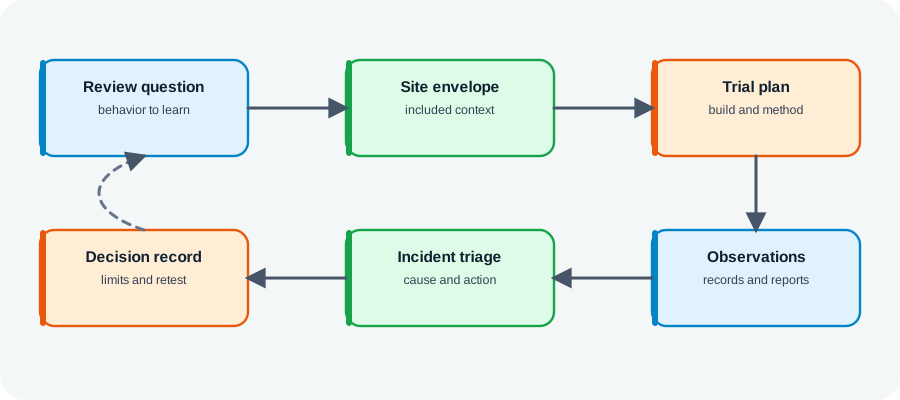
Read Figure 13.1 from the review question into the site envelope and trial plan. The envelope records the environmental, network, operator, and usage context; the plan says how the chosen build will be exercised. Continue through observations and incident triage to the decision record. That order prevents a memorable incident or a quiet trial from becoming an unbounded conclusion, and it connects real-site learning to the chapter’s evidence-first deployment narrative.
13.1.1 The Core Idea in One Minute
Real context, not the lab
Field trials expose installation, user behavior, and network conditions no bench reproduces.
Controlled, not a soft launch
A trial has a question, selected sites, a known build, an observation plan, and a decision record.
Bounded to what was trialed
Results hold for the sites, build, and window observed, not for every future deployment.
13.1.2 Everyday Signals From the Field
Work through these observations as a diagnostic sequence: A device installs perfectly in the lab, but a pilot reveals the setup steps confuse real installers at a real site. An A/B trial of two firmware builds shows one drains the battery faster in real use, a difference the bench never surfaced. A participant reports “missing data”; telemetry shows the readings were queued and delivered after a network gap — a symptom now tied to evidence.
13.1.3 Overview Knowledge Check
If you can say why a trial is controlled evidence rather than a soft launch, you have the core idea. Continue to Practitioner for the kinds of field validation and how to plan one.
13.2 Choose the Trial Shape and the Evidence
This section: Choose the Trial Shape and the Evidence — “Field trial” covers several methods, chosen by the question.
-

Set the trial question, real site limits, and exact build before testing.
-

Observe normal use and incidents together at that site.
-

Record limits, the decision, and what change will require another test.
“Field trial” covers several methods, chosen by the question. They share a need to be planned before any device ships, with the device and build identity, the site envelope, and the observation plan written down first.
13.2.1 Write the Plan Before Devices Ship
Three records belong in place before the trial starts. Build identity: the device, firmware, configuration, and enabled features, so a later issue can be tied to the right candidate. The site envelope: the installation context, connectivity, environment, power, placement, and operator role included — and, explicitly, the conditions left out. The observation plan: what telemetry is recorded automatically, what requires a human note, the support path, and the criteria that turn a symptom into an incident record.
Tessa’s Field Check
- Bench says: the build identity — device, firmware, configuration, enabled features — is fixed and known.
- Field adds: the site envelope — connectivity, environment, power, placement, operator — plus what is excluded.
- Stamp when: build, envelope, and observation plan are written down before devices ship.
13.2.2 Use the Field to Find Context Gaps
Done this way, trials expose what controlled tests cannot: installation and setup friction (which step actually confused the operator), operational fit (whether normal use matches lab assumptions), diagnostic readiness (whether the device records enough to investigate a reported fault), and change impact (which evidence is still valid after a firmware or configuration change during the trial). Inspect Figure 13.2 to keep those context gaps attached to the build and site that exposed them.
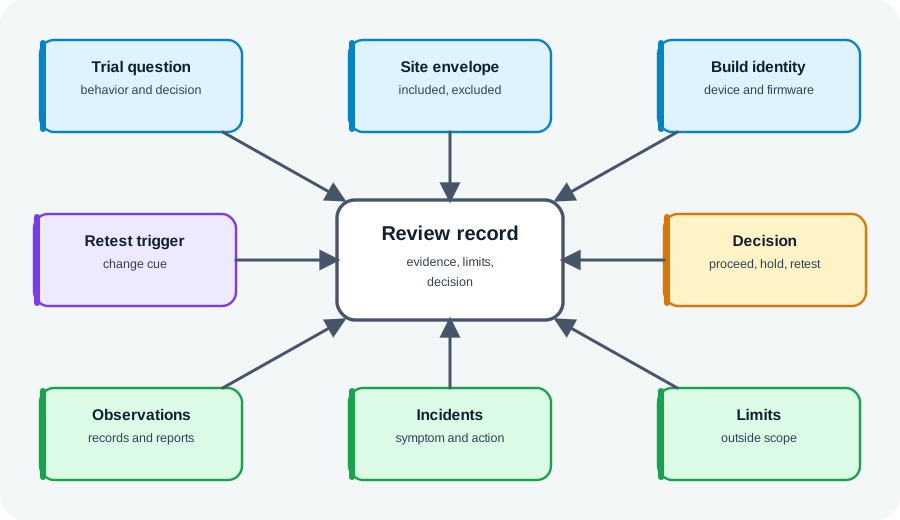
Read Figure 13.2 from the trial boundary to the decision so every discovered context gap stays tied to its site and build.
In Figure 13.2, begin with the trial question, site envelope, and build identity. Next read observations beside incidents so ordinary operation and failures share the same context. Finish with limits, retest trigger, and decision: these prevent one successful site or one failed installation from speaking for every deployment. The compact record closes the loop from contextual discovery to a bounded release action while preserving exactly what must be revisited after a change.
13.2.3 Practitioner Knowledge Check
If you can pick the method and plan build, site envelope, and observation up front, you can stop here. Continue to Under the Hood for what field trials cannot close and how to triage what they find.
13.3 Know What the Trial Really Covers
This section: Know What the Trial Really Covers — The deeper skill is using field evidence honestly: correlating what users report with what devices recorded, triaging incidents into something reproducible, and refusing to let a trial close questions it cannot.
The deeper skill is using field evidence honestly: correlating what users report with what devices recorded, triaging incidents into something reproducible, and refusing to let a trial close questions it cannot.
13.3.1 Tie the Complaint to the Device Record
Participant reports and device telemetry are two views of the same event, and the truth is usually in comparing them. A report of “missing measurements” set against telemetry showing a communication gap and later delivery of queued readings turns a vague complaint into a located behavior. Reconcile the two on time, device, and sequence before recording a conclusion; a report alone is a claim, and telemetry alone may miss the human-visible symptom.
Tessa’s Field Check
- Bench says: telemetry alone — which can miss the symptom a human actually sees.
- Field adds: the participant’s report — a claim until matched against the device record.
- Stamp when: the two views are reconciled on time, device, and sequence before any conclusion.
13.3.2 Keep Incidents Reviewable
A field incident is reviewable only when it records the symptom, its scope (one device or many on the same build), the suspected cause, the action, and the retest trigger. Closing an incident because the device recovered on its own — without a suspected cause — discards exactly the evidence the next investigation needs.
13.3.3 Hand Off Questions the Trial Cannot Answer
Field trials supplement controlled tests; they do not replace them. They cannot, on their own, close questions about untested environmental extremes, unobserved security behavior, manufacturing variation beyond the trial units, long-term wear not exercised, service paths never triggered, or user populations and sites not included. When a field result depends on one of these, the right action is a handoff: name the controlled test or follow-up trial that actually answers it. And because field evidence is tied to a build, a firmware or configuration change during or after the trial makes prior evidence stale — which is what a retest trigger guards against.
Tessa’s Field Check
- Bench says: extremes, security behavior, manufacturing variation, and long-term wear stay with controlled tests.
- Field adds: evidence tied to one build — any firmware or configuration change makes it stale.
- Stamp when: each open question gets a named handoff and a retest trigger guards staleness.
13.3.4 Common Review Findings
Work through these observations as a diagnostic sequence: No clear question. The trial starts without one, so the result cannot support a decision. Unstated build. The record names the device but not the firmware or configuration trialed. Reports without telemetry. Participant feedback is collected but device data is missing, so reports cannot be corroborated. Incident closed blind. An issue is closed with no suspected cause or retest trigger because the device recovered. Overstated decision. A few sites are treated as the whole fleet. Silent staleness. A field fix lands but no record says which controlled tests or prior evidence became stale.
13.3.5 Under-the-Hood Knowledge Check
At this depth, field testing is bounded, correlated evidence from the real world: tie reports to telemetry, triage incidents so they can be reproduced, hand off what the trial cannot close, and keep every conclusion inside the site envelope and build. A trustworthy field review states what the trial showed, what it could not, and what reopens it.
13.4 Field-Study Statistics: A Reviewable 2 By 2 Table
This section: Field-Study Statistics: A Reviewable 2 By 2 Table — Field evidence often starts as a count table.
Field evidence often starts as a count table. For example, compare a candidate gateway firmware (exposed) with the current firmware (control) and define the outcome before looking at the data, such as “a site-day with packet loss above the acceptance threshold.” Odds ratio and risk ratio answer different questions, and neither repairs confounding, selection bias, missing telemetry, or an outcome definition changed after collection.
An interval spanning 1 is compatible with no multiplicative difference under this simple analysis; a narrow interval does not prove causality. Preserve the four counts, denominators, site allocation, observation window, exclusions, missingness, firmware identity, outcome definition, and the code that produced the estimate. When exposure is not randomized, investigate site and time differences before attributing an effect to firmware.
Do not label an odds ratio as “times the risk.” When outcomes are common, odds and risk can diverge substantially. Choose the effect measure before analysis, show absolute risks beside it, and send small samples, repeated observations, clustering, or safety decisions for statistical review.
13.5 Summary
This section: Summary — A field trial is the final, most realistic validation gate — real users, sites, and networks — and a controlled evidence activity, not a soft launch.
A field trial is the final, most realistic validation gate — real users, sites, and networks — and a controlled evidence activity, not a soft launch. Field evidence is specific: it holds for the build, sites, and window trialed, and must not be stretched to every future deployment. Field validation methods include pilot deployment, beta programs, A/B testing, staged/canary rollout, and telemetry-driven validation, chosen by the question. Plan before shipping: record build identity, the site envelope (conditions included and excluded), and the observation plan with incident criteria. Trials validate installation friction, operational fit, diagnostic readiness, and change impact better than any lab. Correlate participant reports with device telemetry before concluding, and triage every incident by symptom, scope, suspected cause, action, and retest trigger. Field trials supplement but do not replace controlled tests; hand off environmental extremes, security, manufacturing variation, long-term wear, and untriggered paths, and treat a build change as a staleness trigger.
Field trials are where assumptions meet operating reality. Define the question, build, site envelope, observation plan, and decision before deployment; correlate what users report with what devices record; and keep every conclusion bounded to the sites and build you trialed. The goal is not to prove every site is covered — it is to learn from the real world while preserving the evidence to decide what is accepted, blocked, or sent back for controlled retest.
13.6 See Also
This section: See Also
Environmental & Physical Tests
Reproduce in the lab the physical conditions a field trial can expose but not isolate.
Reproduce a field issue under controlled device interfaces and signals.
Security Testing for IoT Devices
Security behavior should be tested directly, not inferred from normal field use.
Testing and Validation for IoT Systems
See how field validation completes the module's test strategy.
Find help
3 reviewed answers.
Where should I start in a module?
Open the module page from the sidebar to see its chapters in order. Use the module map to return to a topic you need.
Modules and pathsReviewed
What can I try when a project does not work?
Check the symptom, then work through the diagnostic steps. Keep the error message and the smallest example that reproduces it.
When you are stuckReviewed
How do interactive examples work?
Use the interactive guide to check how examples and simulations work before changing your project.
Interactive examples guideReviewed