20 OTA Update Architecture for IoT
More
Depth: Practitioner
Progress saves as you read. Mark sections complete as you go; your progress appears in the sidebar.
A roadside controller downloads a new image, then loses power before its first successful boot. The update service has a complete file-transfer record, but the device has not confirmed the candidate. Its boot architecture must preserve a usable outcome across that gap.
20.1 Start With the Device You Cannot Touch
This section: Start With the Device You Cannot Touch — Picture a roadside unit losing power halfway through a remote software change.
Prove the Old-Safe or One-Complete-New Outcome
Picture a roadside unit losing power halfway through a remote software change. On restart, it must not run a half-written image or report the new version before that image is accepted.
An over-the-air update is a software change delivered through a network instead of a local cable. OTA is its short name. Firmware is the stored device code and its version.
Record device identity, old version, target version, file identity, signature result, and final boot slot. Cut power during download and install, corrupt the file, repeat the request, and restart. Accept only the old safe image or one complete verified new image.
This runway does not prove a whole fleet rollout. The deeper sections cover build evidence, signed artifacts, staged release, rollback, health checks, observability, and the limits of automation.
Imagine an update reaching a device on a roof, in a field, or inside a wall. No one can press a reset button, plug in a debugger, or swap the firmware by hand. OTA architecture exists for that moment: the device must know which signed artifact it is allowed to install, whether it is ready, whether the new image really booted, and which previous image can recover it if the update fails.
20.2 Overview: An Update Is a Controlled Release, Not a File Copy
This section: Overview: An Update Is a Controlled Release, Not a File Copy — It is tempting to picture an over-the-air update as sending a file to a device.
It is tempting to picture an over-the-air update as sending a file to a device. That picture is the source of most OTA disasters. A safe update is a controlled release path: a CI/CD system prepares and signs an artifact, a manifest states exactly what that artifact is allowed to update, the device decides whether it can attempt the update at all, the artifact is verified before it is used, the new image is confirmed to have actually booted, and the previous working image stays recoverable until that confirmation arrives.
The stakes are higher than for a server because the target is a remote device you may never touch again. A web rollout that goes wrong is rolled back centrally; a firmware update that goes wrong can leave a fleet bricked in the field. That is why the durable OTA practices are not about transfer speed but about safety: signed artifacts so a device only runs authorized code, staged rollout and canary cohorts so a bad release reaches few devices, a dual-slot layout so an update is atomic, and rollback so a failed boot is survivable.
If you only need the intuition, this layer is enough: receiving the bytes is the easy part. The update is not done when the file arrives, and it is not done when the file is written. It is done when the device has verified the artifact, booted the new image, and confirmed it — and even then the old image is kept until that confirmation is in hand.
Before following any OTA mechanism in detail, inspect Figure 20.1 to separate what the release system promises from what the remote device must prove.
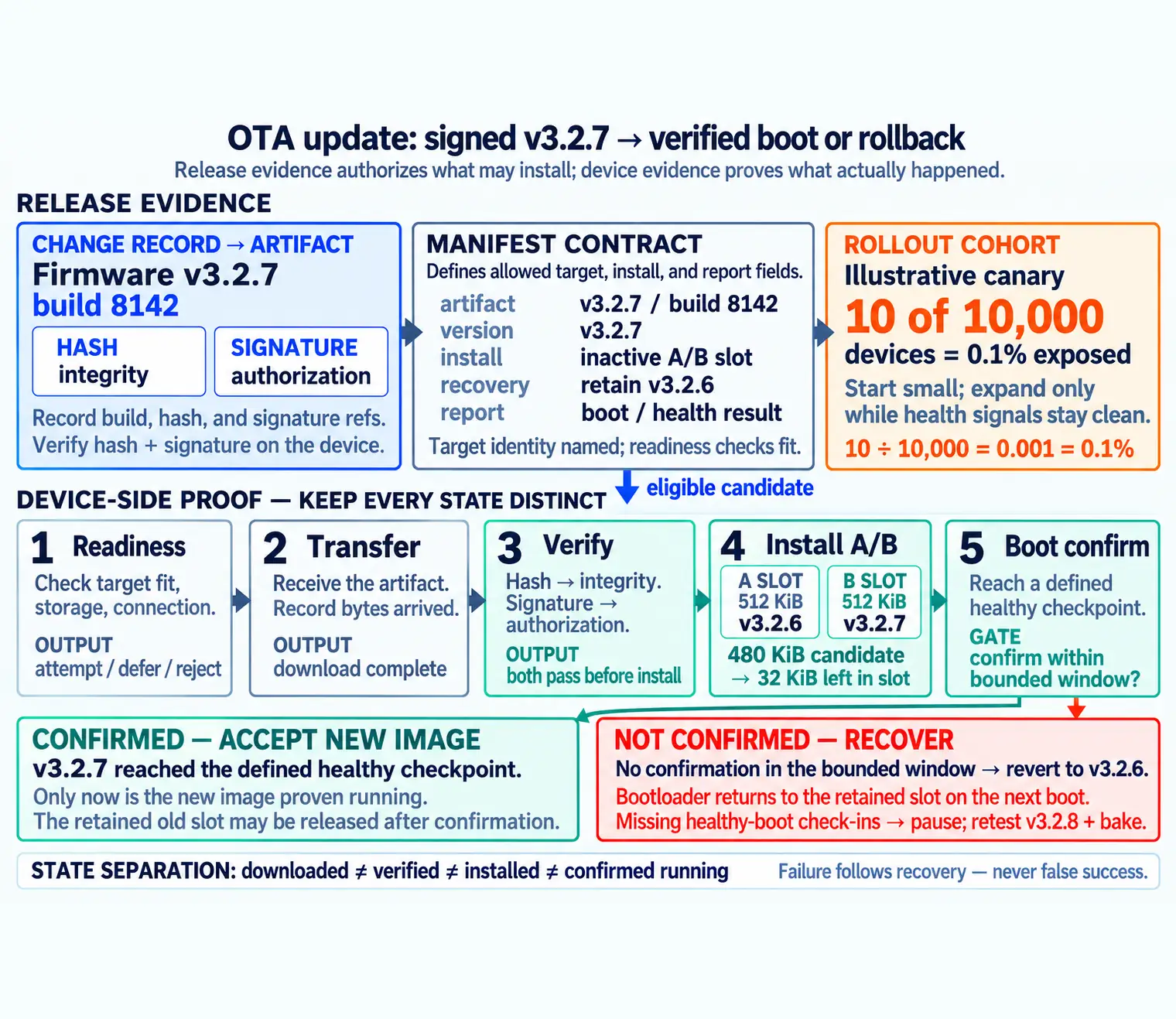
Read Figure 20.1 from the signed artifact and manifest to the rollout cohort, which defines what may reach a given device. The device must then prove readiness, verify the received bytes, boot the inactive image, and report health before the old image can be released. A failed gate follows the recovery branch instead of turning a download into a false success. The illustrated story below puts those same responsibilities into one device journey, so look for the handoff from release evidence to local proof.
-

Tessa signs the image and binds its manifest.
-

The remote device passes its readiness check.
-

The device verifies the received image itself.
-

The new image enters the inactive boot slot.
-

The device boots the new image and confirms health.
-

A failed boot returns to the saved working image.
Read the six-panel story from Tessa’s signed image and matching manifest to the remote device’s readiness check. The device verifies the bytes it received, installs them in the inactive slot, and boots without overwriting the working image. Only a returned health signal confirms the new state. If that check fails, the last panel sends the device back to the saved image. This sequence shows why the server’s release decision is only the start: the remote device must produce its own verification, boot, health, and recovery evidence before the update can be called successful.
20.2.1 The One-Minute View
Signed and described
A signed artifact plus a manifest that names the target, version, integrity material, and recovery expectation.
Verify before, confirm after
Check integrity and authorization before installing, then confirm the new image actually booted before trusting it.
Always recoverable
Keep the previous working image, roll out in stages, and define a rollback path before the first device updates.
20.2.2 Beginner Examples
Read these examples as a progression from the simplest observation to the boundary that still needs evidence. Begin with this case: a device finishes downloading new firmware but the signature does not verify, so it refuses to install — the transfer succeeded, the update did not. Then examine how a new image is written to a spare slot; if it fails to confirm a healthy boot, the bootloader switches back to the old slot automatically. Finish with "Downloaded" is not "installed," and "installed" is not "confirmed running" — three different states that a good release record never collapses into one. Together, the examples connect an intuitive result to a bounded engineering claim.
20.2.3 Overview Knowledge Check
If you can explain why arrival is not completion, you have the core idea. Continue to Practitioner for the release-side and device-side evidence.
20.3 Practitioner: Release-Side and Device-Side Evidence
This section: Practitioner: Release-Side and Device-Side Evidence — Validation work for OTA is about preserving evidence on both sides of the boundary so a reviewer can trace one decision from a change record all the way to a confirmed boot.
Validation work for OTA is about preserving evidence on both sides of the boundary so a reviewer can trace one decision from a change record all the way to a confirmed boot. Keep the two sides separate: the release side proves what was built and what it is allowed to do; the device side proves what the device decided and what actually happened.
20.3.1 Release-Side: Change, Artifact, Manifest
The change record ties the update candidate to a reviewed change, naming the affected component, the intended target group, and the rollback assumptions. The artifact is the build output devices may receive; record its build reference, target hardware or boot profile, a hash for integrity, and a signature for authorization, so there is no ambiguity about which binary passed review. The manifest is the contract between the release system and the device's update logic, and it should be short and testable.
A manifest should name the artifact identity, the target identity, the version intent, any required boot or runtime condition, the integrity and authorization material, the install mode or slot expectation, the recovery expectation, and the fields the device reports back after completion or failure. If a device is allowed to defer an update, the valid reason categories belong here too — policy should not hide in prose.
20.3.2 Device-Side: Readiness, Verify, Confirm, Recover
Before attempting anything, the device records a readiness decision: its current firmware identity, target compatibility, storage and connection state, and a reason to attempt, defer, or reject. This matters most when a device does not update — without a reason, a skipped update looks identical to a transfer fault. Then it keeps transfer evidence (the artifact was received) strictly separate from verification evidence (integrity and authorization checks passed). Only then does it install and record a boot confirmation that the new image reached a defined checkpoint, while the previous image is retained until that confirmation. If any gate fails, a recovery record names the failed gate, the previous working image, and the next allowed action.
To audit one device’s outcome without collapsing “downloaded,” “installed,” and “running” into one status, inspect Figure 20.2.
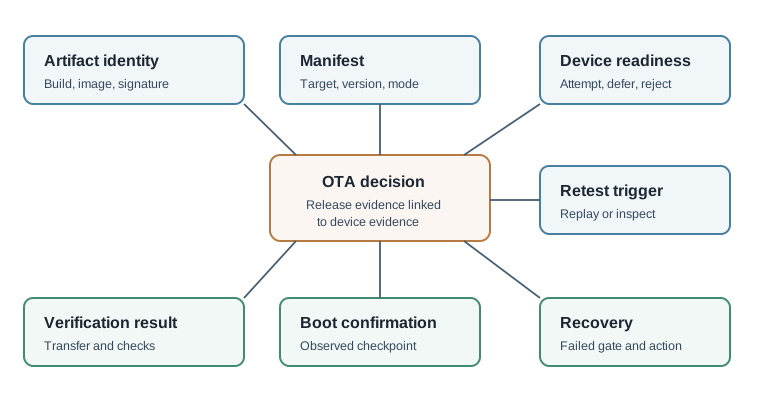
In Figure 20.2, start with the file identity and manifest rules. Compare both with the device’s ready state. Next, keep transfer apart from the checks for integrity and authority. A full download is not yet an approved image. Only then inspect the boot result. The recovery field names the last working image and the gate that failed. The retest field states which change can allow a new try. This record carries release control onto the device instead of ending it when the bytes arrive.
20.3.3 Roll Out in Stages
Do not ship to the whole fleet at once. A staged rollout releases to a small canary cohort first, watches health telemetry, and expands by waves only while the signals stay clean; a regression halts the rollout and triggers rollback for the affected cohort. This bounds the blast radius of a bad release to a fraction of the fleet, which is the difference between a contained incident and a mass bricking.
20.3.4 Practitioner Knowledge Check
If you can build the manifest, separate transfer from verification, and stage the rollout with recovery in place, you can stop here. Continue to Under the Hood for the three states an update passes through and how recovery actually works.
20.4 Under the Hood: Three States, Atomic Slots, and Real Recovery
This section: Under the Hood: Three States, Atomic Slots, and Real Recovery — The deeper layer is about the mechanisms that make an update survivable.
The deeper layer is about the mechanisms that make an update survivable. Most OTA failures trace back to one of three things: treating distinct states as the same, writing the update in a way that is not atomic, or trusting an image that never confirmed it booted.
20.4.1 Downloaded, Installed, Confirmed Are Three Different States
A device that downloaded an artifact, a device that installed it, and a device that confirmed the new image booted have reached three different evidence states, and collapsing them hides risk. Transfer completion says bytes arrived. Installation says they were written to a target. Confirmation says the new image ran far enough to assert it is healthy. Only the third state should mark an update successful, and the release system needs each state reported separately to know where a stuck device actually stands.
20.4.3 Atomic Updates and the Dual-Slot Layout
An update must never leave the device in a half-written, unbootable state if power is lost mid-write. The standard answer is a dual-slot (A/B) layout: the new image is written to the inactive slot while the running image stays untouched, the boot target is switched only after the write and verification complete, and the previous slot is retained for rollback. This makes the update atomic from the bootloader's point of view — either the new slot is selected and confirmed, or the device falls back to the slot that already works. Overwriting the running image in place to save storage is how single-image devices brick on an interrupted update.
20.4.4 Boot Confirmation and Automatic Rollback
The link that ties it together is a confirmation handshake. After switching to the new slot, the device must reach a defined checkpoint — application started, connectivity restored, a self-test passed — and explicitly mark the image confirmed. If it does not confirm within a bounded window, often enforced by a watchdog, the bootloader treats the new image as failed and reverts to the retained previous slot on the next boot. Without this handshake, an image that boot-loops before the application runs is never detected as failed, and a device can sit broken while reporting "installed."
Boot confirmation matters because it is the point where installation evidence becomes running-system evidence. Return to the recovery branch in Figure 20.1 to see what must happen when that confirmation never arrives.
In Figure 20.1, locate the failed gate first, because recovery must respond to a specific observed failure rather than a generic timeout. Then trace the allowed action—retry, defer, or roll back—to the retained image that restores a bootable state. End at the retest trigger, which prevents the same unsafe candidate from cycling indefinitely. This closes the dual-slot story with evidence that rollback is executable, not merely promised.
20.4.5 Mechanisms and Failure Modes
20.4.6 Common Review Findings
Review these failure modes in the order they can weaken or invalidate the result. Begin with Transfer treated as installation. A completed download is recorded as a successful update, hiding verification and boot failures. Then examine Integrity and authorization collapsed. A single vague "verified" status hides whether the signature, the hash, or neither was actually checked. Then examine Missing boot confirmation. The release cannot tell whether the new image ran, only that it was written. Then examine Rollback claimed without a gate. The record says rollback happened but never names which gate triggered it or which image was restored. Finish with No retest trigger. The same accept, defer, or rollback decision cannot be reproduced because the inputs were not preserved. This sequence connects each warning to the evidence a reviewer should demand before accepting the claim.
20.4.7 Under-the-Hood Knowledge Check
At this depth, OTA is a survivability discipline: verify before you install, treat downloaded, installed, and confirmed as distinct states, keep the update atomic with a retained previous image, and let a confirmation handshake trigger automatic rollback. A trustworthy review asks which gate produced each decision and what proves the new image actually ran.
20.5 Rollback and Staged Rollouts
This section: Rollback and Staged Rollouts
20.5.1 Start With the First Wave
Stop the Update Before the Whole Fleet Breaks
Picture ten test devices losing check-ins while thousands of untouched devices remain healthy. Firmware is stored device software.
Name the build, first group, health signals, pause rule, rollback image, and recovery owner. Test normal installation, lost power, failed boot, and a signal that crosses the stop threshold.
Keep assignments, versions, confirmations, errors, decisions, and recovery results. This proves one staged release and way back, not every failure; the deeper sections cover rings, gates, compatibility, rollback, and unreachable devices.
Imagine approving an update for ten devices before you approve it for ten thousand. Those first devices are not just early recipients; they are evidence gatherers. Their boot confirmations, check-ins, errors, and missing signals tell the release gate whether to expand, pause, retest, or roll back while the risk is still bounded.
20.5.2 Overview: Don’t Ship to Everyone at Once, and Keep a Way Back
A staged rollout releases an update to a small group of devices first, watches how they behave, and expands to wider groups only while the signals stay healthy. Rollback is the planned way back to the last known-good version when they do not. Together they turn an update from a single all-or-nothing event into a sequence of decisions, each one made with evidence from the devices that already received the change.
This matters more for IoT than for almost any other software, because you cannot easily reach a device in someone's wall, a remote field, or a moving vehicle. A bad web deploy can be reverted in seconds; a bad firmware update pushed to an entire fleet at once can leave thousands of devices broken and unreachable. The whole discipline exists to bound the blast radius: if something is wrong, it reaches a few devices, not all of them, and there is a defined path to recover the ones it touched.
If you only need the intuition, this layer is enough: release to a small cohort, gate each expansion on device health, and define the rollback path before the first device updates. The goal is not to guarantee a perfect update; it is to make sure a bad one reaches few devices and has a way back.
Picture a chef serving a new dish. Instead of plating it for the whole banquet at once, a few plates go out first; if the table enjoys them, more follow, and the previous reliable dish stays ready in the kitchen in case the new one is sent back. Staged rollout is the few plates first; rollback is the dish kept ready.
Before choosing cohort sizes, inspect Figure 20.3 to see how a staged release bounds exposure and turns device health into a decision.
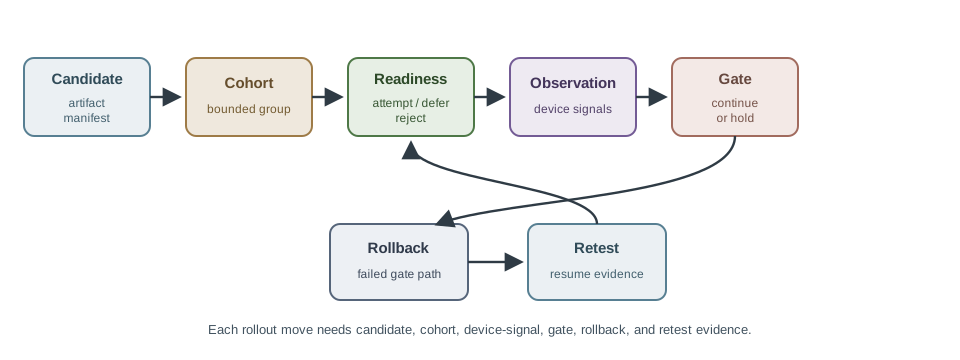
Read Figure 20.3 from the candidate into the first bounded cohort. Readiness prevents unsuitable devices from attempting the change; observation compares predefined health signals with the gate; and the decision either expands, pauses, or rolls back. Recovery and retest evidence then govern what happens after a failure. This sequence connects the banquet analogy to the engineering purpose of staged rollout: a measurable blast radius and a tested way back.
20.5.2.1 The One-Minute View
Start small, expand on health
A canary cohort gets the update first; wider waves follow only while the watched signals stay healthy.
Gate every expansion
Each wave is a decision: continue, pause, or roll back, based on evidence from the devices already updated.
Define the way back first
The rollback or recovery path is decided before the first device updates, not improvised during an incident.
20.5.2.2 Beginner Examples
Read these examples as a progression from the simplest observation to the boundary that still needs evidence. Begin with this case: an update goes to one percent of a fleet for a day; only after they report healthy boots does it move to the next wave. Then examine how a cohort fails to confirm a healthy boot, so the rollout pauses instead of advancing to the next group. Finish by considering how a device keeps the previous working image available so it can return to it if the new one cannot confirm itself. Together, the examples connect an intuitive result to a bounded engineering claim.
20.5.2.3 Overview Knowledge Check
If you can explain "start small, gate on health, plan the way back," you have the core idea. Continue to Practitioner for the strategies and the gate decisions.
20.5.3 Practitioner: Strategies, Gates, and Rollback Mechanics
Several well-known deployment strategies trade speed against exposure. A canary release sends the change to a small first cohort and watches it before going further. A staged (phased or ring) rollout expands through widening waves, each gated on the last. A blue-green switch keeps two environments and moves traffic from the old to the new, which fits gateways and backend services more than constrained devices. For device fleets, canary and staged waves dominate, because devices update individually and report back over time rather than switching atomically.
20.5.3.1 Health Checks Define “Healthy” Before You Start
A gate is only as good as the signal it reads. Decide in advance what healthy looks like and write it as an evidence condition: a confirmed healthy boot, a stable connection, an error or crash rate within an expected band, and telemetry whose shape matches the reviewed contract. Pause criteria should be just as concrete — missing boot confirmations, repeated recovery events on the same gate, or observed messages that disagree with the change record — so a pause is triggered by evidence, not by vague concern. A pause is the process working, not failing.
Inspect Figure 20.4 to follow one canary from candidate identity through the failed health gate to recovery and retest.
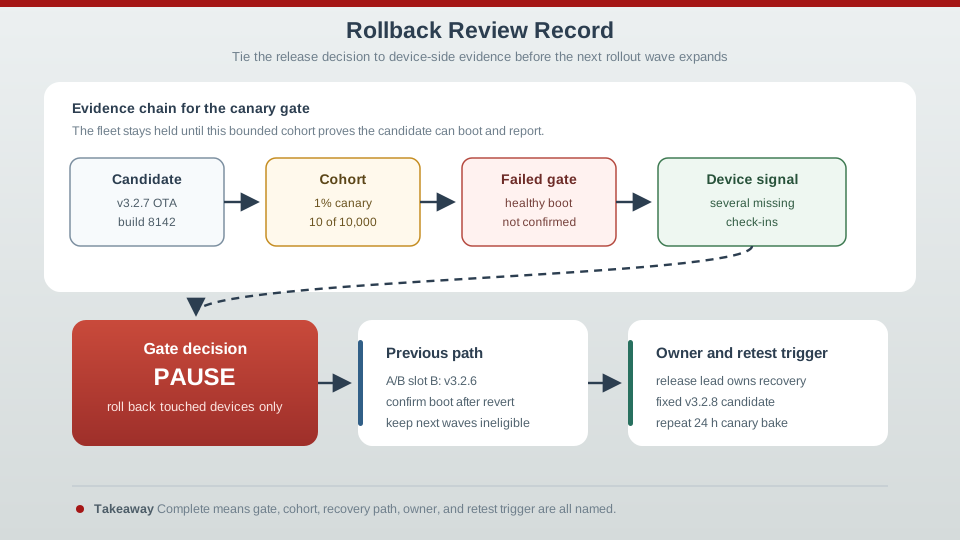
Read Figure 20.4 from v3.2.7 build 8142 and the ten-device canary to the missing healthy-boot check-ins. That evidence pauses expansion before the fleet is exposed, sends touched devices back to the known v3.2.6 A/B slot, assigns a recovery owner, and requires fixed v3.2.8 plus a bake before retest. The sequence connects a predefined health condition to an executable rollback rather than an improvised reaction.
20.5.3.2 Rollback Is Itself an Update
Reverting is not free. On constrained devices, the common enabler is a dual-image (A/B) layout: the previous working image stays in a second slot so the device can switch back and confirm a healthy boot. That means the tested previous artifact must be retained, and the rollback must be verified the same way the forward update was — a rollback that itself fails to confirm a healthy boot is not a recovery. Whether you revert depends on scope: roll back the affected cohort tied to the failed gate, and keep other cohorts ineligible until the candidate is corrected and retested.
20.5.3.3 Reading the Gate
20.5.3.4 Practitioner Knowledge Check
If you can pick a strategy, define health signals, and gate continue-pause-rollback decisions, you can stop here. Continue to Under the Hood for why rollback is sometimes impossible and why silence is dangerous.
20.5.4 Under the Hood: When Rollback Is Harder Than Rollout
Rollback sounds like a safety net, but several mechanisms can weaken or remove it. The serious ones are forward-incompatible state, deliberate anti-rollback protection, and health signals that lie by omission. Each can turn a confident rollout plan into an incident.
20.5.4.1 Forward-Incompatible State: The Code Reverts, the Data Does Not
The deepest rollback trap is a change that migrates stored state, a configuration schema, or a message contract. If the new firmware rewrites persisted data into a new layout, rolling the code back to the old version does not roll the data back — and the old code may be unable to read what the new code wrote. The device reverts but then cannot start cleanly, so the rollback fails exactly when it is needed. The defenses are designed in before release: make migrations backward-compatible, stage schema changes across versions, or accept that such a change is effectively one-way and plan to recover by rolling forward to a fixed image instead.
20.5.4.2 Anti-Rollback Protection Can Forbid the Downgrade
Security and reliability can pull in opposite directions. To stop an attacker from forcing devices back onto an old image with a known vulnerability, devices often enforce anti-rollback (downgrade) protection, refusing images below a minimum accepted version. That is correct for security — but it means "just roll back to the previous version" may be blocked by design. When a security-relevant update goes wrong, the recovery is usually to roll forward to a new fixed build that satisfies the version constraint, not to downgrade. The release plan has to know in advance which updates are downgrade-protected.
20.5.4.3 Silence Is Not Health
A device that fails to boot cannot send telemetry, so the most dangerous failure produces an absence of bad signals rather than a flood of them. Counting only error rates creates survivorship bias: you measure the devices healthy enough to report and miss the ones that went dark. A trustworthy health gate watches for missing expected check-ins, not just elevated errors, so a cohort going quiet is treated as a strong negative signal. Pairing this with a bake time — holding each wave long enough for slow failures like memory leaks or storage wear to appear — is what keeps a rollout from racing past a problem that only shows up after hours.
20.5.4.4 Common Pitfalls
Review these failure modes in the order they can weaken or invalidate the result. Begin with Assuming rollback always works. A forward-incompatible migration can make the previous code unable to run. Then examine Forgetting anti-rollback. Downgrade-protected updates must be recovered by rolling forward, not back. Then examine Reading silence as success. Missing telemetry can mean a dead device; gate on missing check-ins. Then examine Expanding too fast. Without bake time, slow failures surface only after the rollout has widened. Finish with Trusting an unverified rollback. A revert is an update and must confirm a healthy boot like any other. This sequence connects each warning to the evidence a reviewer should demand before accepting the claim.
20.5.4.5 Under-the-Hood Knowledge Check
At this depth, rollback and staged rollout are a single risk-bounding discipline: expand through gated waves on honest health signals, give each wave time to surface slow faults, and know before release whether a real way back even exists — because some changes can only be recovered by rolling forward. The strongest rollout record names the candidate, the cohort, the gate that decided, and the recovery path that was proven, not assumed.
20.5.5 Summary
Bring the rollout story together by starting with bounded exposure. A canary or staged ring sends the candidate to a small device cohort and expands only through evidence gates, while blue-green switching serves gateways or backends that can maintain two swappable environments. Before the first wave, define healthy boot, connection stability, error bands, telemetry shape, pause thresholds, and bake time. Those conditions turn each expansion into a repeatable decision and make missing check-ins a warning rather than allowing a silent, possibly bricked device to count as healthy.
Then trace the recovery path. Rollback is itself an update: it needs a retained, tested image, often in an A/B layout, and it must restore and confirm a healthy boot only for the cohort tied to the failed gate. That path is not always available. Forward-incompatible state migrations can leave old code unable to read new data, and anti-rollback controls can forbid a downgrade, leaving a fixed roll-forward as the only recovery. The chapter’s running rule is therefore to bound the blast radius and prove the available way back before exposing the fleet.
Rollout and rollback strategy should define cohorts, gates, stop conditions, compatibility checks, and recovery evidence before production release. The hardest truth is that rollback is not guaranteed: when a change migrates state forward or is downgrade-protected, the only real recovery may be rolling forward, so the safe plan decides in advance whether a way back exists and gates expansion on honest signals, treating a silent cohort as a warning, not a pass.
20.5.6 See Also
CI/CD Fundamentals for IoT
The change record, artifact identity, and release-gate vocabulary a rollout builds on.
OTA Update Architecture for IoT
The device-side update path, dual-image layout, and boot confirmation rollback depends on.
Monitoring and CI/CD Tools for IoT
The telemetry that grades a wave and signals when to pause or roll back.
20.6 Prove the Trial Slot before Expanding the Cohort
This section: Prove the Trial Slot before Expanding the Cohort — Assume an illustrative dual-slot layout with two 512 KiB image slots.
Assume an illustrative dual-slot layout with two 512 KiB image slots. Together they reserve 1,024 KiB, or 1 MiB, before bootloader, metadata and working space. A 480 KiB candidate leaves 32 KiB within its slot for any slot-resident overhead. The update must check the actual signed image layout rather than comparing only the uncompressed application binary with nominal flash capacity.
Follow Figure 20.1 from signed artifact and manifest to readiness, local verification, inactive-slot installation and boot confirmation. Each transition creates a different update state. Download complete means the bytes arrived; verification checks their integrity and authorization; confirmation establishes that the new running image met the defined health conditions.
Cut power before the boot selection changes, then in a separate test cut it during the first trial boot. The architecture should recover according to its documented state machine without selecting partially written code. Keep the retained image and boot metadata consistent under these fault points. The boot architecture needs power-loss evidence to establish its flash-write and metadata guarantees.
For a staged update example, choose 10 devices from a fleet of 10,000. The exposed fraction is 10 divided by 10,000 = 0.001, or 0.1%. If two fail the healthy-boot check, that is 20% of the trial cohort. Do not dilute the failed update result by dividing those failures by the untouched fleet. The update stays within the first cohort until the stated gate permits expansion.
Predict whether returning to the old code is sufficient after the candidate changed stored data into an incompatible format. The update architecture needs a compatible state plan or a tested roll-forward recovery. Next, let a device stop checking in. The update policy treats silence as unknown or failed health, not confirmation by default.
This module treats remote updates as controlled state changes because the device may be beyond physical reach. The exact slot sizes and cohort figures are illustrative, while the retained-image, health and recovery evidence must come from the hardware and bootloader that will perform the change.
20.7 Summary
This section: Summary — Read the OTA story as a controlled release that crosses two evidence boundaries.
Read the OTA story as a controlled release that crosses two evidence boundaries. On the release side, the change record, immutable artifact identity, hash, signature, and manifest establish what may be installed; the manifest also fixes the target, version intent, slot or install mode, recovery expectation, and reporting fields. On the device side, readiness, transfer, verification, boot confirmation, and recovery remain separate states. In particular, downloaded is not installed, and installed is not confirmed: success requires a defined healthy-boot checkpoint rather than the mere arrival of bytes.
The safety mechanisms follow from that separation. The device checks the hash for integrity and the signature for authorization before installation, while anti-rollback policy prevents a return to a known-vulnerable version. A dual-slot layout leaves the running image untouched during the write and retains the previous image for recovery. The boot-confirmation handshake then either accepts the new slot or causes automatic reversion when confirmation does not arrive. Finally, canary cohorts and explicit halt criteria bound fleet exposure, with every recovery record naming the failed gate and the change that permits a retest.
A trustworthy OTA pipeline never confuses arrival with success. Sign and describe the artifact, verify it on the device before install, keep the update atomic with a dual-slot layout, confirm the new image actually booted, and roll out in stages with a rollback that is proven, not promised. The question that grades any OTA review is simple: which gate produced this decision, and what evidence shows the new image is really running?
20.8 See Also
This section: See Also
CI/CD Fundamentals for IoT
Ground OTA in change records, test stages, release gates, and retest triggers.
Rollback & Staged Rollouts
Extend the release into pacing, canary waves, and rollback decisions.
Monitoring and CI/CD Tools
See the telemetry that grades a staged rollout and signals when to halt.
Find help
3 reviewed answers.
Where should I start in a module?
Open the module page from the sidebar to see its chapters in order. Use the module map to return to a topic you need.
Modules and pathsReviewed
What can I try when a project does not work?
Check the symptom, then work through the diagnostic steps. Keep the error message and the smallest example that reproduces it.
When you are stuckReviewed
How do interactive examples work?
Use the interactive guide to check how examples and simulations work before changing your project.
Interactive examples guideReviewed