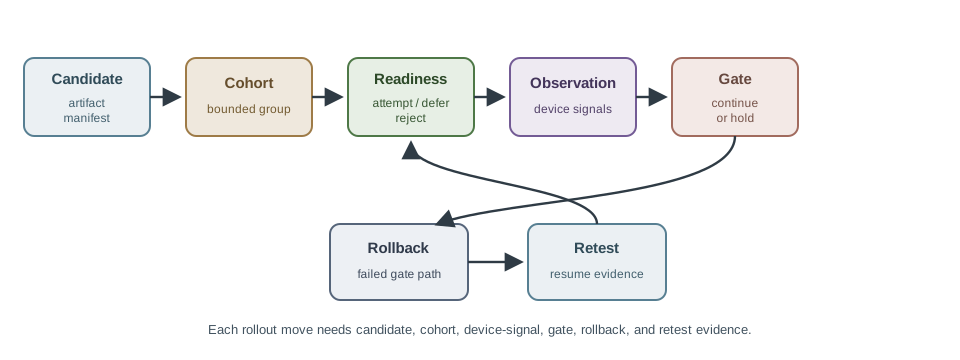
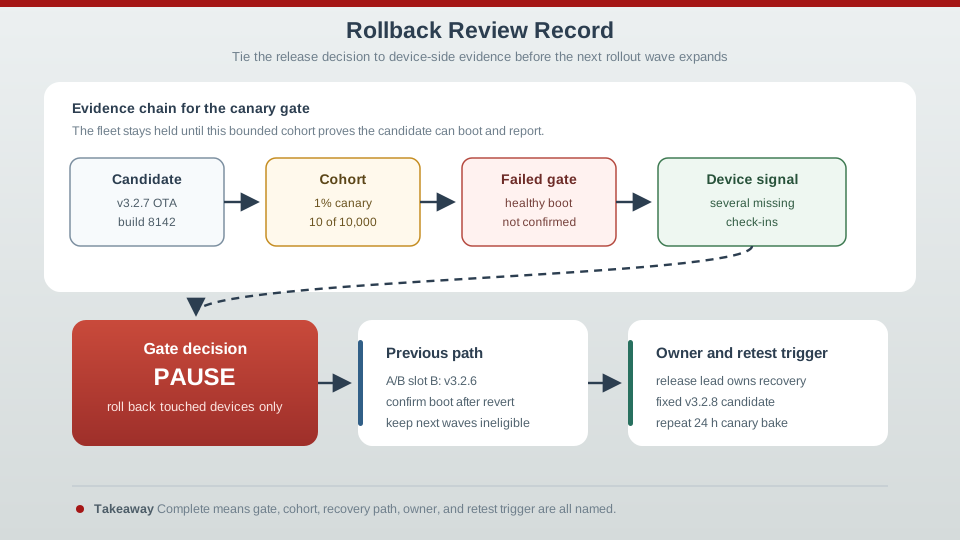
21  Rollback & Staged Rollouts

21.1 Learning Objectives

By the end of this chapter, you will be able to:

  • Design automatic rollback mechanisms using health checks, watchdog timers, and boot counters
  • Implement graceful degradation strategies when updates partially fail
  • Plan fleet-wide rollback procedures for canary deployments that reveal issues
  • Calculate staged rollout timing and pause thresholds for different fleet sizes
  • Implement feature flags for A/B testing and emergency kill switches
  • Apply ring deployment strategies to progressively less risk-tolerant device groups
  • Analyze bandwidth savings from delta updates for cellular IoT deployments
In 60 Seconds

Staged rollouts deliver firmware updates to incrementally larger device subsets (1% → 5% → 20% → 100%) with health checks between stages, allowing early detection of regressions before fleet-wide impact. Rollback capability — automatic reversion to the previous firmware on detected health check failure — is the critical safety net for OTA deployments. Without staged rollout and rollback, a single bad firmware version can simultaneously affect millions of deployed IoT devices.

21.2 For Beginners: Rollback & Staged Rollouts

Imagine updating software on 100,000 devices at once and discovering a bug - you have just broken 100,000 devices! Rollback strategies let devices automatically detect problems and revert to the old version. Staged rollouts are like testing the water temperature with your toe before jumping in - you update a small group first (1%), watch for problems, then gradually expand (5%, 25%, 100%). If something goes wrong at any stage, you stop and fix it before it affects everyone. This approach turns potential disasters into minor incidents caught early.

“What happens when an update goes wrong in the field?” asked Sammy the Sensor nervously. Max the Microcontroller had it covered. “Automatic rollback! After every update, the device runs a health check – can it read sensors? Can it connect to the network? Is it using a reasonable amount of memory? If any check fails, it reboots back to the previous firmware automatically.”

Lila the LED described staged rollouts. “Imagine updating 100,000 street lights. You do not flip them all at once! First, update 1,000 in a test zone. Watch them for a week. If the crash rate stays below 0.1%, update the next 5,000. Keep expanding until all 100,000 are done. If problems appear at any stage, you stop and investigate.”

“Feature flags are another clever trick,” said Max. “You deploy the same firmware to all devices, but new features are hidden behind a switch in the cloud. You can enable a feature for 1% of devices to test it, then gradually increase. If something goes wrong, you turn off the feature flag instantly – no firmware update needed!” Bella the Battery added, “And for cellular devices, delta updates save huge amounts of bandwidth. Instead of downloading a full 500 KB firmware over expensive cellular data, the device downloads just the 20 KB that changed. That can be the difference between a sustainable and an unaffordable deployment!”

21.3 Introduction

Even with the most rigorous testing, firmware updates can fail in production. Network interruptions, power loss during flashing, unexpected hardware variations, and subtle bugs that escaped testing can all cause devices to malfunction after an update. The difference between a minor incident and a fleet-wide disaster lies in rollback and staged rollout strategies.

This chapter explores how to design update systems that fail gracefully, recover automatically, and limit the blast radius of problems through progressive deployment.

21.4 Rollback Strategies

21.4.1 Automatic Rollback

Devices must detect and recover from bad updates autonomously:

Health Checks:

  • After update, application runs self-tests
  • Verify sensor readings are reasonable
  • Confirm network connectivity
  • Test actuator responses
  • Report health to server

Watchdog Timer Protection:

  • Hardware watchdog must be petted regularly
  • If new firmware crashes/hangs, watchdog resets device
  • Bootloader detects repeated resets, reverts to old firmware

Boot Counter Limits:

  • Bootloader increments counter on each boot
  • Application resets counter after successful initialization
  • If counter exceeds threshold (e.g., 3), rollback to previous firmware
  • Prevents boot loops

Mark-and-Commit:

  • New firmware initially marked “pending”
  • After successful operation period (e.g., 1 hour), marked “committed”
  • Boot failure before commit leads to automatic rollback

21.4.2 Graceful Degradation

When updates fail, maintain essential functionality:

Safe Mode Operation:

  • Minimal functionality firmware (recovery partition)
  • Basic connectivity to download full firmware again
  • No advanced features, just enough to un-brick

Feature Disablement:

  • If update partially succeeds, disable broken features
  • Continue operating with reduced capability
  • Example: Smart lock with broken biometric sensor still accepts PIN codes

21.4.3 Fleet-Wide Rollback

Canary Crash Rate Statistical Significance: Smart meter fleet baseline crash rate 0.2% devices/hour (0.002 per device-hour, or 50 crashes/hour across 25,000 meters):

Canary group (1,250 devices, 4 hours): \[\text{Expected crashes} = 1,250 \times 0.002 \times 4 = 10 \text{ crashes}\] \[\text{Observed crashes} = 40 \text{ crashes}\]

Crash rate increase: \[\text{Ratio} = \frac{40}{10} = 4\times \text{ baseline}\]

Statistical significance (Poisson distribution): \[\text{P-value} = P(X \geq 40 | \lambda=10) < 0.001\]

This 4x increase is statistically significant (p<0.001), not random variance. Industry threshold typically 2-3x baseline triggers automatic halt.

Cost of halting vs continuing:

  • Halt now: 1,250 devices affected, rollback restores service in 2hr
  • Continue: Risk 23,750 more devices over next 12hr = 19x more customer impact

Halting after detecting 4x baseline prevents 95% of potential fleet damage.

When canary deployment reveals issues:

Halt Rollout:

  • Monitor key metrics during staged deployment
  • Automatic pause if crash rate exceeds threshold
  • Prevent wide-scale damage

Remote Downgrade:

  • Push previous firmware version as new update
  • Requires A/B partitioning or stored previous version
  • Anti-rollback protection must be carefully managed

Selective Rollback:

  • Identify affected device cohort (specific hardware revision, region)
  • Target rollback only to affected devices
  • Minimize disruption

State machine diagram showing complete over-the-air firmware update lifecycle with safety mechanisms: Device starts in Running Old FW state, transitions to Downloading Update when OTA Available, moves to Verifying state after Download Complete (Checksum Failed loops back to downloading, Signature Valid proceeds), enters Installing Update then First Boot after Install Complete. First Boot has two paths: Boot Success leads to Health Checks (annotated with sensor readings, network connectivity, and actuator response validation), or Boot Failed after 3 attempts triggers Rollback. Health Checks decision leads to either Committed state if All Tests Pass (then Running New FW success state), or Rollback if Tests Failed. Rollback always returns to Running Old FW state, restoring previous firmware. Verifying state includes notes about cryptographic validation and anti-rollback protection. Multiple safety gates ensure device cannot brick from failed updates.

State machine diagram showing complete over-the-air firmware update lifecycle with safety mechanisms: Device starts in Running Old FW state, transitions to Downloading Update when OTA Available, moves to Verifying state after Download Complete (Checksum Failed loops back to downloading, Signature Valid proceeds), enters Installing Update then First Boot after Install Complete. First Boot has two paths: Boot Success leads to Health Checks (annotated with sensor readings, network connectivity, and actuator response validation), or Boot Failed after 3 attempts triggers Rollback. Health Checks decision leads to either Committed state if All Tests Pass (then Running New FW success state), or Rollback if Tests Failed. Rollback always returns to Running Old FW state, restoring previous firmware. Verifying state includes notes about cryptographic validation and anti-rollback protection. Multiple safety gates ensure device cannot brick from failed updates.
Figure 21.1: Complete OTA update lifecycle state machine showing download, verification, installation, health checks, and automatic rollback paths with multiple safety gates to prevent bricking.

21.5 Staged Rollout Strategies

21.5.1 Canary Deployments

Named after “canary in a coal mine,” this strategy exposes a small subset to risk first:

Typical Canary Stages:

  1. 1% Canary: 1-2 hours, detect catastrophic issues
  2. 5% Canary: 6-12 hours, detect common bugs
  3. 25% Canary: 24 hours, detect edge cases
  4. 100% Full Rollout: 3-7 days, monitor long-term stability

Metrics to Monitor:

  • Crash Rate: Unexpected reboots per device-hour
  • Connectivity Rate: Percentage of devices checking in
  • Battery Drain: Power consumption increase
  • Sensor Accuracy: Drift in calibrated sensors
  • User Complaints: Support ticket volume
  • Rollback Rate: Devices reverting to old firmware

Automatic Pause Triggers:

  • Crash rate > 2x baseline
  • Connectivity drop > 5%
  • Battery drain > 20% increase
  • Rollback rate > 10%

21.5.2 Feature Flags

Enable/disable features remotely without firmware updates:

Implementation:

  • Device downloads feature flag configuration from server
  • Flags stored in persistent storage
  • Application checks flags before enabling features
  • Can be per-device, per-group, or per-region

Use Cases:

  • A/B Testing: 50% get new algorithm, 50% get old
  • Emergency Kill Switch: Disable problematic feature remotely
  • Gradual Enablement: New feature starts disabled, enable after monitoring
  • Regional Features: Enable features only in specific markets

Example:

{
  "device_id": "ABC123",
  "flags": {
    "new_sensor_algorithm": true,
    "bluetooth_mesh": false,
    "extended_sleep_mode": true
  },
  "version": 42
}
Interactive Calculator: Staged Rollout Planning

Plan your own staged rollout strategy:

Adjust the sliders to plan rollout stages for different fleet sizes, baseline crash rates, and pause thresholds. The calculator shows expected crashes at each stage and automatic pause triggers.

21.5.3 Ring Deployments

Deploy to progressively less risk-tolerant groups:

Ring 0 - Insiders (1-10 devices): - Engineers’ devices - Immediate feedback, can tolerate issues - Duration: 1-3 days

Ring 1 - Alpha (10-100 devices): - QA team, beta customers who opted in - Duration: 3-7 days

Ring 2 - Beta (100-1,000 devices): - Willing beta testers, less critical deployments - Duration: 1-2 weeks

Ring 3 - Production (All remaining devices): - General customer base - Duration: 2-4 weeks for full rollout

Worked Example: Calculating Staged Rollout Timing for Smart Thermostat Fleet

Scenario: A smart home company is deploying a critical HVAC control firmware update (v2.4.1) to their fleet of 250,000 smart thermostats during winter. The update fixes a bug that causes heating to run continuously under certain conditions. The company must balance urgency (energy waste and comfort issues) against risk (bricking thermostats in homes during freezing weather).

Given:

  • Fleet size: 250,000 thermostats across North America
  • Firmware update size: 1.8 MB (full image)
  • Average device bandwidth: 500 Kbps over Wi-Fi
  • Baseline crash rate: 0.02% per device-day
  • Acceptable crash rate threshold: 0.06% (3x baseline)
  • Rollback success rate: 99.7% (A/B partitioning)
  • Support capacity: 500 tickets/day before overflow

Steps:

  1. Calculate download time per device:
    • Download size: 1.8 MB = 14.4 Mbits
    • Bandwidth: 500 Kbps = 0.5 Mbps
    • Download time: 14.4 Mbits / 0.5 Mbps = 28.8 seconds
    • With overhead (TLS handshake, retries): ~45 seconds per device
  2. Design staged rollout percentages and durations:
    • Stage 1 (Canary): 0.5% = 1,250 devices, 6 hours observation
    • Stage 2 (Early): 5% = 12,500 devices, 24 hours observation
    • Stage 3 (Regional): 25% = 62,500 devices, 48 hours observation
    • Stage 4 (Full): 100% = all 250,000 devices, 72 hours rolling for remaining 173,750
  3. Calculate expected failures and support load:
    • Stage 1: 1,250 devices x 0.02% crash rate = 0.25 crashes expected
    • If crash rate hits 0.06%: 1,250 x 0.06% = 0.75 crashes (pause threshold)
    • Stage 2: 12,500 x 0.02% = 2.5 crashes expected (normal)
    • Stage 2 alert threshold: 12,500 x 0.06% = 7.5 crashes (automatic pause)
    • Rollback failures: 12,500 x 0.3% = 37.5 support tickets maximum
  4. Define automatic pause triggers:
    • Crash rate exceeds 3x baseline (0.06%)
    • Rollback rate exceeds 2%
    • Support tickets exceed 100 in any 4-hour window
    • Average heating runtime increases >15% post-update
  5. Calculate total deployment timeline:
    • Stage 1: 6 hours + analysis
    • Stage 2: 24 hours + analysis
    • Stage 3: 48 hours + analysis
    • Stage 4: 72 hours rolling deployment
    • Total minimum: 6.5 days (no issues)
    • With one pause event: 8-10 days

Result: The rollout plan deploys updates to 250,000 devices over approximately one week, with automatic safeguards that pause deployment if crash rates triple. At 0.5% canary size, a catastrophic bug would affect at most 1,250 homes before detection, and 99.7% of those could automatically roll back. Support capacity of 500 tickets/day can handle the 3.7 expected rollback failures per stage.

Key Insight: Staged rollouts are about limiting blast radius. By observing 1,250 devices for 6 hours before expanding to 12,500, you catch most issues while affecting <1% of customers. The math shows that even with a 3x crash rate increase, the absolute number of affected devices remains manageable. The key metrics to monitor are relative changes (crash rate ratio) not absolute numbers, because fleet health varies by season, region, and usage patterns.

Interactive Calculator: Delta Update Bandwidth Savings

Calculate potential savings from implementing delta updates for your cellular IoT fleet:

Adjust parameters to calculate the ROI of implementing delta updates for your cellular IoT deployment. The calculator shows bandwidth savings, cost comparison, and break-even fleet size.

Worked Example: Delta Update Bandwidth Savings for Cellular IoT Sensors

Scenario: An agricultural monitoring company deploys 15,000 soil sensors across rural farms using LTE-M cellular connectivity. The sensors transmit data every 15 minutes and receive firmware updates quarterly. Cellular data costs $0.50/MB on their IoT plan. The engineering team is evaluating whether to implement delta updates instead of full image updates.

Given:

  • Fleet size: 15,000 sensors
  • Full firmware image: 512 KB
  • Quarterly update frequency: 4 updates/year
  • Typical code changes per update: 15% of firmware modified
  • Delta update overhead: 8% (metadata, patch instructions)
  • Cellular data cost: $0.50/MB
  • Delta generation tooling cost: $2,000/year (server + bsdiff licensing)
  • Failed update retry rate: 3% (requires re-download)

Steps:

  1. Calculate full image update costs (baseline):
    • Per-device download: 512 KB = 0.5 MB
    • Per-device with retries: 0.5 MB x 1.03 = 0.515 MB
    • Fleet download per update: 15,000 x 0.515 MB = 7,725 MB
    • Annual downloads: 7,725 MB x 4 = 30,900 MB
    • Annual cellular cost: 30,900 x $0.50 = $15,450
  2. Calculate delta update size:
    • Changed code: 512 KB x 15% = 76.8 KB
    • Delta overhead: 76.8 KB x 8% = 6.14 KB
    • Delta package size: 76.8 + 6.14 = 82.94 KB (approximately 83 KB)
    • Compression ratio: 83 KB / 512 KB = 16.2% (83.8% savings)
  3. Calculate delta update costs:
    • Per-device download: 83 KB = 0.081 MB
    • Per-device with retries: 0.081 MB x 1.03 = 0.083 MB
    • Fleet download per update: 15,000 x 0.083 MB = 1,245 MB
    • Annual downloads: 1,245 MB x 4 = 4,980 MB
    • Annual cellular cost: 4,980 x $0.50 = $2,490
    • Total with tooling: $2,490 + $2,000 = $4,490
  4. Calculate annual savings:
    • Full image cost: $15,450
    • Delta update cost: $4,490
    • Annual savings: $15,450 - $4,490 = $10,960
    • ROI: 244% ($10,960 savings / $4,490 investment)
  5. Assess delta update risks:
    • Version dependency: Delta requires exact base version match
    • Mitigation: Server maintains deltas for last 3 versions
    • Storage overhead: 3 delta variants x 83 KB = 249 KB per update
    • Fallback: Full image available if delta fails after 2 retries

Result: Implementing delta updates saves $10,960 annually (71% cost reduction) for a fleet of 15,000 cellular sensors. The 83% bandwidth reduction also improves update success rates in areas with poor cellular coverage, where large downloads frequently fail. The break-even point is approximately 1,800 devices - any fleet larger than this benefits from delta updates even after accounting for tooling costs.

Key Insight: Delta updates are most valuable for cellular-connected devices with metered data plans. The 83.8% bandwidth savings directly translate to cost savings, but the calculation must include delta generation infrastructure, version management complexity, and fallback mechanisms. For Wi-Fi-connected devices with unlimited data, the ROI calculation shifts to focus on update speed and reliability rather than bandwidth cost. The sweet spot for delta updates is devices with moderate code churn (10-20% per update) - very small changes don’t justify the complexity, and very large changes (>50%) may approach full image size anyway.

Common Pitfalls

1. Testing Only on Development Hardware

  • Mistake: Running all CI tests on developer machines or cloud VMs, then discovering firmware crashes on actual target hardware due to memory constraints, timing differences, or peripheral behavior
  • Why it happens: Hardware-in-the-loop (HIL) testing is expensive and complex to set up. Teams convince themselves that simulation is “good enough” and defer hardware testing until late in the cycle
  • Solution: Include at least one real hardware target in your CI pipeline from day one. Use device farms (AWS Device Farm, BrowserStack, or DIY Raspberry Pi clusters) for automated hardware testing. Even testing on one representative device catches 80% of hardware-specific issues

2. No Rollback Strategy for OTA Updates

  • Mistake: Deploying OTA updates to production devices without A/B partition schemes or automatic rollback, resulting in bricked devices when updates fail mid-install or contain critical bugs
  • Why it happens: Implementing dual-partition bootloaders and rollback logic requires significant engineering effort. Teams ship “MVP” with single-partition updates, planning to add rollback “later” - which never happens until a field incident
  • Solution: Design rollback into your OTA architecture from the start. Use A/B partitioning where the bootloader validates the new partition before committing. Implement automatic rollback if devices fail health checks after N boot attempts. Test power-loss during update scenarios explicitly

3. Skipping Staged Rollouts

  • Mistake: Pushing firmware updates to 100% of devices simultaneously because “we tested it thoroughly,” then discovering a device-specific bug affects 10% of the fleet and now thousands of devices need emergency patches
  • Why it happens: Staged rollouts add operational complexity and slow down releases. Confidence from passing all tests leads teams to push directly to production, especially under deadline pressure
  • Solution: Always use staged rollouts: 1% canary for 24-48 hours, then 10%, 25%, 50%, 100% with monitoring gates between stages. Define automatic rollback triggers (crash rate > 0.1%, error logs > threshold). The few days of slower rollout prevent weeks of emergency response to fleet-wide failures

Question: How long should you wait at each rollout stage before expanding to the next?

Stage Typical % Recommended Duration Why This Duration Pause Trigger Threshold
Internal Alpha 10-50 devices 24-48 hours Catch obvious bugs Any crash or failure
Beta 1-5% 3-7 days Catch rare edge cases 2× baseline metrics
Canary 1-5% 6-24 hours Detect immediate regressions 2× baseline metrics
Early 5-25% 24-72 hours Validate at moderate scale 1.5× baseline metrics
Regional 25-50% 3-7 days Test across geographies 1.5× baseline metrics
Full 50-100% 7-14 days Complete rollout 1.2× baseline metrics

How to Calculate Stage Duration:

Formula: Duration = Mean_Time_To_Failure / (Stage_Size × Failure_Rate)

Example Calculation:

Assume: - Your firmware has a critical bug that affects 0.5% of devices - The bug manifests within 4 hours of operation (mean time to failure) - You deploy to 1% canary stage (1,000 devices)

Expected failures in canary:

Expected_Failures = 1,000 devices × 0.5% = 5 devices
Time_To_Detect = 4 hours (mean time to failure)
Confidence_Level = 95% requires observing 2-3 failures

Minimum_Stage_Duration = 4 hours (one MTTF cycle)
Recommended_Duration = 12 hours (3× MTTF for 95% confidence)

Real-World Stage Duration Rules:

1. Catastrophic Bugs (bricking, security issues): - Can manifest within minutes to hours - Canary duration: 6-12 hours sufficient - Example: Memory leak that crashes device after 2 hours

2. Moderate Bugs (feature degradation): - May take days to manifest or observe pattern - Early rollout duration: 48-72 hours needed - Example: Bluetooth connection fails for 1% of pairings (need time to see pattern)

3. Rare Edge Cases (specific conditions): - May require weeks to observe at small scale - Beta/regional duration: 7+ days - Example: Bug only triggered when device reboots during specific 10-minute window daily

Adaptive Duration Algorithm:

def calculate_stage_duration(stage_size, baseline_metrics):
    # Start with minimum duration
    base_duration_hours = {
        'alpha': 24,
        'beta': 72,
        'canary': 6,
        'early': 24,
        'regional': 72,
        'full': 168  # 1 week
    }

    # Adjust based on historical failure rates
    if baseline_metrics['rare_bug_rate'] > 0.1:
        # History shows rare bugs - increase duration
        multiplier = 2
    else:
        multiplier = 1

    # Adjust based on risk
    if is_safety_critical():
        multiplier *= 1.5

    # Adjust based on stage size (smaller = shorter OK)
    if stage_size < 100:
        multiplier *= 0.5

    return base_duration_hours[current_stage] * multiplier

When to Use Shorter Durations (Aggressive): - Emergency security patch (hours matter) - Small cosmetic change (low risk) - Extensive pre-production testing completed - Strong automatic rollback capability

When to Use Longer Durations (Conservative): - Safety-critical system (medical, automotive) - First deployment of major feature - History of production incidents - Weak rollback capability

Cost of Being Too Fast:

Fast rollout (1 day canary + 1 day early + 1 week full = 9 days)
Bug affects 10% of fleet = 10,000 devices
Service call cost: $200 per device
Total cost: $2,000,000

Fast rollout saved: 3 weeks time-to-market
Time-to-market value: ???? (likely <<$2M for most products)

Cost of Being Too Slow:

Slow rollout (1 week canary + 1 week early + 2 weeks regional + 2 weeks full = 6 weeks)
Delayed feature revenue: 4 weeks × $50k/week = $200,000
Competitor ships similar feature 2 weeks earlier = potential market share loss
Engineering team idle during long monitoring windows = $20k/week × 4 weeks = $80,000

Optimal Balance:

  • Critical bug detection time: 12-48 hours at canary scale
  • Rare bug detection time: 7+ days at early/regional scale
  • Total rollout duration: 2-6 weeks for 100,000+ device fleets

Decision Rule:

If (risk_of_bug_cost > cost_of_slow_rollout):
    Use longer durations
Else:
    Use shorter durations

# For most IoT products:
# Bug cost = $100-500 per device affected
# Slow rollout cost = $10-50k per week
# Break-even: If bug affects >100-1,000 devices, slow rollout is worth it
Common Mistake: Pausing Rollout Without Root Cause Analysis

The Problem: Your automatic monitoring detects a metric spike at 5% rollout. You immediately pause the rollout, but then spend days investigating while devices remain “stuck” on mixed firmware versions.

Why This Is Problematic:

Scenario: Smart thermostat deployment

Day 1: 5% rollout (2,500 devices) shows crash rate increase from 0.01% to 0.05% - Automatic pause triggered ✓ - Engineering notified ✓

Day 2-5: Investigation begins - Team examines code changes - Can’t reproduce crash in lab - Telemetry data inconclusive (stack traces vary) - No clear root cause identified

Day 6: Fleet Status

Firmware Distribution:
├─ v2.5 (old):  95,000 devices (95%) ✓ working fine
├─ v2.6 (new):   2,500 devices (2.5%) ⚠️ slightly elevated crash rate
└─ v2.4 (ancient): 2,500 devices (2.5%) 🤷 forgot about these stragglers

The Dilemma:

  1. Continue rollout? Risk: Crash rate might be real bug affecting more devices
  2. Rollback 2,500? Risk: Rolling back doesn’t give root cause, bug still exists
  3. Stay paused? Risk: Fleet fragmentation increases, delaying all future updates

What Went Wrong:

Mistake 1: No “Pause Runbook”

  • Team paused but had no process for what to do next
  • No timeline for investigation (how long before forcing a decision?)
  • No criteria for resume vs rollback vs abort

Mistake 2: Insufficient Telemetry

  • Crash rate increased but crash clustering not available
  • Couldn’t determine if 0.05% was one bug or multiple bugs
  • Couldn’t correlate with environmental factors (network, temperature, etc.)

Mistake 3: No “Continue Monitoring” Option

  • Pause was binary: either continue or rollback
  • No option to “pause expansion but keep monitoring 2,500 devices for 48 more hours”

The Right Approach: Pause with Decision Tree

def handle_rollout_pause(metrics):
    # Step 1: Immediate triage (within 1 hour)
    severity = classify_issue_severity(metrics)

    if severity == 'critical':  # Devices bricking, safety risk
        immediate_rollback()
        return

    # Step 2: Extended monitoring (24-48 hours)
    if severity == 'moderate':  # Elevated metrics but devices functional
        # Keep current cohort at current version
        # Monitor for 48 more hours before deciding
        extended_monitoring_period = 48

        # Collect additional telemetry
        enable_debug_logging(current_cohort)
        cluster_crashes(current_cohort)
        correlate_with_metadata(current_cohort)

        # Set decision deadline
        schedule_review_meeting(hours=48)

    # Step 3: Root cause or forced decision (48 hours later)
    if root_cause_found():
        if root_cause.severity == 'high':
            rollback_cohort()
            fix_and_retest()
        else:  # Low severity, acceptable
            resume_rollout_with_monitoring()
    else:
        # No root cause after 48 hours - forced decision
        if metrics_stable_or_improving():
            # Likely false alarm or transient issue
            resume_rollout_slowly()  # Next stage at 2% not 10%
        else:
            # Metrics getting worse or staying elevated
            rollback_cohort()
            quarantine_firmware()  # Block further deployment

Better Outcome with Process:

Day 1: Pause triggered, triage begins immediately Day 2: Extended monitoring shows crash rate stable at 0.05% (not increasing) Day 2 PM: Crash clustering reveals: All crashes are same NULL pointer in HTTP parser Day 3: Root cause found - rare edge case in parsing malformed HTTP header Day 3: Fix deployed to canary (50 devices) Day 4: Fix confirmed, v2.6.1 deployed to original 2,500 devices Day 5: Resume rollout with v2.6.1

Fleet Status Day 6:

Firmware Distribution:
├─ v2.5 (old):    92,500 devices (92.5%) - being phased out
├─ v2.6.1 (new):   7,500 devices (7.5%) - rollout resuming ✓
└─ v2.6 (buggy):       0 devices - rolled back ✓

Pause Decision Criteria Table:

Metric Change Severity Action Timeline
Crash rate 2× baseline Moderate Pause + Monitor 48h 48h to decide
Crash rate 5× baseline High Pause + Immediate investigation 24h to decide
Crash rate 10× baseline Critical Immediate rollback <4h
Devices unresponsive Critical Immediate rollback <1h
Battery drain 1.2× Low Continue + Monitor Weekly review
Support tickets 2× Moderate Pause + Triage tickets 24h to decide

Best Practices:

  1. Pre-define pause criteria - What metric changes trigger pause?
  2. Create pause runbooks - Exactly what to do when pause triggers
  3. Set decision deadlines - Force decision after 48-72 hours maximum
  4. Enable debug telemetry on pause - Collect additional data immediately
  5. Document resume criteria - What needs to be true to resume rollout?

The Rule: Pausing a rollout is easy. Having a plan for what happens AFTER the pause is what separates professional IoT CI/CD from amateur hour.

21.6 Summary

Rollback and staged rollout strategies are essential safety nets for IoT deployments. Key takeaways from this chapter:

  • Automatic rollback requires health checks, watchdog timers, boot counters, and mark-and-commit mechanisms
  • Graceful degradation keeps devices functional with reduced capability when updates partially fail
  • Fleet-wide rollback should be targeted to affected devices using device attributes, not applied universally
  • Canary deployments expose small percentages (1%, 5%, 25%) to risk first with automatic pause triggers
  • Feature flags enable A/B testing and emergency kill switches without firmware updates
  • Ring deployments progressively expand from engineers to alpha to beta to production
  • Staged rollout timing balances urgency against blast radius, with typical deployments taking 6-10 days
  • Delta updates provide 70-85% bandwidth savings for cellular IoT at the cost of increased complexity
Related Chapters

21.7 Knowledge Check

21.8 Concept Relationships

Understanding rollback and staged rollout strategies connects to the complete deployment lifecycle:

  • CI/CD Fundamentals provides tested artifacts - rollback strategies operate on firmware that passed all CI tests, but production environments reveal issues testing missed
  • OTA Update Architecture enables rollback - A/B partitioning, boot counters, and health checks are the mechanisms that staged rollouts rely on for automatic recovery
  • Monitoring and Tools detects problems - crash rate spikes, connectivity drops, and battery drain trigger automatic pause conditions in staged rollouts
  • Device Management Platforms execute rollouts - platforms like AWS IoT and Mender implement canary deployments, ring releases, and fleet-wide rollback
  • Edge Computing Patterns complicates rollouts - updating edge Lambda functions and ML models requires coordinating cloud and edge deployments

Staged rollouts trade deployment speed for safety - the few extra days of gradual rollout prevent weeks of emergency response to fleet-wide failures.

21.9 See Also

21.10 What’s Next

In the next chapter, Monitoring and CI/CD Tools, we explore how to implement comprehensive telemetry for deployed IoT fleets, including device health metrics, crash reporting, and version distribution monitoring. You’ll also learn about CI/CD tools, OTA platforms, and real-world case studies from Tesla and John Deere.

Previous Current Next
OTA Update Architecture for IoT Rollback & Staged Rollouts Monitoring and CI/CD Tools for IoT