9 Hardware Simulation Fundamentals
More
Depth: Practitioner
Progress saves as you read. Mark sections complete as you go; your progress appears in the sidebar.
9.1 Start With the Hardware Stand-In Story
This section: Start With the Hardware Stand-In Story — Picture a team writing pump-control code before the test rig is free.
Let the Model Answer One Honest Question
Picture a team writing pump-control code before the test rig is free. They can feed made-up tank levels into a software model and watch the state change. The test can reveal a bad rule today, but it cannot show whether the real level probe sticks or the motor draws too much current.
Write the question before building the model. Name the input, expected state, timing, fault, and result that the model must show. Then list what the model leaves out. Keep the model version, code version, run steps, and output so another person can repeat the same claim.
Test normal levels, a sudden jump, a frozen value, a lost input, a restart, and a command that arrives late. Compare each result with the stated rule. Do not turn a pass into a claim about heat, noise, wear, wiring, or any other effect the model did not include.
Keep the real unit in a safe state while its behavior is still unknown. The model can narrow the bench work, but it cannot replace a physical stop check.
This opening does not prove the pump is ready. Practitioner defines the model boundary and handoff. Under the Hood examines model detail, repeat runs, rare faults, and the physical retest that closes each open question.
Picture a team waiting for a sensor board that has not arrived yet. They still need to know whether the firmware reads an input, changes state, and records the right evidence, so they build a software stand-in for the board and run the scenario there first.
That is the heart of hardware simulation: the model is not the device, but it can answer one bounded question before the device is available. In everyday IoT work, that might mean checking a temperature threshold, a debounce rule, a retry path, or a fault response while the real hardware is still being ordered, shared, or repaired.
Start simple by writing the question the model is allowed to answer, then record the modeled input, the simulated observation, the model limit, and the hardware retest that will close the remaining gap.
9.2 Overview: Testing Against a Model of the Hardware
This section: Overview: Testing Against a Model of the Hardware — Hardware simulation tests IoT behavior against a software model of the device, network, or environment instead of the physical thing.
Hardware simulation tests IoT behavior against a software model of the device, network, or environment instead of the physical thing. Rather than wait for a board, a sensor, or a hundred deployed nodes, you describe how those parts behave and let firmware or a whole system run against that description. Because the model is software, runs are fast, repeatable, available before any hardware exists, and able to scale to many virtual devices and to reproduce rare faults on demand — all of which the physical world makes slow, expensive, or unsafe.
The single most important idea is that a simulation is a model, and every model includes some things and simplifies others. A useful one is built to answer a specific question, and it is trustworthy only within the boundary of what it represents. That is why simulation evidence is never just "it passed"; it is "it behaved this way under these modeled assumptions, and these physical questions are still open." Simulation reduces uncertainty cheaply and early; it does not, by itself, close behavior that depends on effects the model left out.
If you only need the intuition, this layer is enough: simulation runs firmware or a system against a model of the hardware, so it is fast, repeatable, and available early. Its evidence is bounded by the model's assumptions, so a useful simulation record always names what the model included, what it simplified, and what must still be checked on real hardware.
Think of a map. A map is useful precisely because it leaves things out — a subway map shows which stops connect, not the true distances between them. It answers “how do I get from here to there” perfectly and “how far is it really” not at all. A simulation is the same: trustworthy for the questions it was drawn to answer, and silent or misleading about the ones it was not. Inspect Figure 9.1 to follow that bounded claim.
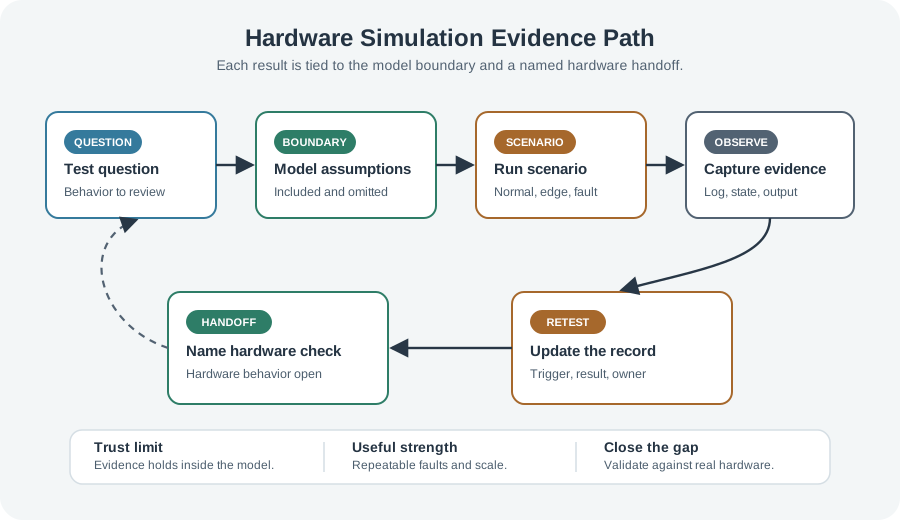
Read Figure 9.1 from the bounded question through model assumptions, scenario run, and observation. The question says what the model must represent; assumptions disclose what it simplifies; and the repeatable run records the resulting behavior. The hardware handoff names physical effects still open, while the retest record identifies changes that invalidate the result. This path connects simulation’s speed and determinism to an honest evidence boundary rather than a blanket claim that the hardware will work.
The One-Minute View
Fast, repeatable, early
Software models run before hardware exists, repeat exactly, scale to many virtual nodes, and inject rare faults on demand.
A model, not reality
Every simulation includes some behavior and simplifies the rest; its evidence holds only inside that boundary.
Name the handoff
Physical effects the model omits stay open as specific hardware questions, not vague "needs a real test" notes.
Beginner Examples
Read these examples as a progression from the simplest observation to the boundary that still needs evidence. Begin with this case: a firmware state machine is exercised against modeled sensor readings to confirm it rejects an invalid value — no physical sensor needed yet. Then examine how a network simulation runs a hundred virtual nodes to see how a protocol behaves under message loss that a small bench cannot reproduce. Finish by considering how a scenario injects a power interruption deterministically, every run, to check the firmware reaches a safe state. Together, the examples connect an intuitive result to a bounded engineering claim.
Overview Knowledge Check
If you can explain "a model included some things and simplified others," you have the core idea. Continue to Practitioner for the kinds of simulation and how to record their evidence.
9.3 Practitioner: Kinds of Simulation and Reviewable Scenarios
This section: Practitioner: Kinds of Simulation and Reviewable Scenarios — "Simulation" covers several techniques that model different parts of an IoT system, and choosing the right one starts with the question you are trying to answer.
"Simulation" covers several techniques that model different parts of an IoT system, and choosing the right one starts with the question you are trying to answer. They form a rough ladder of fidelity and cost: model only what the question needs, because more fidelity means more effort and slower runs.
State the Question as a Repeatable Scenario
Simulation is strongest when the question is phrased as a scenario: a defined starting state, an input or fault, and an expected observation. Then drive the normal case, the edge case, and the fault case, and capture the logs, state, or output that prove which path the firmware took. The determinism that makes this possible is the whole point — the same scenario gives the same result every run, so a fault you inject today can be reproduced exactly next month. Use Figure 9.2 to see what must accompany that repeatable run.Inspect Figure 9.2 from scenario definition to the hardware handoff before accepting the repeatable modeled result.
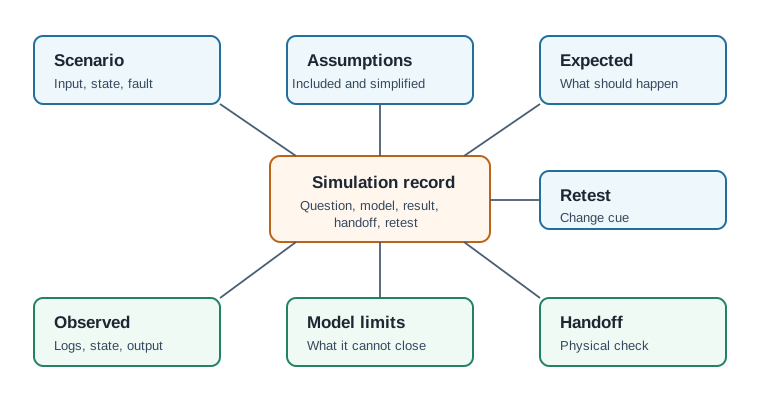
Read Figure 9.2 from scenario and model assumptions to expected behavior, observed behavior, model limits, hardware handoff, and retest trigger. The first pair defines the repeatable question and its artificial world; the middle pair records whether the run agreed with the claim; and the final fields stop a model result from being mistaken for physical proof. This record connects deterministic simulation to the chapter’s evidence narrative by making both its result and its limits reproducible.
Worked Example: A Sensor Startup Scenario
Consider a node that should start, take a reading, reject invalid readings, and emit a status event. A simulation can exercise that firmware logic before the physical sensor path is ready. The scenario defines the startup state, a valid modeled reading, and an invalid one; the run records whether the firmware accepted the valid value, rejected the invalid value, and produced the expected status. That is useful logic evidence — but the record must state that the sensor response was a modeled, idealized input, so the open question becomes specific: "confirm the real sensor startup response on the physical board, because the model used an ideal sensor." A handoff written that precisely tells the next reviewer exactly what to test; "needs hardware test" does not.
Practitioner Knowledge Check
If you can pick the right kind of simulation and write a scenario record with a specific handoff, you can stop here. Continue to Under the Hood for fidelity trade-offs and the reality gap.
9.4 Under the Hood: Fidelity, Time, and the Reality Gap
This section: Under the Hood: Fidelity, Time, and the Reality Gap — The deeper layer is about why a confident green simulation can still mislead.
The deeper layer is about why a confident green simulation can still mislead. Three mechanisms govern it: the fidelity-versus-cost trade-off, the difference between simulated time and real time, and the gap between any model and the world it stands in for.
Fidelity Costs, So Models Idealize
A higher-fidelity model is more accurate but slower to run and more expensive to build, so practical models idealize: a sensor with no noise or drift, a link that never corrupts a byte, a CPU that is infinitely fast between events. Those simplifications are what make the model fast and are usually fine for logic questions — but each one is a place where simulated behavior can diverge from hardware. The skill is choosing fidelity to match the question and recording the idealizations, so a reviewer knows which physical effects were assumed away.
Simulated Time Is Not Wall-Clock Time
Many simulators are discrete-event: they keep a virtual clock and jump from one scheduled event to the next, so a simulated hour can finish in seconds and a microsecond can take seconds to compute. This is powerful for studying behavior and scale, but it means the simulation does not, by construction, reproduce real wall-clock timing, interrupt latency, or the race conditions that depend on them. Questions about true timing belong to a hardware-in-the-loop setup or real hardware, where time is real rather than modeled.
The Reality Gap and Validating the Model
The difference between simulated and real behavior is often called the reality gap or sim-to-real gap: a design tuned until it works perfectly in simulation can fail on hardware because the model omitted noise, nonlinearity, timing, or a real failure mode. The defense is to validate the model itself — confirm it reproduces a known real measurement before trusting it on new predictions. An unvalidated model that has never been checked against reality produces confident numbers with no anchor; a validated one earns trust within the range it was checked against, and no further. Verifying that the model was built as intended is necessary, but it is not the same as validating that it is the right model for reality.
Common Pitfalls
Review these failure modes in the order they can weaken or invalidate the result. Begin with Trusting an unvalidated model. A model never checked against a real measurement produces unanchored confidence. Then examine Reading virtual time as real time. Discrete-event runs do not prove wall-clock timing or interrupt races. Then examine Ignoring the reality gap. A design tuned only in simulation can fail on hardware the model simplified. Then examine Testing only the happy path. Simulation's strength is repeatable faults; not driving them wastes it. Finish with Vague handoffs. "Needs a real test" does not tell the next reviewer which physical behavior to check. This sequence connects each warning to the evidence a reviewer should demand before accepting the claim.
Under-the-Hood Knowledge Check
At this depth, simulation is the disciplined use of models: choose fidelity to fit the question, remember that virtual time is not wall-clock time, validate the model against reality before trusting it, and record the boundary so a logic pass is never mistaken for a physical guarantee. The strongest simulation evidence states what the model represented, what it idealized, and the specific hardware question it handed onward.
9.5 Summary
This section: Summary
Hardware simulation tests IoT behavior against a software model of the device, network, or environment, so runs are fast, repeatable, available before hardware exists, scalable to many virtual nodes, and able to inject rare faults deterministically. A simulation is a model that includes some behavior and simplifies the rest; its evidence is trustworthy only within that boundary, never as a blanket “it works.”. Different kinds of simulation answer different questions: logic and behavioral, instruction and peripheral emulation, network and discrete-event, and environment or signal models, each on a fidelity-versus-cost ladder. The strongest simulation work states the question as a repeatable scenario, drives normal, edge, and fault cases, and captures logs or state that prove which path the firmware took. Higher fidelity costs more and runs slower, so models idealize inputs; each idealization is a place simulated behavior can diverge from hardware and must be recorded. Discrete-event simulators advance a virtual clock, so they study behavior and scale but do not reproduce real wall-clock timing or interrupt races, which belong to hardware-in-the-loop and real hardware. The reality gap is closed only by validating the model against a known real measurement and by writing specific hardware handoffs, not vague “needs a real test” notes.
Simulation is evidence only when its assumptions, model boundary, scenario inputs, and validation against reality are documented. It reduces uncertainty cheaply and early, but it earns trust only when the model has been checked against the real world and the record names exactly which physical behavior it could not close.
9.6 See Also
This section: See Also
HIL Testing for IoT
Add the real device when timing and electrical behavior outrun what a model can represent.
Online Hardware Simulators
Turn the scenario and model-boundary ideas here into hands-on, browser-based simulation work.
Emulation & Debugging
Run the actual binary on an emulated CPU and peripherals to debug at the register level.
Network Simulation Tools
Model many nodes, topology, loss, and latency to study protocol behavior at scale.
Find help
3 reviewed answers.
Where should I start in a module?
Open the module page from the sidebar to see its chapters in order. Use the module map to return to a topic you need.
Modules and pathsReviewed
What can I try when a project does not work?
Check the symptom, then work through the diagnostic steps. Keep the error message and the smallest example that reproduces it.
When you are stuckReviewed
How do interactive examples work?
Use the interactive guide to check how examples and simulations work before changing your project.
Interactive examples guideReviewed