32 Fleet Device Management
More
Depth: Practitioner
Progress saves as you read. Mark sections complete as you go; your progress appears in the sidebar.
32.1 Start With the Story
This section: Start With the Story — Device management becomes real when there is more than one device, more than one firmware version, and more than one support action.
Device management becomes real when there is more than one device, more than one firmware version, and more than one support action. A prototype that enrolls one board is only a beginning. The useful story asks whether identity, configuration, diagnostics, health, rollout, rollback, retirement, and ownership stay visible as the fleet changes.
This chapter starts with a small representative fleet. Force drift and failure early, keep support decisions explicit, and record which management responsibilities belong to firmware, edge, cloud, application, and people.
32.2 Device Management Proves Fleet
This section: Device Management Proves Fleet — Device management is the difference between a prototype that works while the developer is present and a fleet that another team can enroll, configure, update, diagnose, suspend, replace, and retire.
Device management is the difference between a prototype that works while the developer is present and a fleet that another team can enroll, configure, update, diagnose, suspend, replace, and retire. The review should prove managed states, not just a successful firmware flash or a list of connected devices.
Figure 32.1 follows one device group from enrollment to support evidence.
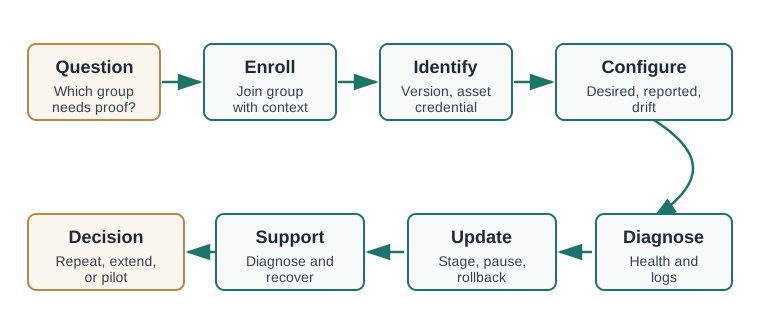
The route in Figure 32.1 asks which fleet group needs proof before a device is enrolled. Joining records the unit and context; identity links version, asset, credential, and owner. Configuration then compares desired with reported state so drift is visible. Diagnostics add health and logs before a staged update can be paused or rolled back. Support must be able to diagnose and recover the unit, not merely show it as connected. The final decision can repeat, extend, or pilot the trial. Follow one physical device through these records so a later reviewer can explain its state after a failure or replacement.
Start by naming the smallest representative fleet: device type, identity method, owner, installation context, network path, firmware package, configuration schema, and support role. Then force one normal path and one failure path through the same managed system. A cold-room trial might enroll three sensors, assign them to a site, set a sampling interval, report battery and link quality, apply a staged firmware package, pause one rollout when health fails, roll it back, and record which support person owns the next action.
- Enrollment question: can the team prove which physical unit joined which group, with which credential and owner?
- Change question: can desired configuration, reported configuration, drift, update state, pause gate, and rollback result be seen together?
- Support question: can someone diagnose, rotate credentials, replace, quarantine, or retire the unit without private developer notes?
The evidence should connect physical reality to managed state. A serial number alone is not enough if the support dashboard cannot map it to the installed asset. A firmware version alone is not enough if the system cannot show which package, signing key, target group, install result, and rollback state produced it. A configuration value alone is not enough if desired state, reported state, rejected value, and last writer are separated across tools.
A good review ends with a decision about fleet readiness: repeat the trial, harden enrollment, improve diagnostics, move update logic back to firmware, add support workflow, or prepare a pilot. That decision is stronger when reviewers can reconstruct one device’s story from managed records rather than from the developer who happened to run the bench script.
32.3 Match Platform to Managed State
This section: Match Platform to Managed State — Different tools expose different parts of fleet operation.
Different tools expose different parts of fleet operation. AWS IoT Device Management Jobs, AWS IoT Fleet Provisioning, and AWS IoT Device Defender can prove cloud-side enrollment, job rollout, and security posture. Azure IoT Hub Device Provisioning Service and Device Update for IoT Hub can prove provisioning and staged updates. Mender, Eclipse hawkBit, balenaCloud, Memfault, Golioth, Particle Device Cloud, ThingsBoard, AVSystem Coiote, and LwM2M stacks such as Eclipse Leshan can prove OTA, diagnostics, grouping, device shadow, or constrained-device management patterns.
- For provisioning: record serial number, hardware revision, X.509 certificate or TPM-backed identity, MQTT client id, group assignment, installer, site, and first-contact timestamp.
- For configuration: record desired state, reported state, schema version, accepted range, rejection reason, last writer, retry policy, and local fallback.
- For diagnostics: record reset reason, boot count, crash signature, memory or storage pressure, modem RSSI/RSRP, battery voltage, clock drift, log redaction rule, and support action.
- For rollout: record package id, signing key, target cohort, compatibility rule, canary result, health threshold, pause owner, rollback version, and final device state.
Choose the platform by the evidence state it exposes, not by the vendor checklist. If the uncertainty is enrollment, the trial should prove manufacturing id, installer action, credential issue, group assignment, first contact, and ownership transfer. If the uncertainty is configuration drift, the trial should prove desired state, reported state, rejection, retry, local fallback, and who can approve the change. If the uncertainty is support, the trial should prove that logs are redacted, diagnostics are scoped, and a non-developer can see enough state to decide replacement, quarantine, or rollback.
Run the first pass with a deliberately small managed set. Enroll one normal device, one device with a credential problem, and one device that goes offline during a change. Apply one safe configuration change, make one device reject it, stage one update to a canary group, trigger one pause gate, and prove one rollback. Capture a before-and-after record for each device: group, credential state, firmware version, configuration version, health state, update state, diagnostic note, and support owner.
Keep the fleet artifacts portable enough to review. Export package metadata, target cohort, rollout state, logs, device identifiers, configuration schema, and support notes into files, tickets, tables, or dashboards that another reviewer can read. If the only evidence is a transient console screen, the prototype has not yet produced a durable fleet record. If the only support path is a developer shell session, the team has not yet proven operations ownership.
Do not over-scale the first trial. Ten or twenty simulated devices can help exercise grouping, but one well-documented failed update and one well-documented configuration drift case usually teach more than a large happy-path count. The aim is to prove the shape of fleet control before the organization pays for field growth.
32.4 Firmware Supports Managed State
This section: Firmware Supports Managed State — A management platform cannot rescue firmware that has no identity boundary, no safe update path, no local health record, or no recovery mode.
A management platform cannot rescue firmware that has no identity boundary, no safe update path, no local health record, or no recovery mode. The device, gateway, cloud service, and support workflow all need compatible state machines.
- Identity boundary: separate manufacturing id, user-visible asset id, certificate subject, MQTT topic namespace, device-shadow record, and support ticket reference.
- Update boundary: define A/B slot layout, bootloader rollback flag, MCUboot, RAUC, SWUpdate, Uptane or TUF metadata, delta-update rules, battery threshold, and network resume behavior.
- Access boundary: decide who can enroll, group, configure, command, suspend, delete credentials, export logs, approve rollout, and release a quarantined device.
- Lifecycle boundary: preserve replacement mapping, credential revocation, data-retention action, final configuration state, and proof that the retired unit can no longer reconnect.
The most important hidden contract is the device state machine. Firmware must report enough facts for the platform to make safe decisions: boot slot, package version, configuration version, monotonic install attempt, last successful check-in, battery or power condition, storage headroom, network class, reset reason, watchdog state, and whether rollback is still possible. If the firmware reports only a generic “online” state, the management platform cannot reliably decide whether to continue a rollout, pause it, or ask for field support.
Update safety depends on more than the OTA transport. A/B slots, MCUboot image confirmation, RAUC bundles, SWUpdate handlers, Uptane or TUF metadata, signed manifests, delta package compatibility, resume behavior, and battery or link thresholds all influence whether a failed update is recoverable. The prototype should say which of these are real, which are mocked, and which are out of scope for the next pilot. That distinction prevents a successful lab update from being misread as fleet-safe rollout evidence.
Diagnostics and support also need privacy and access boundaries. Logs should avoid secrets and personal data; commands should be scoped by role; certificate rotation and quarantine should leave an audit record; and deletion should not leave a retired device able to reconnect under an old identity. For constrained devices, protocols such as LwM2M can expose objects for firmware, connectivity, diagnostics, and security, but the review still needs to show which objects are implemented and which are only planned.
The path is strong when a reviewer can point to one device and reconstruct its enrollment, configuration, diagnostic, update, rollback, support, replacement, and retirement states from system records rather than memory.
32.5 Learning Objectives
This section: Learning Objectives
By the end of this chapter, you will be able to:
- Define the device management evidence an IoT prototype should capture before fleet growth.
- Review enrollment, identity, configuration, health, diagnostics, update, and retirement evidence.
- Separate device-management responsibility from cloud, edge, application, firmware, and support work.
- Plan staged rollout evidence with canary groups, pause gates, rollback evidence, and recovery records.
- Write a device management handoff summary with tested states, boundaries, open risks, and change conditions.
32.6 Device Management as an Evidence Path
This section: Device Management as an Evidence Path — Device management starts when a prototype has more than isolated devices.
Device management starts when a prototype has more than isolated devices. The team needs repeatable proof that devices can be enrolled, grouped, configured, observed, changed, recovered, and retired without private bench notes.
Start with one sentence:
The device management path must prove whether [device group] can be enrolled, configured, observed, updated, recovered, and supported during [representative field condition] before we choose [pilot or next prototype form].Then choose the evidence type:
Manual flashing can be enough for the bench. It is not enough for a fleet review. The evidence must show identity, grouping, version, configuration, health, update state, and support action.
32.7 Evidence Roles in the Managed Fleet Path
This section: Evidence Roles in the Managed Fleet Path — Device management touches several systems.
Device management touches several systems. Name the roles before choosing tooling so the review can separate identity, update, diagnostics, configuration, and support responsibilities.
Figure 32.2 assigns each managed device fact to a reviewable record.
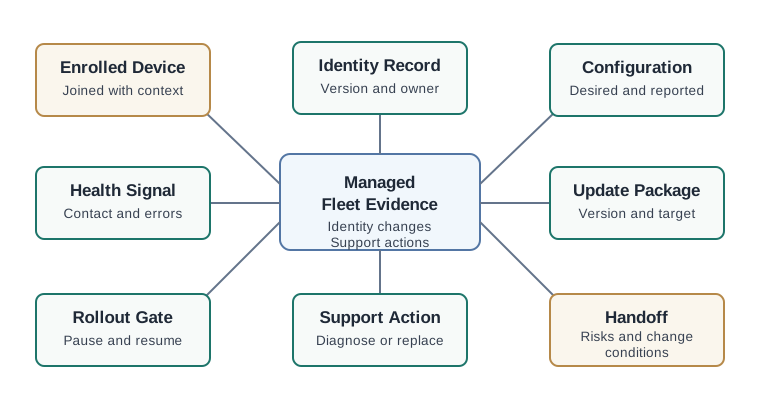
The roles in Figure 32.2 each hold a different fleet fact. An enrolled device needs an identity record with version and owner. Configuration keeps desired and reported settings together, while health signals show contact and errors. An update package names its version and target; the rollout gate can pause or resume based on those signals. Support actions record diagnosis or replacement rather than hiding them in developer notes. The handoff keeps risks and change conditions when the fleet expands. A firmware flash proves one package moved, but these linked records show whether a managed group can be configured, observed, updated, and supported over time.
Use this role checklist:
If the team cannot identify a device, it cannot safely configure, update, support, suspend, replace, or retire that device.
32.8 Enrollment and Identity Evidence
This section: Enrollment and Identity Evidence — The first device management review should prove that devices can enter the managed set with enough context to support later decisions.
The first device management review should prove that devices can enter the managed set with enough context to support later decisions. Identity and configuration evidence are the foundation for update rollout and support.
Figure 32.3 lists the proof needed for each fleet-management role.
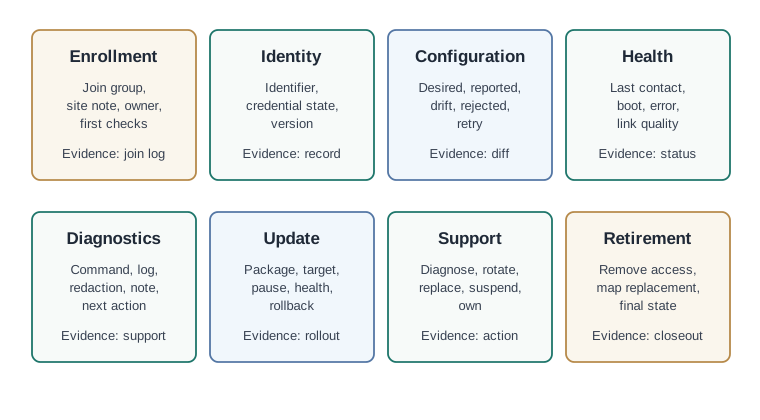
Enrollment evidence links a device to its group, site note, and owner. Identity keeps the identifier, credential state, and version; configuration compares desired and reported values and records rejection or retry. Health needs last contact, boot, and error signals so stale devices are visible. Update evidence names target, package, pause gate, and rollback result, while support evidence records a diagnostic action and its outcome. Select a representative device group and capture these artifacts under normal and fault conditions. A device appearing in a fleet list is only the beginning of management proof.
Use the matrix as a review guide:
Change one managed setting, let a device reject or miss it, and verify that the review shows desired setting, reported setting, drift state, retry path, and support note.
32.9 Diagnostics and Rollout Limits
This section: Diagnostics and Rollout Limits — Update rollout is where device management becomes operationally important.
Update rollout is where device management becomes operationally important. The prototype should prove more than “the update installed.” It should show targeting, compatibility, staged rollout, health checks, pause conditions, rollback evidence, and support diagnosis.
Figure 32.4 tests the cold-room rollout before fleet expansion.
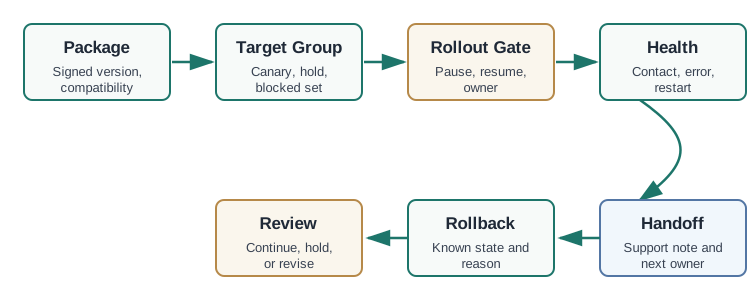
The worked chain starts with three sensors and a staged package. Compatibility, credential state, and hardware or storage conditions need a preflight result before the canary is selected. The canary group then receives the package and reports health; a failed check pauses wider rollout. A rollback result must show that the affected device returned to its prior working state. Record target membership, package identity, and observed health at each gate. The figure leaves some package and compatibility values unstated, so those gaps must be filled by a real rollout record before the example can support a production decision.
Review these boundaries before accepting the result:
A rollout should leave evidence for package readiness, target group, first install, health check, pause or continue decision, rollback case, and final handoff.
32.10 Cold-Room Managed Fleet Trial
This section: Cold-Room Managed Fleet Trial — A team has reviewed cold-room devices, cloud ingestion, edge buffering, and operator workflow.
A team has reviewed cold-room devices, cloud ingestion, edge buffering, and operator workflow. The next uncertainty is whether a small managed fleet can be enrolled, configured, diagnosed, updated, and supported before a pilot.
32.10.1 Stage 1: Evidence Question
question=can a cold-room sensor group be enrolled, identified, configured, diagnosed, updated in stages, recovered after failure, and handed to support?
device_group=cold-room sensor group
identity_evidence=device identifier, credential state, hardware type, firmware version, installation note
configuration_evidence=sample interval, alarm threshold, desired setting, reported setting, drift state
health_evidence=last contact, boot count, error state, storage pressure, link quality
update_evidence=package version, target group, first install, pause gate, rollback result
support_evidence=diagnostic command, support note, replacement mapping, retirement path
32.10.2 Stage 2: Trial Conditions
The team enrolls representative devices, groups them by site and hardware type, applies a configuration change, forces one device to miss the change, gathers diagnostics from a failing device, stages an update to a small group, triggers a pause condition, verifies rollback, and records a support handoff.
32.10.3 Stage 3: Findings
The device management path is accepted for the next prototype because identity, grouping, configuration drift, staged update, rollback, and support notes are visible. The team does not yet accept the path for a larger pilot because replacement mapping and field retirement still need a repeatable support workflow.
32.10.4 Stage 4: Change Conditions
Rerun fleet checks if hardware type, credential method, firmware package format, configuration schema, target grouping, update health checks, or support ownership changes. These conditions define the managed set and the evidence used to judge enrolment, configuration, rollout, recovery, and support. A changed target group requires renewed targeting and compatibility evidence, while changed health checks require another review of pause and continue decisions. Configuration changes need comparison of desired and reported state, including rejection or missed changes.
Record the changed condition with the fleet handoff and repeat the relevant trial paths. Keep package identity, device state, rollback result, diagnostics, and support responsibility visible. The revised decision should retain the unresolved need for repeatable replacement mapping and field retirement before a larger pilot.
32.11 Fleet Handoff Summary
This section: Fleet Handoff Summary — A device management handoff summary should make fleet readiness repeatable.
A device management handoff summary should make fleet readiness repeatable. It should capture what the managed path proved, what it only mocked, and what would require another run before pilot growth.
Figure 32.5 collects the device-group decision and the evidence needed for support.
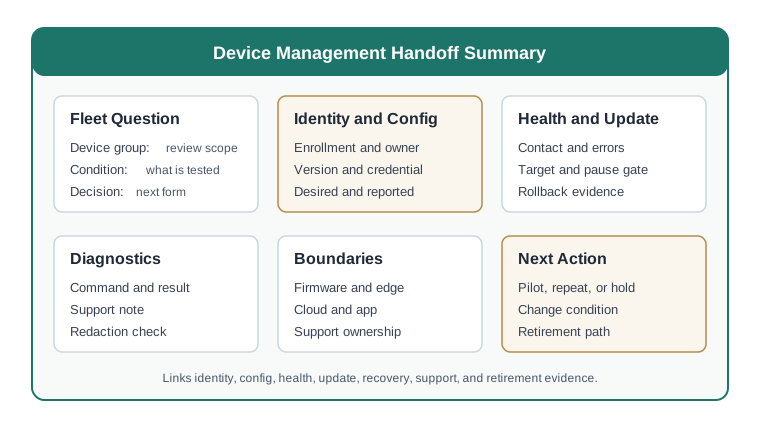
The fleet question identifies which group and tested condition the review covers. Identity and configuration fields keep enrollment owner, version, credential state, and desired versus reported values. Health and update fields record contact, errors, target, pause gate, and rollback proof. Diagnostics keep a support command with its observed result, so an operator can tell whether recovery worked. The decision should say whether to repeat, extend, or pilot the group and name the next form. A rollout pass without those support facts would leave the fleet hard to maintain after the prototype team leaves.
Use this template:
prototype:
fleet_question:
device_group:
enrollment_evidence:
identity_evidence:
configuration_evidence:
health_evidence:
diagnostics_evidence:
update_package:
target_group:
rollout_gate:
rollback_evidence:
support_action:
retirement_path:
hidden_conveniences:
boundary_change_conditions:
open_risks:
next_action:
review_owner:
review_cycle:
Good records are observable:
32.12 Device Management Evidence Fit
This section: Device Management Evidence Fit
32.13 Common Failure Patterns
This section: Common Failure Patterns
Having many devices connected does not prove management. The review needs identity, grouping, configuration, health, update, recovery, and support evidence.
If desired settings and reported settings are not visible together, the team cannot tell whether the device accepted, rejected, missed, or later overwrote a change.
An update path without staged rollout and pause criteria can spread a failure quickly. Define target group, health signal, hold point, and resume owner before accepting the path.
A managed fleet also needs a clean ending. Credential removal, group removal, replacement mapping, and final device state should be part of the review.
32.14 Summary
This section: Summary — Device management helps IoT prototypes prove enrollment, identity, configuration, diagnostics, health, update rollout, recovery, support action, and retirement.
Device management helps IoT prototypes prove enrollment, identity, configuration, diagnostics, health, update rollout, recovery, support action, and retirement. Use it deliberately. Start with the fleet evidence question, test drift and failure states, keep rollout decisions visible, and record which responsibilities belong to firmware, edge, cloud, application, and support work.
32.15 Key Takeaway
This section: Key Takeaway — Device-management selection should prove provisioning, identity, updates, monitoring, grouping, access control, and incident response before fleet scale.
Device-management selection should prove provisioning, identity, updates, monitoring, grouping, access control, and incident response before fleet scale.
32.16 See Also
This section: See Also
32.17 What’s Next
This section: What’s Next — This completes the prototyping platforms path.
This completes the prototyping platforms path. Continue with Reference Architectures when you are ready to compare reusable end-to-end IoT system patterns.
Find help
3 reviewed answers.
Where should I start in a module?
Open the module page from the sidebar to see its chapters in order. Use the module map to return to a topic you need.
Modules and pathsReviewed
What can I try when a project does not work?
Check the symptom, then work through the diagnostic steps. Keep the error message and the smallest example that reproduces it.
When you are stuckReviewed
How do interactive examples work?
Use the interactive guide to check how examples and simulations work before changing your project.
Interactive examples guideReviewed