21 Testing and Debugging Firmware
More
Depth: Practitioner
Progress saves as you read. Mark sections complete as you go; your progress appears in the sidebar.
A greenhouse controller reads soil moisture and displays a watering reminder. Its demo works until someone unplugs the sensor. The display keeps the last reading, so an apparently healthy screen now hides a failed input. A normal run could never reveal that mistake.
A test turns a behaviour claim into a comparison between expected and observed results at a named boundary. Debugging explains a mismatch and checks whether a change removes its cause. The boundary matters: a host test can check the rule for a missing value, while a board run checks whether the real driver reports a disconnected sensor.
For a worked run, specify that disconnecting the probe must produce a visible missing-sensor state within one sampling period. First capture a normal reading. Then remove the connector during sampling and record the next state and timestamp. If the old reading remains, trace the driver’s error result into the display state. After the fix, repeat both runs: the fault must become visible and normal sampling must still work.
The common misconception is that “the demo passed” means failure handling works. Keep a normal case beside a meaningful fault case, and save the setup, version, result, and rerun trigger. That turns one successful repair into evidence another person can repeat.
21.1 Start With the Story
This section: Start With the Story — Testing a prototype is not the same as proving the final product.
Testing a prototype is not the same as proving the final product. A good test asks whether the evidence question survives normal use and at least one meaningful failure: a missing sensor, malformed payload, watchdog reset, lost broker connection, interrupted update, or confusing operator state. The test should make the risk visible before the team builds around it.
Use this chapter to design small tests that teach. Each test needs a setup, expected behavior, observed result, fault run, and decision so the prototype can either retire the risk or name the next experiment.
21.2 Overview: Test the Boundary That Can Lie
This section: Overview: Test the Boundary That Can Lie — Firmware tests are valuable when they stress the boundary most likely to hide the fault.
Firmware tests are valuable when they stress the boundary most likely to hide the fault. Pure logic can be tested on a host. Pin timing, bus errors, sleep current, radio retries, and update recovery need hardware or a faithful integration rig.
Figure 21.1 carries a software fault question into a repeatable regression record.
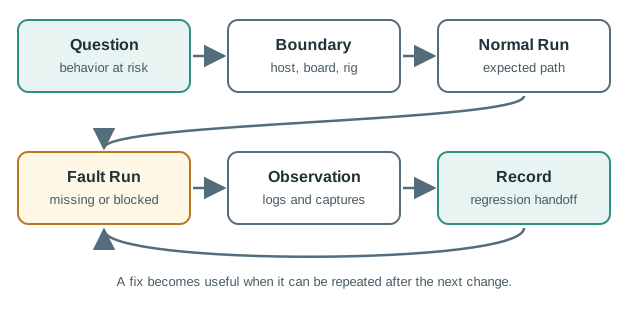
The route in Figure 21.1 starts with the behavior at risk and the boundary that can expose it. A parser claim can use a host test, while bus timeout or brownout behavior needs a board or suitable rig. The normal run shows the expected path; a fault run adds a missing probe, blocked gateway, or other relevant failure at that same boundary. Logs and captures explain what happened, then the record states the setup, version, artifact, and trigger for rerun. This pairing matters because one successful publish does not show whether stale readings, retries, or recovery remain visible after a fault.
The purpose is not to run every possible test. It is to prove that the selected evidence boundary is strong enough for the decision the team wants to make. If the question is about a JSON payload, a host test around the parser may be enough. If the question is about an I2C sensor returning stale data after a bus timeout, a host test can only support the parser claim; the board run still has to prove the driver, timeout path, local state, and recovery evidence.
A useful review starts with one sentence: “This run proves this behavior at this boundary, and it does not prove these other risks.” For an ESP32 cold-room monitor, that might separate calibration math in a pytest or Unity fixture from SHT31 missing-probe behavior on the bench, MQTT reconnect behavior in an integration rig, and brownout recovery on the actual board. The evidence is stronger because each layer admits its limit.
The normal run and the fault run should stay paired. A normal temperature publish proves the selected happy path still works; a missing probe, blocked gateway, full queue, watchdog reset, or weak power run proves that the firmware fails in a visible and recoverable way. The handoff record should name the firmware version, board revision, dependency record, setup, observed result, artifact, and retest trigger so the same question can be reopened after a library, hardware, OTA, or configuration change.
21.3 Happy Paths Need Real Faults
This section: Happy Paths Need Real Faults — A useful firmware test run includes the normal behavior and at least one fault that the product will actually face.
A useful firmware test run includes the normal behavior and at least one fault that the product will actually face. The fault should exercise the same boundary as the decision.
- Parser or calibration logic: run host fixtures with valid, invalid, missing, and out-of-range payloads.
- State-machine behavior: test timeout, stale reading, denied command, reboot, and retry transitions.
- Board behavior: test missing sensor, bus lockup, watchdog reset, brownout, interrupt timing, and sleep/wake rhythm.
- System behavior: test gateway loss, queue overflow, duplicate packets, delayed cloud acknowledgement, and dashboard stale-data display.
Choose the cheapest faithful tool for each boundary. Plain C logic can run in Unity, Ceedling, CMock, GoogleTest, or a small pytest harness around generated fixtures. Zephyr code can often use ztest for logic and driver-facing seams. ESP-IDF projects can use its Unity test runner for target tests and host-side checks for pure functions. Arduino sketches can still isolate conversion and state logic into testable C++ units instead of making every check depend on flashing a board.
Keep the bench plan concrete. Record the board, firmware commit, flash command, wiring note, sensor part, power source, serial speed, broker or gateway address, and the exact fault you inject. A missing-sensor run should say whether the connector was removed before boot or during sampling. A queue-overflow run should say how the gateway was blocked and how long the window lasted. A watchdog run should say whether the test forced a task stall, an assertion, or a power interruption.
Do not let a broad test blur the decision. If the integration rig fails, split the next run by boundary: first verify the host state machine with the same event sequence, then verify the board can keep sampling, then verify the communication worker retries without blocking sensing. Each split should leave an artifact: a test log, serial excerpt, packet capture, trace screenshot, reset reason, or issue link. That discipline makes the final “fixed” claim reviewable rather than dependent on the person who debugged it.
21.4 Observability Before Debugging
This section: Observability Before Debugging — Debugging is slow when the only evidence is a failed demo.
Debugging is slow when the only evidence is a failed demo. Add counters, timestamps, trace pins, packet captures, persisted fault reasons, and firmware/build identifiers before the fault appears.
Good observability also changes what can be trusted. A reboot with a stored reset reason, last state, queue depth, and version number is a reproducible event. A reboot described as “it restarted once” is only a story. On ESP32, a record might include esp_reset_reason(), a compact fault code in non-volatile storage, the current OTA slot, queue depth, and the last sensor state. In Zephyr, it might include structured logging, shell commands, watchdog reason, and a retained crash or reset counter.
Observation has a cost. Serial prints can change interrupt timing, UART buffers can hide scheduling bugs, network logs can alter radio duty cycle, and verbose messages can exhaust flash or heap. When the symptom is timing-sensitive, prefer a GPIO trace pin, a counter sampled at the end of a run, a logic-analyzer capture, or a packet capture from Wireshark, mosquitto, tcpdump, or the gateway rather than printing from every function entry. If adding logs makes the bug disappear, that is a finding: the bug is probably sensitive to timing, buffering, memory pressure, or task scheduling.
Regression evidence should close the loop. After the cause is isolated, the final record should connect the reproduced symptom, the smallest credible boundary, the instrument used, the one change made, the rerun result, and the condition that must reopen the test. That condition might be a new sensor library, FreeRTOS task split, MQTT client update, bootloader change, OTA partition change, low-power mode, or gateway firmware update. Without that trigger, the team can accidentally reuse old evidence after the prototype has become a different system. The trigger is part of the evidence, not a scheduling note.
21.5 Learning Objectives
This section: Learning Objectives
By the end of this chapter, you will be able to:
- Convert prototype questions into host tests, simulator checks, board runs, integration tests, and field observations.
- Choose the right test boundary for firmware logic, drivers, state machines, communication paths, storage, and update behavior.
- Add observability through logs, counters, trace pins, packet captures, persisted fault records, and dashboards without hiding timing or power problems.
- Use a repeatable debug loop that isolates one variable at a time and records the result.
- Create regression and handoff records that connect dependency, architecture, OTA, and best-practice reviews.
21.6 Prerequisites
This section: Prerequisites
This chapter builds on:
- Software Development Environments, where build, upload, serial, debugger, and simulator access are recorded.
- Choosing Architecture Patterns for IoT Software Prototypes, where driver, state, communication, storage, update, and observability responsibilities are separated.
- Managing Libraries and Version Control for IoT Prototypes, where dependency versions and build records are locked before test evidence is trusted.
21.7 Testing Is Evidence, Not Ceremony
This section: Testing Is Evidence, Not Ceremony — A prototype test is useful when it answers a real risk question.
A prototype test is useful when it answers a real risk question. It does not need to copy a production verification program, but it does need to be explicit about what it proves, what it ignores, and what must be repeated later.
Start with the evidence question:
A successful demo proves one narrow path. It does not prove reboot behavior, missing-sensor behavior, queue limits, gateway loss, race conditions, timing margins, or whether another reviewer can rebuild and repeat the same result.
21.8 Test Evidence Ladder
This section: Test Evidence Ladder — Use the cheapest faithful test that answers the current question.
Use the cheapest faithful test that answers the current question. Host tests are excellent for pure logic, parsers, filters, and state machines. Board and integration tests are necessary when timing, drivers, buses, radios, storage, power, or update behavior can change the result.
Inspect Figure 21.2 and ask which cheapest faithful boundary can answer the current firmware question without overstating what it proves.
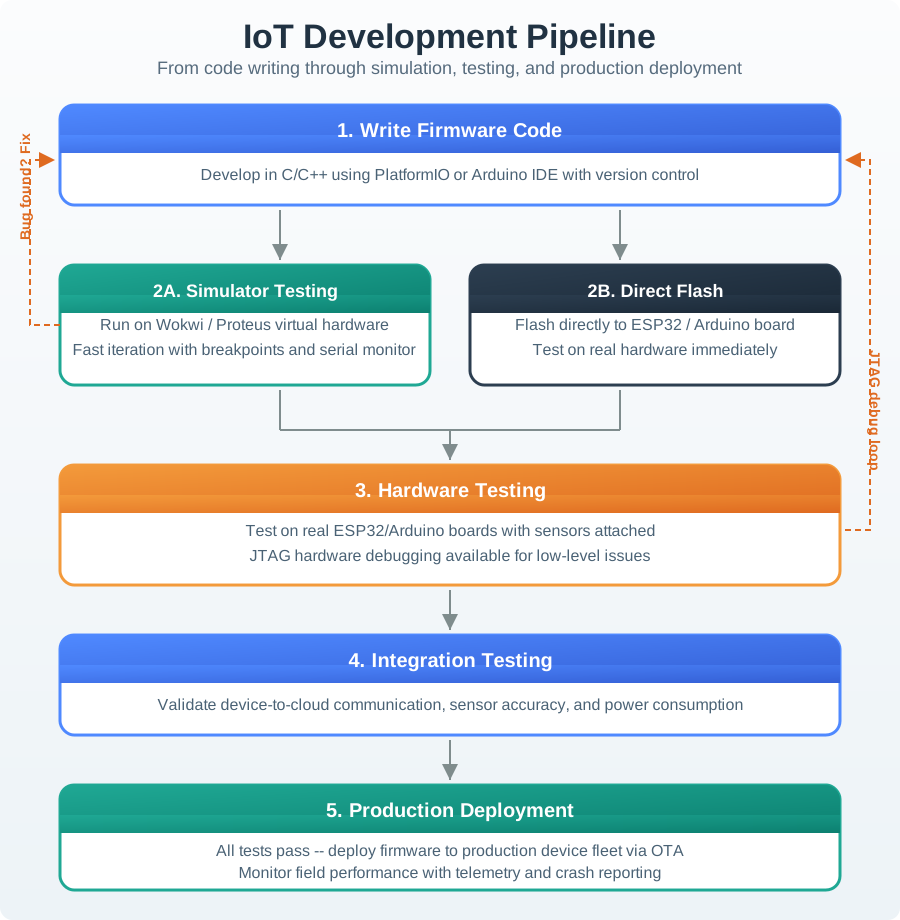
Read Figure 21.2 from static checks and host harnesses into simulators, bench boards, integration rigs, and pilot observation. Each wider boundary answers questions the cheaper one cannot: parsers and state machines can run on a host, but buses, interrupts, timing, and power require hardware. Normal and fault runs remain paired at every layer. When a fault appears, move back to the smallest boundary that reproduces it, apply the smallest fix, and rerun upward rather than treating field telemetry as a substitute for earlier evidence.
Review each layer by what it can and cannot prove:
Do not run a field trial to validate a string parser. Do not trust a host test to validate interrupt timing. Pick the lowest layer that is faithful to the risk and record why that layer is enough.
21.9 Choose the Test Boundary
This section: Choose the Test Boundary — A boundary is where the test enters and observes the system.
A boundary is where the test enters and observes the system. Poor boundaries create false confidence: the test passes because the hard part was mocked away, or it fails because the setup is measuring a different system than the prototype uses.
Use these boundary choices:
Good tests name their boundary in the record. A vague “device test passed” is hard to reuse. “Board run proved missing sensor creates FAULT_SENSOR_MISSING within one sample period and local control remains active” is evidence.
21.10 Observability and Debug Fixtures
This section: Observability and Debug Fixtures — Debugging improves when the prototype is observable before it fails.
Debugging improves when the prototype is observable before it fails. Observability is not just more logs. It is the planned set of signals that show state, timing, counters, payloads, errors, and recovery without changing the behavior under review.
Figure 21.3 points to the retry delay that blocked sensing in the cold-room monitor.
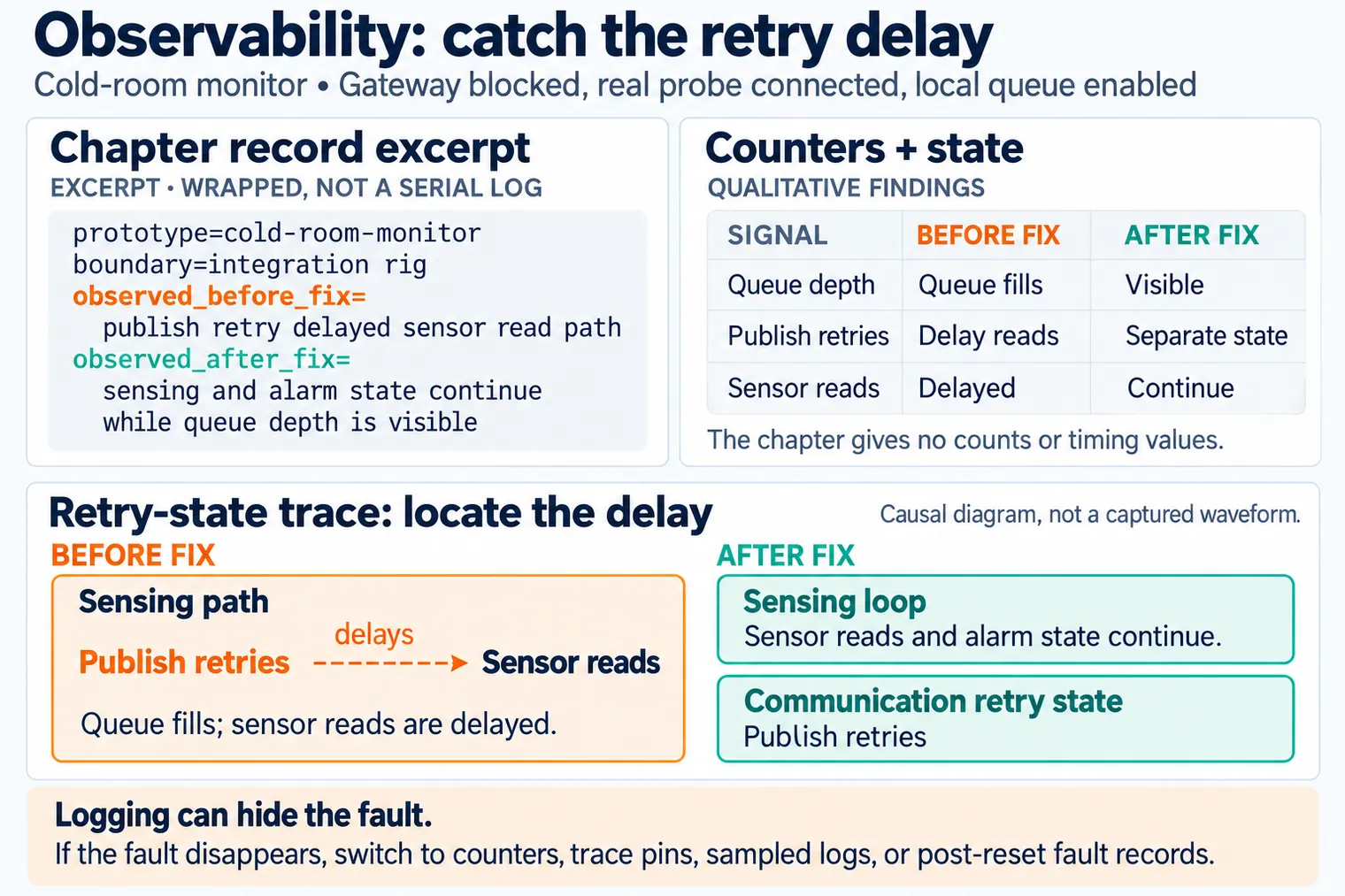
The record excerpt names an integration rig with a real probe and a blocked gateway. Before the fix, the publish retry delayed the sensor read path; after the fix, sensing and local queue behavior continue while the gateway is unavailable. The text in the figure is a wrapped record excerpt, so reviewers should use the attached log or trace for timing claims. Record both normal and blocked-gateway runs with the firmware version and fixture. That evidence lets the team check that changing retry behavior solved the observed delay without hiding stale readings.
Build observability fixtures that match the risk:
Serial prints, network logging, and verbose diagnostics can change timing, power, memory, and radio behavior. If a fault disappears after logging is added, record that as evidence and switch to a lower-impact observation method such as counters, trace pins, sampled logs, or post-reset fault records.
21.11 Debug With a Repeatable Loop
This section: Debug With a Repeatable Loop — Debugging should narrow the unknowns.
Debugging should narrow the unknowns. Avoid changing wiring, firmware, configuration, and test data at the same time. A useful debug session changes one thing, observes one outcome, and leaves a record.
Figure 21.4 keeps each fault investigation tied to one reproducible change.
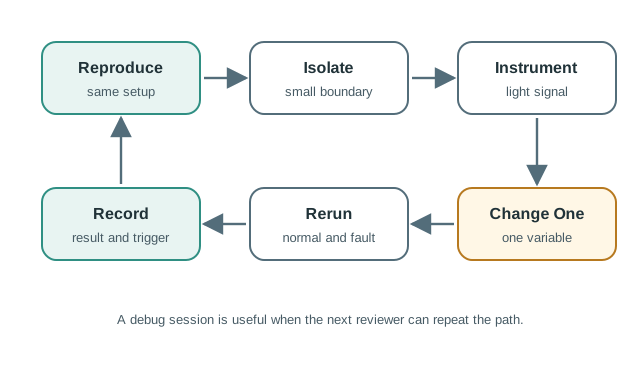
Reproduce the symptom with the same board, inputs, and fault trigger so a later run is comparable. Isolate the smallest boundary that still shows it, then add a light log or capture at that point. Change one variable, such as a retry timeout, and run both the normal and fault cases again. The record keeps the before and after observations plus the condition that should trigger a future rerun. If several changes are made at once, a passing result cannot show which one removed the fault or whether a new risk was introduced.
Use this loop:
21.12 Cold-Room Test Review
This section: Cold-Room Test Review — A team is prototyping a cold-room monitor.
A team is prototyping a cold-room monitor. The firmware reads a temperature probe, tracks alarm state, queues samples while the gateway is unavailable, and reports status when connectivity returns. The demo worked on the bench, but the team needs evidence before a pilot.
21.12.1 Checkpoint: Test Questions
The team defines four review questions:
- Does the temperature conversion and alarm state logic behave correctly around the threshold?
- Does the firmware expose a clear missing-probe state instead of reporting a stale value?
- Does the local queue avoid blocking sensing when the gateway is unavailable?
- Does the post-reset record explain why the device rebooted or entered a fault state?
21.12.2 Evidence Plan
The test plan uses different boundaries:
21.12.3 Debug Result
The initial gateway-blocked run shows that the queue fills and publish retries begin to delay sensor reads. The team does not rewrite the entire communication path. It first adds queue-depth counters and a retry-state trace, then confirms the delay appears only when publish retries run in the sensing path.
The fix moves retry work behind an explicit communication state boundary. The final evidence record includes the host state-machine test, bench missing-probe run, gateway-blocked integration run, queue-depth log excerpt, and firmware commit used for the repeat run.
prototype=cold-room-monitor
test_question=gateway loss must not freeze sensing or alarm state
boundary=integration rig
firmware_version=
dependency_versions=
setup=gateway blocked, real probe connected, local queue enabled
normal_case=read, queue, publish, dashboard update
fault_case=gateway unavailable for the review window
observed_before_fix=publish retry delayed sensor read path
change=separate communication retry state from sensing loop
observed_after_fix=sensing and alarm state continue while queue depth is visible
artifacts=host-test-log, board-run-log, queue-depth-capture, commit, wiring-note
handoff=OTA chapter must rerun queue and rollback behavior after updatePick one prototype bug that was fixed recently. Before calling the fix complete, write a small card another reviewer could rerun without you in the room.
- Symptom: state the failed behavior, setup, firmware version, and whether it was deterministic.
- Boundary: choose host harness, simulator, bench board, integration rig, or field observation, and explain why that boundary is faithful enough.
- Normal case: name the input or condition that should still pass after the fix.
- Fault case: name the realistic failure that caused the bug or could make it return.
- Artifact: record the command, log, capture, screenshot, wiring note, or issue link that proves the result.
- Rerun condition: name the code, dependency, hardware, OTA, configuration, or environment change that must repeat this card.
Accept the card only when the expected result, observed result, artifact, owner, and rerun condition are all explicit. Revise it if the record depends on memory or a one-off demo setup.
21.13 Regression and Handoff Record
This section: Regression and Handoff Record — A fix is incomplete until it becomes regression evidence.
A fix is incomplete until it becomes regression evidence. The team should know which command, board setup, fixture, version, and observation must be repeated when code, dependencies, configuration, hardware, or update behavior changes.
Figure 21.5 lists the context needed to rerun a software fault test.
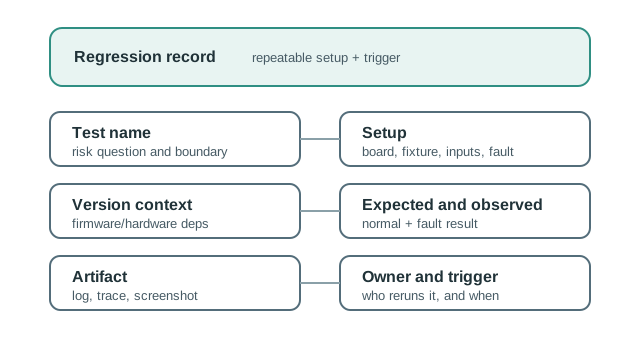
The fields in Figure 21.5 make a fix repeatable. Test name and risk question state what failed and which host, board, rig, or field boundary can show it. Setup records the board, fixture, inputs, and injected fault. Version context keeps firmware, hardware, and dependencies with the run. Expected and observed results cover normal and fault paths; a log, trace, or screenshot preserves the observation. The owner and trigger say who repeats the check after a code, library, configuration, hardware, or update change. Without those fields, a repaired symptom can return while the team still believes the old green result applies.
Keep the record small but complete:
test_name=
risk_question=
boundary=host | simulator | bench-board | integration-rig | field-observation
setup=
firmware_version=
hardware_revision=
dependency_record=
input_or_fault=
expected_result=
observed_result=
artifact_link_or_path=
owner=
rerun_condition=
handoff_note=
Rerun conditions matter. A threshold test might rerun when calibration changes. A gateway-loss test might rerun when the communication library changes. A post-reset record might rerun when OTA or boot behavior changes. Without those conditions, tests slowly become stale documentation.
21.14 Knowledge Check
This section: Knowledge Check
21.15 Common Failure Patterns
This section: Common Failure Patterns
21.16 Checkpoint: Summary
This section: Checkpoint: Summary
- Testing an IoT prototype means matching evidence to the risk boundary.
- Host tests are valuable for logic, but board, integration, and field observations are needed for drivers, timing, storage, networks, power, and update behavior.
- Observability should make faults visible without changing the behavior being measured.
- Debugging should reproduce, isolate, instrument, change one variable, rerun, and record.
- Regression records connect a fix to future dependency, architecture, OTA, and best-practice reviews.
21.17 Key Takeaway
This section: Key Takeaway — Testing should cover unit behavior, hardware interfaces, integration paths, fault cases, and field-like conditions before prototype results are trusted.
Testing should cover unit behavior, hardware interfaces, integration paths, fault cases, and field-like conditions before prototype results are trusted.
21.18 What’s Next
This section: What’s Next
Find help
3 reviewed answers.
Where should I start in a module?
Open the module page from the sidebar to see its chapters in order. Use the module map to return to a topic you need.
Modules and pathsReviewed
What can I try when a project does not work?
Check the symptom, then work through the diagnostic steps. Keep the error message and the smallest example that reproduces it.
When you are stuckReviewed
How do interactive examples work?
Use the interactive guide to check how examples and simulations work before changing your project.
Interactive examples guideReviewed