23 Maintainable Firmware Practices
More
Depth: Practitioner
Progress saves as you read. Mark sections complete as you go; your progress appears in the sidebar.
23.1 Start With the Story
This section: Start With the Story — A prototype can follow style rules and still be hard to trust.
A prototype can follow style rules and still be hard to trust. If configuration is hidden in source, faults are silently retried, logs do not name the state, or release notes omit the test conditions, the next engineer inherits mystery. Maintainable firmware starts with behavior that can be reviewed, not just code that looks tidy.
Use this chapter to connect practice to evidence. Bound responsibilities, expose configuration, make recovery visible, keep observability close to the fault, and record the handoff conditions that tell the next team what must be retested.
23.2 Reviewable Firmware Behavior
This section: Reviewable Firmware Behavior — Maintainability in an IoT prototype means a reviewer can find the boundary that owns a behavior, reproduce the build, run the normal and fault cases, and understand what must change before the firmware moves to a pilot.
Maintainability in an IoT prototype means a reviewer can find the boundary that owns a behavior, reproduce the build, run the normal and fault cases, and understand what must change before the firmware moves to a pilot. Clean names and tidy folders help only when they expose that evidence path. Before choosing individual practices, use Figure 23.1 to see how those pieces form one review route.
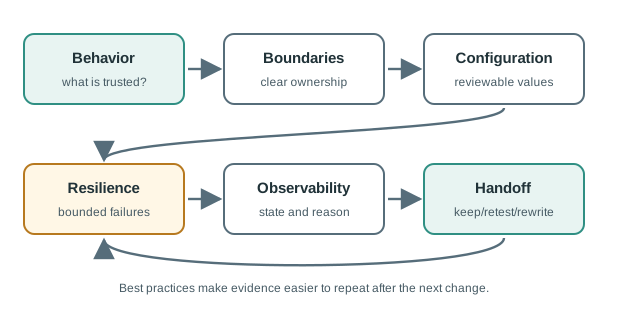
Read Figure 23.1 from prototype behavior at the start toward handoff evidence at the end. Responsibility boundaries make ownership visible; configuration separates reusable behavior from site-specific values; resilience defines what happens under faults; and observability exposes the state needed to judge the result. The release handoff then records which of those claims were actually tested. This route is the chapter’s running narrative: each practice matters because it makes one link in the evidence chain inspectable.
The core habit is separation: drivers report hardware facts, application state owns policy, communication handles transport, storage owns persistence, configuration owns site-specific values, update code owns package safety, and observability explains the last known state without changing it.
For example, a cold-room monitor should not bury calibration, MQTT topics, retry limits, alarm thresholds, and reset handling inside one sketch. A maintainable prototype might keep the SHT31 driver responsible for readings and error codes, a state module responsible for normal, door_open, probe_missing, and gateway_offline, a publisher responsible for JSON or CBOR payload shape, and a configuration module responsible for site-specific thresholds loaded from NVS, LittleFS, SPIFFS, or a gateway-provided profile.
The review record should connect each practice to evidence. A build record names PlatformIO, Arduino CLI, ESP-IDF, Zephyr, or CMake inputs. A configuration record names defaults, validation rules, and where real credentials live. A fault run names the observed reset reason, retry count, queue depth, update slot, and last fault code. Those records matter because prototype code is often reused by accident; the best-practice layer tells the next engineer which parts are safe to keep and which parts are still lab scaffolding.
- Boundary question: which module owns sensing, state, communication, storage, configuration, update, and diagnostics?
- Failure question: what does the firmware do when a sensor disappears, a queue fills, a gateway is offline, storage is corrupt, or an update fails?
- Handoff question: which code, configuration, tests, logs, and release records can the next reviewer reproduce?
23.3 Name Mechanism, Limit, Record
This section: Name Mechanism, Limit, Record — Turn each mechanism into a small review rule.
Real firmware practice depends on concrete mechanisms: FreeRTOS tasks and queues, Zephyr work queues and devicetree overlays, ESP-IDF components, Arduino or PlatformIO board profiles, CMake build targets, GPIO interrupts, I2C/SPI/UART/CAN drivers, MQTT clients, BLE GATT services, CBOR/JSON/protobuf payloads, NVS or EEPROM settings, LittleFS or SPIFFS records, MCUboot or ESP-IDF OTA slots, watchdog timers, and bootloader rollback flags.
Turn each mechanism into a small review rule. If a FreeRTOS task owns publishing, record its priority, queue length, maximum wait, stack high-water mark, and what happens when the broker is unavailable. If Zephyr work queues handle sensor events, record the devicetree overlay, driver binding, timeout, and work-item drop policy. If an Arduino or PlatformIO prototype stores calibration in EEPROM or NVS, record the schema version, validation bounds, migration behavior, and the serial command or fixture used to write it.
Make limits visible before the demo hides them. MQTT reconnects need backoff and a give-up state. BLE GATT notifications need connection state and queue pressure. A CAN or UART parser needs framing error behavior. A LittleFS log needs full-storage and power-loss handling. An OTA package needs signature or hash verification, compatibility checks, health confirmation, and rollback evidence. The prototype may not solve every production case, but it should state each current limit and the exact condition that would make the evidence stale.
- For boundaries: keep driver return codes, application state enums, message schemas, queue ownership, storage keys, and update state machines separate enough to test alone.
- For bounded behavior: set timeouts, retry limits, ring-buffer sizes, queue depths, heap budgets, stack-watermark checks, watchdog windows, and overflow policies explicitly.
- For configuration: record calibration source, firmware version, hardware revision, feature flags, credential reference, schema version, migration rule, and validation failure behavior.
- For observability: emit reset reason, git SHA or build id, firmware semantic version, configuration version, last fault, queue depth, retry count, publish status, OTA slot, and rollback reason.
Keep the handoff record short enough to use. A useful record can be a table with source revision, board revision, firmware version, dependency lockfile, build command, configuration profile, normal run, fault run, known limits, and next change condition. The point is not process weight; it is preventing a later pilot from depending on a prototype whose credentials, calibration, retry policy, or update state cannot be reconstructed.
23.4 Silent Success Is Not Maintainable
This section: Silent Success Is Not Maintainable — A prototype that recovers silently can look stable while losing data, masking brownouts, skipping samples, overwriting flash, or hiding failed updates.
A prototype that recovers silently can look stable while losing data, masking brownouts, skipping samples, overwriting flash, or hiding failed updates. The goal is not to log everything; it is to expose the state that decides whether the behavior can be trusted.
Silent success often appears at resource boundaries. A heap allocation that usually succeeds may fragment over a long run. A retained queue that works during a short outage may wrap or corrupt records after a power loss. A watchdog reset can restore the loop while erasing the reason it happened. A debug build can meet the demo goal while a production logging level changes timing and current draw. Maintainable firmware preserves the facts needed to separate a real fix from a hidden retry loop.
Use low-cost signals first: reset reason registers, monotonically increasing boot counters, queue high-water marks, publish retry counters, last-fault enums, firmware semantic version, git SHA or build ID, configuration schema version, OTA image slot, rollback reason, and compact timing measurements. On an ESP32, that may include NVS keys, partition table, FreeRTOS stack high-water marks, and esp_reset_reason output. On Nordic or STM32 targets, it may include retained RAM flags, watchdog cause, flash-log sequence numbers, and power-profile notes from a shunt or power profiler.
- Timing boundary: avoid blocking sensor, control, watchdog, update, and local fallback work behind a network request, delay loop, or long synchronous flash write.
- Storage boundary: handle full queues, corrupt records, schema migration, flash wear, power loss during write, and replay after reconnect as first-class behavior.
- Update boundary: verify signed image, compatibility check, staged rollout, health check, rollback, boot-count limit, and preserved configuration before handoff.
- Support boundary: make field diagnosis possible with compact logs, counters, version reports, fault codes, and a local reset path that does not erase the only useful evidence.
The firmware is maintainable enough for the next stage when its records let a reviewer reproduce the build, trigger the fault, inspect the state, and decide what must be checked again.
The under-the-hood rule is to preserve meaning when the device is unattended. If a gateway outage, missing probe, queue overflow, update rollback, brownout, or configuration mismatch happens overnight, the next boot should still explain the boundary involved and the action taken. That does not require a large telemetry system; it requires a deliberate state record and a release note that says what the prototype has actually proved.
23.5 Learning Objectives
This section: Learning Objectives
By the end of this chapter, you will be able to:
- Define firmware boundaries that make code easier to test, debug, update, and hand off.
- Keep configuration, credentials, calibration, and environment-specific values reviewable without embedding site-specific values in source behavior.
- Use non-blocking timing, bounded memory, explicit timeouts, watchdog-aware recovery, and local fallback states to reduce field failure risk.
- Add observability that explains faults without changing the behavior under review.
- Create review and release records that connect architecture, dependency, testing, and OTA evidence.
23.6 Prerequisites
This section: Prerequisites
This chapter builds on:
- Choosing Architecture Patterns for IoT Software Prototypes, where responsibility boundaries are separated.
- Managing Libraries and Version Control for IoT Prototypes, where dependencies and build inputs are recorded.
- Testing and Debugging IoT Software Prototypes, where normal runs, fault runs, and regression records are created.
- Over-the-Air Update Evidence for IoT Software Prototypes, where update packages, rollout gates, health checks, and rollback records are reviewed.
23.7 Best Practices Are Evidence Habits
This section: Best Practices Are Evidence Habits — A working prototype can still be hard to trust.
A working prototype can still be hard to trust. If the code is tightly coupled, configuration is hidden, failures are silent, timing is blocking, or release notes are missing, the next reviewer cannot tell whether the prototype is ready to continue.
Frame best practices as evidence habits:
Names, folders, and style matter, but a neat repository can still hide unsafe behavior. Use best practices to make behavior reviewable, not only to make source files look tidy.
23.8 Responsibility Boundaries
This section: Responsibility Boundaries — Firmware becomes fragile when every function knows about every device, state, queue, network, and setting.
Firmware becomes fragile when every function knows about every device, state, queue, network, and setting. A maintainable prototype gives each boundary a clear owner and a clear evidence path. Inspect Figure 23.2 to separate those owners before reviewing their detailed records.
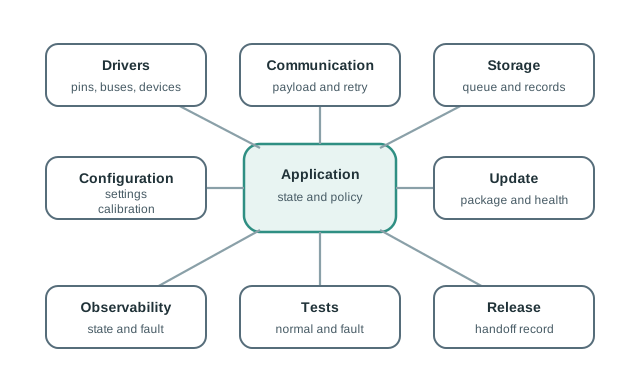
Read Figure 23.2 from drivers at the hardware edge through application state, communication, and storage. These middle boundaries turn observations into policy, transport, and retained state without making any one layer own the whole system. Configuration and update paths change behavior over time, while observability and tests supply the evidence needed to judge those changes. Keeping the paths distinct lets a reviewer inject a fault or replace one implementation without silently changing unrelated policy.
Review these boundaries:
The main loop, scheduler, or task entry point should coordinate boundaries. It should not contain the hidden details of every sensor read, retry policy, storage decision, and diagnostic message.
23.9 Configuration and Credential Boundaries
This section: Configuration and Credential Boundaries — Prototype firmware should separate behavior from environment-specific values.
Prototype firmware should separate behavior from environment-specific values. The source should describe what configuration exists and how it is loaded, not embed private site details or one-off setup values inside application logic. Figure 23.3 shows where those values should enter and which records must remain outside the reusable source path.
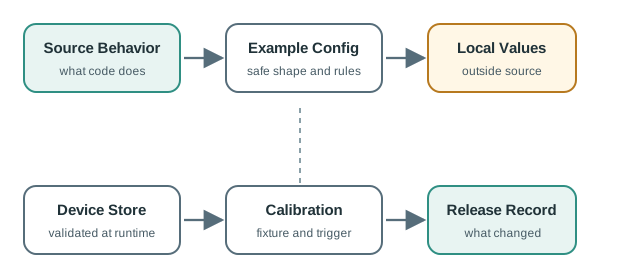
Read Figure 23.3 from source behavior toward the runtime device. Safe example configuration documents shape and defaults, while real credentials and site values enter through a protected local path rather than through committed source. Device storage and calibration then need validation, ownership, and version information, and the release record captures exactly which profile was tested. This boundary preserves the earlier responsibility split: firmware defines how values are used, but deployment evidence proves which values governed the observed behavior.
Use a configuration record:
configuration_item=
purpose=
owner=
default_or_example_value=
source_of_real_value=
storage_location=
validation_rule=
change_condition=
included_in_release_record=yes | no
Review configuration through these checks:
23.10 Resilience and Bounded Behavior
This section: Resilience and Bounded Behavior — IoT firmware runs in messy conditions: sensors disappear, gateways reboot, queues fill, clocks drift, storage wears, radios sleep, and power changes.
IoT firmware runs in messy conditions: sensors disappear, gateways reboot, queues fill, clocks drift, storage wears, radios sleep, and power changes. Best-practice firmware gives each risky path a bound and a recovery rule. Figure 23.4 turns that rule into a loop that can be observed and repeated.
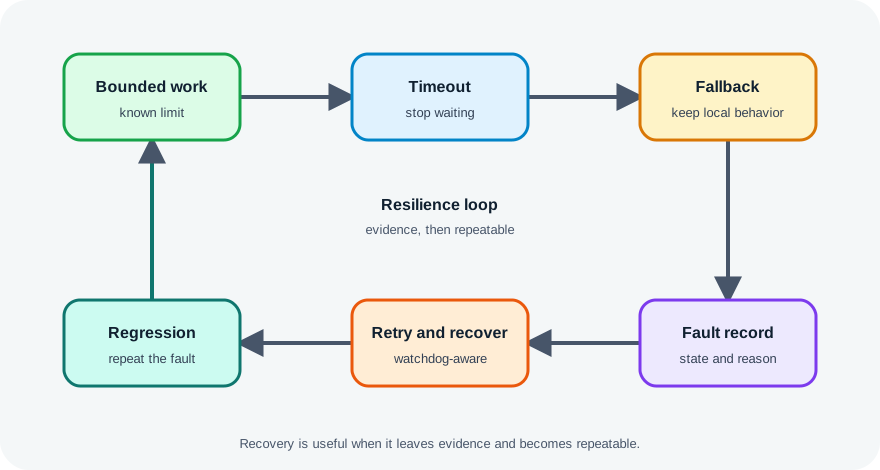
Follow Figure 23.4 around the loop. Work begins with a defined time, memory, or attempt bound; crossing that bound produces a timeout rather than an indefinite wait. The firmware enters an explicit fallback, records the fault, and only then retries or recovers under a stated policy. A regression test feeds the learned failure back into the next build. The loop connects resilience to maintainability: recovery is trustworthy only when it leaves evidence and can be reproduced.
Review bounded behavior:
A retry, reset, or fallback is useful only when the device reports why it happened. Silent recovery can make the demo look stable while hiding a pattern that will matter during a pilot.
23.11 Observability and Review Gates
This section: Observability and Review Gates — Good observability is intentionally small.
Good observability is intentionally small. It gives reviewers enough evidence to understand the state of the device, the last fault, and the current release without flooding storage, radio, or power budgets. Inspect Figure 23.5 to place those signals inside the review sequence rather than treating logging as a separate feature.
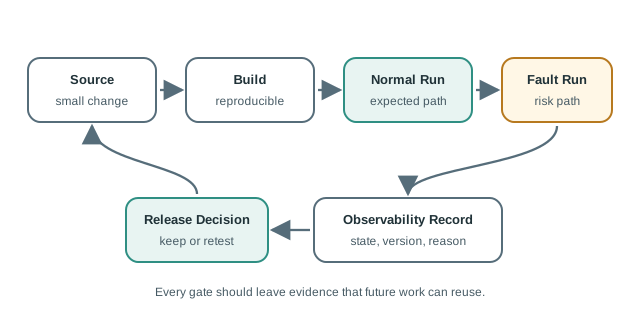
Read Figure 23.5 from the source change to the handoff. A reproducible build fixes the artifact under review; normal and fault tests then exercise both the intended path and the bounded failures described earlier. The observability record explains which state and failure the device actually reached, so the release decision rests on measured behavior rather than a clean test exit alone. Handoff carries that evidence forward and names what must be retested after the next change.
Use review gates before handoff:
Power behavior is a software quality concern, not a late hardware cleanup. Add these checks when firmware controls sleep, wake, radio, sensor polling, or logging:
First, Build evidence: compile every intended board profile, record warnings, binary size, dependency versions, and configuration inputs. Next, Host evidence: run tests for hardware-independent logic such as thresholds, retry state, payload formatting, and configuration validation. Then, Board smoke evidence: capture boot log, firmware version, reset reason, sample interval, publish interval, and one successful sleep/wake cycle. After that, Power evidence: measure active, idle, transmit, and sleep current with the production logging level, not a chatty debug build. Finally, Review trigger: require review when a change affects pins, power states, network behavior, persistent storage, watchdogs, or OTA/update flow.
Record the duty-cycle shape before trusting a battery-life number. A prototype with a realistic current trace and an honest limitation note is more useful than one precise estimate copied from a datasheet.
23.12 Cold-Room Release Review
This section: Cold-Room Release Review — A cold-room monitor prototype now has clear architecture boundaries, dependency records, test evidence, and OTA evidence.
A cold-room monitor prototype now has clear architecture boundaries, dependency records, test evidence, and OTA evidence. Before the team hands it to a pilot group, the software best-practices review checks whether the firmware is maintainable enough to keep moving.
23.12.1 Review Questions
The team asks:
First, Can a reviewer find where sensing, alarm state, communication, storage, update, configuration, and observability are owned? Next, Can the firmware keep local monitoring active when the gateway is unavailable? Then, Can configuration be changed without editing source behavior? After that, Can a reset, queue overflow, missing probe, update failure, or gateway outage be explained from the device record? Finally, Can the next reviewer reproduce the exact build and the evidence runs?
23.12.2 Evidence Runs
The team records:
23.12.3 Decision
The prototype is allowed into a controlled pilot because local monitoring remains active during gateway loss, update rollback is proven, and the release record makes the evidence reproducible. The storage queue is marked as a pilot risk because long offline windows have not yet been proven with the final enclosure and power profile.
prototype=cold-room-monitor
review_question=is the firmware maintainable enough for a controlled pilot?
kept_for_pilot=driver boundary, state boundary, bounded communication retry, update health record
pilot_risk=offline queue duration with final enclosure and power profile
must_check_again=gateway outage, missing probe, full queue, reset record, OTA rollback
release_artifacts=source revision, dependency record, build command, normal run, fault run
handoff=pilot can proceed with queue-duration risk tracked
23.13 Release and Handoff Record
This section: Release and Handoff Record — Inspect Figure 23.6 and ask which evidence each pipeline stage contributes to the final release decision.
Inspect Figure 23.6 and ask which evidence each pipeline stage contributes to the final release decision.
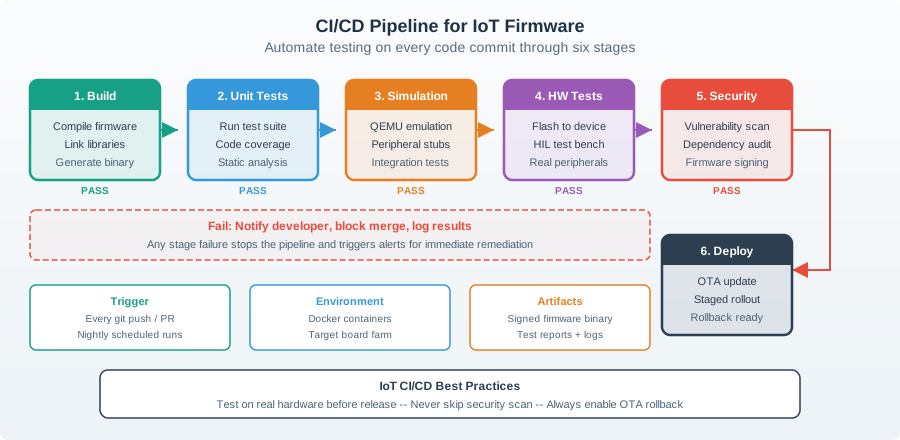
Follow Figure 23.6 from the source change to release review. The build and code gates catch faults in the source first. A model then tests the program with fake parts. Hardware-in-the-loop moves the same build onto the real target. Packaging keeps those tested bytes and adds a manifest, digest, and signature link. It must not rebuild them. The release gate still checks board revision, setup, fault results, and rollout rules. Any failed gate stops the build because an early software pass cannot replace proof from a later physical test.
Use this template:
release_name=
source_revision=
dependency_record=
target_hardware_revision=
configuration_record=
build_command=
generated_artifacts=
normal_behavior_evidence=
fault_behavior_evidence=
power_or_resource_observations=
observability_record=
ota_or_update_record=
known_limits=
temporary_prototype_fixtures=
keep_rewrite_or_check_again=
next_change_condition=
review_owner=
23.14 Try It: Set a Handoff Change Condition
This section: Try It: Set a Handoff Change Condition — Pick one fault or temporary fixture in a firmware prototype you know.
Pick one fault or temporary fixture in a firmware prototype you know. Write one release-record line that says which boundary owns it, what evidence proves the current behavior, and what future change would require the behavior to be checked again.
risk_or_fixture=
owning_boundary=
current_evidence=
next_change_condition=
handoff_decision=keep | rewrite | check again | postpone
Keep the condition specific. “Check again later” is too vague; “check gateway-outage behavior again when retry policy, queue size, or power profile changes” gives the next reviewer a usable rule.
23.15 Knowledge Check
This section: Knowledge Check
23.16 Common Failure Patterns
This section: Common Failure Patterns
23.17 Summary
This section: Summary — First, Software best practices for IoT prototypes are evidence habits, not generic style rules.
First, Software best practices for IoT prototypes are evidence habits, not generic style rules. Next, Clear responsibility boundaries make firmware easier to test, debug, update, and hand off. Then, Configuration, credentials, calibration, and feature flags need explicit records and clear change conditions. After that, Resilience depends on bounded timing, bounded memory, explicit timeouts, visible fallback, and recorded recovery. Finally, Release and handoff records connect architecture, dependencies, testing, OTA, observability, and unresolved risks.
23.18 Key Takeaway
This section: Key Takeaway — Software prototyping best practice is to keep experiments small while preserving tests, logs, version history, configuration control, and failure handling.
Software prototyping best practice is to keep experiments small while preserving tests, logs, version history, configuration control, and failure handling.
23.19 What’s Next
This section: What’s Next
Find help
3 reviewed answers.
Where should I start in a module?
Open the module page from the sidebar to see its chapters in order. Use the module map to return to a topic you need.
Modules and pathsReviewed
What can I try when a project does not work?
Check the symptom, then work through the diagnostic steps. Keep the error message and the smallest example that reproduces it.
When you are stuckReviewed
How do interactive examples work?
Use the interactive guide to check how examples and simulations work before changing your project.
Interactive examples guideReviewed