25 Smart Home and Environmental Kits
More
Depth: Practitioner
Progress saves as you read. Mark sections complete as you go; your progress appears in the sidebar.
25.1 Start With the Story
This section: Start With the Story — A smart-home or environmental kit can produce a dashboard quickly, but the prototype still needs a question.
A smart-home or environmental kit can produce a dashboard quickly, but the prototype still needs a question. Is the team proving sensing range, privacy boundaries, control safety, battery rhythm, cloud dependency, or installation workflow? A kit is useful only when it makes that evidence visible instead of replacing it with a polished app.
This chapter starts from the room, garden, freezer, or classroom where the kit will be judged. Choose the kit by the evidence gap, test the normal and failure path, and record what the kit proves versus what it hides.
25.2 Split State and Context
This section: Split State and Context — Smart-home kits are useful when they expose the full control loop: request, accepted command, device action, confirmed state, manual override, delayed response, local fallback, and recovery after hub or network failure.
Smart-home kits are useful when they expose the full control loop: request, accepted command, device action, confirmed state, manual override, delayed response, local fallback, and recovery after hub or network failure. A button that toggles a demo lamp does not prove the product state contract. It proves that one path could send one command in one condition. A stronger kit test asks what happened when Home Assistant restarted, when an ESPHome node rejoined Wi-Fi, when a Zigbee relay reported a stale endpoint value, when a Matter controller saw a different attribute value than the wall switch, and when the occupant used the physical override before the dashboard refreshed.
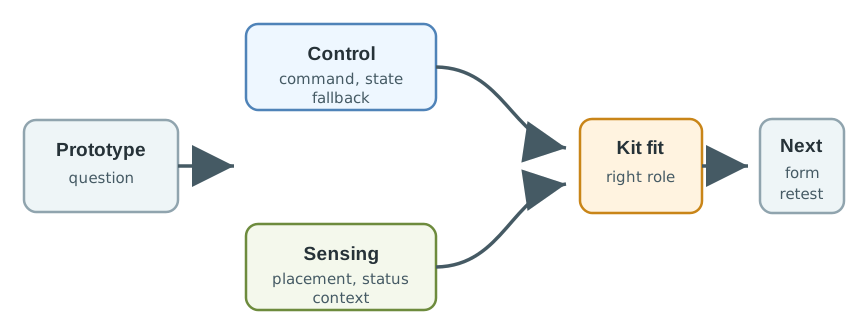
In Figure 25.1, Environmental kits are useful when they expose measurement context: sensor placement, warm-up, calibration reference, drift, stale readings, maintenance, power rhythm, and whether the reading represents a room, wall, vent, window, tank, soil patch, or outdoor microclimate. A BME280 temperature reading beside a vent, an SCD41 carbon-dioxide reading during warm-up, or a DS18B20 water reading with a damaged cable can look precise while being operationally misleading. The kit should make that context visible before the team connects the value to an alert, dashboard color, or automatic action.
The main review move is to keep control evidence and sensing evidence in separate lanes until both have been challenged. A hybrid classroom monitor, greenhouse controller, leak detector, or assisted-living comfort system may eventually combine command, occupancy, air-quality, water, temperature, and maintenance signals. During prototyping, however, the team should ask which stream is currently unproven. If the control stream is weak, prove command acknowledgement, physical state, local override, and fallback first. If the sensing stream is weak, prove placement, calibration, stale flags, power rhythm, and maintenance access first. Only after that review should the kit be treated as a candidate for the next physical form, gateway, enclosure, automation rule, or pilot workflow.
- Control question: can the prototype make device state visible and reversible when cloud, app, gateway, automation, or manual control changes?
- Sensing question: can the prototype explain what a reading means, how old it is, and when the sensor or placement makes it unreliable?
- Hybrid question: which state values are allowed to drive automation, notification, or occupant action without hiding stale or private context?
25.3 Test Protocol and Sensor Path
This section: Test Protocol and Sensor Path — A practical test script should exercise one control path and one sensing path under normal and degraded conditions.
Smart-home experiments may use Home Assistant, Node-RED, Zigbee2MQTT, Z-Wave JS, ESPHome, Tasmota, Matter, Thread, Zigbee, Z-Wave, BLE, Wi-Fi, MQTT, Shelly relays, Sonoff switches, Philips Hue bridges, Aqara sensors, or Raspberry Pi gateways. Environmental experiments may use ESP32 or nRF52 sensor nodes, BME280, SHT31, SCD40/SCD41 CO2 sensors, Sensirion SPS30 particulate sensors, Plantower PMS5003 modules, DS18B20 temperature probes, capacitive soil sensors, water-leak probes, reed switches, PIR sensors, light sensors, solar charge boards, LiFePO4 packs, and LoRaWAN or Wi-Fi gateways. The kit choice is not a shopping comparison; it is a question about which path can produce reviewable evidence with timestamps, firmware versions, configuration files, and repeatable failure cases.
A practical test script should exercise one control path and one sensing path under normal and degraded conditions. For control, send a command from the rule engine, from the dashboard, and from a physical input. Record the command id, source, requested state, acknowledgement, actual device state, bridge topic or endpoint, and visible occupant wording. Then restart the gateway, remove internet access, toggle the local switch, and confirm whether the state record explains what changed. For sensing, collect raw and filtered readings, reference measurements, placement notes, sample intervals, battery level, and stale timestamps. Move the node near a vent, window, wet surface, cabinet, or shaded location only when the chapter scenario calls for that condition, and record why the reading changed.
The review record should also name the data and privacy boundary. Motion, contact, CO2, humidity, room temperature, sound level, light level, and comfort trends can imply activity even when the prototype is not trying to identify people. Decide whether the kit will retain raw samples, hourly aggregates, rule triggers, room labels, diagnostic logs, and failed pairing events. When the next form changes the enclosure, firmware, gateway, hub, cloud connector, alert wording, or maintenance schedule, repeat the evidence script instead of assuming the kit result transfers unchanged.
- For control: log command id, source, requested state, acknowledged state, actual device state, delay, manual override, retained MQTT value, Home Assistant entity state, Matter attribute, Zigbee endpoint, and Z-Wave command-class response.
- For sensing: log placement, shielding, airflow, water exposure, warm-up time, sample interval, calibration reference, raw reading, filtered reading, battery level, maintenance note, and stale timestamp.
- For gateway behavior: log bridge restart, local control without internet, offline queue length, duplicate events, retained topics, device rejoin, pairing recovery, firmware version, and diagnostic visibility.
- For privacy: mark whether occupancy, motion, sound, CO2, door contact, or room-comfort trends could infer behavior, and decide what is retained, aggregated, or deleted.
25.4 Ambiguous State Breaks Automation
This section: Ambiguous State Breaks Automation — The dangerous failure is not only a wrong reading or a missed command.
The dangerous failure is not only a wrong reading or a missed command. It is an automation rule acting on stale, inferred, or partly confirmed state while the occupant sees a clean dashboard. The prototype should make uncertainty visible before it controls a device or sends a notification. A retained MQTT message can look like current state after a device is offline. A device-shadow value can describe the last reported state, the desired cloud state, or a pending delta depending on the platform. A Matter attribute, Zigbee cluster value, Z-Wave command-class report, or Home Assistant entity can also lag behind the physical device when a bridge restarts, a mesh route changes, or a manual override happens out of band.
Environmental readings have a similar hidden-state problem. A sensor pipeline may carry raw counts, compensated readings, rolling averages, calibration coefficients, sample time, publish time, receive time, battery state, and quality flags. If the dashboard keeps the last good value without showing age and quality, an automation rule can ventilate, water, heat, alert, or suppress an alert for the wrong reason. The kit should therefore test the full state vocabulary: fresh, stale, missing, low-confidence, maintenance-required, manually overridden, locally controlled, cloud-controlled, and rollback-required.
Under the hood, the handoff record should preserve enough data to repeat the result: firmware build, hardware revision, gateway image, rule version, MQTT topic or API endpoint, sampling interval, calibration method, enclosure note, placement photo reference if the project keeps one, and the exact failure test. It should also record safe defaults. A valve should fail closed or require local confirmation when water evidence is stale; a door or lock prototype should preserve manual operation; an HVAC or fan rule should avoid acting on an occupancy inference that cannot be explained; and an environmental alert should label stale data rather than silently clearing the condition. These details keep the next form from inheriting a demo-only state model.
- State boundary: separate desired state, reported state, physical state, cached state, retained MQTT messages, device-shadow versions, dashboard labels, and notification payloads.
- Fallback boundary: verify wall switch, local button, valve handle, thermostat control, lock override, reset path, and safe default before app or cloud control is trusted.
- Sensor boundary: check placement bias, vent drafts, sun exposure, enclosure openings, filter loading, condensation, cable routing, calibration drift, and battery replacement access.
- Operations boundary: verify pairing, rejoin, OTA update, credential rotation, hub replacement, rule rollback, audit logs, support diagnostics, and data deletion before a pilot.
The kit is ready to hand off only when the next prototype knows which state, sensing, privacy, and fallback tests must repeat after the physical or automation form changes.
25.5 Learning Objectives
This section: Learning Objectives
By the end of this chapter, you will be able to:
- Match smart-home and environmental kit roles to the evidence they can produce.
- Separate control evidence from environmental sensing evidence.
- Review protocol, power, privacy, data, and workflow boundaries before integration.
- Stage a hybrid prototype without hiding measurement or automation failures.
- Write a review record that captures selected kit roles, rejected options, assumptions, and change conditions.
25.6 Control and Sensing Evidence
This section: Control and Sensing Evidence — Smart-home kits focus on controlled actions: switching, dimming, locking, opening, alerting, and automating based on state.
Smart-home kits focus on controlled actions: switching, dimming, locking, opening, alerting, and automating based on state. Environmental-monitoring kits focus on measured context: air, temperature, humidity, water, soil, light, sound, motion, or occupancy over time. A strong prototype review starts by deciding which evidence stream is currently at risk.
Start by naming the evidence gap:
A polished dashboard can hide weak sensing, weak control confirmation, stale readings, and manual override gaps. Prove the control and sensing paths before treating the dashboard as evidence.
25.7 Kit Roles
This section: Kit Roles — Choose the kit role that exposes the current risk.
Choose the kit role that exposes the current risk. A lighting controller, room sensor node, gateway bridge, and outdoor monitor should not be compared only by feature count. They support different review questions.
Figure 25.2 selects a room-sensor kit for a classroom status question.
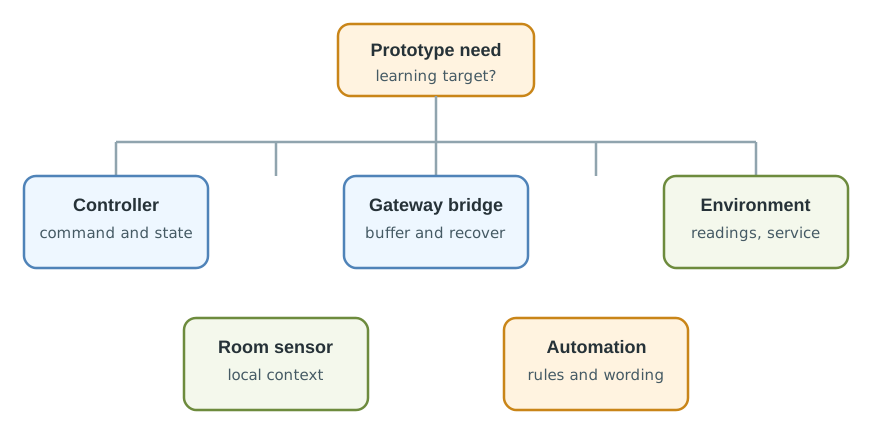
The classroom comfort monitor needs a room reading and a clear stale-status signal before it needs broader automation. The diagram therefore puts the room sensor first and treats a controller kit as a later choice. Keep reference readings, sensor placement, and missed samples with the sensing result. A gateway may add buffering and stale flags, but its result must be tested during a gap or restart. The named components show one path to an observable room status; they do not establish that every classroom placement or automation rule is safe. Choose the next kit only when the current question requires it.
25.8 Smart-Home Kit Evidence
This section: Smart-Home Kit Evidence — Smart-home prototypes fail when control is assumed from a command being sent.
Smart-home prototypes fail when control is assumed from a command being sent. A useful kit exposes command, acknowledgement, local state, manual override, failure state, and user-visible recovery.
Review control evidence with these questions:
Record the trigger, command, expected state, observed state, delay, manual override, failure condition, and recovery path. A control log is more useful than a polished demo where every command happens to work.
25.9 Environmental Kit Evidence
This section: Environmental Kit Evidence — Environmental prototypes fail when a sensor reading is treated as context-free truth.
Environmental prototypes fail when a sensor reading is treated as context-free truth. The kit should expose placement, calibration, drift, coverage, power, and maintenance effort.
Review sensing evidence with these questions:
Temperature, humidity, air-quality, light, water, and soil readings are incomplete without placement notes, time, status, and recent maintenance context.
25.10 Evidence Matrix
This section: Evidence Matrix — Use the matrix to decide which kit role belongs in the current experiment and which evidence should wait until a later prototype form.
Use the matrix to decide which kit role belongs in the current experiment and which evidence should wait until a later prototype form.
Read Figure 25.3 left to right as an end-to-end trace. Sense the room must expose calibrated readings and state changes before Coordinate can add coverage and automation evidence.
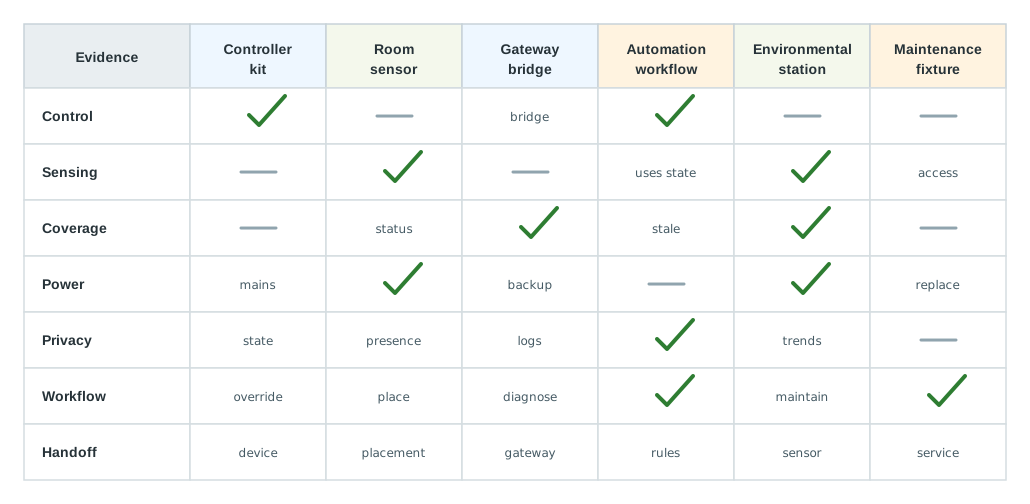
In Figure 25.3, the Privacy boundary asks what leaves the room and who can read it, while Product gap prevents a kit test from certifying an enclosure or service life. Advance only when reading, decision, action, and maintenance ownership appear in one reviewable record.
Use these review rules:
25.11 Classroom Comfort Monitor
This section: Classroom Comfort Monitor — A team is prototyping a classroom comfort monitor.
A team is prototyping a classroom comfort monitor. The first version should observe room conditions, show stale status, and trigger a local alert when conditions need attention. The team stages evidence before connecting the monitor to broader building automation.
25.11.1 Stage 1: Sensing Evidence
Place room sensor nodes in representative positions away from drafts, vents, direct sunlight and doors. Record the position with the readings so the review can assess what room conditions the sensor represents. Keep reference measurements and calibration notes alongside raw readings, and record warm-up behavior before treating the output as useful room status.
Log reading times, missed samples and battery state rather than presenting only the latest value. These records provide the sensing context needed for the later stale-status review. Check maintenance access and retain recent service notes with the result. Review this evidence before adding the gateway or local alert. Changes to placement, enclosure, firmware or sampling schedule should identify which sensing checks need repeating.
25.11.2 Stage 2: Gateway Evidence
Place the gateway bridge where a real gateway might live and retain its location and configuration with the classroom trial. Interrupt the connection and restart the bridge while recording message buffering, recovery behavior and local diagnostics. Check whether stale-reading labels remain visible when the displayed value is older than the current room conditions.
Record clock alignment with the sensor nodes so reading time and gateway receipt can be reviewed together. Keep offline queue length, duplicate events and device rejoin observations with the recovery trace where relevant. This evidence supports the later review of which status values may drive a local alert or automation rule. Preserve the firmware and gateway configuration, and repeat the relevant checks when the gateway location, software or data path changes.
25.11.3 Stage 3: Control Evidence
Add a local alert and reviewed manual action after the sensing and gateway paths have been examined. Keep this control step limited to the classroom status question before connecting it to broader building automation. Record the trigger thresholds alongside acknowledgement behavior, occupant wording, override, and recovery when the sensor is stale.
The record should connect the condition that triggered the alert with the status shown to the occupant and the action taken. Acknowledgement and override need visible outcomes, rather than being inferred from a dashboard change. Test the stale-data path explicitly: an old reading should be labeled as old, and the alert record should explain its recovery behavior. This evidence supports the later review of which status values may enter automation.
25.11.4 Stage 4: Integration Review
Only reviewed status values move into automation: current reading, stale flag, confidence note, last maintenance note, and alert state. Any later connection to a controller, dashboard, or building system must repeat the evidence script.
prototype=classroom-comfort-monitor
current_question=can room conditions and stale status be reviewed before automation?
sensing_evidence=placement notes, reference readings, missed samples, battery state
gateway_evidence=buffering, stale flag, restart recovery, local diagnostics
control_evidence=local alert, acknowledgement, manual action, failure wording
data_boundary=room status only; no person-level inference
integration_boundary=kit proves evidence path, not final enclosure, hub, dashboard, or building control
change_condition=repeat when placement, enclosure, gateway, rule engine, or alert wording changes
next_step=fixture review and limited pilot with the same evidence script
25.12 Integration Boundary
This section: Integration Boundary — The kit proves evidence, not the final smart-home or environmental deployment.
The kit proves evidence, not the final smart-home or environmental deployment. Draw the boundary before moving from kit boards to a mounted node, gateway location, dashboard, automation rule, or pilot installation.
Figure 25.4 marks which classroom status evidence can cross into later forms.
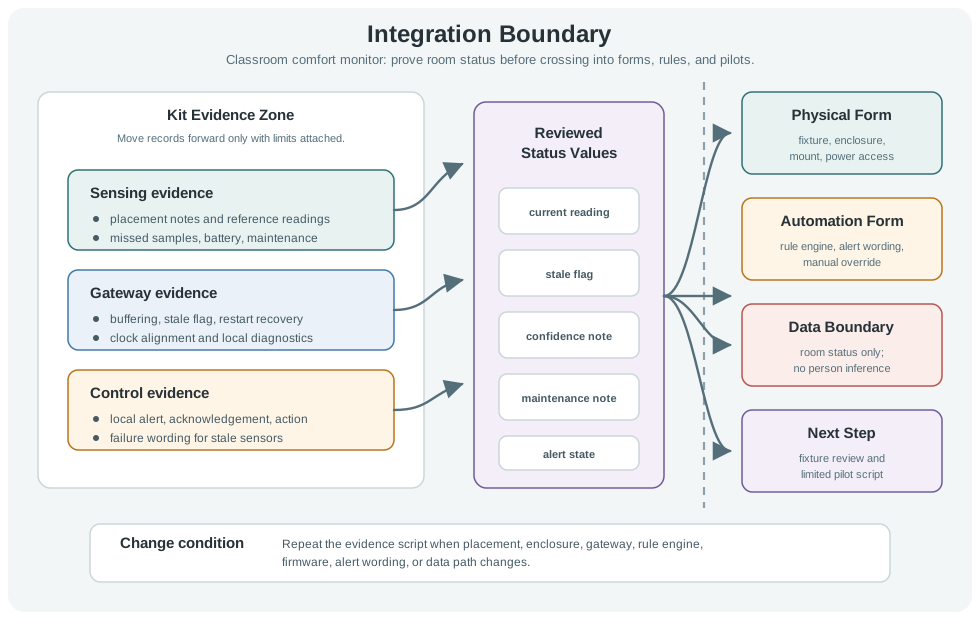
Only reviewed status should cross the boundary in Figure 25.4. The classroom sensor node first records reading time, battery state, and a stale timestamp in a representative room position. The gateway evidence then checks buffering, stale labels, restart recovery, and clock alignment. Local alert rules need wording, acknowledgement, override, and a path for stale data. The integration review carries current reading, stale flag, confidence note, maintenance note, and alert state into automation. A mounted node, hub, dashboard, or building control still needs its own tests. Repeat the evidence when placement, firmware, gateway, enclosure, rules, or data path changes.
25.13 Kit Review Record
This section: Kit Review Record — Leave a record that another reviewer can challenge.
Leave a record that another reviewer can challenge. A good record explains what the kit proved, what was rejected, what remains unproven, and when evidence must be repeated.
Figure 25.5 connects the classroom kit result to a bounded decision.
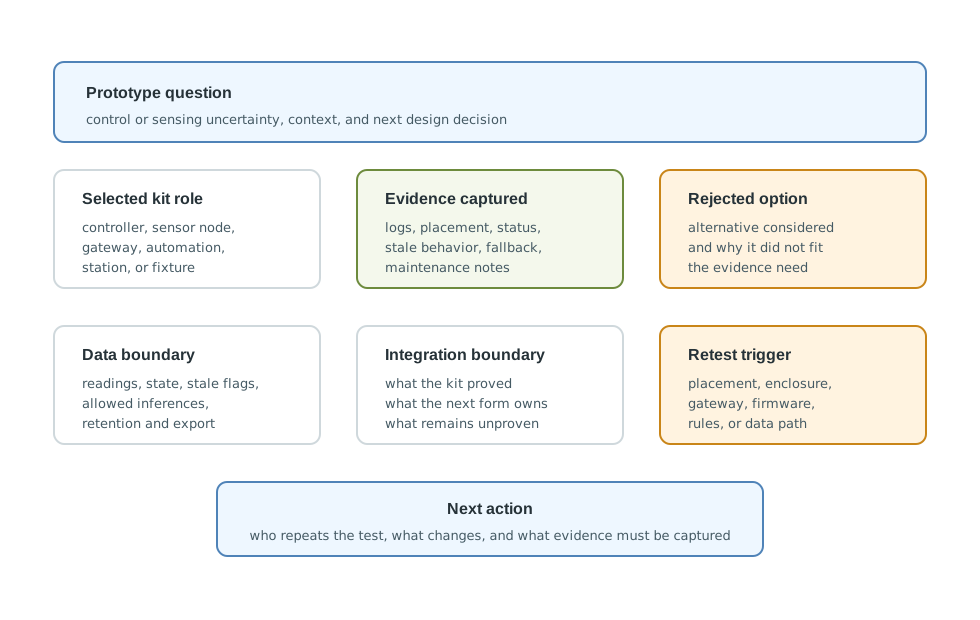
The review record in Figure 25.5 starts with a prototype question and the context that makes it useful. It then keeps the observed logs, placement, stale state, and fallback beside the selected kit role. The boundary field states what data may be used, what inference is allowed, and which physical or integration claims remain open. The record also preserves a rejected option and the reason its evidence did not fit. A next action needs an owner, a new form, and the proof to collect. Placement, enclosure, gateway, firmware, rule, or data-path changes are retest triggers, so the kit result is never silently carried into a different deployment.
Use this template:
prototype=
stage=
current_question=
selected_kit_role=
control_or_sensing_context=
evidence_captured=
rejected_option=
data_boundary=
privacy_boundary=
integration_boundary=
change_condition=
next_action=
review_owner=
review_date=
25.14 Knowledge Check
This section: Knowledge Check
25.15 Common Failure Patterns
This section: Common Failure Patterns
25.16 Summary
This section: Summary — First, Smart-home kits are strongest when they expose control, state confirmation, local override, automation workflow, and failure recovery.
First, Smart-home kits are strongest when they expose control, state confirmation, local override, automation workflow, and failure recovery. Next, Environmental kits are strongest when they expose placement, calibration, coverage, power rhythm, maintenance, and stale-data behavior. Then, Hybrid systems should stage sensing evidence, gateway evidence, control evidence, and automation evidence separately. After that, Data and privacy boundaries matter because room conditions, presence, and environmental trends can reveal behavior. Finally, A clear review record makes the decision revisable when the prototype moves to a mounted node, gateway pilot, rule engine, or limited deployment.
25.17 Key Takeaway
This section: Key Takeaway — Smart-home and environmental kits must prove sensor accuracy, connectivity, privacy, power, enclosure, and installation assumptions in the actual setting.
Smart-home and environmental kits must prove sensor accuracy, connectivity, privacy, power, enclosure, and installation assumptions in the actual setting.
25.18 What’s Next
This section: What’s Next
| If you want to… | Read this |
|---|---|
| Review kit selection across broader constraints | Kit Selection Best Practices for IoT Prototypes |
| Review robotics and agricultural kit evidence | Robotics and Agricultural Kit Selection for IoT Prototypes |
| Plan the move from kit evidence to board-level hardware decisions | Hardware Platform Selection for IoT Prototypes |
Find help
3 reviewed answers.
Where should I start in a module?
Open the module page from the sidebar to see its chapters in order. Use the module map to return to a topic you need.
Modules and pathsReviewed
What can I try when a project does not work?
Check the symptom, then work through the diagnostic steps. Keep the error message and the smallest example that reproduces it.
When you are stuckReviewed
How do interactive examples work?
Use the interactive guide to check how examples and simulations work before changing your project.
Interactive examples guideReviewed